

Wi-Fi Protected Setup (WPS) was designed to make connecting new devices as simple as pressing a button, eliminating the need to enter long, complex passwords. Consider it a universal keycard for your premises—highly convenient, but a significant security risk if compromised. This trade-off between convenience and security is where the fundamental issues arise.
The Hidden Dangers of Easy Wi-Fi Access

Connecting a new device to a Wi-Fi network can often be cumbersome. It typically requires locating the network name, reading the small print on the router, and manually entering the credentials. Wi-Fi Protected Setup was introduced in 2006 to resolve this issue, offering a highly convenient shortcut for network access.
The objective was straightforward: simplify the process for standard users struggling with increasingly complex security configurations. However, by creating this simplified access method, the system introduced fundamental design flaws that security professionals have highlighted for years. This represents a classic compromise between initial convenience and long-term security.
Understanding the Core Concept
Fundamentally, WPS is a network authorisation standard that allows devices to join a secure wireless network without manual password entry. Instead, it relies on simplified authentication methods. The two most prevalent are:
- Push-Button Connect (PBC): A physical or virtual button is pressed on the router, followed by the corresponding button on the connecting device within a two-minute window. This process is highly convenient.
- PIN Entry: The router or device generates an eight-digit PIN, which is entered on the corresponding device to establish the connection.
While both appear straightforward, the PIN method contains a critical vulnerability that attackers can exploit with relative ease. Understanding these methods is the first step towards recognising why WPS is often a security liability rather than an asset.
Why This Matters for Your Business
For IT administrators in hospitality, retail, or multi-tenant housing, the risks associated with a Wi-Fi protected setup are significantly amplified. A single compromised access point can expose sensitive guest data and internal business systems, creating a pathway for widespread network breaches.
The reality is that while most users utilise passwords, their understanding of the underlying security is often limited. A 2023 survey revealed that although 97% of UK users secure their home Wi-Fi with a password, 65% were unfamiliar with the actual security standards, such as WPA2, that protect them.
This knowledge gap highlights the danger of relying on outdated convenience features. Building a truly secure network requires moving beyond these shortcuts and adopting modern, safer alternatives. To enhance your security knowledge, our guide on staying safe while using public Wi-Fi provides an excellent starting point.
To understand why Wi-Fi Protected Setup is a liability, it is necessary to examine the underlying mechanics of its connection methods. Consider them as different mechanisms to unlock a door—some are more secure than others, but one possesses a fundamental vulnerability. The entire system was designed for simplicity, allowing devices to join a network without the inconvenience of entering complex passphrases.
This convenience is achieved through several approaches, with the Push-Button and PIN methods being the most prevalent. Each is intended to establish a trusted link between a new device (such as a printer or smart TV) and the router, but their operational methods differ significantly. Analysing these operations reveals exactly where the security risks emerge.
Push-Button Connect: The Two-Minute Open Door
The most common and visually apparent method is Push-Button Connect (PBC). It is designed for maximum simplicity.
Consider the router as a gatekeeper to a secure network. Normally, exact credentials are required for access. With PBC, pressing the WPS button temporarily bypasses this requirement, allowing the next device that requests access within a two-minute window to connect automatically.
Pressing the corresponding WPS button on the new device within this timeframe grants it immediate access and automatically provisions the network credentials. While efficient for devices without keyboards, it creates a brief window where any device within range could potentially connect if it initiates a simultaneous WPS request.
Although PBC is generally considered more secure than the PIN method, its security relies entirely on the brevity of the connection window. An attacker in close physical proximity who times their attempt accurately could theoretically gain unauthorised access.
The PIN Method: A Flawed Security Mechanism
The second primary method utilises a Personal Identification Number (PIN). Superficially, this appears secure, as a PIN functions similarly to a password. Unfortunately, its implementation is the source of the most severe WPS vulnerability. In this configuration, the router possesses a static, eight-digit PIN that cannot be modified, often printed directly on the device's hardware label.
To connect a new device, this PIN is entered into its interface. The device then presents the PIN to the router. If the credentials match, the router grants access and provisions the full Wi-Fi password.
This introduces a critical flaw, which is explored in greater detail below. While the process is straightforward, the underlying verification is dangerously weak. This vulnerability transforms an ostensibly secure mechanism into one that can be compromised with alarming speed.
Other, Less Common WPS Methods
Beyond these two primary options, the Wi-Fi Alliance specified additional methods for Wi-Fi Protected Setup. These were designed to leverage newer technologies but failed to achieve widespread adoption.
- Near Field Communication (NFC): This method requires bringing the new device into close physical proximity with the router. Tapping the two NFC-enabled devices together allows them to securely exchange network credentials without button presses or PINs.
- USB Flash Drive: An older, more cumbersome method involved saving the network's configuration file from the router onto a USB drive. This drive was then inserted into the new device to transfer the settings.
While these methods are inherently more secure due to the requirement for physical action or proximity, their lack of universal support resulted in rare implementation. Consequently, the vulnerable Push-Button and PIN methods became the de facto standards for WPS connections.
Uncovering The Critical Flaws In WPS Security
While a simplified connection method appears advantageous, the reality of Wi-Fi Protected Setup security is highly concerning. The protocol’s most significant weaknesses are not merely patchable bugs; they are fundamental design flaws inherent to its core architecture. These vulnerabilities transform a convenience feature into a major liability for any network where it remains enabled.
The primary vulnerability lies within the PIN method. Superficially, an eight-digit code appears sufficiently secure, offering 100 million possible combinations (10^8), which should require a considerable amount of time to crack. However, the system does not validate the PIN as a single, eight-digit entity.
Instead, it executes a critical error in its validation process. The router verifies the code in two separate halves. It first checks the initial four digits, followed by the subsequent three. The eighth and final digit functions merely as a checksum—a mathematical value derived from the first seven digits, which an attacker's software can easily calculate.
The Brute-Force Shortcut
This two-step validation process creates a significant vulnerability. Rather than attempting up to 100 million combinations, an attacker only needs to determine the first half (10,000 possibilities) and subsequently the second half (1,000 possibilities).
This architectural decision reduces the total number of required attempts from 100,000,000 to a mere 11,000. It is the equivalent of downgrading enterprise-grade encryption to a basic four-digit padlock.
This vulnerability means an attacker does not require sophisticated equipment or insider knowledge. They merely need sufficient time and physical proximity to the network. Consequently, specialised, freely available software tools were rapidly developed to exploit this specific weakness.
Tools That Exploit WPS Flaws
The discovery of this design flaw led directly to the development of tools that automate the entire attack, making it accessible to anyone with a compatible wireless card and basic technical knowledge. Two of the most prominent tools include:
- Reaver: One of the initial and most widely recognised tools designed for WPS brute-force attacks. It systematically tests all 11,000 possible PINs until the correct sequence is identified.
- Pixie Dust Attack: A subsequent, more efficient evolution. The Pixie Dust attack can often compromise the correct PIN in seconds or minutes, rather than hours, by exploiting vulnerabilities in the random number generation of certain routers.
Once the correct PIN is identified, these tools can retrieve the network’s actual WPA/WPA2 password, granting the attacker full access. Even with a complex Wi-Fi password, the WPS PIN vulnerability acts as an insecure backdoor, rendering the primary password ineffective.
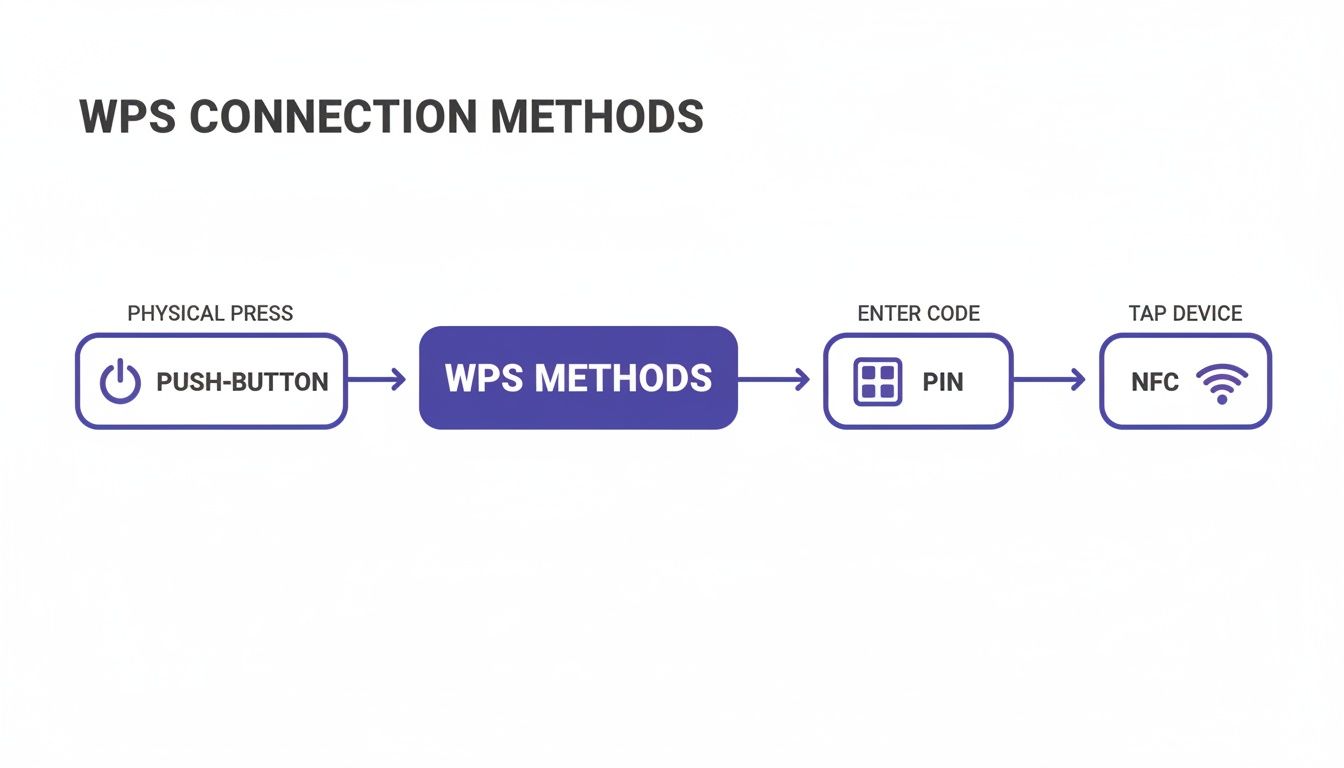
This flowchart illustrates the various WPS connection methods. While Push-Button and NFC offer alternative paths, the underlying mechanics of the PIN method create the most significant security risk.
To provide a clear overview of how these methods compare, consider the following breakdown.
WPS Methods And Their Associated Risks
Each method was designed for ease of use; however, this convenience frequently compromises robust security, with the PIN method being the most critically flawed.
This issue is escalating with the proliferation of smart devices. According to a 2022 techUK report, 77% of UK adults now own at least one smart device, many of which rely on simplified setup methods like WPS. This growth exposes numerous IoT devices, from security cameras to environmental sensors, to these well-documented attacks—a significant concern for businesses such as hotels managing smart TVs or electronic locks in guest rooms. Further insights into these trends are available in the full techUK report.
Ultimately, the inherent insecurity of the PIN method cannot be mitigated with a stronger password or a standard firmware update. It is a foundational vulnerability that necessitates disabling WPS on any network where security is a priority.
Why WPS Is A Major Risk For Businesses
A weak Wi-Fi Protected Setup configuration on a home network is problematic, but in a business environment, it represents a severe security risk. The convenience WPS offers is entirely overshadowed by the amplified vulnerabilities it introduces in commercial settings such as hotels, retail stores, and managed residential properties.
For an enterprise, a network breach is not merely an inconvenience; it is a direct threat to operational continuity, customer trust, and financial stability.
Consider a hotel where guests expect secure, private internet access. If a single access point has WPS enabled, an attacker located in the car park could brute-force the PIN within hours. Once inside the guest network, they could execute man-in-the-middle attacks to intercept unencrypted data, capturing sensitive information ranging from personal emails to payment details. The operational and reputational fallout from such a breach would be substantial.
The Amplified Impact In Commercial Environments
In a commercial setting, the stakes are significantly higher. A single compromised access point can serve as a gateway to the broader corporate network, depending on the existing network segmentation.
Consider a retail chain where point-of-sale (POS) systems, inventory management, and staff communications operate on the same internal network. If a single, overlooked router in a stockroom maintains an active WPS PIN, an attacker could compromise it. This vulnerability could lead to:
- Data Theft: Unauthorised access to sensitive customer payment information, loyalty programme data, and employee records.
- Network Eavesdropping: Monitoring internal communications and intercepting proprietary business information.
- Service Disruption: Executing attacks capable of disabling payment systems or disrupting supply chain logistics, resulting in immediate financial losses.
The potential for reputational damage is equally severe. A public disclosure that customer data was compromised due to a fundamental security oversight can erode years of customer loyalty immediately. In the modern enterprise landscape, trust is an asset that businesses cannot afford to compromise.
This risk is not merely theoretical. Many legacy or consumer-grade devices, occasionally installed without strict IT oversight, feature Wi-Fi Protected Setup enabled by default. This introduces a hidden yet significant vulnerability within an otherwise secure infrastructure.
Building The Business Case For Disabling WPS
For any organisation managing public or private Wi-Fi, disabling WPS must be a non-negotiable, fundamental security policy. The operational risk significantly outweighs any minor convenience it might offer for connecting a single printer or smart device.
The rationale is straightforward: the protocol is fundamentally compromised, and no degree of network monitoring can fully mitigate the risk of a rapid brute-force attack. It is analogous to leaving a faulty, easily bypassed lock on a secondary entrance. Despite advanced security on the primary access points, a single vulnerability undermines the entire infrastructure.
Real-World Scenarios And Consequences
These scenarios are alarmingly common. A managed student housing complex might deploy consumer routers in each unit, all with WPS enabled. A single compromised unit could provide an attacker with a foothold to intercept the network traffic of hundreds of other residents.
Similarly, a pop-up retail kiosk or a temporary event network might be rapidly deployed using off-the-shelf hardware. The priority is often immediate connectivity, leading to the oversight of critical security configurations such as disabling WPS. This creates an ideal opportunity for attackers targeting high-traffic public environments.
Ultimately, the convenience of Wi-Fi Protected Setup is a relic of a previous era. Modern enterprise networks demand robust, scalable, and verifiable security measures. Relying on an outdated and compromised protocol is an unnecessary risk to corporate data, brand reputation, and customer trust.
Practical Steps To Secure Your Network From WPS Attacks
Understanding the inherent flaws in Wi-Fi Protected Setup is essential, but taking decisive action is required to secure the network. For IT administrators, the following steps provide a clear, actionable roadmap to eliminate WPS vulnerabilities and harden the wireless infrastructure.
The goal is simple: eliminate the threat entirely.
The single most effective action is to disable WPS across all routers and access points. It is frequently enabled by default, even on professional-grade hardware, creating an immediate and unnecessary risk. Disabling it neutralises the primary attack vector associated with this flawed protocol.
Finding And Disabling The WPS Setting
Locating the WPS configuration within a device's administration panel is typically straightforward, although the exact placement varies by manufacturer. Generally, the process involves the following steps:
- Access the Router's Admin Panel: Open a web browser and enter the router's IP address. This is typically
192.168.1.1or192.168.0.1. - Log In: Enter the administrator username and password to access the configuration interface.
- Navigate to Wireless Settings: Locate the menu labelled "Wireless," "Wi-Fi," or "WLAN." This often contains an "Advanced" or "Security" sub-menu.
- Locate and Disable WPS: Find the setting for Wi-Fi Protected Setup and switch it to "Disabled" or "Off." Ensure all changes are saved before logging out.
For organisations managing a fleet of access points, this process must be applied to every device. Centralised network management platforms streamline this procedure, often allowing administrators to disable WPS across all hardware from a single dashboard.
By disabling this feature, the vulnerable PIN backdoor is effectively removed. Consequently, every connection will be required to authenticate securely using the primary network credentials.
Essential Network Hardening Steps
Disabling WPS is a critical first step, but it should be combined with additional security best practices to build a more resilient network. These supplementary defences protect against a broader spectrum of threats, extending beyond those targeting a wifi protected setup.
- Maintain Firmware Updates: Regularly check for and install the latest firmware updates for all network equipment. Manufacturers frequently release patches to resolve newly discovered security vulnerabilities, enhance performance, and improve stability.
- Implement Network Monitoring: Utilise network monitoring tools to track connection attempts and overall traffic. Anomalous patterns, such as a high volume of failed login attempts from a single device, can indicate an active brute-force attack.
- Deploy Strong WPA3 Encryption: If supported by the hardware, upgrade network security to WPA3. As the modern standard, it offers significantly enhanced protection against offline password-guessing attacks. For advanced enterprise security, exploring the benefits of 802.1X authentication is recommended, as it provides robust, individualised access control.
Implementing these concrete steps permanently mitigates the inherent risks of WPS. By disabling the feature and reinforcing network defences, organisations can establish a more secure and reliable wireless experience, safeguarding critical corporate data.
Exploring Modern and Secure Wi-Fi Alternatives
Given the severe risks associated with any form of Wi-Fi Protected Setup, it is evident that businesses require a superior method for managing network access. Fortunately, wireless security has advanced significantly. Modern authentication technologies deliver robust protection without introducing friction for users, providing an optimal balance of security and convenience.
Transitioning away from WPS vulnerabilities requires adopting robust, modern standards designed for the contemporary security landscape. These alternatives not only shield the network from brute-force attacks but also facilitate a more professional and seamless connection experience for guests and staff. For organisations aiming to eliminate WPS risks, exploring secure Wi-Fi alternatives, such as deploying modern mesh WiFi systems like Eero Pro 6e , is a critical first step.
Embracing WPA3 and Simultaneous Authentication of Equals
The most direct upgrade from legacy security protocols is WPA3 (Wi-Fi Protected Access 3). This standard introduces a powerful feature known as Simultaneous Authentication of Equals (SAE), which fundamentally alters how devices join a network. It functions as a secure cryptographic handshake that occurs before any sensitive information is exchanged.
Unlike the flawed PIN system in WPS, SAE establishes a secure, encrypted channel between the device and the access point before the password is transmitted. This provides exceptional resilience against the offline dictionary attacks that compromise older standards. Even if an attacker intercepts the connection handshake, they cannot subsequently execute offline password guessing.
This level of protection is vital for any business handling sensitive information, ensuring that even if a password lacks extreme complexity, the connection itself remains fully secure.
The Future is Passwordless with Passpoint and OpenRoaming
For venues with high footfall—such as hotels, shopping centres, or airports—the optimal connection requires zero user intervention. This is precisely where technologies like Passpoint and OpenRoaming excel, delivering a truly seamless and secure passwordless Wi-Fi experience.
These systems allow a user's device to connect to a participating network automatically and securely, bypassing login portals and manual password entry. The device is authenticated via a digital certificate or existing credentials (such as a mobile carrier profile), ensuring the connection is encrypted and secure from the initial data packet.
This approach eliminates the security vulnerabilities of open networks and the user friction associated with captive portals , delivering a premium, secure-by-default experience. It functions as an automated, secure access credential valid across thousands of global venues.
Advanced Security for Enterprise Environments
In corporate or multi-tenant environments, security requirements are exceptionally stringent. Modern networks in these settings frequently rely on advanced authentication methods that link network access directly to a user's identity, providing granular control and comprehensive visibility over network activity.
Key technologies in this space include:
- Certificate-Based Authentication: Rather than relying on a shared password, each user or device is issued a unique digital certificate. This functions as a non-transferable digital identity, restricting access exclusively to authorised individuals and their approved devices.
- Single Sign-On (SSO) Integration: By integrating with identity providers such as Entra ID, Google Workspace, or Okta, network access is governed by existing corporate credentials. Upon an employee's departure and subsequent account deactivation, their Wi-Fi access is revoked instantaneously.
Solutions such as Purple are built upon these modern, secure principles. By leveraging Passpoint, certificate-based authentication, and SSO integrations, Purple provides a secure, frictionless alternative to obsolete systems like WPS. For further insights into securing networks through identity management, refer to our complete guide to identity-based Wi-Fi security . This approach enables businesses to deliver both robust security and an effortless user experience.
Frequently Asked Questions About Wi-Fi Protected Setup
Despite its known vulnerabilities, Wi-Fi Protected Setup can still present points of confusion. The following section addresses common questions to help ensure your network remains secure.
Is The Push-Button Method Safer Than The PIN Method?
Yes, the push-button method carries less risk than the PIN method; however, it remains an insecure protocol. It still represents a significant vulnerability.
Its primary defence is the brief, two-minute window it opens for a new device to connect. An attacker would require close physical proximity and precise timing to exploit this opportunity. Conversely, the PIN method can be brute-forced remotely over an extended period. While the push-button method is the less vulnerable option, both are components of a compromised system. The only secure course of action is to disable WPS entirely.
Does A Strong Wi-Fi Password Protect Me From WPS Attacks?
Unfortunately, no. While a strong, complex WPA2 or WPA3 password is a critical component of network security, it provides no protection against a WPS PIN attack.
This highlights the core issue: the WPS PIN vulnerability functions as an independent access point that entirely bypasses the primary network password.
An attacker exploiting the WPS PIN does not need to compromise the Wi-Fi password. Once the eight-digit PIN is cracked, the router automatically provisions the network credentials, rendering the primary password ineffective.
Can I Safely Use WPS For Simple Devices Like A Printer?
This is a frequent justification for leaving WPS enabled, particularly for devices lacking a screen or keyboard for password entry. While it may appear to be a minor risk for a basic device, it leaves the entire network exposed.
Even a basic device such as a printer serves as a network entry point. If an attacker gains access via the printer, they establish a foothold within the network. From there, they can move laterally to target critical assets such as servers, point-of-sale systems, or guest databases. The temporary convenience of connecting a single device does not justify the permanent risk to the broader infrastructure. The only secure option is to disable WPS.
At Purple, we advocate replacing outdated systems like WPS with secure, identity-based networking. Our platform utilises modern, passwordless authentication such as Passpoint and SSO, providing robust security alongside a seamless connection experience for users. Discover how Purple can modernise your network security .