
43% of UK businesses reported a cyber breach or attack in the previous 12 months, according to the 2025 Cyber Security Breaches Survey. Hearing a number like that can bring to mind stolen customer records. Picture instead a hotel whose door locks stop issuing keys, a clinic that can't pull up the morning list, or a shop that can't take a card payment for four hours on a Saturday.
Why is it important to secure a network? Because the network is the route to all of those systems. It carries the payment, the login, the door command, the stock update and the guest's email address. Close the route and an attacker stalls at the first door. Leave it open and every system behind it inherits the same weakness.
What follows is a working explanation of what an unsecured network really exposes, how one weak connection becomes an outage across a whole site, and which controls break that chain. It ends with a checklist you can run against your own network this quarter, before you buy anything.
What an unsecured network puts at risk
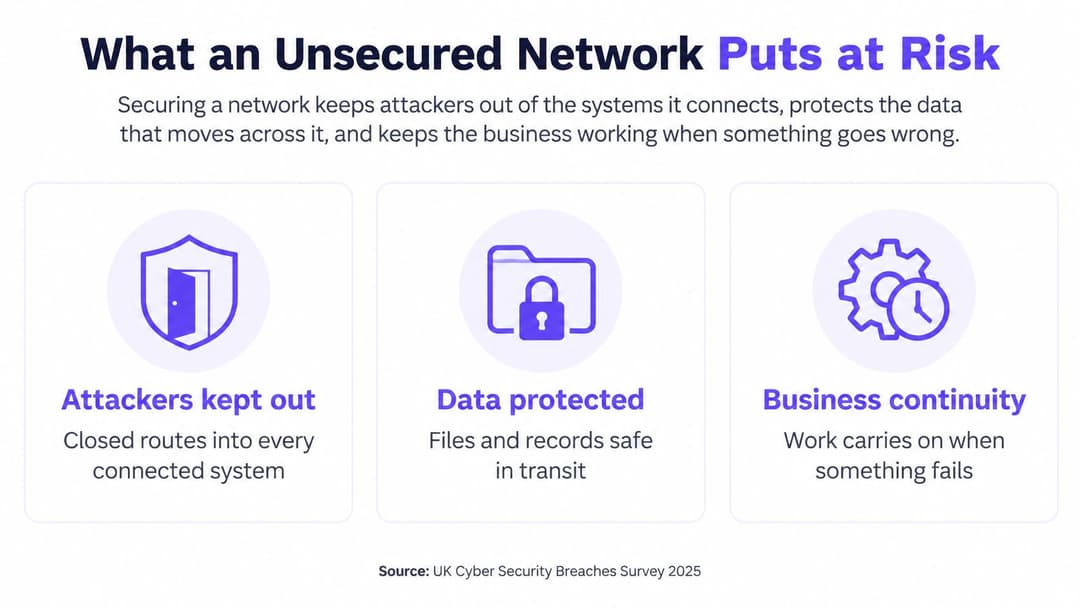
Securing a network keeps attackers out of the systems it connects, protects the data that moves across it, and keeps the business working when something goes wrong. Everything else in this guide sits underneath those three outcomes.
The exposure is ordinary, not specialist. In the same 2025 Cyber Security Breaches Survey, the government estimated that 20% of businesses, approximately 283,000 organisations, were victims of at least one cyber crime, and that 46% of organisations which identified a breach or attack subsequently became victims of cyber crime. Size doesn't insulate anyone: 5% of large businesses and 5% of medium-sized businesses reported that their accounts or systems had been compromised for illicit purposes, against 1% of businesses overall.
Those three promises, attackers kept out, data protected, work continuing, are what a network is for.
What an attacker actually reaches
A network is not one asset. It's a corridor with many doors off it, and each door opens onto something an intruder can use. The table below is the version worth pinning to a wall, because it makes the point that a weak wireless credential is never only a wireless problem.
| Asset | What an attacker can reach | Typical consequence |
|---|---|---|
| Customer records | Personal and payment data | Regulatory enquiry, fines and loss of trust |
| Business accounts | Email, finance and admin logins | Fraudulent payments and account takeover |
| Operational systems | Tills, building controls or clinical devices | Temporary loss of service |
| Cloud services | Hosted files and applications | Data exposed or locked |
| Guest and visitor devices | Shared networks that reach staff systems | Malware spread to staff machines |
Read down the middle column and the pattern appears: each row is reachable from the row below it when nothing separates them. A guest laptop is harmless on its own. A guest laptop that can open a session to the finance file share is a different object entirely.
For venue operators, that's the strongest argument for treating guest access as a designed system rather than a password taped to reception. Our guest WiFi guide covers the portal and isolation decisions that keep visitors on the internet and off everything else.
A network is the route to everything else the business owns, which is why it deserves protecting in its own right and not merely as a way to reach the applications that sit behind it.
How one weak connection becomes a network-wide breach
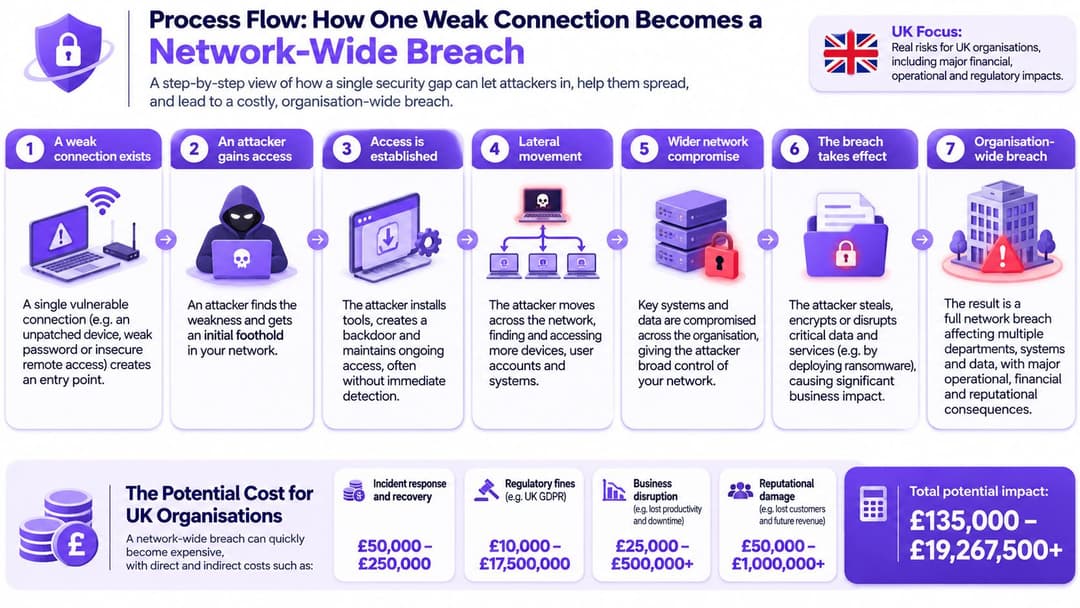
An open side door doesn't hand over the safe. It hands over the corridor, the stairwell, and the office with the filing cabinet in it. Networks fail the same way. Almost no breach begins with an attacker walking straight up to the thing they want. It begins with a cheap foothold, then a quiet walk through everything that foothold can see.
The walk usually goes like this.
- Entry through a shared door. The attacker joins with a reused credential, a passphrase that leaked when a contractor left, or a guest device already carrying malware. Nothing looks unusual, because joining the network looks exactly like a normal visitor arriving.
- Watching what travels. Where traffic isn't strongly encrypted, or where internal traffic is treated as automatically safe, the attacker reads or alters what passes. A captured session token or an unencrypted management page is usually enough to climb a rung.
- Moving sideways. On a flat network, that device can talk to tills, printers, file servers and management consoles, none of which ever needed to be reachable from a guest laptop. This is lateral movement, the step that turns a nuisance into an incident.
- Reaching something worth having. Payment systems, admin consoles, clinical devices, building controls, the finance share. The attacker now holds a position that exposes the business, not just a device.
- Cashing in. Ransomware, stolen data, altered bank details. The financial end is not theoretical: ransomware affected 3% of UK businesses in 2025, according to the 2025 Cyber Security Breaches Survey technical report.
Why the first device rarely matters
The attacker's prize is what the landed device can see, not the device itself. A compromised guest phone that can only reach the internet and a captive portal is a dead end. The same phone on a flat network shared with staff laptops is a starting position.
You can test this on your own network. Join the guest WiFi with an ordinary phone and try to reach something: a printer, a till, a staff file share, a router admin page. Everything it answers is a step three waiting to happen.
The same survey treats unauthorised access to files or networks by staff or volunteers as its own breach category, which corrects the stranger-in-a-hoodie picture. Legitimate identities become the route whenever nobody revokes them, when a shared login gets passed around, or when a former employee's device stays enrolled.
Each step has a control that bites there. Individual credentials and fast revocation block the first. Strong encryption closes the second. Separating guest, staff and operational traffic cuts off the third and fourth. A breach that stalls at the foothold is a bad afternoon, not a headline.
Encryption and authentication that protect every connection
Protection doesn't begin at the login page. It begins at the first packet, before any application has a chance to ask who you are.
The NCSC's zero trust network access guidance_0.pdf) is direct about the principle: network traffic must be protected against interception, tampering and impersonation whether the underlying network is public, private or internal. It recommends cryptographically secure transport across the whole journey, strong protocols, cipher suites and key lengths, and disabling insecure or deprecated options, naming TLS and IPsec as typical secure protocols.
That internal-versus-public distinction can be confusing. Venue WiFi feels private. It isn't. An untrusted guest device, a rogue access point, a compromised laptop or a stolen credential all give an attacker a position from which traffic and internal services can be attacked.
| Control | Threat it stops | Where it applies |
|---|---|---|
| WPA2/3-Enterprise with individual credentials | Shared password leaks and lingering access | Staff and managed WiFi |
| Certificate-backed authentication (EAP-TLS) | Stolen or reused passwords | Company-managed devices |
| TLS or IPsec encryption | Interception and tampering of traffic | Every link, including internal ones |
| Disabling weak cipher suites | Downgrade and weak-encryption attacks | Gateways and access points |
| Instant access revocation | Former staff or lost devices keeping access | Offboarding and device loss |
Per-device credentials beat a shared passphrase
A single passphrase handed to staff, guests and contractors fails in a specific, predictable way. Once it's written on a whiteboard, photographed by a visitor or passed to a departing cleaner, it can't be withdrawn from one person. You can only change it for everybody, which means most organisations don't change it at all.
Enterprise authentication solves this by giving each person and each device its own identity. WPA2 or WPA3-Enterprise with certificate-backed authentication means the access point checks a certificate on the device, not a phrase someone typed. Revoking one certificate removes one device. Nothing else notices.
Practical rule: if you can't name the individual behind a live connection, you can't revoke them without switching the network off.
Offboarding is a network test, not an HR task
The measurable test of any authentication design is what happens on a Friday afternoon when someone leaves. With individual identities, disabling the account or revoking the device certificate removes network access immediately, and you can prove it happened. With a shared key, the leaver keeps a working key until you inconvenience everybody else.
Encryption and identity do different jobs here. Encryption stops an attacker reading what's already flowing. Identity stops them joining in the first place, and lets you eject them cleanly. For teams mapping out staff-side access, our enterprise WiFi security guide walks through the deployment side of 802.1X without assuming an on-site authentication server.
Segmenting guest, staff and operational traffic
Think of a ship's watertight compartments. A hull breach is serious, but it's survivable because the damage is confined to one compartment and the ship stays afloat. Segmentation is that idea applied to network traffic. Guest, staff, payment, building-management and administrative traffic each live in their own compartment and can reach only what their job needs.
Least privilege sounds abstract until you name the devices. A guest phone needs internet access and a sign-in portal, and nothing else. A staff laptop needs its business applications and file shares. A payment terminal needs its processor and no one else. A building-management controller needs its vendor's cloud service, which is never the same thing as the staff network.
| Segment | Should reach | Should not reach |
|---|---|---|
| Guest devices | Internet and the sign-in portal | Staff file servers and management interfaces |
| Staff laptops | Internal file shares and business applications | Payment terminals and building controls |
| Payment and point-of-sale devices | Payment processor only | Guest and general staff networks |
| Building management and IoT | Vendor cloud service only | Staff and guest traffic |
| Network management | Authorised administrator accounts | All user traffic |
One device per segment, checked against the table
Take the guest phone first. It joins, gets a portal, reaches the internet, and is blocked from everything with an internal address. If it's compromised, the attacker holds a device with almost no reach.
Now the payment terminal. It speaks to its processor and nothing else, so a compromised terminal can't browse the staff file share. Then the controller that runs the air handling. It talks to the vendor and receives nothing from guests, which matters because building systems are rarely patched on a schedule.
The most common gap in hotels, retailers, clinics and residential operators is a flat network where customers, employees, payment devices and building systems all share one range. On that design, a single compromised device can reach nearly everything, and nothing in the table above applies.
Start by listing every device class on the network and asking one question of each: can this thing reach a system it has no business reaching?
Answer that and you'll usually find three or four surprises, such as a printer that answers on the management range or a television in a guest room with a route to the staff subnet. Identity-based networking is how those rules stay accurate as people and devices move around, and our identity-based networking overview explains how policy follows a user rather than a port.
Keeping operations running when a network is breached

Data theft is the outcome people worry about. Downtime is the outcome they experience. The UK government's Cyber Security Breaches Survey consistently reports the same two outcomes at the top of the list: temporary loss of access to files or networks and disruption to websites or online services. A security failure usually announces itself as an outage before it announces itself as a leak.
That distinction matters because encryption is often treated as the whole answer. Encryption protects data in transit. Isolation limits what an incident can touch. A network can encrypt every packet and still fail the isolation test, because an attacker inside the perimeter is already reading traffic with a valid identity. Containment, alongside confidentiality, is what decides whether Monday morning happens.
A hotel incident, traced through the design
Say a guest laptop on the guest segment is compromised during a conference. Segmented networks work like watertight compartments in a ship: one flooded compartment is survivable, but only if the doors hold. Here is how the evening goes when they do.
- The device reaches the internet and the sign-in portal, and nothing else, because the guest segment has no route to internal addresses.
- The access point revokes that device by its certificate or account, so it stops being a platform rather than a curiosity.
- Check-in keeps working, door access keeps working, and card payments keep running on the staff and payment segments.
- The incident closes with one device re-imaged and a short note in the log.
Run the same scenario on a flat network and the sequence inverts. Payments get suspended while the whole range is isolated, door controllers go with it, and the property is offline for a night.
A retail version is just as short. A compromised till held inside the point-of-sale segment leaves stock systems, email and the back office running. The till is replaced; the shop keeps trading.
The question worth asking of any network design: how does this keep an incident in one environment from becoming a venue-wide outage?
Red flags that show a network is already exposed
You don't need a penetration test to find the problems that matter most. These six conditions are observable from the management console, and each one is a route rather than a theory.
- One passphrase shared by staff, guests and contractors. Access can't be attributed to a person, a leaver keeps a working key, and nothing can be revoked without breaking everyone. The fix is individual credentials; the check is whether your access point logs show a username or just a network name.
- Guest and staff devices on the same switch or access point with no separation. An untrusted guest device or a rogue access point becomes a position from which staff services get probed. The fix is a separate guest segment; the check is whether a guest address can reach an internal one.
- Internal traffic carried in plain protocols. Anything on the path can read or alter it, and the interception, tampering and impersonation risk applies to internal networks just as much as public ones. The fix is enforced encryption on every link; the check is what your gateway allows to fall back.
- Dormant, shared or ex-staff accounts still active. These identities are a live route, and they're the ones nobody watches because nothing appears to be happening. The fix is revocation tied to your directory; the check is an export of accounts with no recent authentication.
- Unknown devices in the address table or wireless client list. A rogue access point or a personal hotspot bridging guest traffic onto staff systems shows up exactly here. The fix is device visibility and admission control; the check is comparing what's connected against what's supposed to be.
- No authentication log recording user, device, time and location. Without it you can't scope an incident, so containment means switching off the whole network. The fix is identity-based logging; the check is whether you can answer "who was on the staff network at 14:20 on Tuesday" in under a minute.
Two of these together are what turn one compromised device into a network-wide breach. A flat network plus no per-user logging is the worst pairing, because the incident is both wide and invisible.
Audit your network protections this quarter
Six checks, one quarter, no procurement required for the first five.
- Inventory the networks and device classes. Write down every network you run and every class of device on each one, including televisions, controllers, printers and tills.
- Confirm individual credentials. Each device class should authenticate with its own account or certificate. Any class relying on a shared passphrase goes to the top of the list.
- Verify separation. Confirm guest, staff, payment and building systems sit in different segments and test one route from each to prove the block is real.
- Check encryption everywhere. Confirm strong protocols are enforced on all links and that weak or deprecated options are disabled rather than merely unused.
- Test revocation. Create a test account, authenticate, then disable it and confirm access stops at once. If it doesn't, you have found your biggest gap.
- Record who can change network policy. Name the people who can alter access rules and review that list every quarter.
Step five is the one that separates a policy from a system. Our Staff WiFi onboards employee devices with managed EAP-TLS certificates, so there's no shared passphrase to rotate, and every staff WiFi authentication is logged with user, device, time and location. That log is what makes an audit answerable rather than aspirational. Staff WiFi is custom priced on portfolio size, access point count and identity provider requirements, so a quote should follow the audit rather than replace it.
The decision at the end of the checklist is simple: fix the gaps your own team can close this quarter, and bring in help for the ones that need certificate infrastructure, cloud authentication and logging you don't currently run.
Purple replaces shared WiFi passwords with passwordless, certificate-backed access for staff and isolated, encrypted access for guests, running on the access points you already own. If the audit above turned up a flat network, a shared passphrase or no way to prove who was connected, Purple can close those gaps in weeks rather than quarters, across hotels, clinics, retail sites and residential portfolios. Start with the checklist, then bring us the findings.