
UniFi hotspot portal vs a hosted captive portal: what multi-site venues gain in data, filtering and support
You will be able to decide whether the built-in UniFi hotspot portal still fits your estate, or whether a hosted captive portal should take over the login step. You can compare consent records, cross-site reporting, DNS filtering, support and running costs. Then you can migrate site by site on the UniFi access points, switches and gateways you already run.
By Tom HackettPublished
📖 13 min read2,888 words3 worked examples12 key definitions
Part of our core series: Captive Portal: the complete guide →
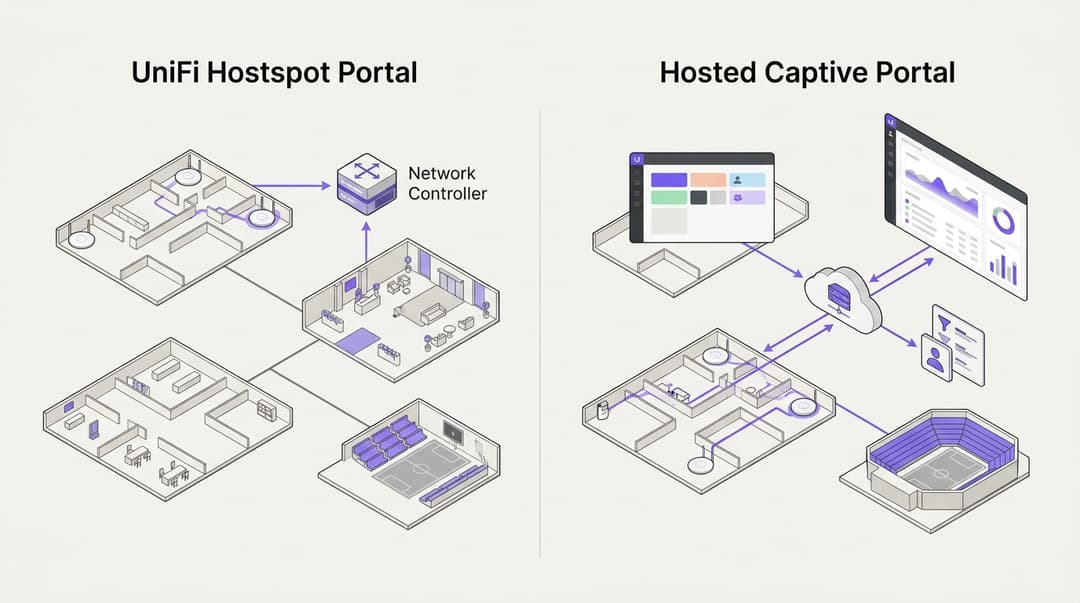
The UniFi hotspot portal handles guest access well at one site. It offers click-through terms, passwords, vouchers, payments and an external portal option at no extra licence cost. Across many sites it holds no central consent record and filters only through UniFi gateways. A hosted captive portal such as Purple centralises consent, data, DNS filtering and support.
Should you keep the UniFi hotspot portal or switch to a hosted captive portal?
The built-in portal does the access job at a single site where guests accept terms or type a voucher code. The case for a hosted captive portal grows with every site you add. A captive portal is the login page a guest sees before getting online. The case becomes clear once you need any of these:
- Proof of consent. GDPR Article 7(1) requires you to demonstrate that each person consented. The UniFi hotspot authorises devices. It does not keep a marketing consent record.
- One guest record across venues. UniFi holds guest authorisations site by site, not as one profile per guest.
- Comparable reporting. You want to compare visits, dwell time and return rates across venues without exporting site by site.
- Consistent filtering. UniFi content filtering runs on UniFi gateways, so sites behind another firewall fall outside it.
- One change, applied everywhere. New terms or new branding should take one edit, not one per site.
A hosted captive portal does not replace your UniFi network. Your UniFi access points, switches and gateways keep doing the networking. UniFi's external portal server setting hands the login step to Purple, which runs as a cloud overlay. There is no rip and replace, as covered in Why your next WiFi upgrade doesn't need new hardware.
Purple's own data shows 80,000+ live venues in more than 90 countries and 500 million users and logins a year.
What does the UniFi hotspot portal include out of the box?
Ubiquiti builds the hotspot portal into the UniFi Network application. Ubiquiti's documentation describes these capabilities:
- Authentication options. Guests can accept terms, enter a shared password, redeem a voucher or pay through a card processor. You can also use RADIUS (Remote Authentication Dial-In User Service, a protocol that checks credentials against a central server) or an external portal server.
- Branding. You can set a logo, background, colours, terms of service and a redirect page after login.
- Hotspot Manager. You can create and print vouchers with time and data limits, and see which guests are authorised. A Hotspot Operator role lets reception staff issue vouchers without full admin rights.
- Pre-authorisation access. You can list the domains or subnets guests can reach before login. This list is often called a walled garden.
- Guest isolation. Guest devices are kept off your internal networks, and client device isolation stops them reaching each other.
For one venue, this toolkit makes sense. Vouchers suit a hotel front desk. Payments suit a marina or campsite selling access by the day. It costs nothing beyond the UniFi hardware you already own.
The portal is built to authorise devices. It is not built to collect consented guest profiles, report on visits across an estate or pass data to a CRM. Those gaps stay small at one site and compound with every site you add.
Where do the UniFi guest portal and a hosted captive portal genuinely differ?
| Capability | UniFi hotspot portal | Purple hosted captive portal on UniFi |
|---|---|---|
| Licence | Included in the UniFi Network application | Purple subscription on the Connect, Capture or Engage plan |
| Hardware needed | UniFi access points and UniFi Network | The same UniFi access points, no new hardware |
| Login options | Terms, password, voucher, payment, RADIUS | Branded data-capture forms with conscious-choice opt-ins |
| Consent record | No marketing consent record | Each guest's opt-in choices held centrally |
| Where guest data sits | Per site in UniFi Network | One platform across every venue |
| Cross-venue reporting | Network and client statistics, site by site | Visits, dwell time and return visits in one view |
| Guest content filtering | UniFi gateway filtering, CyberSecure subscription for more categories | Purple Shield at the DNS layer, any gateway |
| Changing terms or branding | One edit per site | One edit, published to every site |
| Other hardware supported | UniFi only | Cisco Meraki, HPE Aruba, Ruckus, Juniper Mist, Ubiquiti UniFi, Cambium, Extreme, Fortinet |
| Best fit | One site needing access control | Multi-site estates needing consent, data, filtering and central support |
Consent records and guest data
GDPR Article 4(11) says consent must be freely given, specific, informed and unambiguous. Article 7(1) puts the burden on you to demonstrate it. Article 7(4) treats tying a service to unnecessary consent as a sign that consent was not freely given. In practice, a guest must be able to get online without agreeing to marketing.
In the UK, regulation 22 of the Privacy and Electronic Communications Regulations (PECR) adds a consent requirement for marketing emails. It has only a narrow "soft opt-in" exception.
The UniFi hotspot records which devices were authorised and when. It has no field for which marketing purposes a guest agreed to, or against which wording. At one site you can patch this with a separate form tool. Across 30 sites you maintain 30 patches.
Purple separates access from marketing consent. Each guest makes a conscious-choice opt-in for each purpose, and Purple stores that choice against their profile. Purple Engage then uses that consented first-party data for campaigns, and integrates with CRM and marketing platforms. A guest may ask what you hold under Article 15, or request erasure under Article 17. Either way, you search one platform. Purple is GDPR compliant and certified to ISO 27001 and Cyber Essentials.
Reporting across sites
UniFi Network reports on the network: connected clients, traffic and access point health. UniFi Site Manager gives a fleet view of devices across sites. Neither answers the questions an operations director asks. How many guests visited each venue this month? How long did they stay? How many came back?
Purple's WiFi Analytics reports visits, dwell time and returning visitors for every venue in one view. You can compare a city-centre hotel with a roadside one without exporting anything.
Content filtering for guests
UniFi gateways offer category-based content filtering and ad blocking. Ubiquiti also sells a CyberSecure subscription that expands the categories. These controls work where every site runs a UniFi gateway. Many multi-site estates do not.
Hotels often sit behind an ISP-supplied router. Shopping-centre units often share a landlord's firewall. Larger sites may run a Fortinet firewall managed by a third party. Wherever the gateway is not UniFi, UniFi filtering does not apply, and your policy splits.
Purple Shield filters guest traffic at the DNS layer. When a guest's device looks up a blocked domain, Shield blocks the lookup and the page never loads. The policy lives in the DNS service rather than the gateway, so the same rules apply at every venue. The same applies to patient and visitor networks in Healthcare settings.
DNS filtering has one known gap. Devices using DNS over HTTPS (RFC 8484) or DNS over TLS (RFC 7858) can bypass the resolver your network hands out. To close the gap on the guest network, block outbound DNS on port 53 to any resolver except the filtering service. Block port 853 as well, where your gateway allows it. Why is it important to secure a network? a 2026 guide covers the wider case.
Central support and change control
With the built-in portal, your team or your managed service provider (MSP) is the support desk. A broken redirect at site 23 means someone logs into site 23. Terms, branding and voucher settings live per site, so versions drift apart.
With Purple, the login experience, policy and guest data sit in a single pane of glass. Purple runs the platform at 99.999% uptime. Your team keeps UniFi Network for radios, switching and routing, and manages guest access centrally.
How do you configure a UniFi external portal server?
You change a small set of guest network settings per site and leave the rest of UniFi alone. The exact fields vary by UniFi Network version. Follow Purple's Ubiquiti UniFi article in the Purple support centre for the values. The sequence runs as follows:
- Build the venue in Purple. Create the splash page, data form and opt-in wording once, then reuse them across sites.
- Enable the hotspot on the guest network. In UniFi Network, turn on the hotspot portal for the guest network name (SSID). Then choose the external portal server as the authentication method.
- Point UniFi at Purple. Enter the portal address given in Purple's support article.
- Allow pre-authorisation access. Add the domains Purple lists so guests can load the login page before authorisation.
- Test captive portal detection. iOS, Android, Windows and macOS each probe a known web address to detect a login page. Test every platform before go-live.
- Roll out site by site. The setting is per site, so you can migrate one venue, confirm it, then move on.
Mixed estates follow the same pattern with each vendor's external portal setting. Captive portal for HPE Aruba: set it up with Purple guest WiFi covers Aruba. How to Set Up a Captive Portal on Starlink for Guest WiFi covers sites on satellite backhaul.
Got questions about your specific setup?
Our team works with venue operators, IT managers, and network engineers across 80,000 venues. Book a 20-minute call and we will show you how others like you solved it.
Guaranteed response within 4 business hours - No commitment required
Which venues suit the built-in portal and which need a hosted portal?
Site count is the first filter, but not the only one. The three scenarios below are illustrative. Each shows where the hosted model changes the outcome.
Worked scenario: a 12-hotel group consolidating guest data
Situation. A regional group runs 12 hotels on UniFi access points and gateways. Each hotel uses the UniFi hotspot portal, with vouchers issued at reception. Terms of service were pasted into each site separately, and three sites carry an older version. Marketing wants to email past guests, but no site holds a marketing consent record. A guest then sends a subject access request, and staff must check all 12 sites.
What was done. The group built one Purple splash page with separate choices for access terms and marketing. Each site switched to the external portal, starting with the largest hotel. Purple Engage connected to the group's CRM.
Outcome. Guest data stores fell from 12 to one. Live terms versions fell from 12 to one, which removed the three outdated copies. A terms change now takes one edit instead of 12. The next subject access request took one search. The marketing list contains only guests who opted in, as PECR requires. Hotels running Guest WiFi follow the same pattern.
Worked scenario: a 60-store retailer with mixed gateways
Situation. A fashion retailer runs UniFi access points in all 60 stores. Its 38 high-street stores use UniFi gateways with content filtering on. Its 22 shopping-centre units sit behind landlord firewalls. Filtering covered 38 of 60 stores, so a shopper's experience depended on which store they visited.
What was done. The retailer moved guest login to Purple and applied Shield to every guest VLAN (virtual LAN, a logically separate network segment). Each guest VLAN's DHCP scope now hands out Shield's resolvers. Where firewalls allowed it, outbound DNS to other resolvers was blocked. For the 22 landlord sites, the team raised one change request per landlord.
Outcome. Filtering coverage rose from 63% to 100% of stores, under one policy. A policy change now takes one edit instead of 38 gateway edits. Area managers compare shopper visits across stores in one report. See Retail for more on store estates.
Worked scenario: a council running public WiFi in 25 libraries
Situation. A council IT team of three supports UniFi WiFi in 25 libraries. A quarterly usage report for councillors meant 25 exports merged by hand. The council's safeguarding policy also requires filtered visitor access.
What was done. The team moved visitor login to Purple and applied Shield across all 25 libraries.
Outcome. The quarterly report now comes from one view instead of 25 exports. One filtering policy covers every library.
What does each option cost to run?
| Cost line | UniFi hotspot portal | Purple hosted captive portal |
|---|---|---|
| Portal licence | £0, included in UniFi Network | Subscription on Connect, Capture or Engage |
| Expanded guest filtering | CyberSecure subscription on each UniFi gateway | Purple Shield add-on |
| New hardware | None | None |
| Terms or branding change | One edit per site | One edit for the estate |
| Subject access request | Search each site | Search one platform |
| Day-to-day support | Your team or MSP | Purple for guest access, your team for the network |
Staff time
The built-in portal costs nothing to license and plenty to repeat. Multiply your site count by the portal changes you make each year and the minutes each takes. As an illustration, take 40 sites, four changes a year and 20 minutes per change. That comes to more than 53 hours of repeated work. With one central edit, the same four changes take a little over an hour.
Add the time spent merging reports and answering data requests across sites. Those tasks scale with site count in the same way.
The switch itself
Moving to Purple is a configuration change, not a hardware project. You can make the UniFi changes remotely. Most of the effort goes into agreeing the splash page, opt-in wording and integrations once. The rest is testing captive portal detection on each device type.
The cost of staying
Guest data collected without a demonstrable consent record cannot be used for email marketing under PECR. Weak consent records also carry regulatory risk. The maximum fine under UK GDPR is £17.5 million or 4% of global annual turnover, whichever is higher.
How do you decide for your UniFi estate?
| Your situation | Recommendation |
|---|---|
| One site, access control only | UniFi handles access; Purple adds consent records and reporting from day one |
| Two or more sites and a marketing team wanting guest data | Purple with Engage |
| Some sites behind non-UniFi gateways, filtering required | Purple with Shield |
| UniFi alongside Cisco Meraki or HPE Aruba | Purple across every vendor, one login experience |
| MSP managing many UniFi client sites | Purple, so guest access changes happen centrally |
| Public-sector estate with reporting and safeguarding duties | Purple with Shield and WiFi Analytics |
| Plans for Passpoint or OpenRoaming | Purple as the identity layer for automatic login |
Five questions settle most decisions:
- How many sites do you run, and how many will you add? Every new site multiplies per-site edits and exports.
- Do you need to contact guests after they leave? If so, you need a consent record you can demonstrate.
- Does every site run a UniFi gateway? If not, gateway-based filtering leaves gaps.
- Who answers the support call at site 23? Central guest access shortens that call.
- Where is your network heading? Passpoint, also called Hotspot 2.0, lets devices join without a splash page. OpenRoaming extends that across operators. WiFi Passpoint explained: How automatic Access works covers the next step.
Frequently asked questions
Does Purple work with my existing Ubiquiti UniFi access points?
Yes. Purple runs as a hosted captive portal on your existing UniFi access points through the external portal server setting in UniFi Network. You keep your UniFi access points, switches and gateways, and change the guest network's authentication method at each site. No new hardware is needed. Purple is hardware-agnostic, so the same portal also runs on Cisco Meraki, HPE Aruba, Ruckus, Juniper Mist, Cambium, Extreme and Fortinet in a mixed estate.
How much does a UniFi hotspot portal alternative cost?
Purple is a subscription, while the UniFi hotspot portal carries no separate licence. Purple is offered on the Connect, Capture and Engage plans, with Shield as a security add-on for DNS filtering. Ask Purple for a quote based on your venues and the plan you need. Then compare it with the staff time you spend repeating portal changes, consent checks and report exports site by site.
Can I run the UniFi portal at some sites and Purple at others while I migrate?
Yes. UniFi configures the hotspot portal per site, so you can switch one venue to Purple and leave the rest unchanged. A sensible sequence is to migrate one site first. Test captive portal detection on iOS, Android, Windows and macOS, then move through the estate in batches. Guests at sites not yet migrated keep the existing UniFi login until their site moves.
Is a hosted captive portal GDPR compliant?
Yes. Purple is GDPR compliant and certified to ISO 27001 and Cyber Essentials. It separates WiFi access from marketing consent, so guests get online without being pushed to opt in, in line with GDPR Article 7(4). Purple stores each conscious-choice opt-in against the guest's profile, which helps you demonstrate consent under Article 7(1). You remain the data controller, so set your privacy notice and retention period to match your policies.
Does Purple Shield replace UniFi's content filtering for guests?
Yes, for guest traffic. Purple Shield applies one DNS-layer filtering policy to guest networks at every venue. It works whether a site runs a UniFi gateway, an ISP router or a third-party firewall. UniFi's own filtering covers only sites with a UniFi gateway. To stop devices bypassing DNS filtering, block outbound DNS to other resolvers and port 853 on the guest network, where your gateway allows it.
How long does it take to switch a UniFi site to Purple?
Switching a UniFi site to Purple is a configuration change, not a hardware project. At each site, you set the guest network to use the external portal and add Purple's domains to pre-authorisation access. You can make both changes remotely in UniFi Network. Most of the effort goes into agreeing the splash page and opt-in wording once. Testing login on each major device platform comes next.
Key Definitions
Captive portal
A web page a network presents before granting internet access, typically by intercepting HTTP requests from unauthorised clients and redirecting them to a login or terms page. Operating systems detect it by probing a known web address after joining a network.
Both options in this guide are captive portals. The decision is whether the portal lives per site in UniFi Network or is hosted centrally, which determines where consent and guest data sit.
External portal server
A UniFi Network hotspot authentication method that redirects unauthorised guests to a portal hosted outside the UniFi controller, which then signals the network to authorise the device. Field names vary by UniFi Network version.
This is the setting that hands the login step to Purple while UniFi keeps doing the networking. It is configured per site, which allows a site-by-site migration.
Pre-authorisation access (walled garden)
A list of domains or subnets a guest device can reach before captive portal authorisation completes, configured in the UniFi hotspot settings.
Purple's domains must be on this list or the splash page will not load. A missing entry is the most common cause of a broken redirect after switching.
RADIUS
Remote Authentication Dial-In User Service, defined in IETF RFC 2865, a client-server protocol in which a network access server sends credentials to a central server that returns accept or reject and session attributes.
UniFi offers RADIUS as a hotspot authentication option. It checks credentials but does not by itself create a marketing consent record or cross-venue guest profile.
GDPR Article 7 consent conditions
Regulation (EU) 2016/679 Article 7(1) requires the controller to demonstrate that the data subject consented; Article 7(4) treats making a service conditional on unnecessary consent as evidence consent was not freely given. Article 4(11) defines consent as freely given, specific, informed and unambiguous.
A guest must be able to get online without agreeing to marketing, and you must be able to prove each opt-in. The UniFi hotspot has no field recording which purposes a guest agreed to.
PECR regulation 22
Regulation 22 of the UK Privacy and Electronic Communications Regulations 2003 prohibits unsolicited marketing email to individuals without prior consent, subject to a narrow soft opt-in exception for existing customers of similar products.
Guest data collected without a demonstrable consent record cannot be used for email marketing. This is why the 12-hotel group rebuilt its splash page with separate marketing choices.
Data subject rights (Articles 15 and 17)
GDPR Article 15 gives individuals the right of access to personal data a controller holds about them; Article 17 gives the right to erasure in defined circumstances. Controllers must respond within the regulation's time limits.
With per-site UniFi records, a subject access request means checking every site. With one central platform, it means one search.
DNS over HTTPS (DoH)
IETF RFC 8484, which carries DNS queries inside HTTPS, typically on port 443, so a device can use a resolver other than the one the network hands out.
DoH is the known gap in any DNS-layer filtering. Restricting outbound DNS on the guest network to the filtering service limits bypass.
DNS over TLS (DoT)
IETF RFC 7858, which encrypts DNS queries over a TLS connection on dedicated port 853.
Blocking port 853 on the guest network, where the gateway allows it, stops devices sending lookups to an unfiltered resolver.
VLAN
Virtual LAN, a logically separate layer 2 network segment defined by IEEE 802.1Q, which tags Ethernet frames with a VLAN identifier so traffic stays isolated on shared switching.
Guest traffic runs on its own VLAN. In the retail scenario, each guest VLAN's DHCP scope hands out Shield's resolvers so filtering follows the guest network, not the gateway.
Passpoint (Hotspot 2.0)
An industry certification programme built on IEEE 802.11u network discovery and 802.1X authentication that lets a device find and join a network automatically using stored credentials, without a splash page.
If your estate plans automatic login, a hosted identity layer such as Purple carries over to Passpoint, which UniFi's site-based portal does not.
OpenRoaming
A roaming federation that extends Passpoint-style automatic, credential-based network access across participating identity providers and network operators.
OpenRoaming is the next step after Passpoint in the decision table. Planning for it favours a central identity layer over per-site portal settings.
Worked Examples
A regional group runs 12 hotels on UniFi, each with its own hotspot portal and vouchers at reception. Three sites carry outdated terms, no site holds a marketing consent record, and a subject access request means checking all 12 sites. What should the group do?
The group built one Purple splash page with separate choices for access terms and marketing, so guests could get online without opting in. Each hotel switched to the UniFi external portal server setting, starting with the largest site. Purple Engage connected to the group's CRM. Guest data stores fell from 12 to one, and live terms versions fell from 12 to one, which removed the three outdated copies. A terms change now takes one edit instead of 12. The next subject access request took one search. The marketing list now contains only guests who opted in, as PECR regulation 22 requires.
A fashion retailer runs UniFi access points in 60 stores. Its 38 high-street stores use UniFi gateways with content filtering, but its 22 shopping-centre units sit behind landlord firewalls. Shopper filtering depends on which store they visit. How does the retailer get one policy?
Gateway-based filtering cannot reach sites without a UniFi gateway, so the retailer moved filtering to the DNS layer. It switched guest login to Purple and applied Purple Shield to every guest VLAN. Each guest VLAN's DHCP scope now hands out Shield's resolvers. Where firewalls allowed it, outbound DNS to other resolvers was blocked to close the bypass gap. For the 22 landlord sites, the team raised one change request per landlord. Filtering coverage rose from 63% to 100% of stores under one policy. A policy change now takes one edit instead of 38 gateway edits, and area managers compare shopper visits across stores in one report.
A council IT team of three supports UniFi WiFi in 25 libraries. The quarterly usage report for councillors means 25 exports merged by hand, and the safeguarding policy requires filtered visitor access. What changes the outcome?
The team moved visitor login to Purple through the external portal setting at each library and applied Purple Shield across all 25 sites. Because the filtering policy sits in the DNS service rather than each gateway, one policy now covers every library regardless of the gateway at each site. Purple WiFi Analytics reports visits, dwell time and return visits for every library in one view. The quarterly report for councillors now comes from one view instead of 25 exports, which returns time to a three-person team that otherwise repeats the same work at every site.
Frequently asked questions
Does Purple work with my existing Ubiquiti UniFi access points?
Yes. Purple runs as a hosted captive portal on your existing UniFi access points through the external portal server setting in UniFi Network. You keep your UniFi access points, switches and gateways, and change the guest network's authentication method at each site. No new hardware is needed. Purple is hardware-agnostic, so the same portal also runs on Cisco Meraki, HPE Aruba, Ruckus, Juniper Mist, Cambium, Extreme and Fortinet in a mixed estate.
How much does a UniFi hotspot portal alternative cost?
Purple is a subscription, while the UniFi hotspot portal carries no separate licence. Purple is offered on the Connect, Capture and Engage plans, with Shield as a security add-on for DNS filtering. Ask Purple for a quote based on your venues and the plan you need. Then compare it with the staff time you spend repeating portal changes, consent checks and report exports site by site.
Can I run the UniFi portal at some sites and Purple at others while I migrate?
Yes. UniFi configures the hotspot portal per site, so you can switch one venue to Purple and leave the rest unchanged. A sensible sequence is to migrate one site first. Test captive portal detection on iOS, Android, Windows and macOS, then move through the estate in batches. Guests at sites not yet migrated keep the existing UniFi login until their site moves.
Is a hosted captive portal GDPR compliant?
Yes. Purple is GDPR compliant and certified to ISO 27001 and Cyber Essentials. It separates WiFi access from marketing consent, so guests get online without being pushed to opt in, in line with GDPR Article 7(4). Purple stores each conscious-choice opt-in against the guest's profile, which helps you demonstrate consent under Article 7(1). You remain the data controller, so set your privacy notice and retention period to match your policies.
Does Purple Shield replace UniFi's content filtering for guests?
Yes, for guest traffic. Purple Shield applies one DNS-layer filtering policy to guest networks at every venue. It works whether a site runs a UniFi gateway, an ISP router or a third-party firewall. UniFi's own filtering covers only sites with a UniFi gateway. To stop devices bypassing DNS filtering, block outbound DNS to other resolvers and port 853 on the guest network, where your gateway allows it.
How long does it take to switch a UniFi site to Purple?
Switching a UniFi site to Purple is a configuration change, not a hardware project. At each site, you set the guest network to use the external portal and add Purple's domains to pre-authorisation access. You can make both changes remotely in UniFi Network. Most of the effort goes into agreeing the splash page and opt-in wording once. Testing login on each major device platform comes next.
Sources
- Regulation (EU) 2016/679 (GDPR), Articles 4, 7, 15 and 17
- UK GDPR, legislation.gov.uk
- Privacy and Electronic Communications (EC Directive) Regulations 2003, regulation 22
- IETF RFC 8484: DNS queries over HTTPS (DoH)
- IETF RFC 7858: DNS over Transport Layer Security (TLS)
- IETF RFC 2865: Remote Authentication Dial In User Service (RADIUS)
- Ubiquiti help centre: UniFi Network hotspot and guest portal documentation
Continue reading in this series
Migrating from Cisco Meraki splash pages to a hosted captive portal: a step-by-step plan for multi-site venues
You will be able to move every Cisco Meraki guest SSID from click-through to a Purple hosted captive portal without new hardware. The plan covers RADIUS and custom splash URL settings, walled garden entries, a two-week pilot and template-based rollout waves. Each guest sign-in then becomes a first-party profile with a consent record that meets GDPR Article 7.
Public library WiFi procurement checklist: library card sign-in, session limits and filtering
You will be able to write a public library WiFi specification that bidders can price accurately. It covers library card sign-in against your LMS, per-branch session and bandwidth limits, IWF-based filtering with an exceptions process, and branch-level reports for councillors. You also get acceptance tests, contract clauses and the cost lines to price.
Event venue WiFi providers: per-event captive portals, exhibitor access and attendee reporting
You will be able to choose between temporary contractors, vendor splash pages, organiser-supplied networks and a cloud overlay for your event venue. You will also be able to specify per-event captive portals, expiring exhibitor keys and sponsor-ready attendance reports. Finally, you can settle who controls attendee data under UK GDPR before the first portal goes live.
Got questions about your specific setup?
Our team works with venue operators, IT managers, and network engineers across 80,000 venues. Book a 20-minute call and we will show you how others like you solved it.
Guaranteed response within 4 business hours - No commitment required