

रेस्टोरेंट के लिए गेस्ट WiFi: ग्राहकों को आकर्षित करें, बनाए रखें और उन्हें मार्केटिंग करें
यह गाइड बताता है कि कैसे रेस्टोरेंट के IT मैनेजर और ऑपरेशंस डायरेक्टर गेस्ट WiFi को एक लागत केंद्र से एक मापने योग्य राजस्व चैनल में बदल सकते हैं। इसमें नेटवर्क आर्किटेक्चर, स्प्लैश पेज ऑप्टिमाइजेशन, डेटा कैप्चर कंप्लायंस और ROI एट्रिब्यूशन शामिल हैं।
🎧 Listen to this Guide
View Transcript
कार्यकारी सारांश
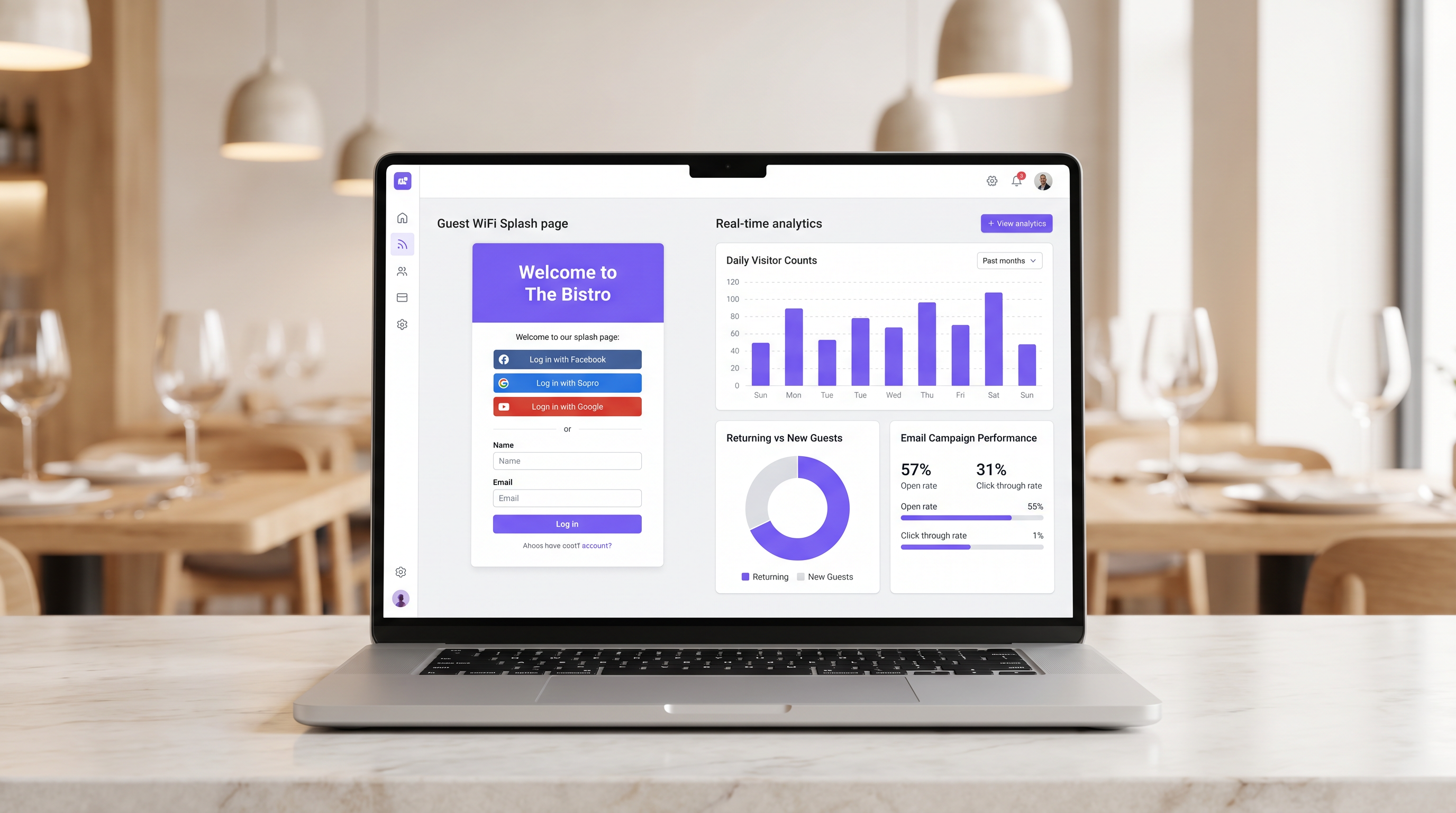
आधुनिक हॉस्पिटैलिटी स्थलों के लिए, इंटरनेट एक्सेस प्रदान करना अब बुनियादी ढांचे के खर्च के लिए पर्याप्त औचित्य नहीं है। गेस्ट WiFi को एक प्राथमिक डेटा अधिग्रहण चैनल के रूप में कार्य करना चाहिए जो मापने योग्य व्यावसायिक परिणाम देता है। यह गाइड रेस्टोरेंट के वातावरण में एक उच्च-प्रदर्शन वाले गेस्ट WiFi नेटवर्क को तैनात करने के लिए आवश्यक तकनीकी आर्किटेक्चर और परिचालन प्रक्रियाओं की रूपरेखा तैयार करता है।
गेस्ट WiFi को एक एकीकृत WiFi Analytics लेयर के साथ लागू करके, IT मैनेजर फर्स्ट-पार्टी डेटा कैप्चर करते हुए सुरक्षित एक्सेस प्रदान कर सकते हैं। यह डेटा लक्षित पोस्ट-विज़िट ईमेल अभियानों को शक्ति प्रदान करता है, जिससे बार-बार विज़िट होती हैं और ग्राहक के आजीवन मूल्य में वृद्धि होती है। हम हॉस्पिटैलिटी सेक्टर के लिए आवश्यक नेटवर्क सेगमेंटेशन, Captive Portal डिज़ाइन सिद्धांतों, GDPR कंप्लायंस फ्रेमवर्क और अपेक्षित ROI बेंचमार्क का पता लगाएंगे।
तकनीकी गहन-विश्लेषण
राजस्व-उत्पादक WiFi डिप्लॉयमेंट का आधार एक मजबूत, सुरक्षित नेटवर्क आर्किटेक्चर है। एक खराब कॉन्फ़िगर किया गया नेटवर्क सुरक्षा और उपयोगकर्ता अनुभव दोनों से समझौता करता है, जिससे कम प्रमाणीकरण दरें और विरल डेटा कैप्चर होता है।
नेटवर्क सेगमेंटेशन और सुरक्षा
गेस्ट नेटवर्क को परिचालन बुनियादी ढांचे से सख्ती से अलग किया जाना चाहिए। यह अलगाव कार्डधारक डेटा वातावरण की सुरक्षा के लिए PCI DSS आवश्यकताओं द्वारा अनिवार्य है।
मानक दृष्टिकोण में गेस्ट ट्रैफ़िक के लिए एक समर्पित VLAN को कॉन्फ़िगर करना शामिल है, जो पॉइंट-ऑफ़-सेल (POS) सिस्टम, किचन डिस्प्ले स्क्रीन और बैक-ऑफ़िस हार्डवेयर से पूरी तरह से अलग होता है। फ़ायरवॉल नियमों को गेस्ट VLAN और परिचालन सबनेट के बीच किसी भी रूटिंग को स्पष्ट रूप से अस्वीकार करना चाहिए।
इसके अलावा, एक्सेस पॉइंट को गेस्ट SSID के लिए WPA3 का समर्थन करना चाहिए। WPA3 का Simultaneous Authentication of Equals (SAE) ऑफ़लाइन डिक्शनरी हमलों के खिलाफ मजबूत सुरक्षा प्रदान करता है। मिश्रित-क्लाइंट वातावरण के लिए, एक WPA2/WPA3 ट्रांज़िशन मोड संगतता सुनिश्चित करता है जबकि सक्षम उपकरणों के लिए बेहतर सुरक्षा प्रदान करता है।
Captive Portal आर्किटेक्चर
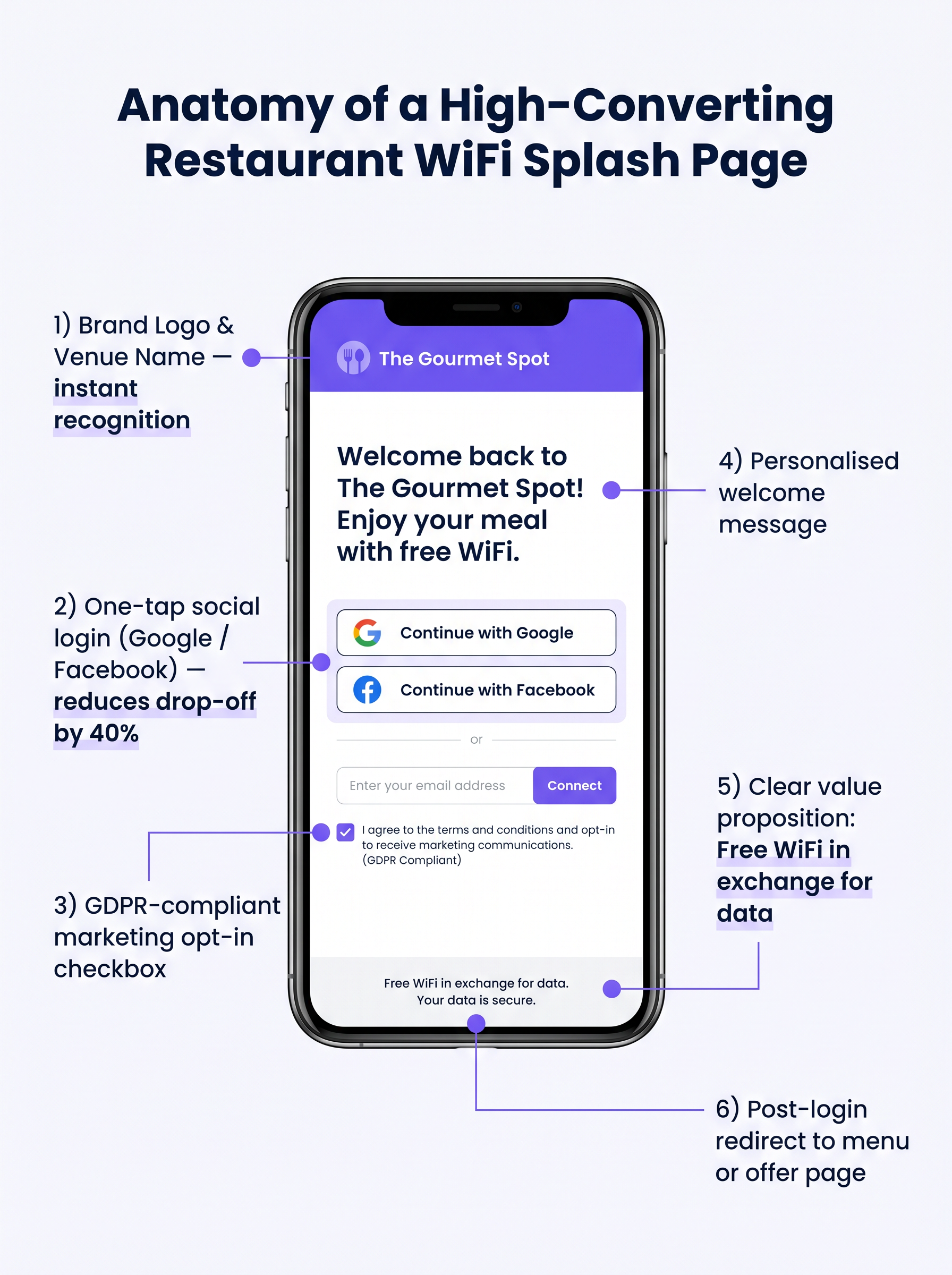
Captive Portal, जिसे आमतौर पर स्प्लैश पेज के रूप में जाना जाता है, नेटवर्क एक्सेस और डेटा कैप्चर के बीच महत्वपूर्ण बिंदु है। जब कोई गेस्ट इंटरनेट एक्सेस करने का प्रयास करता है, तो नेटवर्क HTTP अनुरोध को इंटरसेप्ट करता है और क्लाइंट को Captive Portal पर रीडायरेक्ट करता है।
यह रीडायरेक्शन DHCP द्वारा एक स्थानीय IP एड्रेस और DNS सर्वर असाइन करने पर निर्भर करता है, जिसके बाद DNS सर्वर Captive Portal के IP पर प्रारंभिक अनुरोधों को हल करता है, या गेटवे HTTP 302 रीडायरेक्ट जारी करता है। आधुनिक Captive Portal को HTTPS पर परोसा जाना चाहिए ताकि ब्राउज़र सुरक्षा चेतावनियों को रोका जा सके जो उपयोगकर्ताओं को रोकती हैं।
कार्यान्वयन गाइड
एक सफल गेस्ट WiFi समाधान को तैनात करने के लिए सावधानीपूर्वक योजना और निष्पादन की आवश्यकता होती है। निम्नलिखित चरण एकल-साइट और मल्टी-साइट रेस्टोरेंट ऑपरेटरों के लिए उपयुक्त एक विक्रेता-तटस्थ दृष्टिकोण की रूपरेखा तैयार करते हैं।
चरण 1: बुनियादी ढांचे का मूल्यांकन
मौजूदा एक्सेस पॉइंट और स्विच का मूल्यांकन करें। उपभोक्ता-ग्रेड हार्डवेयर एक व्यस्त रेस्टोरेंट की विशिष्ट समवर्ती क्लाइंट घनत्व के लिए अपर्याप्त है। VLAN टैगिंग, मजबूत Captive Portal एकीकरण और पर्याप्त रेडियो क्षमता का समर्थन करने के लिए एंटरप्राइज़-ग्रेड एक्सेस पॉइंट (जैसे, Cisco Meraki, Aruba) की आवश्यकता होती है। एकल उपयोगकर्ता को अपलिंक को संतृप्त करने से रोकने के लिए प्रति-क्लाइंट बैंडविड्थ थ्रॉटलिंग लागू करें।
चरण 2: स्प्लैश पेज ऑप्टिमाइजेशन
स्प्लैश पेज को अधिकतम रूपांतरण के लिए डिज़ाइन किया जाना चाहिए। एक जटिल या धीरे-धीरे लोड होने वाला पेज महत्वपूर्ण ड्रॉप-ऑफ का कारण बनेगा।
- इसे सरल रखें: स्थल का लोगो, एक स्पष्ट मूल्य प्रस्ताव ("आपके ईमेल के बदले मुफ्त WiFi"), और प्रमाणीकरण विकल्प प्रदर्शित करें।
- सोशल लॉगिन सक्षम करें: OAuth प्रदाताओं (Google, Facebook) को एकीकृत करें। सोशल लॉगिन घर्षण को कम करता है और आमतौर पर मैन्युअल फॉर्म एंट्री के लिए 35-45% की तुलना में 60-70% पूर्णता दर देता है।
- मोबाइल रिस्पॉन्सिवनेस सुनिश्चित करें: अधिकांश प्रमाणीकरण मोबाइल उपकरणों पर होंगे। UI छोटे स्क्रीन पर त्रुटिहीन होना चाहिए।
चरण 3: कंप्लायंस और डेटा कैप्चर
उचित सहमति के बिना डेटा कैप्चर करने से महत्वपूर्ण कानूनी और वित्तीय जोखिम पैदा होता है। पहले दिन से ही एक मजबूत GDPR-अनुरूप फ्रेमवर्क लागू करें।
सहमति तंत्र स्पष्ट और ऑप्ट-इन होना चाहिए। GDPR के अनुच्छेद 7 के तहत पहले से टिक किए गए बॉक्स अनुपालन योग्य नहीं हैं। गोपनीयता नीति में स्पष्ट रूप से बताया जाना चाहिए कि कौन सा डेटा एकत्र किया जाता है, इसका उपयोग कैसे किया जाएगा (उदाहरण के लिए, मार्केटिंग संचार के लिए), और डेटा विषयों को सहमति वापस लेने के लिए एक सरल तंत्र प्रदान करना चाहिए।
सर्वोत्तम प्रथाएं
तैनात बुनियादी ढांचे के मूल्य को अधिकतम करने के लिए, ऑपरेटरों को कई उद्योग-मानक सर्वोत्तम प्रथाओं का पालन करना चाहिए।
- मार्केटिंग स्टैक के साथ एकीकृत करें: WiFi प्लेटफॉर्म को मौजूदा CRM और ईमेल मार्केटिंग सिस्टम के साथ सहजता से एकीकृत होना चाहिए। पोर्टल पर कैप्चर किया गया डेटा स्वचालित रूप से मार्केटिंग डेटाबेस में प्रवाहित होना चाहिए।
- स्वचालित पोस्ट-विज़िट अनुक्रम लागू करें: गेस्ट के स्थल छोड़ने के तुरंत बाद एक स्वचालित ईमेल अनुक्रम ट्रिगर करें। दो घंटे के भीतर एक "धन्यवाद" ईमेल, जिसके बाद 48 घंटे के भीतर एक लक्षित ऑफ़र, अत्यधिक प्रभावी होता है।
- स्थान एनालिटिक्स का लाभ उठाएं: मल्टी-साइट ऑपरेटरों के लिए, विभिन्न स्थलों पर फुटफॉल पैटर्न, ठहरने के समय और नए बनाम लौटने वाले आगंतुकों के अनुपात को समझने के लिए स्थान एनालिटिक्स का उपयोग करें।
ये प्रथाएं हॉस्पिटैलिटी और रिटेल वातावरण में विशेष रूप से प्रासंगिक हैं जहां ग्राहक व्यवहार को समझना सर्वोपरि है।
समस्या निवारण और जोखिम न्यूनीकरण
सावधानीपूर्वक योजना के साथ भी, डिप्लॉयमेंट में समस्याएँ आ सकती हैं। सामान्य विफलता मोड को समझना IT टीमों के लिए महत्वपूर्ण है।
Captive Portal दिखाई नहीं दे रहा है
यह सबसे आम उपयोगकर्ता शिकायत है। यह अक्सर आक्रामक क्लाइंट-साइड DNS सेटिंग्स (जैसे, 8.8.8.8 पर हार्डकोडेड) या सख्त सुरक्षा सॉफ़्टवेयर के कारण होता है। सुनिश्चित करें कि नेटवर्क गेटवे गेस्ट VLAN पर अप्रमाणित क्लाइंट से सभी DNS क्वेरी को ठीक से इंटरसेप्ट और रीडायरेक्ट करता है।
कम प्रमाणीकरण दरें
यदि उपयोगकर्ता SSID से कनेक्ट होते हैं लेकिन प्रमाणीकृत होने में विफल रहते हैं, तो स्प्लैश पेज ही इसका कारण हो सकता है। पेज लोड समय की समीक्षा करें, फ़ॉर्म को सरल बनाएं, और सत्यापित करें कि सोशल लॉगिन API सही ढंग से काम कर रहे हैं।
MAC रैंडमाइजेशन
आधुनिक मोबाइल ऑपरेटिंग सिस्टम गोपनीयता बढ़ाने के लिए MAC एड्रेस रैंडमाइजेशन का उपयोग करते हैं। यह डिवाइस ट्रैकिंग और लौटने वाले विज़िटर की पहचान को जटिल बना सकता है। सुनिश्चित करें कि आपका एनालिटिक्स प्लेटफ़ॉर्म प्रमाणीकरण के दौरान कैप्चर किए गए स्थायी पहचानकर्ताओं (जैसे, ईमेल पता या सोशल ID) पर निर्भर करता है, न कि केवल MAC एड्रेस पर दीर्घकालिक ट्रैकिंग के लिए।
ROI और व्यावसायिक प्रभाव
इस डिप्लॉयमेंट का अंतिम लक्ष्य निवेश पर एक मापने योग्य रिटर्न उत्पन्न करना है। प्रभाव का मूल्यांकन कई प्रमुख मेट्रिक्स पर किया जाना चाहिए।
सफलता का मापन
- डेटा कैप्चर दर: कनेक्टेड डिवाइसों का प्रतिशत जो सफलतापूर्वक प्रमाणीकृत होते हैं और मार्केटिंग सहमति प्रदान करते हैं।
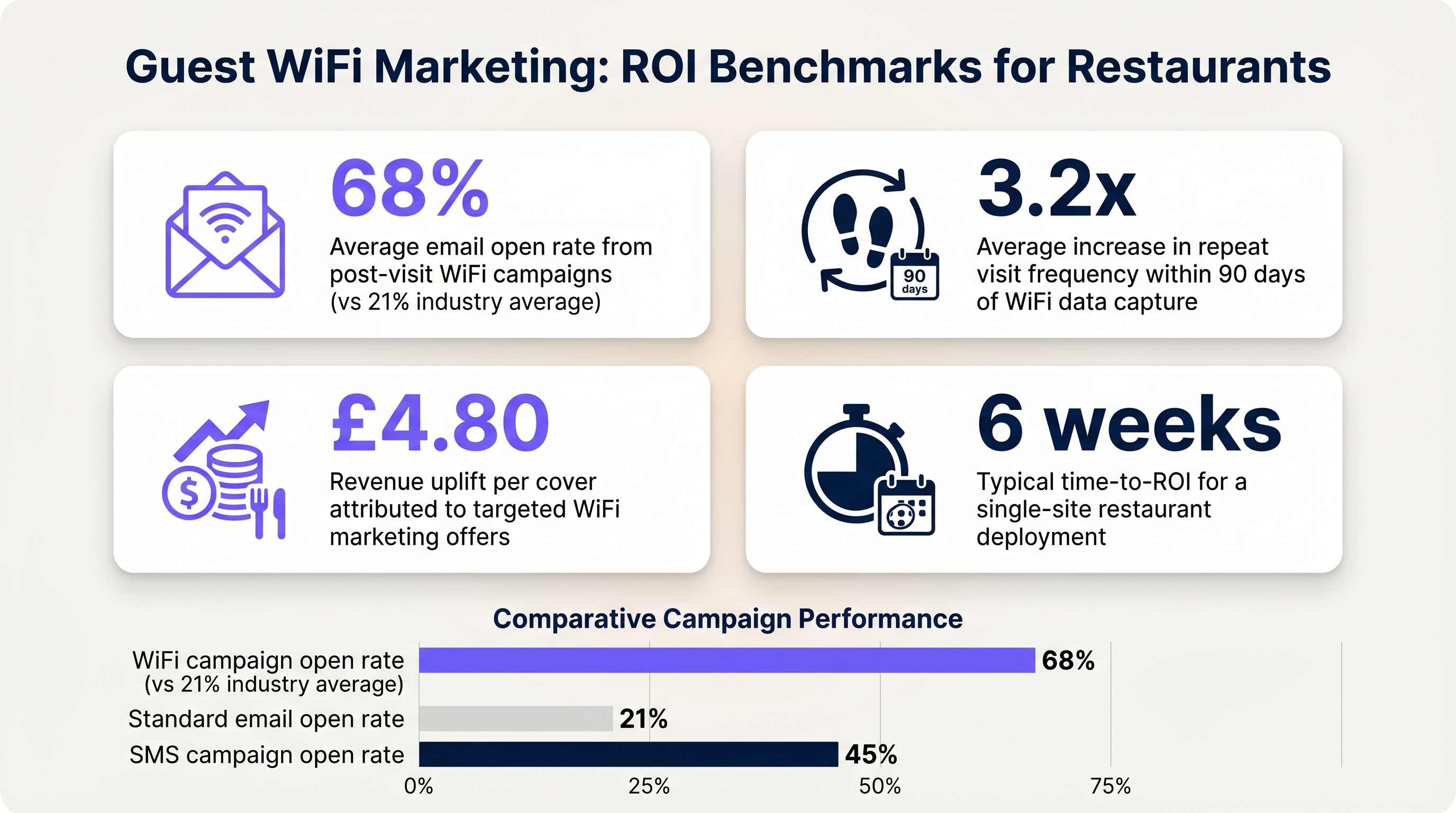
- ईमेल ओपन दरें: WiFi डेटा द्वारा ट्रिगर किए गए विज़िट के बाद के ईमेल में आमतौर पर 60-70% की ओपन दरें देखी जाती हैं, जो मानक अभियानों के लिए 21% के उद्योग औसत से काफी अधिक है।
- वापसी विज़िट आवृत्ति: प्रमाणीकृत उपयोगकर्ताओं के लिए विज़िट के बीच के समय को ट्रैक करें जिन्हें लक्षित ऑफ़र प्राप्त होते हैं बनाम जिन्हें नहीं मिलते हैं।
इन बेंचमार्क को स्थापित करके, ऑपरेटर व्यावसायिक हितधारकों को गेस्ट WiFi इंफ्रास्ट्रक्चर का वित्तीय मूल्य स्पष्ट रूप से प्रदर्शित कर सकते हैं।
Key Terms & Definitions
Captive Portal
A web page that a user of a public access network is obliged to view and interact with before access is granted.
The primary interface for capturing guest data and presenting marketing opt-ins.
VLAN (Virtual Local Area Network)
A logical subnetwork that groups a collection of devices from different physical LANs.
Used to logically separate guest WiFi traffic from secure operational traffic on the same physical infrastructure.
PCI DSS
Payment Card Industry Data Security Standard; a set of security standards designed to ensure that all companies that accept, process, store or transmit credit card information maintain a secure environment.
Mandates the strict isolation of guest networks from payment processing systems.
MAC Randomization
A privacy feature in modern operating systems that periodically changes the device's Media Access Control (MAC) address.
Complicates device tracking, requiring reliance on authenticated user profiles rather than hardware identifiers.
WPA3
Wi-Fi Protected Access 3; the latest security certification program developed by the Wi-Fi Alliance.
Provides enhanced protection against offline dictionary attacks on the guest network.
OAuth
An open standard for access delegation, commonly used as a way for internet users to grant websites or applications access to their information on other websites but without giving them the passwords.
The underlying technology that enables 'Social Login' (e.g., logging in with Google or Facebook) on the splash page.
Dwell Time
The amount of time a connected device remains within the coverage area of the WiFi network.
A key metric for understanding customer behaviour and venue utilization.
Bandwidth Throttling
The intentional slowing or speeding of an internet service by an Internet service provider (ISP) or network administrator.
Essential on guest networks to prevent individual users from consuming all available bandwidth.
Case Studies
A 120-cover restaurant is experiencing poor WiFi performance during peak hours. The current setup uses a single consumer-grade router provided by the ISP. Guests frequently complain about slow speeds, and the marketing team reports very few email sign-ups from the captive portal.
- Replace the consumer router with two enterprise-grade access points (APs) positioned for optimal coverage. 2. Configure a dedicated guest VLAN, isolated from the POS system. 3. Implement per-client bandwidth limits (e.g., 5 Mbps down / 2 Mbps up) to prevent network saturation. 4. Redesign the splash page to include social login (Google/Facebook) and a clear GDPR-compliant opt-in checkbox, removing unnecessary form fields.
A multi-site restaurant group wants to implement a loyalty program. They need to identify when a registered customer enters any of their 15 locations, but MAC randomization on modern smartphones is preventing accurate tracking.
Deploy a centralized WiFi authentication platform. Instead of relying on MAC addresses, the system must use the authenticated identity (email or social login ID). When a user authenticates at Location A, their device MAC is temporarily associated with their profile. If the MAC randomizes before they visit Location B, they will be prompted to authenticate again, re-linking the new MAC to their existing profile. The CRM integration ensures loyalty points are attributed correctly based on the profile ID.
Scenario Analysis
Q1. Your restaurant group is updating its guest WiFi privacy policy. The marketing director wants to automatically subscribe all users who connect to the WiFi to the weekly newsletter to maximize reach. As the IT manager, how should you advise?
💡 Hint:Consider the requirements of Article 7 of the GDPR regarding consent.
Show Recommended Approach
You must advise against this approach. Under GDPR, consent must be freely given, specific, informed, and unambiguous. Automatically subscribing users or using pre-ticked boxes is non-compliant. The splash page must include an unchecked opt-in box, clearly stating that checking it grants permission for marketing communications. Failure to comply risks significant fines.
Q2. A new venue is being fitted out. The network architect proposes placing the guest WiFi, the POS terminals, and the manager's office PC on the same physical switch to save costs. What configuration is essential to maintain security?
💡 Hint:Think about logical separation when physical separation is not possible.
Show Recommended Approach
While using the same physical switch is acceptable, strict logical separation is mandatory. The architect must configure separate Virtual LANs (VLANs) for the guest traffic, the POS terminals, and the back-office PC. Firewall rules must be implemented to ensure there is no routing or lateral movement possible between the guest VLAN and the operational VLANs, ensuring PCI DSS compliance.
Q3. The marketing team reports that despite a high number of daily connections to the guest SSID, the data capture rate (emails collected) is below 10%. What is the most likely technical cause, and how would you investigate?
💡 Hint:Consider the user journey between connecting to the network and accessing the internet.
Show Recommended Approach
The most likely cause is an issue with the captive portal (splash page). It may not be loading correctly across all devices, or it may be too slow, causing users to abandon the process. Investigation steps: 1. Test the connection process on various devices (iOS, Android, Windows, macOS). 2. Check the gateway configuration to ensure DNS redirection for unauthenticated clients is working. 3. Review the splash page design for complexity or excessive load times.




