

WiFi para invitados en restaurantes: atraiga, retenga y comercialice con los comensales
Esta guía detalla cómo los gerentes de TI y los directores de operaciones de restaurantes pueden transformar el WiFi para invitados de un centro de costes a un canal de ingresos medible. Cubre la arquitectura de red, la optimización de la página de bienvenida (splash page), el cumplimiento de la captura de datos y la atribución del ROI.
🎧 Escuchar esta guía
Ver transcripción
Resumen ejecutivo
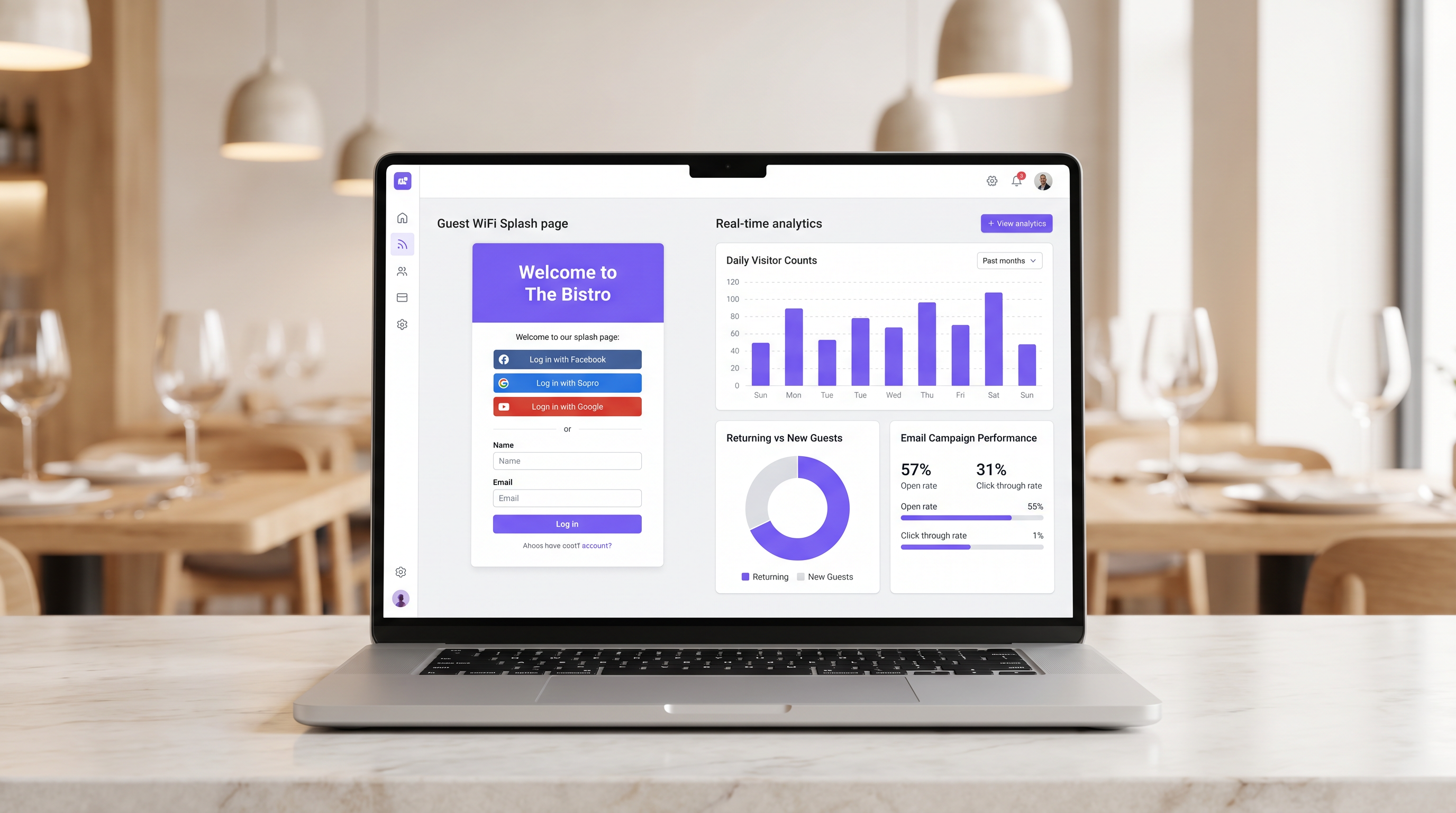
Para los locales de hostelería modernos, proporcionar acceso a internet ya no es una justificación suficiente para el gasto en infraestructura. El Guest WiFi debe funcionar como un canal principal de adquisición de datos que impulse resultados comerciales medibles. Esta guía describe la arquitectura técnica y los procesos operativos necesarios para implementar una red de Guest WiFi de alto rendimiento en entornos de restaurantes.
Al implementar Guest WiFi con una capa integrada de WiFi Analytics , los gerentes de TI pueden proporcionar acceso seguro mientras capturan datos de primera mano. Estos datos impulsan campañas de correo electrónico post-visita dirigidas, fomentando las visitas repetidas y aumentando el valor de vida del cliente. Exploraremos la segmentación de red necesaria, los principios de diseño del Captive Portal, los marcos de cumplimiento GDPR y los puntos de referencia de ROI esperados para el sector de la hostelería.
Análisis técnico en profundidad
La base de una implementación de WiFi que genere ingresos es una arquitectura de red robusta y segura. Una red mal configurada compromete tanto la seguridad como la experiencia del usuario, lo que lleva a bajas tasas de autenticación y una escasa captura de datos.
Segmentación y seguridad de la red
La red de invitados debe estar estrictamente aislada de la infraestructura operativa. Este aislamiento es obligatorio según los requisitos de PCI DSS para proteger los entornos de datos de titulares de tarjetas.
El enfoque estándar implica configurar una VLAN dedicada para el tráfico de invitados, completamente separada de los sistemas de punto de venta (POS), las pantallas de visualización de la cocina y el hardware de back-office. Las reglas del firewall deben denegar explícitamente cualquier enrutamiento entre la VLAN de invitados y las subredes operativas.
Además, los puntos de acceso deben ser compatibles con WPA3 para el SSID de invitados. El Simultaneous Authentication of Equals (SAE) de WPA3 proporciona una protección robusta contra ataques de diccionario offline. Para entornos de clientes mixtos, un modo de transición WPA2/WPA3 garantiza la compatibilidad al tiempo que ofrece seguridad mejorada para los dispositivos compatibles.
La arquitectura del Captive Portal
El Captive Portal, comúnmente conocido como splash page, es la intersección crítica entre el acceso a la red y la captura de datos. Cuando un invitado intenta acceder a internet, la red intercepta la solicitud HTTP y redirige al cliente al Captive Portal.
Esta redirección se basa en que DHCP asigna una dirección IP local y servidores DNS, seguido de que el servidor DNS resuelve las solicitudes iniciales a la IP del Captive Portal, o la puerta de enlace emite redirecciones HTTP 302. Los Captive Portals modernos deben servirse a través de HTTPS para evitar advertencias de seguridad del navegador que disuaden a los usuarios.
Guía de implementación
Desplegar una solución de Guest WiFi exitosa requiere una planificación y ejecución cuidadosas. Los siguientes pasos describen un enfoque neutral al proveedor adecuado para operadores de restaurantes de un solo sitio y de múltiples sitios.
Paso 1: Evaluación de la infraestructura
Evalúe los puntos de acceso y switches existentes. El hardware de consumo es insuficiente para la densidad de clientes concurrentes típica de un restaurante concurrido. Se requieren puntos de acceso de nivel empresarial (por ejemplo, Cisco Meraki, Aruba) para admitir el etiquetado de VLAN, una integración robusta del Captive Portal y una capacidad de radio adecuada. Implemente la limitación de ancho de banda por cliente para evitar que un solo usuario sature el enlace ascendente.
Paso 2: Optimización de la splash page
La splash page debe diseñarse para una conversión máxima. Una página compleja o de carga lenta resultará en una caída significativa de usuarios.
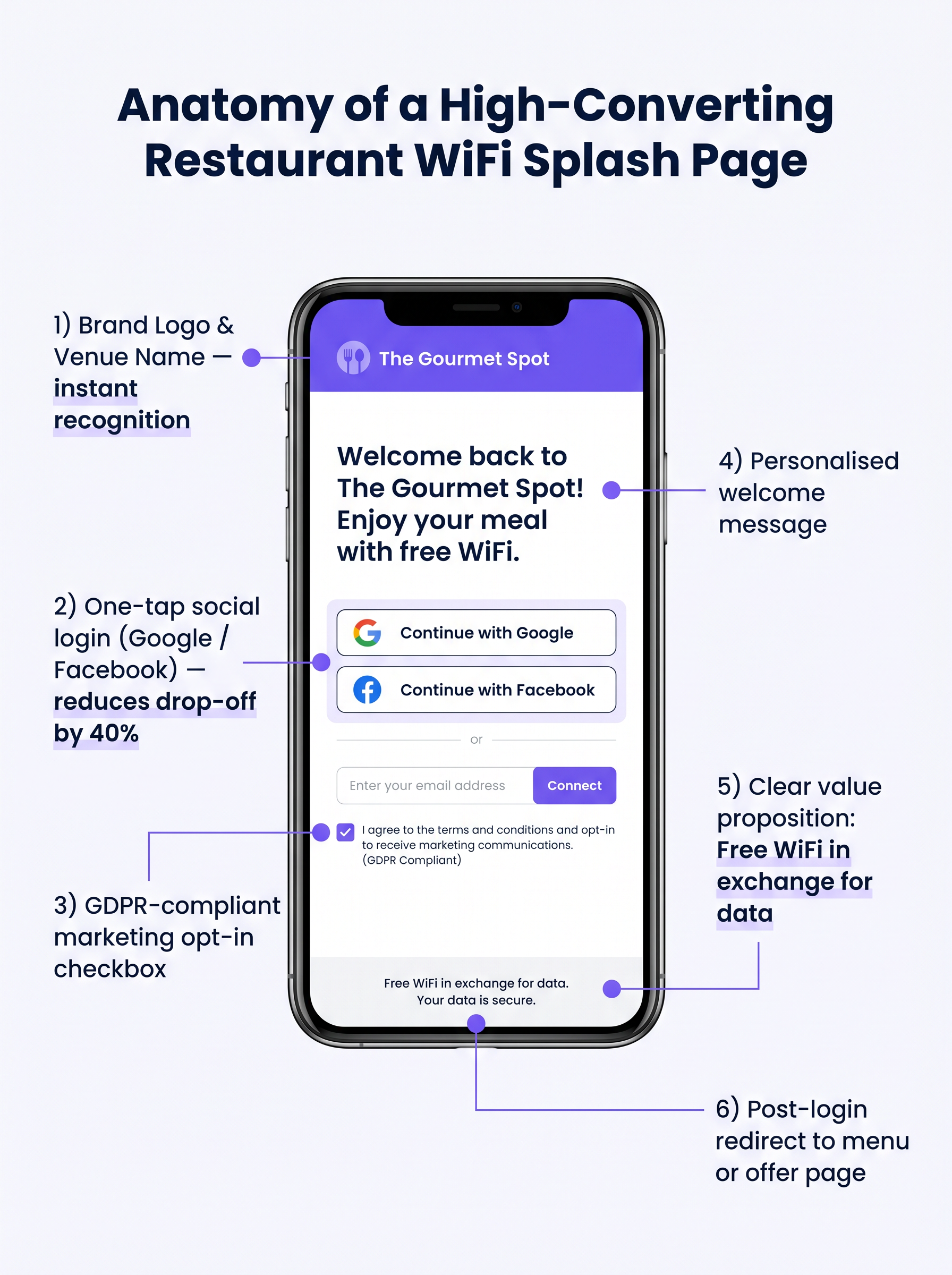
- Manténgalo simple: Muestre el logotipo del local, una propuesta de valor clara ("WiFi gratis a cambio de su correo electrónico") y las opciones de autenticación.
- Habilite el inicio de sesión social: Integre proveedores de OAuth (Google, Facebook). El inicio de sesión social reduce la fricción y generalmente produce una tasa de finalización del 60-70%, en comparación con el 35-45% para la entrada manual de formularios.
- Asegure la adaptabilidad móvil: La gran mayoría de las autenticaciones ocurrirán en dispositivos móviles. La interfaz de usuario debe ser impecable en pantallas pequeñas.
Paso 3: Cumplimiento y captura de datos
Capturar datos sin el consentimiento adecuado crea un riesgo legal y financiero significativo. Implemente un marco robusto compatible con GDPR desde el primer día.
El mecanismo de consentimiento debe ser explícito y de aceptación voluntaria (opt-in). Las casillas premarcadas no cumplen con el Artículo 7 del GDPR. La política de privacidad debe establecer claramente qué datos se recopilan, cómo se utilizarán (por ejemplo, para comunicaciones de marketing) y proporcionar un mecanismo simple para que los interesados retiren su consentimiento.
Mejores prácticas
Para maximizar el valor de la infraestructura desplegada, los operadores deben adherirse a varias mejores prácticas estándar de la industria.
- Integrar con pilas de marketing: La plataforma WiFi debe integrarse sin problemas con los sistemas CRM y de marketing por correo electrónico existentes. Los datos capturados en el portal deben fluir automáticamente a la base de datos de marketing.
- Implementar secuencias automatizadas post-visita: Active una secuencia de correo electrónico automatizada poco después de que el invitado abandone el local. Un correo electrónico de "agradecimiento" dentro de las dos horas, seguido de una oferta dirigida dentro de las 48 horas, es muy efectivo.
- Aprovechar el análisis de ubicación: Para operadores de múltiples sitios, utilice el análisis de ubicación para comprender los patrones de afluencia, los tiempos de permanencia y la proporción de visitantes nuevos y recurrentes en diferentes locales.
Estas prácticas son particularmente relevantes en entornos de Hospitality y Retail donde comprender el comportamiento del cliente es primordial.
Resolución de problemas y mitigación de riesgos
Incluso con una planificación cuidadosa, las implementaciones pueden encontrar problemas. Comprender los modos de fallo comunes es crucial para los equipos de TI.
Captive Portal no aparece
Esta es la queja de usuario más común. A menudo es causada por configuraciones DNS agresivas del lado del cliente (por ejemplo, codificadas a 8.8.8.8) o software de seguridad estricto. Asegúrese de que la puerta de enlace de red intercepte y redirija correctamente todas las consultas DNS de clientes no autenticados en la VLAN de invitados.
Bajas tasas de autenticación
Si los usuarios se conectan al SSID pero no logran autenticarse, la página de bienvenida es probablemente la culpable. Revise el tiempo de carga de la página, simplifique el formulario y verifique que las APIs de inicio de sesión social funcionen correctamente.
Aleatorización de MAC
Los sistemas operativos móviles modernos emplean la aleatorización de direcciones MAC para mejorar la privacidad. Esto puede complicar el seguimiento de dispositivos y el reconocimiento de visitantes recurrentes. Asegúrese de que su plataforma de análisis se base en identificadores persistentes capturados durante la autenticación (por ejemplo, dirección de correo electrónico o ID social) en lugar de depender únicamente de las direcciones MAC para el seguimiento a largo plazo.
ROI e impacto empresarial
El objetivo final de esta implementación es generar un retorno de la inversión medible. El impacto debe evaluarse a través de varias métricas clave.
Medición del éxito
- Tasa de captura de datos: El porcentaje de dispositivos conectados que se autentican con éxito y proporcionan consentimiento de marketing.
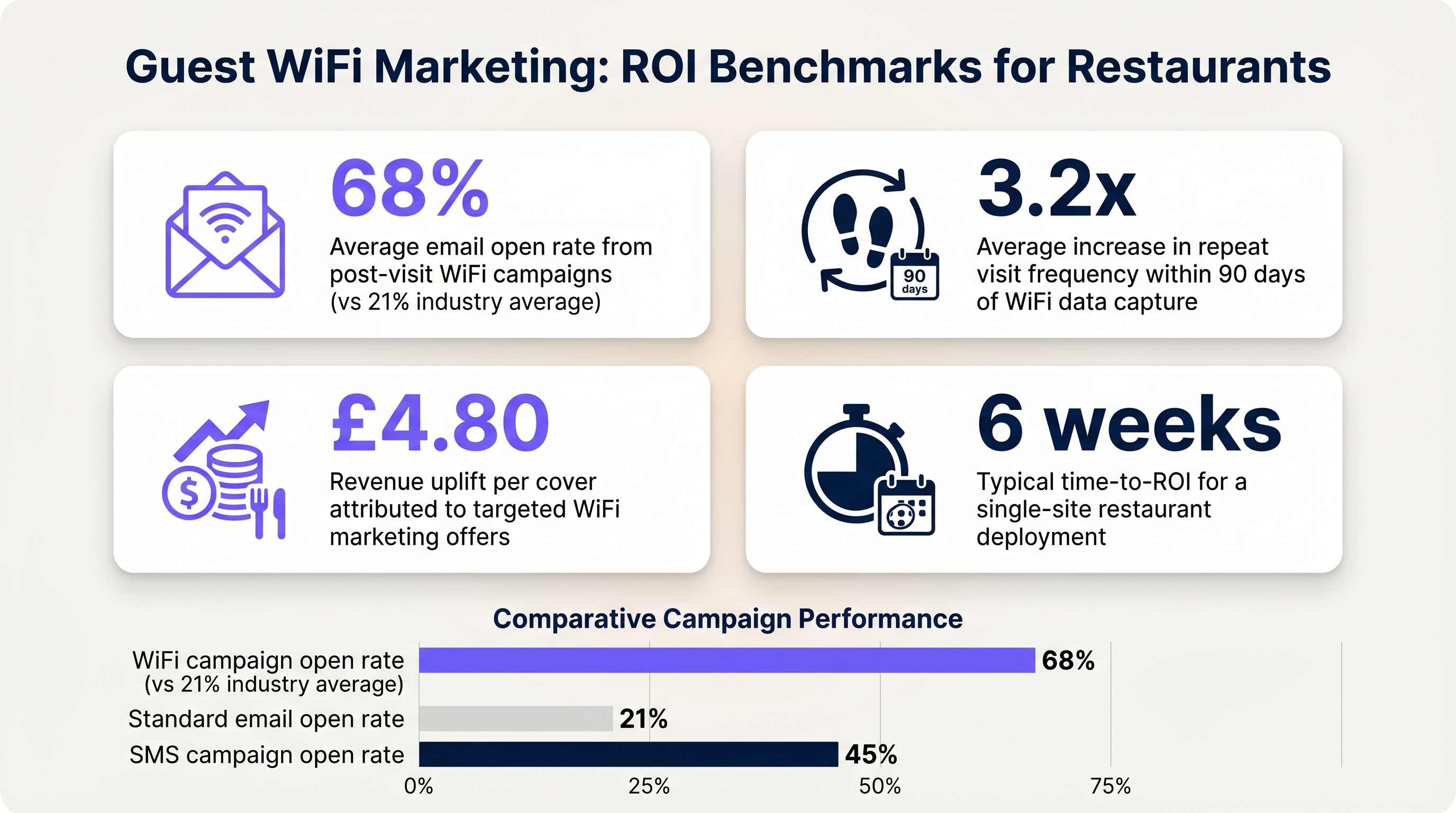
- Tasas de apertura de correo electrónico: Los correos electrónicos post-visita activados por datos de WiFi suelen tener tasas de apertura del 60-70%, significativamente más altas que el promedio de la industria del 21% para campañas estándar.
- Frecuencia de visitas recurrentes: Realice un seguimiento del tiempo entre visitas para usuarios autenticados que reciben ofertas dirigidas frente a aquellos que no.
Al establecer estos puntos de referencia, los operadores pueden demostrar claramente el valor financiero de la infraestructura de WiFi para invitados a las partes interesadas del negocio.
Términos clave y definiciones
Captive Portal
A web page that a user of a public access network is obliged to view and interact with before access is granted.
The primary interface for capturing guest data and presenting marketing opt-ins.
VLAN (Virtual Local Area Network)
A logical subnetwork that groups a collection of devices from different physical LANs.
Used to logically separate guest WiFi traffic from secure operational traffic on the same physical infrastructure.
PCI DSS
Payment Card Industry Data Security Standard; a set of security standards designed to ensure that all companies that accept, process, store or transmit credit card information maintain a secure environment.
Mandates the strict isolation of guest networks from payment processing systems.
MAC Randomization
A privacy feature in modern operating systems that periodically changes the device's Media Access Control (MAC) address.
Complicates device tracking, requiring reliance on authenticated user profiles rather than hardware identifiers.
WPA3
Wi-Fi Protected Access 3; the latest security certification program developed by the Wi-Fi Alliance.
Provides enhanced protection against offline dictionary attacks on the guest network.
OAuth
An open standard for access delegation, commonly used as a way for internet users to grant websites or applications access to their information on other websites but without giving them the passwords.
The underlying technology that enables 'Social Login' (e.g., logging in with Google or Facebook) on the splash page.
Dwell Time
The amount of time a connected device remains within the coverage area of the WiFi network.
A key metric for understanding customer behaviour and venue utilization.
Bandwidth Throttling
The intentional slowing or speeding of an internet service by an Internet service provider (ISP) or network administrator.
Essential on guest networks to prevent individual users from consuming all available bandwidth.
Casos de éxito
A 120-cover restaurant is experiencing poor WiFi performance during peak hours. The current setup uses a single consumer-grade router provided by the ISP. Guests frequently complain about slow speeds, and the marketing team reports very few email sign-ups from the captive portal.
- Replace the consumer router with two enterprise-grade access points (APs) positioned for optimal coverage. 2. Configure a dedicated guest VLAN, isolated from the POS system. 3. Implement per-client bandwidth limits (e.g., 5 Mbps down / 2 Mbps up) to prevent network saturation. 4. Redesign the splash page to include social login (Google/Facebook) and a clear GDPR-compliant opt-in checkbox, removing unnecessary form fields.
A multi-site restaurant group wants to implement a loyalty program. They need to identify when a registered customer enters any of their 15 locations, but MAC randomization on modern smartphones is preventing accurate tracking.
Deploy a centralized WiFi authentication platform. Instead of relying on MAC addresses, the system must use the authenticated identity (email or social login ID). When a user authenticates at Location A, their device MAC is temporarily associated with their profile. If the MAC randomizes before they visit Location B, they will be prompted to authenticate again, re-linking the new MAC to their existing profile. The CRM integration ensures loyalty points are attributed correctly based on the profile ID.
Análisis de escenarios
Q1. Your restaurant group is updating its guest WiFi privacy policy. The marketing director wants to automatically subscribe all users who connect to the WiFi to the weekly newsletter to maximize reach. As the IT manager, how should you advise?
💡 Sugerencia:Consider the requirements of Article 7 of the GDPR regarding consent.
Mostrar enfoque recomendado
You must advise against this approach. Under GDPR, consent must be freely given, specific, informed, and unambiguous. Automatically subscribing users or using pre-ticked boxes is non-compliant. The splash page must include an unchecked opt-in box, clearly stating that checking it grants permission for marketing communications. Failure to comply risks significant fines.
Q2. A new venue is being fitted out. The network architect proposes placing the guest WiFi, the POS terminals, and the manager's office PC on the same physical switch to save costs. What configuration is essential to maintain security?
💡 Sugerencia:Think about logical separation when physical separation is not possible.
Mostrar enfoque recomendado
While using the same physical switch is acceptable, strict logical separation is mandatory. The architect must configure separate Virtual LANs (VLANs) for the guest traffic, the POS terminals, and the back-office PC. Firewall rules must be implemented to ensure there is no routing or lateral movement possible between the guest VLAN and the operational VLANs, ensuring PCI DSS compliance.
Q3. The marketing team reports that despite a high number of daily connections to the guest SSID, the data capture rate (emails collected) is below 10%. What is the most likely technical cause, and how would you investigate?
💡 Sugerencia:Consider the user journey between connecting to the network and accessing the internet.
Mostrar enfoque recomendado
The most likely cause is an issue with the captive portal (splash page). It may not be loading correctly across all devices, or it may be too slow, causing users to abandon the process. Investigation steps: 1. Test the connection process on various devices (iOS, Android, Windows, macOS). 2. Check the gateway configuration to ensure DNS redirection for unauthenticated clients is working. 3. Review the splash page design for complexity or excessive load times.




