

WiFi invité pour les restaurants : Attirer, fidéliser et commercialiser auprès des clients
Ce guide détaille comment les responsables informatiques et les directeurs des opérations de restaurant peuvent transformer le WiFi invité d'un centre de coûts en un canal de revenus mesurable. Il couvre l'architecture réseau, l'optimisation des pages de connexion (splash page), la conformité en matière de capture de données et l'attribution du retour sur investissement (ROI).
🎧 Écouter ce guide
Voir la transcription
Résumé Exécutif
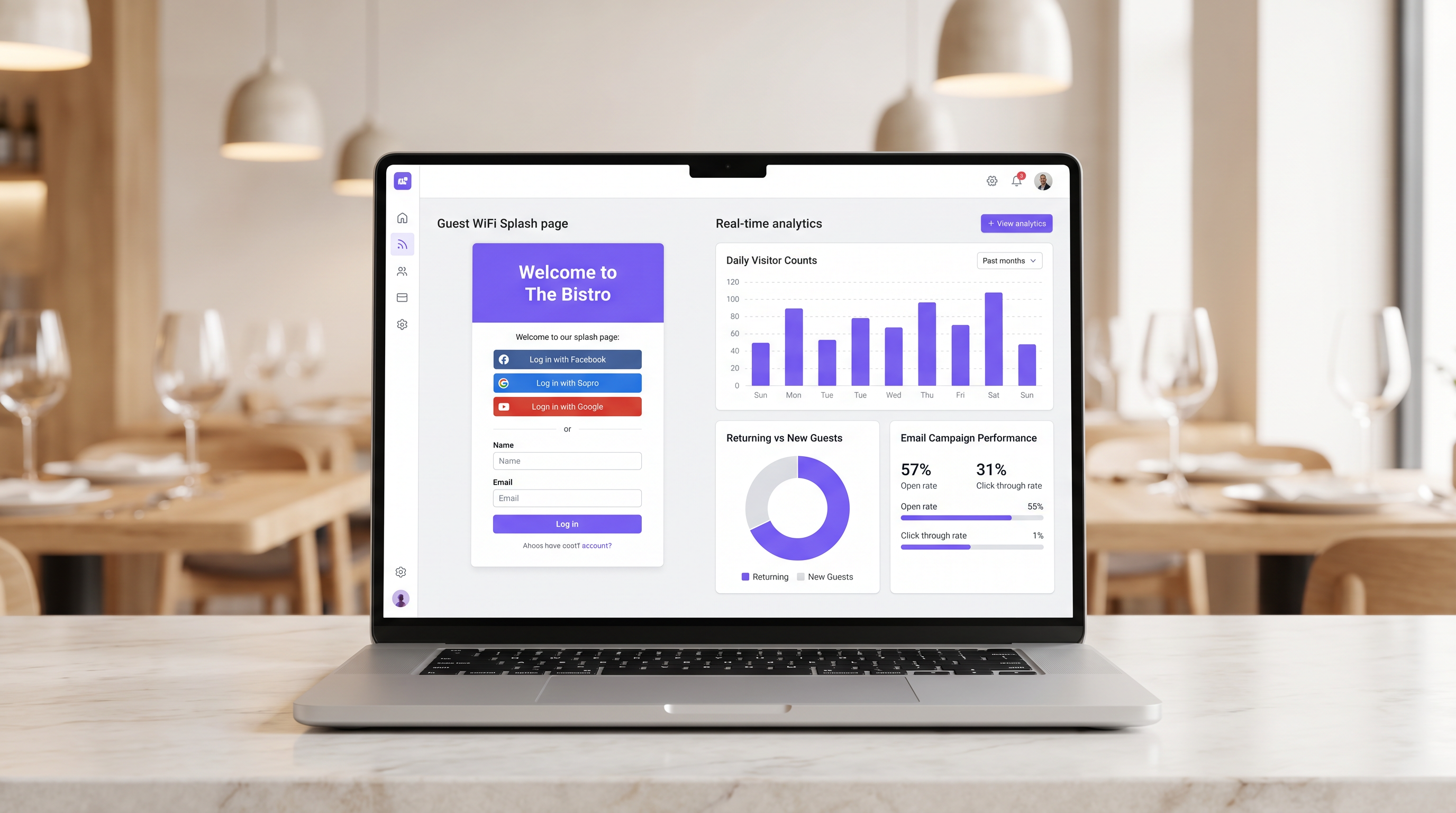
Pour les établissements hôteliers modernes, fournir un accès internet ne justifie plus à lui seul les dépenses d'infrastructure. Le Guest WiFi doit fonctionner comme un canal d'acquisition de données primaire qui génère des résultats commerciaux mesurables. Ce guide décrit l'architecture technique et les processus opérationnels nécessaires pour déployer un réseau Guest WiFi performant dans les environnements de restaurant.
En mettant en œuvre le Guest WiFi avec une couche intégrée de WiFi Analytics , les IT managers peuvent fournir un accès sécurisé tout en capturant des first-party data. Ces data alimentent des campagnes d'email ciblées après la visite, stimulant les visites répétées et augmentant la valeur vie client. Nous explorerons la segmentation réseau nécessaire, les principes de conception du captive portal, les cadres de conformité GDPR et les benchmarks de ROI attendus pour le secteur de l'hospitalité.
Approfondissement Technique
La base d'un déploiement WiFi générateur de revenus est une architecture réseau robuste et sécurisée. Un réseau mal configuré compromet à la fois la sécurité et l'expérience utilisateur, entraînant de faibles taux d'authentification et une capture de données limitée.
Segmentation et Sécurité du Réseau
Le guest network doit être strictement isolé de l'operational infrastructure. Cet isolement est exigé par les exigences PCI DSS pour protéger les cardholder data environments.
L'approche standard consiste à configurer un VLAN dédié pour le guest traffic, complètement séparé des point-of-sale (POS) systems, des kitchen display screens et du back-office hardware. Les Firewall rules doivent explicitement refuser tout routage entre le guest VLAN et les operational subnets.
De plus, les access points doivent prendre en charge WPA3 pour le guest SSID. Le Simultaneous Authentication of Equals (SAE) de WPA3 offre une protection robuste contre les offline dictionary attacks. Pour les environnements à clients mixtes, un mode de transition WPA2/WPA3 assure la compatibilité tout en offrant une sécurité renforcée pour les appareils compatibles.
L'Architecture du Captive Portal
Le captive portal, communément appelé splash page, est l'intersection critique entre l'accès réseau et la data capture. Lorsqu'un guest tente d'accéder à l'internet, le réseau intercepte la requête HTTP et redirige le client vers le captive portal.
Cette redirection repose sur l'attribution par DHCP d'une IP address locale et de DNS servers, suivie par la résolution des requêtes initiales par le DNS server vers l'IP du captive portal, ou par l'émission de redirections HTTP 302 par la passerelle. Les captive portals modernes doivent être servis via HTTPS pour éviter les browser security warnings qui dissuadent les utilisateurs.
Guide d'Implémentation
Le déploiement d'une solution guest WiFi réussie nécessite une planification et une exécution minutieuses. Les étapes suivantes décrivent une approche neutre vis-à-vis des fournisseurs, adaptée aux restaurant operators à site unique et multi-sites.
Étape 1 : Évaluation de l'Infrastructure
Évaluez les access points et switches existants. Le hardware de qualité grand public est insuffisant pour la densité de clients simultanés typique d'un restaurant très fréquenté. Des access points de qualité entreprise (par exemple, Cisco Meraki, Aruba) sont nécessaires pour prendre en charge le VLAN tagging, une intégration robuste du captive portal et une radio capacity adéquate. Mettez en œuvre le per-client bandwidth throttling pour éviter qu'un seul utilisateur ne sature l'uplink.
Étape 2 : Optimisation de la Splash Page
La splash page doit être conçue pour une conversion maximale. Une page complexe ou lente à charger entraînera un drop-off significatif.
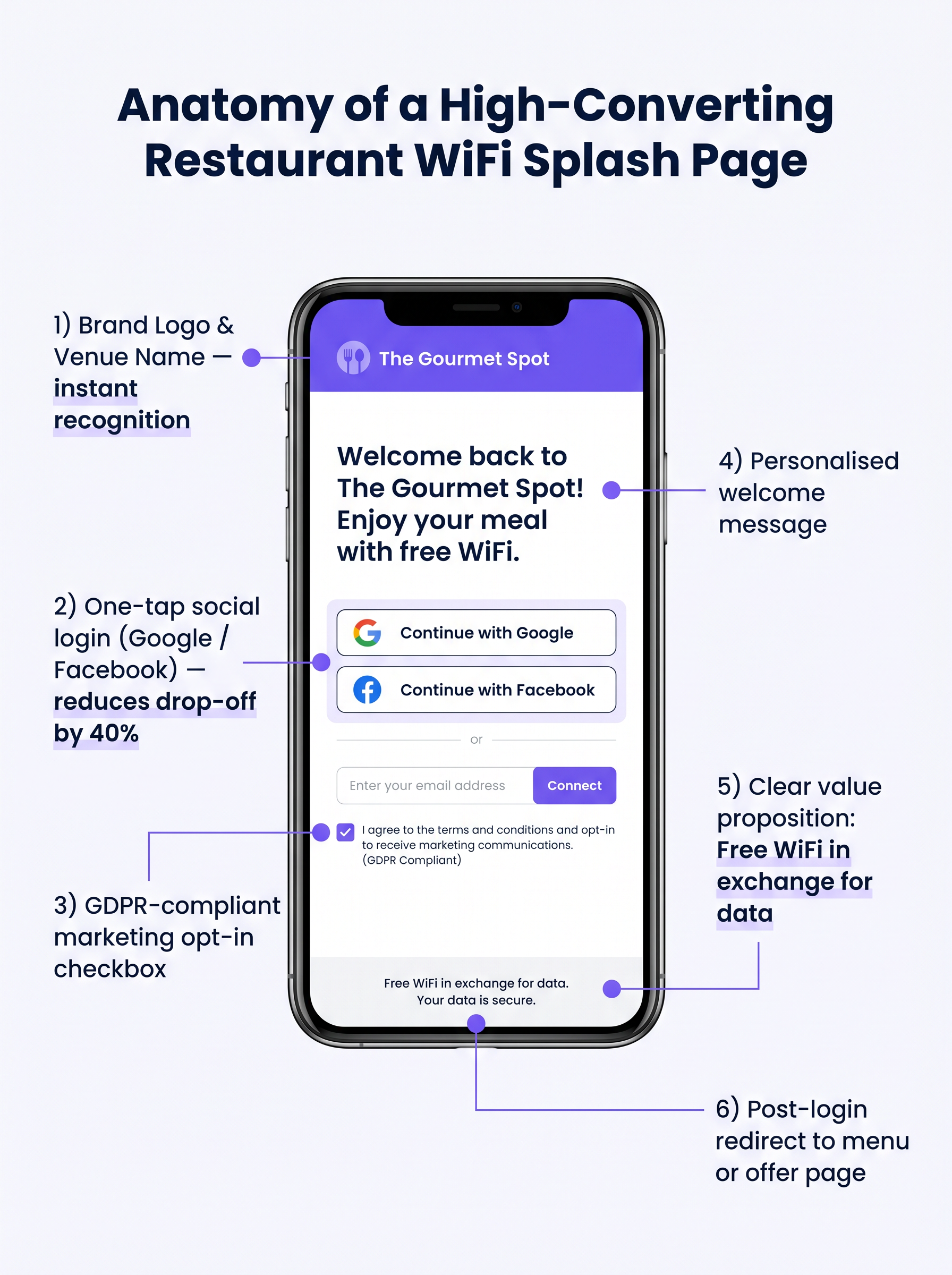
- Restez Simple : Affichez le venue logo, une proposition de valeur claire ("WiFi gratuit en échange de votre email"), et les options d'authentication.
- Activez la Connexion Sociale : Intégrez les OAuth providers (Google, Facebook). Le Social login réduit les frictions et génère généralement un completion rate de 60 à 70 %, contre 35 à 45 % pour la saisie manuelle de formulaire.
- Assurez la Réactivité Mobile : La grande majorité des authentications se feront sur des mobile devices. L'UI doit être impeccable sur les petits écrans.
Étape 3 : Conformité et Capture de Données
La capture de data sans consentement approprié crée des risques juridiques et financiers importants. Mettez en œuvre un GDPR-compliant framework robuste dès le premier jour.
Le consent mechanism doit être explicite et opt-in. Les cases pré-cochées ne sont pas conformes à l'Article 7 du GDPR. La privacy policy doit clairement indiquer quelles data sont collectées, comment elles seront utilisées (par exemple, pour les marketing communications), et fournir un mécanisme simple permettant aux data subjects de withdraw consent.
Bonnes Pratiques
Pour maximiser la valeur de l'infrastructure déployée, les opérateurs doivent adhérer à plusieurs industry-standard best practices.
- Intégrer aux Piles Marketing : La WiFi platform doit s'intégrer de manière transparente aux systèmes CRM et d'email marketing existants. Les Data capturées au portal doivent automatiquement alimenter la marketing database.
- Mettre en Œuvre des Séquences Post-Visite Automatisées : Déclenchez une automated email sequence peu après que le guest quitte le venue. Un email de "remerciement" dans les deux heures, suivi d'une targeted offer dans les 48 heures, est très efficace.
- Tirer Parti de l'Analyse de Localisation : Pour les multi-site operators, utilisez le location analytics pour comprendre les footfall patterns, les dwell times et le ratio de new to returning visitors dans les différents venues.
Ces pratiques sont particulièrement pertinentes dans les environnements Hospitality et Retail où la compréhension du comportement client est primordiale.
Dépannage et Atténuation des Risques
Même avec une planification minutieuse, les déploiements peuvent rencontrer des problèmes. Comprendre les modes de défaillance courants est crucial pour les équipes informatiques.
Captive Portal ne s'affiche pas
C'est la plainte d'utilisateur la plus courante. Elle est souvent causée par des paramètres DNS côté client agressifs (par exemple, codés en dur à 8.8.8.8) ou par des logiciels de sécurité stricts. Assurez-vous que la passerelle réseau intercepte et redirige correctement toutes les requêtes DNS des clients non authentifiés sur le VLAN invité.
Faibles taux d'authentification
Si les utilisateurs se connectent au SSID mais ne parviennent pas à s'authentifier, la page d'accueil est probablement en cause. Passez en revue le temps de chargement de la page, simplifiez le formulaire et vérifiez que les API de connexion sociale fonctionnent correctement.
Randomisation des adresses MAC
Les systèmes d'exploitation mobiles modernes utilisent la randomisation des adresses MAC pour améliorer la confidentialité. Cela peut compliquer le suivi des appareils et la reconnaissance des visiteurs récurrents. Assurez-vous que votre plateforme d'analyse s'appuie sur des identifiants persistants capturés lors de l'authentification (par exemple, adresse e-mail ou ID social) plutôt que de se fier uniquement aux adresses MAC pour un suivi à long terme.
ROI et impact commercial
L'objectif ultime de ce déploiement est de générer un retour sur investissement mesurable. L'impact doit être évalué à l'aide de plusieurs indicateurs clés.
Mesurer le succès
- Taux de capture de données : Le pourcentage d'appareils connectés qui s'authentifient avec succès et donnent leur consentement marketing.
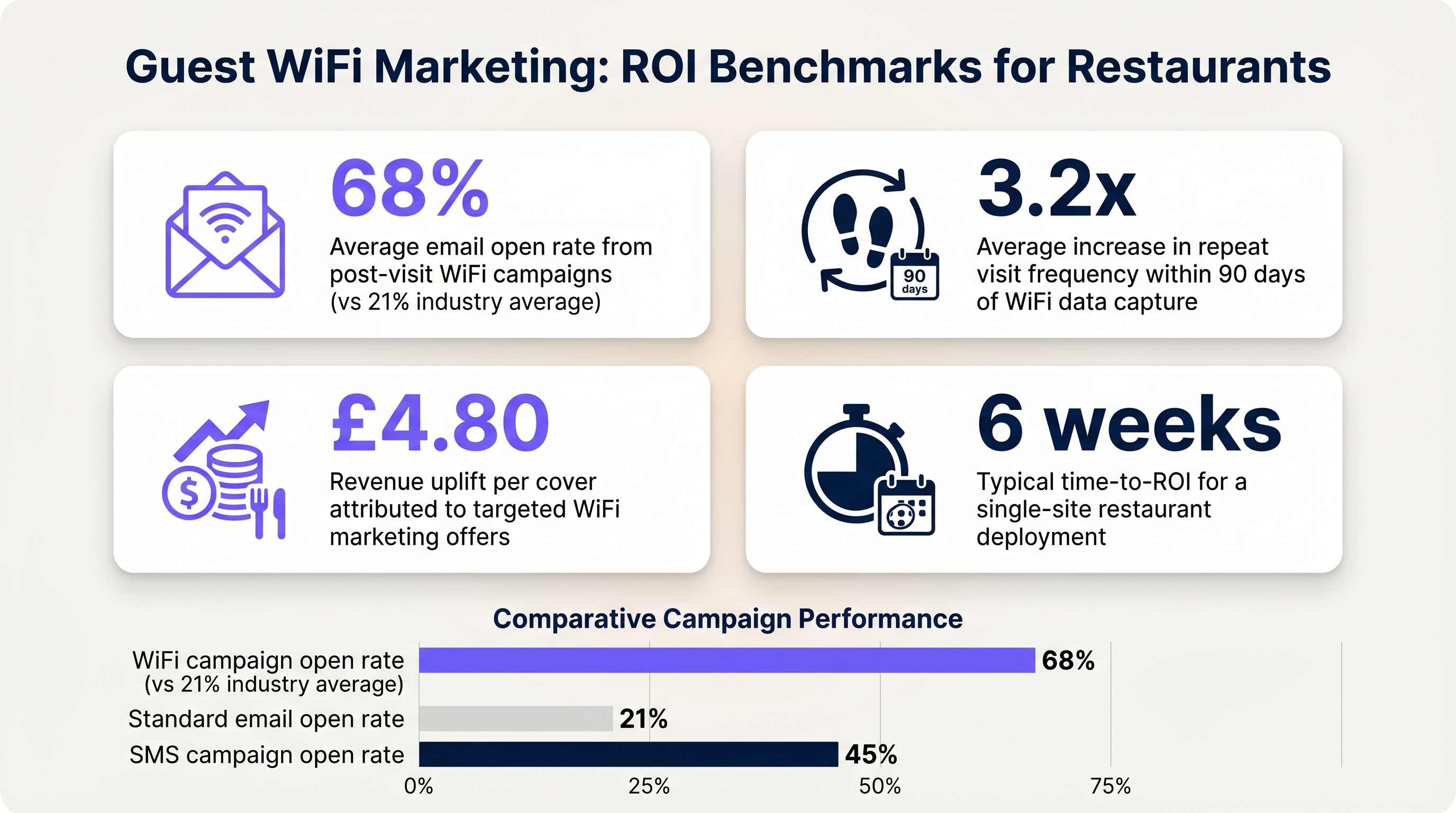
- Taux d'ouverture des e-mails : Les e-mails post-visite déclenchés par les données WiFi affichent généralement des taux d'ouverture de 60 à 70 %, nettement supérieurs à la moyenne de l'industrie de 21 % pour les campagnes standard.
- Fréquence des visites de retour : Suivez le temps entre les visites pour les utilisateurs authentifiés qui reçoivent des offres ciblées par rapport à ceux qui n'en reçoivent pas.
En établissant ces repères, les opérateurs peuvent clairement démontrer la valeur financière de l'infrastructure WiFi invité aux parties prenantes de l'entreprise.
Termes clés et définitions
Captive Portal
A web page that a user of a public access network is obliged to view and interact with before access is granted.
The primary interface for capturing guest data and presenting marketing opt-ins.
VLAN (Virtual Local Area Network)
A logical subnetwork that groups a collection of devices from different physical LANs.
Used to logically separate guest WiFi traffic from secure operational traffic on the same physical infrastructure.
PCI DSS
Payment Card Industry Data Security Standard; a set of security standards designed to ensure that all companies that accept, process, store or transmit credit card information maintain a secure environment.
Mandates the strict isolation of guest networks from payment processing systems.
MAC Randomization
A privacy feature in modern operating systems that periodically changes the device's Media Access Control (MAC) address.
Complicates device tracking, requiring reliance on authenticated user profiles rather than hardware identifiers.
WPA3
Wi-Fi Protected Access 3; the latest security certification program developed by the Wi-Fi Alliance.
Provides enhanced protection against offline dictionary attacks on the guest network.
OAuth
An open standard for access delegation, commonly used as a way for internet users to grant websites or applications access to their information on other websites but without giving them the passwords.
The underlying technology that enables 'Social Login' (e.g., logging in with Google or Facebook) on the splash page.
Dwell Time
The amount of time a connected device remains within the coverage area of the WiFi network.
A key metric for understanding customer behaviour and venue utilization.
Bandwidth Throttling
The intentional slowing or speeding of an internet service by an Internet service provider (ISP) or network administrator.
Essential on guest networks to prevent individual users from consuming all available bandwidth.
Études de cas
A 120-cover restaurant is experiencing poor WiFi performance during peak hours. The current setup uses a single consumer-grade router provided by the ISP. Guests frequently complain about slow speeds, and the marketing team reports very few email sign-ups from the captive portal.
- Replace the consumer router with two enterprise-grade access points (APs) positioned for optimal coverage. 2. Configure a dedicated guest VLAN, isolated from the POS system. 3. Implement per-client bandwidth limits (e.g., 5 Mbps down / 2 Mbps up) to prevent network saturation. 4. Redesign the splash page to include social login (Google/Facebook) and a clear GDPR-compliant opt-in checkbox, removing unnecessary form fields.
A multi-site restaurant group wants to implement a loyalty program. They need to identify when a registered customer enters any of their 15 locations, but MAC randomization on modern smartphones is preventing accurate tracking.
Deploy a centralized WiFi authentication platform. Instead of relying on MAC addresses, the system must use the authenticated identity (email or social login ID). When a user authenticates at Location A, their device MAC is temporarily associated with their profile. If the MAC randomizes before they visit Location B, they will be prompted to authenticate again, re-linking the new MAC to their existing profile. The CRM integration ensures loyalty points are attributed correctly based on the profile ID.
Analyse de scénario
Q1. Your restaurant group is updating its guest WiFi privacy policy. The marketing director wants to automatically subscribe all users who connect to the WiFi to the weekly newsletter to maximize reach. As the IT manager, how should you advise?
💡 Astuce :Consider the requirements of Article 7 of the GDPR regarding consent.
Afficher l'approche recommandée
You must advise against this approach. Under GDPR, consent must be freely given, specific, informed, and unambiguous. Automatically subscribing users or using pre-ticked boxes is non-compliant. The splash page must include an unchecked opt-in box, clearly stating that checking it grants permission for marketing communications. Failure to comply risks significant fines.
Q2. A new venue is being fitted out. The network architect proposes placing the guest WiFi, the POS terminals, and the manager's office PC on the same physical switch to save costs. What configuration is essential to maintain security?
💡 Astuce :Think about logical separation when physical separation is not possible.
Afficher l'approche recommandée
While using the same physical switch is acceptable, strict logical separation is mandatory. The architect must configure separate Virtual LANs (VLANs) for the guest traffic, the POS terminals, and the back-office PC. Firewall rules must be implemented to ensure there is no routing or lateral movement possible between the guest VLAN and the operational VLANs, ensuring PCI DSS compliance.
Q3. The marketing team reports that despite a high number of daily connections to the guest SSID, the data capture rate (emails collected) is below 10%. What is the most likely technical cause, and how would you investigate?
💡 Astuce :Consider the user journey between connecting to the network and accessing the internet.
Afficher l'approche recommandée
The most likely cause is an issue with the captive portal (splash page). It may not be loading correctly across all devices, or it may be too slow, causing users to abandon the process. Investigation steps: 1. Test the connection process on various devices (iOS, Android, Windows, macOS). 2. Check the gateway configuration to ensure DNS redirection for unauthenticated clients is working. 3. Review the splash page design for complexity or excessive load times.




