

Gast-WiFi für Restaurants: Gäste anziehen, binden und gezielt ansprechen
Dieser Leitfaden beschreibt, wie IT-Manager und Betriebsleiter von Restaurants Gast-WiFi von einem Kostenfaktor in einen messbaren Einnahmekanal umwandeln können. Er behandelt Netzwerkarchitektur, Optimierung der Begrüßungsseite, Einhaltung der Datenerfassungsvorschriften und ROI-Zuordnung.
🎧 Diesen Leitfaden anhören
Transkript anzeigen
Management Summary
Für moderne Gastronomiebetriebe stellt die Bereitstellung von Internetzugang allein keine ausreichende Rechtfertigung mehr für die Infrastrukturausgaben dar. Gast-WiFi muss als primärer Datenerfassungskanal fungieren, der messbare Geschäftsergebnisse liefert. Dieser Leitfaden skizziert die technische Architektur und die operativen Prozesse, die für die Bereitstellung eines leistungsstarken Gast-WiFi-Netzwerks in Restaurantumgebungen erforderlich sind.
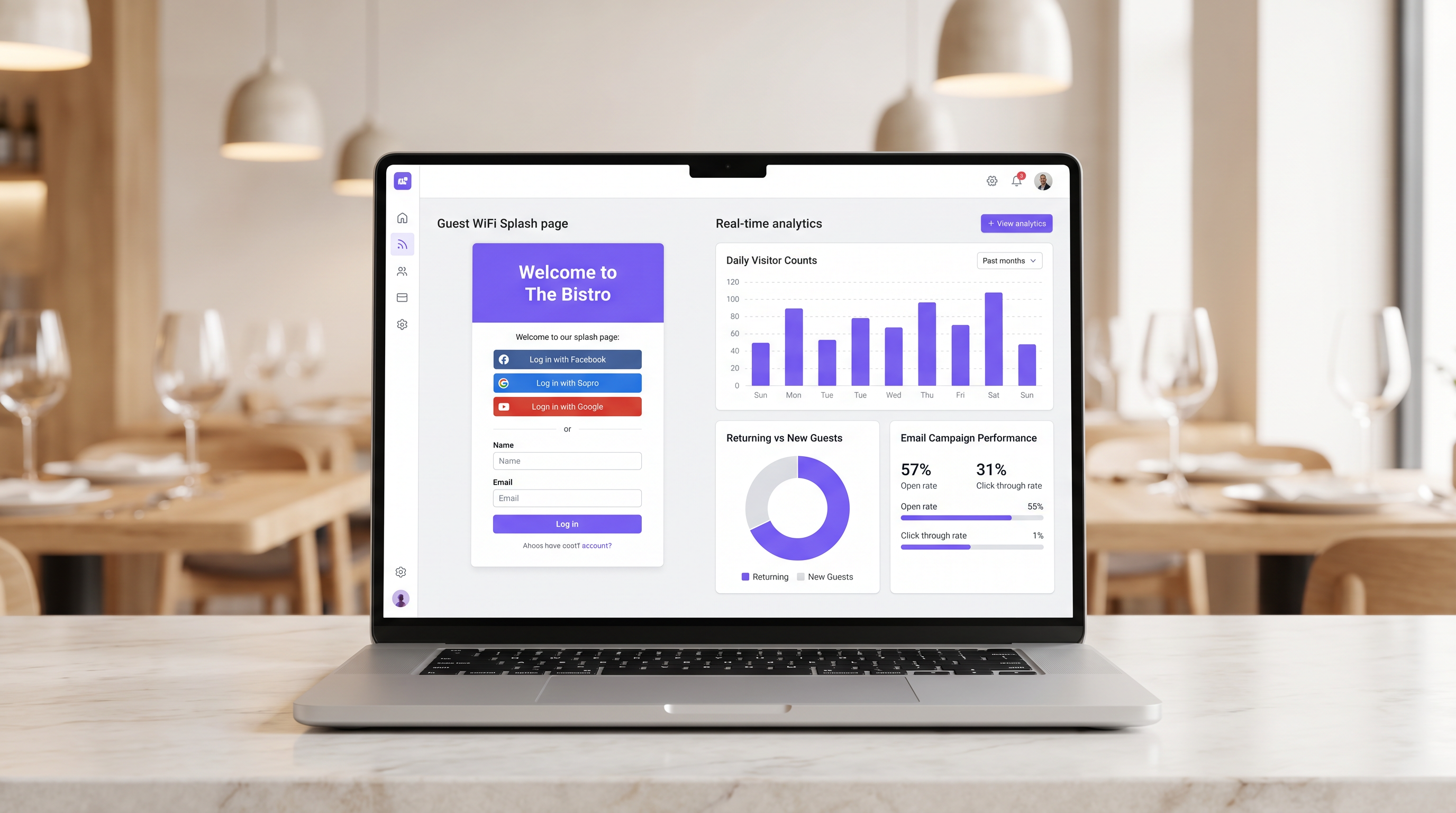
Durch die Implementierung von Guest WiFi mit einer integrierten WiFi Analytics -Schicht können IT-Manager sicheren Zugang bieten und gleichzeitig Erstanbieterdaten erfassen. Diese Daten ermöglichen gezielte E-Mail-Kampagnen nach dem Besuch, fördern wiederkehrende Besuche und erhöhen den Customer Lifetime Value. Wir werden die notwendige Netzwerksegmentierung, Designprinzipien für Captive Portals, GDPR-Compliance-Frameworks und erwartete ROI-Benchmarks für den Hospitality-Sektor untersuchen.
Technischer Überblick
Die Grundlage einer umsatzgenerierenden WiFi-Implementierung ist eine robuste, sichere Netzwerkarchitektur. Ein schlecht konfiguriertes Netzwerk beeinträchtigt sowohl die Sicherheit als auch die Benutzererfahrung, was zu niedrigen Authentifizierungsraten und geringer Datenerfassung führt.
Netzwerksegmentierung und Sicherheit
Das Gastnetzwerk muss strikt von der operativen Infrastruktur isoliert sein. Diese Isolation ist durch PCI DSS-Anforderungen zum Schutz von Karteninhaberdaten vorgeschrieben.
Der Standardansatz besteht darin, ein dediziertes VLAN für den Gastverkehr zu konfigurieren, das vollständig getrennt von Point-of-Sale (POS)-Systemen, Küchenbildschirmen und Backoffice-Hardware ist. Firewall-Regeln müssen jegliches Routing zwischen dem Gast-VLAN und den operativen Subnetzen explizit unterbinden.
Darüber hinaus sollten Access Points WPA3 für die Gast-SSID unterstützen. WPA3's Simultaneous Authentication of Equals (SAE) bietet robusten Schutz vor Offline-Wörterbuchangriffen. Für Umgebungen mit gemischten Clients gewährleistet ein WPA2/WPA3-Übergangsmodus Kompatibilität und bietet gleichzeitig verbesserte Sicherheit für kompatible Geräte.
Die Captive Portal-Architektur
Das Captive Portal, allgemein bekannt als Begrüßungsseite, ist die entscheidende Schnittstelle zwischen Netzwerkzugang und Datenerfassung. Wenn ein Gast versucht, auf das Internet zuzugreifen, fängt das Netzwerk die HTTP-Anfrage ab und leitet den Client zum Captive Portal um.
Diese Umleitung basiert darauf, dass DHCP eine lokale IP-Adresse und DNS-Server zuweist, gefolgt von der Auflösung der anfänglichen Anfragen durch den DNS-Server zur IP des Captive Portals oder der Ausgabe von HTTP 302-Weiterleitungen durch das Gateway. Moderne Captive Portals müssen über HTTPS bereitgestellt werden, um Browser-Sicherheitswarnungen zu vermeiden, die Benutzer abschrecken.
Implementierungsleitfaden
Die Bereitstellung einer erfolgreichen Gast-WiFi-Lösung erfordert sorgfältige Planung und Ausführung. Die folgenden Schritte skizzieren einen anbieterneutralen Ansatz, der für Einzel- und Mehrstandort-Restaurantbetreiber geeignet ist.
Schritt 1: Infrastrukturbewertung
Bewerten Sie vorhandene Access Points und Switches. Hardware für Endverbraucher ist unzureichend für die gleichzeitige Client-Dichte, die in einem belebten Restaurant typisch ist. Access Points der Enterprise-Klasse (z.B. Cisco Meraki, Aruba) sind erforderlich, um VLAN-Tagging, eine robuste Captive Portal-Integration und ausreichende Funkkapazität zu unterstützen. Implementieren Sie eine Bandbreitenbegrenzung pro Client, um zu verhindern, dass ein einzelner Benutzer den Uplink überlastet.
Schritt 2: Optimierung der Begrüßungsseite
Die Begrüßungsseite muss auf maximale Konversion ausgelegt sein. Eine komplexe oder langsam ladende Seite führt zu einem erheblichen Abbruch.
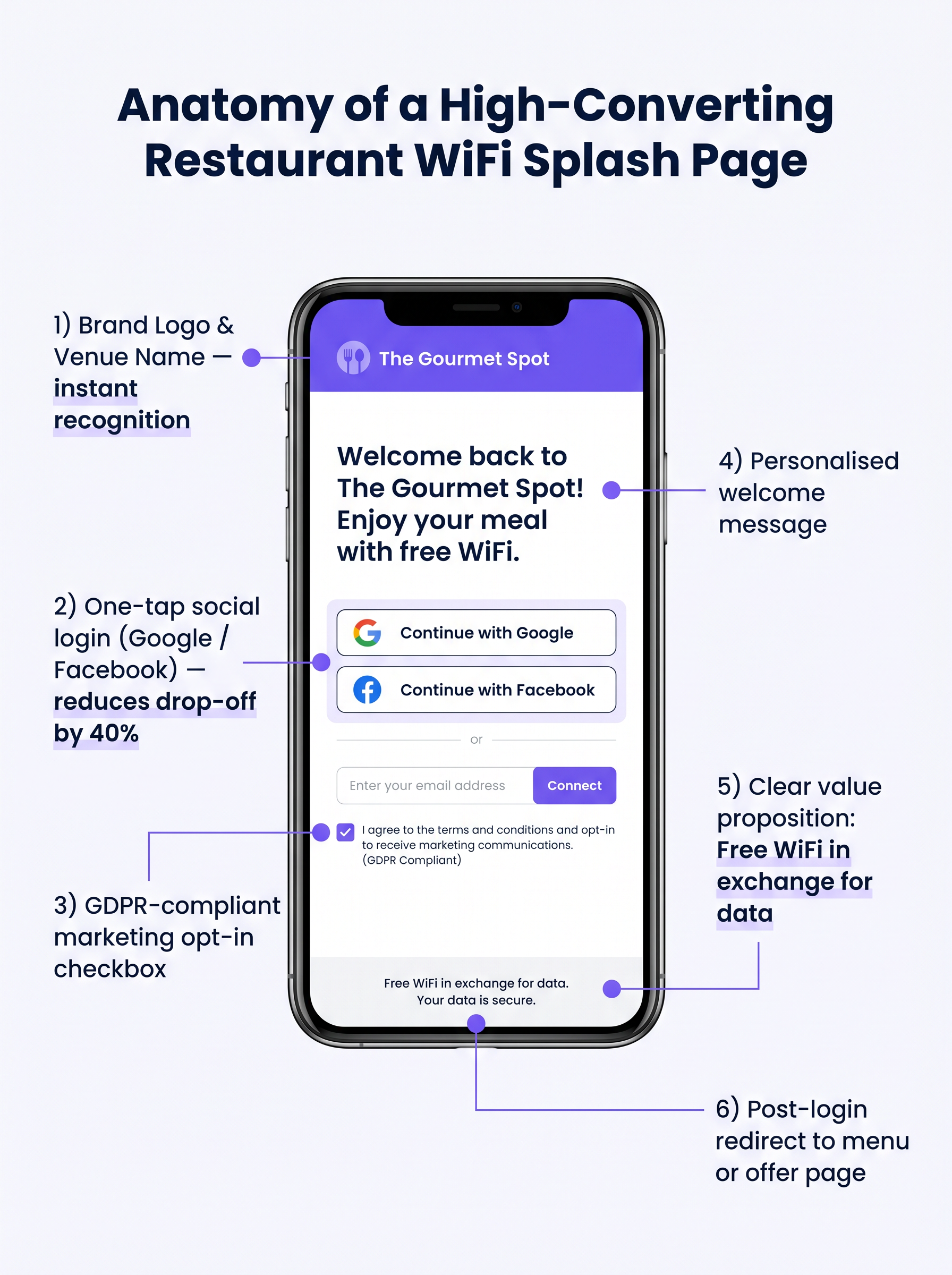
- Einfach halten: Zeigen Sie das Logo des Veranstaltungsortes, ein klares Wertversprechen ("Kostenloses WiFi im Austausch für Ihre E-Mail-Adresse") und die Authentifizierungsoptionen an.
- Social Login aktivieren: Integrieren Sie OAuth-Anbieter (Google, Facebook). Social Login reduziert die Reibung und führt typischerweise zu einer Abschlussrate von 60-70%, verglichen mit 35-45% bei manueller Formulareingabe.
- Mobile Responsiveness sicherstellen: Die überwiegende Mehrheit der Authentifizierungen erfolgt auf mobilen Geräten. Die Benutzeroberfläche muss auf kleinen Bildschirmen fehlerfrei sein.
Schritt 3: Compliance und Datenerfassung
Das Erfassen von Daten ohne ordnungsgemäße Zustimmung birgt erhebliche rechtliche und finanzielle Risiken. Implementieren Sie von Anfang an ein robustes GDPR-konformes Framework.
Der Zustimmungsmechanismus muss explizit und Opt-in sein. Vorausgewählte Kästchen sind gemäß Artikel 7 der GDPR nicht konform. Die Datenschutzerklärung muss klar darlegen, welche Daten gesammelt werden, wie sie verwendet werden (z.B. für Marketingkommunikation) und einen einfachen Mechanismus für betroffene Personen zur Widerrufung der Zustimmung bereitstellen.
Best Practices
Um den Wert der implementierten Infrastruktur zu maximieren, sollten Betreiber mehrere branchenübliche Best Practices befolgen.
- Integration mit Marketing-Stacks: Die WiFi-Plattform muss sich nahtlos in bestehende CRM- und E-Mail-Marketing-Systeme integrieren lassen. Am Portal erfasste Daten sollten automatisch in die Marketingdatenbank fließen.
- Automatisierte Post-Visit-Sequenzen implementieren: Lösen Sie eine automatisierte E-Mail-Sequenz aus, kurz nachdem der Gast den Veranstaltungsort verlassen hat. Eine "Dankeschön"-E-Mail innerhalb von zwei Stunden, gefolgt von einem gezielten Angebot innerhalb von 48 Stunden, ist sehr effektiv.
- Location Analytics nutzen: Für Betreiber mit mehreren Standorten nutzen Sie Location Analytics, um Besucherströme, Verweildauern und das Verhältnis von neuen zu wiederkehrenden Besuchern an verschiedenen Standorten zu verstehen.
Diese Praktiken sind besonders relevant in Hospitality - und Retail -Umgebungen, wo das Verständnis des Kundenverhaltens von größter Bedeutung ist.
Fehlerbehebung & Risikominderung
Selbst bei sorgfältiger Planung, können Implementierungen auf Probleme stoßen. Das Verständnis gängiger Fehlerursachen ist für IT-Teams entscheidend.
Captive Portal wird nicht angezeigt
Dies ist die häufigste Benutzerbeschwerde. Sie wird oft durch aggressive clientseitige DNS-Einstellungen (z.B. fest auf 8.8.8.8 eingestellt) oder strenge Sicherheitssoftware verursacht. Stellen Sie sicher, dass das Netzwerk-Gateway alle DNS-Anfragen von nicht authentifizierten Clients im Gast-VLAN ordnungsgemäß abfängt und umleitet.
Niedrige Authentifizierungsraten
Wenn Benutzer sich mit der SSID verbinden, aber die Authentifizierung fehlschlägt, ist wahrscheinlich die Splash Page die Ursache. Überprüfen Sie die Ladezeit der Seite, vereinfachen Sie das Formular und stellen Sie sicher, dass die Social Login APIs korrekt funktionieren.
MAC Randomization
Moderne mobile Betriebssysteme verwenden MAC address randomization, um die Privatsphäre zu verbessern. Dies kann die Geräteverfolgung und die Erkennung wiederkehrender Besucher erschweren. Stellen Sie sicher, dass Ihre Analyseplattform auf persistenten Identifikatoren basiert, die während der Authentifizierung erfasst werden (z.B. E-Mail-Adresse oder Social ID), anstatt sich ausschließlich auf MAC addresses für die langfristige Verfolgung zu verlassen.
ROI & Geschäftsauswirkungen
Das ultimative Ziel dieser Implementierung ist es, einen messbaren Return on Investment zu erzielen. Die Auswirkungen sollten anhand mehrerer Schlüsselkennzahlen bewertet werden.
Erfolgsmessung
- Datenerfassungsrate: Der Prozentsatz der verbundenen Geräte, die sich erfolgreich authentifizieren und ihre Marketingzustimmung erteilen.
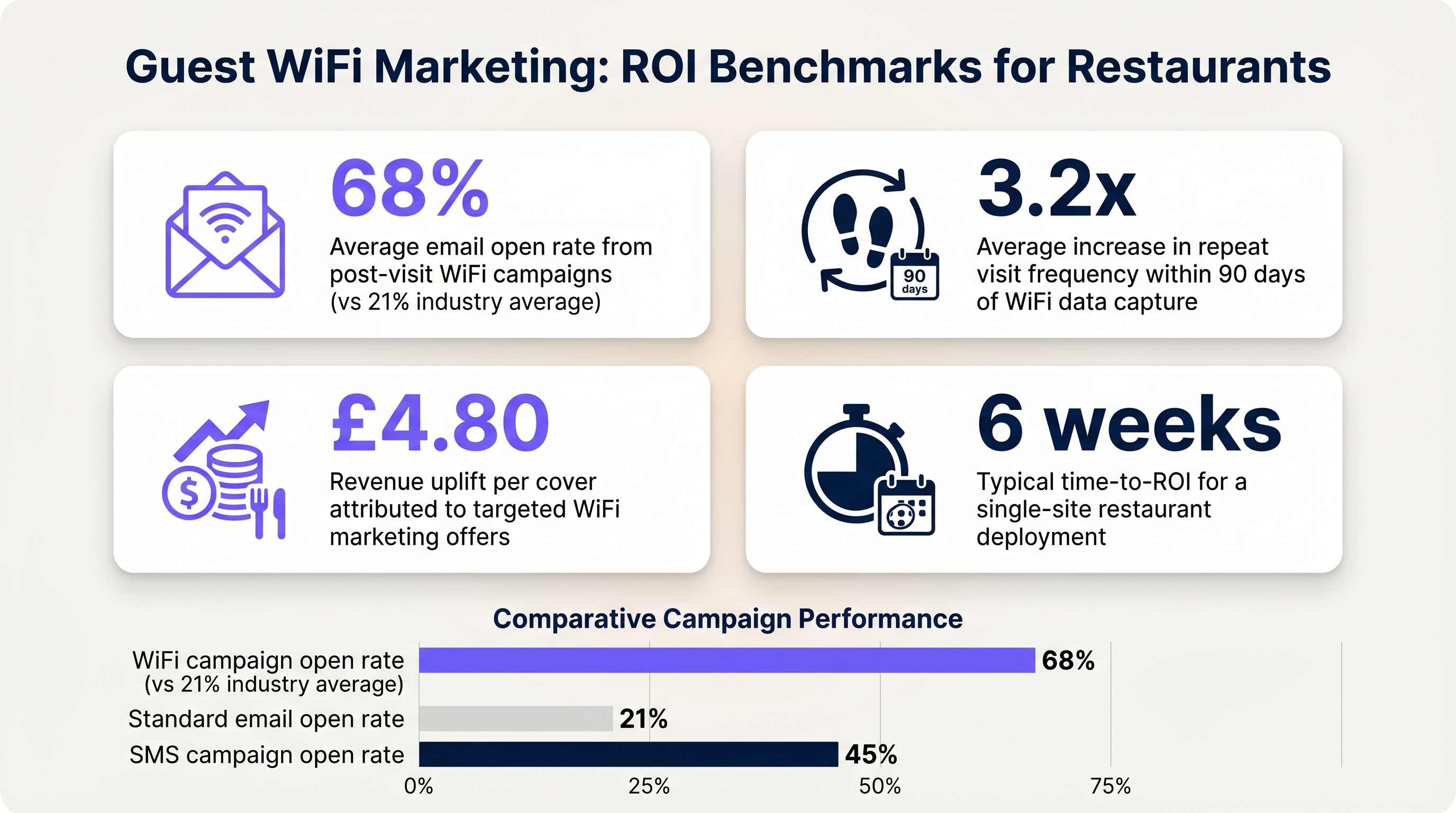
- E-Mail-Öffnungsraten: E-Mails nach dem Besuch, die durch WiFi-Daten ausgelöst werden, weisen typischerweise Öffnungsraten von 60-70% auf, was deutlich über dem Branchendurchschnitt von 21% für Standardkampagnen liegt.
- Häufigkeit der Wiederholungsbesuche: Verfolgen Sie die Zeit zwischen den Besuchen für authentifizierte Benutzer, die gezielte Angebote erhalten, im Vergleich zu denen, die keine erhalten.
Durch die Festlegung dieser Benchmarks können Betreiber den finanziellen Wert der Gast-WiFi-Infrastruktur für die Geschäftsverantwortlichen klar aufzeigen.
Schlüsselbegriffe & Definitionen
Captive Portal
A web page that a user of a public access network is obliged to view and interact with before access is granted.
The primary interface for capturing guest data and presenting marketing opt-ins.
VLAN (Virtual Local Area Network)
A logical subnetwork that groups a collection of devices from different physical LANs.
Used to logically separate guest WiFi traffic from secure operational traffic on the same physical infrastructure.
PCI DSS
Payment Card Industry Data Security Standard; a set of security standards designed to ensure that all companies that accept, process, store or transmit credit card information maintain a secure environment.
Mandates the strict isolation of guest networks from payment processing systems.
MAC Randomization
A privacy feature in modern operating systems that periodically changes the device's Media Access Control (MAC) address.
Complicates device tracking, requiring reliance on authenticated user profiles rather than hardware identifiers.
WPA3
Wi-Fi Protected Access 3; the latest security certification program developed by the Wi-Fi Alliance.
Provides enhanced protection against offline dictionary attacks on the guest network.
OAuth
An open standard for access delegation, commonly used as a way for internet users to grant websites or applications access to their information on other websites but without giving them the passwords.
The underlying technology that enables 'Social Login' (e.g., logging in with Google or Facebook) on the splash page.
Dwell Time
The amount of time a connected device remains within the coverage area of the WiFi network.
A key metric for understanding customer behaviour and venue utilization.
Bandwidth Throttling
The intentional slowing or speeding of an internet service by an Internet service provider (ISP) or network administrator.
Essential on guest networks to prevent individual users from consuming all available bandwidth.
Fallstudien
A 120-cover restaurant is experiencing poor WiFi performance during peak hours. The current setup uses a single consumer-grade router provided by the ISP. Guests frequently complain about slow speeds, and the marketing team reports very few email sign-ups from the captive portal.
- Replace the consumer router with two enterprise-grade access points (APs) positioned for optimal coverage. 2. Configure a dedicated guest VLAN, isolated from the POS system. 3. Implement per-client bandwidth limits (e.g., 5 Mbps down / 2 Mbps up) to prevent network saturation. 4. Redesign the splash page to include social login (Google/Facebook) and a clear GDPR-compliant opt-in checkbox, removing unnecessary form fields.
A multi-site restaurant group wants to implement a loyalty program. They need to identify when a registered customer enters any of their 15 locations, but MAC randomization on modern smartphones is preventing accurate tracking.
Deploy a centralized WiFi authentication platform. Instead of relying on MAC addresses, the system must use the authenticated identity (email or social login ID). When a user authenticates at Location A, their device MAC is temporarily associated with their profile. If the MAC randomizes before they visit Location B, they will be prompted to authenticate again, re-linking the new MAC to their existing profile. The CRM integration ensures loyalty points are attributed correctly based on the profile ID.
Szenarioanalyse
Q1. Your restaurant group is updating its guest WiFi privacy policy. The marketing director wants to automatically subscribe all users who connect to the WiFi to the weekly newsletter to maximize reach. As the IT manager, how should you advise?
💡 Hinweis:Consider the requirements of Article 7 of the GDPR regarding consent.
Empfohlenen Ansatz anzeigen
You must advise against this approach. Under GDPR, consent must be freely given, specific, informed, and unambiguous. Automatically subscribing users or using pre-ticked boxes is non-compliant. The splash page must include an unchecked opt-in box, clearly stating that checking it grants permission for marketing communications. Failure to comply risks significant fines.
Q2. A new venue is being fitted out. The network architect proposes placing the guest WiFi, the POS terminals, and the manager's office PC on the same physical switch to save costs. What configuration is essential to maintain security?
💡 Hinweis:Think about logical separation when physical separation is not possible.
Empfohlenen Ansatz anzeigen
While using the same physical switch is acceptable, strict logical separation is mandatory. The architect must configure separate Virtual LANs (VLANs) for the guest traffic, the POS terminals, and the back-office PC. Firewall rules must be implemented to ensure there is no routing or lateral movement possible between the guest VLAN and the operational VLANs, ensuring PCI DSS compliance.
Q3. The marketing team reports that despite a high number of daily connections to the guest SSID, the data capture rate (emails collected) is below 10%. What is the most likely technical cause, and how would you investigate?
💡 Hinweis:Consider the user journey between connecting to the network and accessing the internet.
Empfohlenen Ansatz anzeigen
The most likely cause is an issue with the captive portal (splash page). It may not be loading correctly across all devices, or it may be too slow, causing users to abandon the process. Investigation steps: 1. Test the connection process on various devices (iOS, Android, Windows, macOS). 2. Check the gateway configuration to ensure DNS redirection for unauthenticated clients is working. 3. Review the splash page design for complexity or excessive load times.




