

Guest WiFi para Restaurantes: Atrair, Reter e Fazer Marketing para Clientes
Este guia detalha como os gestores de TI e diretores de operações de restaurantes podem transformar o Guest WiFi de um centro de custos num canal de receita mensurável. Abrange arquitetura de rede, otimização de splash page, conformidade na recolha de dados e atribuição de ROI.
🎧 Ouça este Guia
Ver Transcrição
Resumo Executivo
Para os estabelecimentos de hotelaria modernos, fornecer acesso à internet já não é uma justificação suficiente para o investimento em infraestrutura. O Guest WiFi deve funcionar como um canal primário de aquisição de dados que impulsiona resultados de negócio mensuráveis. Este guia descreve a arquitetura técnica e os processos operacionais necessários para implementar uma rede Guest WiFi de alto desempenho em ambientes de restaurante.
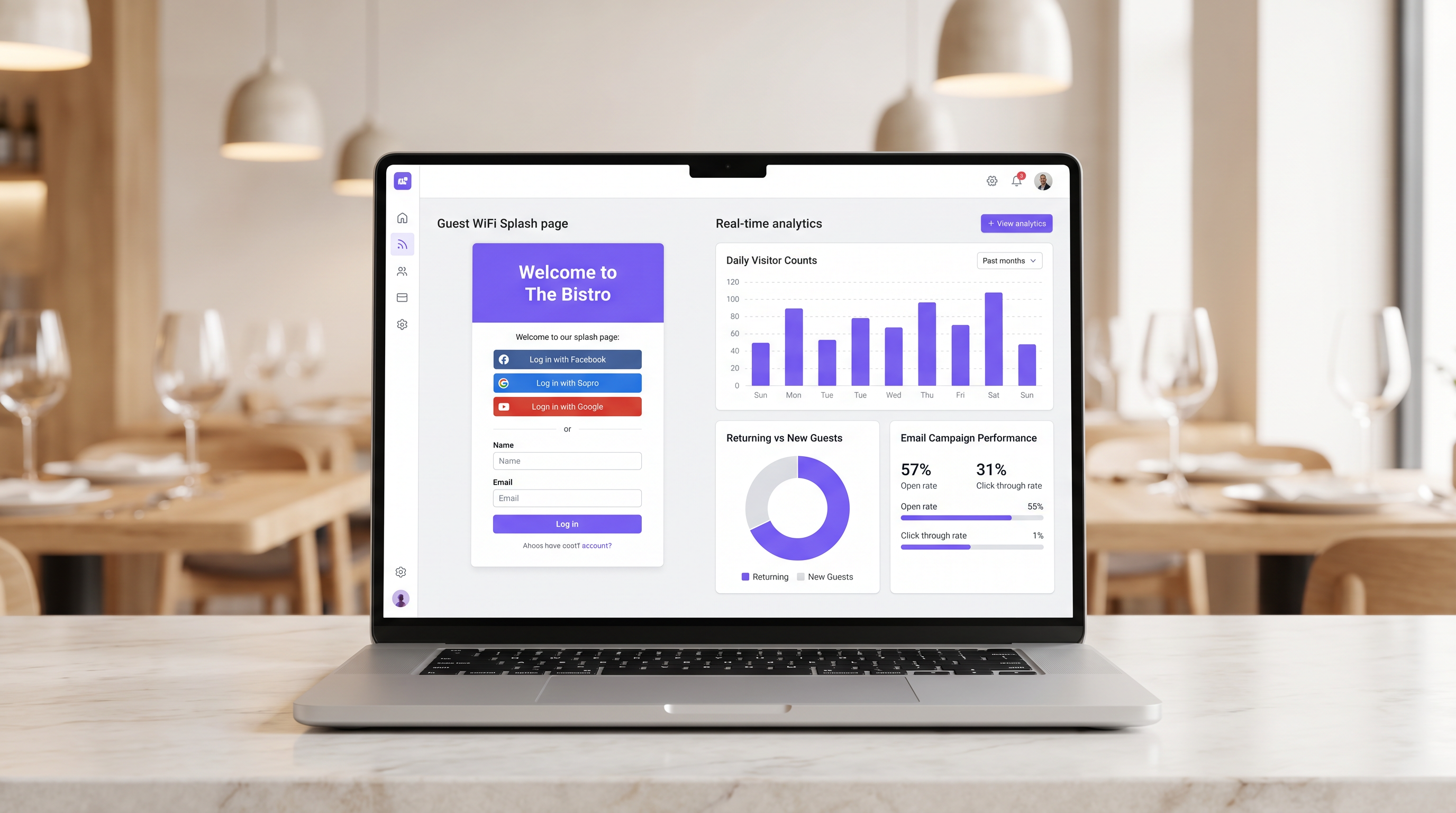
Ao implementar Guest WiFi com uma camada integrada de WiFi Analytics , os gestores de TI podem fornecer acesso seguro enquanto recolhem dados primários. Estes dados alimentam campanhas de email pós-visita direcionadas, impulsionando visitas repetidas e aumentando o valor vitalício do cliente. Exploraremos a segmentação de rede necessária, os princípios de design do Captive Portal, os frameworks de conformidade GDPR e os benchmarks de ROI esperados para o setor da hotelaria.
Análise Técnica Detalhada
A base de uma implementação de WiFi geradora de receita é uma arquitetura de rede robusta e segura. Uma rede mal configurada compromete tanto a segurança quanto a experiência do utilizador, levando a baixas taxas de autenticação e recolha de dados escassa.
Segmentação e Segurança da Rede
A rede de convidados deve ser estritamente isolada da infraestrutura operacional. Este isolamento é exigido pelos requisitos PCI DSS para proteger os ambientes de dados de titulares de cartões.
A abordagem padrão envolve a configuração de uma VLAN dedicada para o tráfego de convidados, completamente separada dos sistemas de ponto de venda (POS), ecrãs de cozinha e hardware de back-office. As regras da firewall devem negar explicitamente qualquer encaminhamento entre a VLAN de convidados e as sub-redes operacionais.
Além disso, os pontos de acesso devem suportar WPA3 para o SSID de convidados. O Simultaneous Authentication of Equals (SAE) do WPA3 oferece proteção robusta contra ataques de dicionário offline. Para ambientes de cliente mistos, um modo de transição WPA2/WPA3 garante compatibilidade enquanto oferece segurança aprimorada para dispositivos compatíveis.
A Arquitetura do Captive Portal
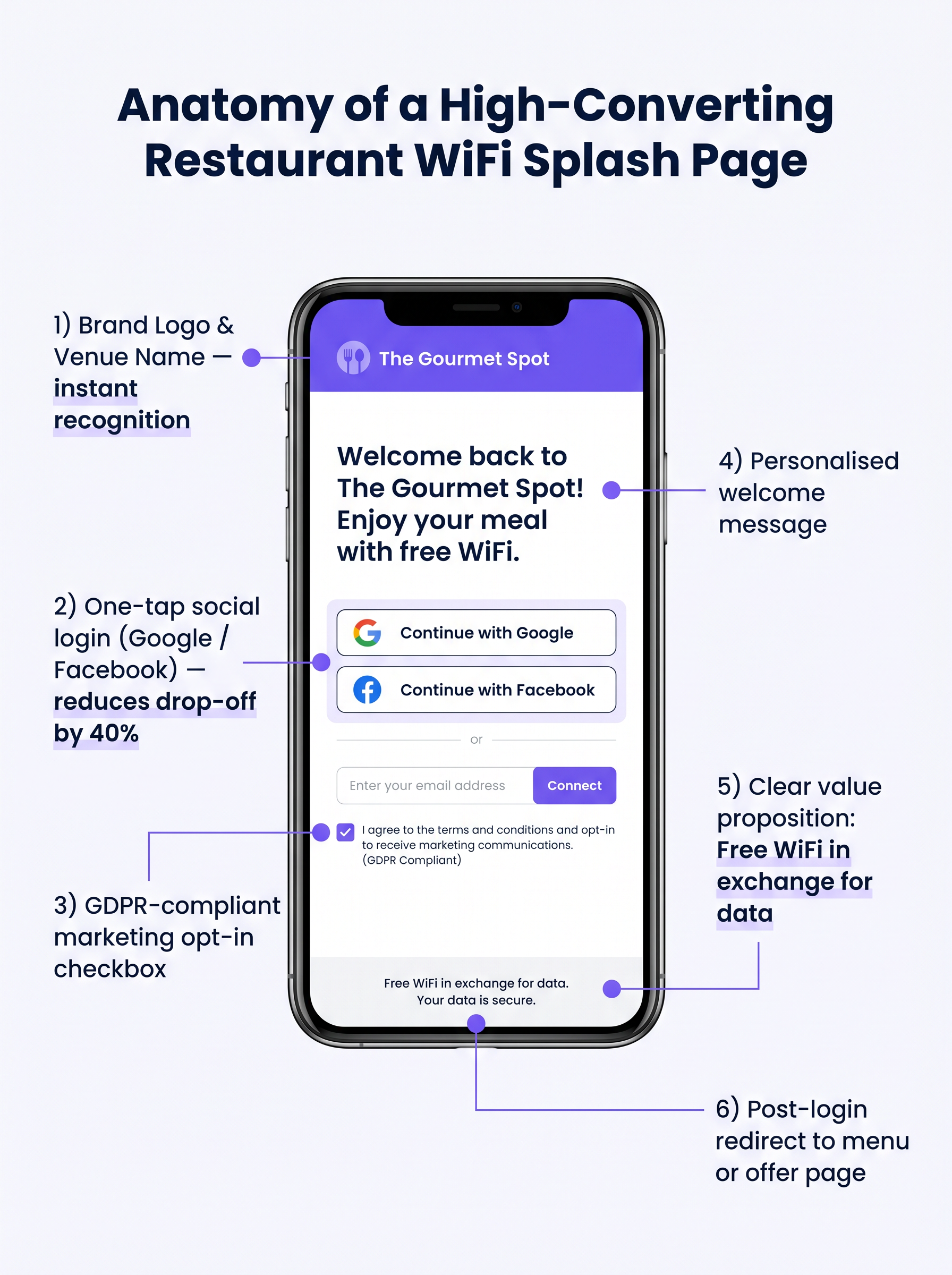
O Captive Portal, comummente conhecido como splash page, é a intersecção crítica entre o acesso à rede e a recolha de dados. Quando um convidado tenta aceder à internet, a rede interceta o pedido HTTP e redireciona o cliente para o Captive Portal.
Este redirecionamento depende do DHCP atribuir um endereço IP local e servidores DNS, seguido pelo servidor DNS a resolver os pedidos iniciais para o IP do Captive Portal, ou o gateway a emitir redirecionamentos HTTP 302. Os Captive Portals modernos devem ser servidos via HTTPS para evitar avisos de segurança do navegador que dissuadem os utilizadores.
Guia de Implementação
Implementar uma solução Guest WiFi bem-sucedida requer planeamento e execução cuidadosos. Os passos seguintes descrevem uma abordagem neutra em relação ao fornecedor, adequada para operadores de restaurantes de um único local e de vários locais.
Passo 1: Avaliação da Infraestrutura
Avalie os pontos de acesso e switches existentes. Hardware de nível de consumidor é insuficiente para a densidade de clientes concorrentes típica de um restaurante movimentado. São necessários pontos de acesso de nível empresarial (por exemplo, Cisco Meraki, Aruba) para suportar VLAN tagging, integração robusta de Captive Portal e capacidade de rádio adequada. Implemente a limitação de largura de banda por cliente para evitar que um único utilizador sature o uplink.
Passo 2: Otimização da Splash Page
A splash page deve ser projetada para máxima conversão. Uma página complexa ou de carregamento lento resultará numa desistência significativa.
- Mantenha a Simplicidade: Exiba o logótipo do local, uma proposta de valor clara ("WiFi Grátis em troca do seu email") e as opções de autenticação.
- Ative o Social Login: Integre provedores OAuth (Google, Facebook). O social login reduz o atrito e geralmente resulta numa taxa de conclusão de 60-70%, em comparação com 35-45% para entrada manual de formulário.
- Garanta a Responsividade Móvel: A grande maioria das autenticações ocorrerá em dispositivos móveis. A UI deve ser impecável em ecrãs pequenos.
Passo 3: Conformidade e Recolha de Dados
A recolha de dados sem o consentimento adequado cria um risco legal e financeiro significativo. Implemente um framework robusto e compatível com o GDPR desde o primeiro dia.
O mecanismo de consentimento deve ser explícito e opt-in. Caixas pré-selecionadas não estão em conformidade com o Artigo 7 do GDPR. A política de privacidade deve indicar claramente quais os dados recolhidos, como serão utilizados (por exemplo, para comunicações de marketing) e fornecer um mecanismo simples para os titulares dos dados retirarem o consentimento.
Melhores Práticas
Para maximizar o valor da infraestrutura implementada, os operadores devem aderir a várias melhores práticas padrão da indústria.
- Integrar com Stacks de Marketing: A plataforma WiFi deve integrar-se perfeitamente com os sistemas CRM e de email marketing existentes. Os dados recolhidos no portal devem fluir automaticamente para a base de dados de marketing.
- Implementar Sequências Pós-Visita Automatizadas: Acione uma sequência de email automatizada logo após o convidado sair do local. Um email de "agradecimento" dentro de duas horas, seguido por uma oferta direcionada dentro de 48 horas, é altamente eficaz.
- Aproveitar a Análise de Localização: Para operadores de vários locais, utilize a análise de localização para entender os padrões de fluxo de pessoas, tempos de permanência e a proporção de visitantes novos versus recorrentes em diferentes locais.
Estas práticas são particularmente relevantes em ambientes de Hotelaria e Retalho onde a compreensão do comportamento do cliente é primordial.
Resolução de Problemas e Mitigação de Riscos
Mesmo com um planeamento cuidadoso, as implementações podem encontrar problemas. Compreender os modos de falha comuns é crucial para as equipas de TI.
Captive Portal Não Aparece
Esta é a queixa mais comum dos utilizadores. É frequentemente causada por configurações DNS agressivas do lado do cliente (por exemplo, codificadas para 8.8.8.8) ou software de segurança rigoroso. Certifique-se de que o gateway de rede interceta e redireciona corretamente todas as consultas DNS de clientes não autenticados na VLAN de convidados.
Baixas Taxas de Autenticação
Se os utilizadores se ligarem ao SSID mas não conseguirem autenticar-se, a página de apresentação é provavelmente a culpada. Reveja o tempo de carregamento da página, simplifique o formulário e verifique se as APIs de login social estão a funcionar corretamente.
Aleatorização de MAC
Os sistemas operativos móveis modernos utilizam a aleatorização de endereços MAC para aumentar a privacidade. Isto pode complicar o rastreamento de dispositivos e o reconhecimento de visitantes recorrentes. Certifique-se de que a sua plataforma de análise se baseia em identificadores persistentes capturados durante a autenticação (por exemplo, endereço de e-mail ou ID social) em vez de depender apenas de endereços MAC para rastreamento a longo prazo.
ROI e Impacto no Negócio
O objetivo final desta implementação é gerar um retorno mensurável do investimento. O impacto deve ser avaliado através de várias métricas chave.
Medir o Sucesso
- Taxa de Captura de Dados: A percentagem de dispositivos conectados que se autenticam com sucesso e fornecem consentimento de marketing.
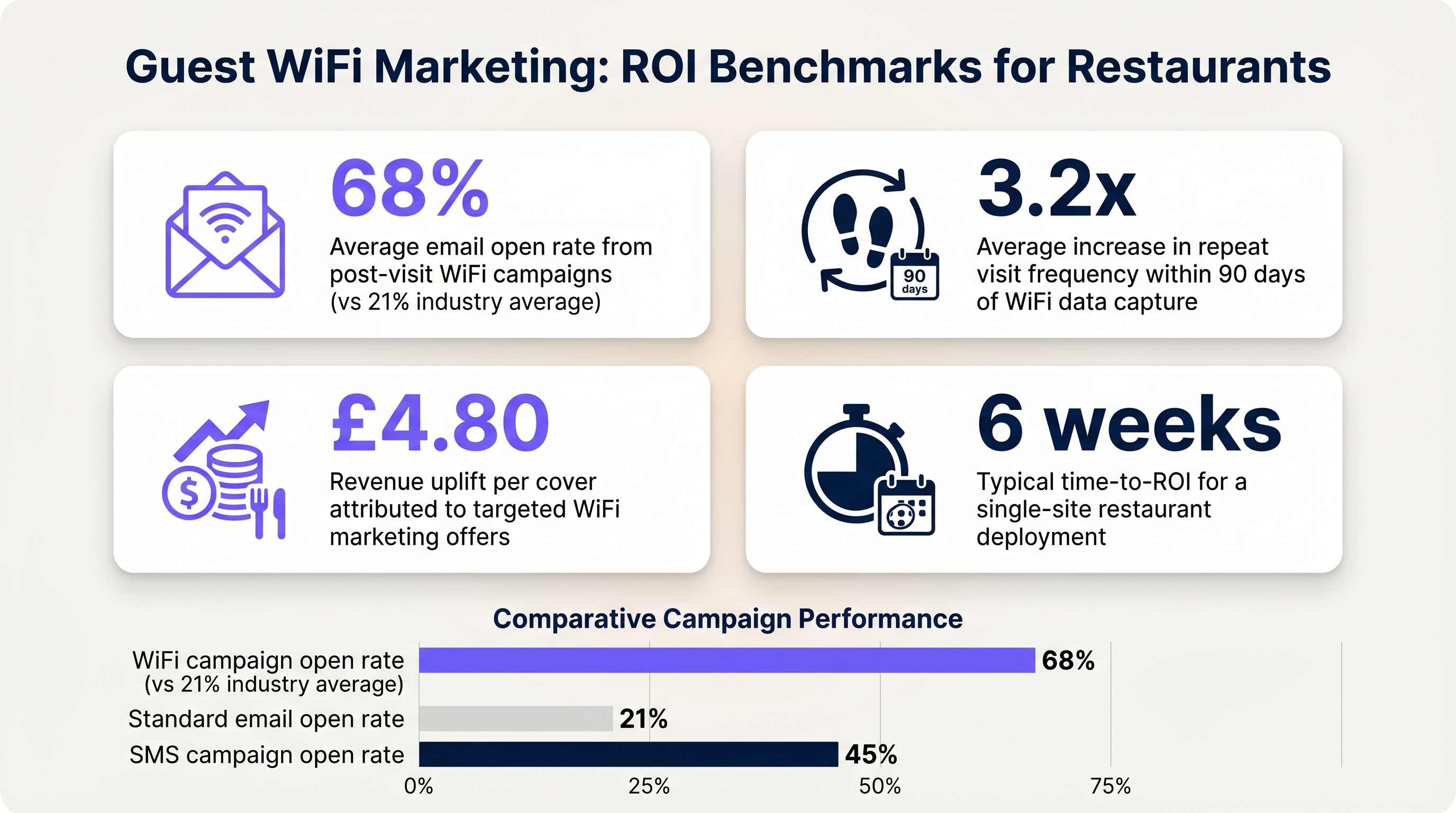
- Taxas de Abertura de E-mail: E-mails pós-visita acionados por dados de WiFi geralmente registam taxas de abertura de 60-70%, significativamente mais altas do que a média da indústria de 21% para campanhas padrão.
- Frequência de Visitas de Retorno: Acompanhe o tempo entre visitas para utilizadores autenticados que recebem ofertas direcionadas versus aqueles que não recebem.
Ao estabelecer estes benchmarks, os operadores podem demonstrar claramente o valor financeiro da infraestrutura de WiFi para convidados aos stakeholders do negócio.
Termos-Chave e Definições
Captive Portal
A web page that a user of a public access network is obliged to view and interact with before access is granted.
The primary interface for capturing guest data and presenting marketing opt-ins.
VLAN (Virtual Local Area Network)
A logical subnetwork that groups a collection of devices from different physical LANs.
Used to logically separate guest WiFi traffic from secure operational traffic on the same physical infrastructure.
PCI DSS
Payment Card Industry Data Security Standard; a set of security standards designed to ensure that all companies that accept, process, store or transmit credit card information maintain a secure environment.
Mandates the strict isolation of guest networks from payment processing systems.
MAC Randomization
A privacy feature in modern operating systems that periodically changes the device's Media Access Control (MAC) address.
Complicates device tracking, requiring reliance on authenticated user profiles rather than hardware identifiers.
WPA3
Wi-Fi Protected Access 3; the latest security certification program developed by the Wi-Fi Alliance.
Provides enhanced protection against offline dictionary attacks on the guest network.
OAuth
An open standard for access delegation, commonly used as a way for internet users to grant websites or applications access to their information on other websites but without giving them the passwords.
The underlying technology that enables 'Social Login' (e.g., logging in with Google or Facebook) on the splash page.
Dwell Time
The amount of time a connected device remains within the coverage area of the WiFi network.
A key metric for understanding customer behaviour and venue utilization.
Bandwidth Throttling
The intentional slowing or speeding of an internet service by an Internet service provider (ISP) or network administrator.
Essential on guest networks to prevent individual users from consuming all available bandwidth.
Estudos de Caso
A 120-cover restaurant is experiencing poor WiFi performance during peak hours. The current setup uses a single consumer-grade router provided by the ISP. Guests frequently complain about slow speeds, and the marketing team reports very few email sign-ups from the captive portal.
- Replace the consumer router with two enterprise-grade access points (APs) positioned for optimal coverage. 2. Configure a dedicated guest VLAN, isolated from the POS system. 3. Implement per-client bandwidth limits (e.g., 5 Mbps down / 2 Mbps up) to prevent network saturation. 4. Redesign the splash page to include social login (Google/Facebook) and a clear GDPR-compliant opt-in checkbox, removing unnecessary form fields.
A multi-site restaurant group wants to implement a loyalty program. They need to identify when a registered customer enters any of their 15 locations, but MAC randomization on modern smartphones is preventing accurate tracking.
Deploy a centralized WiFi authentication platform. Instead of relying on MAC addresses, the system must use the authenticated identity (email or social login ID). When a user authenticates at Location A, their device MAC is temporarily associated with their profile. If the MAC randomizes before they visit Location B, they will be prompted to authenticate again, re-linking the new MAC to their existing profile. The CRM integration ensures loyalty points are attributed correctly based on the profile ID.
Análise de Cenários
Q1. Your restaurant group is updating its guest WiFi privacy policy. The marketing director wants to automatically subscribe all users who connect to the WiFi to the weekly newsletter to maximize reach. As the IT manager, how should you advise?
💡 Dica:Consider the requirements of Article 7 of the GDPR regarding consent.
Mostrar Abordagem Recomendada
You must advise against this approach. Under GDPR, consent must be freely given, specific, informed, and unambiguous. Automatically subscribing users or using pre-ticked boxes is non-compliant. The splash page must include an unchecked opt-in box, clearly stating that checking it grants permission for marketing communications. Failure to comply risks significant fines.
Q2. A new venue is being fitted out. The network architect proposes placing the guest WiFi, the POS terminals, and the manager's office PC on the same physical switch to save costs. What configuration is essential to maintain security?
💡 Dica:Think about logical separation when physical separation is not possible.
Mostrar Abordagem Recomendada
While using the same physical switch is acceptable, strict logical separation is mandatory. The architect must configure separate Virtual LANs (VLANs) for the guest traffic, the POS terminals, and the back-office PC. Firewall rules must be implemented to ensure there is no routing or lateral movement possible between the guest VLAN and the operational VLANs, ensuring PCI DSS compliance.
Q3. The marketing team reports that despite a high number of daily connections to the guest SSID, the data capture rate (emails collected) is below 10%. What is the most likely technical cause, and how would you investigate?
💡 Dica:Consider the user journey between connecting to the network and accessing the internet.
Mostrar Abordagem Recomendada
The most likely cause is an issue with the captive portal (splash page). It may not be loading correctly across all devices, or it may be too slow, causing users to abandon the process. Investigation steps: 1. Test the connection process on various devices (iOS, Android, Windows, macOS). 2. Check the gateway configuration to ensure DNS redirection for unauthenticated clients is working. 3. Review the splash page design for complexity or excessive load times.




