

Guest WiFi for Restaurants: Attract, Retain and Market to Diners
This guide details how restaurant IT managers and operations directors can transform guest WiFi from a cost centre into a measurable revenue channel. It covers network architecture, splash page optimisation, data capture compliance, and ROI attribution.
🎧 Listen to this Guide
View Transcript
Executive Summary
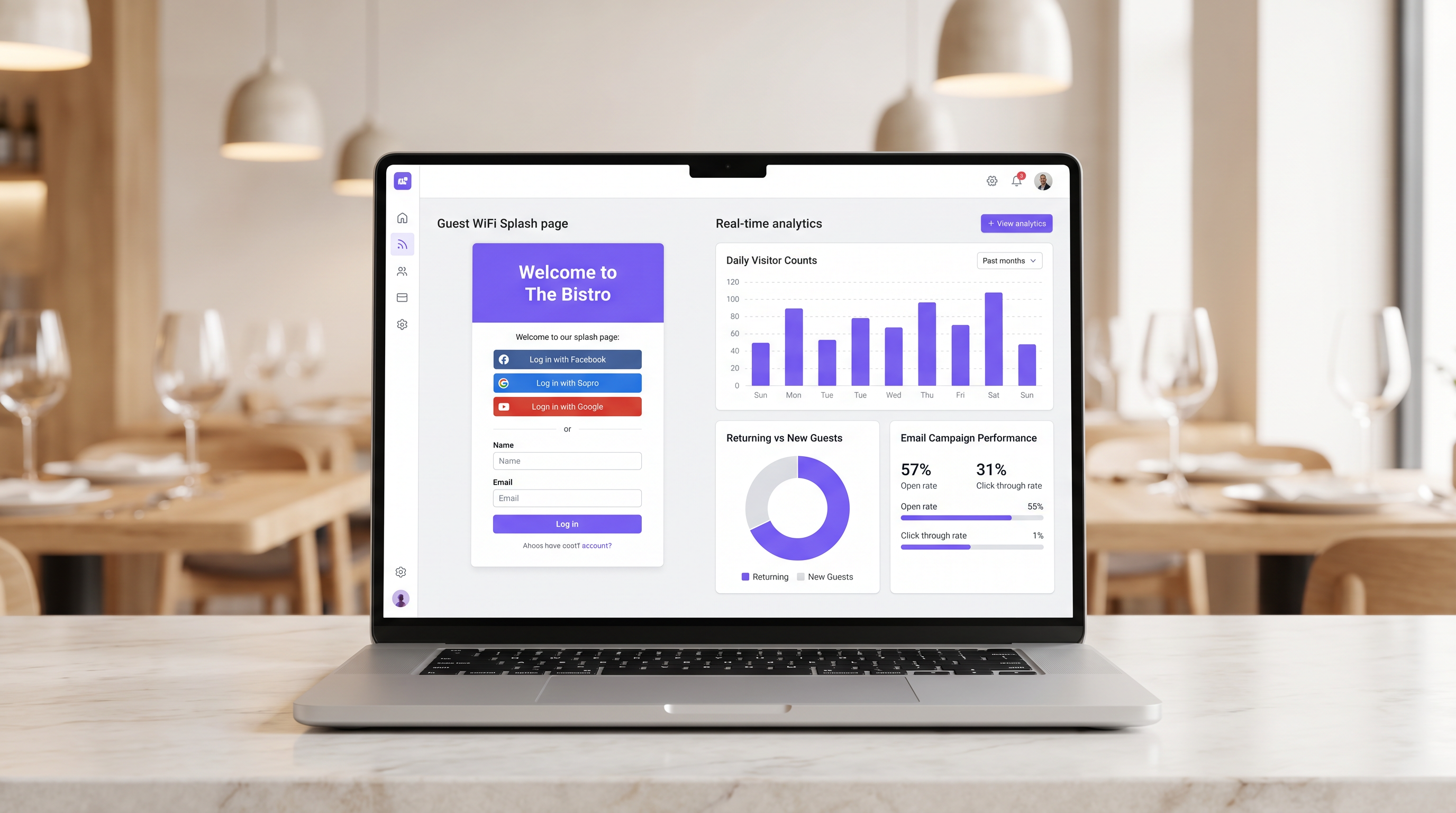
For modern hospitality venues, providing internet access is no longer a sufficient justification for the infrastructure expenditure. Guest WiFi must function as a primary data acquisition channel that drives measurable business outcomes. This guide outlines the technical architecture and operational processes required to deploy a high-performing guest WiFi network in restaurant environments.
By implementing Guest WiFi with an integrated WiFi Analytics layer, IT managers can provide secure access while capturing first-party data. This data powers targeted post-visit email campaigns, driving repeat visits and increasing customer lifetime value. We will explore the necessary network segmentation, captive portal design principles, GDPR compliance frameworks, and expected ROI benchmarks for the hospitality sector.
Technical Deep-Dive
The foundation of a revenue-generating WiFi deployment is a robust, secure network architecture. A poorly configured network compromises both security and the user experience, leading to low authentication rates and sparse data capture.
Network Segmentation and Security
The guest network must be strictly isolated from operational infrastructure. This isolation is mandated by PCI DSS requirements to protect cardholder data environments.
The standard approach involves configuring a dedicated VLAN for guest traffic, completely separate from point-of-sale (POS) systems, kitchen display screens, and back-office hardware. Firewall rules must explicitly deny any routing between the guest VLAN and operational subnets.
Furthermore, access points should support WPA3 for the guest SSID. WPA3's Simultaneous Authentication of Equals (SAE) provides robust protection against offline dictionary attacks. For mixed-client environments, a WPA2/WPA3 transition mode ensures compatibility while offering enhanced security for capable devices.
The Captive Portal Architecture
The captive portal, commonly known as the splash page, is the critical intersection between network access and data capture. When a guest attempts to access the internet, the network intercepts the HTTP request and redirects the client to the captive portal.
This redirection relies on DHCP assigning a local IP address and DNS servers, followed by the DNS server resolving initial requests to the captive portal's IP, or the gateway issuing HTTP 302 redirects. Modern captive portals must be served over HTTPS to prevent browser security warnings that deter users.
Implementation Guide
Deploying a successful guest WiFi solution requires careful planning and execution. The following steps outline a vendor-neutral approach suitable for single-site and multi-site restaurant operators.
Step 1: Infrastructure Assessment
Evaluate existing access points and switches. Consumer-grade hardware is insufficient for the concurrent client density typical of a busy restaurant. Enterprise-grade access points (e.g., Cisco Meraki, Aruba) are required to support VLAN tagging, robust captive portal integration, and adequate radio capacity. Implement per-client bandwidth throttling to prevent a single user from saturating the uplink.
Step 2: Splash Page Optimisation
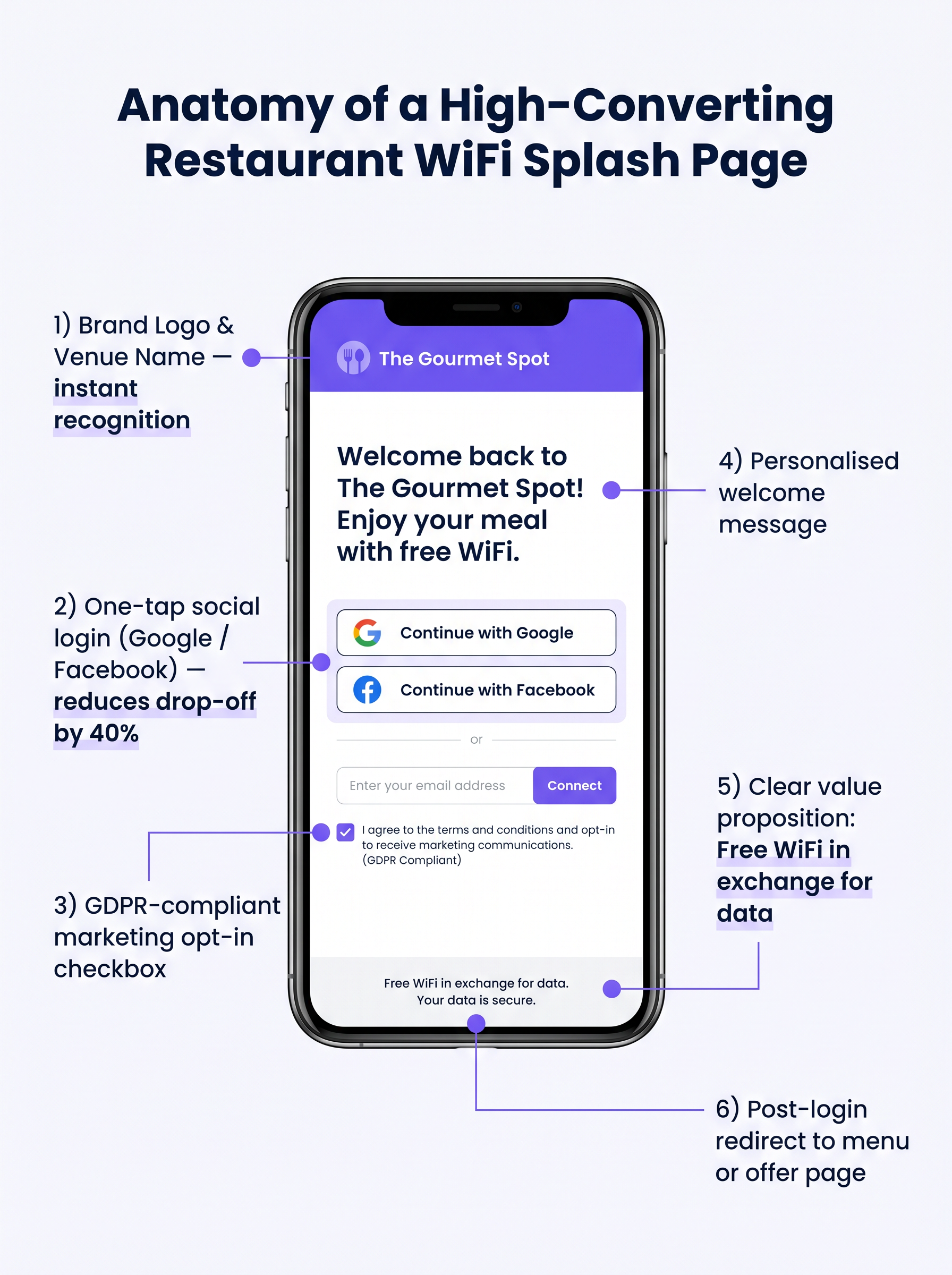
The splash page must be designed for maximum conversion. A complex or slow-loading page will result in significant drop-off.
- Keep it Simple: Display the venue logo, a clear value proposition ("Free WiFi in exchange for your email"), and the authentication options.
- Enable Social Login: Integrate OAuth providers (Google, Facebook). Social login reduces friction and typically yields a 60-70% completion rate, compared to 35-45% for manual form entry.
- Ensure Mobile Responsiveness: The vast majority of authentications will occur on mobile devices. The UI must be flawless on small screens.
Step 3: Compliance and Data Capture
Capturing data without proper consent creates significant legal and financial risk. Implement a robust GDPR-compliant framework from day one.
The consent mechanism must be explicit and opt-in. Pre-ticked boxes are not compliant under Article 7 of the GDPR. The privacy policy must clearly state what data is collected, how it will be used (e.g., for marketing communications), and provide a simple mechanism for data subjects to withdraw consent.
Best Practices
To maximise the value of the deployed infrastructure, operators should adhere to several industry-standard best practices.
- Integrate with Marketing Stacks: The WiFi platform must integrate seamlessly with existing CRM and email marketing systems. Data captured at the portal should flow automatically into the marketing database.
- Implement Automated Post-Visit Sequences: Trigger an automated email sequence shortly after the guest leaves the venue. A "thank you" email within two hours, followed by a targeted offer within 48 hours, is highly effective.
- Leverage Location Analytics: For multi-site operators, utilise location analytics to understand footfall patterns, dwell times, and the ratio of new to returning visitors across different venues.
These practices are particularly relevant across Hospitality and Retail environments where understanding customer behaviour is paramount.
Troubleshooting & Risk Mitigation
Even with careful planning, deployments can encounter issues. Understanding common failure modes is crucial for IT teams.
Captive Portal Not Appearing
This is the most common user complaint. It is often caused by aggressive client-side DNS settings (e.g., hardcoded to 8.8.8.8) or strict security software. Ensure the network gateway properly intercepts and redirects all DNS queries from unauthenticated clients on the guest VLAN.
Low Authentication Rates
If users connect to the SSID but fail to authenticate, the splash page is likely the culprit. Review the page load time, simplify the form, and verify that social login APIs are functioning correctly.
MAC Randomization
Modern mobile operating systems employ MAC address randomization to enhance privacy. This can complicate device tracking and returning visitor recognition. Ensure your analytics platform relies on persistent identifiers captured during authentication (e.g., email address or social ID) rather than relying solely on MAC addresses for long-term tracking.
ROI & Business Impact
The ultimate goal of this deployment is to generate a measurable return on investment. The impact should be evaluated across several key metrics.
Measuring Success
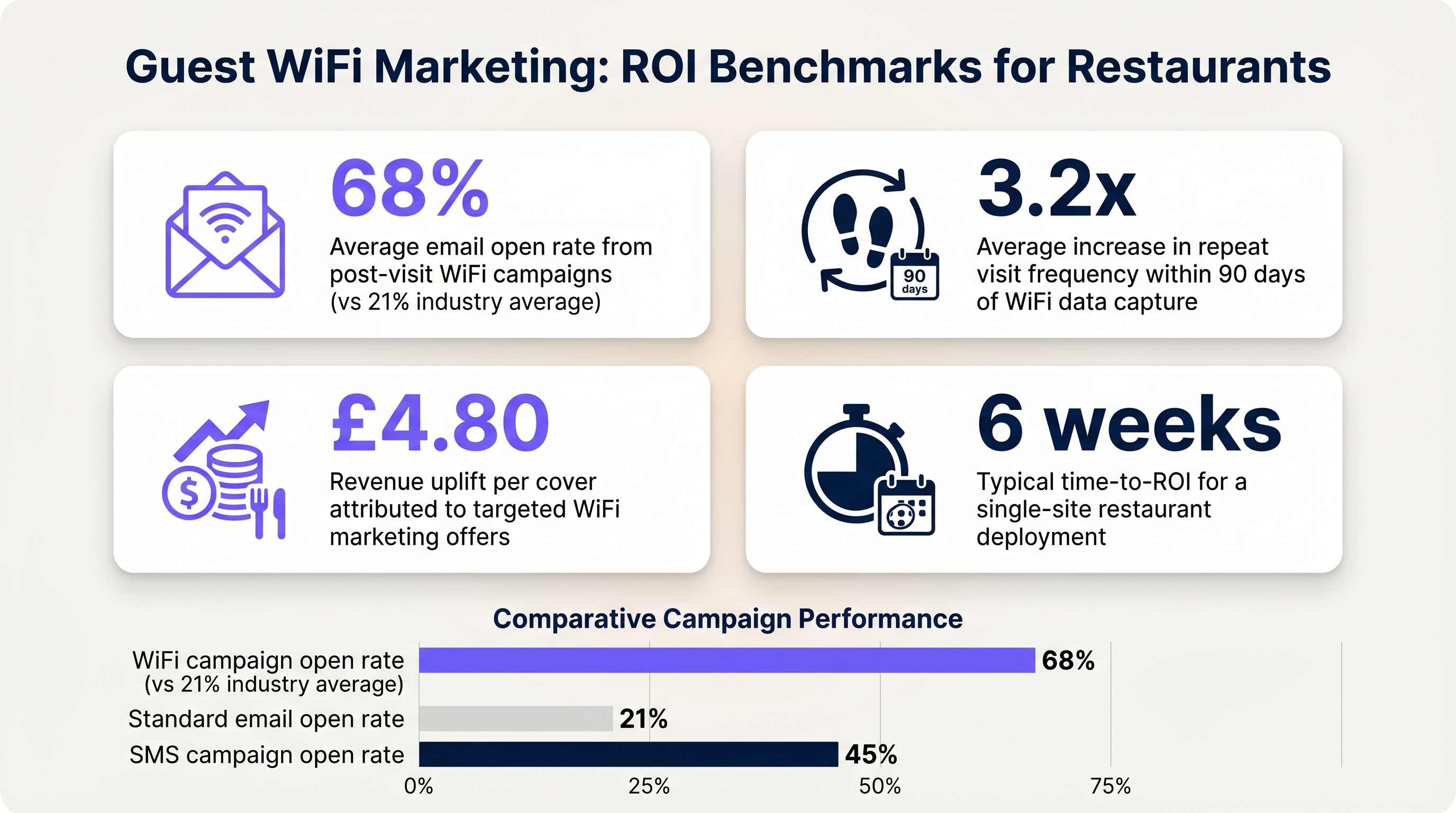
- Data Capture Rate: The percentage of connected devices that successfully authenticate and provide marketing consent.
- Email Open Rates: Post-visit emails triggered by WiFi data typically see open rates of 60-70%, significantly higher than the 21% industry average for standard campaigns.
- Return Visit Frequency: Track the time between visits for authenticated users who receive targeted offers versus those who do not.
By establishing these benchmarks, operators can clearly demonstrate the financial value of the guest WiFi infrastructure to business stakeholders.
Key Terms & Definitions
Captive Portal
A web page that a user of a public access network is obliged to view and interact with before access is granted.
The primary interface for capturing guest data and presenting marketing opt-ins.
VLAN (Virtual Local Area Network)
A logical subnetwork that groups a collection of devices from different physical LANs.
Used to logically separate guest WiFi traffic from secure operational traffic on the same physical infrastructure.
PCI DSS
Payment Card Industry Data Security Standard; a set of security standards designed to ensure that all companies that accept, process, store or transmit credit card information maintain a secure environment.
Mandates the strict isolation of guest networks from payment processing systems.
MAC Randomization
A privacy feature in modern operating systems that periodically changes the device's Media Access Control (MAC) address.
Complicates device tracking, requiring reliance on authenticated user profiles rather than hardware identifiers.
WPA3
Wi-Fi Protected Access 3; the latest security certification program developed by the Wi-Fi Alliance.
Provides enhanced protection against offline dictionary attacks on the guest network.
OAuth
An open standard for access delegation, commonly used as a way for internet users to grant websites or applications access to their information on other websites but without giving them the passwords.
The underlying technology that enables 'Social Login' (e.g., logging in with Google or Facebook) on the splash page.
Dwell Time
The amount of time a connected device remains within the coverage area of the WiFi network.
A key metric for understanding customer behaviour and venue utilization.
Bandwidth Throttling
The intentional slowing or speeding of an internet service by an Internet service provider (ISP) or network administrator.
Essential on guest networks to prevent individual users from consuming all available bandwidth.
Case Studies
A 120-cover restaurant is experiencing poor WiFi performance during peak hours. The current setup uses a single consumer-grade router provided by the ISP. Guests frequently complain about slow speeds, and the marketing team reports very few email sign-ups from the captive portal.
- Replace the consumer router with two enterprise-grade access points (APs) positioned for optimal coverage. 2. Configure a dedicated guest VLAN, isolated from the POS system. 3. Implement per-client bandwidth limits (e.g., 5 Mbps down / 2 Mbps up) to prevent network saturation. 4. Redesign the splash page to include social login (Google/Facebook) and a clear GDPR-compliant opt-in checkbox, removing unnecessary form fields.
A multi-site restaurant group wants to implement a loyalty program. They need to identify when a registered customer enters any of their 15 locations, but MAC randomization on modern smartphones is preventing accurate tracking.
Deploy a centralized WiFi authentication platform. Instead of relying on MAC addresses, the system must use the authenticated identity (email or social login ID). When a user authenticates at Location A, their device MAC is temporarily associated with their profile. If the MAC randomizes before they visit Location B, they will be prompted to authenticate again, re-linking the new MAC to their existing profile. The CRM integration ensures loyalty points are attributed correctly based on the profile ID.
Scenario Analysis
Q1. Your restaurant group is updating its guest WiFi privacy policy. The marketing director wants to automatically subscribe all users who connect to the WiFi to the weekly newsletter to maximize reach. As the IT manager, how should you advise?
💡 Hint:Consider the requirements of Article 7 of the GDPR regarding consent.
Show Recommended Approach
You must advise against this approach. Under GDPR, consent must be freely given, specific, informed, and unambiguous. Automatically subscribing users or using pre-ticked boxes is non-compliant. The splash page must include an unchecked opt-in box, clearly stating that checking it grants permission for marketing communications. Failure to comply risks significant fines.
Q2. A new venue is being fitted out. The network architect proposes placing the guest WiFi, the POS terminals, and the manager's office PC on the same physical switch to save costs. What configuration is essential to maintain security?
💡 Hint:Think about logical separation when physical separation is not possible.
Show Recommended Approach
While using the same physical switch is acceptable, strict logical separation is mandatory. The architect must configure separate Virtual LANs (VLANs) for the guest traffic, the POS terminals, and the back-office PC. Firewall rules must be implemented to ensure there is no routing or lateral movement possible between the guest VLAN and the operational VLANs, ensuring PCI DSS compliance.
Q3. The marketing team reports that despite a high number of daily connections to the guest SSID, the data capture rate (emails collected) is below 10%. What is the most likely technical cause, and how would you investigate?
💡 Hint:Consider the user journey between connecting to the network and accessing the internet.
Show Recommended Approach
The most likely cause is an issue with the captive portal (splash page). It may not be loading correctly across all devices, or it may be too slow, causing users to abandon the process. Investigation steps: 1. Test the connection process on various devices (iOS, Android, Windows, macOS). 2. Check the gateway configuration to ensure DNS redirection for unauthenticated clients is working. 3. Review the splash page design for complexity or excessive load times.




