

Cloud RADIUS vs. RADIUS On-Premise: Guía de decisión para equipos de TI
Esta guía proporciona a directores de TI, arquitectos de red y equipos de operaciones de recintos un marco definitivo para elegir entre servicios RADIUS alojados en la nube y servidores RADIUS on-premise tradicionales. Abarca la arquitectura técnica, las compensaciones de latencia y confiabilidad, el costo total de propiedad y las consideraciones de cumplimiento para implementaciones en múltiples sitios de hospitalidad, retail y sector público. Al finalizar, los lectores tendrán un modelo de decisión claro alineado con sus restricciones de infraestructura específicas y su nivel de tolerancia al riesgo organizacional.
🎧 Escucha esta guía
Ver transcripción
Resumen ejecutivo
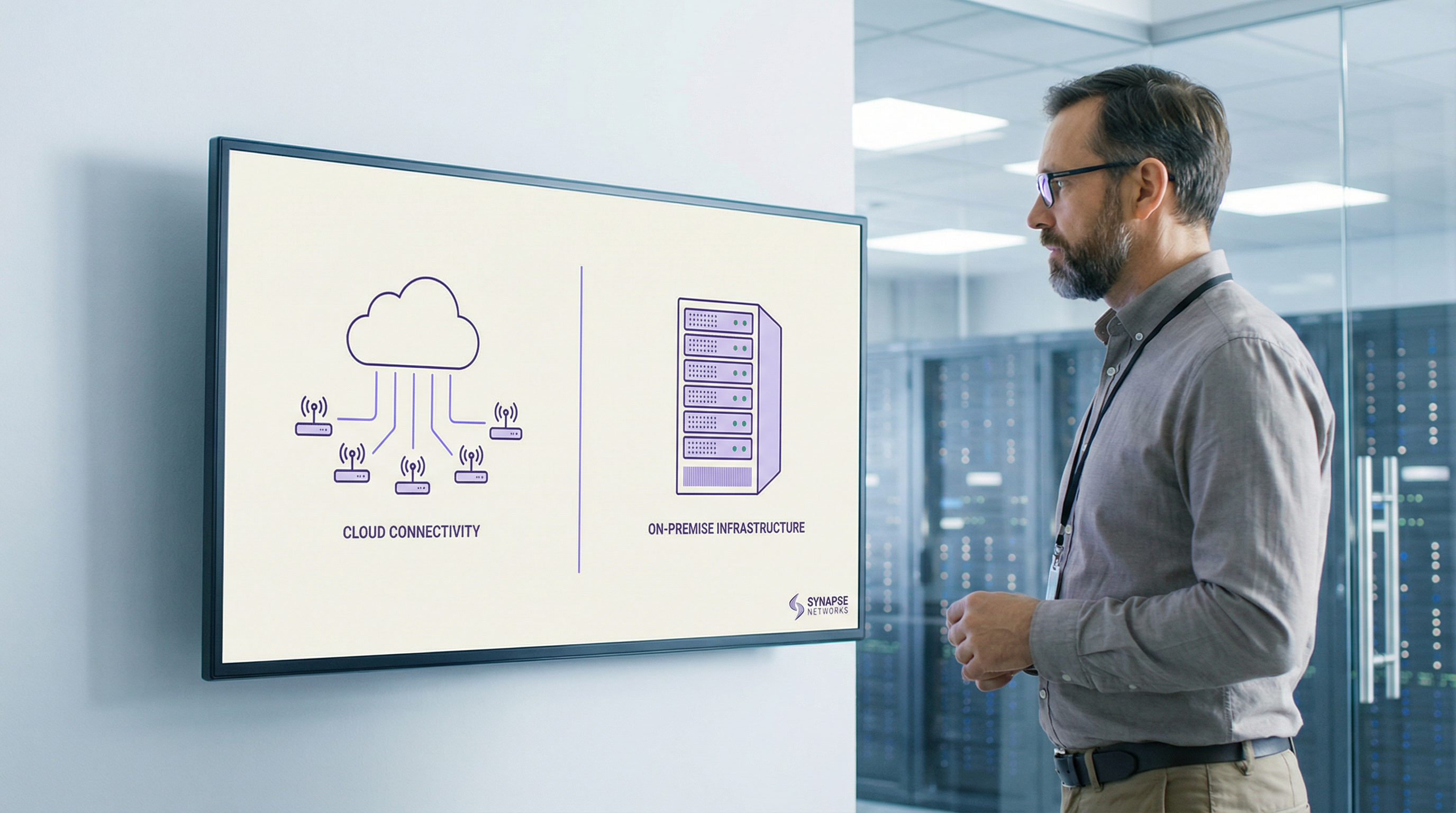
La autenticación RADIUS es el núcleo de toda implementación de WiFi empresarial. Ya sea que esté asegurando el acceso de los empleados a través de IEEE 802.1X o gestionando la incorporación de invitados en un patrimonio de recintos de múltiples sitios, la decisión de dónde alojar su infraestructura RADIUS tiene consecuencias directas en el tiempo de actividad, la carga operativa y el costo total de propiedad.
Los servicios de Cloud RADIUS ofrecen una infraestructura de autenticación gestionada y distribuida globalmente con alta disponibilidad integrada, rotación automática de certificados y escalabilidad elástica, eliminando la carga de mantenimiento por sitio que afecta a las implementaciones distribuidas on-premise. El RADIUS on-premise, ya sea ejecutando FreeRADIUS o Microsoft NPS, ofrece autenticación local de submilisegundos, soberanía total de los datos e independencia de la conectividad WAN; ventajas que siguen siendo decisivas en entornos específicos de alta densidad o regulados.
Para la mayoría de los operadores de múltiples sitios (grupos hoteleros, cadenas de retail, centros de convenciones), Cloud RADIUS ofrece un resultado operativo superior con un costo total de propiedad a cinco años más bajo. Las excepciones están bien definidas: entornos aislados (air-gapped), mandatos estrictos de residencia de datos y implementaciones de sitio único muy grandes donde el rendimiento de la LAN local es primordial. Esta guía le brinda el marco para determinar en qué categoría cae su implementación y cómo actuar sobre esa decisión.
Análisis técnico profundo
El protocolo RADIUS y su función en la infraestructura 802.1X
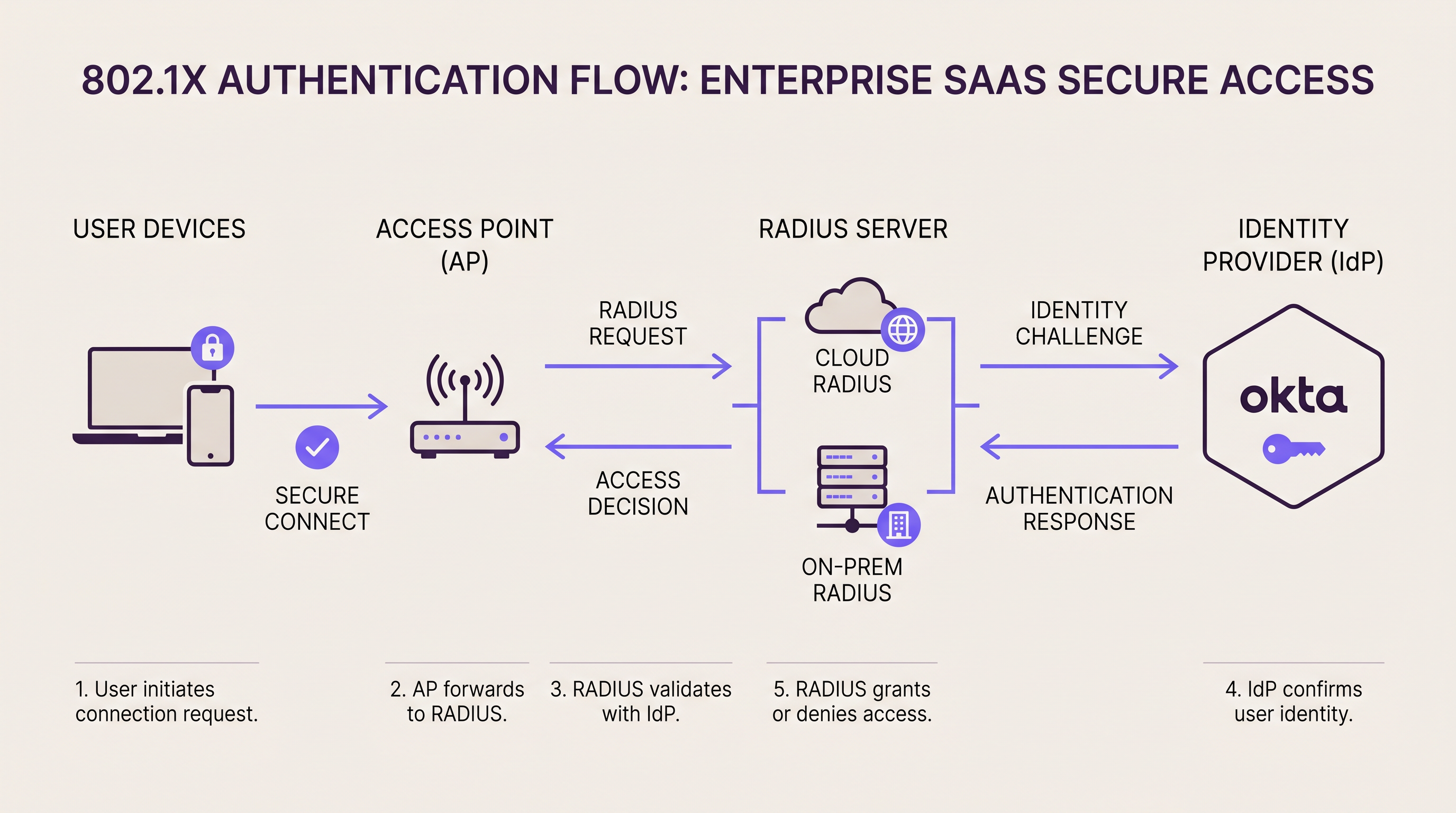
RADIUS (Remote Authentication Dial-In User Service, RFC 2865) opera como el intermediario de autenticación entre su capa de acceso a la red y su directorio de identidad. En una implementación 802.1X , el punto de acceso o switch actúa como el Servidor de Acceso a la Red (NAS), reenviando tramas de autenticación EAP al servidor RADIUS a través de UDP (puerto 1812 para autenticación, puerto 1813 para contabilidad). El servidor RADIUS valida las credenciales del suplicante contra un directorio backend (Active Directory, LDAP o un proveedor de identidad en la nube) y devuelve una respuesta Access-Accept o Access-Reject, incluyendo opcionalmente atributos de asignación de VLAN.
Esta arquitectura es fundamentalmente la misma ya sea que su servidor RADIUS sea un dispositivo montado en rack en su sala de servidores o un servicio en la nube distribuido globalmente. La diferencia radica en dónde vive ese servidor, quién lo mantiene y cómo se escala.
RADIUS On-Premise: Arquitectura y compensaciones
Las dos plataformas RADIUS on-premise dominantes son FreeRADIUS y Microsoft Network Policy Server (NPS). FreeRADIUS es el servidor RADIUS más implementado en el mundo, compatible con una amplia gama de métodos EAP, incluidos EAP-TLS, PEAP-MSCHAPv2, EAP-TTLS y EAP-PWD. Se integra con prácticamente cualquier directorio backend a través de LDAP, SQL o REST, y está disponible sin costo de licencia. Sin embargo, exige una administración calificada: la configuración se basa en archivos, la depuración requiere experiencia en análisis de registros y el escalado en docenas de sitios requiere una planificación cuidadosa de replicación y conmutación por error.
Microsoft NPS se integra de forma nativa con Active Directory y es la opción predeterminada para entornos centrados en Windows. Admite PEAP-MSCHAPv2 y EAP-TLS de forma inmediata y se gestiona a través de la interfaz familiar de Windows Server. La compensación es el acoplamiento estrecho con las licencias de Windows Server y un conjunto de métodos EAP más limitado en comparación con FreeRADIUS.
Para implementaciones on-premise de alta disponibilidad, las organizaciones suelen desplegar clústeres RADIUS activo-activo o activo-pasivo. Los puntos de acceso se configuran con una dirección de servidor RADIUS primaria y secundaria; si el primario no responde dentro del tiempo de espera configurado (normalmente de 3 a 5 segundos), el NAS conmuta al secundario. Esta arquitectura requiere servidores dispersos geográficamente, lo que introduce su propia complejidad, o un par de servidores en la misma instalación, lo que no protege contra una interrupción a nivel de sitio.
Perfil de latencia: El RADIUS on-premise ofrece ciclos de autenticación de menos de 1 milisegundo a través de una LAN local. Para entornos de alta densidad que procesan miles de autenticaciones simultáneas (un estadio de 68,000 asientos durante un evento con entradas agotadas, por ejemplo), esta capacidad de procesamiento local es una ventaja operativa real.
Cloud RADIUS: Arquitectura y compensaciones
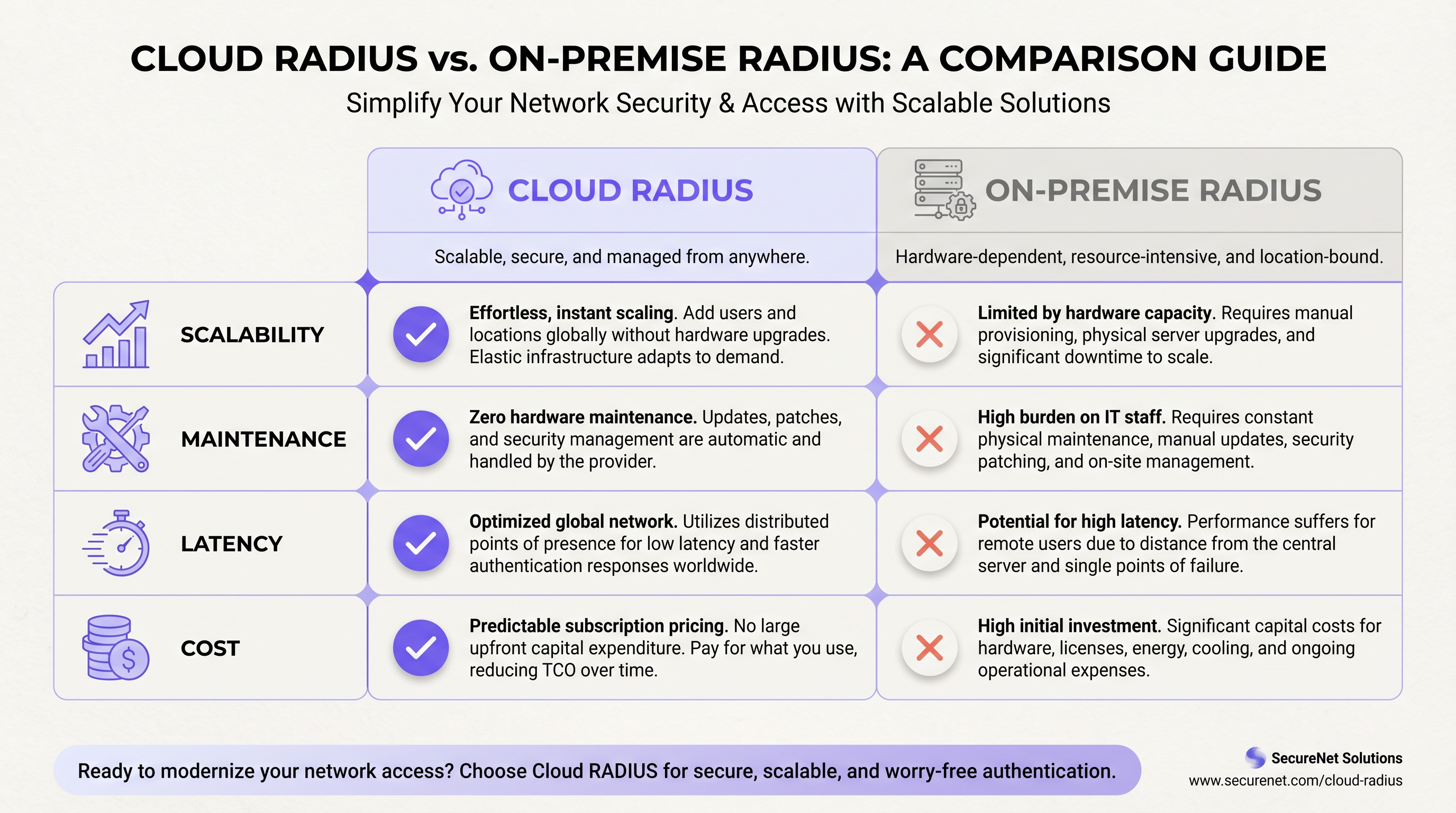
Las plataformas de Cloud RADIUS alojan la infraestructura RADIUS en múltiples zonas de disponibilidad distribuidas geográficamente. Cuando un punto de acceso envía una solicitud de autenticación, se enruta al nodo perimetral de la nube más cercano, lo que normalmente agrega de 5 a 50 milisegundos de latencia de ida y vuelta, dependiendo de la proximidad del punto de presencia del proveedor al sitio. Para la gran mayoría de los casos de uso de autenticación, esta latencia es imperceptible para los usuarios finales.
El modelo de alta disponibilidad es fundamentalmente diferente al on-premise. En lugar de configurar un par primario/secundario, el equilibrador de carga de la plataforma en la nube enruta automáticamente las solicitudes lejos de los nodos fallidos. Los proveedores empresariales de Cloud RADIUS suelen publicar SLAs de 99.99% de tiempo de actividad, respaldados por redundancia multirregión. Lograr una redundancia equivalente on-premise requiere desplegar clústeres activo-activo en múltiples centros de datos dispersos geográficamente, lo que representa una inversión significativa en ingeniería y capital.
Las plataformas de Cloud RADIUS se integran de forma nativa con los proveedores de identidad en la nube. Si su organización utiliza Okta, Azure Active Directory o Google Workspace, un servicio de Cloud RADIUS se conecta a través de SAML, LDAP-over-TLS o conectores de API propietarios. Para un recorrido detallado de la integración con Okta específicamente, consulte nuestra guía: Okta y RADIUS: Extensión de su proveedor de identidad a la autenticación WiFi .
La gestión de certificados es uno de los argumentos operativos más convincentes para Cloud RADIUS. EAP-TLS y PEAP dependen de certificados digitales del lado del servidor. On-premise, la expiración de certificados es una de las principales causas de interrupciones de autenticación: un certificado que expira en un servidor FreeRADIUS hace que cada cliente conectado rechace la identidad del servidor, lo que resulta en una interrupción completa de WiFi hasta que el certificado se renueve y se implemente. Los proveedores de Cloud RADIUS automatizan la rotación de certificados por completo, eliminando este modo de falla.
WPA3-Enterprise y consideraciones de protocolo
La especificación WPA3-Enterprise de la WiFi Alliance introduce un modo de seguridad de 192 bits que exige EAP-TLS con criptografía Suite B (ECDHE, ECDSA, AES-256-GCM). Esto es cada vez más relevante para implementaciones en salud, finanzas y gobierno. La mayoría de las plataformas modernas de Cloud RADIUS admiten WPA3-Enterprise de forma nativa. Las implementaciones on-premise que ejecutan versiones anteriores de FreeRADIUS (anteriores a 3.0.x) o configuraciones heredadas de NPS pueden requerir actualizaciones antes de que se pueda implementar WPA3-Enterprise. Si WPA3-Enterprise está en su hoja de ruta, valide el soporte de su plataforma RADIUS antes de comprometerse con una ruta de infraestructura.
Para las organizaciones que consideran la capa SD-WAN que sustenta las implementaciones de Cloud RADIUS en múltiples sitios, nuestra guía sobre Los beneficios principales de SD-WAN para las empresas modernas proporciona un contexto complementario sobre la arquitectura de resiliencia WAN.
Guía de implementación
Paso 1: Audite sus dependencias de autenticación actuales
Antes de seleccionar un modelo de implementación, documente cada SSID, VLAN, método EAP y directorio backend que toca su infraestructura de autenticación actual. Incluya las políticas de MAC Authentication Bypass (MAB) para dispositivos sin interfaz (headless): impresoras, sensores IoT, terminales de punto de venta, ya que estos se pasan por alto con frecuencia durante las migraciones y pueden causar incidentes significativos después de la transición.
Paso 2: Evalúe la preparación del proveedor de identidad
Si su directorio de usuarios es Active Directory on-premise y no se puede sincronizar con un IdP en la nube, sus opciones de Cloud RADIUS se limitan a plataformas que admiten el proxy LDAP a directorios on-premise. Si puede implementar Azure AD Connect o una herramienta de sincronización similar, estará disponible toda la gama de plataformas de Cloud RADIUS. Esta única decisión (IdP en la nube frente a directorio on-premise) suele ser el factor determinante en la elección entre Cloud RADIUS y RADIUS on-premise.
Paso 3: Evalúe la resiliencia de la WAN en cada sitio
Cloud RADIUS es tan confiable como la conexión a internet en cada sitio. Antes de migrar, audite la conectividad WAN en cada ubicación. Los sitios con una sola conexión de ISP y sin conmutación por error representan un riesgo significativo. Implemente conectividad dual de ISP o conmutación por error SD-WAN antes de desplegar Cloud RADIUS como su infraestructura de autenticación principal. Para entornos de retail donde los sistemas de punto de venta dependen de la autenticación de red, la resiliencia de la WAN no es negociable.
Paso 4: Planifique la migración de certificados (implementaciones on-premise)
Si implementa o mantiene RADIUS on-premise con EAP-TLS, establezca un proceso de gestión del ciclo de vida de los certificados. Implemente alertas de monitoreo a los 90, 60 y 30 días antes de la expiración del certificado. Considere implementar una PKI interna (como Microsoft ADCS o HashiCorp Vault) para automatizar la emisión y renovación de certificados. Nunca confíe únicamente en los recordatorios del calendario para la gestión de certificados en entornos de producción.
Paso 5: Configure políticas de supervivencia
Para implementaciones de Cloud RADIUS, configure una política de supervivencia local en sus controladores inalámbricos o puntos de acceso. Las opciones incluyen: almacenar en caché el último estado de autenticación conocido por un período configurable, recurrir a MAC Authentication Bypass para listas de dispositivos preaprobados o enrutar los SSID del personal crítico a través de una ruta de autenticación secundaria. Para los operadores de hospitalidad , asegúrese de que la incorporación de WiFi de invitados a través de plataformas como Guest WiFi de Purple tenga un comportamiento de respaldo definido durante la indisponibilidad de RADIUS.
Paso 6: Ejecute una implementación paralela
Despliegue la nueva plataforma RADIUS en paralelo con la infraestructura existente. Cree un SSID de prueba dedicado mapeado al nuevo servidor RADIUS y valide todos los métodos EAP, asignaciones de VLAN y cumplimiento de políticas antes de migrar los SSID de producción. Este período de ejecución paralela debe ser de un mínimo de dos semanas para una implementación de sitio único y de cuatro a seis semanas para una migración de múltiples sitios.
Paso 7: Ejecute una migración gradual sitio por sitio
Para implementaciones de múltiples sitios, migre los sitios de forma secuencial en lugar de simultánea. Comience con los sitios de menor riesgo (ubicaciones más pequeñas con menos tráfico y usuarios más tolerantes) antes de migrar los sitios de alta prioridad, como tiendas insignia o propiedades hoteleras con gran actividad de conferencias. Documente el procedimiento de reversión para cada sitio antes de comenzar la transición.
Mejores prácticas
Higiene de secretos compartidos: Los secretos compartidos de RADIUS entre los puntos de acceso y el servidor RADIUS deben tener un mínimo de 32 caracteres, generarse aleatoriamente y ser únicos por dispositivo NAS. Reutilizar secretos compartidos en todos los puntos de acceso significa que comprometer un dispositivo expone toda la infraestructura de autenticación. Rote los secretos compartidos anualmente o después de cualquier sospecha de compromiso.
Segmentación de VLAN: Utilice VLAN asignadas por RADIUS (a través de los atributos Tunnel-Type, Tunnel-Medium-Type y Tunnel-Private-Group-ID) para segmentar dinámicamente el tráfico por rol de usuario. Los dispositivos de invitados deben aterrizar en una VLAN aislada con acceso solo a internet; los dispositivos corporativos en la VLAN de producción; los dispositivos IoT en una VLAN restringida dedicada. Esta segmentación es un requisito de PCI DSS para cualquier red que maneje datos de titulares de tarjetas.
Contabilidad y registro de auditoría: Habilite la contabilidad RADIUS (puerto 1813) y conserve los registros de contabilidad durante un mínimo de 12 meses. Estos registros documentan las horas de inicio/finalización de la sesión, los volúmenes de datos y las direcciones IP asignadas, lo cual es esencial para la investigación de incidentes de seguridad y el cumplimiento de GDPR. Las plataformas de Cloud RADIUS suelen exportar datos de contabilidad a sistemas SIEM a través de syslog o API; las implementaciones on-premise deben enrutar los datos de contabilidad a una plataforma de gestión de registros centralizada.
Selección del método EAP: Para las redes de empleados corporativos, EAP-TLS (basado en certificados) proporciona la postura de seguridad más sólida y se recomienda para entornos de PCI DSS y salud. PEAP-MSCHAPv2 es aceptable para entornos de menor riesgo, pero es vulnerable a ataques de recolección de credenciales si el certificado del servidor no es validado correctamente por los suplicantes. Evite EAP-MD5 por completo; está obsoleto y no proporciona autenticación mutua.
RadSec (RADIUS sobre TLS): El protocolo RADIUS tradicional transmite datos a través de UDP con solo el atributo User-Password cifrado. RadSec (RFC 6614) envuelve RADIUS en TLS, proporcionando cifrado de transporte completo y autenticación mutua entre el NAS y el servidor RADIUS. La mayoría de las plataformas modernas de Cloud RADIUS admiten RadSec. Para nuevas implementaciones, RadSec debería ser la opción de transporte predeterminada.
Para implementaciones en los sectores de salud y transporte , donde las obligaciones de manejo de datos bajo GDPR y las regulaciones específicas del sector son particularmente estrictas, asegúrese de que su plataforma RADIUS proporcione un Acuerdo de Procesamiento de Datos y admita la residencia de datos regional.
Solución de problemas y mitigación de riesgos
Modo de falla común 1: Expiración de certificados (On-Premise)
Síntoma: Todos los clientes fallan repentinamente al autenticarse; los registros de RADIUS muestran fallas en el saludo TLS.
Causa raíz: El certificado del lado del servidor en el servidor RADIUS ha expirado. Los suplicantes del cliente rechazan la identidad del servidor.
Mitigación: Implemente el monitoreo automatizado de certificados con alertas a los 90/60/30 días. Utilice una CA interna con renovación automatizada. Cloud RADIUS elimina este modo de falla por completo mediante la rotación automatizada de certificados.
Modo de falla común 2: Interrupción de WAN que bloquea Cloud RADIUS
Síntoma: La autenticación falla en un sitio específico; otros sitios no se ven afectados. La red local está operativa.
Causa raíz: La conexión a internet del sitio ha fallado, lo que impide que los puntos de acceso lleguen al servicio de Cloud RADIUS.
Mitigación: Despliegue conectividad dual de ISP o SD-WAN con conmutación por error automática. Configure políticas de supervivencia en los puntos de acceso para almacenar credenciales en caché o recurrir a MAB para dispositivos críticos.
Modo de falla común 3: Discrepancia de secreto compartido
Síntoma: Las solicitudes de autenticación se descartan silenciosamente; los registros de RADIUS muestran errores de "autenticador no válido" o "autenticador de mensajes".
Causa raíz: El secreto compartido configurado en el punto de acceso no coincide con el secreto configurado en el servidor RADIUS.
Mitigación: Utilice un sistema de gestión de secretos centralizado (HashiCorp Vault, AWS Secrets Manager) para garantizar la coherencia. Valide los secretos compartidos después de cualquier cambio de configuración en el NAS o en el servidor RADIUS.
Modo de falla común 4: Mala configuración del suplicante
Síntoma: Dispositivos individuales fallan al autenticarse mientras que otros en el mismo SSID tienen éxito.
Causa raíz: El suplicante 802.1X en el dispositivo que falla no está configurado para confiar en el certificado del servidor RADIUS, o está configurado para un método EAP incompatible.
Mitigación: Despliegue la configuración del suplicante a través de MDM o Directiva de grupo para garantizar la coherencia. Para entornos BYOD, proporcione una guía de incorporación clara. La plataforma WiFi Analytics de Purple puede ayudar a identificar patrones de falla de autenticación en todo su parque de dispositivos.
Modo de falla común 5: Tiempo de espera de RADIUS bajo carga
Síntoma: Retrasos o fallas de autenticación durante los períodos pico (inicio de evento, cambio de turno).
Causa raíz: El servidor RADIUS está abrumado por solicitudes de autenticación simultáneas; se excede el tiempo de espera del NAS antes de recibir una respuesta.
Mitigación: On-premise: escale la capacidad del servidor RADIUS antes de eventos pico conocidos; implemente la limitación de la tasa de conexión en los puntos de acceso. Cloud RADIUS: verifique que su nivel de suscripción admita su rendimiento máximo de autenticación; la mayoría de las plataformas en la nube empresariales escalan automáticamente.
ROI e impacto empresarial
Costo total de propiedad: Comparación a cinco años
El siguiente análisis se basa en una cadena de retail representativa de 20 sitios con aproximadamente 50 puntos de acceso por sitio y 200 dispositivos autenticados simultáneamente por sitio en el pico.
| Componente de costo | RADIUS On-Premise (20 sitios) | Cloud RADIUS (20 sitios) |
|---|---|---|
| Hardware (servidores, pares HA) | £80,000–£120,000 | £0 |
| Licenciamiento de SO y software | £10,000–£30,000 | £0 |
| Suscripción anual | £0 | £18,000–£40,000/año |
| Energía y refrigeración (5 años) | £15,000–£25,000 | £0 |
| Tiempo de ingeniería (5 años) | £60,000–£100,000 | £10,000–£20,000 |
| Total a 5 años | £165,000–£275,000 | £100,000–£220,000 |
El diferencial de tiempo de ingeniería es el factor más significativo. El RADIUS on-premise en 20 sitios requiere parches continuos, gestión de certificados, monitoreo y respuesta a incidentes. Cloud RADIUS reduce esto a la gestión de políticas y el mantenimiento de la integración, una fracción del esfuerzo.
Midiendo el éxito
Los indicadores clave de rendimiento para su implementación de RADIUS deben incluir: tasa de éxito de autenticación (objetivo: >99.5% para entornos de producción), latencia promedio de autenticación (objetivo: <100ms para la nube, <5ms para LAN on-premise), tiempo medio de recuperación de interrupciones de autenticación (objetivo: <15 minutos) e incidentes de expiración de certificados (objetivo: cero, alcanzable con la automatización adecuada).
Para los operadores de hospitalidad que utilizan la plataforma Guest WiFi de Purple, la confiabilidad de la infraestructura de autenticación afecta directamente las puntuaciones de satisfacción de los huéspedes. Un retraso de autenticación de 2 segundos durante los períodos pico de check-in es medible en los comentarios de los huéspedes. Cloud RADIUS con políticas de supervivencia configuradas correctamente supera consistentemente a las implementaciones on-premise ad-hoc en esta métrica.
Las organizaciones que han migrado de implementaciones distribuidas de FreeRADIUS on-premise a Cloud RADIUS informan consistentemente una reducción del 30 al 50% en los incidentes de TI relacionados con la autenticación y una reducción significativa en las horas de ingeniería asignadas al mantenimiento de RADIUS, horas que se reasignan a proyectos estratégicos de mejora de la red. La plataforma de Purple, que se integra con ambos modelos de implementación, proporciona los datos de WiFi Analytics y Sensors para cuantificar estas mejoras frente a las métricas de referencia capturadas antes de la migración.
Para los operadores de recintos que consideran el contexto más amplio de la modernización de la red, las capacidades de Wayfinding de Purple y la integración de los datos de autenticación con el análisis de afluencia representan la siguiente capa de valor que permite una infraestructura RADIUS bien diseñada. Los eventos de autenticación son, en su esencia, datos de presencia, y cuando se presentan a través de la capa analítica de Purple, se convierten en una herramienta poderosa para comprender el comportamiento de los visitantes, el tiempo de permanencia y las tasas de visitas recurrentes en todo su patrimonio.
Términos clave y definiciones
RADIUS (Remote Authentication Dial-In User Service)
A networking protocol (RFC 2865) that provides centralised authentication, authorisation, and accounting (AAA) for users connecting to a network. RADIUS operates over UDP and acts as the broker between network access equipment (access points, switches) and the identity directory (Active Directory, LDAP, cloud IdP).
IT teams encounter RADIUS whenever deploying 802.1X authentication for WiFi or wired networks. It is the foundational protocol for enterprise network access control and is required for WPA2-Enterprise and WPA3-Enterprise deployments.
802.1X
An IEEE standard for port-based network access control that defines the framework for EAP-based authentication. In a WiFi context, 802.1X requires three components: the supplicant (client device), the authenticator (access point), and the authentication server (RADIUS). The access point blocks all traffic from the client until RADIUS returns an Access-Accept.
802.1X is the authentication mechanism for WPA2-Enterprise and WPA3-Enterprise networks. IT teams use it to ensure that only authorised devices and users can connect to the corporate WiFi, with dynamic VLAN assignment based on user identity.
EAP (Extensible Authentication Protocol)
A flexible authentication framework used within 802.1X that supports multiple authentication methods. Common EAP methods include EAP-TLS (certificate-based, strongest security), PEAP-MSCHAPv2 (password-based with server certificate validation), and EAP-TTLS (tunnelled password authentication).
The choice of EAP method directly impacts security posture and deployment complexity. EAP-TLS requires client certificates on every device, making it more complex to deploy but significantly more resistant to credential theft attacks. IT teams in regulated industries (healthcare, finance) should default to EAP-TLS.
FreeRADIUS
The world's most widely deployed open-source RADIUS server, powering authentication for hundreds of millions of users globally. FreeRADIUS supports an extensive range of EAP methods and backend integrations, is available at no licensing cost, and runs on Linux. It requires skilled administration and file-based configuration.
FreeRADIUS is the default choice for on-premise RADIUS deployments in non-Microsoft environments. IT teams evaluating the cloud versus on-premise decision should assess whether they have the in-house expertise to operate FreeRADIUS effectively, as misconfiguration is a leading cause of authentication incidents.
NPS (Network Policy Server)
Microsoft's built-in RADIUS server, included with Windows Server. NPS integrates natively with Active Directory and supports PEAP-MSCHAPv2 and EAP-TLS. It is managed through the Windows Server GUI and is the default RADIUS choice for Microsoft-centric environments.
IT teams running Windows Server infrastructure typically deploy NPS as their on-premise RADIUS server. NPS is tightly coupled to Windows Server licensing and Active Directory, which simplifies deployment in Microsoft environments but limits flexibility in heterogeneous or cloud-native environments.
MAC Authentication Bypass (MAB)
An authentication method that uses a device's MAC address as its credential, allowing headless devices (printers, IoT sensors, point-of-sale terminals) that cannot run an 802.1X supplicant to authenticate to the network. The MAC address is checked against an allow-list on the RADIUS server.
MAB is essential for any network with IoT devices or legacy equipment. IT teams must maintain accurate MAC address inventories and implement processes for adding new devices. Cloud RADIUS platforms typically provide a centralised dashboard for MAB list management across all sites, which is significantly more efficient than per-site configuration file management on FreeRADIUS.
RadSec (RADIUS over TLS)
An extension of the RADIUS protocol (RFC 6614) that transports RADIUS packets over TLS rather than UDP. RadSec provides full transport encryption and mutual authentication between the NAS and RADIUS server, addressing several well-documented security vulnerabilities in the traditional UDP-based RADIUS protocol.
Traditional RADIUS encrypts only the User-Password attribute; all other attributes, including usernames and session data, are transmitted in plaintext. RadSec is the modern, secure transport mechanism for RADIUS and is supported by most enterprise Cloud RADIUS platforms and modern access point vendors. IT teams deploying new RADIUS infrastructure should evaluate RadSec as the default transport.
VLAN Assignment (RADIUS-assigned VLAN)
A RADIUS capability that dynamically assigns a connecting device to a specific VLAN based on authentication outcome. The RADIUS server returns Tunnel-Type (13=VLAN), Tunnel-Medium-Type (6=802), and Tunnel-Private-Group-ID (VLAN ID) attributes in the Access-Accept response, and the access point places the device in the specified VLAN.
Dynamic VLAN assignment is the mechanism by which IT teams implement network segmentation based on user identity. A single SSID can serve multiple user types — guests, employees, contractors, IoT devices — with each type automatically placed in the appropriate VLAN based on their RADIUS authentication result. This is a PCI DSS requirement for networks that handle cardholder data.
High Availability (HA) RADIUS
A RADIUS deployment architecture that ensures authentication services remain available despite individual server failures. Common HA patterns include active-active clustering (both servers handle traffic simultaneously, with load balancing), active-passive failover (secondary server takes over when primary fails), and geographically distributed redundancy (servers in separate physical locations).
HA is a critical design consideration for any production RADIUS deployment. IT teams must define their Recovery Time Objective (RTO) — how quickly authentication must be restored after a failure — and design their HA architecture accordingly. Cloud RADIUS providers deliver HA as a built-in service; on-premise HA requires explicit architectural design and ongoing maintenance.
Casos de éxito
A European hotel group operates 45 properties across six countries. Each property has 150–400 guest rooms plus conference facilities. The central IT team consists of three network engineers. They currently run FreeRADIUS on virtual machines at each property — 45 separate instances. A certificate expiry at one property caused a complete guest WiFi outage during a major conference. The CTO wants to eliminate this class of incident and reduce maintenance overhead. What is the recommended architecture?
Recommended Architecture: Cloud RADIUS with Purple Guest WiFi Integration
Select a Cloud RADIUS provider with European data residency (to satisfy GDPR obligations) and native integration with your existing IdP. If the hotel group uses Azure AD for staff identity, select a platform with Azure AD LDAP connector support.
Migrate guest WiFi SSIDs first. Guest authentication is the highest-volume, lowest-risk migration target. Configure Purple's captive portal to handle guest onboarding (data capture, consent, branded splash page) and pass authenticated sessions to the Cloud RADIUS backend. This immediately eliminates per-property FreeRADIUS maintenance for the guest network.
Migrate staff SSIDs property by property, beginning with smaller properties. For each property, run a two-week parallel deployment with a test SSID before cutting over production traffic.
Configure WAN survivability at each property. Implement SD-WAN or dual-ISP connectivity. Configure the wireless controller to cache staff credentials locally for up to 8 hours, ensuring hotel operations staff can authenticate even during brief internet outages.
Decommission FreeRADIUS VMs at each property post-migration. Retain VM snapshots for 30 days as a rollback safety net.
Centralise policy management through the Cloud RADIUS dashboard. Define VLAN assignment policies once and apply them across all 45 properties — a task that previously required per-property configuration file edits.
Expected outcomes: Elimination of certificate expiry incidents (automated rotation), reduction of RADIUS-related engineering time by approximately 40%, and improved authentication latency at properties in countries where the cloud provider has local edge nodes.
A national sports stadium with 68,000 seats hosts 30 major events per year. Peak concurrent WiFi users exceed 25,000 during sold-out matches. The stadium has a dedicated 10Gbps internet connection, but the IT security team has a hard requirement: all authentication logs must remain on UK soil and must not traverse the public internet. The stadium also operates a PCI DSS-compliant point-of-sale network for concessions. What RADIUS architecture is appropriate?
Recommended Architecture: On-Premise RADIUS with Active-Active Cluster and Co-Location DR
Deploy a primary active-active RADIUS cluster within the stadium's on-site data room. Use two physical servers running FreeRADIUS in active-active configuration, load-balanced via the wireless controller's RADIUS server list. Each server should be capable of handling the full authentication load independently — size for 3,000+ authentications per minute at peak event ingress.
Deploy a secondary cluster at a UK co-location facility within 30 miles of the stadium, connected via a dedicated private WAN link (not the public internet). This provides site-level disaster recovery without violating the data sovereignty requirement.
Segment the PCI DSS environment with a dedicated RADIUS policy for the point-of-sale SSID. Assign POS devices to a dedicated VLAN via RADIUS attributes. Ensure RADIUS accounting logs for POS authentication are retained for 12 months minimum, stored on-premise in compliance with PCI DSS Requirement 10.
Implement EAP-TLS for all staff and POS device authentication. Deploy an internal Certificate Authority (Microsoft ADCS or equivalent) to issue and manage client certificates. Configure automated certificate renewal with 90-day advance alerts.
Deploy RadSec (RADIUS over TLS) between access points and the on-premise RADIUS cluster to encrypt authentication traffic on the internal network — particularly important given the high-density public environment.
Pre-provision capacity before major events. Work with the stadium's event operations team to receive confirmed attendance figures 72 hours in advance, and validate RADIUS server capacity against expected peak authentication rates.
Expected outcomes: Sub-millisecond authentication latency during peak event ingress, full data sovereignty compliance, PCI DSS-compliant authentication logging, and 99.99%+ availability via the active-active cluster architecture.
Análisis de escenarios
Q1. A national pharmacy chain operates 320 stores across the UK. Each store has a single internet connection from a major ISP with no failover. The chain uses Microsoft 365 and Azure Active Directory for all staff identity. The IT team of 8 engineers currently manages FreeRADIUS instances on a virtual machine at each store. The CISO has flagged that 23% of stores have RADIUS certificates that will expire within 90 days. The CTO wants to resolve this and reduce ongoing maintenance overhead. What RADIUS architecture do you recommend, and what is the single most critical infrastructure change required before migration?
💡 Sugerencia:Consider the WAN resilience requirement carefully — what happens to in-store operations if the internet connection fails after Cloud RADIUS is deployed?
Mostrar enfoque recomendado
Recommended architecture: Cloud RADIUS integrated with Azure Active Directory, replacing the 320 FreeRADIUS instances. The Azure AD integration is straightforward given the existing Microsoft 365 deployment, and Cloud RADIUS eliminates the certificate management crisis immediately through automated rotation.
Critical infrastructure change before migration: WAN resilience. Each store currently has a single ISP connection with no failover. Cloud RADIUS is entirely dependent on internet connectivity. Before migrating any store, implement SD-WAN with dual-ISP failover, or at minimum configure the wireless controller to cache staff credentials locally for 8–12 hours. Without this, a store that loses internet connectivity cannot authenticate staff to the corporate network — potentially blocking access to point-of-sale systems, inventory management, and other network-dependent operations.
Migration sequence: (1) Deploy SD-WAN or credential caching at all 320 stores. (2) Migrate the 23% of stores with imminent certificate expiry first — this addresses the immediate risk. (3) Migrate remaining stores in batches of 20–30 per week. (4) Decommission FreeRADIUS VMs post-migration. Expected outcome: zero certificate expiry incidents, 60–70% reduction in RADIUS-related engineering time, centralised policy management across all 320 stores.
Q2. A conference centre operator runs a single flagship venue with a capacity of 5,000 delegates. The venue hosts 200 events per year, ranging from small board meetings to large international conferences. Peak concurrent WiFi users reach 4,500 during major events. The venue has a 1Gbps dedicated internet connection with 99.9% SLA. The IT team consists of two network engineers. There are no specific data sovereignty requirements. The current on-premise FreeRADIUS server is approaching end-of-life. Should they replace it with a new on-premise deployment or migrate to Cloud RADIUS?
💡 Sugerencia:Consider both the peak load profile and the team size. Is 4,500 concurrent users at a single site a strong argument for on-premise, or does the team size and management overhead tip the balance?
Mostrar enfoque recomendado
Recommended architecture: Cloud RADIUS. Despite the single-site, high-density profile, the combination of a small IT team (2 engineers), no data sovereignty requirements, and a reliable dedicated internet connection makes Cloud RADIUS the stronger choice.
Reasoning: The peak load of 4,500 concurrent users is well within the throughput capacity of enterprise Cloud RADIUS platforms, which are designed for far higher volumes. The 5–20ms additional latency from cloud routing is imperceptible in a conference environment. The 1Gbps dedicated internet connection with a 99.9% SLA provides sufficient WAN reliability for Cloud RADIUS dependence.
The decisive factor is team size. Two engineers managing an on-premise FreeRADIUS replacement — including hardware procurement, OS hardening, certificate management, EAP configuration, and ongoing maintenance — represents a significant ongoing overhead for a small team. Cloud RADIUS reduces this to policy management, freeing both engineers for the venue's broader network infrastructure needs.
Implementation note: Configure credential caching on the wireless controller for the venue operations staff SSID, providing survivability during any brief internet disruption. Ensure the Cloud RADIUS provider has a UK or European edge node to minimise authentication latency for the high-density event scenario.
Q3. A regional NHS trust operates 12 hospital sites across a county. Authentication requirements include: (1) staff access to the clinical network via 802.1X with EAP-TLS, (2) guest/patient WiFi via captive portal, and (3) medical device authentication via MAC Authentication Bypass. The trust's information governance team has mandated that all patient-related data, including authentication logs, must remain within NHS-approved data centres in England. The trust uses on-premise Active Directory with no current plans to migrate to Azure AD. What architecture do you recommend?
💡 Sugerencia:This scenario has multiple hard constraints. Identify each one and determine whether it eliminates cloud RADIUS entirely or only partially.
Mostrar enfoque recomendado
Recommended architecture: Hybrid — On-Premise RADIUS for clinical staff and medical device authentication; Cloud RADIUS (NHS-compliant) or on-premise for guest/patient WiFi.
Analysis of constraints:
- Data sovereignty (NHS-approved English data centres): This eliminates most commercial Cloud RADIUS providers unless they offer NHS-compliant data residency. Some providers offer NHS-specific deployments; these should be evaluated. If no compliant cloud option exists, on-premise is required for all authentication.
- On-premise Active Directory with no cloud sync: This is a hard constraint for Cloud RADIUS integration. Without Azure AD Connect or equivalent, Cloud RADIUS cannot query the trust's staff directory. On-premise RADIUS is required for staff authentication.
- EAP-TLS for clinical staff: Supported by both on-premise FreeRADIUS and NPS. Requires an internal PKI (Microsoft ADCS recommended for an AD-integrated environment).
Recommended deployment: Deploy on-premise RADIUS (NPS or FreeRADIUS) at each of the 12 hospital sites in active-passive pairs, integrated with the trust's on-premise Active Directory. Use RADIUS-assigned VLANs to segment clinical, administrative, and medical device traffic. For guest/patient WiFi, deploy Purple's captive portal for GDPR-compliant data capture and consent management — this does not require RADIUS for guest authentication and sidesteps the data sovereignty constraint for the guest network entirely. Medical device MAB policies are managed on the on-premise RADIUS server with MAC address lists maintained centrally via a configuration management tool.
Key risk to mitigate: Certificate management for EAP-TLS across 12 sites. Deploy Microsoft ADCS with automated certificate enrolment via Group Policy to ensure all clinical devices receive and renew certificates automatically.
Conclusiones clave
- ✓Cloud RADIUS delivers built-in high availability, automatic certificate rotation, and elastic scalability — making it operationally superior for multi-site deployments with distributed footprints and small central IT teams.
- ✓On-premise RADIUS remains the correct choice for air-gapped environments, deployments with hard data sovereignty requirements that no cloud provider can satisfy, and very large single-site venues where sub-millisecond local LAN authentication is operationally critical.
- ✓The 10-Site Rule: organisations with more than 10 sites and fewer than 5 network engineers almost always achieve a positive ROI from Cloud RADIUS within 18 months, driven primarily by the elimination of per-site maintenance overhead.
- ✓WAN resilience is the non-negotiable prerequisite for Cloud RADIUS deployment. Implement dual-ISP connectivity or SD-WAN failover, and configure credential caching on wireless controllers before migrating any production authentication traffic to the cloud.
- ✓Certificate expiry is the leading cause of on-premise RADIUS outages and is entirely preventable — either through Cloud RADIUS (automated rotation) or through a properly implemented certificate lifecycle management process with proactive monitoring at 90/60/30-day intervals.
- ✓The hybrid model — Cloud RADIUS for guest and IoT networks, on-premise RADIUS for corporate employee networks — is a common and pragmatic architecture that applies the right tool to each use case without forcing a binary choice.
- ✓Purple's platform integrates with both cloud and on-premise RADIUS backends, and authentication event data surfaced through Purple's analytics layer transforms RADIUS accounting records into actionable footfall intelligence for venue operators.




