

Cloud RADIUS vs RADIUS On-Premise: Guida decisionale per i team IT
Questa guida fornisce ai direttori IT, agli architetti di rete e ai team operativi delle location un framework definitivo per scegliere tra i servizi RADIUS ospitati in cloud e i server RADIUS on-premise tradizionali. Copre l'architettura tecnica, i compromessi tra latenza e affidabilità, il costo totale di proprietà (TCO) e le considerazioni sulla conformità per implementazioni multi-sito nei settori hospitality, retail e pubblico. Al termine, i lettori avranno un modello decisionale chiaro, allineato ai vincoli specifici della propria infrastruttura e alla propensione al rischio aziendale.
🎧 Ascolta questa guida
Visualizza trascrizione
Sintesi operativa
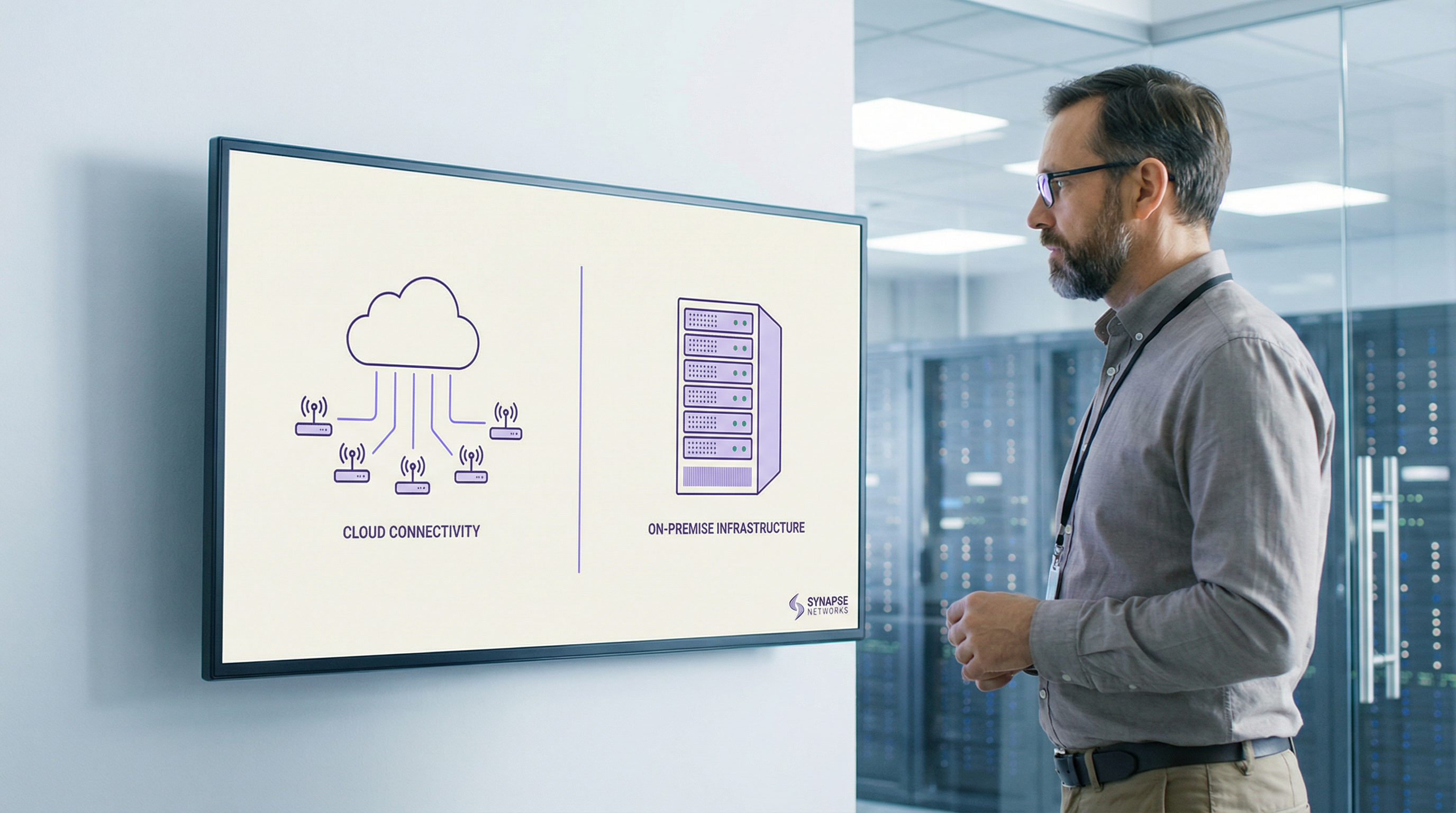
L'autenticazione RADIUS è il cuore di ogni implementazione WiFi aziendale. Sia che si tratti di proteggere l'accesso dei dipendenti tramite IEEE 802.1X o di gestire l'onboarding degli ospiti in un patrimonio di location multi-sito, la decisione su dove ospitare l'infrastruttura RADIUS ha conseguenze dirette su uptime, costi operativi e costo totale di proprietà.
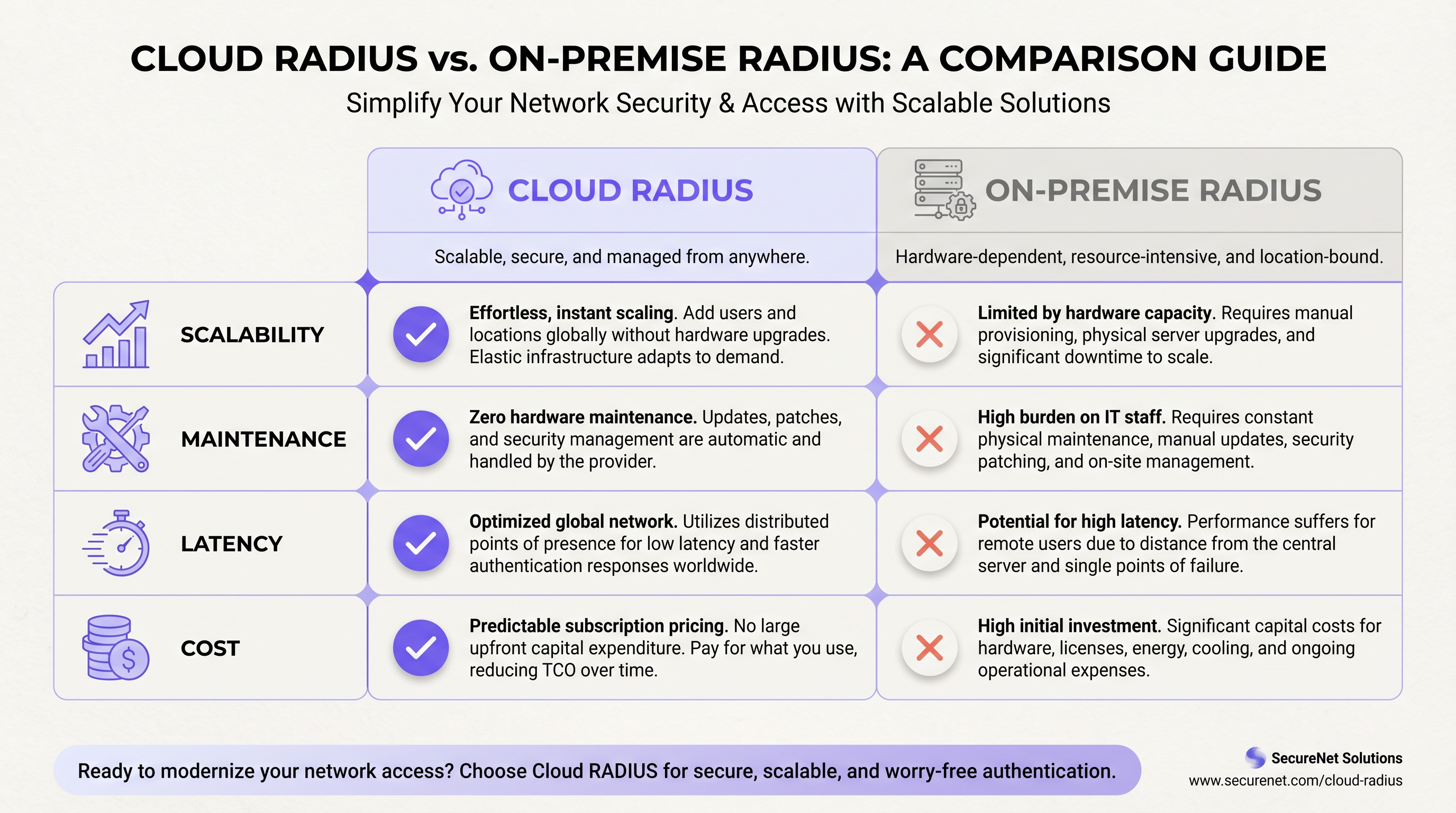
I servizi Cloud RADIUS offrono un'infrastruttura di autenticazione gestita e distribuita a livello globale con alta disponibilità integrata, rotazione automatica dei certificati e scalabilità elastica, eliminando l'onere di manutenzione per singolo sito che affligge le implementazioni on-premise distribuite. Il RADIUS on-premise, basato su FreeRADIUS o Microsoft NPS, offre autenticazione locale inferiore al millisecondo, piena sovranità dei dati e indipendenza dalla connettività WAN: vantaggi che rimangono decisivi in specifici ambienti ad alta densità o regolamentati.
Per la maggior parte degli operatori multi-sito — gruppi alberghieri, catene retail, centri congressi — il Cloud RADIUS offre un risultato operativo superiore con un costo totale di proprietà a cinque anni inferiore. Le eccezioni sono ben definite: ambienti air-gapped, mandati rigorosi sulla residenza dei dati e implementazioni a sito singolo molto grandi dove le prestazioni della LAN locale sono fondamentali. Questa guida fornisce il framework per determinare in quale categoria rientra la vostra implementazione e come agire di conseguenza.
Approfondimento tecnico
Il protocollo RADIUS e il suo ruolo nell'infrastruttura 802.1X
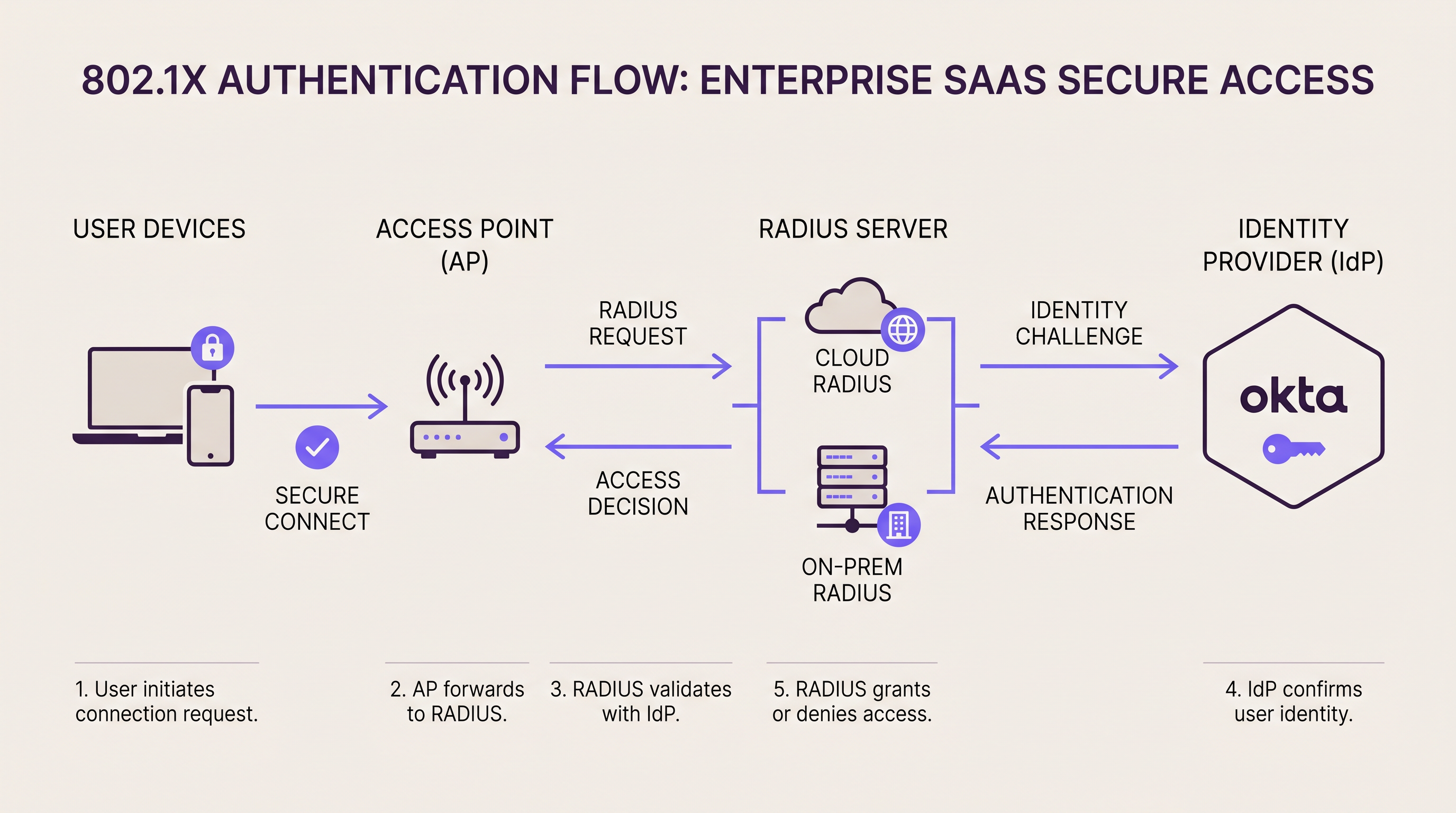
RADIUS (Remote Authentication Dial-In User Service, RFC 2865) opera come broker di autenticazione tra il livello di accesso alla rete e la directory delle identità. In un'implementazione 802.1X , l'access point o lo switch funge da Network Access Server (NAS), inoltrando i frame di autenticazione EAP al server RADIUS tramite UDP (porta 1812 per l'autenticazione, porta 1813 per l'accounting). Il server RADIUS convalida le credenziali del supplicant rispetto a una directory backend — Active Directory, LDAP o un Identity Provider cloud — e restituisce una risposta Access-Accept o Access-Reject, includendo opzionalmente gli attributi di assegnazione VLAN.
Questa architettura è fondamentalmente la stessa, sia che il server RADIUS sia un'appliance montata su rack nella sala server, sia che si tratti di un servizio cloud distribuito globalmente. La differenza risiede nel luogo in cui risiede il server, in chi lo gestisce e in come scala.
RADIUS On-Premise: Architettura e compromessi
Le due piattaforme RADIUS on-premise dominanti sono FreeRADIUS e Microsoft Network Policy Server (NPS). FreeRADIUS è il server RADIUS più diffuso al mondo e supporta un'ampia gamma di metodi EAP, tra cui EAP-TLS, PEAP-MSCHAPv2, EAP-TTLS ed EAP-PWD. Si integra con virtualmente qualsiasi directory backend tramite LDAP, SQL o REST ed è disponibile senza costi di licenza. Tuttavia, richiede un'amministrazione esperta: la configurazione è basata su file, il debug richiede competenze nell'analisi dei log e la scalabilità su decine di siti richiede un'attenta pianificazione della replica e del failover.
Microsoft NPS si integra nativamente con Active Directory ed è la scelta predefinita per gli ambienti incentrati su Windows. Supporta PEAP-MSCHAPv2 ed EAP-TLS in modo nativo e viene gestito tramite la familiare interfaccia di Windows Server. Il compromesso è lo stretto legame con le licenze di Windows Server e un set di metodi EAP più limitato rispetto a FreeRADIUS.
Per implementazioni on-premise ad alta disponibilità, le organizzazioni solitamente distribuiscono cluster RADIUS active-active o active-passive. Gli access point sono configurati con un indirizzo server RADIUS primario e uno secondario; se il primario non risponde entro il timeout configurato (solitamente 3–5 secondi), il NAS passa al secondario. Questa architettura richiede server geograficamente dispersi — il che introduce complessità — o una coppia di server nella stessa struttura, che non protegge da un'interruzione a livello di sito.
Profilo di latenza: il RADIUS on-premise offre round-trip di autenticazione inferiori a 1 millisecondo su una LAN locale. Per gli ambienti ad alta densità che gestiscono migliaia di autenticazioni simultanee — ad esempio, uno stadio da 68.000 posti durante un evento sold-out — questa capacità di elaborazione locale rappresenta un reale vantaggio operativo.
Cloud RADIUS: Architettura e compromessi
Le piattaforme Cloud RADIUS ospitano l'infrastruttura RADIUS in più zone di disponibilità distribuite geograficamente. Quando un access point invia una richiesta di autenticazione, questa viene instradata al nodo edge cloud più vicino, aggiungendo tipicamente 5–50 millisecondi di latenza round-trip a seconda della vicinanza del point-of-presence del provider al sito. Per la stragrande maggioranza dei casi d'uso di autenticazione, questa latenza è impercettibile per gli utenti finali.
Il modello di alta disponibilità è fondamentalmente diverso da quello on-premise. Invece di configurare una coppia primario/secondario, il load balancer della piattaforma cloud instrada automaticamente le richieste lontano dai nodi guasti. I provider di Cloud RADIUS aziendali pubblicano solitamente SLA del 99,99% di uptime, supportati da ridondanza multi-regione. Raggiungere una ridondanza equivalente on-premise richiede la distribuzione di cluster active-active in più data center geograficamente dispersi: un investimento significativo in termini di ingegneria e capitale.
Le piattaforme Cloud RADIUS si integrano nativamente con gli Identity Provider cloud. Se la vostra organizzazione utilizza Okta, Azure Active Directory, o Google Workspace, un servizio Cloud RADIUS si connette tramite SAML, LDAP-over-TLS o connettori API proprietari. Per una guida dettagliata sull'integrazione specifica di Okta, consulta la nostra guida: Okta e RADIUS: Estendere il tuo Identity Provider all'autenticazione WiFi .
La gestione dei certificati è uno degli argomenti operativi più convincenti a favore del Cloud RADIUS. Sia EAP-TLS che PEAP si basano su certificati digitali lato server. Nelle soluzioni on-premise, la scadenza dei certificati è una delle cause principali di interruzioni dell'autenticazione: la scadenza di un certificato su un server FreeRADIUS porta ogni client connesso a rifiutare l'identità del server, causando un'interruzione totale del WiFi fino al rinnovo e alla distribuzione del certificato. I provider Cloud RADIUS automatizzano completamente la rotazione dei certificati, eliminando questa modalità di guasto.
WPA3-Enterprise e considerazioni sui protocolli
La specifica WPA3-Enterprise della WiFi Alliance introduce una modalità di sicurezza a 192 bit che richiede EAP-TLS con crittografia Suite B (ECDHE, ECDSA, AES-256-GCM). Questo è sempre più rilevante per le implementazioni in ambito sanitario, finanziario e governativo. La maggior parte delle moderne piattaforme Cloud RADIUS supporta nativamente WPA3-Enterprise. Le implementazioni on-premise che eseguono versioni precedenti di FreeRADIUS (pre-3.0.x) o configurazioni NPS legacy potrebbero richiedere aggiornamenti prima di poter distribuire WPA3-Enterprise. Se WPA3-Enterprise è nei tuoi piani, verifica il supporto della tua piattaforma RADIUS prima di impegnarti in un percorso infrastrutturale.
Per le organizzazioni che considerano il livello SD-WAN alla base delle implementazioni Cloud RADIUS multi-sede, la nostra guida su I principali vantaggi della SD-WAN per le aziende moderne fornisce un contesto complementare sull'architettura di resilienza WAN.
Guida all'implementazione
Fase 1: Analisi delle dipendenze di autenticazione attuali
Prima di selezionare un modello di distribuzione, documenta ogni SSID, VLAN, metodo EAP e directory backend toccati dalla tua attuale infrastruttura di autenticazione. Includi le policy di MAC Authentication Bypass (MAB) per i dispositivi headless (stampanti, sensori IoT, terminali punto vendita), poiché questi vengono spesso trascurati durante le migrazioni e possono causare incidenti significativi dopo il cutover.
Fase 2: Valutazione della predisposizione dell'Identity Provider
Se la tua directory utenti è Active Directory on-premise e non può essere sincronizzata con un IdP cloud, le tue opzioni Cloud RADIUS sono limitate alle piattaforme che supportano il proxying LDAP verso directory on-premise. Se puoi distribuire Azure AD Connect o uno strumento di sincronizzazione simile, l'intera gamma di piattaforme Cloud RADIUS diventa disponibile. Questa singola decisione — IdP cloud rispetto a directory on-premise — è spesso il fattore determinante nella scelta tra RADIUS cloud o on-premise.
Fase 3: Valutazione della resilienza WAN in ogni sede
Il Cloud RADIUS è affidabile tanto quanto la connessione Internet di ogni sede. Prima di migrare, analizza la connettività WAN in ogni posizione. Le sedi con una singola connessione ISP e senza failover rappresentano un rischio significativo. Implementa una doppia connettività ISP o un failover SD-WAN prima di distribuire il Cloud RADIUS come infrastruttura di autenticazione primaria. Per gli ambienti retail in cui i sistemi punto vendita dipendono dall'autenticazione di rete, la resilienza WAN non è negoziabile.
Fase 4: Pianificazione della migrazione dei certificati (implementazioni on-premise)
In caso di implementazione o manutenzione di un RADIUS on-premise con EAP-TLS, stabilisci un processo di gestione del ciclo di vita dei certificati. Implementa avvisi di monitoraggio a 90, 60 e 30 giorni prima della scadenza del certificato. Considera l'implementazione di una PKI interna (come Microsoft ADCS o HashiCorp Vault) per automatizzare l'emissione e il rinnovo dei certificati. Non affidarti mai solo ai promemoria del calendario per la gestione dei certificati in ambienti di produzione.
Fase 5: Configurazione delle policy di sopravvivenza
Per le implementazioni Cloud RADIUS, configura una policy di sopravvivenza locale (local survivability) sui tuoi controller wireless o access point. Le opzioni includono: il caching dell'ultimo stato di autenticazione noto per un periodo configurabile, il passaggio al MAC Authentication Bypass per elenchi di dispositivi pre-approvati o l'instradamento degli SSID del personale critico attraverso un percorso di autenticazione secondario. Per gli operatori del settore hospitality , assicurati che l'onboarding del WiFi per gli ospiti tramite piattaforme come Guest WiFi di Purple abbia un comportamento di fallback definito in caso di indisponibilità del RADIUS.
Fase 6: Esecuzione di un'implementazione parallela
Distribuisci la nuova piattaforma RADIUS in parallelo all'infrastruttura esistente. Crea un SSID di test dedicato mappato al nuovo server RADIUS e convalida tutti i metodi EAP, le assegnazioni VLAN e l'applicazione delle policy prima di migrare gli SSID di produzione. Questo periodo di esecuzione parallela dovrebbe durare almeno due settimane per un'implementazione in una singola sede e da quattro a sei settimane per una migrazione multi-sede.
Fase 7: Esecuzione di una migrazione graduale sede per sede
Per le implementazioni multi-sede, migra le sedi in sequenza anziché simultaneamente. Inizia con le sedi a minor rischio — sedi più piccole con meno traffico e utenti più tolleranti — prima di migrare le sedi ad alta priorità come i flagship store o le proprietà alberghiere con molti congressi. Documenta la procedura di rollback per ogni sede prima di iniziare il cutover.
Best Practice
Igiene dei segreti condivisi: i segreti condivisi RADIUS tra gli access point e il server RADIUS devono avere una lunghezza minima di 32 caratteri, essere generati casualmente e univoci per ogni dispositivo NAS. Il riutilizzo dei segreti condivisi su tutti gli access point significa che la compromissione di un singolo dispositivo espone l'intera infrastruttura di autenticazione. Ruota i segreti condivisi annualmente o a seguito di qualsiasi sospetta compromissione.
Segmentazione VLAN: utilizza le VLAN assegnate via RADIUS (tramite gli attributi Tunnel-Type, Tunnel-Medium-Type e Tunnel-Private-Group-ID) per segmentare dinamicamente il traffico in base al ruolo dell'utente. I dispositivi degli ospiti dovrebbero atterrare su una VLAN isolata con solo accesso a Internet; i dispositivi aziendali dispositivi sulla VLAN di produzione; dispositivi IoT su una VLAN dedicata e limitata. Questa segmentazione è un requisito PCI DSS per qualsiasi rete che gestisca dati dei titolari di carta.
Accounting e audit logging: Abilita il RADIUS accounting (porta 1813) e conserva i log di accounting per un minimo di 12 mesi. Questi log registrano gli orari di inizio/fine sessione, i volumi di dati e gli indirizzi IP assegnati — essenziali per l'investigazione degli incidenti di sicurezza e la conformità al GDPR. Le piattaforme Cloud RADIUS solitamente esportano i dati di accounting verso sistemi SIEM tramite syslog o API; le implementazioni on-premise dovrebbero instradare i dati di accounting verso una piattaforma di gestione log centralizzata.
Selezione del metodo EAP: Per le reti aziendali dei dipendenti, EAP-TLS (basato su certificato) offre il livello di sicurezza più elevato ed è raccomandato per gli ambienti PCI DSS e sanitari. PEAP-MSCHAPv2 è accettabile per ambienti a basso rischio, ma è vulnerabile agli attacchi di credential harvesting se il certificato del server non viene validato correttamente dai supplicant. Evita completamente EAP-MD5 — è deprecato e non fornisce autenticazione reciproca.
RadSec (RADIUS over TLS): Il protocollo RADIUS tradizionale trasmette i dati su UDP con il solo attributo User-Password crittografato. RadSec (RFC 6614) incapsula RADIUS in TLS, fornendo crittografia completa del trasporto e autenticazione reciproca tra NAS e server RADIUS. La maggior parte delle moderne piattaforme Cloud RADIUS supporta RadSec. Per le nuove implementazioni, RadSec dovrebbe essere la scelta di trasporto predefinita.
Per le implementazioni nei settori sanitario e dei trasporti , dove gli obblighi di gestione dei dati ai sensi del GDPR e delle normative specifiche di settore sono particolarmente rigorosi, assicurati che la tua piattaforma RADIUS fornisca un Data Processing Agreement e supporti la residenza dei dati regionale.
Risoluzione dei problemi e mitigazione dei rischi
Modalità di guasto comune 1: Scadenza del certificato (On-Premise)
Sintomo: Tutti i client falliscono improvvisamente l'autenticazione; i log RADIUS mostrano errori di handshake TLS.
Causa principale: Il certificato lato server sul server RADIUS è scaduto. I supplicant dei client rifiutano l'identità del server.
Mitigazione: Implementa il monitoraggio automatizzato dei certificati con avvisi a 90/60/30 giorni. Utilizza una CA interna con rinnovo automatico. Cloud RADIUS elimina completamente questa modalità di guasto attraverso la rotazione automatica dei certificati.
Modalità di guasto comune 2: Interruzione WAN che blocca il Cloud RADIUS
Sintomo: L'autenticazione fallisce in un sito specifico; gli altri siti non sono interessati. La rete locale è operativa.
Causa principale: La connessione Internet del sito è interrotta, impedendo agli access point di raggiungere il servizio Cloud RADIUS.
Mitigazione: Implementa una connettività dual-ISP o SD-WAN con failover automatico. Configura policy di sopravvivenza degli access point per memorizzare nella cache le credenziali o passare a MAB per i dispositivi critici.
Modalità di guasto comune 3: Mancata corrispondenza del segreto condiviso
Sintomo: Le richieste di autenticazione vengono eliminate silenziosamente; i log RADIUS mostrano errori di "invalid authenticator" o "message authenticator".
Causa principale: Il segreto condiviso configurato sull'access point non corrisponde al segreto configurato sul server RADIUS.
Mitigazione: Utilizza un sistema di gestione dei segreti centralizzato (HashiCorp Vault, AWS Secrets Manager) per garantire la coerenza. Convalida i segreti condivisi dopo ogni modifica alla configurazione del NAS o del server RADIUS.
Modalità di guasto comune 4: Errata configurazione del supplicant
Sintomo: Singoli dispositivi non riescono ad autenticarsi mentre altri sullo stesso SSID ci riescono.
Causa principale: Il supplicant 802.1X sul dispositivo che presenta il guasto non è configurato per considerare attendibile il certificato del server RADIUS, oppure è configurato per un metodo EAP incompatibile.
Mitigazione: Distribuisci la configurazione del supplicant tramite MDM o Group Policy per garantire la coerenza. Per gli ambienti BYOD, fornisci una guida di onboarding chiara. La piattaforma WiFi Analytics di Purple può aiutare a identificare i pattern di errore di autenticazione in tutto il parco dispositivi.
Modalità di guasto comune 5: Timeout RADIUS sotto carico
Sintomo: Ritardi o fallimenti dell'autenticazione durante i periodi di picco (inizio evento, cambio turno).
Causa principale: Il server RADIUS è sovraccarico di richieste di autenticazione simultanee; il timeout del NAS viene superato prima che venga ricevuta una risposta.
Mitigazione: On-premise: scala la capacità del server RADIUS prima di eventi di picco noti; implementa la limitazione della frequenza di connessione sugli access point. Cloud RADIUS: verifica che il tuo piano di abbonamento supporti il throughput di autenticazione di picco; la maggior parte delle piattaforme cloud aziendali scala automaticamente.
ROI e impatto aziendale
Costo totale di proprietà: confronto su cinque anni
La seguente analisi si basa su una catena retail rappresentativa di 20 siti con circa 50 access point per sito e 200 dispositivi autenticati simultaneamente per sito al picco.
| Componente di costo | RADIUS On-Premise (20 siti) | Cloud RADIUS (20 siti) |
|---|---|---|
| Hardware (server, coppie HA) | £80.000–£120.000 | £0 |
| Licenze SO e software | £10.000–£30.000 | £0 |
| Abbonamento annuale | £0 | £18.000–£40.000/anno |
| Energia e raffreddamento (5 anni) | £15.000–£25.000 | £0 |
| Tempo di ingegneria (5 anni) | £60.000–£100.000 | £10.000–£20.000 |
| Totale 5 anni | £165.000–£275.000 | £100.000–£220.000 |
Il differenziale del tempo di ingegneria è il fattore più significativo. Il RADIUS on-premise in 20 siti richiede patching continuo, gestione dei certificati, monitoraggio e risposta agli incidenti. Il Cloud RADIUS riduce tutto questo alla gestione delle policy e alla manutenzione dell'integrazione — una frazione dello sforzo.
Misurare il successo
Gli indicatori chiave di prestazione per la tua implementazione RADIUS dovrebbero includere: tasso di successo dell'autenticazione (target: >99,5% per gli ambienti di produzione), latenza media di autenticazione (target: <100ms per il cloud, <5ms per la LAN on-premise), tempo medio di ripristino dalle interruzioni dell'autenticazione (target: <15 minuti) e incidenti di scadenza dei certificati (target: zero, raggiungibile con una corretta automazione).
Per gli operatori del settore hospitality che utilizzano il [Guest WiFi](/products di Purple/guest-wifi), l'affidabilità dell'infrastruttura di autenticazione influisce direttamente sui punteggi di soddisfazione degli ospiti. Un ritardo di autenticazione di 2 secondi durante i periodi di picco del check-in è misurabile nei feedback degli ospiti. Cloud RADIUS con policy di sopravvivenza correttamente configurate supera costantemente le implementazioni on-premise ad hoc su questo parametro.
Le organizzazioni che sono passate da implementazioni FreeRADIUS on-premise distribuite a Cloud RADIUS segnalano costantemente una riduzione del 30–50% degli incidenti IT legati all'autenticazione e una significativa riduzione delle ore di ingegneria dedicate alla manutenzione RADIUS — ore che vengono riallocate a progetti strategici di miglioramento della rete. La piattaforma di Purple, che si integra con entrambi i modelli di implementazione, fornisce i dati di WiFi Analytics e Sensors per quantificare questi miglioramenti rispetto alle metriche di base acquisite prima della migrazione.
Per i gestori di sedi che considerano il più ampio contesto di modernizzazione della rete, le funzionalità di Wayfinding di Purple e l'integrazione dei dati di autenticazione con l'analisi delle presenze rappresentano l'ulteriore livello di valore abilitato da un'infrastruttura RADIUS ben architettata. Gli eventi di autenticazione sono, nella loro essenza, dati di presenza — e quando vengono visualizzati attraverso il livello di analisi di Purple, diventano uno strumento potente per comprendere il comportamento dei visitatori, il tempo di permanenza e i tassi di ritorno in tutte le tue sedi.
Termini chiave e definizioni
RADIUS (Remote Authentication Dial-In User Service)
A networking protocol (RFC 2865) that provides centralised authentication, authorisation, and accounting (AAA) for users connecting to a network. RADIUS operates over UDP and acts as the broker between network access equipment (access points, switches) and the identity directory (Active Directory, LDAP, cloud IdP).
IT teams encounter RADIUS whenever deploying 802.1X authentication for WiFi or wired networks. It is the foundational protocol for enterprise network access control and is required for WPA2-Enterprise and WPA3-Enterprise deployments.
802.1X
An IEEE standard for port-based network access control that defines the framework for EAP-based authentication. In a WiFi context, 802.1X requires three components: the supplicant (client device), the authenticator (access point), and the authentication server (RADIUS). The access point blocks all traffic from the client until RADIUS returns an Access-Accept.
802.1X is the authentication mechanism for WPA2-Enterprise and WPA3-Enterprise networks. IT teams use it to ensure that only authorised devices and users can connect to the corporate WiFi, with dynamic VLAN assignment based on user identity.
EAP (Extensible Authentication Protocol)
A flexible authentication framework used within 802.1X that supports multiple authentication methods. Common EAP methods include EAP-TLS (certificate-based, strongest security), PEAP-MSCHAPv2 (password-based with server certificate validation), and EAP-TTLS (tunnelled password authentication).
The choice of EAP method directly impacts security posture and deployment complexity. EAP-TLS requires client certificates on every device, making it more complex to deploy but significantly more resistant to credential theft attacks. IT teams in regulated industries (healthcare, finance) should default to EAP-TLS.
FreeRADIUS
The world's most widely deployed open-source RADIUS server, powering authentication for hundreds of millions of users globally. FreeRADIUS supports an extensive range of EAP methods and backend integrations, is available at no licensing cost, and runs on Linux. It requires skilled administration and file-based configuration.
FreeRADIUS is the default choice for on-premise RADIUS deployments in non-Microsoft environments. IT teams evaluating the cloud versus on-premise decision should assess whether they have the in-house expertise to operate FreeRADIUS effectively, as misconfiguration is a leading cause of authentication incidents.
NPS (Network Policy Server)
Microsoft's built-in RADIUS server, included with Windows Server. NPS integrates natively with Active Directory and supports PEAP-MSCHAPv2 and EAP-TLS. It is managed through the Windows Server GUI and is the default RADIUS choice for Microsoft-centric environments.
IT teams running Windows Server infrastructure typically deploy NPS as their on-premise RADIUS server. NPS is tightly coupled to Windows Server licensing and Active Directory, which simplifies deployment in Microsoft environments but limits flexibility in heterogeneous or cloud-native environments.
MAC Authentication Bypass (MAB)
An authentication method that uses a device's MAC address as its credential, allowing headless devices (printers, IoT sensors, point-of-sale terminals) that cannot run an 802.1X supplicant to authenticate to the network. The MAC address is checked against an allow-list on the RADIUS server.
MAB is essential for any network with IoT devices or legacy equipment. IT teams must maintain accurate MAC address inventories and implement processes for adding new devices. Cloud RADIUS platforms typically provide a centralised dashboard for MAB list management across all sites, which is significantly more efficient than per-site configuration file management on FreeRADIUS.
RadSec (RADIUS over TLS)
An extension of the RADIUS protocol (RFC 6614) that transports RADIUS packets over TLS rather than UDP. RadSec provides full transport encryption and mutual authentication between the NAS and RADIUS server, addressing several well-documented security vulnerabilities in the traditional UDP-based RADIUS protocol.
Traditional RADIUS encrypts only the User-Password attribute; all other attributes, including usernames and session data, are transmitted in plaintext. RadSec is the modern, secure transport mechanism for RADIUS and is supported by most enterprise Cloud RADIUS platforms and modern access point vendors. IT teams deploying new RADIUS infrastructure should evaluate RadSec as the default transport.
VLAN Assignment (RADIUS-assigned VLAN)
A RADIUS capability that dynamically assigns a connecting device to a specific VLAN based on authentication outcome. The RADIUS server returns Tunnel-Type (13=VLAN), Tunnel-Medium-Type (6=802), and Tunnel-Private-Group-ID (VLAN ID) attributes in the Access-Accept response, and the access point places the device in the specified VLAN.
Dynamic VLAN assignment is the mechanism by which IT teams implement network segmentation based on user identity. A single SSID can serve multiple user types — guests, employees, contractors, IoT devices — with each type automatically placed in the appropriate VLAN based on their RADIUS authentication result. This is a PCI DSS requirement for networks that handle cardholder data.
High Availability (HA) RADIUS
A RADIUS deployment architecture that ensures authentication services remain available despite individual server failures. Common HA patterns include active-active clustering (both servers handle traffic simultaneously, with load balancing), active-passive failover (secondary server takes over when primary fails), and geographically distributed redundancy (servers in separate physical locations).
HA is a critical design consideration for any production RADIUS deployment. IT teams must define their Recovery Time Objective (RTO) — how quickly authentication must be restored after a failure — and design their HA architecture accordingly. Cloud RADIUS providers deliver HA as a built-in service; on-premise HA requires explicit architectural design and ongoing maintenance.
Casi di studio
A European hotel group operates 45 properties across six countries. Each property has 150–400 guest rooms plus conference facilities. The central IT team consists of three network engineers. They currently run FreeRADIUS on virtual machines at each property — 45 separate instances. A certificate expiry at one property caused a complete guest WiFi outage during a major conference. The CTO wants to eliminate this class of incident and reduce maintenance overhead. What is the recommended architecture?
Recommended Architecture: Cloud RADIUS with Purple Guest WiFi Integration
Select a Cloud RADIUS provider with European data residency (to satisfy GDPR obligations) and native integration with your existing IdP. If the hotel group uses Azure AD for staff identity, select a platform with Azure AD LDAP connector support.
Migrate guest WiFi SSIDs first. Guest authentication is the highest-volume, lowest-risk migration target. Configure Purple's captive portal to handle guest onboarding (data capture, consent, branded splash page) and pass authenticated sessions to the Cloud RADIUS backend. This immediately eliminates per-property FreeRADIUS maintenance for the guest network.
Migrate staff SSIDs property by property, beginning with smaller properties. For each property, run a two-week parallel deployment with a test SSID before cutting over production traffic.
Configure WAN survivability at each property. Implement SD-WAN or dual-ISP connectivity. Configure the wireless controller to cache staff credentials locally for up to 8 hours, ensuring hotel operations staff can authenticate even during brief internet outages.
Decommission FreeRADIUS VMs at each property post-migration. Retain VM snapshots for 30 days as a rollback safety net.
Centralise policy management through the Cloud RADIUS dashboard. Define VLAN assignment policies once and apply them across all 45 properties — a task that previously required per-property configuration file edits.
Expected outcomes: Elimination of certificate expiry incidents (automated rotation), reduction of RADIUS-related engineering time by approximately 40%, and improved authentication latency at properties in countries where the cloud provider has local edge nodes.
A national sports stadium with 68,000 seats hosts 30 major events per year. Peak concurrent WiFi users exceed 25,000 during sold-out matches. The stadium has a dedicated 10Gbps internet connection, but the IT security team has a hard requirement: all authentication logs must remain on UK soil and must not traverse the public internet. The stadium also operates a PCI DSS-compliant point-of-sale network for concessions. What RADIUS architecture is appropriate?
Recommended Architecture: On-Premise RADIUS with Active-Active Cluster and Co-Location DR
Deploy a primary active-active RADIUS cluster within the stadium's on-site data room. Use two physical servers running FreeRADIUS in active-active configuration, load-balanced via the wireless controller's RADIUS server list. Each server should be capable of handling the full authentication load independently — size for 3,000+ authentications per minute at peak event ingress.
Deploy a secondary cluster at a UK co-location facility within 30 miles of the stadium, connected via a dedicated private WAN link (not the public internet). This provides site-level disaster recovery without violating the data sovereignty requirement.
Segment the PCI DSS environment with a dedicated RADIUS policy for the point-of-sale SSID. Assign POS devices to a dedicated VLAN via RADIUS attributes. Ensure RADIUS accounting logs for POS authentication are retained for 12 months minimum, stored on-premise in compliance with PCI DSS Requirement 10.
Implement EAP-TLS for all staff and POS device authentication. Deploy an internal Certificate Authority (Microsoft ADCS or equivalent) to issue and manage client certificates. Configure automated certificate renewal with 90-day advance alerts.
Deploy RadSec (RADIUS over TLS) between access points and the on-premise RADIUS cluster to encrypt authentication traffic on the internal network — particularly important given the high-density public environment.
Pre-provision capacity before major events. Work with the stadium's event operations team to receive confirmed attendance figures 72 hours in advance, and validate RADIUS server capacity against expected peak authentication rates.
Expected outcomes: Sub-millisecond authentication latency during peak event ingress, full data sovereignty compliance, PCI DSS-compliant authentication logging, and 99.99%+ availability via the active-active cluster architecture.
Analisi degli scenari
Q1. A national pharmacy chain operates 320 stores across the UK. Each store has a single internet connection from a major ISP with no failover. The chain uses Microsoft 365 and Azure Active Directory for all staff identity. The IT team of 8 engineers currently manages FreeRADIUS instances on a virtual machine at each store. The CISO has flagged that 23% of stores have RADIUS certificates that will expire within 90 days. The CTO wants to resolve this and reduce ongoing maintenance overhead. What RADIUS architecture do you recommend, and what is the single most critical infrastructure change required before migration?
💡 Suggerimento:Consider the WAN resilience requirement carefully — what happens to in-store operations if the internet connection fails after Cloud RADIUS is deployed?
Mostra l'approccio consigliato
Recommended architecture: Cloud RADIUS integrated with Azure Active Directory, replacing the 320 FreeRADIUS instances. The Azure AD integration is straightforward given the existing Microsoft 365 deployment, and Cloud RADIUS eliminates the certificate management crisis immediately through automated rotation.
Critical infrastructure change before migration: WAN resilience. Each store currently has a single ISP connection with no failover. Cloud RADIUS is entirely dependent on internet connectivity. Before migrating any store, implement SD-WAN with dual-ISP failover, or at minimum configure the wireless controller to cache staff credentials locally for 8–12 hours. Without this, a store that loses internet connectivity cannot authenticate staff to the corporate network — potentially blocking access to point-of-sale systems, inventory management, and other network-dependent operations.
Migration sequence: (1) Deploy SD-WAN or credential caching at all 320 stores. (2) Migrate the 23% of stores with imminent certificate expiry first — this addresses the immediate risk. (3) Migrate remaining stores in batches of 20–30 per week. (4) Decommission FreeRADIUS VMs post-migration. Expected outcome: zero certificate expiry incidents, 60–70% reduction in RADIUS-related engineering time, centralised policy management across all 320 stores.
Q2. A conference centre operator runs a single flagship venue with a capacity of 5,000 delegates. The venue hosts 200 events per year, ranging from small board meetings to large international conferences. Peak concurrent WiFi users reach 4,500 during major events. The venue has a 1Gbps dedicated internet connection with 99.9% SLA. The IT team consists of two network engineers. There are no specific data sovereignty requirements. The current on-premise FreeRADIUS server is approaching end-of-life. Should they replace it with a new on-premise deployment or migrate to Cloud RADIUS?
💡 Suggerimento:Consider both the peak load profile and the team size. Is 4,500 concurrent users at a single site a strong argument for on-premise, or does the team size and management overhead tip the balance?
Mostra l'approccio consigliato
Recommended architecture: Cloud RADIUS. Despite the single-site, high-density profile, the combination of a small IT team (2 engineers), no data sovereignty requirements, and a reliable dedicated internet connection makes Cloud RADIUS the stronger choice.
Reasoning: The peak load of 4,500 concurrent users is well within the throughput capacity of enterprise Cloud RADIUS platforms, which are designed for far higher volumes. The 5–20ms additional latency from cloud routing is imperceptible in a conference environment. The 1Gbps dedicated internet connection with a 99.9% SLA provides sufficient WAN reliability for Cloud RADIUS dependence.
The decisive factor is team size. Two engineers managing an on-premise FreeRADIUS replacement — including hardware procurement, OS hardening, certificate management, EAP configuration, and ongoing maintenance — represents a significant ongoing overhead for a small team. Cloud RADIUS reduces this to policy management, freeing both engineers for the venue's broader network infrastructure needs.
Implementation note: Configure credential caching on the wireless controller for the venue operations staff SSID, providing survivability during any brief internet disruption. Ensure the Cloud RADIUS provider has a UK or European edge node to minimise authentication latency for the high-density event scenario.
Q3. A regional NHS trust operates 12 hospital sites across a county. Authentication requirements include: (1) staff access to the clinical network via 802.1X with EAP-TLS, (2) guest/patient WiFi via captive portal, and (3) medical device authentication via MAC Authentication Bypass. The trust's information governance team has mandated that all patient-related data, including authentication logs, must remain within NHS-approved data centres in England. The trust uses on-premise Active Directory with no current plans to migrate to Azure AD. What architecture do you recommend?
💡 Suggerimento:This scenario has multiple hard constraints. Identify each one and determine whether it eliminates cloud RADIUS entirely or only partially.
Mostra l'approccio consigliato
Recommended architecture: Hybrid — On-Premise RADIUS for clinical staff and medical device authentication; Cloud RADIUS (NHS-compliant) or on-premise for guest/patient WiFi.
Analysis of constraints:
- Data sovereignty (NHS-approved English data centres): This eliminates most commercial Cloud RADIUS providers unless they offer NHS-compliant data residency. Some providers offer NHS-specific deployments; these should be evaluated. If no compliant cloud option exists, on-premise is required for all authentication.
- On-premise Active Directory with no cloud sync: This is a hard constraint for Cloud RADIUS integration. Without Azure AD Connect or equivalent, Cloud RADIUS cannot query the trust's staff directory. On-premise RADIUS is required for staff authentication.
- EAP-TLS for clinical staff: Supported by both on-premise FreeRADIUS and NPS. Requires an internal PKI (Microsoft ADCS recommended for an AD-integrated environment).
Recommended deployment: Deploy on-premise RADIUS (NPS or FreeRADIUS) at each of the 12 hospital sites in active-passive pairs, integrated with the trust's on-premise Active Directory. Use RADIUS-assigned VLANs to segment clinical, administrative, and medical device traffic. For guest/patient WiFi, deploy Purple's captive portal for GDPR-compliant data capture and consent management — this does not require RADIUS for guest authentication and sidesteps the data sovereignty constraint for the guest network entirely. Medical device MAB policies are managed on the on-premise RADIUS server with MAC address lists maintained centrally via a configuration management tool.
Key risk to mitigate: Certificate management for EAP-TLS across 12 sites. Deploy Microsoft ADCS with automated certificate enrolment via Group Policy to ensure all clinical devices receive and renew certificates automatically.
Punti chiave
- ✓Cloud RADIUS delivers built-in high availability, automatic certificate rotation, and elastic scalability — making it operationally superior for multi-site deployments with distributed footprints and small central IT teams.
- ✓On-premise RADIUS remains the correct choice for air-gapped environments, deployments with hard data sovereignty requirements that no cloud provider can satisfy, and very large single-site venues where sub-millisecond local LAN authentication is operationally critical.
- ✓The 10-Site Rule: organisations with more than 10 sites and fewer than 5 network engineers almost always achieve a positive ROI from Cloud RADIUS within 18 months, driven primarily by the elimination of per-site maintenance overhead.
- ✓WAN resilience is the non-negotiable prerequisite for Cloud RADIUS deployment. Implement dual-ISP connectivity or SD-WAN failover, and configure credential caching on wireless controllers before migrating any production authentication traffic to the cloud.
- ✓Certificate expiry is the leading cause of on-premise RADIUS outages and is entirely preventable — either through Cloud RADIUS (automated rotation) or through a properly implemented certificate lifecycle management process with proactive monitoring at 90/60/30-day intervals.
- ✓The hybrid model — Cloud RADIUS for guest and IoT networks, on-premise RADIUS for corporate employee networks — is a common and pragmatic architecture that applies the right tool to each use case without forcing a binary choice.
- ✓Purple's platform integrates with both cloud and on-premise RADIUS backends, and authentication event data surfaced through Purple's analytics layer transforms RADIUS accounting records into actionable footfall intelligence for venue operators.




