

Autenticación WiFi de Google Workspace: Integración de Chromebook y LDAP
Una referencia técnica definitiva para administradores de TI que implementan WiFi seguro en entornos de Google Workspace. Esta guía cubre el despliegue de certificados 802.1X en Chromebooks gestionados a través de Google Admin Console, la integración de Google Secure LDAP como backend de RADIUS y decisiones de arquitectura para sectores de educación, medios y empresas. Proporciona pasos de implementación prácticos, casos de estudio reales y una comparación directa de métodos EAP para ayudar a los equipos a migrar de PSK compartidas vulnerables a un control de acceso a la red robusto basado en la identidad.
🎧 Escucha esta guía
Ver transcripción
Resumen Ejecutivo
Para recintos empresariales, instituciones educativas y proveedores de hospitalidad estandarizados en Google Workspace, la implementación de una autenticación WiFi segura y fluida ha representado históricamente un desafío en comparación con los entornos de Microsoft Active Directory. Esta guía detalla la arquitectura y el despliegue de la autenticación WiFi de Google Workspace, enfocándose específicamente en el despliegue de certificados 802.1X para Chromebook y la integración de Google Secure LDAP para backends de RADIUS.
Los gerentes de TI y arquitectos de red deben equilibrar la seguridad (WPA3-Enterprise, IEEE 802.1X) con la fricción del usuario. Mientras que las claves precompartidas (PSK) se ven comprometidas fácilmente y son difíciles de rotar, la autenticación basada en certificados (EAP-TLS) o la autenticación basada en credenciales (PEAP-MSCHAPv2) vinculada directamente a la identidad de Google Workspace de un usuario proporciona un control de acceso robusto, aplicación de políticas granulares y roaming fluido a través de Guest WiFi y redes corporativas.
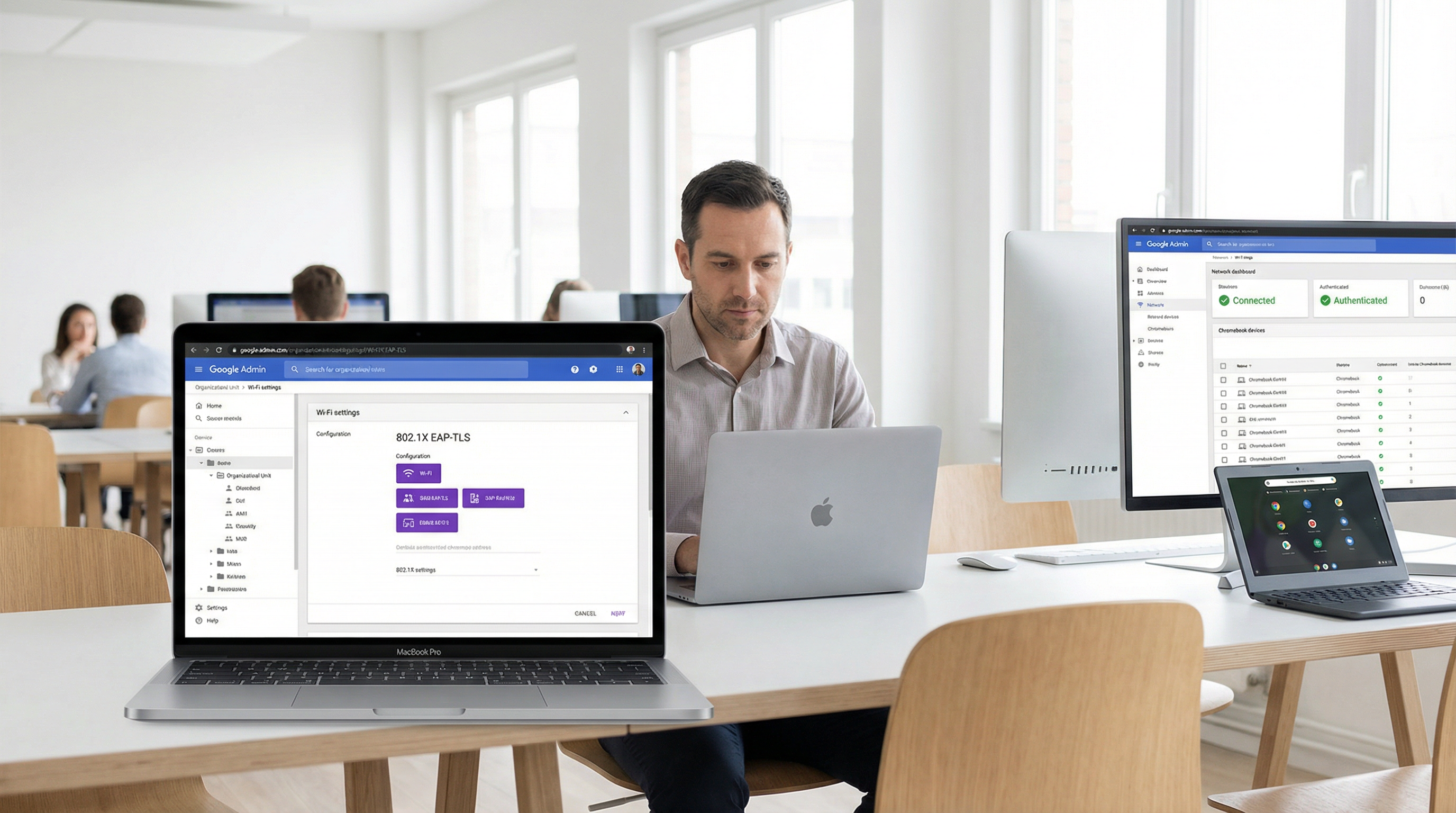
Esta referencia técnica describe los pasos exactos para configurar Google Admin Console para la distribución automatizada de certificados, desplegar Google Secure LDAP e integrar estas fuentes de identidad con servidores RADIUS empresariales. Al seguir estas mejores prácticas neutrales respecto al proveedor, las organizaciones pueden mitigar el robo de credenciales, reducir los tickets de soporte técnico y garantizar el cumplimiento con GDPR y PCI DSS.
Inmersión Técnica Profunda
La arquitectura de la autenticación WiFi de Google Workspace
Autenticar clientes inalámbricos contra Google Workspace requiere cerrar la brecha entre la identidad nativa de la nube (SAML/OAuth) y los protocolos de red heredados (RADIUS/802.1X). A diferencia de Active Directory, que utiliza LDAP de forma nativa y se integra perfectamente con Network Policy Server (NPS), Google Workspace requiere una capa intermediaria deliberada.
Existen dos arquitecturas principales para lograr esto:
Arquitectura 1 — Google Secure LDAP (Cloud Identity Premium / Google Workspace Enterprise): Google proporciona una interfaz LDAP gestionada para su directorio en la nube. Su servidor RADIUS (por ejemplo, FreeRADIUS, Cisco ISE, Aruba ClearPass) se conecta de forma segura a ldap.google.com utilizando certificados de cliente. Cuando un usuario intenta conectarse al WiFi, el servidor RADIUS valida sus credenciales contra el servicio LDAP de Google.
Arquitectura 2 — Captive Portals basados en SAML / RadSec: Para escenarios de BYOD (Trae tu propio dispositivo) o invitados, los usuarios se conectan a una red abierta o PSK, que los redirige a un Captive Portal. El portal autentica al usuario a través de Google SSO (SAML/OAuth). Una vez autenticado, el sistema puede proporcionar dinámicamente una credencial única (por ejemplo, una PSK dinámica o un certificado temporal) para conexiones posteriores.
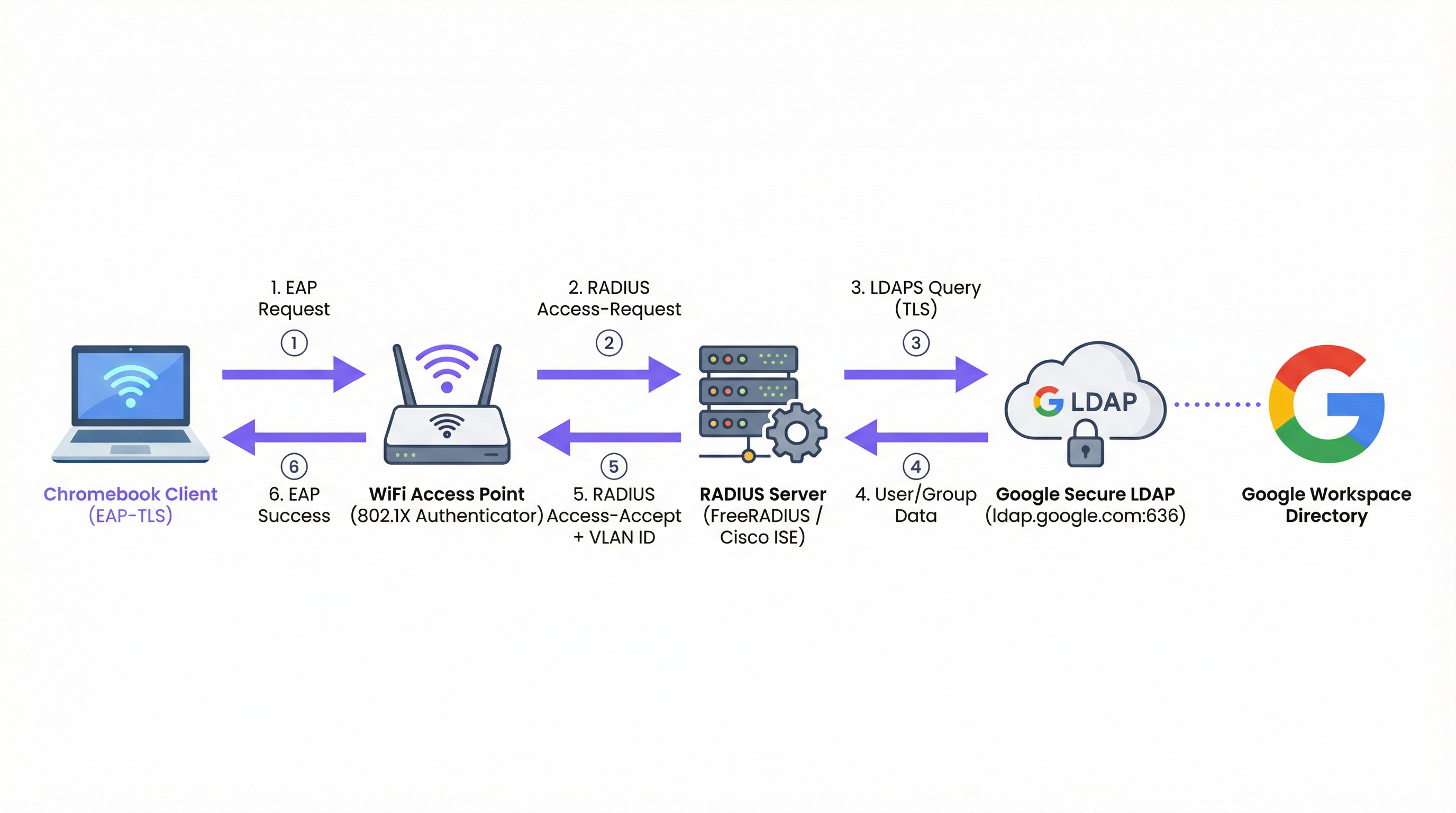
Figura 1: El flujo de autenticación 802.1X para entornos de Google Workspace, que muestra el servidor RADIUS como intermediario entre el punto de acceso y Google Secure LDAP.
Tipos de EAP y soporte para Chromebook
Los Chromebooks admiten de forma nativa varios tipos de Protocolo de Autenticación Extensible (EAP) para 802.1X. La elección del tipo de EAP dicta la postura de seguridad y la complejidad del despliegue. Para una visión general completa de los fundamentos de 802.1X, consulte Autenticación 802.1X: Asegurando el acceso a la red en dispositivos modernos .
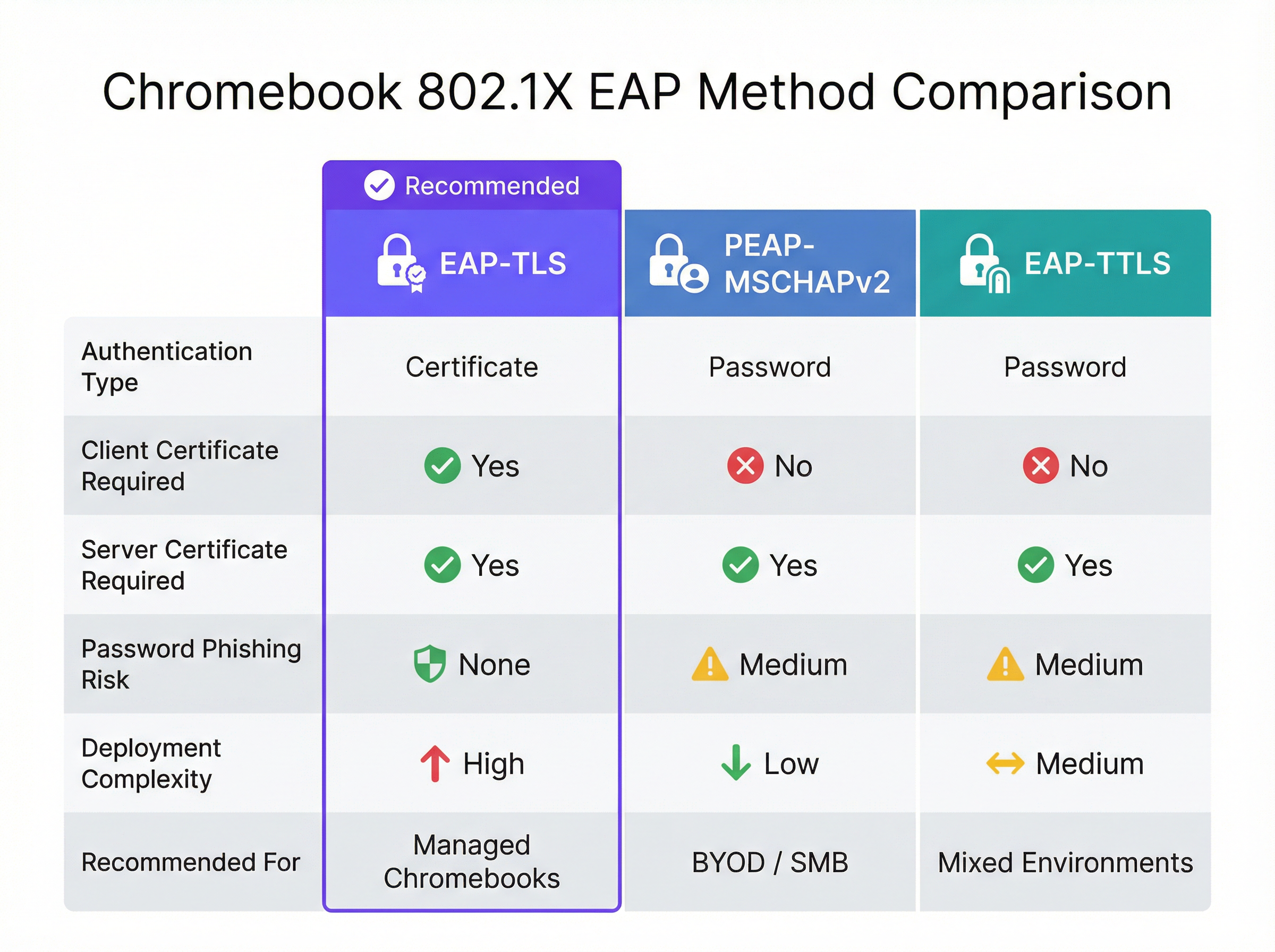
Figura 2: Una comparación directa de los métodos EAP compatibles con Chromebooks, destacando las compensaciones entre seguridad y complejidad.
| Método EAP | Tipo de autenticación | Certificado de cliente requerido | Riesgo de phishing | Recomendado para |
|---|---|---|---|---|
| EAP-TLS | Certificado | Sí | Ninguno | Chromebooks gestionados |
| PEAP-MSCHAPv2 | Contraseña | No | Medio | Despliegues BYOD / PyME |
| EAP-TTLS | Contraseña | No | Medio | Entornos mixtos |
EAP-TLS (Transport Layer Security): El estándar de oro para WiFi empresarial. Requiere tanto un certificado de servidor (en el servidor RADIUS) como un certificado de cliente (en el Chromebook). Esto elimina la necesidad de contraseñas, mitigando los riesgos de phishing. Google Admin Console puede enviar automáticamente certificados de cliente a Chromebooks gestionados a través de Google Cloud Certificate Connector o integraciones SCEP/EST de terceros.
PEAP-MSCHAPv2 / EAP-TTLS: Estos protocolos utilizan un certificado de servidor para establecer un túnel seguro, dentro del cual se intercambian el nombre de usuario y la contraseña. Aunque son más fáciles de desplegar para dispositivos no gestionados, son vulnerables al robo de credenciales si el dispositivo cliente no valida estrictamente el certificado del servidor.
Al diseñar la red, considere cómo estos eventos de autenticación se correlacionan con sistemas posteriores como las plataformas de WiFi Analytics , que dependen de direcciones MAC estables o nombres de usuario autenticados para rastrear los recorridos de los usuarios y la afluencia.
Google Workspace frente a Microsoft y Okta: Una evaluación comparativa
Las organizaciones que evalúan plataformas de identidad para la autenticación WiFi empresarial deben comprender las compensaciones inherentes. Microsoft Active Directory sigue siendo la opción más integrada, dado su soporte nativo de LDAP y su estrecha integración con NPS. Okta proporciona una robusta capacidad de RADIUS-as-a-Service a través de su Agente RADIUS, eliminando la necesidad de una infraestructura RADIUS autogestionada. Google Workspace, a través de Secure LDAP, es una opción sólida pero requiere una arquitectura más deliberada: siempre se necesita un servidor RADIUS intermediario y el servicio Secure LDAP solo está disponible en licencias de nivel superior.
| Capacidad | Google Workspace | Microsoft AD/Entra | Okta |
|---|---|---|---|
| Soporte nativo de RADIUS | No (requiere servidor RADIUS) | Vía NPS | Vía Agente RADIUS |
| Interfaz LDAP | Google Secure LDAP | LDAP nativo de AD | Agente de interfaz LDAP |
| Soporte EAP-TLS | Sí (vía integración PKI) | Sí (nativo) | Sí |
| Envío de certificados a dispositivos gestionados | Google Admin Console | Intune / GPO | Integración MDM |
| Requisito de licencia | Enterprise / Cloud Identity Premium | Incluido en AD | Workforce Identity |
Guía de Implementación
Desplegando 802.1X en Chromebooks gestionados
Desplegar WiFi seguro en Chromebooks gestionados implica configurar Google Admin Console para enviar los perfiles de red y certificados necesarios. Esto garantiza que los dispositivos se conecten automáticamente sin intervención del usuario.
Paso 1: Configurar el servidor RADIUS
Despliegue un servidor RADIUS (por ejemplo, FreeRADIUS) capaz de EAP-TLS o PEAP. Instale un certificado de servidor confiable en el servidor RADIUS. Si utiliza una CA privada, asegúrese de exportar el certificado de la CA raíz para su despliegue en los clientes. Configure el servidor RADIUS para consultar Google Secure LDAP (si utiliza autenticación basada en credenciales) o validar los certificados de cliente contra su CA (si utiliza EAP-TLS).
Paso 2: Configurar Google Secure LDAP (Para PEAP/EAP-TTLS)
En Google Admin Console, navegue a Apps > LDAP. Agregue un nuevo cliente LDAP (por ejemplo, "Enterprise RADIUS"). Configure los permisos de acceso (leer información de usuario, verificar contraseñas). Descargue el certificado de cliente y la clave generados. Instale estas credenciales en su servidor RADIUS y configúrelo para conectarse a ldap.google.com:636.
Paso 3: Desplegar certificados en Chromebooks (Para EAP-TLS)
En Google Admin Console, navegue a Dispositivos > Redes > Certificados. Cargue su certificado de CA raíz y márquelo como una "Autoridad de certificación confiable". Configure un mecanismo para emitir certificados de cliente a los dispositivos a través de Google Cloud Certificate Connector o un proveedor de PKI basado en la nube que admita la integración SCEP/EST.
Paso 4: Crear el perfil WiFi en Google Admin Console
Navegue a Dispositivos > Redes > Wi-Fi. Cree un nuevo perfil de red Wi-Fi. Establezca el SSID y seleccione WPA/WPA2/WPA3-Enterprise como el tipo de seguridad. Seleccione el tipo de EAP apropiado. Si utiliza EAP-TLS, seleccione el certificado de cliente desplegado. Si utiliza PEAP, configúrelo para usar las credenciales de inicio de sesión del usuario. Fundamentalmente, seleccione el certificado de CA raíz confiable para asegurar que el Chromebook valide el servidor RADIUS. Aplique el perfil a las Unidades Organizativas (OU) correspondientes.
Mejores Prácticas
Validación estricta del certificado del servidor: Siempre exija la validación del certificado del servidor en los dispositivos cliente. No hacerlo expone a los usuarios a ataques de "Evil Twin", donde un atacante transmite el mismo SSID y captura credenciales. Esta única decisión de configuración es la diferencia entre un despliegue seguro y uno vulnerable. Para una exploración más profunda de la arquitectura de seguridad 802.1X, consulte Autenticación 802.1X: Asegurando el acceso a la red en dispositivos modernos .
Segmentar redes por rol: Utilice los atributos RADIUS (por ejemplo, Filter-Id, Tunnel-Private-Group-Id) devueltos por Google LDAP para asignar dinámicamente a los usuarios a diferentes VLAN según su membresía de grupo en Google Workspace (por ejemplo, Personal frente a Estudiantes). Esto limita el movimiento lateral y mejora significativamente la postura de seguridad.
Monitorear y auditar: Revise regularmente los registros de autenticación RADIUS y los registros de auditoría de Google Workspace. Integre estos registros en un sistema SIEM para detectar patrones de autenticación anómalos o intentos de fuerza bruta. Considere cómo estos datos alimentan plataformas de inteligencia de red más amplias.
Planificar para BYOD: Mientras que los Chromebooks gestionados pueden usar EAP-TLS, los dispositivos no gestionados (teléfonos personales del personal, dispositivos de invitados) necesitan un enfoque diferente. Implemente un portal de incorporación seguro o use PSK dinámicas para estos dispositivos. Para áreas de acceso público en entornos de Hospitalidad o Retail , considere soluciones estándar de Guest WiFi con Captive Portals que capturen el consentimiento y garanticen el cumplimiento de GDPR.
Redundancia de infraestructura: Despliegue múltiples servidores RADIUS y configure los puntos de acceso para que realicen una conmutación por error automática. Un solo servidor RADIUS es un punto crítico de falla; si deja de funcionar, ningún dispositivo gestionado podrá conectarse a la red.
Resolución de Problemas y Mitigación de Riesgos
Modos de falla comunes
La expiración de certificados es la causa más común de falla de EAP-TLS en entornos de producción. Implemente monitoreo y alertas automatizadas para los períodos de validez de los certificados a los 90, 30 y 7 días antes de su vencimiento. Esto se aplica tanto al certificado del servidor RADIUS como a cualquier certificado de CA intermedia.
El desfase del reloj es una causa frecuentemente ignorada de fallas de autenticación intermitentes. EAP-TLS depende de un cronometraje preciso para la validación de certificados. Asegúrese de que el servidor RADIUS, la Autoridad de Certificación y los Chromebooks se sincronicen a través de NTP. Un desfase de más de unos pocos minutos puede causar que se rechacen certificados válidos.
Problemas de conectividad LDAP: Si utiliza Google Secure LDAP, asegúrese de que el servidor RADIUS pueda llegar a ldap.google.com en el puerto TCP 636 y que el certificado de cliente utilizado para la autenticación no haya expirado ni haya sido revocado en Google Admin Console.
Aplicación incorrecta de OU: Asegúrese de que el perfil WiFi y los certificados se apliquen a las Unidades Organizativas correctas en Google Admin Console. Un error común es aplicar un perfil de certificado de dispositivo a una OU de usuario, lo que significa que el certificado nunca se envía al dispositivo.
Estrategias de mitigación de riesgos
Un despliegue gradual es esencial. Nunca despliegue una nueva configuración 802.1X en toda la organización a la vez. Comience con un pequeño grupo piloto (por ejemplo, el equipo de TI), luego expándalo a un solo departamento o ubicación antes de un despliegue global. Mantenga un SSID de respaldo oculto y fuertemente restringido que el personal de TI pueda usar para solucionar problemas de dispositivos que no logran autenticarse a través de 802.1X.
Para las organizaciones en sectores regulados, asegúrese de que su despliegue de 802.1X se alinee con los marcos de cumplimiento pertinentes. En entornos de Salud , la segmentación de red a través de la asignación dinámica de VLAN respalda directamente los requisitos de HIPAA para aislar los sistemas clínicos. En el sector minorista, PCI DSS exige la separación de la red entre los entornos de datos de los titulares de tarjetas y las redes corporativas generales, un requisito que la asignación dinámica de VLAN satisface elegantemente.
ROI e Impacto Comercial
La transición de redes basadas en PSK a 802.1X integrado con Google Workspace ofrece beneficios significativos y medibles que justifican la inversión en la implementación.
Reducción de la carga de trabajo del soporte técnico: El despliegue automatizado de certificados a través de Google Admin Console elimina la configuración manual de WiFi en los dispositivos gestionados. Las organizaciones suelen informar una reducción del 40-60% en los tickets de soporte técnico relacionados con WiFi tras un despliegue de EAP-TLS, ya que no hay contraseñas que olvidar o rotar.
Mejora de la postura de seguridad: EAP-TLS elimina la autenticación basada en contraseñas, neutralizando los ataques de phishing y de relleno de credenciales (credential stuffing). Esto reduce el riesgo de brechas de datos y los costos financieros y de reputación asociados. El costo promedio de una brecha de datos en 2024 superó los $4.8 millones de dólares, una cifra que hace que la inversión en una arquitectura de autenticación adecuada sea fácil de justificar.
Desvinculación simplificada: Cuando un empleado se va, deshabilitar su cuenta de Google Workspace revoca inmediatamente su acceso al WiFi. No es necesario rotar una PSK compartida en toda la organización, eliminando la ventana de vulnerabilidad que existe entre la salida de un empleado y la rotación de la PSK.
Mejora de la analítica e inteligencia: Al vincular la autenticación de red a una identidad única, los recintos pueden aprovechar plataformas como Wayfinding y WiFi Analytics para comprender la utilización del espacio y el comportamiento del usuario con mayor precisión. Estos datos pueden informar las inversiones en infraestructura y optimizar el uso de bienes raíces en entornos complejos como centros de Transporte o grandes centros de conferencias. Para las organizaciones que exploran cómo la inteligencia de red respalda objetivos operativos más amplios, el artículo Soluciones modernas de WiFi para hospitalidad que sus huéspedes merecen proporciona un contexto relevante.
Para las organizaciones que consideran el contexto más amplio de la arquitectura de red, la Definición de puntos de acceso inalámbricos: Su guía definitiva para 2026 y Los beneficios principales de SD WAN para las empresas modernas brindan orientación complementaria sobre las decisiones de infraestructura que sustentan un despliegue exitoso de 802.1X.
Términos clave y definiciones
802.1X
An IEEE standard for port-based Network Access Control (PNAC). It provides an authentication mechanism to devices wishing to attach to a LAN or WLAN, requiring each device to authenticate before being granted network access.
The foundational protocol for enterprise WiFi security, replacing shared passwords (PSKs) with individual, identity-based authentication. Supported natively by Chromebooks and all modern WiFi access points.
EAP-TLS (Extensible Authentication Protocol - Transport Layer Security)
An EAP method that uses PKI (Public Key Infrastructure) to authenticate both the client and the server using digital certificates. No passwords are exchanged during authentication.
The gold standard for managed device WiFi authentication. Requires a client certificate on the Chromebook (deployed via Google Admin Console) and a server certificate on the RADIUS server.
Google Secure LDAP
A managed service from Google that exposes a traditional LDAP interface to the Google Workspace cloud directory, allowing legacy systems like RADIUS servers to authenticate users against Google's identity platform.
Essential for organisations that want to use their Google credentials for 802.1X WiFi authentication. Available on Cloud Identity Premium and Google Workspace Enterprise licences.
RADIUS (Remote Authentication Dial-In User Service)
A networking protocol that provides centralised Authentication, Authorization, and Accounting (AAA) management for users connecting to a network service. Access points communicate with a RADIUS server to verify user or device credentials.
The intermediary server that bridges the gap between WiFi access points and identity providers like Google Workspace. Common implementations include FreeRADIUS, Cisco ISE, and Aruba ClearPass.
PEAP-MSCHAPv2 (Protected Extensible Authentication Protocol)
An EAP method that uses a server certificate to create a secure TLS tunnel, inside of which the user's username and password are validated using the MSCHAPv2 protocol.
A common alternative to EAP-TLS for BYOD or SMB environments where deploying client certificates to every device is impractical. Requires strict server certificate validation to prevent credential theft.
Dynamic VLAN Assignment
The process of placing a user or device into a specific Virtual Local Area Network (VLAN) based on their identity or group membership, determined during the 802.1X authentication process via RADIUS attributes.
Allows network administrators to segment traffic (e.g., keeping students and staff on different subnets) using a single SSID, based on Google Workspace group membership returned via Secure LDAP.
SCEP (Simple Certificate Enrollment Protocol)
A protocol designed to automate the issuance and revocation of digital certificates at scale, commonly used in MDM and device management platforms.
Used in conjunction with Google Admin Console to automatically push client certificates to managed Chromebooks for EAP-TLS authentication, without requiring manual certificate installation.
Evil Twin Attack
A fraudulent Wi-Fi access point that appears to be legitimate by broadcasting the same SSID as a trusted network, designed to intercept user credentials or traffic.
The primary threat mitigated by enforcing strict server certificate validation in 802.1X configurations. Without certificate validation, a PEAP user's Google credentials can be captured by a rogue access point.
WPA3-Enterprise
The latest generation of the Wi-Fi Protected Access security protocol for enterprise networks, providing stronger encryption (192-bit minimum in WPA3-Enterprise 192-bit mode) and improved protection against offline dictionary attacks.
The recommended security protocol for all new 802.1X deployments. Fully supported by modern Chromebooks and access points, and configurable via the Google Admin Console WiFi profile.
Casos de éxito
A 2,000-student university campus needs to deploy secure WiFi to both university-owned Chromebooks (managed via Google Admin) and student BYOD devices (phones, laptops). They use Google Workspace for Education as their sole identity provider and have no on-premise Active Directory.
For the managed Chromebooks, the university should deploy EAP-TLS. They configure a cloud-based PKI integrated with Google Workspace via SCEP. The Google Admin Console pushes the Root CA, the SCEP payload, and the WiFi profile (WPA3-Enterprise, EAP-TLS) to the Chromebook OUs. Devices authenticate silently and securely without any user interaction.
For BYOD devices, they deploy a secure onboarding portal. Students connect to an open 'Onboarding' SSID, authenticate via Google SAML SSO on a captive portal, and are then provisioned with a unique, device-specific certificate (or dynamic PSK) for the main 'Campus-Secure' SSID. This separates managed and unmanaged traffic while leveraging the same Google identity. The RADIUS server uses Google Secure LDAP to validate credentials and assigns students and staff to separate VLANs based on their Google Workspace group membership.
A retail chain with 50 locations uses Google Workspace. They want to provide staff WiFi on corporate-owned devices and separate Guest WiFi for customers. They currently use a single PSK for staff, which hasn't been changed in three years. A former employee is known to have the PSK.
The retail chain should implement Google Secure LDAP immediately. They deploy a central RADIUS server in the cloud, configured to authenticate against Google Secure LDAP. In the Google Admin Console, they create a WiFi profile using PEAP-MSCHAPv2, enforcing strict server certificate validation. The access points at all 50 locations point to this central RADIUS server. Staff connect using their Google Workspace credentials — no new passwords to distribute.
For customers, they deploy a separate captive portal solution on a segregated VLAN, which captures marketing consent and ensures GDPR compliance, completely isolated from the staff network. The former employee's Google account is disabled, immediately revoking their network access without requiring a PSK rotation across 50 sites.
Análisis de escenarios
Q1. Your organisation is deploying 802.1X to 500 managed Chromebooks. You want the highest level of security and want to avoid users ever needing to type a password to connect to the WiFi. Which EAP method should you configure in the Google Admin Console, and what additional infrastructure component must you deploy?
💡 Sugerencia:Which method relies entirely on certificates rather than credentials, and what must be deployed on the client device?
Mostrar enfoque recomendado
EAP-TLS. It requires a client certificate to be pushed to the Chromebook via the Google Admin Console (using SCEP or the Google Cloud Certificate Connector) and a server certificate on the RADIUS server. This eliminates password-based authentication entirely. The additional infrastructure required is a PKI (Certificate Authority) to issue and manage client certificates.
Q2. You have configured Google Secure LDAP and a FreeRADIUS server. Users can authenticate successfully, but they are all being placed on the same default VLAN regardless of whether they are staff or students. You want staff and students to be on separate VLANs. Where must this configuration be applied, and what data source enables it?
💡 Sugerencia:Which component bridges the identity data from Google to the network equipment, and what protocol attributes carry VLAN information?
Mostrar enfoque recomendado
The RADIUS server must be configured to query the user's group membership from Google Secure LDAP and then return the appropriate RADIUS attributes (specifically Tunnel-Private-Group-Id and Tunnel-Type) back to the Access Point. The Access Point uses these attributes to place the client on the correct VLAN. The data source enabling this is the Google Workspace group membership, retrieved via the Secure LDAP query.
Q3. A user reports they cannot connect to the new 802.1X network on their BYOD Android phone. They are prompted for a username and password (PEAP), but the connection fails silently after entering them. The RADIUS logs show no authentication attempt was received. What is the most likely cause, and how do you resolve it?
💡 Sugerencia:Think about what the client device must do before it sends the user's credentials, and what configuration is required on the device.
Mostrar enfoque recomendado
The client device is failing to validate the RADIUS server's certificate. In modern Android versions, strict certificate validation is enforced by default. If the user hasn't installed the Root CA certificate on their device, or if the domain name on the server certificate doesn't match what the device expects, the client will terminate the connection before sending credentials. Resolution: the user must install the Root CA certificate on their Android device and configure the WiFi profile to specify the CA and the expected server domain name.
Q4. A retail chain is considering moving from a static PSK to 802.1X using Google Secure LDAP. The CFO asks for the business case. What are the three most compelling financial and operational arguments you would present?
💡 Sugerencia:Consider the costs associated with PSK management, the risk of credential exposure, and the operational overhead of distributed site management.
Mostrar enfoque recomendado
- Elimination of PSK rotation costs: With a static PSK, any staff departure requires a key rotation across all sites — a costly, disruptive operation. With identity-based auth, disabling a Google account instantly revokes access at all locations. 2. Reduced breach risk: A compromised PSK grants network access to anyone with the key. Identity-based auth limits exposure to individual accounts, which can be disabled immediately. The average cost of a data breach exceeds $4.8M, making the infrastructure investment straightforward to justify. 3. Reduced helpdesk overhead: Automated credential management via Google Workspace eliminates WiFi-related password reset tickets and manual device configuration, typically reducing WiFi helpdesk volume by 40-60%.
Conclusiones clave
- ✓Google Workspace requires an intermediary RADIUS server plus Google Secure LDAP to enable native 802.1X WiFi authentication — there is no direct integration between Google and access points.
- ✓EAP-TLS is the gold standard for managed Chromebooks: it uses certificates instead of passwords, eliminating phishing risk and helpdesk overhead from password resets.
- ✓Google Admin Console automates the deployment of WiFi profiles and client certificates to managed Chromebooks via SCEP or the Google Cloud Certificate Connector.
- ✓For BYOD and guest devices, SAML-based captive portals provide a secure onboarding path tied to Google SSO, avoiding the complexity of manual certificate deployment on unmanaged devices.
- ✓Enforcing strict server certificate validation is the single most critical security configuration when using credential-based EAP methods (PEAP/EAP-TTLS) — without it, Evil Twin attacks can capture user credentials.
- ✓Dynamic VLAN assignment via RADIUS attributes enables granular network segmentation based on Google Workspace group membership, supporting compliance requirements and limiting lateral movement.
- ✓The primary business case for 802.1X over PSK is instant offboarding: disabling a Google Workspace account immediately revokes network access at all locations, eliminating the PSK rotation problem.




