

Authentification WiFi Google Workspace : Intégration Chromebook et LDAP
Une référence technique définitive pour les administrateurs IT déployant un WiFi sécurisé dans les environnements Google Workspace. Ce guide couvre le déploiement de certificats 802.1X sur les Chromebooks gérés via la console d'administration Google, l'intégration de Google Secure LDAP en tant que backend RADIUS, et les décisions d'architecture pour les secteurs de l'éducation, des médias et des entreprises. Il fournit des étapes de mise en œuvre exploitables, des études de cas réelles et une comparaison directe des méthodes EAP pour aider les équipes à passer des PSK partagés vulnérables à un contrôle d'accès réseau robuste basé sur l'identité.
🎧 Écouter ce guide
Voir la transcription
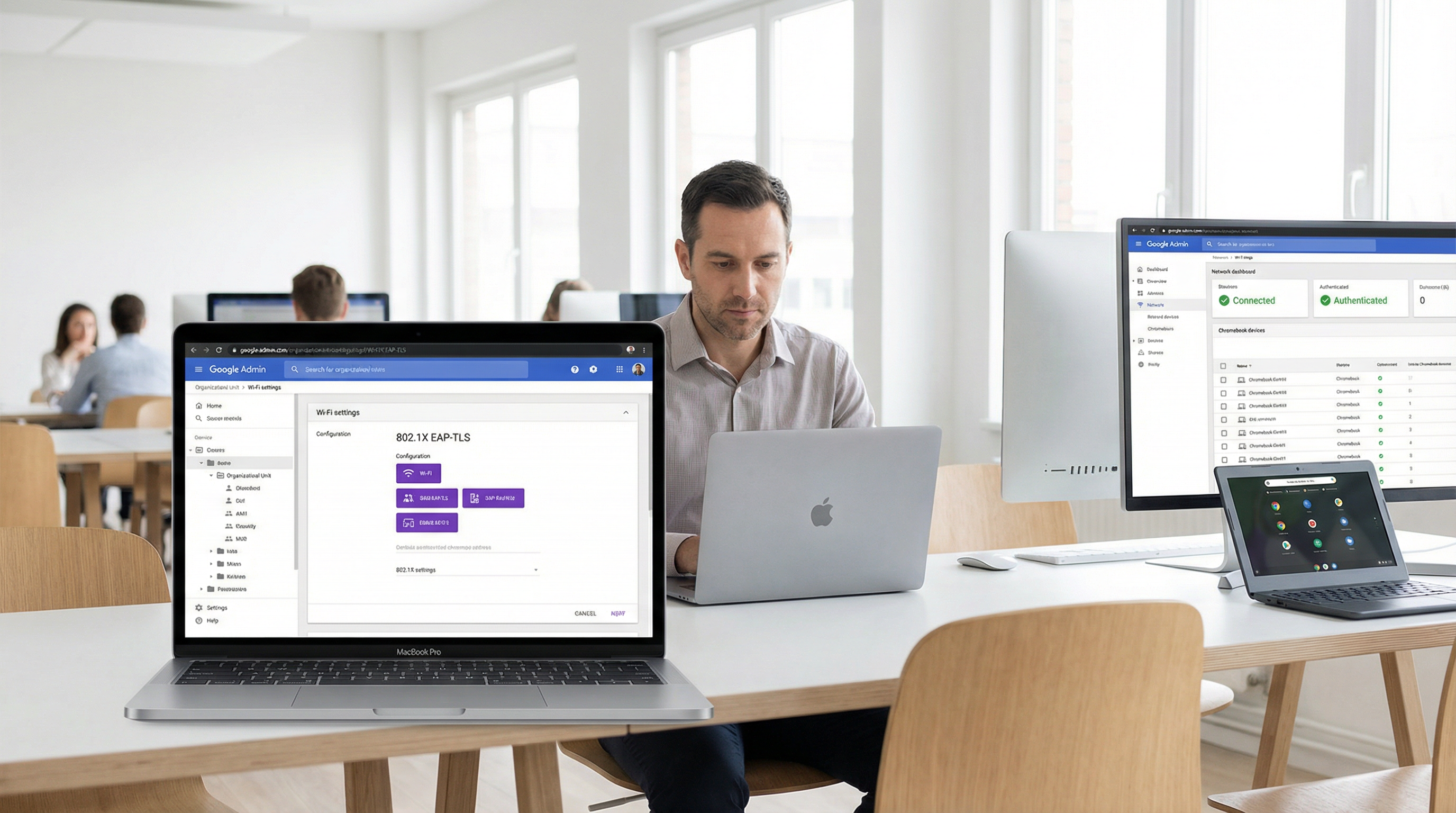
Résumé exécutif
Pour les sites d'entreprise, les établissements d'enseignement et les prestataires d'hôtellerie standardisés sur Google Workspace, la mise en œuvre d'une authentification WiFi sécurisée et fluide a historiquement représenté un défi par rapport aux environnements Microsoft Active Directory. Ce guide détaille l'architecture et le déploiement de l'authentification WiFi Google Workspace, en se concentrant spécifiquement sur le déploiement de certificats 802.1X pour Chromebook et l'intégration de Google Secure LDAP pour les backends RADIUS.
Les responsables IT et les architectes réseau doivent équilibrer la sécurité (WPA3-Enterprise, IEEE 802.1X) et la friction pour l'utilisateur. Alors que les clés pré-partagées (PSK) sont facilement compromises et difficiles à renouveler, l'authentification basée sur les certificats (EAP-TLS) ou l'authentification basée sur les identifiants (PEAP-MSCHAPv2) liée directement à l'identité Google Workspace d'un utilisateur offre un contrôle d'accès robuste, une application granulaire des politiques et une itinérance fluide sur le Guest WiFi et les réseaux d'entreprise.
Cette référence technique décrit les étapes exactes pour configurer la console d'administration Google pour la distribution automatisée de certificats, déployer Google Secure LDAP et intégrer ces sources d'identité avec des serveurs RADIUS d'entreprise. En suivant ces meilleures pratiques indépendantes des fournisseurs, les organisations peuvent atténuer le vol d'identifiants, réduire les tickets de support et assurer la conformité avec le GDPR et PCI DSS.
Analyse technique approfondie
L'architecture de l'authentification WiFi Google Workspace
L'authentification des clients sans fil par rapport à Google Workspace nécessite de combler le fossé entre l'identité cloud-native (SAML/OAuth) et les protocoles réseau hérités (RADIUS/802.1X). Contrairement à Active Directory, qui utilise nativement LDAP et s'intègre parfaitement au Network Policy Server (NPS), Google Workspace nécessite une couche intermédiaire délibérée.
Il existe deux architectures principales pour y parvenir :
Architecture 1 — Google Secure LDAP (Cloud Identity Premium / Google Workspace Enterprise) : Google fournit une interface LDAP gérée pour votre annuaire cloud. Votre serveur RADIUS (par exemple, FreeRADIUS, Cisco ISE, Aruba ClearPass) se connecte de manière sécurisée à ldap.google.com en utilisant des certificats clients. Lorsqu'un utilisateur tente de se connecter au WiFi, le serveur RADIUS valide ses identifiants par rapport au service LDAP de Google.
Architecture 2 — Captive Portals basés sur SAML / RadSec : Pour les scénarios BYOD (Bring Your Own Device) ou invités, les utilisateurs se connectent à un réseau ouvert ou PSK, qui les redirige vers un Captive Portal. Le portail authentifie l'utilisateur via Google SSO (SAML/OAuth). Une fois authentifié, le système peut fournir dynamiquement un identifiant unique (par exemple, une PSK dynamique ou un certificat temporaire) pour les connexions ultérieures.
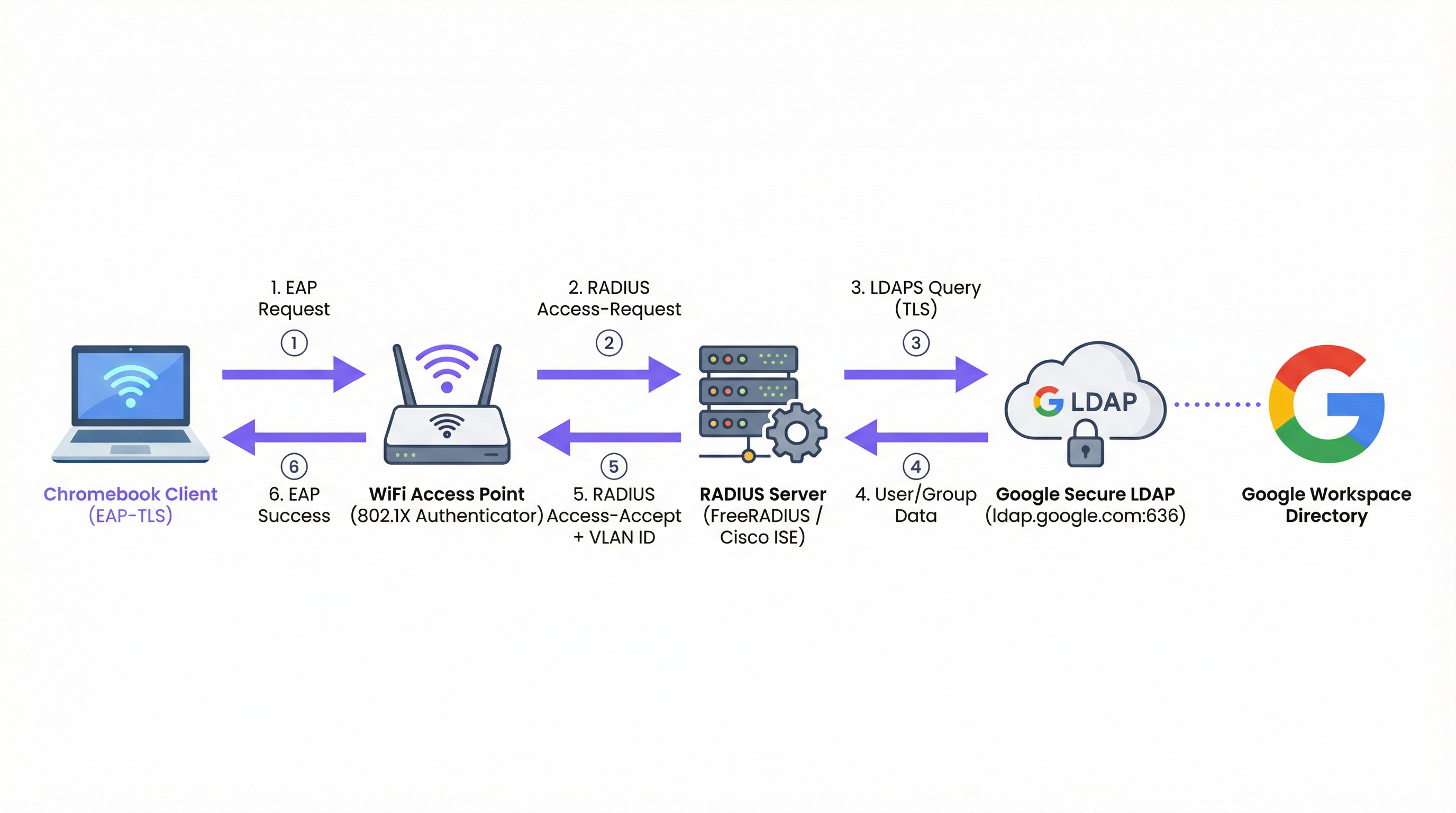
Figure 1 : Le flux d'authentification 802.1X pour les environnements Google Workspace, montrant le serveur RADIUS comme intermédiaire entre le point d'accès et Google Secure LDAP.
Types EAP et support Chromebook
Les Chromebooks supportent nativement plusieurs types de protocole d'authentification extensible (EAP) pour le 802.1X. Le choix du type EAP dicte le niveau de sécurité et la complexité du déploiement. Pour un aperçu complet des fondamentaux du 802.1X, consultez Authentification 802.1X : Sécuriser l'accès réseau sur les appareils modernes .
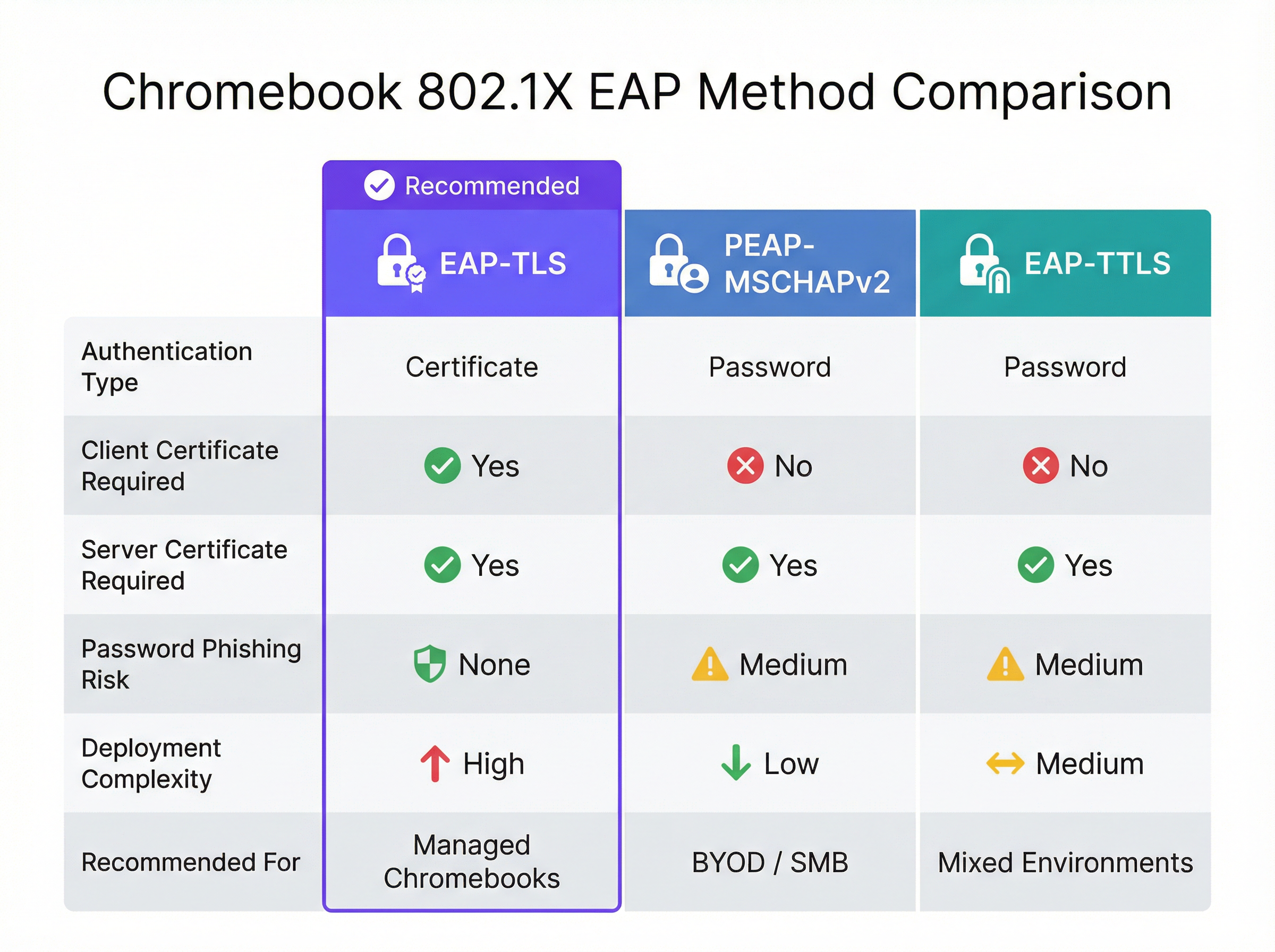
Figure 2 : Une comparaison directe des méthodes EAP supportées par les Chromebooks, soulignant les compromis entre sécurité et complexité.
| Méthode EAP | Type d'authentification | Certificat client requis | Risque de phishing | Recommandé pour |
|---|---|---|---|---|
| EAP-TLS | Certificat | Oui | Aucun | Chromebooks gérés |
| PEAP-MSCHAPv2 | Mot de passe | Non | Moyen | Déploiements BYOD / PME |
| EAP-TTLS | Mot de passe | Non | Moyen | Environnements mixtes |
EAP-TLS (Transport Layer Security) : La référence absolue pour le WiFi d'entreprise. Il nécessite à la fois un certificat serveur (sur le serveur RADIUS) et un certificat client (sur le Chromebook). Cela élimine le besoin de mots de passe, atténuant les risques de phishing. La console d'administration Google peut envoyer automatiquement des certificats clients aux Chromebooks gérés via le Google Cloud Certificate Connector ou des intégrations SCEP/EST tierces.
PEAP-MSCHAPv2 / EAP-TTLS : Ces protocoles utilisent un certificat serveur pour établir un tunnel sécurisé, à l'intérieur duquel le nom d'utilisateur et le mot de passe de l'utilisateur sont échangés. Bien que plus faciles à déployer pour les appareils non gérés, ils sont vulnérables au vol d'identifiants si l'appareil client ne valide pas strictement le certificat serveur.
Lors de la conception du réseau, réfléchissez à la manière dont ces événements d'authentification sont corrélés avec les systèmes en aval tels que les plateformes de WiFi Analytics , qui s'appuient sur des adresses MAC stables ou des noms d'utilisateur authentifiés pour suivre les parcours utilisateurs et la fréquentation.
Google Workspace vs Microsoft et Okta : Une évaluation comparative
Les organisations évaluant les plateformes d'identité pour l'authentification WiFi d'entreprise doivent comprendre les compromis inhérents. Microsoft Active Directory reste l'option la plus parfaitement intégrée, compte tenu de son support LDAP natif et de son intégration étroite avec NPS. Okta offre une capacité robuste de RADIUS-as-a-Service via son agent RADIUS, éliminant le besoin d'une infrastructure RADIUS gérée en interne. Google Worksvia Secure LDAP, est une option solide mais nécessite une architecture plus réfléchie — vous avez toujours besoin d'un serveur RADIUS intermédiaire, et le service Secure LDAP n'est disponible que sur les licences de niveau supérieur.
| Capacité | Google Workspace | Microsoft AD/Entra | Okta |
|---|---|---|---|
| Support RADIUS natif | Non (nécessite un serveur RADIUS) | Via NPS | Via Agent RADIUS |
| Interface LDAP | Google Secure LDAP | LDAP AD natif | Agent d'interface LDAP |
| Support EAP-TLS | Oui (via intégration PKI) | Oui (natif) | Oui |
| Push de certificats d'appareils gérés | Google Admin Console | Intune / GPO | Intégration MDM |
| Exigence de licence | Enterprise / Cloud Identity Premium | Inclus dans AD | Workforce Identity |
Guide de mise en œuvre
Déploiement de 802.1X sur les Chromebooks gérés
Le déploiement d'un WiFi sécurisé sur les Chromebooks gérés implique la configuration de la Google Admin Console pour pousser les profils réseau et les certificats nécessaires. Cela garantit que les appareils se connectent automatiquement sans intervention de l'utilisateur.
Étape 1 : Configurer le serveur RADIUS
Déployez un serveur RADIUS (par exemple, FreeRADIUS) capable de gérer l'EAP-TLS ou le PEAP. Installez un certificat serveur approuvé sur le serveur RADIUS. Si vous utilisez une CA privée, assurez-vous que le certificat Root CA est exporté pour le déploiement sur les clients. Configurez le serveur RADIUS pour interroger Google Secure LDAP (si vous utilisez l'authentification par identifiants) ou pour valider les certificats clients par rapport à votre CA (si vous utilisez l'EAP-TLS).
Étape 2 : Configurer Google Secure LDAP (pour PEAP/EAP-TTLS)
Dans la Google Admin Console, accédez à Applications > LDAP. Ajoutez un nouveau client LDAP (par exemple, « RADIUS d'entreprise »). Configurez les autorisations d'accès (lire les informations utilisateur, vérifier les mots de passe). Téléchargez le certificat client et la clé générés. Installez ces identifiants sur votre serveur RADIUS et configurez-le pour se connecter à ldap.google.com:636.
Étape 3 : Déployer les certificats sur les Chromebooks (pour EAP-TLS)
Dans la Google Admin Console, accédez à Appareils > Réseaux > Certificats. Téléchargez votre certificat Root CA et marquez-le comme « Autorité de certification de confiance ». Configurez un mécanisme pour émettre des certificats clients aux appareils via le Google Cloud Certificate Connector ou un fournisseur PKI basé sur le cloud prenant en charge l'intégration SCEP/EST.
Étape 4 : Créer le profil WiFi dans la Google Admin Console
Accédez à Appareils > Réseaux > Wi-Fi. Créez un nouveau profil de réseau Wi-Fi. Définissez le SSID et sélectionnez WPA/WPA2/WPA3-Enterprise comme type de sécurité. Sélectionnez le type EAP approprié. Si vous utilisez l'EAP-TLS, sélectionnez le certificat client déployé. Si vous utilisez le PEAP, configurez-le pour utiliser les identifiants de session de l'utilisateur. Crucialement, sélectionnez le certificat Root CA de confiance pour garantir que le Chromebook valide le serveur RADIUS. Appliquez le profil aux unités d'organisation (OU) appropriées.
Bonnes pratiques
Validation stricte du certificat serveur : Imposez toujours la validation du certificat serveur sur les appareils clients. Ne pas le faire expose les utilisateurs aux attaques de type Evil Twin, où un attaquant diffuse le même SSID et capture les identifiants. Cette seule décision de configuration fait la différence entre un déploiement sécurisé et un déploiement vulnérable. Pour une exploration plus approfondie de l'architecture de sécurité 802.1X, reportez-vous à Authentification 802.1X : Sécuriser l'accès réseau sur les appareils modernes .
Segmenter les réseaux par rôle : Utilisez les attributs RADIUS (par exemple, Filter-Id, Tunnel-Private-Group-Id) renvoyés par Google LDAP pour affecter dynamiquement les utilisateurs à différents VLAN en fonction de leur appartenance à un groupe Google Workspace (par exemple, Personnel vs Étudiants). Cela limite le mouvement latéral et améliore considérablement la posture de sécurité.
Surveillance et audit : Examinez régulièrement les journaux d'authentification RADIUS et les journaux d'audit Google Workspace. Intégrez ces journaux dans un système SIEM pour détecter des schémas d'authentification anormaux ou des tentatives de force brute. Considérez comment ces données alimentent des plateformes d'intelligence réseau plus larges.
Planifier le BYOD : Alors que les Chromebooks gérés peuvent utiliser l'EAP-TLS, les appareils non gérés (téléphones personnels du personnel, appareils des invités) nécessitent une approche différente. Mettez en œuvre un portail d'intégration sécurisé ou utilisez des PSK dynamiques pour ces appareils. Pour les zones d'accès public dans les environnements de l' Hôtellerie ou du Commerce de détail , envisagez des solutions de Guest WiFi standard avec des Captive Portals qui recueillent le consentement et garantissent la conformité GDPR.
Redondance de l'infrastructure : Déployez plusieurs serveurs RADIUS et configurez les points d'accès pour un basculement automatique. Un serveur RADIUS unique est un point de défaillance critique — s'il tombe en panne, aucun appareil géré ne peut se connecter au réseau.
Dépannage et atténuation des risques
Modes de défaillance courants
L'expiration du certificat est la cause la plus fréquente d'échec de l'EAP-TLS dans les environnements de production. Mettez en œuvre une surveillance et des alertes automatisées pour les périodes de validité des certificats à 90, 30 et 7 jours avant l'expiration. Cela s'applique à la fois au certificat du serveur RADIUS et à tout certificat de CA intermédiaire.
Le décalage d'horloge est une cause fréquemment négligée d'échecs d'authentification intermittents. L'EAP-TLS repose sur une synchronisation précise de l'heure pour la validation des certificats. Assurez-vous que le serveur RADIUS, l'autorité de certification et les Chromebooks se synchronisent tous via NTP. Un décalage de plus de quelques minutes peut entraîner le rejet de certificats valides.
Problèmes de connectivité LDAP : Si vous utilisez Google Secure LDAP, assurez-vous que le serveur RADIUS peut atteindre ldap.google.com sur le port TCP 636 et que le certificat client utilisé pour l'authentification n'a pas expiré ou n'a pas été révoqué dans la Google Admin Console.
Application incorrecte de l'OU : Assurez-vous que le profil WiFi et les certificats sont appliqués aux bonnes unités d'organisation dans la Google Admin Console. Une erreur courante consiste à appliquer un profil de certificat d'appareil à une OU d'utilisateur, ce qui signifie que le certificat n'est jamais poussé vers l'appareil.
Stratégies d'atténuation des risques
Un déploiement progressif est essentiel. Ne déployez jamais une nouvelle configuration 802.1X à l'ensemble de l'organisation d'un seul coup.Commencez par un petit groupe pilote (par exemple, l'équipe informatique), puis étendez-le à un seul département ou site avant un déploiement mondial. Maintenez un SSID de secours masqué et fortement restreint que le personnel informatique peut utiliser pour dépanner les appareils qui ne parviennent pas à s'authentifier via 802.1X.
Pour les organisations des secteurs réglementés, assurez-vous que votre déploiement 802.1X s'aligne sur les cadres de conformité pertinents. Dans les environnements de Santé , la segmentation du réseau via l'assignation dynamique de VLAN répond directement aux exigences GDPR et HIPAA pour l'isolation des systèmes cliniques. Dans le commerce de détail, la norme PCI DSS impose une séparation réseau entre les environnements de données des titulaires de cartes et les réseaux d'entreprise généraux — une exigence que l'assignation dynamique de VLAN satisfait élégamment.
ROI et impact commercial
La transition des réseaux basés sur PSK vers le 802.1X intégré à Google Workspace offre des avantages significatifs et mesurables qui justifient l'investissement de mise en œuvre.
Réduction de la charge de travail du support technique : Le déploiement automatisé de certificats via la console d'administration Google élimine la configuration WiFi manuelle sur les appareils gérés. Les organisations signalent généralement une réduction de 40 à 60 % des tickets de support liés au WiFi après un déploiement EAP-TLS, car il n'y a plus de mots de passe à oublier ou à renouveler.
Posture de sécurité renforcée : L'EAP-TLS élimine l'authentification par mot de passe, neutralisant les attaques de phishing et de credential stuffing. Cela réduit le risque de violation de données et les coûts financiers et de réputation associés. Le coût moyen d'une violation de données en 2024 a dépassé 4,8 millions de dollars — un chiffre qui rend l'investissement dans une architecture d'authentification appropriée facile à justifier.
Offboarding simplifié : Lorsqu'un employé part, la désactivation de son compte Google Workspace révoque immédiatement son accès WiFi. Il n'est pas nécessaire de renouveler une clé PSK partagée dans toute l'organisation, ce qui élimine la fenêtre de vulnérabilité qui existe entre le départ d'un employé et la rotation de la PSK.
Analyses et intelligence améliorées : En liant l'authentification réseau à une identité unique, les établissements peuvent exploiter des plateformes telles que le Wayfinding et le WiFi Analytics pour comprendre l'utilisation de l'espace et le comportement des utilisateurs avec une plus grande précision. Ces données peuvent orienter les investissements dans les infrastructures et optimiser l'utilisation de l'espace immobilier dans des environnements complexes tels que les hubs de Transport ou les grands centres de conférence. Pour les organisations qui explorent comment l'intelligence réseau soutient des objectifs opérationnels plus larges, l'article Les solutions WiFi d'hôtellerie moderne que vos clients méritent fournit un contexte pertinent.
Pour les organisations qui envisagent le contexte plus large de l'architecture réseau, les articles Définition des points d'accès sans fil : votre guide ultime 2026 et Les principaux avantages du SD WAN pour les entreprises modernes fournissent des conseils complémentaires sur les décisions d'infrastructure qui soutiennent un déploiement 802.1X réussi.
Termes clés et définitions
802.1X
An IEEE standard for port-based Network Access Control (PNAC). It provides an authentication mechanism to devices wishing to attach to a LAN or WLAN, requiring each device to authenticate before being granted network access.
The foundational protocol for enterprise WiFi security, replacing shared passwords (PSKs) with individual, identity-based authentication. Supported natively by Chromebooks and all modern WiFi access points.
EAP-TLS (Extensible Authentication Protocol - Transport Layer Security)
An EAP method that uses PKI (Public Key Infrastructure) to authenticate both the client and the server using digital certificates. No passwords are exchanged during authentication.
The gold standard for managed device WiFi authentication. Requires a client certificate on the Chromebook (deployed via Google Admin Console) and a server certificate on the RADIUS server.
Google Secure LDAP
A managed service from Google that exposes a traditional LDAP interface to the Google Workspace cloud directory, allowing legacy systems like RADIUS servers to authenticate users against Google's identity platform.
Essential for organisations that want to use their Google credentials for 802.1X WiFi authentication. Available on Cloud Identity Premium and Google Workspace Enterprise licences.
RADIUS (Remote Authentication Dial-In User Service)
A networking protocol that provides centralised Authentication, Authorization, and Accounting (AAA) management for users connecting to a network service. Access points communicate with a RADIUS server to verify user or device credentials.
The intermediary server that bridges the gap between WiFi access points and identity providers like Google Workspace. Common implementations include FreeRADIUS, Cisco ISE, and Aruba ClearPass.
PEAP-MSCHAPv2 (Protected Extensible Authentication Protocol)
An EAP method that uses a server certificate to create a secure TLS tunnel, inside of which the user's username and password are validated using the MSCHAPv2 protocol.
A common alternative to EAP-TLS for BYOD or SMB environments where deploying client certificates to every device is impractical. Requires strict server certificate validation to prevent credential theft.
Dynamic VLAN Assignment
The process of placing a user or device into a specific Virtual Local Area Network (VLAN) based on their identity or group membership, determined during the 802.1X authentication process via RADIUS attributes.
Allows network administrators to segment traffic (e.g., keeping students and staff on different subnets) using a single SSID, based on Google Workspace group membership returned via Secure LDAP.
SCEP (Simple Certificate Enrollment Protocol)
A protocol designed to automate the issuance and revocation of digital certificates at scale, commonly used in MDM and device management platforms.
Used in conjunction with Google Admin Console to automatically push client certificates to managed Chromebooks for EAP-TLS authentication, without requiring manual certificate installation.
Evil Twin Attack
A fraudulent Wi-Fi access point that appears to be legitimate by broadcasting the same SSID as a trusted network, designed to intercept user credentials or traffic.
The primary threat mitigated by enforcing strict server certificate validation in 802.1X configurations. Without certificate validation, a PEAP user's Google credentials can be captured by a rogue access point.
WPA3-Enterprise
The latest generation of the Wi-Fi Protected Access security protocol for enterprise networks, providing stronger encryption (192-bit minimum in WPA3-Enterprise 192-bit mode) and improved protection against offline dictionary attacks.
The recommended security protocol for all new 802.1X deployments. Fully supported by modern Chromebooks and access points, and configurable via the Google Admin Console WiFi profile.
Études de cas
A 2,000-student university campus needs to deploy secure WiFi to both university-owned Chromebooks (managed via Google Admin) and student BYOD devices (phones, laptops). They use Google Workspace for Education as their sole identity provider and have no on-premise Active Directory.
For the managed Chromebooks, the university should deploy EAP-TLS. They configure a cloud-based PKI integrated with Google Workspace via SCEP. The Google Admin Console pushes the Root CA, the SCEP payload, and the WiFi profile (WPA3-Enterprise, EAP-TLS) to the Chromebook OUs. Devices authenticate silently and securely without any user interaction.
For BYOD devices, they deploy a secure onboarding portal. Students connect to an open 'Onboarding' SSID, authenticate via Google SAML SSO on a captive portal, and are then provisioned with a unique, device-specific certificate (or dynamic PSK) for the main 'Campus-Secure' SSID. This separates managed and unmanaged traffic while leveraging the same Google identity. The RADIUS server uses Google Secure LDAP to validate credentials and assigns students and staff to separate VLANs based on their Google Workspace group membership.
A retail chain with 50 locations uses Google Workspace. They want to provide staff WiFi on corporate-owned devices and separate Guest WiFi for customers. They currently use a single PSK for staff, which hasn't been changed in three years. A former employee is known to have the PSK.
The retail chain should implement Google Secure LDAP immediately. They deploy a central RADIUS server in the cloud, configured to authenticate against Google Secure LDAP. In the Google Admin Console, they create a WiFi profile using PEAP-MSCHAPv2, enforcing strict server certificate validation. The access points at all 50 locations point to this central RADIUS server. Staff connect using their Google Workspace credentials — no new passwords to distribute.
For customers, they deploy a separate captive portal solution on a segregated VLAN, which captures marketing consent and ensures GDPR compliance, completely isolated from the staff network. The former employee's Google account is disabled, immediately revoking their network access without requiring a PSK rotation across 50 sites.
Analyse de scénario
Q1. Your organisation is deploying 802.1X to 500 managed Chromebooks. You want the highest level of security and want to avoid users ever needing to type a password to connect to the WiFi. Which EAP method should you configure in the Google Admin Console, and what additional infrastructure component must you deploy?
💡 Astuce :Which method relies entirely on certificates rather than credentials, and what must be deployed on the client device?
Afficher l'approche recommandée
EAP-TLS. It requires a client certificate to be pushed to the Chromebook via the Google Admin Console (using SCEP or the Google Cloud Certificate Connector) and a server certificate on the RADIUS server. This eliminates password-based authentication entirely. The additional infrastructure required is a PKI (Certificate Authority) to issue and manage client certificates.
Q2. You have configured Google Secure LDAP and a FreeRADIUS server. Users can authenticate successfully, but they are all being placed on the same default VLAN regardless of whether they are staff or students. You want staff and students to be on separate VLANs. Where must this configuration be applied, and what data source enables it?
💡 Astuce :Which component bridges the identity data from Google to the network equipment, and what protocol attributes carry VLAN information?
Afficher l'approche recommandée
The RADIUS server must be configured to query the user's group membership from Google Secure LDAP and then return the appropriate RADIUS attributes (specifically Tunnel-Private-Group-Id and Tunnel-Type) back to the Access Point. The Access Point uses these attributes to place the client on the correct VLAN. The data source enabling this is the Google Workspace group membership, retrieved via the Secure LDAP query.
Q3. A user reports they cannot connect to the new 802.1X network on their BYOD Android phone. They are prompted for a username and password (PEAP), but the connection fails silently after entering them. The RADIUS logs show no authentication attempt was received. What is the most likely cause, and how do you resolve it?
💡 Astuce :Think about what the client device must do before it sends the user's credentials, and what configuration is required on the device.
Afficher l'approche recommandée
The client device is failing to validate the RADIUS server's certificate. In modern Android versions, strict certificate validation is enforced by default. If the user hasn't installed the Root CA certificate on their device, or if the domain name on the server certificate doesn't match what the device expects, the client will terminate the connection before sending credentials. Resolution: the user must install the Root CA certificate on their Android device and configure the WiFi profile to specify the CA and the expected server domain name.
Q4. A retail chain is considering moving from a static PSK to 802.1X using Google Secure LDAP. The CFO asks for the business case. What are the three most compelling financial and operational arguments you would present?
💡 Astuce :Consider the costs associated with PSK management, the risk of credential exposure, and the operational overhead of distributed site management.
Afficher l'approche recommandée
- Elimination of PSK rotation costs: With a static PSK, any staff departure requires a key rotation across all sites — a costly, disruptive operation. With identity-based auth, disabling a Google account instantly revokes access at all locations. 2. Reduced breach risk: A compromised PSK grants network access to anyone with the key. Identity-based auth limits exposure to individual accounts, which can be disabled immediately. The average cost of a data breach exceeds $4.8M, making the infrastructure investment straightforward to justify. 3. Reduced helpdesk overhead: Automated credential management via Google Workspace eliminates WiFi-related password reset tickets and manual device configuration, typically reducing WiFi helpdesk volume by 40-60%.
Points clés à retenir
- ✓Google Workspace requires an intermediary RADIUS server plus Google Secure LDAP to enable native 802.1X WiFi authentication — there is no direct integration between Google and access points.
- ✓EAP-TLS is the gold standard for managed Chromebooks: it uses certificates instead of passwords, eliminating phishing risk and helpdesk overhead from password resets.
- ✓Google Admin Console automates the deployment of WiFi profiles and client certificates to managed Chromebooks via SCEP or the Google Cloud Certificate Connector.
- ✓For BYOD and guest devices, SAML-based captive portals provide a secure onboarding path tied to Google SSO, avoiding the complexity of manual certificate deployment on unmanaged devices.
- ✓Enforcing strict server certificate validation is the single most critical security configuration when using credential-based EAP methods (PEAP/EAP-TTLS) — without it, Evil Twin attacks can capture user credentials.
- ✓Dynamic VLAN assignment via RADIUS attributes enables granular network segmentation based on Google Workspace group membership, supporting compliance requirements and limiting lateral movement.
- ✓The primary business case for 802.1X over PSK is instant offboarding: disabling a Google Workspace account immediately revokes network access at all locations, eliminating the PSK rotation problem.




