

UX de Onboarding de Red: Diseñando una Experiencia de Configuración de WiFi sin Fricciones
Esta guía proporciona un marco técnico integral para diseñar una UX de onboarding de red WiFi sin fricciones, cubriendo la mecánica de detección de Captive Portal en iOS, Android, Windows y macOS, y detallando el registro de certificados de autoservicio para redes de personal 802.1X. Equipa a gerentes de TI, arquitectos de red y directores de operaciones de recintos con estrategias accionables para reducir la carga de soporte técnico, mejorar las tasas de éxito de la primera conexión y mantener el cumplimiento de GDPR y PCI DSS en entornos de hospitalidad, retail y campus.
🎧 Escucha esta guía
Ver transcripción
Resumen Ejecutivo
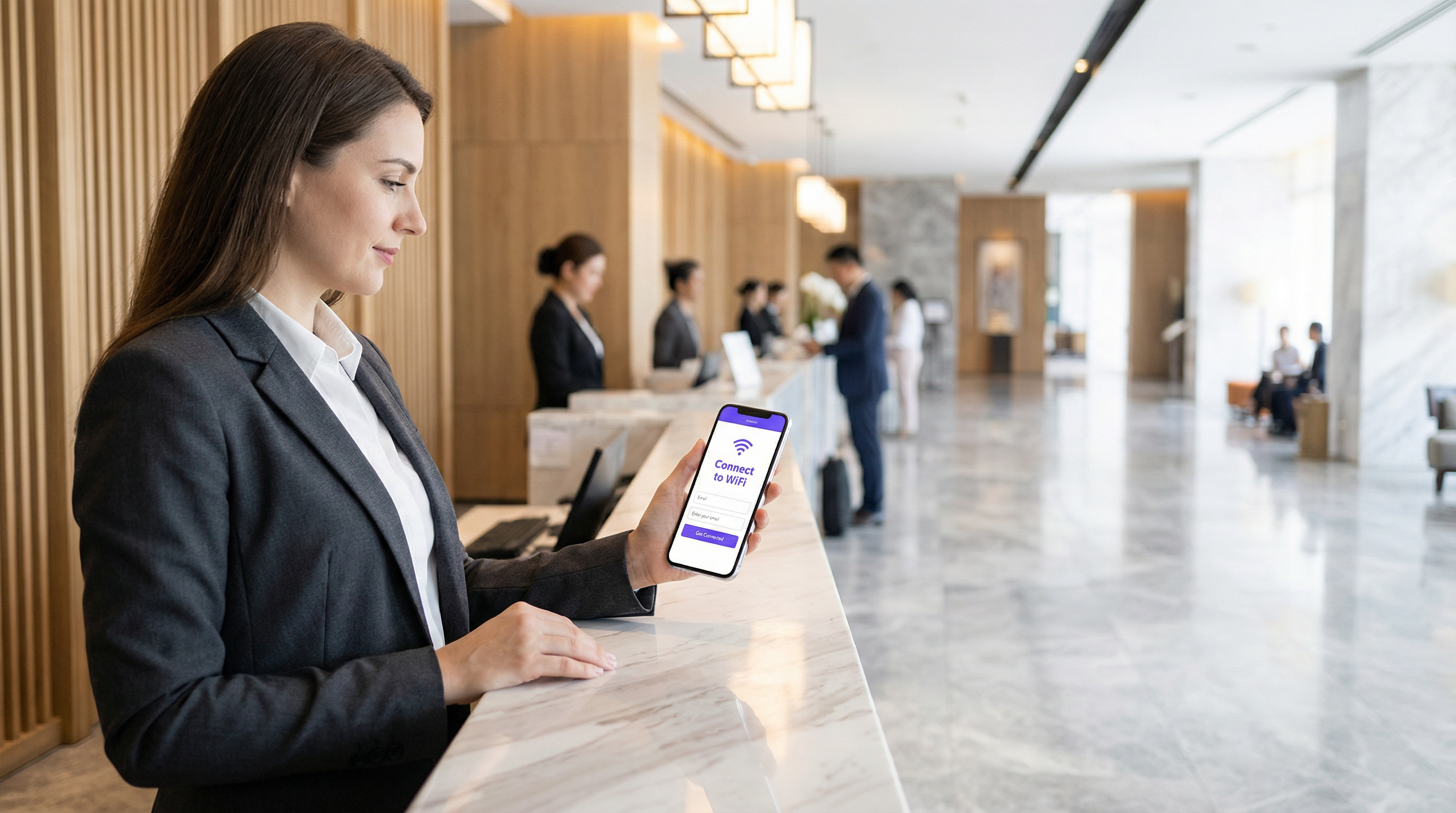
La experiencia de onboarding es el primer punto de contacto crítico entre un usuario y su infraestructura de red. Para los operadores de recintos y los equipos de TI empresariales, una UX de onboarding de red WiFi sin fricciones no es solo una conveniencia; es un requisito operativo fundamental que impacta directamente en la carga de soporte y la satisfacción del usuario. Cuando los invitados o el personal tienen dificultades para conectarse, la consecuencia inmediata es una afluencia de tickets de soporte técnico, conexiones abandonadas y una percepción degradada del recinto u organización.
Esta guía proporciona un marco técnico integral para diseñar una experiencia de configuración de WiFi fluida, abordando las complejidades de la detección de Captive Portal en iOS, Android, Windows y macOS, mientras detalla la implementación del registro de certificados de autoservicio para redes 802.1X. Al adoptar las estrategias descritas aquí, los líderes de TI pueden reducir significativamente la carga de soporte, mejorar el cumplimiento de seguridad y garantizar una sólida tasa de éxito en la primera conexión en todos los tipos de dispositivos. Ya sea que gestione propiedades de Hospitalidad , entornos de Retail o campus del sector público, los principios siguen siendo los mismos: diseñar para el dispositivo, diseñar para el cumplimiento y diseñar para el usuario.
Inmersión Técnica: La Mecánica de Detección de Captive Portal
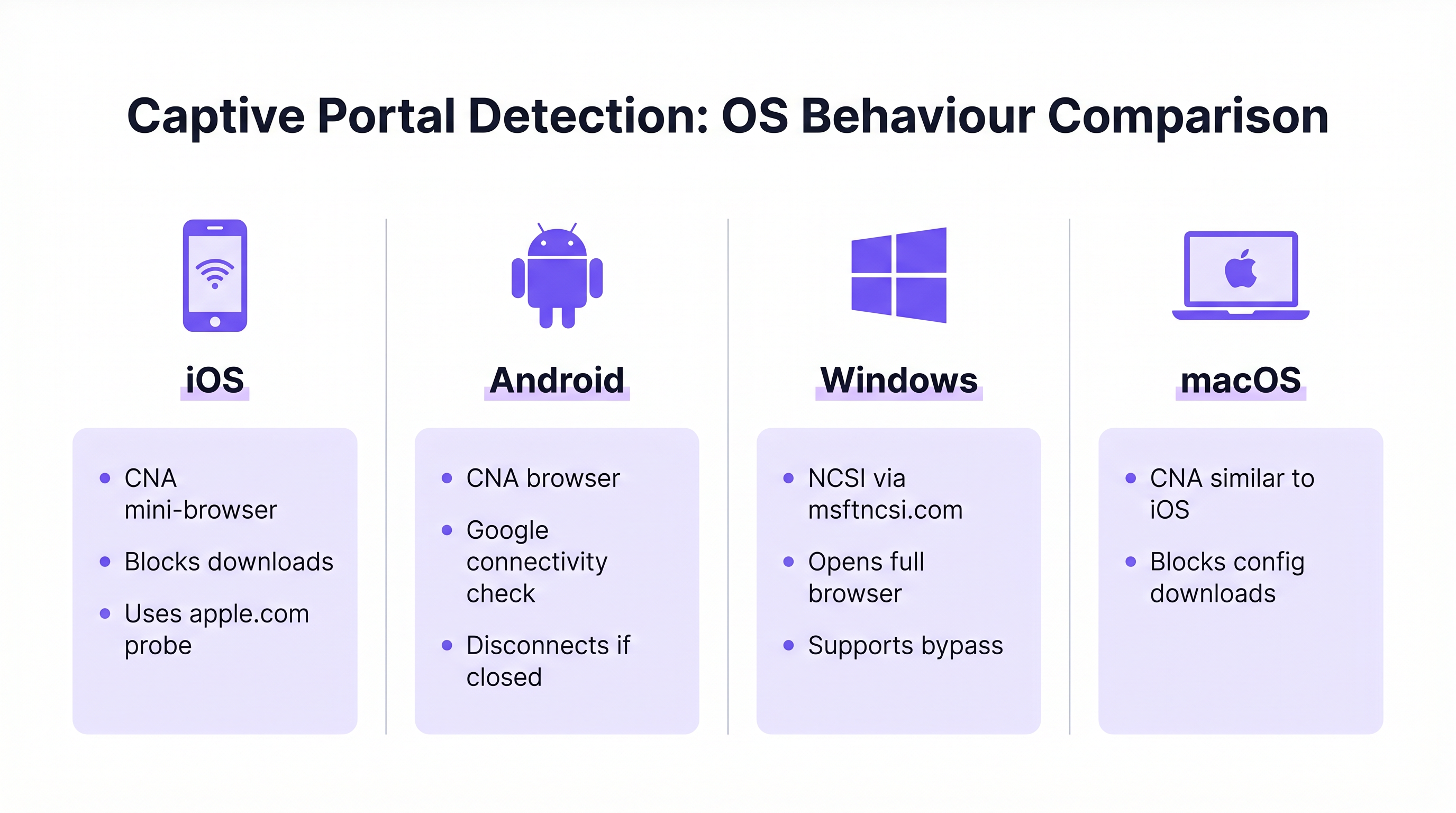
Comprender cómo los diferentes sistemas operativos manejan la detección de Captive Portal es esencial para diseñar un flujo de onboarding confiable. Los mecanismos subyacentes varían significativamente entre plataformas, lo que a menudo conduce a experiencias de usuario inconsistentes cuando no se gestionan adecuadamente.
Windows: Network Connectivity Status Indicator (NCSI)
Windows emplea el Network Connectivity Status Indicator (NCSI) para evaluar el acceso a internet. Al conectarse a una red, Windows intenta resolver y acceder a un dominio específico de Microsoft, normalmente www.msftncsi.com. Si esta solicitud es interceptada y redirigida por la red, Windows identifica la presencia de un Captive Portal e inmediatamente lanza el navegador web predeterminado para mostrar la página del portal. [^1]
Una mejor práctica crítica es asegurar que el Captive Portal redirija consistentemente todo el tráfico hasta que se complete la autenticación. Permitir el acceso prematuro al dominio NCSI resulta en una verificación de conectividad de falso positivo, lo que evita que aparezca el portal y deja al usuario en un estado de "Conectado, sin internet" sin una ruta visible hacia la resolución. Además, Windows admite archivos de aprovisionamiento que permiten la reconexión automática a redes futuras, mejorando la experiencia para los usuarios recurrentes. [^1]
iOS y macOS: Captive Network Assistant (CNA)
Los dispositivos Apple utilizan el Captive Network Assistant (CNA), un mini-navegador especializado de funcionalidad limitada diseñado específicamente para manejar Captive Portals. Cuando un dispositivo iOS o macOS se conecta a una red abierta, sondea URLs específicas de Apple (por ejemplo, captive.apple.com). Si no se recibe la respuesta esperada, el CNA presenta automáticamente la interfaz del portal.
Aunque es efectivo para páginas de bienvenida básicas, el CNA plantea un desafío significativo para el onboarding empresarial: prohíbe estrictamente las descargas de archivos y las instalaciones de perfiles. Esta medida de seguridad impide la descarga directa de las cargas de configuración necesarias para el registro de certificados 802.1X. Para superar esta limitación, las implementaciones empresariales deben implementar la tecnología CNA Breakout, que detecta el entorno CNA y solicita al usuario que pase a un navegador completo (como Safari) para completar el proceso de registro de certificados. [^2]
Android: Verificaciones de Conectividad de Google
Los dispositivos Android realizan verificaciones de conectividad similares utilizando URLs alojadas por Google. Al igual que iOS, Android a menudo utiliza un entorno de navegador limitado para los Captive Portals. Un comportamiento notable en las versiones modernas de Android es que el navegador del Captive Portal se cerrará automáticamente una vez que detecte acceso total a internet. Sin embargo, si un usuario cierra manualmente la ventana del portal antes de completar la autenticación, Android normalmente se desconectará de la red por completo, requiriendo que el usuario reinicie el proceso de conexión. Los diseños de los portales deben tener esto en cuenta haciendo que la acción de finalización sea clara y prominente.
| SO | Mecanismo de Detección | Navegador del Portal | Descargas de Archivos | Riesgo Clave |
|---|---|---|---|---|
| Windows | NCSI vía msftncsi.com | Navegador completo | Permitido | Falso positivo si el dominio NCSI no está bloqueado |
| iOS | Sonda de Apple (captive.apple.com) | Mini-navegador CNA | Bloqueado | La descarga del perfil falla sin CNA Breakout |
| macOS | Sonda de Apple (captive.apple.com) | Mini-navegador CNA | Bloqueado | La descarga del perfil falla sin CNA Breakout |
| Android | Verificación de conectividad de Google | Navegador limitado | Restringido | Se desconecta si la ventana del portal se cierra antes |
Guía de Implementación: Diseñando el Flujo de Onboarding
Diseñar un flujo de onboarding efectivo requiere un equilibrio estratégico entre seguridad, cumplimiento y conveniencia para el usuario. El enfoque difiere significativamente dependiendo de si el público objetivo consiste en invitados transitorios o personal permanente.
Guest WiFi: La Experiencia del Captive Portal
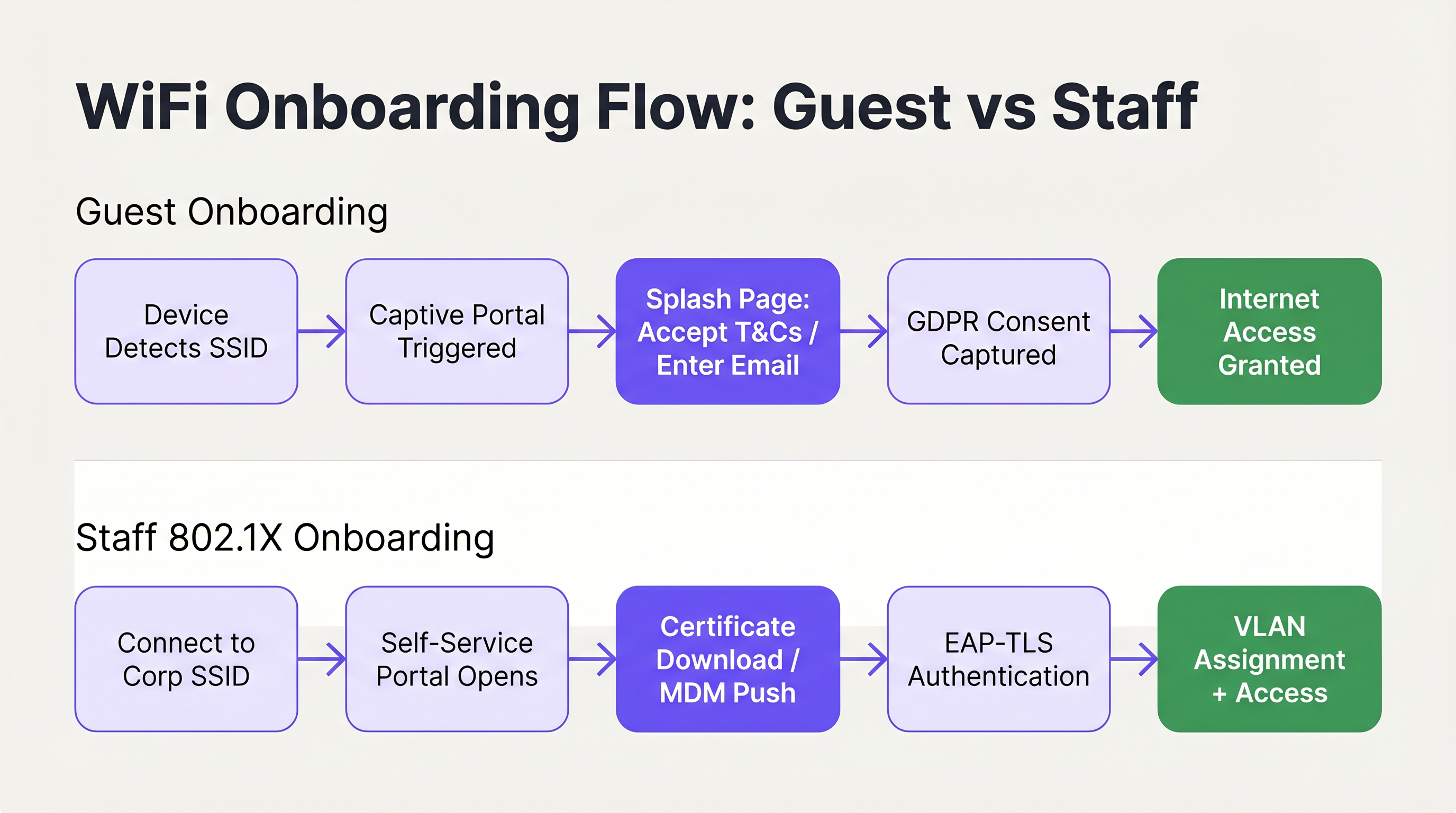
Para el acceso de invitados, el objetivo principal es facilitar una conexión rápida e intuitiva mientras se capturan los datos necesarios y se garantiza el cumplimiento. El despliegue de un Captive Portal con marca es el enfoque estándar. La interfaz de usuario debe ser limpia, amigable al tacto y comunicar claramente las acciones requeridas. El uso de soluciones como Guest WiFi permite a los recintos presentar una página de bienvenida profesional que guía sin problemas a los usuarios a través de la aceptación de términos y condiciones o la provisión de una dirección de correo electrónico.
Crucialmente, el flujo de onboarding debe alinearse con las regulaciones de privacidad de datos como GDPR. El portal debe capturar explícitamente el consentimiento del usuario para el procesamiento de datos y las comunicaciones de marketing, asegurando que la recopilación de datos sea transparente y mínima. El consentimiento de marketing debe ser de inclusión voluntaria (opt-in) en lugar de estar preseleccionado, y la política de privacidad debe ser claramente accesible. Además, la segmentación de la red es un requisito obligatorio, particularmente para el cumplimiento de PCI DSS en entornos de retail y hospitalidad. El tráfico de invitados debe estar estrictamente aislado de las redes corporativas internas y de los sistemas de punto de venta para mitigar los riesgos de seguridad. [^3]
El método de autenticación elegido para el portal impacta directamente tanto en la experiencia del usuario como en la calidad de los datos capturados. Los enfoques más comunes son el registro por correo electrónico (baja fricción, calidad de datos moderada), el inicio de sesión social a través de OAuth (fricción moderada, alta calidad de datos) y la verificación por SMS (mayor fricción, máxima calidad de datos). Para la mayoría de los despliegues en hospitalidad y retail, el registro por correo electrónico con una opción de respaldo de inicio de sesión social representa el equilibrio óptimo. La verificación por SMS se reserva mejor para entornos donde la precisión de los datos es un objetivo comercial principal, como las integraciones de programas de lealtad.
Específicamente para despliegues de Hospitalidad , la redirección post-autenticación es una oportunidad de ingresos significativa. En lugar de simplemente otorgar acceso y dejar al usuario en una página en blanco, rediríjalo a una página de bienvenida con marca, una oferta promocional o un aviso de inscripción en un programa de lealtad. Aquí es donde la inversión en WiFi para invitados comienza a generar valor comercial directo más allá de la conectividad. Para obtener más orientación sobre este tema, consulte Modern Hospitality WiFi Solutions Your Guests Deserve .
La gestión de sesiones es otro aspecto de la UX de onboarding de invitados que se pasa por alto con frecuencia. Configure su portal para reconocer dispositivos recurrentes por dirección MAC y otorgar acceso automáticamente sin requerir el reingreso de credenciales. Esto mejora drásticamente la experiencia para los visitantes frecuentes y es particularmente valioso en entornos de retail donde los clientes visitan a menudo. La duración de la sesión y el intervalo de re-autenticación deben calibrarse según el tipo de recinto: un hotel podría establecer una sesión de 24 horas alineada con el ciclo de check-in, mientras que una cafetería podría usar una sesión de 4 horas para gestionar la congestión de la red durante los períodos pico.
Staff WiFi: Registro de Certificados de Autoservicio
El onboarding de dispositivos del personal, particularmente en escenarios de Bring Your Own Device (BYOD), requiere una postura de seguridad más robusta, aprovechando típicamente IEEE 802.1X y EAP-TLS para la autenticación basada en certificados. El desafío radica en desplegar estos certificados en dispositivos no gestionados sin saturar el soporte técnico de TI.
La arquitectura recomendada es un portal de onboarding de autoservicio. Los usuarios se conectan inicialmente a un SSID de onboarding abierto y restringido. Esta red está aislada mediante segmentación VLAN y Listas de Control de Acceso (ACL), permitiendo el acceso solo al portal de registro y a los proveedores de identidad necesarios. El portal guía al usuario a través de la autenticación con sus credenciales corporativas, tras lo cual se genera y descarga en el dispositivo un certificado de cliente único y un perfil de configuración de red. Una vez instalado el perfil, el dispositivo transita automáticamente al SSID corporativo seguro (utilizando WPA3-Enterprise) y se autentica de forma transparente mediante el certificado.
Para un recorrido técnico detallado sobre la integración de estos flujos con los servicios de identidad de Microsoft, consulte la Azure AD and Entra ID WiFi Authentication: Integration and Configuration Guide . También es relevante comprender cómo el SD-WAN y la arquitectura de red moderna interactúan con estos flujos de onboarding; consulte The Core SD WAN Benefits for Modern Businesses para obtener contexto sobre el panorama más amplio de la infraestructura de red.
Mejores Prácticas para una UX sin Fricciones
Para garantizar una alta tasa de éxito en la primera conexión, los arquitectos de TI deben adherirse a las siguientes mejores prácticas neutrales respecto al proveedor, extraídas de despliegues en entornos empresariales, de hospitalidad y del sector público.
Priorice la comunicación clara y concisa. Los elementos visuales dentro del portal deben guiar al usuario de forma intuitiva, minimizando la carga cognitiva. Asegúrese de que la información de contacto de ayuda y soporte se muestre de forma destacada, permitiendo a los usuarios resolver problemas rápidamente sin frustración. [^2] Los indicadores de progreso son particularmente valiosos en flujos de varios pasos, como el registro de certificados.
Implemente CNA Breakout para todos los portales de autoservicio 802.1X. Intentar forzar la descarga de perfiles a través del Captive Network Assistant de iOS o macOS fallará invariablemente, lo que provocará llamadas de soporte inmediatas. El portal debe detectar inteligentemente el entorno CNA y proporcionar instrucciones claras para abrir un navegador completo. Esta no es una mejora opcional; es un requisito previo para una experiencia de onboarding funcional en iOS. [^2]
Utilice SSIDs ocultos para reducir la confusión. Al transmitir solo las redes principales de invitados y corporativas seguras, y ocultar el SSID de onboarding temporal, reduce el riesgo de que los usuarios intenten conectarse a la red incorrecta. El SSID de onboarding se puede comunicar mediante un código QR o documentación de bienvenida.
Diseñe para la interacción táctil primero. Dado que la mayoría de las conexiones de invitados se originan en smartphones, los diseños de los portales deben usar controles grandes y fáciles de tocar, evitar el desplazamiento excesivo y dividir los flujos complejos en varias páginas cortas. [^1]
Aproveche WiFi Analytics para la optimización continua. El seguimiento de las tasas de abandono del portal, las distribuciones de tipos de dispositivos y las tasas de éxito de la conexión proporciona los datos necesarios para identificar y resolver los puntos de fricción en el viaje de onboarding. Para entornos que también requieren integración de orientación física, Wayfinding y Sensors pueden complementar la capa de WiFi analytics para ofrecer una imagen completa de la inteligencia del recinto.
Resolución de Problemas y Mitigación de Riesgos
Incluso con un flujo de onboarding bien diseñado, pueden surgir problemas. Comprender los modos de falla comunes es esencial para una resolución de problemas rápida y una mitigación de riesgos proactiva.
El Captive Portal no aparece. Esto casi siempre es causado por una ACL de pre-autenticación demasiado permisiva. Si un dispositivo puede alcanzar con éxito sus URLs de verificación de conectividad específicas del SO antes de autenticarse, el SO asumirá que tiene acceso total a internet y no activará el portal. Audite la configuración del walled garden y asegúrese de que los dominios de sondeo de NCSI y Apple sean interceptados y redirigidos hasta que el usuario se haya autenticado por completo.
Fallas de confianza de certificados en despliegues 802.1X. Si el dispositivo no confía en el certificado del servidor RADIUS, la autenticación EAP-TLS fallará silenciosamente. El usuario verá un mensaje genérico de "no se puede conectar" sin ninguna guía accionable. El perfil de onboarding de autoservicio debe incluir explícitamente la cadena completa de certificados de la CA raíz para establecer la confianza. Esta es la causa más común de fallas silenciosas de 802.1X en despliegues BYOD.
Usuarios de iOS incapaces de descargar perfiles de configuración. Este es el problema del CNA descrito anteriormente. Si el portal no ha implementado el CNA Breakout, los usuarios de iOS no podrán proceder. Verifique que el mecanismo de breakout funcione correctamente probando en un dispositivo iOS físico, no solo en un simulador.
Comportamiento inconsistente del portal a través del roaming de SSID. En despliegues de múltiples sitios o múltiples controladores, asegúrese de que la lógica de redirección del Captive Portal sea consistente en todos los puntos de acceso. Un comportamiento inconsistente —donde algunos APs redirigen y otros no— crea una experiencia de usuario confusa e impredecible. Esto es particularmente relevante para cadenas de Retail y centros de Transport donde los usuarios se desplazan por múltiples sitios y esperan una experiencia consistente.
ROI e Impacto en el Negocio
El impacto comercial de optimizar la UX de onboarding de WiFi va mucho más allá de la conveniencia del usuario. Para los departamentos de TI empresariales, el principal retorno de la inversión se materializa a través de una reducción significativa en la carga de soporte técnico. Los tickets de soporte relacionados con WiFi se encuentran entre los más costosos de resolver, requiriendo tiempo del personal técnico para problemas que, en la mayoría de los casos, son prevenibles mediante un mejor diseño y configuración del portal.

Para los recintos que utilizan WiFi Analytics , un proceso de onboarding fluido aumenta directamente el volumen de usuarios conectados, enriqueciendo así los datos disponibles para el análisis de afluencia, la medición del tiempo de permanencia y las estrategias de compromiso del cliente. En entornos de Retail , esto se traduce directamente en datos más precisos del viaje del cliente y un marketing dirigido más efectivo. En entornos de Hospitalidad , una experiencia de conexión fluida contribuye de manera medible a las puntuaciones de satisfacción de los huéspedes. Los entornos de atención médica también se benefician significativamente; para obtener contexto sobre el despliegue de WiFi en entornos regulados, consulte los recursos de la industria de Healthcare .
Las siguientes métricas proporcionan el marco para cuantificar el rendimiento del onboarding y demostrar el ROI:
| Métrica | Definición | Referencia de Objetivo |
|---|---|---|
| Tasa de Éxito de la Primera Conexión | % de usuarios que se conectan con éxito al primer intento | > 95% |
| Tasa de Abandono del Portal | % de usuarios que inician pero no completan el flujo del portal | < 10% |
| Tiempo de Conexión | Tiempo promedio desde la selección del SSID hasta el acceso a internet | < 45 segundos |
| Volumen de Tickets de Soporte de WiFi | Tickets mensuales de soporte técnico atribuibles al onboarding de WiFi | Disminuyendo mes a mes |
| Tasa de Autoconexión de Visitantes Recurrentes | % de dispositivos recurrentes que se reconectan sin reingresar al portal | > 80% |
Al tratar el onboarding de red como un viaje crítico de experiencia de usuario en lugar de una mera necesidad técnica, las organizaciones pueden ofrecer una conectividad segura, compatible y sin fricciones que respalde tanto los objetivos operativos como los resultados comerciales medibles. Para obtener más contexto sobre cómo la infraestructura de puntos de acceso sustenta estas experiencias, consulte Wireless Access Points Definition Your Ultimate 2026 Guide .
[^1]: Microsoft Learn. "Captive Portal Detection and User Experience in Windows." https://learn.microsoft.com/en-us/windows-hardware/drivers/mobilebroadband/captive-portals [^2]: SecureW2. "Wi-Fi Onboarding and Captive Portal Best Practices." https://securew2.com/blog/wi-fi-onboarding-captive-portal [^3]: Purple. "Guest WiFi vs Staff WiFi: Network Segmentation Best Practices." https://www.purple.ai/en-GB/guides/guest-wifi-vs-staff-wifi-segmentation
Términos clave y definiciones
Captive Portal
A web page that a user of a public-access network is obliged to view and interact with before internet access is granted. It is used to enforce acceptable use policies, capture consent, authenticate users, or present branded content.
IT teams deploy captive portals as the primary gateway for guest network access to ensure compliance, gather analytics, and deliver branded experiences.
NCSI (Network Connectivity Status Indicator)
A Windows feature that performs active and passive tests to determine internet connectivity, primarily by attempting to reach specific Microsoft domains such as msftncsi.com.
Understanding NCSI is crucial for ensuring that Windows devices correctly detect and display the captive portal rather than reporting a false positive 'connected' status.
CNA (Captive Network Assistant)
A limited-functionality mini-browser utilised by iOS and macOS to display captive portals. It intentionally restricts features including file downloads, cookie persistence, and JavaScript execution for security reasons.
The CNA is the primary technical hurdle when deploying 802.1X configuration profiles to Apple devices, necessitating specific CNA Breakout strategies.
CNA Breakout
A technical mechanism used within a captive portal to detect the presence of a limited CNA browser and prompt the user to open the portal page in a fully featured browser such as Safari or Chrome.
This is a mandatory requirement for any self-service onboarding flow that requires the user to download and install a network configuration profile on an iOS or macOS device.
IEEE 802.1X
An IEEE Standard for port-based Network Access Control (PNAC) that provides an authentication mechanism to devices wishing to attach to a LAN or WLAN, requiring successful authentication before network access is granted.
This is the enterprise standard for securing staff and corporate networks, moving beyond shared passwords to individual identity verification via RADIUS.
EAP-TLS (Extensible Authentication Protocol - Transport Layer Security)
A highly secure authentication protocol used within 802.1X that requires both the client device and the authentication server to verify each other using digital certificates, providing mutual authentication.
Considered the gold standard for enterprise WiFi security, it eliminates credential theft risks by relying on cryptographic certificates rather than passwords.
VLAN (Virtual Local Area Network)
A logical subnetwork that groups a collection of devices from different physical LANs, allowing network administrators to partition a single switched network to match functional and security requirements.
VLANs are essential for segmenting guest traffic from corporate traffic, ensuring PCI DSS compliance and overall network security in multi-tenant environments.
Walled Garden
A restricted pre-authentication network environment that controls which IP addresses or domains a user can reach before they have fully authenticated through the captive portal.
Configuring the walled garden correctly is vital: it must allow access to the portal server and identity providers while blocking general internet access to ensure OS portal detection triggers correctly.
WPA3-Enterprise
The latest generation of the Wi-Fi Protected Access security protocol for enterprise networks, offering enhanced protection through 192-bit security mode and improved key establishment mechanisms.
WPA3-Enterprise is the recommended security protocol for corporate SSIDs, particularly when combined with 802.1X and EAP-TLS for certificate-based authentication.
RADIUS (Remote Authentication Dial-In User Service)
A networking protocol that provides centralised authentication, authorisation, and accounting (AAA) management for users who connect to a network service.
The RADIUS server is the backbone of 802.1X deployments, validating client certificates and determining which VLAN to assign to each authenticated device.
Casos de éxito
A 400-room luxury hotel is deploying a new guest WiFi network and a secure staff network. They currently experience high volumes of support calls from guests unable to see the login page, and staff struggle to configure their personal phones for the secure network. How should the IT architect design the onboarding flow to resolve both issues?
For the guest network, the architect must audit the Walled Garden settings on the wireless controller. Pre-authentication ACLs must strictly block access to OS connectivity check URLs — specifically msftncsi.com for Windows devices and captive.apple.com for Apple devices — and redirect all HTTP and HTTPS traffic to the Purple captive portal. This guarantees the portal triggers reliably across all device types. The portal itself should be branded to the hotel, require only an email address and terms acceptance, and redirect post-authentication to a welcome page with the hotel's amenity information.
For the staff network, the architect should implement a self-service onboarding portal on an isolated VLAN. Staff connect to a hidden onboarding SSID, authenticate via the portal using their Active Directory or Entra ID credentials, and download a configuration profile. The portal must implement CNA Breakout to ensure iOS users are prompted to open Safari to download the profile, bypassing the restrictive Apple mini-browser. The profile must include the Root CA certificate for the RADIUS server. Once installed, the device auto-connects to the WPA3-Enterprise staff SSID using EAP-TLS and is assigned to the appropriate VLAN based on their identity group.
A national retail chain with 200 stores is updating its in-store WiFi to provide seamless guest access that encourages loyalty app downloads, while ensuring strict compliance with PCI DSS for their point-of-sale systems. What architectural decisions must be made regarding the onboarding UX?
The architecture must enforce strict network segmentation as its foundation. The guest WiFi must operate on a dedicated VLAN, completely isolated from the corporate and POS VLANs through both VLAN tagging and ACL enforcement at the distribution layer. No routing path should exist between the guest VLAN and the PCI-regulated environment.
The guest onboarding flow will utilise a captive portal that captures GDPR-compliant consent before granting access. The form should be minimal — email address, opt-in marketing consent checkbox, and terms acceptance. The post-authentication redirect should send users directly to the relevant app store page for the loyalty application, with a clear call to action. The captive portal traffic itself must be served over HTTPS to protect any user data entered during the onboarding process. Returning customers should be recognised by MAC address and granted access without re-entering details, improving the repeat-visit experience.
Análisis de escenarios
Q1. Your helpdesk is receiving reports that users on Windows laptops are connecting to the guest network, but the splash page never appears. They see a 'Connected, no internet' status in the system tray. What is the most likely configuration error, and how do you resolve it?
💡 Sugerencia:Consider how Windows determines whether it is behind a captive portal or simply offline — and what specific domain it uses to make that determination.
Mostrar enfoque recomendado
The most likely cause is an overly permissive Walled Garden configuration. If the pre-authentication ACLs allow traffic to Microsoft's NCSI domain (msftncsi.com), Windows successfully resolves the connectivity check and assumes it has full internet access, so the captive portal browser is never launched. The resolution is to tighten the Walled Garden ACLs to intercept and redirect requests to msftncsi.com until the user has completed portal authentication. Only the portal server, identity provider, and essential CDN resources should be whitelisted in the pre-auth policy.
Q2. You are designing a self-service onboarding flow for university students to connect their personal iPhones to the secure eduroam (802.1X) network. What specific technical mechanism must you include in the portal design, and why is it necessary?
💡 Sugerencia:Think about the limitations of the default browser that automatically appears on iOS when connecting to an open network.
Mostrar enfoque recomendado
You must implement CNA Breakout technology. When an iPhone connects to an open network, iOS automatically opens the Captive Network Assistant (CNA), a restricted mini-browser that intentionally blocks file downloads and profile installations as a security measure. Without CNA Breakout, the student will be unable to download the 802.1X configuration profile, and the onboarding will fail silently. The portal must detect the CNA environment and present a clear prompt instructing the user to open the portal URL in Safari, where the full browser allows the profile to be downloaded and installed.
Q3. A retail client wants to use their guest WiFi to collect customer emails for marketing, but they are concerned about PCI DSS compliance regarding their in-store payment terminals on the same physical network infrastructure. What architectural requirement is mandatory, and what specific control enforces it?
💡 Sugerencia:How do you ensure that a compromised guest device cannot reach the payment systems, even if they share the same physical access points?
Mostrar enfoque recomendado
Strict network segmentation is mandatory. The guest WiFi network must be placed on a completely separate VLAN from the corporate and point-of-sale (POS) networks. Access Control Lists (ACLs) must be applied at the distribution or core layer to ensure that no traffic can route between the guest VLAN and the PCI-regulated environment. This isolation must be enforced at the network layer, not merely at the SSID level, since SSID-only separation is insufficient for PCI DSS compliance. The guest VLAN should only have outbound internet access, with no routing paths to any internal subnets.
Q4. After deploying a self-service 802.1X onboarding portal, staff members report that their personal Android phones successfully downloaded and installed the configuration profile, but their iPhones show 'Unable to join the network' when attempting to connect to the corporate SSID. What is the most likely cause?
💡 Sugerencia:The profile installed successfully, so the issue is not with the download. Think about what happens during the EAP-TLS handshake when the device attempts to authenticate.
Mostrar enfoque recomendado
The most likely cause is a missing Root CA certificate in the configuration profile. During EAP-TLS authentication, the device must trust the certificate presented by the RADIUS server. If the Root CA that signed the RADIUS server certificate is not included in the onboarding profile, iOS will reject the RADIUS certificate and fail the authentication silently. Android may have the Root CA in its system trust store by default, which is why Android devices succeed while iOS devices fail. The resolution is to update the configuration profile to include the complete certificate trust chain, including the Root CA, before redistributing it to iOS users.
Conclusiones clave
- ✓A frictionless WiFi network onboarding UX is a measurable operational requirement: poor onboarding directly increases helpdesk ticket volume and reduces guest engagement.
- ✓Windows, iOS, Android, and macOS use fundamentally different mechanisms to detect captive portals — designing and testing for each OS is non-negotiable.
- ✓The iOS Captive Network Assistant (CNA) blocks file downloads, making CNA Breakout technology a prerequisite for any 802.1X certificate-based onboarding flow on Apple devices.
- ✓Guest onboarding must balance rapid access with GDPR-compliant consent capture and PCI DSS-mandated network segmentation.
- ✓Staff BYOD onboarding should leverage self-service portals with EAP-TLS certificate deployment to eliminate helpdesk calls and achieve zero-touch provisioning.
- ✓The three most common onboarding failures are: misconfigured walled gardens, missing CNA Breakout, and incomplete certificate trust chains — all preventable through proper design and pre-launch testing.
- ✓Track first-connection success rate, portal abandonment rate, and WiFi support ticket volume as the core KPIs for onboarding performance and ROI justification.




