

UX dell'Onboarding di Rete: Progettare un'Esperienza di Configurazione WiFi Senza Attriti
This guide provides a comprehensive technical framework for designing a frictionless WiFi network onboarding UX, covering captive portal detection mechanics across iOS, Android, Windows, and macOS, and detailing self-service certificate enrolment for 802.1X staff networks. It equips IT managers, network architects, and venue operations directors with actionable strategies to reduce helpdesk overhead, improve first-connection success rates, and maintain GDPR and PCI DSS compliance across hospitality, retail, and campus environments.
🎧 Ascolta questa guida
Visualizza trascrizione
Executive Summary
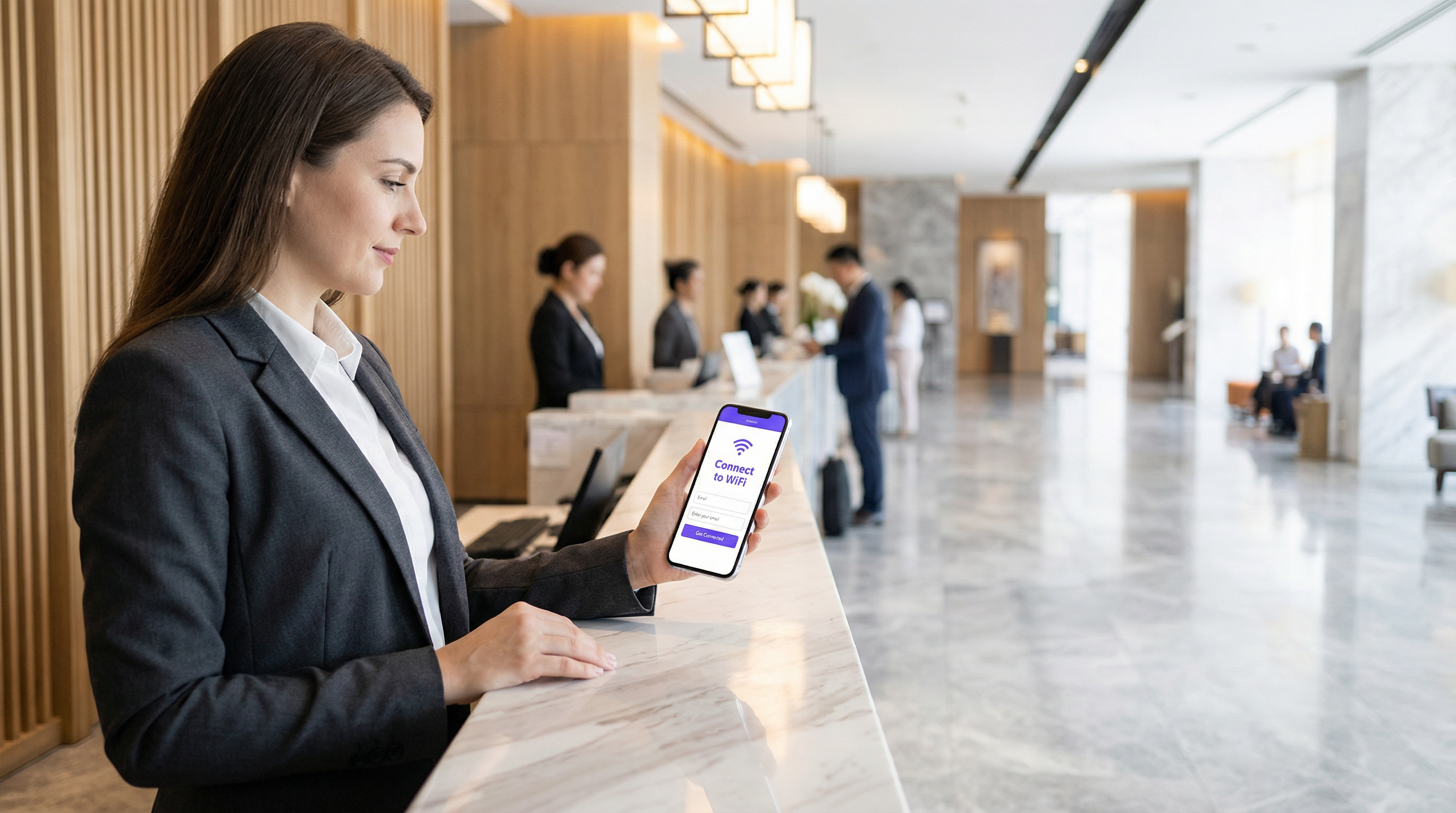
L'esperienza di onboarding è il primo punto di contatto critico tra un utente e l'infrastruttura di rete. Per gli operatori delle strutture e i team IT aziendali, una UX di onboarding alla rete WiFi senza attriti non è una semplice comodità, ma un requisito operativo fondamentale che incide direttamente sui costi di supporto e sulla soddisfazione degli utenti. Quando gli ospiti o il personale hanno difficoltà a connettersi, la conseguenza immediata è un afflusso di ticket all'helpdesk, connessioni abbandonate e una percezione degradata della struttura o dell'organizzazione.
Questa guida fornisce un framework tecnico completo per progettare un'esperienza di configurazione WiFi fluida, affrontando le complessità del rilevamento del Captive Portal su iOS, Android, Windows e macOS, e descrivendo in dettaglio l'implementazione della registrazione self-service dei certificati per le reti 802.1X. Adottando le strategie qui delineate, i leader IT possono ridurre significativamente i costi di supporto, migliorare la conformità alla sicurezza e garantire un solido tasso di successo alla prima connessione su tutti i tipi di dispositivi. Che si gestiscano strutture nel settore Hospitality , ambienti Retail o campus del settore pubblico, i principi rimangono coerenti: progettare per il dispositivo, progettare per la conformità e progettare per l'utente.
Approfondimento Tecnico: Le Meccaniche di Rilevamento del Captive Portal
Comprendere come i diversi sistemi operativi gestiscono il rilevamento del Captive Portal è essenziale per progettare un flusso di onboarding affidabile. I meccanismi sottostanti variano in modo significativo tra le piattaforme, portando spesso a esperienze utente incoerenti se non gestiti correttamente.
Windows: Network Connectivity Status Indicator (NCSI)
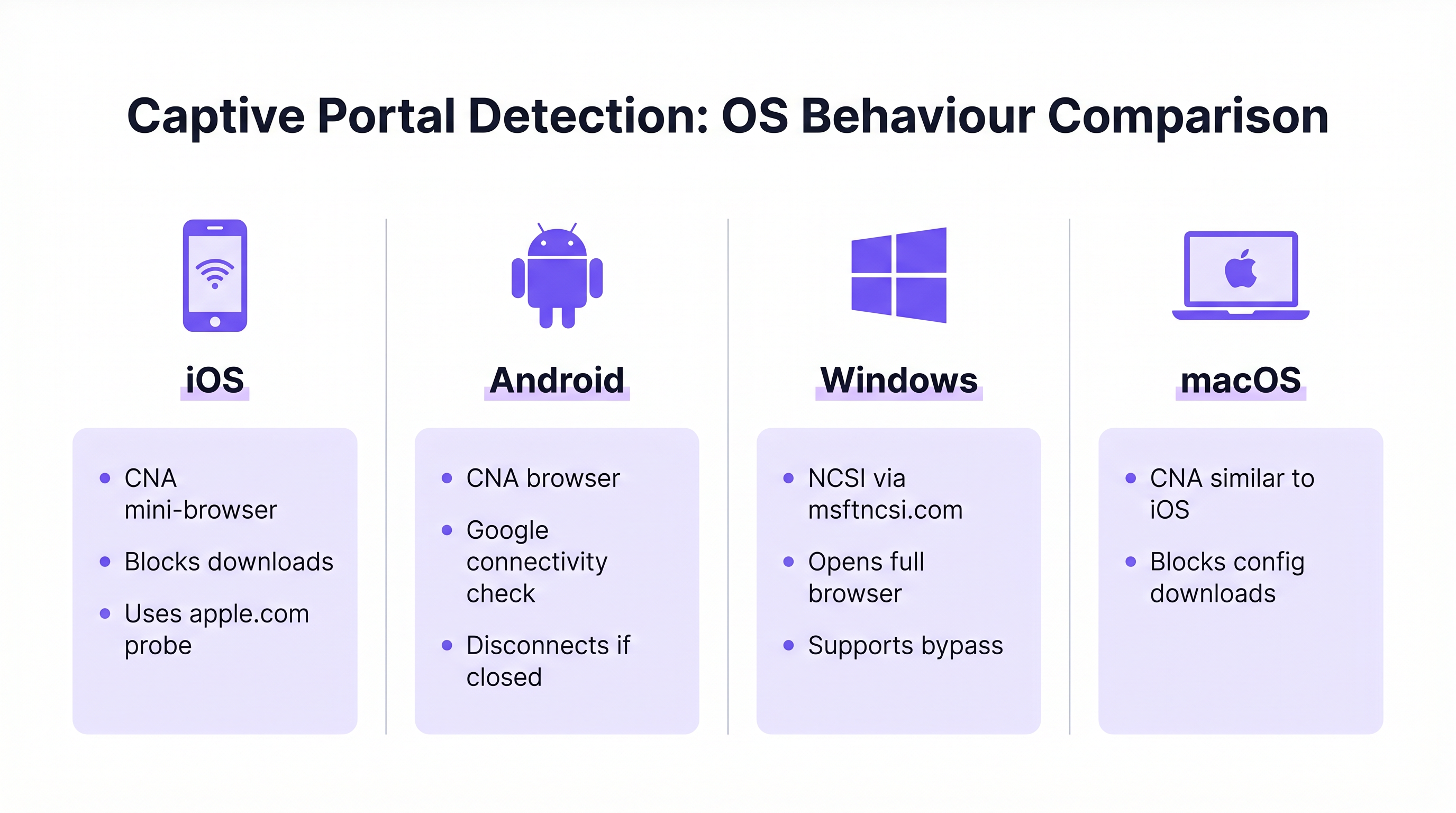
Windows utilizza il Network Connectivity Status Indicator (NCSI) per valutare l'accesso a Internet. Al momento della connessione a una rete, Windows tenta di risolvere e accedere a uno specifico dominio Microsoft, in genere www.msftncsi.com. Se questa richiesta viene intercettata e reindirizzata dalla rete, Windows identifica la presenza di un Captive Portal e avvia immediatamente il browser web predefinito per visualizzare la pagina del portale. [^1]
Una best practice fondamentale è garantire che il Captive Portal reindirizzi costantemente tutto il traffico fino al completamento dell'autenticazione. Consentire un accesso prematuro al dominio NCSI genera un falso positivo nel controllo di connettività, impedendo la visualizzazione del portale e lasciando l'utente in uno stato di "Connesso, senza internet" senza alcun percorso visibile per la risoluzione. Inoltre, Windows supporta file di provisioning che consentono la riconnessione automatica a reti future, migliorando l'esperienza per gli utenti di ritorno. [^1]
iOS e macOS: Captive Network Assistant (CNA)
I dispositivi Apple utilizzano il Captive Network Assistant (CNA), un mini-browser specializzato con funzionalità limitate, progettato specificamente per la gestione dei Captive Portal. Quando un dispositivo iOS o macOS si connette a una rete aperta, interroga specifici URL Apple (es. captive.apple.com). Se non riceve la risposta prevista, il CNA presenta automaticamente l'interfaccia del portale.
Sebbene sia efficace per le splash page di base, il CNA rappresenta una sfida significativa per l'onboarding aziendale: vieta severamente il download di file e l'installazione di profili. Questa misura di sicurezza impedisce il download diretto dei payload di configurazione necessari per l'onboarding dei certificati 802.1X. Per superare questa limitazione, le implementazioni aziendali devono integrare la tecnologia CNA Breakout, che rileva l'ambiente CNA e invita l'utente a passare a un browser completo (come Safari) per completare il processo di registrazione del certificato. [^2]
Android: Controlli di Connettività Google
I dispositivi Android eseguono controlli di connettività simili utilizzando URL ospitati da Google. Come iOS, Android utilizza spesso un ambiente browser limitato per i Captive Portal. Un comportamento degno di nota nelle versioni moderne di Android è che il browser del Captive Portal si chiude automaticamente non appena rileva l'accesso completo a Internet. Tuttavia, se un utente chiude manualmente la finestra del portale prima di aver completato l'autenticazione, Android in genere si disconnette completamente dalla rete, richiedendo all'utente di riavviare il processo di connessione. Il design del portale deve tenere conto di questo aspetto rendendo l'azione di completamento chiara e ben visibile.
| OS | Meccanismo di Rilevamento | Browser del Portale | Download di File | Rischio Principale |
|---|---|---|---|---|
| Windows | NCSI tramite msftncsi.com | Browser completo | Consentito | Falso positivo se il dominio NCSI è sbloccato |
| iOS | Probe Apple (captive.apple.com) | Mini-browser CNA | Bloccato | Il download del profilo fallisce senza CNA Breakout |
| macOS | Probe Apple (captive.apple.com) | Mini-browser CNA | Bloccato | Il download del profilo fallisce senza CNA Breakout |
| Android | Controllo connettività Google | Browser limitato | Limitato | Si disconnette se la finestra del portale viene chiusa in anticipo |
Guida all'Implementazione: Progettare il Flusso di Onboarding
Progettare un flusso di onboarding efficace richiede un equilibrio strategico tra sicurezza, conformità e comodità per l'utente. L'approccio differisce in modo significativo a seconda che il pubblico di destinazione sia composto da ospiti temporanei o personale permanente.
Guest WiFi: L'Esperienza del Captive Portal
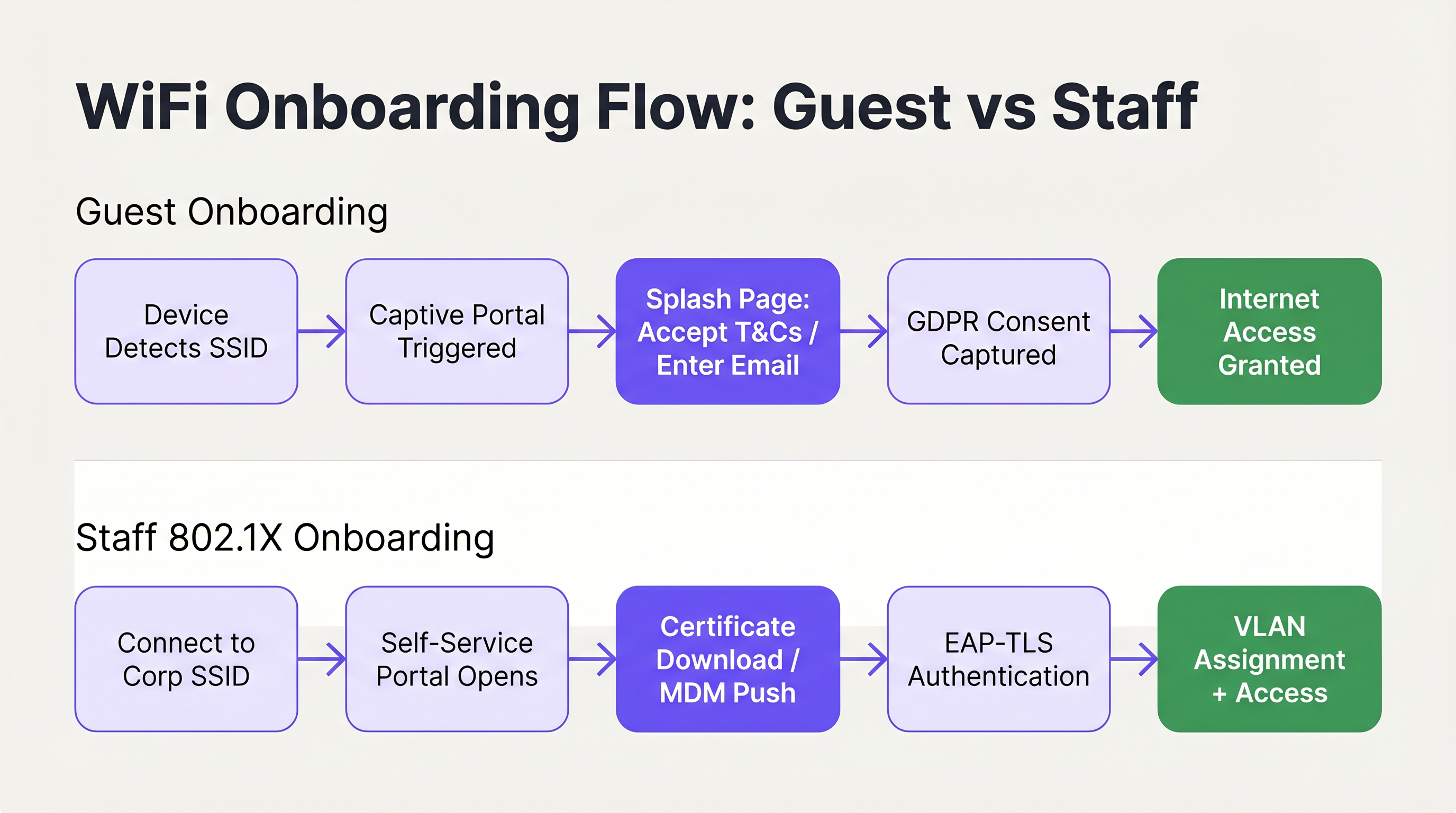
Per l'accesso degli ospiti, l'obiettivo principale è facilitare una connessione rapida e intuitiva, acquisendo al contempo i dati necessari e garantendo la conformità. L'implementazione di un Captive Portal personalizzato con il proprio brand è l'approccio standard. L'interfaccia utente deve essere pulita, ottimizzata per il touch e comunicare chiaramente le azioni richieste. L'utilizzo di soluzioni come Guest WiFi consente alle strutture di presentare una splash page professionale che guida gli utenti in modo fluido attraverso l'accettazione dei termini e delle condizioni o la fornitura di un indirizzo email.
Fondamentalmente, il flusso di onboarding deve essere allineato alle normative sulla privacy dei dati come il GDPR. Il portale deve acquisire esplicitamente il consenso dell'utente per l'elaborazione dei dati e le comunicazioni di marketing, garantendo che la raccolta dei dati sia trasparente e ridotta al minimo. Il consenso al marketing deve essere opt-in anziché preselezionato e l'informativa sulla privacy deve essere chiaramente accessibile. Inoltre, la segmentazione della rete è un requisito obbligatorio, in particolare per la conformità PCI DSS negli ambienti retail e hospitality. Il traffico degli ospiti deve essere rigorosamente isolato dalle reti aziendali interne e dai sistemi point-of-sale per mitigare i rischi di sicurezza. [^3]
Il metodo di autenticazione scelto per il portale ha un impatto diretto sia sull'esperienza utente che sulla qualità dei dati acquisiti. Gli approcci più comuni sono la registrazione tramite email (basso attrito, qualità dei dati moderata), il social login tramite OAuth (attrito moderato, alta qualità dei dati) e la verifica via SMS (maggiore attrito, altissima qualità dei dati). Per la maggior parte delle implementazioni nei settori hospitality e retail, la registrazione tramite email con un'opzione di fallback per il social login rappresenta l'equilibrio ottimale. La verifica via SMS è meglio riservarla ad ambienti in cui l'accuratezza dei dati è un obiettivo commerciale primario, come le integrazioni con i programmi fedeltà.
Nello specifico per le implementazioni nel settore Hospitality , il reindirizzamento post-autenticazione rappresenta una significativa opportunità di guadagno. Invece di concedere semplicemente l'accesso e lasciare l'utente su una pagina vuota, reindirizzatelo a una pagina di benvenuto brandizzata, a un'offerta promozionale o a un invito all'iscrizione a un programma fedeltà. È qui che l'investimento nel WiFi per gli ospiti inizia a generare valore di business diretto oltre alla connettività. Per ulteriori indicazioni su questo argomento, consultare Soluzioni WiFi Moderne per l'Hospitality che i Tuoi Ospiti Meritano .
La gestione delle sessioni è un altro aspetto spesso trascurato della UX di onboarding degli ospiti. Configurate il vostro portale per riconoscere i dispositivi di ritorno tramite indirizzo MAC e concedere l'accesso automaticamente senza richiedere il reinserimento delle credenziali. Ciò migliora drasticamente l'esperienza per i visitatori abituali ed è particolarmente prezioso negli ambienti retail dove i clienti si recano frequentemente. La durata della sessione e l'intervallo di riautenticazione dovrebbero essere calibrati in base al tipo di struttura: un hotel potrebbe impostare una sessione di 24 ore allineata al ciclo di check-in, mentre una caffetteria potrebbe utilizzare una sessione di 4 ore per gestire la congestione della rete durante i periodi di punta.
Staff WiFi: Registrazione Self-Service dei Certificati
L'onboarding dei dispositivi del personale, in particolare negli scenari Bring Your Own Device (BYOD), richiede un livello di sicurezza più solido, che in genere sfrutta IEEE 802.1X ed EAP-TLS per l'autenticazione basata su certificati. La sfida consiste nel distribuire questi certificati su dispositivi non gestiti senza sovraccaricare l'helpdesk IT.
L'architettura consigliata è un portale di onboarding self-service. Gli utenti si connettono inizialmente a un SSID di onboarding aperto e limitato. Questa rete è isolata tramite segmentazione VLAN e Access Control List (ACL), consentendo l'accesso solo al portale di registrazione e agli identity provider necessari. Il portale guida l'utente attraverso l'autenticazione con le proprie credenziali aziendali, dopodiché un certificato client univoco e un profilo di configurazione di rete vengono generati e scaricati sul dispositivo. Una volta installato il profilo, il dispositivo passa automaticamente all'SSID aziendale sicuro (utilizzando WPA3-Enterprise) e si autentica in modo trasparente utilizzando il certificato.
Per una guida tecnica dettagliata sull'integrazione di questi flussi con i servizi di identità Microsoft, fare riferimento alla Guida all'Integrazione e Configurazione dell'Autenticazione WiFi con Azure AD ed Entra ID . È inoltre rilevante comprendere come l'SD-WAN e la moderna architettura di rete interagiscono con questi flussi di onboarding; consultare I Principali Vantaggi dell'SD WAN per le Aziende Moderne per il contesto sul quadro più ampio dell'infrastruttura di rete.
Best Practice per una UX Senza Attriti
Per garantire un elevato tasso di successo alla prima connessione, gli architetti IT dovrebbero aderire alle seguenti best practice indipendenti dal fornitore, tratte da implementazioni in ambienti aziendali, hospitality e del settore pubblico.
Dare priorità a una comunicazione chiara e concisa. Gli elementi visivi all'interno del portale dovrebbero guidare l'utente in modo intuitivo, riducendo al minimo il carico cognitivo. Assicurarsi che le informazioni di contatto per l'assistenza e il supporto siano visualizzate in modo ben visibile, consentendo agli utenti di risolvere rapidamente i problemi senza frustrazioni. [^2] Gli indicatori di avanzamento sono particolarmente utili nei flussi in più fasi, come la registrazione dei certificati.
Implementare il CNA Breakout per tutti i portali self-service 802.1X. Il tentativo di forzare il download dei profili tramite il Captive Network Assistant di iOS o macOS fallirà invariabilmente, portando a immediate chiamate di supporto. Il portale deve rilevare in modo intelligente l'ambiente CNA e fornire istruzioni chiare per l'apertura di un browser completo. Questo non è un miglioramento opzionale; è un prerequisito per un'esperienza di onboarding iOS funzionale. [^2]
Utilizzare SSID nascosti per ridurre la confusione. Trasmettendo solo le reti principali per gli ospiti e quelle aziendali sicure, e nascondendo l'SSID di onboarding temporaneo, si riduce il rischio che gli utenti tentino di connettersi alla rete sbagliata. L'SSID di onboarding può essere comunicato tramite codice QR o documentazione di benvenuto.
Progettare per un'interazione touch-first. Poiché la maggior parte delle connessioni degli ospiti proviene da smartphone, i layout del portale devono utilizzare controlli ampi e facilmente toccabili, evitare scorrimenti eccessivi e suddividere flussi complessi in più pagine brevi. [^1]
Sfruttare la WiFi Analytics per un'ottimizzazione continua. Il monitoraggio dei tassi di abbandono del portale, della distribuzione dei tipi di dispositivi e dei tassi di successo della connessione fornisce i dati necessari per identificare e risolvere i punti di attrito nel percorso di onboarding. Per gli ambienti che richiedono anche l'integrazione del wayfinding fisico, Wayfinding e Sensors possono integrare il livello di WiFi Analytics per fornire un quadro completo di intelligence della struttura.
Risoluzione dei Problemi e Mitigazione dei Rischi
Anche con un flusso di onboarding ben progettato, possono sorgere dei problemi. Comprendere le modalità di guasto più comuni è essenziale per una rapida risoluzione dei problemi e una mitigazione proattiva dei rischi.
Il Captive Portal non viene visualizzato. Ciò è quasi sempre causato da un'ACL pre-autenticazione eccessivamente permissiva. Se un dispositivo riesce a raggiungere con successo gli URL di controllo della connettività specifici del proprio sistema operativo prima dell'autenticazione, il sistema operativo presumerà di avere pieno accesso a Internet e non attiverà il portale. Verificare la configurazione del walled garden e assicurarsi che i domini NCSI e i probe Apple vengano intercettati e reindirizzati fino a quando l'utente non si è completamente autenticato.
Errori di attendibilità del certificato nelle implementazioni 802.1X. Se il dispositivo non considera attendibile il certificato del server RADIUS, l'autenticazione EAP-TLS fallirà silenziosamente. L'utente visualizzerà un messaggio generico "impossibile connettersi" senza alcuna indicazione su come procedere. Il profilo di onboarding self-service deve includere esplicitamente l'intera catena di certificati della Root CA per stabilire l'attendibilità. Questa è la causa più comune di errori silenziosi 802.1X nelle implementazioni BYOD.
Gli utenti iOS non riescono a scaricare i profili di configurazione. Questo è il problema del CNA descritto in precedenza. Se il portale non ha implementato il CNA Breakout, gli utenti iOS non potranno procedere. Verificare che il meccanismo di breakout funzioni correttamente testandolo su un dispositivo iOS fisico, non solo su un simulatore.
Comportamento incoerente del portale durante il roaming SSID. Nelle implementazioni multi-sito o multi-controller, assicurarsi che la logica di reindirizzamento del Captive Portal sia coerente su tutti gli access point. Un comportamento incoerente, in cui alcuni AP reindirizzano e altri no, crea un'esperienza utente confusa e imprevedibile. Ciò è particolarmente rilevante per le catene Retail e gli hub di Trasporti in cui gli utenti si spostano tra più siti e si aspettano un'esperienza coerente.
ROI e Impatto sul Business
L'impatto sul business dell'ottimizzazione della UX di onboarding WiFi va ben oltre la comodità per l'utente. Per i dipartimenti IT aziendali, il ritorno sull'investimento primario si realizza attraverso una significativa riduzione dei costi di supporto. I ticket di helpdesk relativi al WiFi sono tra i più costosi da risolvere, richiedendo tempo al personale tecnico per problemi che, nella maggior parte dei casi, sono prevenibili attraverso una migliore progettazione e configurazione del portale.

Per le strutture che utilizzano la WiFi Analytics , un processo di onboarding fluido aumenta direttamente il volume di utenti connessi, arricchendo così i dati disponibili per l'analisi dell'affluenza, la misurazione del tempo di permanenza e le strategie di customer engagement. Negli ambienti Retail , ciò si traduce direttamente in dati più accurati sul customer journey e in un marketing mirato più efficace. Nelle strutture Hospitality , un'esperienza di connessione fluida contribuisce in modo misurabile ai punteggi di soddisfazione degli ospiti. Anche gli ambienti sanitari ne traggono notevoli vantaggi; per il contesto sull'implementazione del WiFi in ambienti regolamentati, consultare le risorse del settore Sanità .
Le seguenti metriche forniscono il framework per quantificare le prestazioni di onboarding e dimostrare il ROI:
| Metrica | Definizione | Benchmark di Riferimento |
|---|---|---|
| Tasso di Successo alla Prima Connessione | % di utenti che si connettono con successo al primo tentativo | > 95% |
| Tasso di Abbandono del Portale | % di utenti che iniziano ma non completano il flusso del portale | < 10% |
| Tempo di Connessione | Tempo medio dalla selezione dell'SSID all'accesso a Internet | < 45 secondi |
| Volume dei Ticket di Supporto WiFi | Ticket mensili di helpdesk attribuibili all'onboarding WiFi | In calo mese su mese |
| Tasso di Autoconnessione dei Visitatori di Ritorno | % di dispositivi di ritorno che si riconnettono senza reinserimento nel portale | > 80% |
Trattando l'onboarding di rete come un percorso critico della user experience piuttosto che come una mera necessità tecnica, le organizzazioni possono fornire una connettività sicura, conforme e senza attriti che supporta sia gli obiettivi operativi che risultati di business misurabili. Per ulteriore contesto su come l'infrastruttura degli access point sia alla base di queste esperienze, consultare Definizione di Wireless Access Point: La Tua Guida Definitiva per il 2026 .
[^1]: Microsoft Learn. "Rilevamento del Captive Portal ed Esperienza Utente in Windows." https://learn.microsoft.com/en-us/windows-hardware/drivers/mobilebroadband/captive-portals [^2]: SecureW2. "Best Practice per l'Onboarding Wi-Fi e il Captive Portal." https://securew2.com/blog/wi-fi-onboarding-captive-portal [^3]: Purple. "Guest WiFi vs Staff WiFi: Best Practice per la Segmentazione di Rete." https://www.purple.ai/en-GB/guides/guest-wifi-vs-staff-wifi-segmentation
Termini chiave e definizioni
Captive Portal
A web page that a user of a public-access network is obliged to view and interact with before internet access is granted. It is used to enforce acceptable use policies, capture consent, authenticate users, or present branded content.
IT teams deploy captive portals as the primary gateway for guest network access to ensure compliance, gather analytics, and deliver branded experiences.
NCSI (Network Connectivity Status Indicator)
A Windows feature that performs active and passive tests to determine internet connectivity, primarily by attempting to reach specific Microsoft domains such as msftncsi.com.
Understanding NCSI is crucial for ensuring that Windows devices correctly detect and display the captive portal rather than reporting a false positive 'connected' status.
CNA (Captive Network Assistant)
A limited-functionality mini-browser utilised by iOS and macOS to display captive portals. It intentionally restricts features including file downloads, cookie persistence, and JavaScript execution for security reasons.
The CNA is the primary technical hurdle when deploying 802.1X configuration profiles to Apple devices, necessitating specific CNA Breakout strategies.
CNA Breakout
A technical mechanism used within a captive portal to detect the presence of a limited CNA browser and prompt the user to open the portal page in a fully featured browser such as Safari or Chrome.
This is a mandatory requirement for any self-service onboarding flow that requires the user to download and install a network configuration profile on an iOS or macOS device.
IEEE 802.1X
An IEEE Standard for port-based Network Access Control (PNAC) that provides an authentication mechanism to devices wishing to attach to a LAN or WLAN, requiring successful authentication before network access is granted.
This is the enterprise standard for securing staff and corporate networks, moving beyond shared passwords to individual identity verification via RADIUS.
EAP-TLS (Extensible Authentication Protocol - Transport Layer Security)
A highly secure authentication protocol used within 802.1X that requires both the client device and the authentication server to verify each other using digital certificates, providing mutual authentication.
Considered the gold standard for enterprise WiFi security, it eliminates credential theft risks by relying on cryptographic certificates rather than passwords.
VLAN (Virtual Local Area Network)
A logical subnetwork that groups a collection of devices from different physical LANs, allowing network administrators to partition a single switched network to match functional and security requirements.
VLANs are essential for segmenting guest traffic from corporate traffic, ensuring PCI DSS compliance and overall network security in multi-tenant environments.
Walled Garden
A restricted pre-authentication network environment that controls which IP addresses or domains a user can reach before they have fully authenticated through the captive portal.
Configuring the walled garden correctly is vital: it must allow access to the portal server and identity providers while blocking general internet access to ensure OS portal detection triggers correctly.
WPA3-Enterprise
The latest generation of the Wi-Fi Protected Access security protocol for enterprise networks, offering enhanced protection through 192-bit security mode and improved key establishment mechanisms.
WPA3-Enterprise is the recommended security protocol for corporate SSIDs, particularly when combined with 802.1X and EAP-TLS for certificate-based authentication.
RADIUS (Remote Authentication Dial-In User Service)
A networking protocol that provides centralised authentication, authorisation, and accounting (AAA) management for users who connect to a network service.
The RADIUS server is the backbone of 802.1X deployments, validating client certificates and determining which VLAN to assign to each authenticated device.
Casi di studio
A 400-room luxury hotel is deploying a new guest WiFi network and a secure staff network. They currently experience high volumes of support calls from guests unable to see the login page, and staff struggle to configure their personal phones for the secure network. How should the IT architect design the onboarding flow to resolve both issues?
For the guest network, the architect must audit the Walled Garden settings on the wireless controller. Pre-authentication ACLs must strictly block access to OS connectivity check URLs — specifically msftncsi.com for Windows devices and captive.apple.com for Apple devices — and redirect all HTTP and HTTPS traffic to the Purple captive portal. This guarantees the portal triggers reliably across all device types. The portal itself should be branded to the hotel, require only an email address and terms acceptance, and redirect post-authentication to a welcome page with the hotel's amenity information.
For the staff network, the architect should implement a self-service onboarding portal on an isolated VLAN. Staff connect to a hidden onboarding SSID, authenticate via the portal using their Active Directory or Entra ID credentials, and download a configuration profile. The portal must implement CNA Breakout to ensure iOS users are prompted to open Safari to download the profile, bypassing the restrictive Apple mini-browser. The profile must include the Root CA certificate for the RADIUS server. Once installed, the device auto-connects to the WPA3-Enterprise staff SSID using EAP-TLS and is assigned to the appropriate VLAN based on their identity group.
A national retail chain with 200 stores is updating its in-store WiFi to provide seamless guest access that encourages loyalty app downloads, while ensuring strict compliance with PCI DSS for their point-of-sale systems. What architectural decisions must be made regarding the onboarding UX?
The architecture must enforce strict network segmentation as its foundation. The guest WiFi must operate on a dedicated VLAN, completely isolated from the corporate and POS VLANs through both VLAN tagging and ACL enforcement at the distribution layer. No routing path should exist between the guest VLAN and the PCI-regulated environment.
The guest onboarding flow will utilise a captive portal that captures GDPR-compliant consent before granting access. The form should be minimal — email address, opt-in marketing consent checkbox, and terms acceptance. The post-authentication redirect should send users directly to the relevant app store page for the loyalty application, with a clear call to action. The captive portal traffic itself must be served over HTTPS to protect any user data entered during the onboarding process. Returning customers should be recognised by MAC address and granted access without re-entering details, improving the repeat-visit experience.
Analisi degli scenari
Q1. Your helpdesk is receiving reports that users on Windows laptops are connecting to the guest network, but the splash page never appears. They see a 'Connected, no internet' status in the system tray. What is the most likely configuration error, and how do you resolve it?
💡 Suggerimento:Consider how Windows determines whether it is behind a captive portal or simply offline — and what specific domain it uses to make that determination.
Mostra l'approccio consigliato
The most likely cause is an overly permissive Walled Garden configuration. If the pre-authentication ACLs allow traffic to Microsoft's NCSI domain (msftncsi.com), Windows successfully resolves the connectivity check and assumes it has full internet access, so the captive portal browser is never launched. The resolution is to tighten the Walled Garden ACLs to intercept and redirect requests to msftncsi.com until the user has completed portal authentication. Only the portal server, identity provider, and essential CDN resources should be whitelisted in the pre-auth policy.
Q2. You are designing a self-service onboarding flow for university students to connect their personal iPhones to the secure eduroam (802.1X) network. What specific technical mechanism must you include in the portal design, and why is it necessary?
💡 Suggerimento:Think about the limitations of the default browser that automatically appears on iOS when connecting to an open network.
Mostra l'approccio consigliato
You must implement CNA Breakout technology. When an iPhone connects to an open network, iOS automatically opens the Captive Network Assistant (CNA), a restricted mini-browser that intentionally blocks file downloads and profile installations as a security measure. Without CNA Breakout, the student will be unable to download the 802.1X configuration profile, and the onboarding will fail silently. The portal must detect the CNA environment and present a clear prompt instructing the user to open the portal URL in Safari, where the full browser allows the profile to be downloaded and installed.
Q3. A retail client wants to use their guest WiFi to collect customer emails for marketing, but they are concerned about PCI DSS compliance regarding their in-store payment terminals on the same physical network infrastructure. What architectural requirement is mandatory, and what specific control enforces it?
💡 Suggerimento:How do you ensure that a compromised guest device cannot reach the payment systems, even if they share the same physical access points?
Mostra l'approccio consigliato
Strict network segmentation is mandatory. The guest WiFi network must be placed on a completely separate VLAN from the corporate and point-of-sale (POS) networks. Access Control Lists (ACLs) must be applied at the distribution or core layer to ensure that no traffic can route between the guest VLAN and the PCI-regulated environment. This isolation must be enforced at the network layer, not merely at the SSID level, since SSID-only separation is insufficient for PCI DSS compliance. The guest VLAN should only have outbound internet access, with no routing paths to any internal subnets.
Q4. After deploying a self-service 802.1X onboarding portal, staff members report that their personal Android phones successfully downloaded and installed the configuration profile, but their iPhones show 'Unable to join the network' when attempting to connect to the corporate SSID. What is the most likely cause?
💡 Suggerimento:The profile installed successfully, so the issue is not with the download. Think about what happens during the EAP-TLS handshake when the device attempts to authenticate.
Mostra l'approccio consigliato
The most likely cause is a missing Root CA certificate in the configuration profile. During EAP-TLS authentication, the device must trust the certificate presented by the RADIUS server. If the Root CA that signed the RADIUS server certificate is not included in the onboarding profile, iOS will reject the RADIUS certificate and fail the authentication silently. Android may have the Root CA in its system trust store by default, which is why Android devices succeed while iOS devices fail. The resolution is to update the configuration profile to include the complete certificate trust chain, including the Root CA, before redistributing it to iOS users.
Punti chiave
- ✓A frictionless WiFi network onboarding UX is a measurable operational requirement: poor onboarding directly increases helpdesk ticket volume and reduces guest engagement.
- ✓Windows, iOS, Android, and macOS use fundamentally different mechanisms to detect captive portals — designing and testing for each OS is non-negotiable.
- ✓The iOS Captive Network Assistant (CNA) blocks file downloads, making CNA Breakout technology a prerequisite for any 802.1X certificate-based onboarding flow on Apple devices.
- ✓Guest onboarding must balance rapid access with GDPR-compliant consent capture and PCI DSS-mandated network segmentation.
- ✓Staff BYOD onboarding should leverage self-service portals with EAP-TLS certificate deployment to eliminate helpdesk calls and achieve zero-touch provisioning.
- ✓The three most common onboarding failures are: misconfigured walled gardens, missing CNA Breakout, and incomplete certificate trust chains — all preventable through proper design and pre-launch testing.
- ✓Track first-connection success rate, portal abandonment rate, and WiFi support ticket volume as the core KPIs for onboarding performance and ROI justification.




