

नेटवर्क ऑनबोर्डिंग UX: अडथळाविरहित WiFi सेटअप अनुभव डिझाइन करणे
हे मार्गदर्शक अडथळाविरहित WiFi नेटवर्क ऑनबोर्डिंग UX डिझाइन करण्यासाठी एक व्यापक तांत्रिक फ्रेमवर्क प्रदान करते, ज्यामध्ये iOS, Android, Windows आणि macOS वरील Captive Portal शोध यंत्रणा समाविष्ट आहे आणि 802.1X कर्मचारी नेटवर्कसाठी सेल्फ-सर्व्हिस प्रमाणपत्र नोंदणीचे तपशील दिले आहेत. हे IT व्यवस्थापक, नेटवर्क आर्किटेक्ट्स आणि वेन्यू ऑपरेशन्स डायरेक्टर्सना हेल्पडेस्क ओव्हरहेड कमी करण्यासाठी, पहिल्या कनेक्शनच्या यशाचा दर सुधारण्यासाठी आणि हॉस्पिटॅलिटी, रिटेल आणि कॅम्पस वातावरणात GDPR आणि PCI DSS अनुपालन राखण्यासाठी कृतीयोग्य धोरणांसह सुसज्ज करते.
🎧 हे मार्गदर्शक ऐका
ट्रान्सक्रिप्ट पहा
कार्यकारी सारांश
ऑनबोर्डिंग अनुभव हा वापरकर्ता आणि तुमच्या नेटवर्क इन्फ्रास्ट्रक्चरमधील महत्त्वाचा पहिला टचपॉइंट आहे. वेन्यू ऑपरेटर्स आणि एंटरप्राइझ IT टीम्ससाठी, अडथळाविरहित WiFi नेटवर्क ऑनबोर्डिंग UX ही केवळ एक सोय नाही — ती एक मूलभूत ऑपरेशनल गरज आहे जी थेट सपोर्ट ओव्हरहेड आणि वापरकर्त्याच्या समाधानावर परिणाम करते. जेव्हा पाहुणे किंवा कर्मचारी कनेक्ट होण्यासाठी संघर्ष करतात, तेव्हा त्याचा तात्काळ परिणाम म्हणजे हेल्पडेस्क तिकिटांचा ओघ, अर्धवट सोडलेली कनेक्शन्स आणि वेन्यू किंवा संस्थेबद्दलची खालावलेली प्रतिमा.
हे मार्गदर्शक अखंड WiFi सेटअप अनुभव डिझाइन करण्यासाठी एक व्यापक तांत्रिक फ्रेमवर्क प्रदान करते, जे iOS, Android, Windows आणि macOS वरील Captive Portal शोधाच्या गुंतागुंतीचे निराकरण करते, तसेच 802.1X नेटवर्कसाठी सेल्फ-सर्व्हिस प्रमाणपत्र नोंदणीच्या अंमलबजावणीचा तपशील देते. येथे वर्णन केलेली धोरणे अवलंबून, IT लीडर्स सपोर्ट ओव्हरहेड लक्षणीयरीत्या कमी करू शकतात, सुरक्षा अनुपालन वाढवू शकतात आणि सर्व डिव्हाइस प्रकारांमध्ये मजबूत प्रथम-कनेक्शन यश दर सुनिश्चित करू शकतात. तुम्ही हॉस्पिटॅलिटी मालमत्ता, रिटेल वातावरण किंवा सार्वजनिक क्षेत्रातील कॅम्पस व्यवस्थापित करत असाल तरीही, तत्त्वे सुसंगत राहतात: डिव्हाइससाठी डिझाइन करा, अनुपालनासाठी डिझाइन करा आणि वापरकर्त्यासाठी डिझाइन करा.
तांत्रिक सखोल विश्लेषण: Captive Portal शोधाची यंत्रणा
वेगवेगळ्या ऑपरेटिंग सिस्टम्स Captive Portal शोध कशा प्रकारे हाताळतात हे समजून घेणे विश्वसनीय ऑनबोर्डिंग फ्लो डिझाइन करण्यासाठी आवश्यक आहे. मूळ यंत्रणा प्लॅटफॉर्मनुसार लक्षणीयरीत्या बदलतात, ज्यामुळे योग्यरित्या व्यवस्थापित न केल्यास अनेकदा विसंगत वापरकर्ता अनुभव येतात.
Windows: Network Connectivity Status Indicator (NCSI)
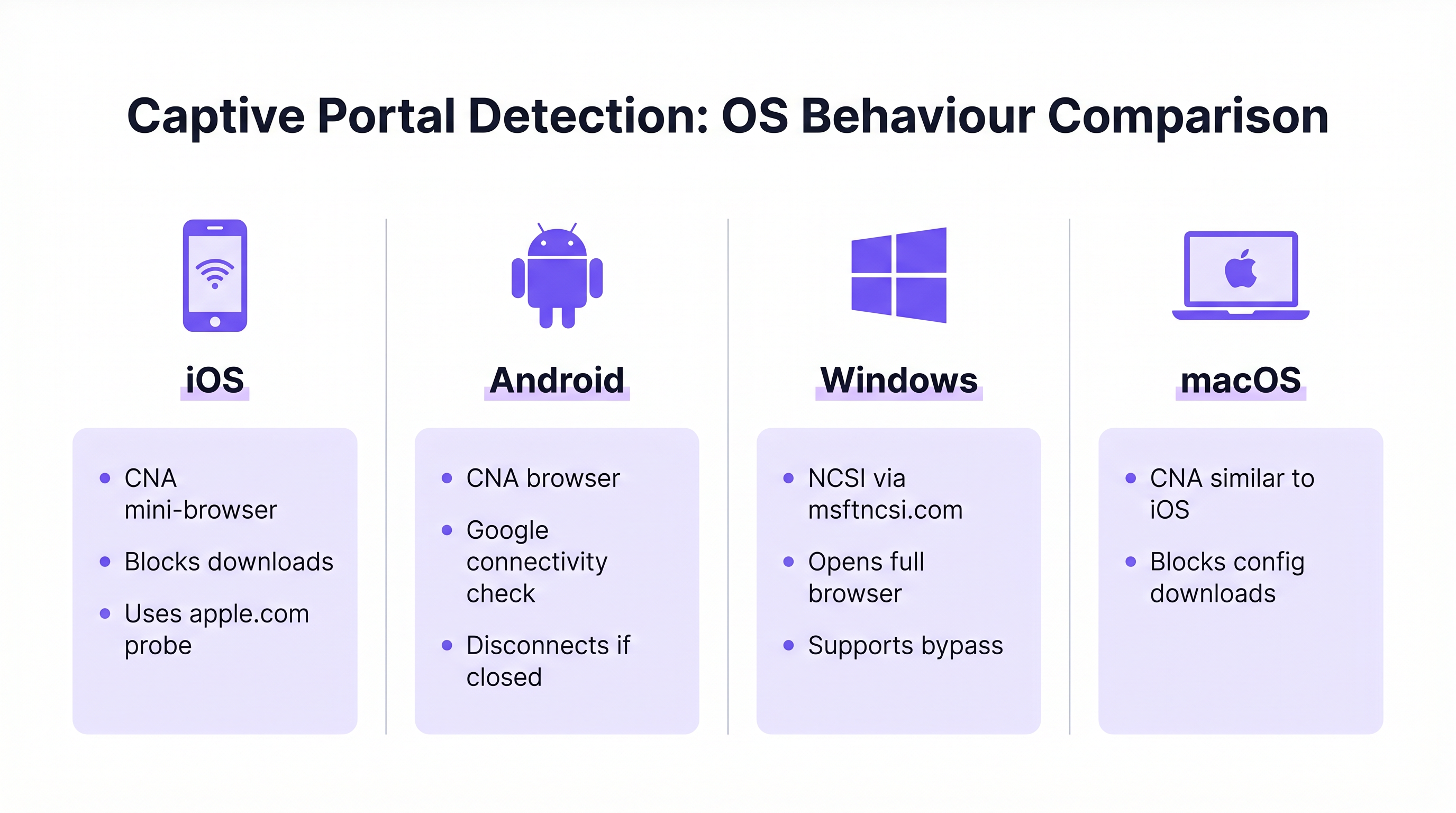
Windows इंटरनेट प्रवेशाचे मूल्यमापन करण्यासाठी Network Connectivity Status Indicator (NCSI) चा वापर करते. नेटवर्कशी कनेक्ट झाल्यावर, Windows एका विशिष्ट Microsoft डोमेनवर, सामान्यतः www.msftncsi.com वर पोहोचण्याचा आणि प्रवेश करण्याचा प्रयत्न करते. जर ही विनंती नेटवर्कद्वारे अडवली गेली आणि पुनर्निर्देशित (redirect) केली गेली, तर Windows Captive Portal ची उपस्थिती ओळखते आणि पोर्टल पृष्ठ प्रदर्शित करण्यासाठी त्वरित डीफॉल्ट वेब ब्राउझर लाँच करते. [^1]
एक महत्त्वाची सर्वोत्तम पद्धत म्हणजे प्रमाणीकरण पूर्ण होईपर्यंत Captive Portal सर्व ट्रॅफिक सातत्याने पुनर्निर्देशित करत असल्याची खात्री करणे. NCSI डोमेनला अकाली प्रवेश दिल्यास चुकीची कनेक्टिव्हिटी तपासणी होते, ज्यामुळे पोर्टल दिसण्यापासून रोखले जाते आणि वापरकर्ता कोणत्याही दृश्यमान निराकरणाशिवाय "कनेक्टेड, इंटरनेट नाही" अशा स्थितीत राहतो. शिवाय, Windows प्रोव्हिजनिंग फाइल्सना सपोर्ट करते ज्या भविष्यातील नेटवर्कशी स्वयंचलित रीकनेक्शन सक्षम करतात, ज्यामुळे परत येणाऱ्या वापरकर्त्यांचा अनुभव सुधारतो. [^1]
iOS आणि macOS: Captive Network Assistant (CNA)
Apple डिव्हाइसेस Captive Network Assistant (CNA) चा वापर करतात, जो विशेषतः Captive Portal हाताळण्यासाठी डिझाइन केलेला एक मर्यादित-कार्यक्षमता असलेला मिनी-ब्राउझर आहे. जेव्हा एखादे iOS किंवा macOS डिव्हाइस ओपन नेटवर्कशी कनेक्ट होते, तेव्हा ते विशिष्ट Apple URLs (उदा. captive.apple.com) तपासते. जर अपेक्षित प्रतिसाद मिळाला नाही, तर CNA स्वयंचलितपणे पोर्टल इंटरफेस सादर करते.
बेसिक स्प्लॅश पेजेससाठी प्रभावी असले तरी, CNA एंटरप्राइझ ऑनबोर्डिंगसाठी एक मोठे आव्हान उभे करते: ते फाइल डाउनलोड आणि प्रोफाइल इंस्टॉलेशनवर कडक बंदी घालते. ही सुरक्षा उपाययोजना 802.1X प्रमाणपत्र ऑनबोर्डिंगसाठी आवश्यक कॉन्फिगरेशन पेलोड्स थेट डाउनलोड करण्यास प्रतिबंध करते. या मर्यादेवर मात करण्यासाठी, एंटरप्राइझ उपयोजनांनी CNA Breakout तंत्रज्ञान लागू करणे आवश्यक आहे, जे CNA वातावरण शोधते आणि वापरकर्त्याला प्रमाणपत्र नोंदणी प्रक्रिया पूर्ण करण्यासाठी पूर्ण ब्राउझरवर (जसे की Safari) जाण्यास प्रवृत्त करते. [^2]
Android: Google कनेक्टिव्हिटी तपासणी
Android डिव्हाइसेस Google-होस्ट केलेल्या URLs वापरून तत्सम कनेक्टिव्हिटी तपासणी करतात. iOS प्रमाणेच, Android अनेकदा Captive Portal साठी मर्यादित ब्राउझर वातावरणाचा वापर करते. आधुनिक Android आवृत्त्यांमधील एक उल्लेखनीय वर्तन असे आहे की एकदा पूर्ण इंटरनेट प्रवेश मिळाल्यावर Captive Portal ब्राउझर स्वयंचलितपणे बंद होतो. तथापि, जर वापरकर्त्याने प्रमाणीकरण पूर्ण करण्यापूर्वी पोर्टल विंडो मॅन्युअली बंद केली, तर Android सहसा नेटवर्कवरून पूर्णपणे डिस्कनेक्ट होते, ज्यामुळे वापरकर्त्याला कनेक्शन प्रक्रिया पुन्हा सुरू करावी लागते. पोर्टल डिझाइनमध्ये पूर्ण करण्याची कृती स्पष्ट आणि ठळक ठेवून याचा विचार केला पाहिजे.
| OS | शोध यंत्रणा | पोर्टल ब्राउझर | फाइल डाउनलोड | मुख्य जोखीम |
|---|---|---|---|---|
| Windows | msftncsi.com द्वारे NCSI | पूर्ण ब्राउझर | अनुमती आहे | NCSI डोमेन अनब्लॉक असल्यास चुकीचा पॉझिटिव्ह |
| iOS | Apple प्रोब (captive.apple.com) | CNA मिनी-ब्राउझर | ब्लॉक केलेले | CNA Breakout शिवाय प्रोफाइल डाउनलोड अयशस्वी |
| macOS | Apple प्रोब (captive.apple.com) | CNA मिनी-ब्राउझर | ब्लॉक केलेले | CNA Breakout शिवाय प्रोफाइल डाउनलोड अयशस्वी |
| Android | Google कनेक्टिव्हिटी तपासणी | मर्यादित ब्राउझर | प्रतिबंधित | पोर्टल विंडो लवकर बंद केल्यास डिस्कनेक्ट होते |
अंमलबजावणी मार्गदर्शक: ऑनबोर्डिंग फ्लो डिझाइन करणे
प्रभावी ऑनबोर्डिंग फ्लो डिझाइन करण्यासाठी सुरक्षा, अनुपालन आणि वापरकर्त्याची सोय यांच्यात धोरणात्मक संतुलन राखणे आवश्यक आहे. लक्ष्यित प्रेक्षक तात्पुरते पाहुणे आहेत की कायमस्वरूपी कर्मचारी आहेत यावर अवलंबून दृष्टिकोन लक्षणीयरीत्या बदलतो.
गेस्ट WiFi: Captive Portal अनुभव
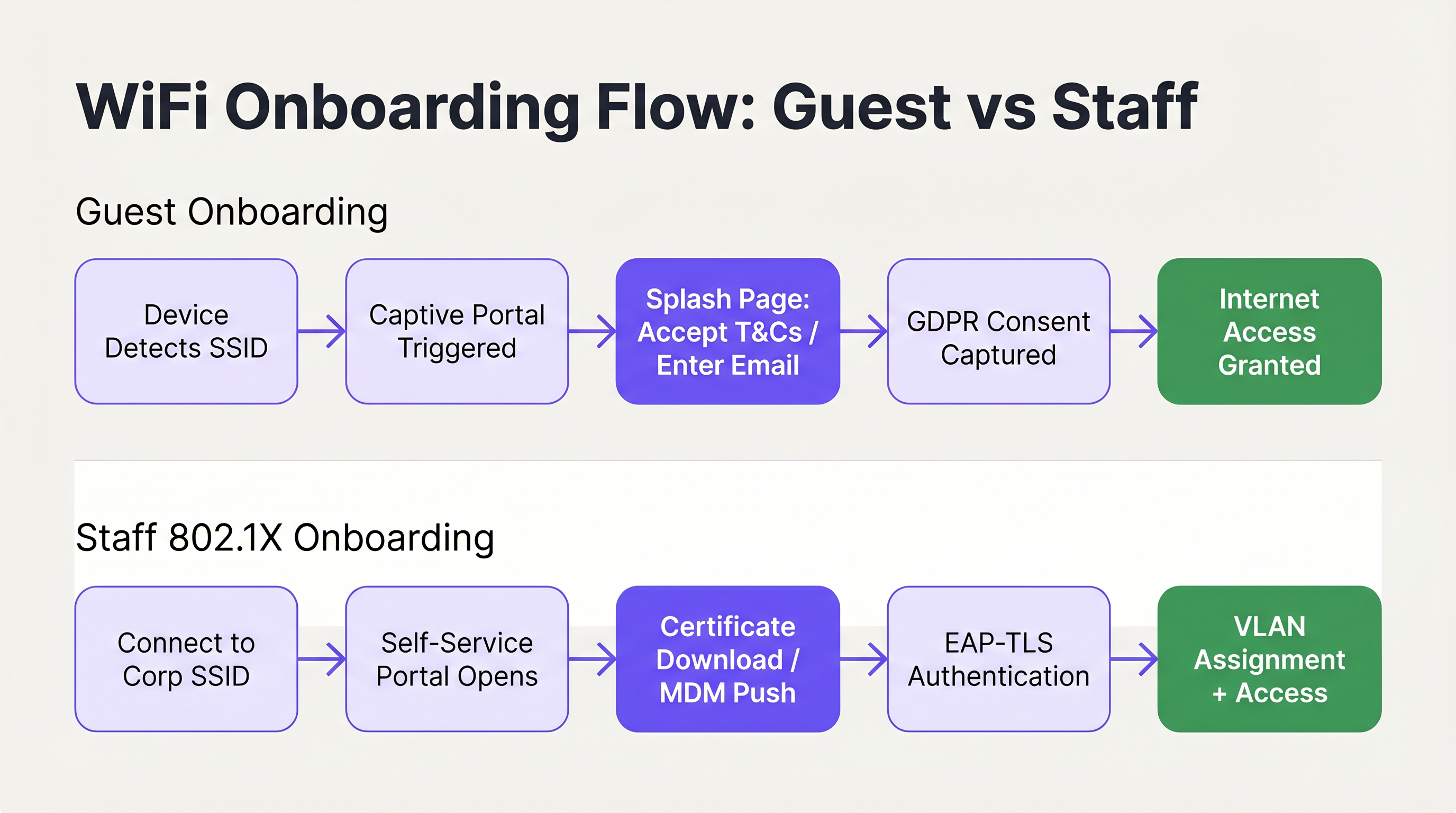
गेस्ट ॲक्सेससाठी, आवश्यक डेटा कॅप्चर करताना आणि अनुपालन सुनिश्चित करताना जलद, अंतर्ज्ञानी कनेक्शन सुलभ करणे हे प्राथमिक उद्दिष्ट आहे. ब्रँडेड Captive Portal तैनात करणे हा मानक दृष्टिकोन आहे. वापरकर्ता इंटरफेस स्वच्छ, टच-फ्रेंडली असावा आणि आवश्यक कृती स्पष्टपणे संवादित केल्या पाहिजेत. Guest WiFi सारख्या सोल्यूशन्सचा वापर केल्याने वेन्यूना एक प्रोफेशनल स्प्लॅश पेज सादर करण्याची अनुमती मिळते जे वापरकर्त्यांना अटी आणि शर्तींच्या स्वीकृती किंवा ईमेल पत्ता प्रदान करण्याच्या प्रक्रियेतून अखंडपणे मार्गदर्शन करते.
महत्त्वाचे म्हणजे, ऑनबोर्डिंग फ्लो GDPR सारख्या डेटा गोपनीयता नियमांशी सुसंगत असणे आवश्यक आहे. पोर्टलने डेटा प्रोसेसिंग आणि मार्केटिंग संवादांसाठी वापरकर्त्याची संमती स्पष्टपणे कॅप्चर केली पाहिजे, डेटा संकलन पारदर्शक आणि किमान असेल याची खात्री केली पाहिजे. मार्केटिंग संमती ही प्री-टिक्ड असण्याऐवजी ऑप्ट-इन असावी आणि गोपनीयता धोरण स्पष्टपणे उपलब्ध असावे. शिवाय, नेटवर्क सेगमेंटेशन ही एक अनिवार्य गरज आहे, विशेषतः रिटेल आणि हॉस्पिटॅलिटी वातावरणात PCI DSS अनुपालनासाठी. सुरक्षा जोखीम कमी करण्यासाठी गेस्ट ट्रॅफिक अंतर्गत कॉर्पोरेट नेटवर्क आणि पॉइंट-ऑफ-सेल सिस्टमपासून काटेकोरपणे वेगळे केले पाहिजे. [^3]
पोर्टलसाठी निवडलेली प्रमाणीकरण पद्धत वापरकर्ता अनुभव आणि कॅप्चर केलेल्या डेटाची गुणवत्ता या दोन्हीवर थेट परिणाम करते. सर्वात सामान्य दृष्टिकोन म्हणजे ईमेल नोंदणी (कमी अडथळा, मध्यम डेटा गुणवत्ता), OAuth द्वारे सोशल लॉगिन (मध्यम अडथळा, उच्च डेटा गुणवत्ता) आणि SMS पडताळणी (जास्त अडथळा, सर्वोच्च डेटा गुणवत्ता). बहुतेक हॉस्पिटॅलिटी आणि रिटेल उपयोजनांसाठी, पर्यायी सोशल लॉगिन फॉलबॅकसह ईमेल नोंदणी हा इष्टतम समतोल दर्शवतो. SMS पडताळणी अशा वातावरणासाठी सर्वोत्तम आहे जिथे डेटा अचूकता हे प्राथमिक व्यावसायिक उद्दिष्ट आहे, जसे की लॉयल्टी प्रोग्राम इंटिग्रेशन.
विशेषतः हॉस्पिटॅलिटी उपयोजनांसाठी, प्रमाणीकरणानंतरचे पुनर्निर्देशन ही उत्पन्नाची एक मोठी संधी आहे. वापरकर्त्याला केवळ प्रवेश देऊन रिकाम्या पृष्ठावर सोडण्याऐवजी, ब्रँडेड स्वागत पृष्ठावर, प्रमोशनल ऑफरवर किंवा लॉयल्टी प्रोग्राम नोंदणी प्रॉम्प्टवर पुनर्निर्देशित करा. येथेच गेस्ट WiFi गुंतवणूक कनेक्टिव्हिटीच्या पलीकडे थेट व्यावसायिक मूल्य निर्माण करण्यास सुरवात करते. या विषयावरील अधिक मार्गदर्शनासाठी, Modern Hospitality WiFi Solutions Your Guests Deserve पहा.
सत्र व्यवस्थापन (Session management) हा गेस्ट ऑनबोर्डिंग UX चा आणखी एक वारंवार दुर्लक्षित केलेला पैलू आहे. तुमचे पोर्टल MAC ॲड्रेसद्वारे परत येणाऱ्या डिव्हाइसेसना ओळखण्यासाठी कॉन्फिगर करा आणि क्रेडेंशियल पुन्हा न भरता स्वयंचलितपणे प्रवेश द्या. यामुळे वारंवार येणाऱ्या अभ्यागतांचा अनुभव नाटकीयरित्या सुधारतो आणि रिटेल वातावरणात हे विशेषतः मौल्यवान आहे जिथे ग्राहक वारंवार भेट देतात. सत्राचा कालावधी आणि पुन्हा-प्रमाणीकरण अंतराल वेन्यू प्रकारानुसार कॅलिब्रेट केले जावे: हॉटेल चेक-इन सायकलशी सुसंगत 24-तासांचे सत्र सेट करू शकते, तर कॉफी शॉप गर्दीच्या काळात नेटवर्कची गर्दी व्यवस्थापित करण्यासाठी 4-तासांचे सत्र वापरू शकते.
कर्मचारी WiFi: सेल्फ-सर्व्हिस प्रमाणपत्र नोंदणी
कर्मचारी डिव्हाइसेस ऑनबोर्ड करण्यासाठी, विशेषतः Bring Your Own Device (BYOD) परिस्थितीत, अधिक मजबूत सुरक्षा स्थिती आवश्यक असते, जी सामान्यतः प्रमाणपत्र-आधारित प्रमाणीकरणासाठी IEEE 802.1X आणि EAP-TLS चा लाभ घेते. IT हेल्पडेस्कवर ताण न पडता अनमॅनेज्ड डिव्हाइसेसवर ही प्रमाणपत्रे तैनात करणे हे आव्हान आहे.
शिफारस केलेले आर्किटेक्चर म्हणजे सेल्फ-सर्व्हिस ऑनबोर्डिंग पोर्टल. वापरकर्ते सुरुवातीला एका ओपन, प्रतिबंधित ऑनबोर्डिंग SSID शी कनेक्ट होतात. हे नेटवर्क VLAN सेगमेंटेशन आणि Access Control Lists (ACLs) वापरून वेगळे केले जाते, जे केवळ नोंदणी पोर्टल आणि आवश्यक ओळख प्रदात्यांना प्रवेश देते. पोर्टल वापरकर्त्याला त्यांच्या कॉर्पोरेट क्रेडेंशियलसह प्रमाणीकरण करण्यासाठी मार्गदर्शन करते, त्यानंतर एक युनिक क्लायंट प्रमाणपत्र आणि नेटवर्क कॉन्फिगरेशन प्रोफाइल तयार केले जाते आणि डिव्हाइसवर डाउनलोड केले जाते. एकदा प्रोफाइल स्थापित झाल्यानंतर, डिव्हाइस स्वयंचलितपणे सुरक्षित कॉर्पोरेट SSID वर (WPA3-Enterprise वापरून) ट्रान्झिशन होते आणि प्रमाणपत्राचा वापर करून पारदर्शकपणे प्रमाणीकृत होते.
Microsoft आयडेंटिटी सर्व्हिसेससह या फ्लोच्या एकत्रीकरणावरील तपशीलवार तांत्रिक माहितीसाठी, Azure AD and Entra ID WiFi Authentication: Integration and Configuration Guide पहा. SD-WAN आणि आधुनिक नेटवर्क आर्किटेक्चर या ऑनबोर्डिंग फ्लोशी कसे संवाद साधतात हे समजून घेणे देखील संबंधित आहे; व्यापक नेटवर्क इन्फ्रास्ट्रक्चरच्या संदर्भासाठी The Core SD WAN Benefits for Modern Businesses पहा.
अडथळाविरहित UX साठी सर्वोत्तम पद्धती
उच्च प्रथम-कनेक्शन यश दर सुनिश्चित करण्यासाठी, IT आर्किटेक्ट्सनी एंटरप्राइझ, हॉस्पिटॅलिटी आणि सार्वजनिक क्षेत्रातील वातावरणातील उपयोजनांमधून घेतलेल्या खालील वेंडर-न्यूट्रल सर्वोत्तम पद्धतींचे पालन केले पाहिजे.
स्पष्ट आणि संक्षिप्त संवादाला प्राधान्य द्या. पोर्टल मधील व्हिज्युअल घटकांनी वापरकर्त्याला अंतर्ज्ञानी मार्गदर्शन केले पाहिजे, ज्यामुळे मानसिक ताण कमी होईल. मदत आणि सपोर्ट संपर्क माहिती ठळकपणे प्रदर्शित केली आहे याची खात्री करा, ज्यामुळे वापरकर्ते निराश न होता समस्यांचे त्वरित निराकरण करू शकतील. [^2] प्रमाणपत्र नोंदणी सारख्या बहु-चरण फ्लोमध्ये प्रगती दर्शक (Progress indicators) विशेषतः मौल्यवान असतात.
सर्व 802.1X सेल्फ-सर्व्हिस पोर्टलसाठी CNA Breakout लागू करा. iOS किंवा macOS Captive Network Assistant द्वारे प्रोफाइल डाउनलोड सक्तीने करण्याचा प्रयत्न केल्यास तो नेहमीच अयशस्वी होईल, ज्यामुळे त्वरित सपोर्ट कॉल्स येतील. पोर्टलने हुशारीने CNA वातावरण शोधले पाहिजे आणि पूर्ण ब्राउझर उघडण्यासाठी स्पष्ट सूचना दिल्या पाहिजेत. ही पर्यायी सुधारणा नाही; हा कार्यात्मक iOS ऑनबोर्डिंग अनुभवासाठी एक पूर्वअपेक्षित घटक आहे. [^2]
गोंधळ कमी करण्यासाठी लपविलेले SSIDs वापरा. केवळ प्राथमिक गेस्ट आणि सुरक्षित कॉर्पोरेट नेटवर्क्स ब्रॉडकास्ट करून आणि तात्पुरते ऑनबोर्डिंग SSID लपवून, तुम्ही वापरकर्त्यांनी चुकीच्या नेटवर्कशी कनेक्ट होण्याचा प्रयत्न करण्याची जोखीम कमी करता. ऑनबोर्डिंग SSID QR कोड किंवा स्वागत दस्तऐवजाद्वारे कळवले जाऊ शकते.
टच-फर्स्ट संवादासाठी डिझाइन करा. बहुतेक गेस्ट कनेक्शन्स स्मार्टफोनवरून येत असल्याने, पोर्टल लेआउटमध्ये मोठी, सहज टॅप करण्यायोग्य नियंत्रणे वापरली पाहिजेत, जास्त स्क्रोलिंग टाळले पाहिजे आणि गुंतागुंतीचे फ्लो अनेक लहान पृष्ठांमध्ये विभागले पाहिजेत. [^1]
सतत ऑप्टिमायझेशनसाठी WiFi Analytics चा लाभ घ्या. पोर्टल सोडण्याचे दर (abandonment rates), डिव्हाइस प्रकारांचे वितरण आणि कनेक्शन यश दरांचा मागोवा घेतल्याने ऑनबोर्डिंग प्रवासातील अडथळे ओळखण्यासाठी आणि त्यांचे निराकरण करण्यासाठी आवश्यक डेटा मिळतो. ज्या वातावरणात फिजिकल वे-फाइंडिंग इंटिग्रेशनची देखील आवश्यकता आहे, तिथे Wayfinding आणि Sensors एक व्यापक वेन्यू इंटेलिजन्स चित्र देण्यासाठी WiFi ॲनालिटिक्स लेयरला पूरक ठरू शकतात.
समस्या निवारण आणि जोखीम कमी करणे
चांगल्या प्रकारे डिझाइन केलेल्या ऑनबोर्डिंग फ्लोमध्येही समस्या उद्भवू शकतात. जलद समस्या निवारण आणि सक्रिय जोखीम कमी करण्यासाठी सामान्य बिघाड मोड समजून घेणे आवश्यक आहे.
Captive Portal दिसण्यात अयशस्वी होणे. हे जवळजवळ नेहमीच अत्यंत परवानगी देणाऱ्या प्री-ऑथेंटिकेशन ACL मुळे होते. जर एखादे डिव्हाइस प्रमाणीकरण करण्यापूर्वी त्याच्या OS-विशिष्ट कनेक्टिव्हिटी तपासणी URLs पर्यंत यशस्वीरित्या पोहोचू शकले, तर OS असे गृहीत धरेल की त्याला पूर्ण इंटरनेट प्रवेश आहे आणि पोर्टल ट्रिगर करणार नाही. वॉल्ड गार्डन कॉन्फिगरेशनचे ऑडिट करा आणि वापरकर्त्याने पूर्णपणे प्रमाणीकरण करेपर्यंत NCSI आणि Apple प्रोब डोमेन अडवले आणि पुनर्निर्देशित केले जातील याची खात्री करा.
802.1X उपयोजनांमध्ये प्रमाणपत्र ट्रस्ट बिघाड. जर डिव्हाइस RADIUS सर्व्हरच्या प्रमाणपत्रावर विश्वास ठेवत नसेल, तर EAP-TLS प्रमाणीकरण शांतपणे अयशस्वी होईल. वापरकर्त्याला कोणत्याही कृतीयोग्य मार्गदर्शनाशिवाय एक सामान्य "कनेक्ट करण्यात अक्षम" संदेश दिसेल. सेल्फ-सर्व्हिस ऑनबोर्डिंग प्रोफाइलमध्ये विश्वास प्रस्थापित करण्यासाठी संपूर्ण Root CA प्रमाणपत्र साखळी स्पष्टपणे समाविष्ट असणे आवश्यक आहे. BYOD उपयोजनांमध्ये शांत 802.1X बिघाडाचे हे एकमेव सर्वात सामान्य कारण आहे.
iOS वापरकर्ते कॉन्फिगरेशन प्रोफाइल डाउनलोड करण्यास अक्षम असणे. ही वर वर्णन केलेली CNA समस्या आहे. जर पोर्टलने CNA Breakout लागू केले नसेल, तर iOS वापरकर्ते पुढे जाण्यास अक्षम असतील. केवळ सिम्युलेटरवरच नव्हे, तर प्रत्यक्ष iOS डिव्हाइसवर चाचणी करून ब्रेकआउट यंत्रणा योग्यरित्या कार्य करत असल्याची पडताळणी करा.
SSID रोमिंगमध्ये विसंगत पोर्टल वर्तन. मल्टी-साइट किंवा मल्टी-कंट्रोलर उपयोजनांमध्ये, सर्व ॲक्सेस पॉइंट्सवर Captive Portal पुनर्निर्देशन लॉजिक सुसंगत असल्याची खात्री करा. विसंगत वर्तन — जिथे काही APs पुनर्निर्देशित करतात आणि इतर करत नाहीत — एक गोंधळात टाकणारा आणि अनपेक्षित वापरकर्ता अनुभव तयार करते. हे विशेषतः रिटेल साखळी आणि ट्रान्सपोर्ट हबसाठी संबंधित आहे जिथे वापरकर्ते एकाधिक साइट्सवर फिरतात आणि सुसंगत अनुभवाची अपेक्षा करतात.
ROI आणि व्यावसायिक प्रभाव
WiFi ऑनबोर्डिंग UX ऑप्टिमाइझ करण्याचा व्यावसायिक प्रभाव वापरकर्त्याच्या सोयीपलीकडे जातो. एंटरप्राइझ IT विभागांसाठी, गुंतवणुकीवरील प्राथमिक परतावा (ROI) सपोर्ट ओव्हरहेडमधील लक्षणीय कपातीद्वारे प्राप्त होतो. WiFi-संबंधित हेल्पडेस्क तिकिटे सोडवण्यासाठी सर्वात महाग असतात, ज्यासाठी तांत्रिक कर्मचाऱ्यांचा वेळ लागतो, जो बहुतेक प्रकरणांमध्ये चांगल्या पोर्टल डिझाइन आणि कॉन्फिगरेशनद्वारे टाळता येण्याजोगा असतो.

WiFi Analytics वापरणाऱ्या वेन्यूसाठी, अखंड ऑनबोर्डिंग प्रक्रिया थेट कनेक्ट केलेल्या वापरकर्त्यांची संख्या वाढवते, ज्यामुळे फूटफॉल विश्लेषण, ड्वेल टाइम मोजमाप आणि ग्राहक प्रतिबद्धता धोरणांसाठी उपलब्ध डेटा समृद्ध होतो. रिटेल वातावरणात, याचा थेट अर्थ अधिक अचूक ग्राहक प्रवास डेटा आणि अधिक प्रभावी लक्ष्यित मार्केटिंग असा होतो. हॉस्पिटॅलिटी सेटिंग्जमध्ये, एक सुरळीत कनेक्शन अनुभव पाहुण्यांच्या समाधान स्कोअरमध्ये मोजण्यायोग्य योगदान देतो. आरोग्य सेवा वातावरणालाही याचा मोठा फायदा होतो; नियमन केलेल्या सेटिंग्जमध्ये WiFi उपयोजनाच्या संदर्भासाठी, Healthcare उद्योग संसाधने पहा.
खालील मेट्रिक्स ऑनबोर्डिंग कामगिरीचे मोजमाप करण्यासाठी आणि ROI प्रदर्शित करण्यासाठी फ्रेमवर्क प्रदान करतात:
| मेट्रिक | व्याख्या | लक्ष्य बेंचमार्क |
|---|---|---|
| प्रथम-कनेक्शन यश दर | पहिल्या प्रयत्नात यशस्वीरित्या कनेक्ट होणाऱ्या वापरकर्त्यांची % | > 95% |
| पोर्टल सोडण्याचा दर | पोर्टल फ्लो सुरू करणाऱ्या परंतु पूर्ण न करणाऱ्या वापरकर्त्यांची % | < 10% |
| कनेक्ट होण्यासाठी लागणारा वेळ | SSID निवडीपासून इंटरनेट प्रवेशापर्यंतचा सरासरी वेळ | < 45 सेकंद |
| WiFi सपोर्ट तिकीट प्रमाण | WiFi ऑनबोर्डिंगमुळे येणारी मासिक हेल्पडेस्क तिकिटे | दरमहा घटणारी |
| परत येणाऱ्या अभ्यागतांचा ऑटो-कनेक्ट दर | पोर्टलमध्ये पुन्हा प्रवेश न करता पुन्हा कनेक्ट होणाऱ्या डिव्हाइसेसची % | > 80% |
नेटवर्क ऑनबोर्डिंगला केवळ तांत्रिक गरज न मानता एक महत्त्वपूर्ण वापरकर्ता अनुभव प्रवास मानून, संस्था सुरक्षित, अनुपालन आणि अडथळाविरहित कनेक्टिव्हिटी देऊ शकतात जी ऑपरेशनल उद्दिष्टे आणि मोजण्यायोग्य व्यावसायिक परिणाम या दोन्हीला समर्थन देते. ॲक्सेस पॉइंट इन्फ्रास्ट्रक्चर या अनुभवांना कसा आधार देते यावरील अधिक संदर्भासाठी, Wireless Access Points Definition Your Ultimate 2026 Guide पहा.
[^1]: Microsoft Learn. "Captive Portal Detection and User Experience in Windows." https://learn.microsoft.com/en-us/windows-hardware/drivers/mobilebroadband/captive-portals [^2]: SecureW2. "Wi-Fi Onboarding and Captive Portal Best Practices." https://securew2.com/blog/wi-fi-onboarding-captive-portal [^3]: Purple. "Guest WiFi vs Staff WiFi: Network Segmentation Best Practices." https://www.purple.ai/en-GB/guides/guest-wifi-vs-staff-wifi-segmentation
महत्त्वाच्या संज्ञा आणि व्याख्या
Captive Portal
A web page that a user of a public-access network is obliged to view and interact with before internet access is granted. It is used to enforce acceptable use policies, capture consent, authenticate users, or present branded content.
IT teams deploy captive portals as the primary gateway for guest network access to ensure compliance, gather analytics, and deliver branded experiences.
NCSI (Network Connectivity Status Indicator)
A Windows feature that performs active and passive tests to determine internet connectivity, primarily by attempting to reach specific Microsoft domains such as msftncsi.com.
Understanding NCSI is crucial for ensuring that Windows devices correctly detect and display the captive portal rather than reporting a false positive 'connected' status.
CNA (Captive Network Assistant)
A limited-functionality mini-browser utilised by iOS and macOS to display captive portals. It intentionally restricts features including file downloads, cookie persistence, and JavaScript execution for security reasons.
The CNA is the primary technical hurdle when deploying 802.1X configuration profiles to Apple devices, necessitating specific CNA Breakout strategies.
CNA Breakout
A technical mechanism used within a captive portal to detect the presence of a limited CNA browser and prompt the user to open the portal page in a fully featured browser such as Safari or Chrome.
This is a mandatory requirement for any self-service onboarding flow that requires the user to download and install a network configuration profile on an iOS or macOS device.
IEEE 802.1X
An IEEE Standard for port-based Network Access Control (PNAC) that provides an authentication mechanism to devices wishing to attach to a LAN or WLAN, requiring successful authentication before network access is granted.
This is the enterprise standard for securing staff and corporate networks, moving beyond shared passwords to individual identity verification via RADIUS.
EAP-TLS (Extensible Authentication Protocol - Transport Layer Security)
A highly secure authentication protocol used within 802.1X that requires both the client device and the authentication server to verify each other using digital certificates, providing mutual authentication.
Considered the gold standard for enterprise WiFi security, it eliminates credential theft risks by relying on cryptographic certificates rather than passwords.
VLAN (Virtual Local Area Network)
A logical subnetwork that groups a collection of devices from different physical LANs, allowing network administrators to partition a single switched network to match functional and security requirements.
VLANs are essential for segmenting guest traffic from corporate traffic, ensuring PCI DSS compliance and overall network security in multi-tenant environments.
Walled Garden
A restricted pre-authentication network environment that controls which IP addresses or domains a user can reach before they have fully authenticated through the captive portal.
Configuring the walled garden correctly is vital: it must allow access to the portal server and identity providers while blocking general internet access to ensure OS portal detection triggers correctly.
WPA3-Enterprise
The latest generation of the Wi-Fi Protected Access security protocol for enterprise networks, offering enhanced protection through 192-bit security mode and improved key establishment mechanisms.
WPA3-Enterprise is the recommended security protocol for corporate SSIDs, particularly when combined with 802.1X and EAP-TLS for certificate-based authentication.
RADIUS (Remote Authentication Dial-In User Service)
A networking protocol that provides centralised authentication, authorisation, and accounting (AAA) management for users who connect to a network service.
The RADIUS server is the backbone of 802.1X deployments, validating client certificates and determining which VLAN to assign to each authenticated device.
केस स्टडीज
A 400-room luxury hotel is deploying a new guest WiFi network and a secure staff network. They currently experience high volumes of support calls from guests unable to see the login page, and staff struggle to configure their personal phones for the secure network. How should the IT architect design the onboarding flow to resolve both issues?
For the guest network, the architect must audit the Walled Garden settings on the wireless controller. Pre-authentication ACLs must strictly block access to OS connectivity check URLs — specifically msftncsi.com for Windows devices and captive.apple.com for Apple devices — and redirect all HTTP and HTTPS traffic to the Purple captive portal. This guarantees the portal triggers reliably across all device types. The portal itself should be branded to the hotel, require only an email address and terms acceptance, and redirect post-authentication to a welcome page with the hotel's amenity information.
For the staff network, the architect should implement a self-service onboarding portal on an isolated VLAN. Staff connect to a hidden onboarding SSID, authenticate via the portal using their Active Directory or Entra ID credentials, and download a configuration profile. The portal must implement CNA Breakout to ensure iOS users are prompted to open Safari to download the profile, bypassing the restrictive Apple mini-browser. The profile must include the Root CA certificate for the RADIUS server. Once installed, the device auto-connects to the WPA3-Enterprise staff SSID using EAP-TLS and is assigned to the appropriate VLAN based on their identity group.
A national retail chain with 200 stores is updating its in-store WiFi to provide seamless guest access that encourages loyalty app downloads, while ensuring strict compliance with PCI DSS for their point-of-sale systems. What architectural decisions must be made regarding the onboarding UX?
The architecture must enforce strict network segmentation as its foundation. The guest WiFi must operate on a dedicated VLAN, completely isolated from the corporate and POS VLANs through both VLAN tagging and ACL enforcement at the distribution layer. No routing path should exist between the guest VLAN and the PCI-regulated environment.
The guest onboarding flow will utilise a captive portal that captures GDPR-compliant consent before granting access. The form should be minimal — email address, opt-in marketing consent checkbox, and terms acceptance. The post-authentication redirect should send users directly to the relevant app store page for the loyalty application, with a clear call to action. The captive portal traffic itself must be served over HTTPS to protect any user data entered during the onboarding process. Returning customers should be recognised by MAC address and granted access without re-entering details, improving the repeat-visit experience.
परिस्थिती विश्लेषण
Q1. Your helpdesk is receiving reports that users on Windows laptops are connecting to the guest network, but the splash page never appears. They see a 'Connected, no internet' status in the system tray. What is the most likely configuration error, and how do you resolve it?
💡 संकेत:Consider how Windows determines whether it is behind a captive portal or simply offline — and what specific domain it uses to make that determination.
शिफारस केलेला दृष्टिकोन दाखवा
The most likely cause is an overly permissive Walled Garden configuration. If the pre-authentication ACLs allow traffic to Microsoft's NCSI domain (msftncsi.com), Windows successfully resolves the connectivity check and assumes it has full internet access, so the captive portal browser is never launched. The resolution is to tighten the Walled Garden ACLs to intercept and redirect requests to msftncsi.com until the user has completed portal authentication. Only the portal server, identity provider, and essential CDN resources should be whitelisted in the pre-auth policy.
Q2. You are designing a self-service onboarding flow for university students to connect their personal iPhones to the secure eduroam (802.1X) network. What specific technical mechanism must you include in the portal design, and why is it necessary?
💡 संकेत:Think about the limitations of the default browser that automatically appears on iOS when connecting to an open network.
शिफारस केलेला दृष्टिकोन दाखवा
You must implement CNA Breakout technology. When an iPhone connects to an open network, iOS automatically opens the Captive Network Assistant (CNA), a restricted mini-browser that intentionally blocks file downloads and profile installations as a security measure. Without CNA Breakout, the student will be unable to download the 802.1X configuration profile, and the onboarding will fail silently. The portal must detect the CNA environment and present a clear prompt instructing the user to open the portal URL in Safari, where the full browser allows the profile to be downloaded and installed.
Q3. A retail client wants to use their guest WiFi to collect customer emails for marketing, but they are concerned about PCI DSS compliance regarding their in-store payment terminals on the same physical network infrastructure. What architectural requirement is mandatory, and what specific control enforces it?
💡 संकेत:How do you ensure that a compromised guest device cannot reach the payment systems, even if they share the same physical access points?
शिफारस केलेला दृष्टिकोन दाखवा
Strict network segmentation is mandatory. The guest WiFi network must be placed on a completely separate VLAN from the corporate and point-of-sale (POS) networks. Access Control Lists (ACLs) must be applied at the distribution or core layer to ensure that no traffic can route between the guest VLAN and the PCI-regulated environment. This isolation must be enforced at the network layer, not merely at the SSID level, since SSID-only separation is insufficient for PCI DSS compliance. The guest VLAN should only have outbound internet access, with no routing paths to any internal subnets.
Q4. After deploying a self-service 802.1X onboarding portal, staff members report that their personal Android phones successfully downloaded and installed the configuration profile, but their iPhones show 'Unable to join the network' when attempting to connect to the corporate SSID. What is the most likely cause?
💡 संकेत:The profile installed successfully, so the issue is not with the download. Think about what happens during the EAP-TLS handshake when the device attempts to authenticate.
शिफारस केलेला दृष्टिकोन दाखवा
The most likely cause is a missing Root CA certificate in the configuration profile. During EAP-TLS authentication, the device must trust the certificate presented by the RADIUS server. If the Root CA that signed the RADIUS server certificate is not included in the onboarding profile, iOS will reject the RADIUS certificate and fail the authentication silently. Android may have the Root CA in its system trust store by default, which is why Android devices succeed while iOS devices fail. The resolution is to update the configuration profile to include the complete certificate trust chain, including the Root CA, before redistributing it to iOS users.
महत्त्वाचे निष्कर्ष
- ✓A frictionless WiFi network onboarding UX is a measurable operational requirement: poor onboarding directly increases helpdesk ticket volume and reduces guest engagement.
- ✓Windows, iOS, Android, and macOS use fundamentally different mechanisms to detect captive portals — designing and testing for each OS is non-negotiable.
- ✓The iOS Captive Network Assistant (CNA) blocks file downloads, making CNA Breakout technology a prerequisite for any 802.1X certificate-based onboarding flow on Apple devices.
- ✓Guest onboarding must balance rapid access with GDPR-compliant consent capture and PCI DSS-mandated network segmentation.
- ✓Staff BYOD onboarding should leverage self-service portals with EAP-TLS certificate deployment to eliminate helpdesk calls and achieve zero-touch provisioning.
- ✓The three most common onboarding failures are: misconfigured walled gardens, missing CNA Breakout, and incomplete certificate trust chains — all preventable through proper design and pre-launch testing.
- ✓Track first-connection success rate, portal abandonment rate, and WiFi support ticket volume as the core KPIs for onboarding performance and ROI justification.




