

Autenticación SAML para el WiFi del personal
This guide provides a technical deep-dive into leveraging SAML 2.0 for enterprise-grade staff WiFi authentication, covering protocol architecture, Identity Provider integration, and deployment best practices. It equips IT leaders and network architects with actionable guidance on connecting Azure AD or Okta to the Purple WiFi intelligence platform to replace insecure pre-shared keys with robust, identity-driven access control. The result is a measurable improvement in security posture, compliance readiness, and operational efficiency across hotels, retail chains, stadiums, and public-sector venues.
🎧 Escucha esta guía
Ver transcripción

Resumen ejecutivo
Para los operadores de recintos a gran escala (cadenas hoteleras, imperios minoristas, grandes espacios para eventos e instalaciones del sector público), proteger la red inalámbrica del personal es un componente fundamental para la mitigación de riesgos y la eficiencia operativa. Las redes tradicionales con clave precompartida (PSK) presentan importantes vulnerabilidades de seguridad y una gran carga administrativa: una sola credencial comprometida expone toda la red, y la gestión de accesos requiere intervención manual con cada cambio de personal. Esta guía detalla un enfoque superior: la implementación de la autenticación basada en el Lenguaje de Marcado de Aserciones de Seguridad (SAML) 2.0 para el WiFi del personal. Al integrar su Proveedor de Identidad (IdP) existente (como Microsoft Azure Active Directory u Okta) con la plataforma de inteligencia de Purple WiFi, se reemplazan las contraseñas compartidas inseguras por un control de acceso robusto y basado en la identidad. Este modelo de implementación eleva su postura de seguridad en línea con los requisitos de PCI DSS y GDPR, y simplifica drásticamente la gestión del ciclo de vida del usuario. El personal se autentica utilizando sus credenciales corporativas principales, lo que habilita el inicio de sesión único (SSO) y garantiza que los derechos de acceso se revoquen automáticamente al término de su contrato. Para el CTO, esto se traduce en una reducción medible de los tickets de soporte de TI, un mejor cumplimiento normativo y una arquitectura de red más sólida y defendible.
Análisis técnico detallado
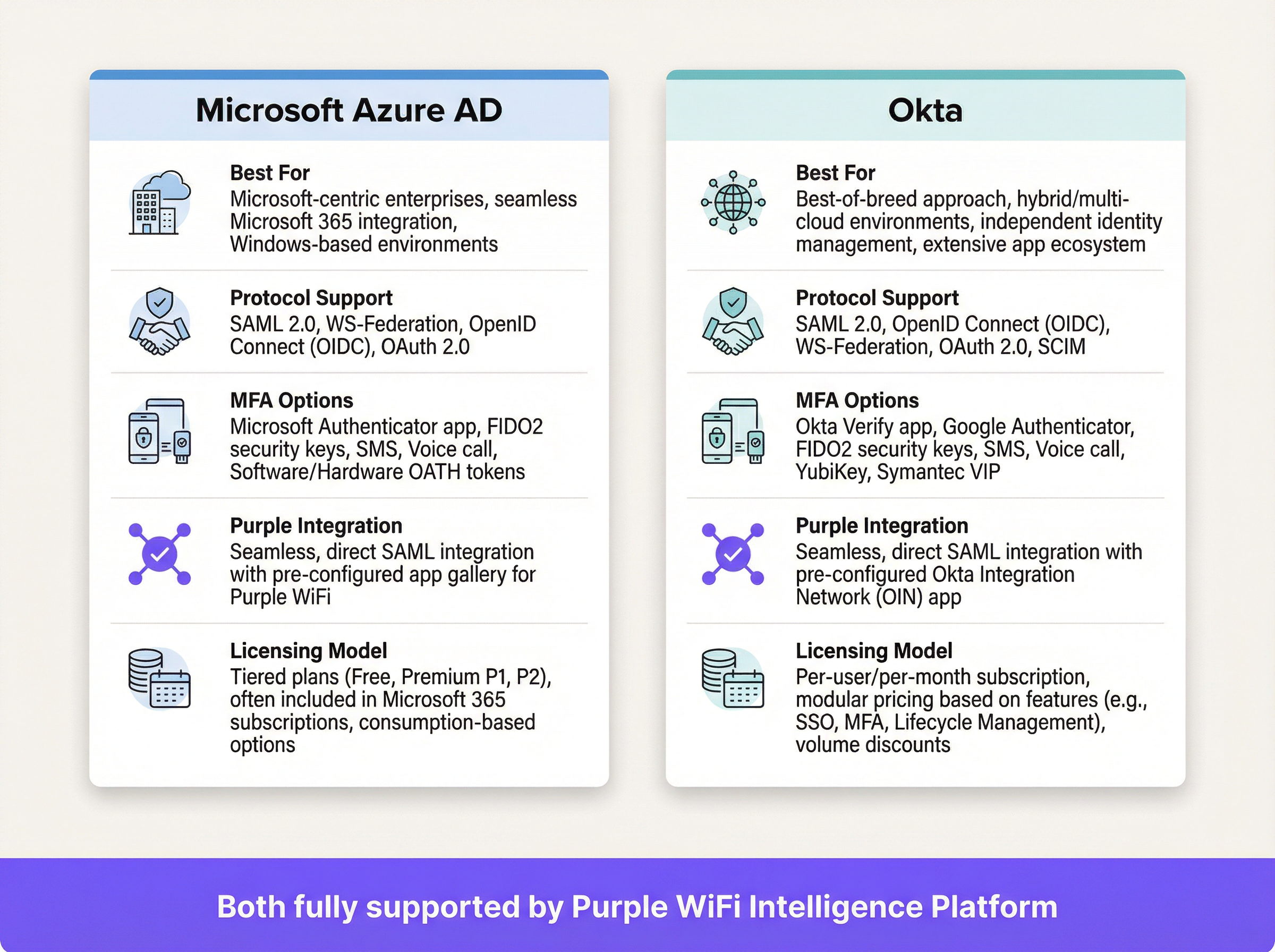
SAML es un estándar abierto para el intercambio de datos de autenticación y autorización entre partes, específicamente entre un Proveedor de Identidad (IdP) y un Proveedor de Servicios (SP). En este contexto, el IdP es su directorio central de usuarios (Azure AD, Okta, Ping Identity o ADFS), y la plataforma Purple actúa como el SP, intermediando el acceso a la red física WiFi.
El flujo de autenticación SAML 2.0
El proceso permite una autenticación segura basada en el navegador para los usuarios de WiFi sin requerir la instalación de ningún software en el lado del cliente. Cuando un miembro del personal se conecta al SSID designado para el personal, su dispositivo es dirigido a un Captive Portal. En lugar de un simple campo de contraseña, este portal inicia un protocolo de enlace criptográfico de varios pasos con el IdP para verificar la identidad del usuario.
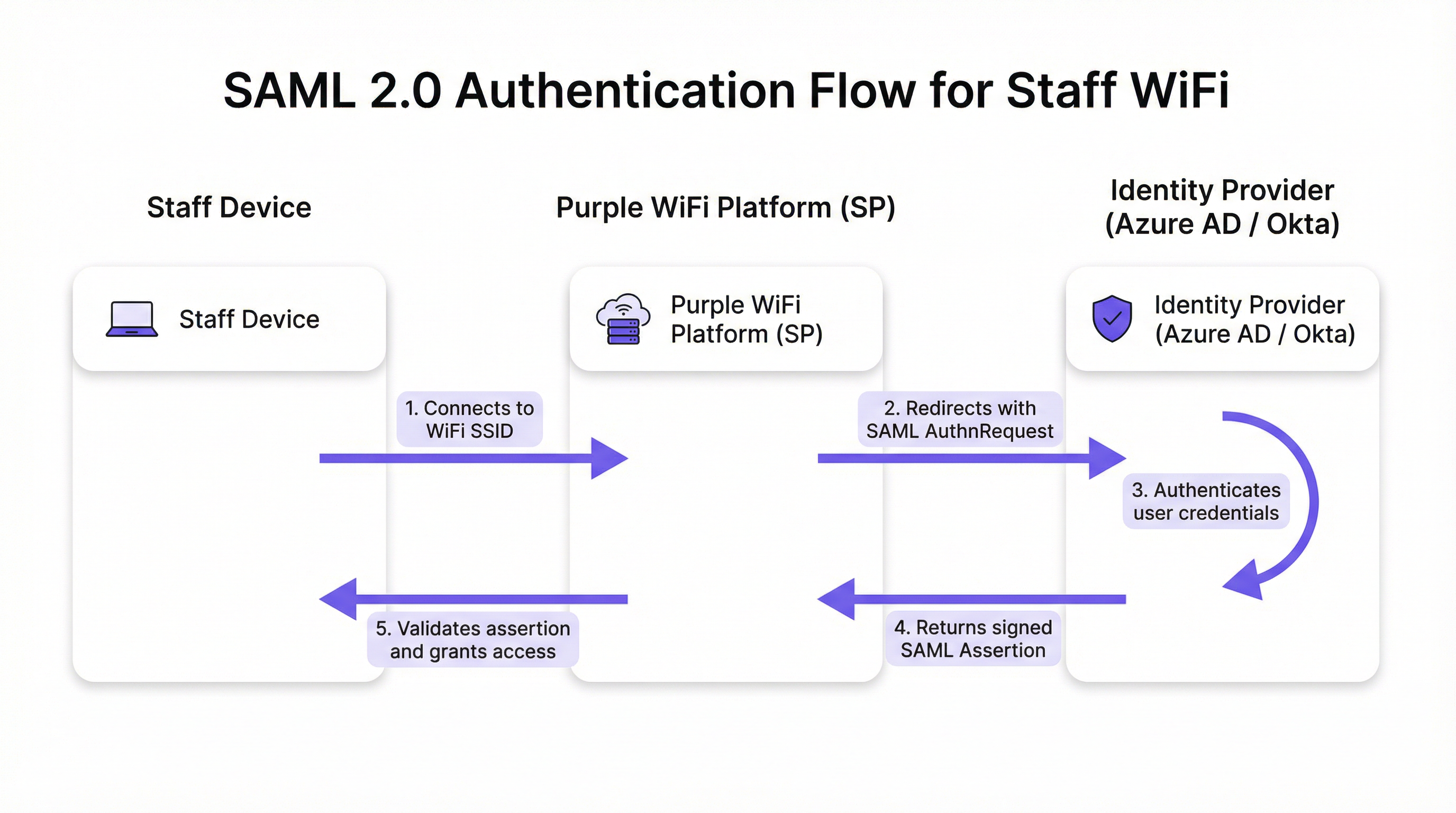
El flujo se desarrolla en cinco etapas discretas. Primero, el usuario conecta su dispositivo (computadora portátil, tableta o teléfono móvil) al SSID del WiFi del personal, y la plataforma Purple presenta un Captive Portal. Segundo, Purple (actuando como SP) genera una solicitud de autenticación SAML (AuthnRequest), un documento XML que contiene información sobre el SP y los parámetros de autenticación deseados. El navegador del usuario es redirigido a la URL de SSO del IdP con esta solicitud incrustada. Tercero, el usuario llega a la página de inicio de sesión habitual del IdP (su pantalla de Microsoft 365 u Okta) e ingresa sus credenciales corporativas. El IdP aplica aquí toda su gama de políticas de seguridad, incluyendo la Autenticación Multifactor (MFA), comprobaciones de confianza del dispositivo y reglas de acceso condicional. Cuarto, tras una autenticación exitosa, el IdP genera una respuesta SAML que contiene una aserción firmada digitalmente. Esta aserción se firma con la clave privada del IdP y contiene información clave sobre el usuario autenticado, incluyendo el nombre de usuario, correo electrónico y membresías de grupos. El navegador del usuario es redirigido de vuelta a la URL del Servicio Consumidor de Aserciones (ACS) de Purple con esta respuesta firmada. Quinto, Purple recibe la respuesta SAML, verifica la firma digital utilizando el certificado público preconfigurado del IdP, analiza la aserción para confirmar la autorización e instruye al controlador de red para que otorgue al dispositivo acceso completo a la red.
Estándares y protocolos relevantes
SAML 2.0 es el protocolo fundamental que define los mensajes basados en XML para aserciones, protocolos, enlaces y perfiles. IEEE 802.1X proporciona un estándar complementario de control de acceso a la red basado en puertos; sin embargo, el enfoque SAML con Captive Portal ofrece compatibilidad universal con dispositivos sin requerir una configuración compleja del suplicante en cada endpoint, lo que lo hace ideal para entornos BYOD. WPA3-Enterprise, cuando se combina con SAML, proporciona una defensa en profundidad: WPA3 cifra el tráfico en el aire mientras que SAML maneja la verificación de identidad en la capa de aplicación. El Requisito 8 de PCI DSS exige la identificación y autenticación del acceso a los componentes del sistema, un requisito que esta arquitectura aborda directamente.
Guía de implementación
La implementación de la autenticación SAML para el WiFi de su personal implica establecer una relación de confianza criptográfica entre su IdP y la plataforma Purple. Los siguientes pasos son independientes del proveedor, aunque los elementos específicos de la interfaz de usuario variarán según el IdP.
Lista de verificación previa a la implementación
Antes de comenzar la configuración, confirme que tiene un IdP compatible con SAML 2.0 (Azure AD, Okta, Ping Identity, ADFS). Asegúrese de tener privilegios administrativos tanto en su portal de IdP como en la plataforma Purple. Defina sus grupos de usuarios (por ejemplo, 'All-Staff', 'IT-Admins', 'Store-Managers'), ya que estos impulsan las políticas de acceso basadas en roles. Verifique que su hardware de WiFi (puntos de acceso y controladores) admita la redirección al Captive Portal.
Paso 1: Configurar la aplicación en su IdP
En su IdP, cree una nueva aplicación basada en SAML para Purple. Navegue a 'Aplicaciones empresariales' en Azure AD o 'Aplicaciones' en Okta y seleccione una aplicación SAML personalizada. Deberá proporcionar a su IdP dos valores de la plataforma Purple: la URL del Servicio Consumidor de Aserciones (ACS) y el ID de entidad (Entity ID). Purple proporciona estos valores en su sección de configuración de autenticación. A cambio, su IdP generará sus propios metadatos (generalmente un archivo XML o una URL) que contienen la URL de SSO del IdP, el ID de entidad y el certificado de firma X.509. Conserve esta información para el siguiente paso.
Paso 2: Configurar las reclamaciones (Claims)
Este es el paso de configuración más significativo a nivel operativo. Debe configurar el IdP para que envíe atributos de usuario específicos en la aserción SAML. Purple requiere un identificador único y persistente para cada usuario como la reclamación NameID. La mejor práctica es utilizar un atributo inmutable como user.objectid en Azure AD o user.id en Okta, en lugar de una dirección de correo electrónico mutable. Además, configure las reclamaciones de grupo para transmitir las membresías de grupo del usuario. Esto permite políticas de acceso dinámicas y basadas en roles dentro de Purple sin necesidad de configuración por usuario.
Paso 3: Configurar el método de autenticación en Purple
En el portal de Purple, navegue a la sección de gestión de autenticación y seleccione SAML 2.0 como tipo de método. Ingrese la URL de SSO del IdP, el ID de entidad y el certificado X.509 obtenidos en el Paso 1. Asigne los nombres de los atributos de la configuración de reclamaciones de su IdP a los campos correspondientes en Purple. Finalmente, asigne este método de autenticación al recorrido del Captive Portal de su personal para activar el flujo para los usuarios que se conectan al SSID del personal.
Paso 4: Pruebas y despliegue por fases
Asigne la nueva aplicación SAML a un pequeño grupo piloto (idealmente el equipo de TI) y valide el flujo de extremo a extremo en múltiples tipos de dispositivos (Windows, macOS, iOS, Android). Supervise los registros de inicio de sesión SAML en su IdP y los registros de autenticación en Purple para diagnosticar cualquier falla. Una vez validado, amplíe gradualmente la asignación de usuarios en su IdP para cubrir a todos los grupos de personal relevantes. Comunique el cambio al personal de manera clara, enfatizando que ahora utilizarán sus credenciales de inicio de sesión corporativas estándar.
Mejores prácticas
Exija MFA para todas las autenticaciones de WiFi. Este es el control más efectivo contra el robo de credenciales y debe considerarse no negociable para cualquier implementación empresarial. Aproveche las capacidades de acceso condicional de su IdP para restringir el acceso a la red en función del estado de cumplimiento del dispositivo, la ubicación geográfica o la puntuación de riesgo. Configure tiempos de espera de sesión cortos dentro de Purple para forzar la reautenticación periódica, garantizando que los derechos de acceso se revaliden regularmente frente al IdP y mitigando el riesgo por pérdida o robo de dispositivos. Adhiérase al principio de minimización de atributos: incluya solo los atributos necesarios para las decisiones de acceso en la aserción SAML, en cumplimiento con el principio de minimización de datos del Artículo 5 del GDPR. Para los dispositivos administrados por la empresa, considere combinar el Captive Portal SAML con WPA3-Enterprise y 802.1X para una defensa en profundidad; el enfoque SAML es más adecuado para BYOD o endpoints no administrados.

Solución de problemas y mitigación de riesgos
El modo de falla más común y de mayor impacto es la caducidad del certificado. El certificado de firma X.509 del IdP tiene un período de validez fijo, generalmente de uno a tres años. Cuando caduca, Purple ya no puede validar las aserciones SAML, lo que provoca una interrupción completa de la autenticación. Mitigación: configure recordatorios de calendario redundantes a los 90, 60 y 30 días antes del vencimiento y documente explícitamente el procedimiento de renovación.
La desincronización del reloj (clock skew) es la segunda causa más frecuente de fallas de autenticación. Las aserciones SAML contienen una ventana de validez, y si los relojes en el IdP y la plataforma Purple difieren en más de unos pocos minutos, las aserciones serán rechazadas por estar caducadas o por no ser válidas aún. Asegúrese de que ambos sistemas se sincronicen con una fuente NTP confiable.
Una URL de ACS incorrecta durante la configuración inicial es un error de configuración común. Un error tipográfico de un solo carácter significa que el IdP envía la aserción firmada a un endpoint inexistente. Siempre copie y pegue la URL de ACS directamente desde la plataforma Purple en lugar de escribirla manualmente.
Finalmente, deshabilite el inicio de sesión iniciado por el IdP para esta aplicación. El acceso a la red solo debe iniciarse desde el SP (el evento de conexión WiFi). Permitir flujos iniciados por el IdP abre la puerta a ciertos ataques de inyección basados en SAML y es un riesgo de seguridad innecesario en este modelo de implementación.
ROI e impacto comercial
El caso de negocio para la autenticación de WiFi del personal basada en SAML es convincente en todos los tipos de recintos. La eliminación de contraseñas compartidas suprime la necesidad de rotaciones de contraseñas periódicas y disruptivas, así como los tickets de la mesa de ayuda asociados. Las organizaciones suelen reportar una reducción de más del 50 % en las solicitudes de soporte de TI relacionadas con el WiFi después de la implementación. La automatización del ciclo de vida del usuario es la ganancia operativa más significativa: cuando un miembro del personal es dado de baja y su cuenta de IdP se deshabilita, su acceso al WiFi se revoca de forma instantánea y automática, cerrando una brecha de seguridad que las redes basadas en PSK dejan abierta indefinidamente. Desde una perspectiva de cumplimiento, SAML proporciona un registro de acceso auditable a nivel individual, respaldando directamente el Requisito 8 de PCI DSS y las obligaciones de responsabilidad del GDPR. La experiencia fluida de SSO (un conjunto de credenciales para correo electrónico, aplicaciones y WiFi) reduce la fricción para el personal y aumenta la productividad, particularmente para los equipos operativos que se mueven entre las áreas de un recinto a lo largo del día.
Referencias
[1] OASIS Security Services (SAML) TC. "SAML V2.0 Executive Overview." April 2008. https://www.oasis-open.org/committees/download.php/27819/sstc-saml-exec-overview-2.0-cd-01.pdf
[2] Reglamento General de Protección de Datos (GDPR). Artículo 5, Principios relativos al tratamiento de datos personales. https://gdpr-info.eu/art-5-gdpr/
[3] Consejo de Normas de Seguridad de la PCI. "Requisito 8 de PCI DSS v4.0: Identificar a los usuarios y autenticar el acceso a los componentes del sistema". 2022. https://www.pcisecuritystandards.org/
Términos clave y definiciones
SAML Assertion
An XML document, digitally signed by the Identity Provider, that declares who a user is and provides additional attributes about them. It is the cryptographic 'digital passport' that the Service Provider trusts to make an access decision.
When troubleshooting authentication failures, IT teams inspect the SAML assertion to verify that the IdP is sending the correct user attributes and that the digital signature is valid. It is the core piece of evidence in every authentication transaction.
Identity Provider (IdP)
The system that manages user identities and authenticates them. It is the authoritative source of truth for user identity within an organisation.
In a corporate environment, this is the central user directory — Azure AD, Okta, Ping Identity, or ADFS. It is where IT teams add, remove, and manage all staff accounts and enforce security policies like MFA.
Service Provider (SP)
The application or service that requires authentication before granting access. It trusts the Identity Provider to perform the authentication and relies on the SAML assertion as proof.
For SAML WiFi authentication, the Purple platform is the Service Provider. It consumes the SAML assertion from the IdP to make a network access control decision for the connecting device.
Assertion Consumer Service (ACS) URL
A specific endpoint on the Service Provider designed to receive and process SAML assertions from the Identity Provider after a successful authentication event.
This is one of the most critical configuration parameters. If the ACS URL is incorrectly entered in the IdP settings, the IdP will not know where to send the user after login, and authentication will fail with a redirect error.
Entity ID
A globally unique identifier for an Identity Provider or Service Provider within the SAML protocol. It acts as a unique name to ensure each party is communicating with the correct counterpart.
Typically formatted as a URL, the Entity ID does not need to resolve to a real webpage. It functions like a unique identifier in a directory, preventing one SP from accidentally consuming assertions intended for another.
SAML Metadata
An XML document containing all necessary configuration information about a SAML party — including its Entity ID, endpoint URLs (such as the ACS URL), and public X.509 signing certificate.
Exchanging metadata files is the most reliable method for configuring a SAML trust relationship. Rather than manually copying individual values, administrators can upload the metadata XML from the other party to auto-populate the configuration, reducing the risk of transcription errors.
Claim
A piece of information about a user — an attribute — that is included in the SAML assertion by the Identity Provider. Common claims include username, email address, department, and group memberships.
IT teams configure claims in the IdP to control what information the SP receives. Sending group membership claims to Purple enables role-based access policies and dynamic VLAN assignment based on a user's job function.
Single Sign-On (SSO)
An authentication scheme that allows a user to authenticate once with a single set of credentials and gain access to multiple independent systems and applications without re-entering credentials for each.
SAML is a primary technical enabler of SSO. By using SAML for WiFi authentication, staff use the same corporate login they use for email, HR systems, and other applications to get online — a seamless experience that reduces friction and eliminates the need for separate WiFi passwords.
X.509 Certificate
A digital certificate standard used to verify the identity of a party and to sign or encrypt data. In SAML, the IdP uses its private key to sign assertions, and the SP uses the IdP's X.509 public certificate to verify those signatures.
This certificate is the foundation of trust in a SAML deployment. Its expiration is the single most common cause of complete authentication outages and must be proactively managed.
Casos de éxito
A global hotel chain with 300 properties needs to replace its insecure, single PSK for staff WiFi. The chain uses Microsoft 365 and Azure AD as its corporate identity platform. They need a solution that can be centrally managed, provides a seamless experience for staff, and revokes access immediately when an employee leaves the organisation.
The IT team creates a new Enterprise Application in Azure AD for the Purple platform. They configure the application with the Entity ID and ACS URL from their Purple instance. Critically, they configure the claims to send the user's group membership — for example, 'Hotel-Staff' and 'IT-Admin' — and use user.objectid as the unique NameID to ensure a stable, immutable identifier. In Purple, they create a new SAML authentication method, uploading the Azure AD metadata XML to establish the trust relationship. They then create two access policies: one for 'Hotel-Staff' that grants access to the general staff network VLAN, and a second for 'IT-Admin' that grants privileged access to the management VLAN. This configuration is tied to a single 'Staff' SSID broadcast across all 300 properties via the chain's centralised network management platform. A new staff member at any hotel is automatically granted the correct level of WiFi access as soon as their user account is added to the relevant group in Azure AD — no local IT intervention required. When a staff member leaves, disabling their Azure AD account immediately revokes their WiFi access at all 300 properties simultaneously.
A large conference centre hosts multiple third-party events simultaneously. They need to provide secure WiFi for event staff from different organisations, each with their own identity systems. They cannot issue credentials to external staff and must ensure that staff from one event cannot access the network resources of another.
The conference centre's IT team uses Purple's support for multiple SAML Identity Providers. For each major event organiser, they configure a separate SAML trust relationship within the Purple platform. Organiser A (using Okta) and Organiser B (using Google Workspace) are set up as distinct IdPs. The captive portal is configured to present an organisation selection step, directing users to their respective IdP for authentication. Using group claims passed by each IdP, Purple maps users to event-specific VLANs, ensuring complete network traffic segregation between events. Access for each organiser's staff automatically expires at the end of the event based on pre-set journey rules configured in Purple, requiring no manual deprovisioning.
Análisis de escenarios
Q1. Your CFO has reported that a former employee's personal device was found still connected to the staff WiFi network two weeks after their departure. Your current system uses a single WPA2-PSK that is rotated quarterly. How would a SAML-based approach mitigate this specific risk, and what additional controls would you recommend?
💡 Sugerencia:Consider the user lifecycle, the source of authentication authority, and the role of session timeouts.
Mostrar enfoque recomendado
A SAML-based approach directly links WiFi access to the employee's active status in the central Identity Provider. The moment the employee's account is disabled or deleted as part of the standard offboarding process, their ability to authenticate to any SAML-integrated service — including the WiFi — is instantly and automatically revoked. The IdP will no longer issue a valid SAML assertion for that user, meaning they cannot re-authenticate. To address the specific scenario of a device that is already connected, configure short session timeouts in Purple (e.g., 8-hour sessions aligned with a working day). When the session expires, the device must re-authenticate; the disabled IdP account will prevent this. This eliminates the security gap inherent in long-lived shared secrets like a PSK, where a device that has already connected remains online indefinitely.
Q2. A stadium is implementing SAML authentication for its 500 event-day staff. They want to ensure that cashiers using point-of-sale terminals can only access the PCI-compliant network segment, while operations staff can access the general corporate network. How would you design the SAML claims configuration and network policy to achieve this segmentation?
💡 Sugerencia:Think about how to pass role information from the IdP to the network infrastructure via the SAML assertion, and how Purple can act on that information.
Mostrar enfoque recomendado
The solution is to use group claims and dynamic VLAN assignment. In the IdP (Azure AD or Okta), create two security groups: 'POS-Staff' and 'Ops-Staff'. Configure the SAML application to include the user's group membership as a claim in the assertion. In the Purple platform, create two user access profiles that map to these group names. Configure the 'POS-Staff' profile to assign users to the PCI-compliant VLAN (e.g., VLAN 10) and the 'Ops-Staff' profile to assign users to the corporate VLAN (e.g., VLAN 20). When a user authenticates, Purple reads the group claim from the SAML assertion and instructs the network controller — via RADIUS attributes or API — to place the user's device in the appropriate VLAN. Network traffic is then segregated at the infrastructure level, ensuring POS terminals can only reach the payment processing network, regardless of where they connect in the stadium.
Q3. You are planning a rollout of SAML WiFi authentication to a retail chain with 1,000 stores. The store managers are not technically proficient. What is the single most important operational risk to proactively manage, and what is your communication and contingency plan?
💡 Sugerencia:What is the one component in the SAML trust relationship that has a fixed expiry date and whose failure would cause a simultaneous outage across all 1,000 stores?
Mostrar enfoque recomendado
The single most critical operational risk is the expiration of the IdP's SAML signing certificate. If it expires, all 1,000 stores will lose staff WiFi access simultaneously, as Purple will be unable to validate any SAML assertions. The mitigation plan has two components. Technically: set multiple, redundant calendar reminders for the certificate's expiry date for the entire IT team, starting 90 days out. Document the step-by-step procedure for generating a new certificate in the IdP and updating it in the Purple platform. Ensure at least two team members are trained on this procedure. Aim to complete the renewal at least 30 days before expiry to allow for testing. For communication: proactively inform the retail operations director about the planned maintenance window for the certificate renewal. There is no need to inform individual store managers for a planned renewal, as the goal is a zero-downtime cutover. In the event of an unplanned outage, the communication plan should be to immediately notify the operations director of the issue and provide a realistic ETA for resolution. A temporary fallback — such as a time-limited PSK for critical operations — should be documented in the business continuity plan.
Conclusiones clave
- ✓Replace insecure staff WiFi pre-shared keys with robust, identity-driven SAML 2.0 authentication to eliminate shared credential vulnerabilities.
- ✓Integrate your existing Identity Provider — Azure AD or Okta — with Purple to leverage a single source of truth for user identity across all applications and network access.
- ✓Automate user onboarding and offboarding: WiFi access is granted and revoked automatically as part of your existing IdP user lifecycle management processes.
- ✓Enforce Multi-Factor Authentication and conditional access policies at the IdP level to protect network entry against credential theft and compromised devices.
- ✓Use group claims within the SAML assertion to enable dynamic, role-based network access and VLAN segmentation without per-user configuration in Purple.
- ✓Achieve compliance with PCI DSS Requirement 8 and GDPR accountability obligations through auditable, individual-level access logs tied to verified corporate identities.
- ✓Proactively manage the IdP signing certificate expiry — the number one cause of SAML authentication outages — with redundant reminders and a documented renewal procedure.




