

Autenticazione SAML per il WiFi del personale
This guide provides a technical deep-dive into leveraging SAML 2.0 for enterprise-grade staff WiFi authentication, covering protocol architecture, Identity Provider integration, and deployment best practices. It equips IT leaders and network architects with actionable guidance on connecting Azure AD or Okta to the Purple WiFi intelligence platform to replace insecure pre-shared keys with robust, identity-driven access control. The result is a measurable improvement in security posture, compliance readiness, and operational efficiency across hotels, retail chains, stadiums, and public-sector venues.
🎧 Ascolta questa guida
Visualizza trascrizione

Sintesi esecutiva
Per gli operatori di strutture su larga scala — catene alberghiere, imperi del retail, grandi spazi per eventi e strutture del settore pubblico — la messa in sicurezza della rete wireless del personale è una componente critica per la mitigazione dei rischi e l'efficienza operativa. Le tradizionali reti con chiave precondivisa (PSK) presentano significative vulnerabilità di sicurezza e oneri amministrativi: una singola credenziale compromessa espone l'intera rete e la gestione degli accessi richiede un intervento manuale a ogni cambio di personale. Questa guida illustra un approccio superiore: l'implementazione dell'autenticazione basata su Security Assertion Markup Language (SAML) 2.0 per il WiFi del personale. Integrando il vostro Identity Provider (IdP) esistente — come Microsoft Azure Active Directory o Okta — con la piattaforma di intelligence Purple WiFi, sostituite le password condivise non sicure con un controllo degli accessi robusto e basato sull'identità. Questo modello di implementazione eleva la vostra postura di sicurezza in linea con i requisiti PCI DSS e GDPR, e semplifica drasticamente la gestione del ciclo di vita degli utenti. Il personale si autentica utilizzando le proprie credenziali aziendali principali, abilitando il Single Sign-On (SSO) e garantendo che i diritti di accesso vengano revocati automaticamente al termine del rapporto di lavoro. Per il CTO, ciò si traduce in una riduzione misurabile dei ticket di supporto IT, in una maggiore conformità e in un'architettura di rete più solida e difendibile.
Approfondimento tecnico
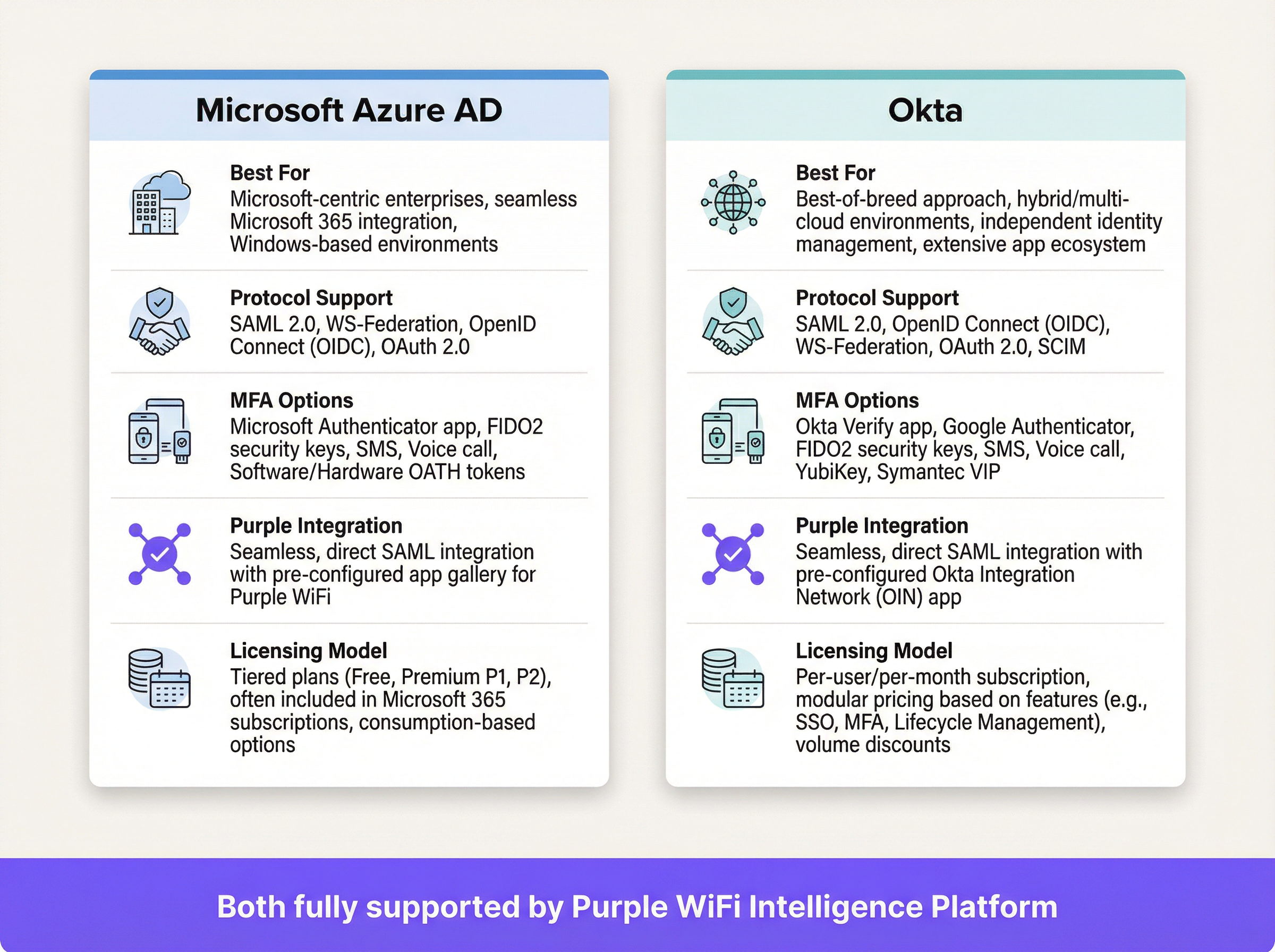
SAML è uno standard aperto per lo scambio di dati di autenticazione e autorizzazione tra le parti, in particolare tra un Identity Provider (IdP) e un Service Provider (SP). In questo contesto, l'IdP è la vostra directory utente centrale (Azure AD, Okta, Ping Identity o ADFS) e la piattaforma Purple funge da SP, intermediando l'accesso alla rete WiFi fisica.
Il flusso di autenticazione SAML 2.0
Il processo consente un'autenticazione sicura basata su browser per gli utenti WiFi senza richiedere alcuna installazione di software lato client. Quando un membro del personale si connette all'SSID designato per il personale, il suo dispositivo viene indirizzato a un Captive Portal. Invece di un semplice campo per la password, questo portale avvia un handshake crittografico in più fasi con l'IdP per verificare l'identità dell'utente.
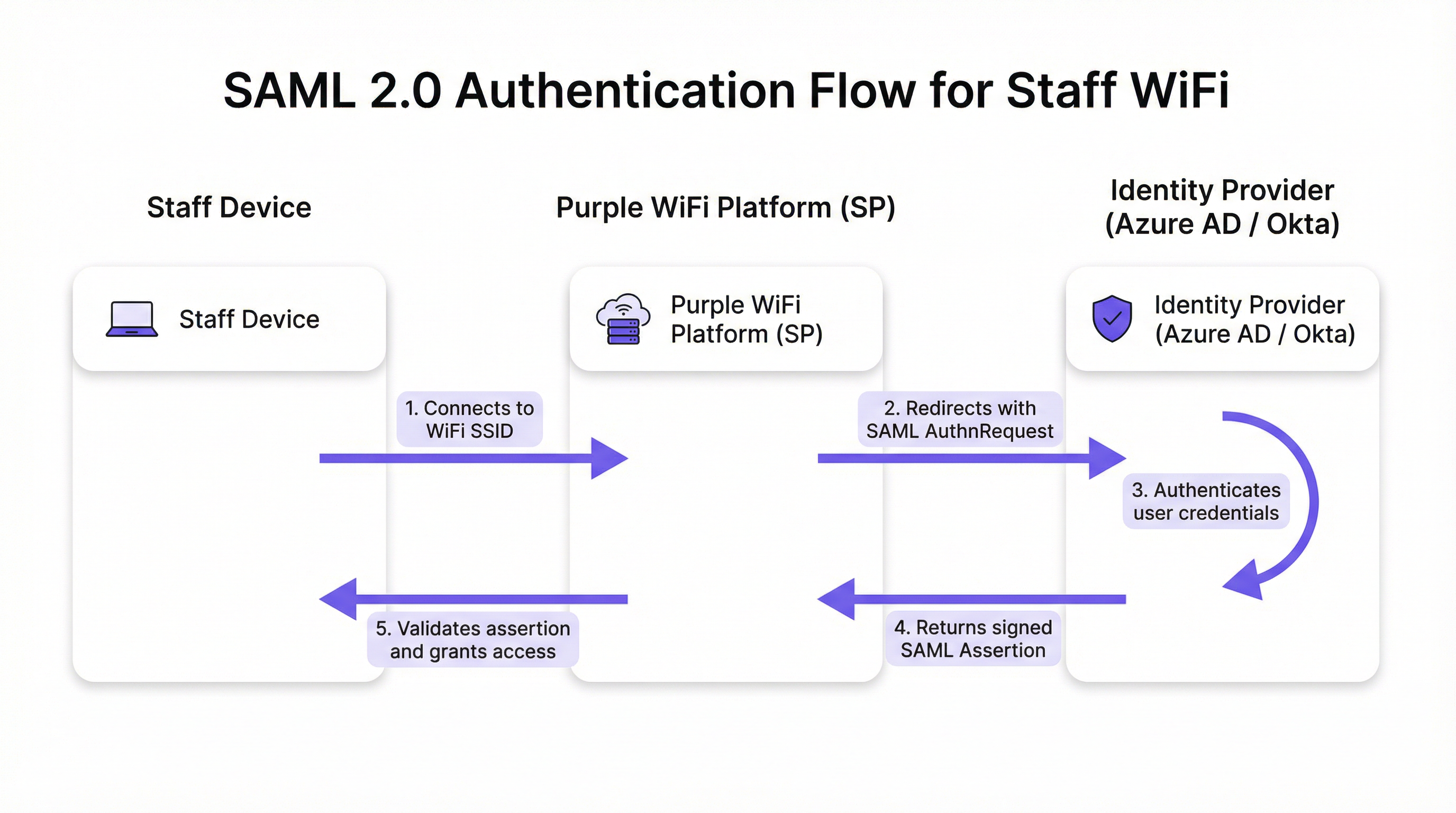
Il flusso procede in cinque fasi distinte. Primo, l'utente connette il proprio dispositivo — laptop, tablet o telefono cellulare — all'SSID del WiFi del personale e la piattaforma Purple presenta un Captive Portal. Secondo, Purple (agendo come SP) genera una richiesta di autenticazione SAML (AuthnRequest), un documento XML contenente informazioni sull'SP e sui parametri di autenticazione desiderati. Il browser dell'utente viene reindirizzato all'URL SSO dell'IdP con questa richiesta incorporata. Terzo, l'utente arriva alla consueta pagina di login dell'IdP — la schermata di Microsoft 365 o Okta — e inserisce le proprie credenziali aziendali. Qui l'IdP applica l'intera gamma delle sue policy di sicurezza, tra cui l'autenticazione a più fattori (MFA), i controlli di attendibilità del dispositivo e le regole di accesso condizionale. Quarto, a seguito di un'autenticazione riuscita, l'IdP genera una risposta SAML contenente un'asserzione firmata digitalmente. Questa asserzione è firmata con la chiave privata dell'IdP e contiene informazioni chiave sull'utente autenticato, tra cui nome utente, e-mail e appartenenza ai gruppi. Il browser dell'utente viene reindirizzato all'URL dell'Assertion Consumer Service (ACS) di Purple con questa risposta firmata. Quinto, Purple riceve la risposta SAML, verifica la firma digitale utilizzando il certificato pubblico preconfigurato dell'IdP, analizza l'asserzione per confermare l'autorizzazione e istruisce il controller di rete a concedere al dispositivo l'accesso completo alla rete.
Standard e protocolli rilevanti
SAML 2.0 è il protocollo fondamentale, che definisce i messaggi basati su XML per asserzioni, protocolli, binding e profili. IEEE 802.1X fornisce uno standard complementare per il controllo degli accessi di rete basato su porta; tuttavia, l'approccio SAML tramite Captive Portal offre una compatibilità universale con i dispositivi senza richiedere complesse configurazioni del supplicant su ogni endpoint, rendendolo ideale per gli ambienti BYOD. WPA3-Enterprise, se combinato con SAML, fornisce una difesa in profondità: WPA3 crittografa il traffico via etere mentre SAML gestisce la verifica dell'identità a livello di applicazione. Il Requisito 8 del PCI DSS impone l'identificazione e l'autenticazione degli accessi ai componenti di sistema, un requisito direttamente soddisfatto da questa architettura.
Guida all'implementazione
L'implementazione dell'autenticazione SAML per il WiFi del personale comporta la creazione di una relazione di fiducia crittografica tra il vostro IdP e la piattaforma Purple. I seguenti passaggi sono indipendenti dal fornitore, sebbene gli elementi specifici dell'interfaccia utente varino in base all'IdP.
Checklist pre-implementazione
Prima di iniziare la configurazione, confermate di disporre di un IdP conforme a SAML 2.0 (Azure AD, Okta, Ping Identity, ADFS). Assicuratevi di disporre dei privilegi di amministratore sia nel portale del vostro IdP che nella piattaforma Purple. Definite i vostri gruppi di utenti — ad esempio, 'All-Staff', 'IT-Admins', 'Store-Managers' — poiché questi guidano le policy di accesso basate sui ruoli. Verificate che il vostro hardware WiFi (access point e controller) supporti il reindirizzamento al Captive Portal.
Passaggio 1 — Configurare l'applicazione nel vostro IdP
Nel vostro IdP, create una nuova applicazione basata su SAML per Purple. Passate ad 'Applicazioni aziendali' in Azure AD o ad 'Applicazioni' in Okta e selezionate un'app SAML personalizzata. Dovrete fornire al vostro IdP due valori provenienti dalla piattaforma Purple: l'Assertion Consumer Service (ACS) URL e l'Entity ID. Purple li fornisce nella sua sezione di configurazione dell'autenticazione. Il vostro IdP, in cambio, genererà i propri metadati — in genere un file XML o un URL — contenenti l'URL SSO dell'IdP, l'Entity ID e il certificato di firma X.509. Conservateli per il passaggio successivo.
Passaggio 2 — Configurare i claim
Questo è il passaggio di configurazione operativamente più significativo. Dovete configurare l'IdP per inviare attributi utente specifici nell'asserzione SAML. Purple richiede un identificatore univoco e persistente per ciascun utente come claim NameID. La best practice consiste nell'utilizzare un attributo immutabile come user.objectid in Azure AD o user.id in Okta, piuttosto che un indirizzo e-mail mutabile. Inoltre, configurate i claim di gruppo per trasmettere l'appartenenza ai gruppi dell'utente. Ciò abilita policy di accesso dinamiche e basate sui ruoli all'interno di Purple senza configurazione per singolo utente.
Passaggio 3 — Configurare il metodo di autenticazione in Purple
Nel portale Purple, passate alla sezione di gestione dell'autenticazione e selezionate SAML 2.0 come tipo di metodo. Inserite l'URL SSO dell'IdP, l'Entity ID e il certificato X.509 ottenuti nel Passaggio 1. Mappate i nomi degli attributi dalla configurazione dei claim del vostro IdP ai campi corrispondenti in Purple. Infine, assegnate questo metodo di autenticazione al percorso del Captive Portal del personale per attivare il flusso per gli utenti che si connettono all'SSID del personale.
Passaggio 4 — Test e rilascio graduale
Assegnate la nuova applicazione SAML a un piccolo gruppo pilota — idealmente il team IT — e convalidate il flusso end-to-end su più tipi di dispositivi (Windows, macOS, iOS, Android). Monitorate i log di accesso SAML nel vostro IdP e i log di autenticazione in Purple per diagnosticare eventuali errori. Una volta convalidato, espandete gradualmente l'assegnazione degli utenti nel vostro IdP per coprire tutti i gruppi di personale rilevanti. Comunicate chiaramente il cambiamento al personale, sottolineando che ora utilizzeranno le loro credenziali di accesso aziendali standard.
Best Practice
Imponete l'MFA per tutte le autenticazioni WiFi. Questo è il singolo controllo più efficace contro il furto di credenziali e dovrebbe essere considerato non negoziabile per qualsiasi implementazione aziendale. Sfruttate le funzionalità di accesso condizionale del vostro IdP per limitare l'accesso alla rete in base allo stato di conformità del dispositivo, alla posizione geografica o al punteggio di rischio. Configurate timeout di sessione brevi all'interno di Purple per forzare la riautenticazione periodica, garantendo che i diritti di accesso vengano regolarmente riconvalidati rispetto all'IdP e mitigando il rischio derivante da dispositivi smarriti o rubati. Attenetevi al principio di minimizzazione degli attributi: includete nell'asserzione SAML solo gli attributi necessari per le decisioni di accesso, in conformità con il principio di minimizzazione dei dati dell'Articolo 5 del GDPR. Per i dispositivi gestiti dall'azienda, valutate la possibilità di combinare il Captive Portal SAML con WPA3-Enterprise e 802.1X per una difesa in profondità; l'approccio SAML è più adatto per il BYOD o per gli endpoint non gestiti.

Risoluzione dei problemi e mitigazione dei rischi
La modalità di guasto più comune e di maggiore impatto è la scadenza del certificato. Il certificato di firma X.509 dell'IdP ha un periodo di validità fisso, in genere da uno a tre anni. Quando scade, Purple non può più convalidare le asserzioni SAML, causando un'interruzione completa dell'autenticazione. Mitigazione: impostate promemoria ridondanti sul calendario a 90, 60 e 30 giorni prima della scadenza e documentate esplicitamente la procedura di rinnovo.
Il disallineamento temporale (clock skew) è la seconda causa più frequente di errori di autenticazione. Le asserzioni SAML contengono una finestra di validità e, se gli orologi sull'IdP e sulla piattaforma Purple divergono di oltre qualche minuto, le asserzioni verranno rifiutate in quanto scadute o non ancora valide. Assicuratevi che entrambi i sistemi si sincronizzino con una fonte NTP affidabile.
Un URL ACS errato durante la configurazione iniziale è un errore di configurazione comune. Un errore di battitura di un singolo carattere fa sì che l'IdP invii l'asserzione firmata a un endpoint inesistente. Copiate e incollate sempre l'URL ACS direttamente dalla piattaforma Purple piuttosto che digitarlo manualmente.
Infine, disabilitate il login avviato dall'IdP (IdP-initiated login) per questa applicazione. L'accesso alla rete dovrebbe essere avviato solo dall'SP (l'evento di connessione WiFi). Consentire flussi avviati dall'IdP apre le porte a determinati attacchi di injection basati su SAML e rappresenta un rischio per la sicurezza non necessario in questo modello di implementazione.
ROI e impatto sul business
Il business case per l'autenticazione WiFi del personale basata su SAML è convincente per tutti i tipi di strutture. L'eliminazione delle password condivise rimuove la necessità di rotazioni periodiche e dirompenti delle password e dei relativi ticket di helpdesk. Le organizzazioni in genere segnalano una riduzione di oltre il 50% delle richieste di supporto IT relative al WiFi a seguito dell'implementazione. L'automazione del ciclo di vita degli utenti è il vantaggio operativo più significativo: quando un membro del personale viene dimesso e il suo account IdP viene disabilitato, il suo accesso WiFi viene revocato istantaneamente e automaticamente, colmando una lacuna di sicurezza che le reti basate su PSK lasciano aperta a tempo indeterminato. Dal punto di vista della conformità, SAML fornisce un registro degli accessi verificabile a livello individuale, supportando direttamente il Requisito 8 del PCI DSS e gli obblighi di responsabilità del GDPR. L'esperienza SSO fluida — un unico set di credenziali per e-mail, applicazioni e WiFi — riduce gli attriti per il personale e aumenta la produttività, in particolare per i team operativi che si spostano tra le aree di una struttura durante il giorno.
Riferimenti
[1] OASIS Security Services (SAML) TC. "SAML V2.0 Executive Overview." Aprile 2008. https://www.oasis-open.org/committees/download.php/27819/sstc-saml-exec-overview-2.0-cd-01.pdf
[2] Regolamento generale sulla protezione dei dati (GDPR). Articolo 5, Principi applicabili al trattamento dei dati personali. https://gdpr-info.eu/art-5-gdpr/
[3] PCI Security Standards Council. "PCI DSS v4.0 Requisito 8: Identificare gli utenti e autenticare l'accesso ai componenti di sistema." 2022. https://www.pcisecuritystandards.org/
Termini chiave e definizioni
SAML Assertion
An XML document, digitally signed by the Identity Provider, that declares who a user is and provides additional attributes about them. It is the cryptographic 'digital passport' that the Service Provider trusts to make an access decision.
When troubleshooting authentication failures, IT teams inspect the SAML assertion to verify that the IdP is sending the correct user attributes and that the digital signature is valid. It is the core piece of evidence in every authentication transaction.
Identity Provider (IdP)
The system that manages user identities and authenticates them. It is the authoritative source of truth for user identity within an organisation.
In a corporate environment, this is the central user directory — Azure AD, Okta, Ping Identity, or ADFS. It is where IT teams add, remove, and manage all staff accounts and enforce security policies like MFA.
Service Provider (SP)
The application or service that requires authentication before granting access. It trusts the Identity Provider to perform the authentication and relies on the SAML assertion as proof.
For SAML WiFi authentication, the Purple platform is the Service Provider. It consumes the SAML assertion from the IdP to make a network access control decision for the connecting device.
Assertion Consumer Service (ACS) URL
A specific endpoint on the Service Provider designed to receive and process SAML assertions from the Identity Provider after a successful authentication event.
This is one of the most critical configuration parameters. If the ACS URL is incorrectly entered in the IdP settings, the IdP will not know where to send the user after login, and authentication will fail with a redirect error.
Entity ID
A globally unique identifier for an Identity Provider or Service Provider within the SAML protocol. It acts as a unique name to ensure each party is communicating with the correct counterpart.
Typically formatted as a URL, the Entity ID does not need to resolve to a real webpage. It functions like a unique identifier in a directory, preventing one SP from accidentally consuming assertions intended for another.
SAML Metadata
An XML document containing all necessary configuration information about a SAML party — including its Entity ID, endpoint URLs (such as the ACS URL), and public X.509 signing certificate.
Exchanging metadata files is the most reliable method for configuring a SAML trust relationship. Rather than manually copying individual values, administrators can upload the metadata XML from the other party to auto-populate the configuration, reducing the risk of transcription errors.
Claim
A piece of information about a user — an attribute — that is included in the SAML assertion by the Identity Provider. Common claims include username, email address, department, and group memberships.
IT teams configure claims in the IdP to control what information the SP receives. Sending group membership claims to Purple enables role-based access policies and dynamic VLAN assignment based on a user's job function.
Single Sign-On (SSO)
An authentication scheme that allows a user to authenticate once with a single set of credentials and gain access to multiple independent systems and applications without re-entering credentials for each.
SAML is a primary technical enabler of SSO. By using SAML for WiFi authentication, staff use the same corporate login they use for email, HR systems, and other applications to get online — a seamless experience that reduces friction and eliminates the need for separate WiFi passwords.
X.509 Certificate
A digital certificate standard used to verify the identity of a party and to sign or encrypt data. In SAML, the IdP uses its private key to sign assertions, and the SP uses the IdP's X.509 public certificate to verify those signatures.
This certificate is the foundation of trust in a SAML deployment. Its expiration is the single most common cause of complete authentication outages and must be proactively managed.
Casi di studio
A global hotel chain with 300 properties needs to replace its insecure, single PSK for staff WiFi. The chain uses Microsoft 365 and Azure AD as its corporate identity platform. They need a solution that can be centrally managed, provides a seamless experience for staff, and revokes access immediately when an employee leaves the organisation.
The IT team creates a new Enterprise Application in Azure AD for the Purple platform. They configure the application with the Entity ID and ACS URL from their Purple instance. Critically, they configure the claims to send the user's group membership — for example, 'Hotel-Staff' and 'IT-Admin' — and use user.objectid as the unique NameID to ensure a stable, immutable identifier. In Purple, they create a new SAML authentication method, uploading the Azure AD metadata XML to establish the trust relationship. They then create two access policies: one for 'Hotel-Staff' that grants access to the general staff network VLAN, and a second for 'IT-Admin' that grants privileged access to the management VLAN. This configuration is tied to a single 'Staff' SSID broadcast across all 300 properties via the chain's centralised network management platform. A new staff member at any hotel is automatically granted the correct level of WiFi access as soon as their user account is added to the relevant group in Azure AD — no local IT intervention required. When a staff member leaves, disabling their Azure AD account immediately revokes their WiFi access at all 300 properties simultaneously.
A large conference centre hosts multiple third-party events simultaneously. They need to provide secure WiFi for event staff from different organisations, each with their own identity systems. They cannot issue credentials to external staff and must ensure that staff from one event cannot access the network resources of another.
The conference centre's IT team uses Purple's support for multiple SAML Identity Providers. For each major event organiser, they configure a separate SAML trust relationship within the Purple platform. Organiser A (using Okta) and Organiser B (using Google Workspace) are set up as distinct IdPs. The captive portal is configured to present an organisation selection step, directing users to their respective IdP for authentication. Using group claims passed by each IdP, Purple maps users to event-specific VLANs, ensuring complete network traffic segregation between events. Access for each organiser's staff automatically expires at the end of the event based on pre-set journey rules configured in Purple, requiring no manual deprovisioning.
Analisi degli scenari
Q1. Your CFO has reported that a former employee's personal device was found still connected to the staff WiFi network two weeks after their departure. Your current system uses a single WPA2-PSK that is rotated quarterly. How would a SAML-based approach mitigate this specific risk, and what additional controls would you recommend?
💡 Suggerimento:Consider the user lifecycle, the source of authentication authority, and the role of session timeouts.
Mostra l'approccio consigliato
A SAML-based approach directly links WiFi access to the employee's active status in the central Identity Provider. The moment the employee's account is disabled or deleted as part of the standard offboarding process, their ability to authenticate to any SAML-integrated service — including the WiFi — is instantly and automatically revoked. The IdP will no longer issue a valid SAML assertion for that user, meaning they cannot re-authenticate. To address the specific scenario of a device that is already connected, configure short session timeouts in Purple (e.g., 8-hour sessions aligned with a working day). When the session expires, the device must re-authenticate; the disabled IdP account will prevent this. This eliminates the security gap inherent in long-lived shared secrets like a PSK, where a device that has already connected remains online indefinitely.
Q2. A stadium is implementing SAML authentication for its 500 event-day staff. They want to ensure that cashiers using point-of-sale terminals can only access the PCI-compliant network segment, while operations staff can access the general corporate network. How would you design the SAML claims configuration and network policy to achieve this segmentation?
💡 Suggerimento:Think about how to pass role information from the IdP to the network infrastructure via the SAML assertion, and how Purple can act on that information.
Mostra l'approccio consigliato
The solution is to use group claims and dynamic VLAN assignment. In the IdP (Azure AD or Okta), create two security groups: 'POS-Staff' and 'Ops-Staff'. Configure the SAML application to include the user's group membership as a claim in the assertion. In the Purple platform, create two user access profiles that map to these group names. Configure the 'POS-Staff' profile to assign users to the PCI-compliant VLAN (e.g., VLAN 10) and the 'Ops-Staff' profile to assign users to the corporate VLAN (e.g., VLAN 20). When a user authenticates, Purple reads the group claim from the SAML assertion and instructs the network controller — via RADIUS attributes or API — to place the user's device in the appropriate VLAN. Network traffic is then segregated at the infrastructure level, ensuring POS terminals can only reach the payment processing network, regardless of where they connect in the stadium.
Q3. You are planning a rollout of SAML WiFi authentication to a retail chain with 1,000 stores. The store managers are not technically proficient. What is the single most important operational risk to proactively manage, and what is your communication and contingency plan?
💡 Suggerimento:What is the one component in the SAML trust relationship that has a fixed expiry date and whose failure would cause a simultaneous outage across all 1,000 stores?
Mostra l'approccio consigliato
The single most critical operational risk is the expiration of the IdP's SAML signing certificate. If it expires, all 1,000 stores will lose staff WiFi access simultaneously, as Purple will be unable to validate any SAML assertions. The mitigation plan has two components. Technically: set multiple, redundant calendar reminders for the certificate's expiry date for the entire IT team, starting 90 days out. Document the step-by-step procedure for generating a new certificate in the IdP and updating it in the Purple platform. Ensure at least two team members are trained on this procedure. Aim to complete the renewal at least 30 days before expiry to allow for testing. For communication: proactively inform the retail operations director about the planned maintenance window for the certificate renewal. There is no need to inform individual store managers for a planned renewal, as the goal is a zero-downtime cutover. In the event of an unplanned outage, the communication plan should be to immediately notify the operations director of the issue and provide a realistic ETA for resolution. A temporary fallback — such as a time-limited PSK for critical operations — should be documented in the business continuity plan.
Punti chiave
- ✓Replace insecure staff WiFi pre-shared keys with robust, identity-driven SAML 2.0 authentication to eliminate shared credential vulnerabilities.
- ✓Integrate your existing Identity Provider — Azure AD or Okta — with Purple to leverage a single source of truth for user identity across all applications and network access.
- ✓Automate user onboarding and offboarding: WiFi access is granted and revoked automatically as part of your existing IdP user lifecycle management processes.
- ✓Enforce Multi-Factor Authentication and conditional access policies at the IdP level to protect network entry against credential theft and compromised devices.
- ✓Use group claims within the SAML assertion to enable dynamic, role-based network access and VLAN segmentation without per-user configuration in Purple.
- ✓Achieve compliance with PCI DSS Requirement 8 and GDPR accountability obligations through auditable, individual-level access logs tied to verified corporate identities.
- ✓Proactively manage the IdP signing certificate expiry — the number one cause of SAML authentication outages — with redundant reminders and a documented renewal procedure.




