

स्टाफ WiFi के लिए SAML ऑथेंटिकेशन
This guide provides a technical deep-dive into leveraging SAML 2.0 for enterprise-grade staff WiFi authentication, covering protocol architecture, Identity Provider integration, and deployment best practices. It equips IT leaders and network architects with actionable guidance on connecting Azure AD or Okta to the Purple WiFi intelligence platform to replace insecure pre-shared keys with robust, identity-driven access control. The result is a measurable improvement in security posture, compliance readiness, and operational efficiency across hotels, retail chains, stadiums, and public-sector venues.
🎧 इस गाइड को सुनें
ट्रांसक्रिप्ट देखें

कार्यकारी सारांश
बड़े पैमाने के स्थानों — होटल चेन, रिटेल एम्पायर, प्रमुख इवेंट स्पेस और सार्वजनिक क्षेत्र की सुविधाओं — के ऑपरेटरों के लिए, स्टाफ वायरलेस नेटवर्क को सुरक्षित करना जोखिम कम करने और परिचालन दक्षता का एक महत्वपूर्ण घटक है। पारंपरिक प्री-शेयर्ड की (PSK) नेटवर्क महत्वपूर्ण सुरक्षा कमजोरियां और प्रशासनिक बोझ पैदा करते हैं: एक भी समझौता किया गया क्रेडेंशियल पूरे नेटवर्क को खतरे में डाल देता है, और एक्सेस प्रबंधन के लिए हर स्टाफ परिवर्तन पर मैन्युअल हस्तक्षेप की आवश्यकता होती है। यह मार्गदर्शिका एक बेहतर दृष्टिकोण का विवरण देती है: स्टाफ WiFi के लिए Security Assertion Markup Language (SAML) 2.0-आधारित ऑथेंटिकेशन लागू करना। अपने मौजूदा आइडेंटिटी प्रोवाइडर (IdP) — जैसे Microsoft Azure Active Directory या Okta — को Purple WiFi इंटेलिजेंस प्लेटफ़ॉर्म के साथ एकीकृत करके, आप असुरक्षित साझा पासवर्ड को मजबूत, पहचान-संचालित एक्सेस कंट्रोल से बदल देते हैं। यह डिप्लॉयमेंट मॉडल PCI DSS और GDPR आवश्यकताओं के अनुरूप आपकी सुरक्षा स्थिति को बढ़ाता है, और उपयोगकर्ता जीवनचक्र प्रबंधन को नाटकीय रूप से सरल बनाता है। स्टाफ अपने प्राथमिक कॉर्पोरेट क्रेडेंशियल्स का उपयोग करके प्रमाणित करता है, जिससे सिंगल साइन-ऑन (SSO) सक्षम होता है और यह सुनिश्चित होता है कि समाप्ति पर एक्सेस अधिकार स्वचालित रूप से रद्द कर दिए जाते हैं। CTO के लिए, इसका अर्थ है IT सपोर्ट टिकटों में मापने योग्य कमी, बेहतर अनुपालन और एक मजबूत, अधिक सुरक्षित नेटवर्क आर्किटेक्चर।
तकनीकी डीप-डाइव
SAML पार्टियों के बीच — विशेष रूप से एक आइडेंटिटी प्रोवाइडर (IdP) और एक सर्विस प्रोवाइडर (SP) के बीच — ऑथेंटिकेशन और ऑथराइजेशन डेटा के आदान-प्रदान के लिए एक खुला मानक है। इस संदर्भ में, IdP आपकी केंद्रीय उपयोगकर्ता निर्देशिका (Azure AD, Okta, Ping Identity, या ADFS) है, और Purple प्लेटफ़ॉर्म SP के रूप में कार्य करता है, जो भौतिक WiFi नेटवर्क तक एक्सेस प्रदान करता है。
SAML 2.0 ऑथेंटिकेशन फ्लो
यह प्रक्रिया बिना किसी क्लाइंट-साइड सॉफ़्टवेयर इंस्टॉलेशन के WiFi उपयोगकर्ताओं के लिए सुरक्षित, ब्राउज़र-आधारित ऑथेंटिकेशन सक्षम करती है। जब कोई स्टाफ सदस्य निर्दिष्ट स्टाफ SSID से कनेक्ट होता है, तो उनके डिवाइस को एक Captive Portal पर निर्देशित किया जाता है। एक साधारण पासवर्ड फ़ील्ड के बजाय, यह पोर्टल उपयोगकर्ता की पहचान सत्यापित करने के लिए IdP के साथ एक मल्टी-स्टेप क्रिप्टोग्राफ़िक हैंडशेक शुरू करता है।
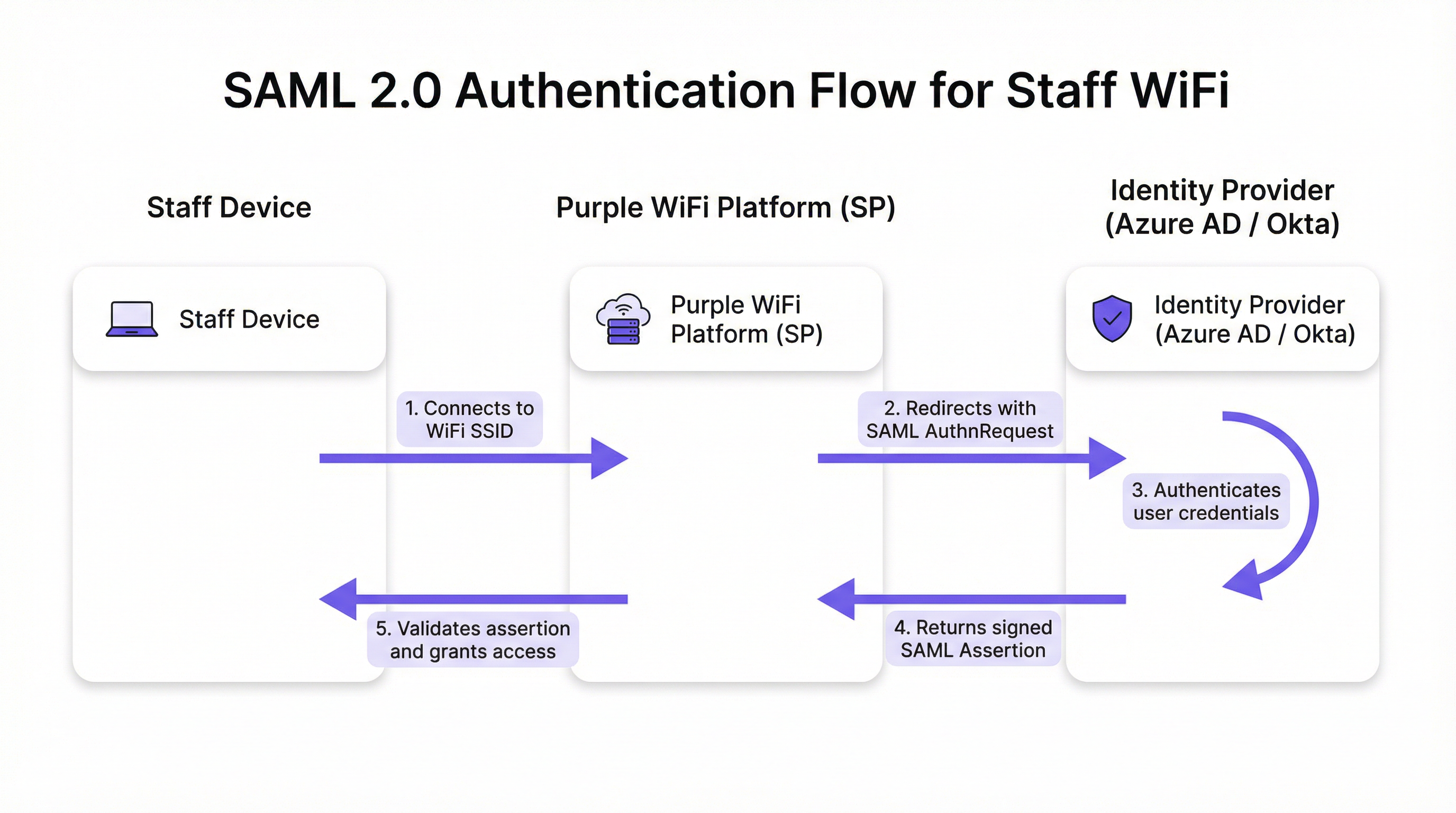
यह फ्लो पांच अलग-अलग चरणों में आगे बढ़ता है। पहला, उपयोगकर्ता अपने डिवाइस — लैपटॉप, टैबलेट, या मोबाइल फोन — को स्टाफ WiFi SSID से कनेक्ट करता है, और Purple प्लेटफ़ॉर्म एक Captive Portal प्रस्तुत करता है। दूसरा, Purple (SP के रूप में कार्य करते हुए) एक SAML ऑथेंटिकेशन अनुरोध (AuthnRequest) उत्पन्न करता है, जो एक XML दस्तावेज़ है जिसमें SP और वांछित ऑथेंटिकेशन मापदंडों के बारे में जानकारी होती है। उपयोगकर्ता के ब्राउज़र को इस एम्बेडेड अनुरोध के साथ IdP के SSO URL पर रीडायरेक्ट किया जाता है। तीसरा, उपयोगकर्ता IdP के परिचित लॉगिन पेज — अपनी Microsoft 365 या Okta स्क्रीन — पर पहुंचता है और अपने कॉर्पोरेट क्रेडेंशियल्स दर्ज करता है। IdP यहां अपनी सुरक्षा नीतियों की पूरी श्रृंखला लागू करता है, जिसमें मल्टी-फैक्टर ऑथेंटिकेशन (MFA), डिवाइस ट्रस्ट चेक और सशर्त एक्सेस नियम शामिल हैं। चौथा, सफल ऑथेंटिकेशन पर, IdP एक डिजिटल रूप से हस्ताक्षरित एसेर्शन (assertion) वाला SAML रिस्पॉन्स उत्पन्न करता है। यह एसेर्शन IdP की निजी कुंजी के साथ हस्ताक्षरित होता है और इसमें प्रमाणित उपयोगकर्ता के बारे में मुख्य जानकारी होती है, जिसमें उपयोगकर्ता नाम, ईमेल और समूह सदस्यता शामिल है। उपयोगकर्ता के ब्राउज़र को इस हस्ताक्षरित रिस्पॉन्स के साथ वापस Purple के Assertion Consumer Service (ACS) URL पर रीडायरेक्ट किया जाता है। पांचवां, Purple SAML रिस्पॉन्स प्राप्त करता है, IdP के पूर्व-कॉन्फ़िगर किए गए सार्वजनिक प्रमाणपत्र का उपयोग करके डिजिटल हस्ताक्षर की पुष्टि करता है, ऑथराइजेशन की पुष्टि करने के लिए एसेर्शन को पार्स करता है, और नेटवर्क कंट्रोलर को डिवाइस को पूर्ण नेटवर्क एक्सेस प्रदान करने का निर्देश देता है।
प्रासंगिक मानक और प्रोटोकॉल
SAML 2.0 मूलभूत प्रोटोकॉल है, जो एसेर्शन, प्रोटोकॉल, बाइंडिंग और प्रोफाइल के लिए XML-आधारित संदेशों को परिभाषित करता है। IEEE 802.1X एक पूरक पोर्ट-आधारित नेटवर्क एक्सेस कंट्रोल मानक प्रदान करता है; हालाँकि, Captive Portal SAML दृष्टिकोण हर एंडपॉइंट पर जटिल सप्लिकेंट कॉन्फ़िगरेशन की आवश्यकता के बिना सार्वभौमिक डिवाइस संगतता प्रदान करता है, जो इसे BYOD वातावरण के लिए आदर्श बनाता है। WPA3-Enterprise, जब SAML के साथ जोड़ा जाता है, तो गहन सुरक्षा (defence-in-depth) प्रदान करता है: WPA3 हवा में ट्रैफ़िक को एन्क्रिप्ट करता है जबकि SAML एप्लिकेशन लेयर पर पहचान सत्यापन को संभालता है। PCI DSS आवश्यकता 8 सिस्टम घटकों तक एक्सेस की पहचान और ऑथेंटिकेशन को अनिवार्य करती है, एक आवश्यकता जिसे इस आर्किटेक्चर द्वारा सीधे संबोधित किया जाता है।
कार्यान्वयन मार्गदर्शिका
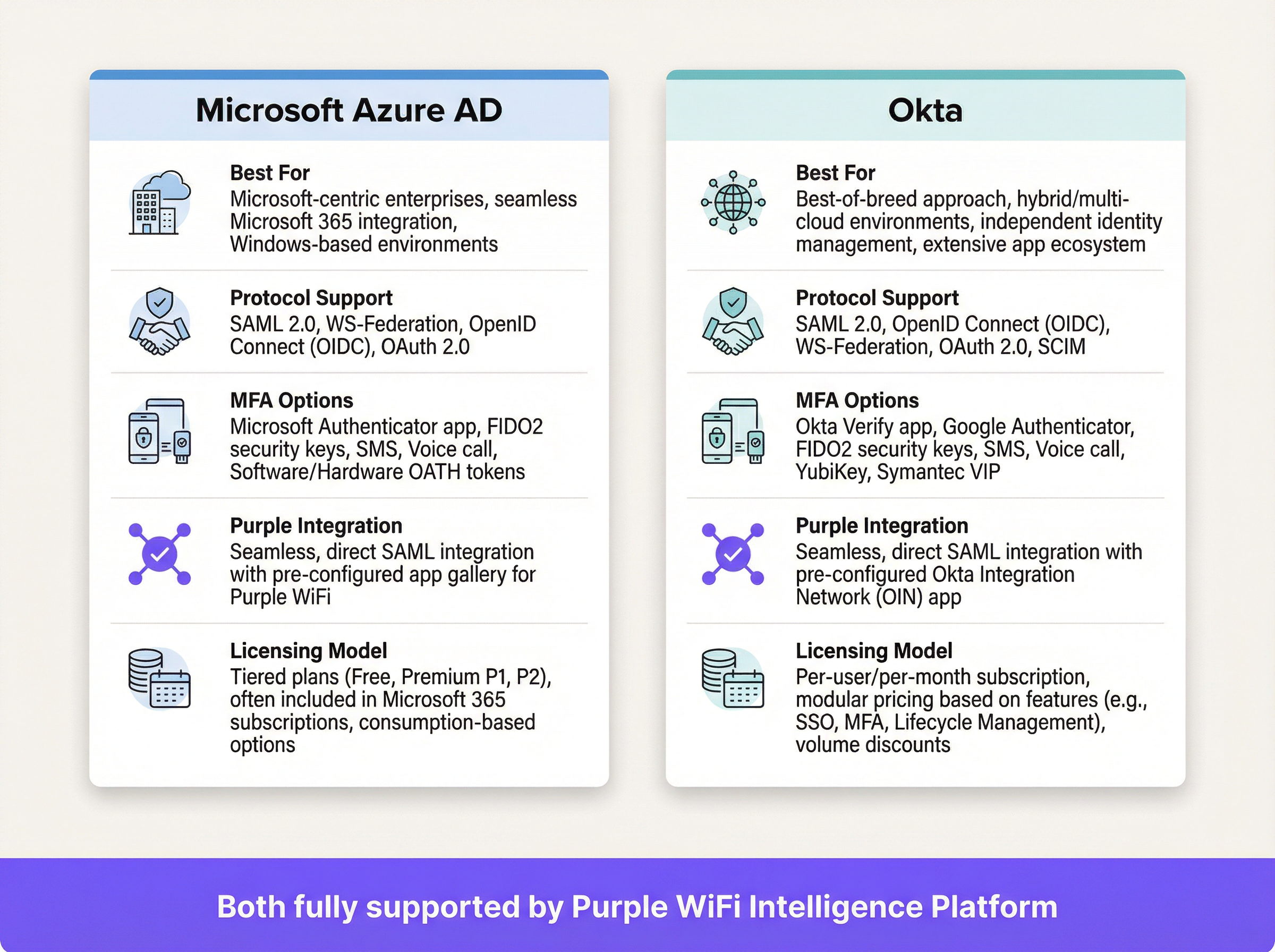
अपने स्टाफ WiFi के लिए SAML ऑथेंटिकेशन तैनात करने में आपके IdP और Purple प्लेटफ़ॉर्म के बीच एक क्रिप्टोग्राफ़िक ट्रस्ट संबंध स्थापित करना शामिल है। निम्नलिखित चरण वेंडर-न्यूट्रल हैं, हालांकि विशिष्ट UI तत्व IdP के अनुसार भिन्न होंगे।
परिनियोजन-पूर्व चेकलिस्ट
कॉन्फ़िगरेशन शुरू करने से पहले, पुष्टि करें कि आपके पास SAML 2.0-अनुपालक IdP (Azure AD, Okta, Ping Identity, ADFS) है। सुनिश्चित करें कि आपके पास अपने IdP पोर्टल और Purple प्लेटफ़ॉर्म दोनों में प्रशासनिक विशेषाधिकार हैं। अपने उपयोगकर्ता समूहों को परिभाषित करें — उदाहरण के लिए, 'All-Staff', 'IT-Admins', 'Store-Managers' — क्योंकि ये भूमिका-आधारित एक्सेस नीतियों को संचालित करते हैं। सत्यापित करें कि आपका WiFi हार्डवेयर (एक्सेस पॉइंट और कंट्रोलर) Captive Portal रीडायरेक्शन का समर्थन करता है।
चरण 1 — अपने IdP में एप्लिकेशन कॉन्फ़िगर करें
अपने IdP में, Purple के लिए एक नया SAML-आधारित एप्लिकेशन बनाएं। Azure AD में 'Enterprise Applications' या Okta में 'Applications' पर नेविगेट करें और एक कस्टम SAML ऐप चुनें। आपको Purple प्लेटफ़ॉर्म से अपने IdP को दो मान प्रदान करने होंगे: Assertion Consumer Service (ACS) URL और Entity ID। Purple इन्हें अपने ऑथेंटिकेशन सेटअप अनुभाग में प्रदान करता है। आपका IdP, बदले में, अपना स्वयं का मेटाडेटा उत्पन्न करेगा — आमतौर पर एक XML फ़ाइल या URL — जिसमें IdP का SSO URL, Entity ID और X.509 साइनिंग प्रमाणपत्र होगा। इसे अगले चरण के लिए सुरक्षित रखें।
चरण 2 — क्लेम्स (Claims) कॉन्फ़िगर करें
यह सबसे महत्वपूर्ण परिचालन कॉन्फ़िगरेशन चरण है। आपको SAML एसेर्शन में विशिष्ट उपयोगकर्ता एट्रिब्यूट्स भेजने के लिए IdP को कॉन्फ़िगर करना होगा। Purple को NameID क्लेम के रूप में प्रत्येक उपयोगकर्ता के लिए एक अद्वितीय, स्थायी पहचानकर्ता की आवश्यकता होती है। सर्वोत्तम अभ्यास यह है कि परिवर्तनशील ईमेल पते के बजाय Azure AD में user.objectid या Okta में user.id जैसे अपरिवर्तनीय एट्रिब्यूट का उपयोग किया जाए। इसके अतिरिक्त, उपयोगकर्ता की समूह सदस्यता पास करने के लिए समूह क्लेम्स कॉन्फ़िगर करें। यह प्रति-उपयोगकर्ता कॉन्फ़िगरेशन के बिना Purple के भीतर गतिशील, भूमिका-आधारित एक्सेस नीतियों को सक्षम बनाता है।
चरण 3 — Purple में ऑथेंटिकेशन विधि कॉन्फ़िगर करें
Purple पोर्टल में, ऑथेंटिकेशन प्रबंधन अनुभाग पर नेविगेट करें और विधि प्रकार के रूप में SAML 2.0 चुनें। चरण 1 में प्राप्त IdP का SSO URL, Entity ID और X.509 प्रमाणपत्र दर्ज करें। अपने IdP के क्लेम्स कॉन्फ़िगरेशन से एट्रिब्यूट नामों को Purple में संबंधित फ़ील्ड्स में मैप करें। अंत में, स्टाफ SSID से कनेक्ट होने वाले उपयोगकर्ताओं के लिए फ्लो को सक्रिय करने के लिए इस ऑथेंटिकेशन विधि को अपने स्टाफ Captive Portal जर्नी में असाइन करें।
चरण 4 — परीक्षण और चरणबद्ध रोलआउट
नए SAML एप्लिकेशन को एक छोटे पायलट समूह — आदर्श रूप से IT टीम — को असाइन करें और कई डिवाइस प्रकारों (Windows, macOS, iOS, Android) पर एंड-टू-एंड फ्लो को मान्य करें। किसी भी विफलता का निदान करने के लिए अपने IdP में SAML साइन-इन लॉग और Purple में ऑथेंटिकेशन लॉग की निगरानी करें। एक बार मान्य होने के बाद, सभी प्रासंगिक स्टाफ समूहों को कवर करने के लिए अपने IdP में उपयोगकर्ता असाइनमेंट का धीरे-धीरे विस्तार करें। स्टाफ को बदलाव के बारे में स्पष्ट रूप से सूचित करें, इस बात पर जोर देते हुए कि वे अब अपने मानक कॉर्पोरेट लॉगिन क्रेडेंशियल्स का उपयोग करेंगे।
सर्वोत्तम अभ्यास
सभी WiFi ऑथेंटिकेशन के लिए MFA लागू करें। यह क्रेडेंशियल चोरी के खिलाफ सबसे प्रभावी नियंत्रण है और इसे किसी भी एंटरप्राइज़ डिप्लॉयमेंट के लिए गैर-परक्राम्य माना जाना चाहिए। डिवाइस अनुपालन स्थिति, भौगोलिक स्थान या जोखिम स्कोर के आधार पर नेटवर्क एक्सेस को प्रतिबंधित करने के लिए अपने IdP की सशर्त एक्सेस क्षमताओं का लाभ उठाएं। आवधिक री-ऑथेंटिकेशन को बाध्य करने के लिए Purple के भीतर छोटे सेशन टाइमआउट कॉन्फ़िगर करें, यह सुनिश्चित करते हुए कि एक्सेस अधिकारों को IdP के विरुद्ध नियमित रूप से फिर से मान्य किया जाता है और खोए या चोरी हुए उपकरणों से जोखिम को कम किया जाता है। एट्रिब्यूट न्यूनीकरण के सिद्धांत का पालन करें: GDPR अनुच्छेद 5 के डेटा न्यूनीकरण सिद्धांत के अनुपालन में, SAML एसेर्शन में केवल एक्सेस निर्णयों के लिए आवश्यक एट्रिब्यूट्स शामिल करें। कॉर्पोरेट-प्रबंधित उपकरणों के लिए, गहन सुरक्षा के लिए SAML Captive Portal को WPA3-Enterprise और 802.1X के साथ संयोजित करने पर विचार करें; SAML दृष्टिकोण BYOD या अप्रबंधित एंडपॉइंट्स के लिए सबसे उपयुक्त है।

समस्या निवारण और जोखिम न्यूनीकरण
सबसे आम और प्रभावशाली विफलता मोड प्रमाणपत्र समाप्ति (certificate expiration) है। IdP के X.509 साइनिंग प्रमाणपत्र की एक निश्चित वैधता अवधि होती है, आमतौर पर एक से तीन वर्ष। जब यह समाप्त हो जाता है, तो Purple अब SAML एसेर्शन को मान्य नहीं कर सकता है, जिससे पूर्ण ऑथेंटिकेशन आउटेज हो जाता है। न्यूनीकरण: समाप्ति से 90, 60 और 30 दिन पहले रिडंडेंट कैलेंडर रिमाइंडर सेट करें और नवीनीकरण प्रक्रिया का स्पष्ट रूप से दस्तावेजीकरण करें।
क्लॉक स्क्यू (Clock skew) ऑथेंटिकेशन विफलताओं का दूसरा सबसे लगातार कारण है। SAML एसेर्शन में एक वैधता विंडो होती है, और यदि IdP और Purple प्लेटफ़ॉर्म पर घड़ियां कुछ मिनटों से अधिक भिन्न होती हैं, तो एसेर्शन को समाप्त या अभी-तक-मान्य-नहीं के रूप में अस्वीकार कर दिया जाएगा। सुनिश्चित करें कि दोनों सिस्टम एक विश्वसनीय NTP स्रोत के साथ सिंक्रनाइज़ हों।
प्रारंभिक सेटअप के दौरान एक गलत ACS URL एक सामान्य कॉन्फ़िगरेशन त्रुटि है। एक भी अक्षर की टाइपो का मतलब है कि IdP हस्ताक्षरित एसेर्शन को एक गैर-मौजूद एंडपॉइंट पर भेजता है। ACS URL को मैन्युअल रूप से टाइप करने के बजाय हमेशा सीधे Purple प्लेटफ़ॉर्म से कॉपी-पेस्ट करें।
अंत में, इस एप्लिकेशन के लिए IdP-आरंभिक लॉगिन (IdP-initiated login) अक्षम करें। नेटवर्क एक्सेस केवल SP (WiFi कनेक्शन ईवेंट) से ही शुरू किया जाना चाहिए। IdP-आरंभिक फ्लो की अनुमति देने से कुछ SAML-आधारित इंजेक्शन हमलों के द्वार खुल जाते हैं और यह इस डिप्लॉयमेंट मॉडल में एक अनावश्यक सुरक्षा जोखिम है।
ROI और व्यावसायिक प्रभाव
SAML-आधारित स्टाफ WiFi ऑथेंटिकेशन के लिए व्यावसायिक मामला सभी प्रकार के स्थानों में सम्मोहक है। साझा पासवर्ड के उन्मूलन से आवधिक, विघटनकारी पासवर्ड रोटेशन और संबंधित हेल्पडेस्क टिकटों की आवश्यकता समाप्त हो जाती है। संगठन आमतौर पर डिप्लॉयमेंट के बाद WiFi से संबंधित IT सपोर्ट अनुरोधों में 50% से अधिक की कमी की रिपोर्ट करते हैं। उपयोगकर्ता जीवनचक्र स्वचालन सबसे महत्वपूर्ण परिचालन लाभ है: जब किसी स्टाफ सदस्य को ऑफ़बोर्ड किया जाता है और उनका IdP खाता अक्षम कर दिया जाता है, तो उनका WiFi एक्सेस तुरंत और स्वचालित रूप से रद्द कर दिया जाता है, जिससे एक सुरक्षा अंतर बंद हो जाता है जिसे PSK-आधारित नेटवर्क अनिश्चित काल तक खुला छोड़ देते हैं। अनुपालन के दृष्टिकोण से, SAML एक ऑडिट योग्य, व्यक्तिगत-स्तर का एक्सेस लॉग प्रदान करता है, जो सीधे PCI DSS आवश्यकता 8 और GDPR जवाबदेही दायित्वों का समर्थन करता है। निर्बाध SSO अनुभव — ईमेल, एप्लिकेशन और WiFi के लिए क्रेडेंशियल्स का एक सेट — कर्मचारियों के लिए घर्षण को कम करता है और उत्पादकता बढ़ाता है, विशेष रूप से उन परिचालन टीमों के लिए जो दिन भर किसी स्थान के विभिन्न क्षेत्रों के बीच आते-जाते हैं।
संदर्भ
[1] OASIS Security Services (SAML) TC. "SAML V2.0 Executive Overview." अप्रैल 2008. https://www.oasis-open.org/committees/download.php/27819/sstc-saml-exec-overview-2.0-cd-01.pdf
[2] General Data Protection Regulation (GDPR). अनुच्छेद 5, व्यक्तिगत डेटा के प्रसंस्करण से संबंधित सिद्धांत। https://gdpr-info.eu/art-5-gdpr/
[3] PCI Security Standards Council. "PCI DSS v4.0 Requirement 8: Identify Users and Authenticate Access to System Components." 2022. https://www.pcisecuritystandards.org/
मुख्य शब्द और परिभाषाएं
SAML Assertion
An XML document, digitally signed by the Identity Provider, that declares who a user is and provides additional attributes about them. It is the cryptographic 'digital passport' that the Service Provider trusts to make an access decision.
When troubleshooting authentication failures, IT teams inspect the SAML assertion to verify that the IdP is sending the correct user attributes and that the digital signature is valid. It is the core piece of evidence in every authentication transaction.
Identity Provider (IdP)
The system that manages user identities and authenticates them. It is the authoritative source of truth for user identity within an organisation.
In a corporate environment, this is the central user directory — Azure AD, Okta, Ping Identity, or ADFS. It is where IT teams add, remove, and manage all staff accounts and enforce security policies like MFA.
Service Provider (SP)
The application or service that requires authentication before granting access. It trusts the Identity Provider to perform the authentication and relies on the SAML assertion as proof.
For SAML WiFi authentication, the Purple platform is the Service Provider. It consumes the SAML assertion from the IdP to make a network access control decision for the connecting device.
Assertion Consumer Service (ACS) URL
A specific endpoint on the Service Provider designed to receive and process SAML assertions from the Identity Provider after a successful authentication event.
This is one of the most critical configuration parameters. If the ACS URL is incorrectly entered in the IdP settings, the IdP will not know where to send the user after login, and authentication will fail with a redirect error.
Entity ID
A globally unique identifier for an Identity Provider or Service Provider within the SAML protocol. It acts as a unique name to ensure each party is communicating with the correct counterpart.
Typically formatted as a URL, the Entity ID does not need to resolve to a real webpage. It functions like a unique identifier in a directory, preventing one SP from accidentally consuming assertions intended for another.
SAML Metadata
An XML document containing all necessary configuration information about a SAML party — including its Entity ID, endpoint URLs (such as the ACS URL), and public X.509 signing certificate.
Exchanging metadata files is the most reliable method for configuring a SAML trust relationship. Rather than manually copying individual values, administrators can upload the metadata XML from the other party to auto-populate the configuration, reducing the risk of transcription errors.
Claim
A piece of information about a user — an attribute — that is included in the SAML assertion by the Identity Provider. Common claims include username, email address, department, and group memberships.
IT teams configure claims in the IdP to control what information the SP receives. Sending group membership claims to Purple enables role-based access policies and dynamic VLAN assignment based on a user's job function.
Single Sign-On (SSO)
An authentication scheme that allows a user to authenticate once with a single set of credentials and gain access to multiple independent systems and applications without re-entering credentials for each.
SAML is a primary technical enabler of SSO. By using SAML for WiFi authentication, staff use the same corporate login they use for email, HR systems, and other applications to get online — a seamless experience that reduces friction and eliminates the need for separate WiFi passwords.
X.509 Certificate
A digital certificate standard used to verify the identity of a party and to sign or encrypt data. In SAML, the IdP uses its private key to sign assertions, and the SP uses the IdP's X.509 public certificate to verify those signatures.
This certificate is the foundation of trust in a SAML deployment. Its expiration is the single most common cause of complete authentication outages and must be proactively managed.
केस स्टडीज
A global hotel chain with 300 properties needs to replace its insecure, single PSK for staff WiFi. The chain uses Microsoft 365 and Azure AD as its corporate identity platform. They need a solution that can be centrally managed, provides a seamless experience for staff, and revokes access immediately when an employee leaves the organisation.
The IT team creates a new Enterprise Application in Azure AD for the Purple platform. They configure the application with the Entity ID and ACS URL from their Purple instance. Critically, they configure the claims to send the user's group membership — for example, 'Hotel-Staff' and 'IT-Admin' — and use user.objectid as the unique NameID to ensure a stable, immutable identifier. In Purple, they create a new SAML authentication method, uploading the Azure AD metadata XML to establish the trust relationship. They then create two access policies: one for 'Hotel-Staff' that grants access to the general staff network VLAN, and a second for 'IT-Admin' that grants privileged access to the management VLAN. This configuration is tied to a single 'Staff' SSID broadcast across all 300 properties via the chain's centralised network management platform. A new staff member at any hotel is automatically granted the correct level of WiFi access as soon as their user account is added to the relevant group in Azure AD — no local IT intervention required. When a staff member leaves, disabling their Azure AD account immediately revokes their WiFi access at all 300 properties simultaneously.
A large conference centre hosts multiple third-party events simultaneously. They need to provide secure WiFi for event staff from different organisations, each with their own identity systems. They cannot issue credentials to external staff and must ensure that staff from one event cannot access the network resources of another.
The conference centre's IT team uses Purple's support for multiple SAML Identity Providers. For each major event organiser, they configure a separate SAML trust relationship within the Purple platform. Organiser A (using Okta) and Organiser B (using Google Workspace) are set up as distinct IdPs. The captive portal is configured to present an organisation selection step, directing users to their respective IdP for authentication. Using group claims passed by each IdP, Purple maps users to event-specific VLANs, ensuring complete network traffic segregation between events. Access for each organiser's staff automatically expires at the end of the event based on pre-set journey rules configured in Purple, requiring no manual deprovisioning.
परिदृश्य विश्लेषण
Q1. Your CFO has reported that a former employee's personal device was found still connected to the staff WiFi network two weeks after their departure. Your current system uses a single WPA2-PSK that is rotated quarterly. How would a SAML-based approach mitigate this specific risk, and what additional controls would you recommend?
💡 संकेत:Consider the user lifecycle, the source of authentication authority, and the role of session timeouts.
अनुशंसित दृष्टिकोण दिखाएं
A SAML-based approach directly links WiFi access to the employee's active status in the central Identity Provider. The moment the employee's account is disabled or deleted as part of the standard offboarding process, their ability to authenticate to any SAML-integrated service — including the WiFi — is instantly and automatically revoked. The IdP will no longer issue a valid SAML assertion for that user, meaning they cannot re-authenticate. To address the specific scenario of a device that is already connected, configure short session timeouts in Purple (e.g., 8-hour sessions aligned with a working day). When the session expires, the device must re-authenticate; the disabled IdP account will prevent this. This eliminates the security gap inherent in long-lived shared secrets like a PSK, where a device that has already connected remains online indefinitely.
Q2. A stadium is implementing SAML authentication for its 500 event-day staff. They want to ensure that cashiers using point-of-sale terminals can only access the PCI-compliant network segment, while operations staff can access the general corporate network. How would you design the SAML claims configuration and network policy to achieve this segmentation?
💡 संकेत:Think about how to pass role information from the IdP to the network infrastructure via the SAML assertion, and how Purple can act on that information.
अनुशंसित दृष्टिकोण दिखाएं
The solution is to use group claims and dynamic VLAN assignment. In the IdP (Azure AD or Okta), create two security groups: 'POS-Staff' and 'Ops-Staff'. Configure the SAML application to include the user's group membership as a claim in the assertion. In the Purple platform, create two user access profiles that map to these group names. Configure the 'POS-Staff' profile to assign users to the PCI-compliant VLAN (e.g., VLAN 10) and the 'Ops-Staff' profile to assign users to the corporate VLAN (e.g., VLAN 20). When a user authenticates, Purple reads the group claim from the SAML assertion and instructs the network controller — via RADIUS attributes or API — to place the user's device in the appropriate VLAN. Network traffic is then segregated at the infrastructure level, ensuring POS terminals can only reach the payment processing network, regardless of where they connect in the stadium.
Q3. You are planning a rollout of SAML WiFi authentication to a retail chain with 1,000 stores. The store managers are not technically proficient. What is the single most important operational risk to proactively manage, and what is your communication and contingency plan?
💡 संकेत:What is the one component in the SAML trust relationship that has a fixed expiry date and whose failure would cause a simultaneous outage across all 1,000 stores?
अनुशंसित दृष्टिकोण दिखाएं
The single most critical operational risk is the expiration of the IdP's SAML signing certificate. If it expires, all 1,000 stores will lose staff WiFi access simultaneously, as Purple will be unable to validate any SAML assertions. The mitigation plan has two components. Technically: set multiple, redundant calendar reminders for the certificate's expiry date for the entire IT team, starting 90 days out. Document the step-by-step procedure for generating a new certificate in the IdP and updating it in the Purple platform. Ensure at least two team members are trained on this procedure. Aim to complete the renewal at least 30 days before expiry to allow for testing. For communication: proactively inform the retail operations director about the planned maintenance window for the certificate renewal. There is no need to inform individual store managers for a planned renewal, as the goal is a zero-downtime cutover. In the event of an unplanned outage, the communication plan should be to immediately notify the operations director of the issue and provide a realistic ETA for resolution. A temporary fallback — such as a time-limited PSK for critical operations — should be documented in the business continuity plan.
मुख्य निष्कर्ष
- ✓Replace insecure staff WiFi pre-shared keys with robust, identity-driven SAML 2.0 authentication to eliminate shared credential vulnerabilities.
- ✓Integrate your existing Identity Provider — Azure AD or Okta — with Purple to leverage a single source of truth for user identity across all applications and network access.
- ✓Automate user onboarding and offboarding: WiFi access is granted and revoked automatically as part of your existing IdP user lifecycle management processes.
- ✓Enforce Multi-Factor Authentication and conditional access policies at the IdP level to protect network entry against credential theft and compromised devices.
- ✓Use group claims within the SAML assertion to enable dynamic, role-based network access and VLAN segmentation without per-user configuration in Purple.
- ✓Achieve compliance with PCI DSS Requirement 8 and GDPR accountability obligations through auditable, individual-level access logs tied to verified corporate identities.
- ✓Proactively manage the IdP signing certificate expiry — the number one cause of SAML authentication outages — with redundant reminders and a documented renewal procedure.




