

Jamf और RADIUS: Apple डिवाइस बेड़े के लिए सर्टिफिकेट-आधारित WiFi प्रमाणीकरण
यह तकनीकी संदर्भ मार्गदर्शिका IT प्रबंधकों, नेटवर्क आर्किटेक्ट्स और CTOs को Jamf Pro और RADIUS का उपयोग करके Apple डिवाइस बेड़े के लिए सर्टिफिकेट-आधारित 802.1X WiFi प्रमाणीकरण तैनात करने के लिए कार्रवाई योग्य कदम प्रदान करती है। इसमें पूर्ण SCEP सर्टिफिकेट प्रोविजनिंग वर्कफ़्लो, WiFi कॉन्फ़िगरेशन प्रोफ़ाइल संरचना, RADIUS एकीकरण आवश्यकताएं और स्वास्थ्य सेवा और उद्यम वातावरण से वास्तविक दुनिया के कार्यान्वयन परिदृश्य शामिल हैं। यह मार्गदर्शिका पासवर्ड-आधारित WiFi कमजोरियों को खत्म करने, हेल्पडेस्क ओवरहेड को कम करने और PCI DSS और GDPR नेटवर्क एक्सेस मानकों के अनुपालन को प्राप्त करने की चाहत रखने वाले किसी भी संगठन के लिए आवश्यक है।
🎧 इस गाइड को सुनें
ट्रांसक्रिप्ट देखें

कार्यकारी सारांश
उद्यम वातावरण में Apple उपकरणों के बेड़े के लिए सुरक्षित WiFi एक्सेस प्रबंधित करना एक महत्वपूर्ण परिचालन और सुरक्षा चुनौती पेश करता है जब पारंपरिक पासवर्ड-आधारित प्रमाणीकरण पर भरोसा किया जाता है। उपयोगकर्ता अपने Active Directory क्रेडेंशियल बदलते हैं, और तुरंत उनके iPhones, iPads और MacBooks नेटवर्क से हट जाते हैं — जिससे हेल्पडेस्क टिकट उत्पन्न होते हैं, वर्कफ़्लो बाधित होता है, और संगठन क्रेडेंशियल-आधारित हमलों के संपर्क में आता है।
होटलों, रिटेल चेन, स्टेडियमों और सार्वजनिक क्षेत्र के संगठनों के IT प्रबंधकों, नेटवर्क आर्किटेक्ट्स और CTOs के लिए, समाधान EAP-TLS का उपयोग करके सर्टिफिकेट-आधारित 802.1X प्रमाणीकरण है। Jamf Pro का लाभ उठाकर SCEP (Simple Certificate Enrollment Protocol) के माध्यम से अद्वितीय क्रिप्टोग्राफ़िक सर्टिफिकेट वितरित करने और RADIUS सर्वर के साथ एकीकृत करके, संगठन प्रत्येक प्रबंधित Apple डिवाइस के लिए निर्बाध, पासवर्ड रहित WiFi एक्सेस प्राप्त कर सकते हैं। यह मार्गदर्शिका Jamf RADIUS WiFi सर्टिफिकेट प्रमाणीकरण को तैनात करने के लिए एक व्यावहारिक, विक्रेता-तटस्थ दृष्टिकोण प्रदान करती है, जो मजबूत सुरक्षा, PCI DSS और GDPR जैसे मानकों के अनुपालन और सपोर्ट ओवरहेड में मापने योग्य कमी सुनिश्चित करती है।
तकनीकी गहराई
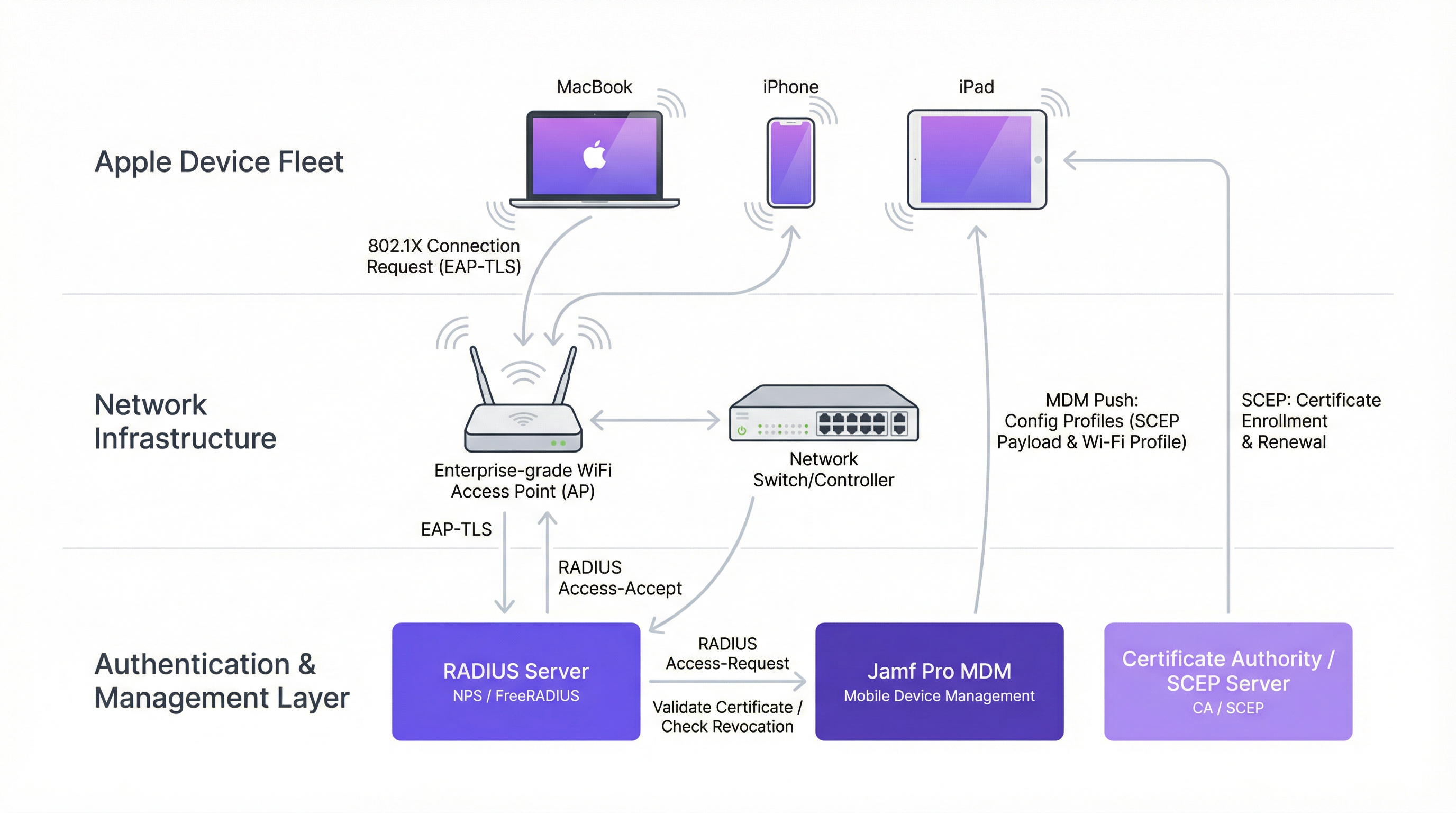
802.1X EAP-TLS आर्किटेक्चर
सर्टिफिकेट-आधारित WiFi प्रमाणीकरण की नींव IEEE 802.1X मानक है जो EAP-TLS (Extensible Authentication Protocol-Transport Layer Security) प्रोटोकॉल के साथ संयुक्त है। 802.1X मानक के विस्तृत विवरण के लिए, हमारी मार्गदर्शिका 802.1X Authentication: Securing Network Access on Modern Devices देखें।
PEAP (Protected EAP) के विपरीत, जो उपयोगकर्ता नाम और पासवर्ड पर निर्भर करता है, EAP-TLS के लिए क्लाइंट डिवाइस और प्रमाणीकरण सर्वर दोनों को डिजिटल सर्टिफिकेट का उपयोग करके अपनी पहचान साबित करने की आवश्यकता होती है। यह पारस्परिक प्रमाणीकरण ही EAP-TLS को उद्यम परिनियोजन के लिए गोल्ड स्टैंडर्ड बनाता है। तीन-पक्षीय मॉडल में निम्नलिखित घटक शामिल होते हैं।
| घटक | भूमिका | उदाहरण |
|---|---|---|
| Supplicant | नेटवर्क एक्सेस का अनुरोध करने वाला Apple डिवाइस | MacBook, iPhone, iPad |
| Authenticator | नेटवर्क एज डिवाइस जो एक्सेस कंट्रोल लागू करता है | WiFi एक्सेस पॉइंट, WLC |
| Authentication Server | सर्टिफिकेट को मान्य करता है और एक्सेस अधिकृत करता है | FreeRADIUS, Cisco ISE, Microsoft NPS |
एक्सेस पॉइंट एक द्वारपाल के रूप में कार्य करता है, जब तक कि RADIUS सर्वर Access-Accept संदेश नहीं भेजता, तब तक सभी ट्रैफ़िक को रोकता है। यह IEEE 802.1X पोर्ट-आधारित नेटवर्क एक्सेस कंट्रोल (PNAC) मॉडल का मूल है।
SCEP और Jamf Pro: स्केलेबल सर्टिफिकेट वितरण
पैमाने पर EAP-TLS के साथ चुनौती सर्टिफिकेट वितरण है। 500 iPads पर मैन्युअल रूप से एक अद्वितीय सर्टिफिकेट स्थापित करना एक व्यवहार्य ऑपरेशन नहीं है। यहीं पर Jamf Pro और SCEP Jamf एकीकरण महत्वपूर्ण प्रवर्तक बन जाता है।
SCEP (Simple Certificate Enrollment Protocol) एक हल्का प्रोटोकॉल है जो डिवाइस को सर्टिफिकेट अथॉरिटी (CA) से हस्ताक्षरित सर्टिफिकेट के लिए स्वचालित रूप से अनुरोध करने और प्राप्त करने की अनुमति देता है। Jamf Pro ऑर्केस्ट्रेटर के रूप में कार्य करता है, जो प्रत्येक Apple डिवाइस पर एक कॉन्फ़िगरेशन प्रोफ़ाइल भेजता है। इस प्रोफ़ाइल में एक SCEP पेलोड होता है जो डिवाइस को SCEP सर्वर से संपर्क करने का निर्देश देता है, एक डायनेमिक चैलेंज पासवर्ड प्रदान करता है, और आवश्यक सर्टिफिकेट विशेषताओं को निर्दिष्ट करता है — जैसे कि Subject Alternative Name (SAN), जो आमतौर पर डिवाइस के MAC एड्रेस या सीरियल नंबर पर मैप किया जाता है।
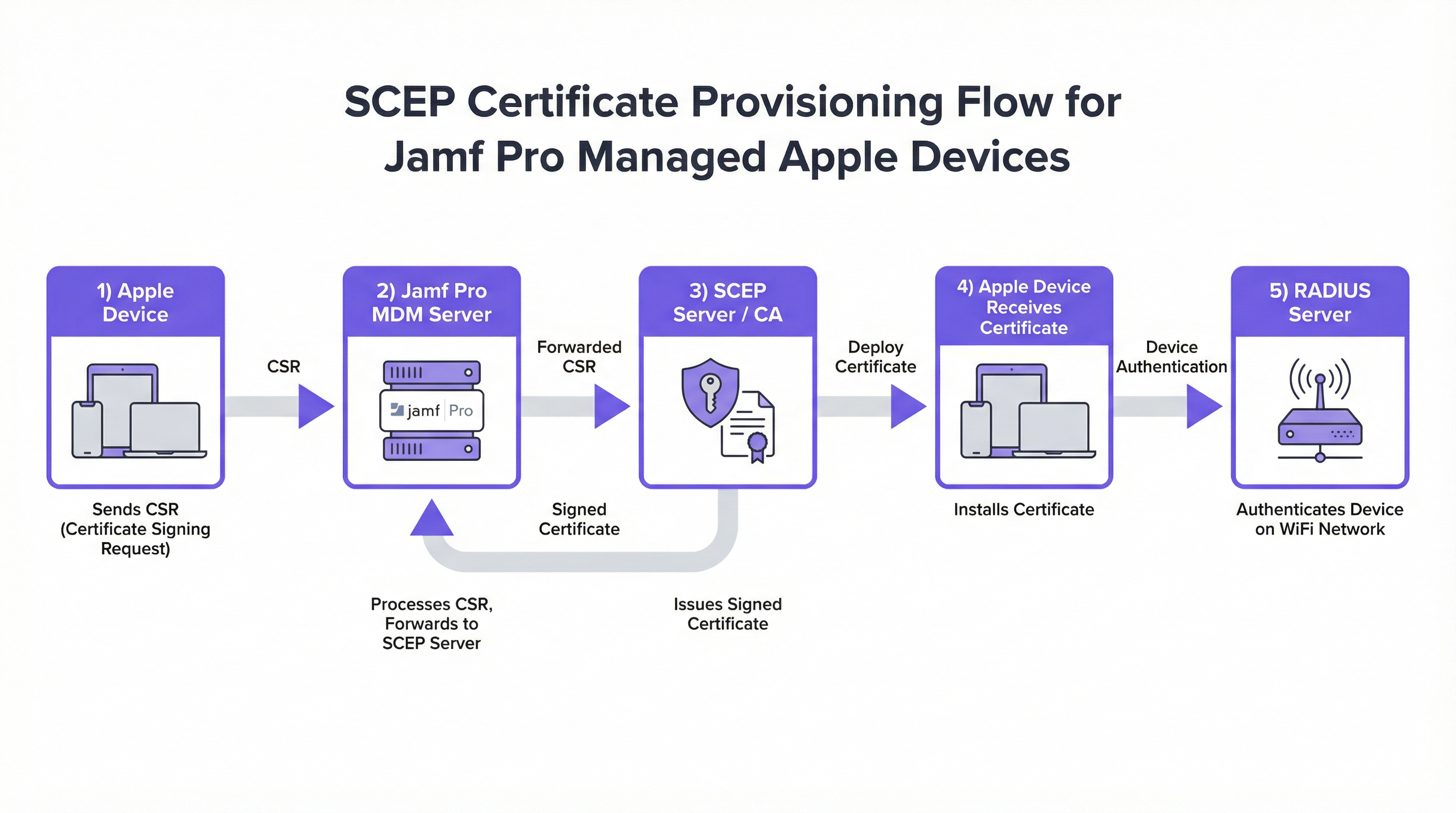
डायनेमिक चैलेंज पासवर्ड तंत्र विशेष रूप से महत्वपूर्ण है। Jamf-एकीकृत SCEP परिनियोजन में, Jamf प्रत्येक डिवाइस के लिए एक अद्वितीय, एकल-उपयोग वाला चैलेंज पासवर्ड उत्पन्न करता है। यह सुनिश्चित करता है कि केवल Jamf Pro में नामांकित डिवाइस — और इसलिए कॉर्पोरेट रूप से प्रबंधित — ही CA से सफलतापूर्वक सर्टिफिकेट प्राप्त कर सकते हैं। यह एक महत्वपूर्ण सुरक्षा नियंत्रण है जो अनधिकृत उपकरणों को नामांकित होने से रोकता है।
Apple डिवाइस प्रमाणीकरण के लिए RADIUS विशेषताएं
जब RADIUS सर्वर एक्सेस पॉइंट से Access-Request प्राप्त करता है, तो वह अपने प्राधिकरण निर्णय लेने के लिए कई विशेषताओं का मूल्यांकन करता है। Apple 802.1X परिनियोजन के लिए, सबसे प्रासंगिक RADIUS विशेषताएं इस प्रकार हैं।
| RADIUS विशेषता | विवरण | Apple प्रासंगिकता |
|---|---|---|
User-Name (Attr 1) |
सप्लीकेंट द्वारा प्रस्तुत पहचान | आमतौर पर सर्टिफिकेट का Subject CN या SAN |
NAS-IP-Address (Attr 4) |
एक्सेस पॉइंट का IP | AP-विशिष्ट नीतियों के लिए उपयोग किया जाता है |
Called-Station-Id (Attr 30) |
AP का BSSID और SSID | SSID-आधारित नीति प्रवर्तन सक्षम करता है |
EAP-Message (Attr 79) |
एनकैप्सुलेटेड EAP पैकेट | TLS हैंडशेक डेटा शामिल है |
Tunnel-Type (Attr 64) |
VLAN असाइनमेंट प्रकार निर्दिष्ट करता है | प्रमाणीकरण के बाद डायनेमिक VLAN असाइनमेंट के लिए उपयोग किया जाता है |
Tunnel-Medium-Type (Attr 65) |
टनल के लिए माध्यम निर्दिष्ट करता है | 802.1Q VLAN टैगिंग के लिए आवश्यक |
Tunnel-Private-Group-Id (Attr 81) |
असाइन करने के लिए VLAN ID | भूमिका-आधारित नेटवर्क सेगमेंटेशन सक्षम करता है |
Tunnel-Private-Group-Id विशेषता उद्यम परिनियोजन में विशेष रूप से शक्तिशाली है। सर्टिफिकेट की विशेषताओं (जैसे, विभाग, डिवाइस प्रकार) के आधार पर अलग-अलग VLAN ID लौटाकर, RADIUS सर्वर अलग SSIDs की आवश्यकता के बिना नेटवर्क को गतिशील रूप से विभाजित कर सकता है।
कार्यान्वयन मार्गदर्शिका
Jamf Pro के माध्यम से सर्टिफिकेट WiFi Apple प्रमाणीकरण को तैनात करना एक संरचित अनुक्रम का पालन करता है। इस क्रम से विचलित होना विफल परिनियोजन का प्राथमिक कारण है।
चरण 1: अपनी सर्टिफिकेट अथॉरिटी इन्फ्रास्ट्रक्चर स्थापित करें
Jamf को छूने से पहले, आपका CA इन्फ्रास्ट्रक्चर तैयार होना चाहिए। Microsoft वातावरण के लिए, यह आमतौर पर Network Device Enrollment Service (NDES) भूमिका के साथ Active Directory Certificate Services (AD CS) है, जो SCEP सर्वर के रूप में कार्य करता है। गैर-Microsoft वातावरण के लिए, विकल्पों में EJBCA, HashiCorp Vault PKI, या AWS Private CA जैसे क्लाउड-आधारित CAs शामिल हैं।
सुनिश्चित करें कि आपका CA पदानुक्रम स्पष्ट है: एक Root CA जिसे ऑफ़लाइन रखा जाता है, और एक या अधिक Issuing CAs जो डिवाइस सर्टिफिकेट पर हस्ताक्षर करते हैं। RADIUS सर्वर को इसी CA पदानुक्रम द्वारा हस्ताक्षरित अपने स्वयं के सर्टिफिकेट की आवश्यकता होगी।
चरण 2: Jamf Pro में SCEP पेलोड कॉन्फ़िगर करें
Computers (या Mobile Devices) > Configuration Profiles > New पर जाएं। एक Certificate पेलोड जोड़ें और सर्टिफिकेट स्रोत के रूप में SCEP चुनें। महत्वपूर्ण फ़ील्ड इस प्रकार हैं।
- URL: SCEP एंडपॉइंट (जैसे,
http://ndes.yourdomain.com/certsrv/mscep/mscep.dll)। - Name: एक वर्णनात्मक नाम जो डिवाइस के कीचेन में दिखाई देगा।
- Subject: सर्टिफिकेट का विशिष्ट नाम (Distinguished Name)। कंप्यूटर के लिए
CN=$COMPUTERNAMEया मोबाइल उपकरणों के लिएCN=$JSSIDजैसे Jamf वेरिएबल का उपयोग करें। - Subject Alternative Name (SAN): SAN प्रकार को
$MACADDRESS@yourdomain.comमान के साथRFC 822 Nameपर सेट करें, या$COMPUTERNAME.yourdomain.comके साथDNS Nameपर सेट करें। यही वह चीज़ है जिसे RADIUS सर्वर डिवाइस की पहचान करने के लिए पढ़ेगा। - Challenge Type: Jamf के अंतर्निहित SCEP प्रॉक्सी का उपयोग करने के लिए Dynamic चुनें, जो प्रति-डिवाइस चैलेंज पासवर्ड उत्पन्न करता है।
- Key Size: न्यूनतम 2048-bit RSA। नए परिनियोजन के लिए 4096-bit की सिफारिश की जाती है।
- Key Usage: Signing और Encryption दोनों को सक्षम करें।
चरण 3: WiFi पेलोड कॉन्फ़िगर करें
उसी कॉन्फ़िगरेशन प्रोफ़ाइल में, एक Wi-Fi पेलोड जोड़ें। Apple 802.1X के लिए मुख्य सेटिंग्स इस प्रकार हैं।
- SSID: आपके कॉर्पोरेट सुरक्षित SSID का सटीक नाम।
- Security Type: WPA2 Enterprise या WPA3 Enterprise (जहाँ हार्डवेयर इसका समर्थन करता है वहाँ अनुशंसित)।
- Protocols — Accepted EAP Types: केवल TLS चुनें। विशेष रूप से EAP-TLS लागू करने के लिए PEAP, TTLS और अन्य सभी प्रकारों को हटा दें।
- Authentication — Identity Certificate: चरण 2 में आपके द्वारा बनाए गए SCEP पेलोड का चयन करें। यह सर्टिफिकेट और WiFi कनेक्शन के बीच महत्वपूर्ण कड़ी है।
- Trust — Trusted Server Certificate Names: अपने RADIUS सर्वर के सर्टिफिकेट का सटीक Common Name (CN) दर्ज करें (जैसे,
radius.yourdomain.com)। यह सबसे अधिक छूट जाने वाली कॉन्फ़िगरेशन आइटम है। - Trust — Trusted Certificates: Root CA और किसी भी Intermediate CA सर्टिफिकेट को अपलोड करें जिन्होंने RADIUS सर्वर के सर्टिफिकेट पर हस्ताक्षर किए हैं।
चरण 4: RADIUS सर्वर कॉन्फ़िगर करें
अपने RADIUS सर्वर पर, एक नेटवर्क नीति बनाएं जो आपके द्वारा Jamf में परिभाषित सर्टिफिकेट विशेषताओं से मेल खाती हो। Microsoft NPS के लिए, इसका मतलब है एक Connection Request Policy बनाना जो Called-Station-Id विशेषता के माध्यम से SSID से मेल खाती हो, और एक Network Policy जो आपके CA के विरुद्ध सर्टिफिकेट को मान्य करती है और वैकल्पिक रूप से टनल विशेषताओं के माध्यम से VLAN असाइन करती है।
FreeRADIUS के लिए, tls का उपयोग करने के लिए eap मॉड्यूल को कॉन्फ़िगर करें और अपने CA सर्टिफिकेट, सर्वर सर्टिफिकेट और निजी कुंजी को इंगित करें। users फ़ाइल या SQL बैकएंड को आपके डिवाइस इन्वेंट्री के विरुद्ध सर्टिफिकेट के SAN से मेल खाने के लिए कॉन्फ़िगर किया जाना चाहिए।
चरण 5: प्रोफ़ाइल को स्कोप और तैनात करें
Jamf Pro में, कॉन्फ़िगरेशन प्रोफ़ाइल को उपयुक्त डिवाइस समूहों के लिए स्कोप करें — उदाहरण के लिए, "Corporate Fleet" स्मार्ट ग्रुप के सभी डिवाइस। प्रोफ़ाइल MDM के माध्यम से स्वचालित रूप से भेजी जाएगी। जो डिवाइस ऑनलाइन हैं उन्हें यह मिनटों में मिल जाएगी; जो डिवाइस ऑफ़लाइन हैं उन्हें अगली बार चेक-इन करने पर यह मिल जाएगी।
सर्वोत्तम प्रथाएं
जहाँ संभव हो WPA3 Enterprise लागू करें। 192-बिट मोड के साथ WPA3 Enterprise GCMP-256 और HMAC-SHA-384 का उपयोग करके उन्नत क्रिप्टोग्राफ़िक मजबूती प्रदान करता है, जो WPA2 Enterprise की तुलना में काफी मजबूत सुरक्षा प्रदान करता है। Hospitality वातावरण और संवेदनशील डेटा संभालने वाले Healthcare संगठनों के लिए, यह अपग्रेड केवल एक सर्वोत्तम अभ्यास के बजाय तेजी से एक अनुपालन आवश्यकता बनता जा रहा है।
साझा हार्डवेयर के लिए डिवाइस-आधारित सर्टिफिकेट का लाभ उठाएं। साझा उपकरणों के लिए — जैसे रिटेल पॉइंट-ऑफ-सेल iPads, होटल कंसीयज टैबलेट, या क्लिनिकल डिवाइस — उपयोगकर्ता-आधारित सर्टिफिकेट के बजाय डिवाइस-बाउंड सर्टिफिकेट का उपयोग करें। यह सुनिश्चित करता है कि डिवाइस बूट होने पर नेटवर्क से जुड़ता है, किसी भी उपयोगकर्ता के लॉगिन करने से पहले, जिससे MDM चेक-इन, ऐप अपडेट और पुश नोटिफिकेशन सही ढंग से कार्य कर सकें। यह Retail परिनियोजन के लिए एक महत्वपूर्ण विचार है जहाँ उपकरणों को शिफ्टों में साझा किया जा सकता है।
अपनी व्यापक सुरक्षा स्थिति के साथ नेटवर्क एक्सेस को एकीकृत करें। जबकि कर्मचारी सुरक्षित आंतरिक एक्सेस के लिए 802.1X का उपयोग करते हैं, सुनिश्चित करें कि स्पष्ट ट्रैफ़िक पृथक्करण बनाए रखने के लिए आपके सार्वजनिक नेटवर्क को एक मजबूत Guest WiFi समाधान के माध्यम से प्रबंधित किया जाता है। WiFi Analytics के साथ सर्टिफिकेट-आधारित कर्मचारी प्रमाणीकरण को मिलाने से प्रमाणित डिवाइस व्यवहार और अतिथि नेटवर्क गतिविधि दोनों में पूर्ण दृश्यता मिलती है।
सर्टिफिकेट नवीनीकरण को स्वचालित करें। जब कोई सर्टिफिकेट समाप्त होने के 14 से 30 दिनों के भीतर हो, तो स्वचालित नवीनीकरण को ट्रिगर करने के लिए Jamf में SCEP पेलोड को कॉन्फ़िगर करें। यह उस परिदृश्य को रोकता है जहाँ कोई डिवाइस चुपचाप नेटवर्क एक्सेस खो देता है क्योंकि उसका सर्टिफिकेट रात भर में समाप्त हो गया था। Jamf Pro में, इसे SCEP पेलोड में Renewal Threshold सेटिंग के माध्यम से नियंत्रित किया जाता है।
सर्टिफिकेट निरसन सूची (CRL) या OCSP रिस्पॉन्डर बनाए रखें। जब कोई डिवाइस सेवामुक्त किया जाता है, चोरी हो जाता है, या Jamf से अन-एनरोल किया जाता है, तो उसके सर्टिफिकेट को CA स्तर पर रद्द किया जाना चाहिए। प्रत्येक प्रमाणीकरण प्रयास पर CRL या OCSP एंडपॉइंट की जांच करने के लिए अपने RADIUS सर्वर को कॉन्फ़िगर करें। इसके बिना, वैध सर्टिफिकेट वाला चोरी हुआ डिवाइस अभी भी नेटवर्क पर प्रमाणित हो सकता है।
आधुनिक नेटवर्क इन्फ्रास्ट्रक्चर निर्णयों पर अधिक संदर्भ के लिए, The Core SD WAN Benefits for Modern Businesses मार्गदर्शिका इस बारे में उपयोगी संदर्भ प्रदान करती है कि सर्टिफिकेट-आधारित प्रमाणीकरण SD-WAN ओवरले आर्किटेक्चर के साथ कैसे एकीकृत होता है।
समस्या निवारण और जोखिम न्यूनीकरण
चिकन-एंड-एग प्रोविजनिंग समस्या। उपकरणों को SCEP सर्वर तक पहुँचने और अपना सर्टिफिकेट डाउनलोड करने के लिए नेटवर्क कनेक्शन की आवश्यकता होती है, लेकिन सुरक्षित WiFi में शामिल होने के लिए उन्हें सर्टिफिकेट की आवश्यकता होती है। यह सबसे आम परिनियोजन अवरोधक है। अनुशंसित न्यूनीकरण रणनीतियाँ हैं: USB-C या Lightning से Ethernet एडेप्टर का उपयोग करके Ethernet के माध्यम से प्रोविजनिंग; iPhones और सेलुलर-सक्षम iPads पर सेलुलर डेटा का उपयोग करना; या फ़ायरवॉल नियमों के साथ एक अस्थायी, प्रतिबंधित ऑनबोर्डिंग SSID बनाना जो केवल SCEP और MDM ट्रैफ़िक की अनुमति देता है।
macOS पर साइलेंट EAP-TLS विफलताएं। यदि ट्रस्ट चेन अधूरी है, तो macOS UI में कोई सार्थक त्रुटि दिखाए बिना चुपचाप कनेक्ट होने में विफल हो सकता है। इसका एकमात्र संकेत सिस्टम लॉग में मिलता है। रीयल-टाइम प्रमाणीकरण घटनाओं को कैप्चर करने के लिए log stream --predicate 'subsystem == "com.apple.network"' का उपयोग करें। हमेशा सत्यापित करें कि Jamf प्रोफ़ाइल में Trusted Server Certificate Names एरे RADIUS सर्वर के सर्टिफिकेट में CN से बिल्कुल मेल खाता है।
उच्च-लोड घटनाओं के दौरान RADIUS टाइमआउट। स्टेडियमों या सम्मेलन केंद्रों जैसे वातावरण में, सैकड़ों उपकरणों से एक साथ प्रमाणीकरण अनुरोध RADIUS सर्वर को अभिभूत कर सकते हैं। इसे उच्च-उपलब्धता जोड़ी में RADIUS तैनात करके, FreeRADIUS में max_requests पैरामीटर को ट्यून करके और यह सुनिश्चित करके कम करें कि RADIUS सर्वर के पास अपेक्षित समवर्ती प्रमाणीकरण लोड के लिए पर्याप्त CPU और मेमोरी है। बड़े पैमाने पर आयोजन स्थल परिनियोजन के लिए, क्षमता नियोजन विचारों के लिए Wireless Access Points Definition Your Ultimate 2026 Guide पर हमारा मार्गदर्शन देखें।
सर्टिफिकेट विशेषता बेमेल। यदि डिवाइस सर्टिफिकेट में SAN वह नहीं है जिसकी RADIUS नेटवर्क नीति अपेक्षा करती है, तो प्रमाणीकरण विफल हो जाएगा। यह विशेष रूप से तब आम है जब एक CA से दूसरे में माइग्रेट किया जाता है, या जब Jamf वेरिएबल अपेक्षा से अलग तरह से हल होते हैं। पूर्ण बेड़े में रोल आउट करने से पहले प्रस्तुत किए जा रहे सटीक पहचान स्ट्रिंग की पुष्टि करने के लिए हमेशा एक डिवाइस के साथ परीक्षण करें और RADIUS सर्वर लॉग का निरीक्षण करें।
ROI और व्यावसायिक प्रभाव
Jamf RADIUS WiFi सर्टिफिकेट प्रमाणीकरण पर संक्रमण कई आयामों में मापने योग्य व्यावसायिक मूल्य प्रदान करता है।
| मीट्रिक | विशिष्ट परिणाम |
|---|---|
| हेल्पडेस्क टिकट में कमी | WiFi-संबंधित सपोर्ट अनुरोधों में 60–85% की कमी |
| प्रति डिवाइस ऑनबोर्डिंग समय | 15–30 मिनट से घटकर 2 मिनट से भी कम (ज़ीरो-टच) |
| सुरक्षा घटना जोखिम | क्रेडेंशियल-आधारित WiFi हमलों का लगभग उन्मूलन |
| अनुपालन स्थिति | PCI DSS आवश्यकता 1.3 और GDPR अनुच्छेद 32 नेटवर्क नियंत्रणों को पूरा करता है |
| सर्टिफिकेट लाइफसाइकिल | स्वचालित नवीनीकरण मैन्युअल सर्टिफिकेट प्रबंधन को समाप्त करता है |
सबसे महत्वपूर्ण ROI चालक पासवर्ड रोटेशन व्यवधानों का उन्मूलन है। 500-डिवाइस के बेड़े में जहाँ पासवर्ड परिवर्तन के कारण प्रत्येक तिमाही में 10% डिवाइस नेटवर्क से हट जाते हैं, और प्रत्येक घटना को हल करने के लिए 20 मिनट के IT समय की आवश्यकता होती है, अकेले वार्षिक सपोर्ट लागत बचत पहले वर्ष के भीतर कार्यान्वयन निवेश को उचित ठहरा सकती है।
Transport ऑपरेटरों और बड़े आयोजन स्थल वातावरण के लिए, डायनेमिक VLAN असाइनमेंट लागू करने की क्षमता से व्यावसायिक मामला और मजबूत हो जाता है — यह सुनिश्चित करना कि परिचालन उपकरण, कर्मचारी उपकरण और प्रबंधन सिस्टम मैन्युअल नेटवर्क पुनर्रचना के बिना स्वचालित रूप से विभाजित हो जाएं।
मुख्य शब्द और परिभाषाएं
EAP-TLS (Extensible Authentication Protocol-Transport Layer Security)
The most secure 802.1X authentication method, requiring both the client device and the RADIUS server to authenticate each other using digital certificates. No password is exchanged or transmitted.
When IT teams need to eliminate password-based WiFi and enforce strict device compliance, EAP-TLS is the mandatory standard. It is the only EAP type that provides mutual authentication.
SCEP (Simple Certificate Enrollment Protocol)
A protocol that allows devices to securely and automatically request digital certificates from a Certificate Authority using a challenge-response mechanism.
Essential for scaling certificate deployments via Jamf Pro without requiring IT staff to manually install certificates on thousands of devices. Jamf's dynamic SCEP proxy generates per-device challenge passwords.
RADIUS (Remote Authentication Dial-In User Service)
A networking protocol providing centralised Authentication, Authorisation, and Accounting (AAA) management for devices connecting to a network service.
The central decision engine that tells the WiFi Access Point whether a Jamf-managed device is allowed on the network, and optionally which VLAN to assign.
Configuration Profile
An XML file (.mobileconfig) deployed by Jamf Pro that contains one or more payloads to manage settings on Apple devices, including certificates, WiFi, VPN, and restrictions.
This is the vehicle used to push the SCEP settings, WiFi SSID configuration, and certificate trust chain to the iPhone, iPad, or Mac.
CSR (Certificate Signing Request)
A block of encoded text generated by the Apple device containing the public key and identity information, sent to the Certificate Authority to apply for a signed digital certificate.
The first step in the SCEP process. The device generates the CSR locally, ensuring the private key never leaves the device — a fundamental principle of PKI security.
Subject Alternative Name (SAN)
An extension to an X.509 certificate that allows multiple identity values to be associated with the certificate, such as email addresses, DNS names, IP addresses, or MAC addresses.
Crucial for RADIUS authentication. The RADIUS server reads the SAN to identify the device or user. In Jamf deployments, the SAN is typically set to the device's MAC address or the user's UPN.
Root CA (Certificate Authority)
The top-most certificate in a PKI hierarchy, the private key of which is used to sign subordinate CA certificates. The Root CA certificate must be trusted by all parties in the authentication chain.
Must be deployed to Apple devices via Jamf so they trust the certificates presented by the RADIUS server during the EAP-TLS handshake. Without it, the handshake fails.
IEEE 802.1X
An IEEE standard for port-based Network Access Control (PNAC), providing an authentication mechanism to devices wishing to attach to a LAN or WLAN before network access is granted.
The overarching framework that blocks network traffic at the Access Point until the RADIUS server validates the Jamf-provisioned certificate. All enterprise WiFi security is built on this standard.
Dynamic VLAN Assignment
A RADIUS feature that assigns a connecting device to a specific VLAN based on policy attributes returned in the Access-Accept message, using RADIUS Tunnel attributes 64, 65, and 81.
Enables network segmentation without multiple SSIDs. A single corporate SSID can automatically place clinical iPads on VLAN 20, executive MacBooks on VLAN 30, and guest devices on VLAN 100.
केस स्टडीज
A 500-bed hospital needs to deploy 1,200 shared iPads for clinical staff. They currently use PEAP with Active Directory credentials, resulting in hundreds of disconnected devices every 90 days when passwords expire. How should they redesign their authentication architecture?
The hospital should migrate to EAP-TLS using device-based certificates managed through Jamf Pro. The implementation involves four key steps. First, deploy AD CS with the NDES role to act as the SCEP server, issuing certificates from a dedicated 'Clinical Device' certificate template. Second, configure a Jamf Configuration Profile with a SCEP payload using $MACADDRESS as the SAN, and a WiFi payload targeting the clinical SSID with EAP-TLS only, explicitly trusting the RADIUS server certificate. Third, configure Microsoft NPS with a Network Policy that matches the 'Clinical Device' certificate template and assigns devices to the Clinical VLAN (Tunnel-Private-Group-Id = 20). Fourth, set the SCEP renewal threshold to 30 days to ensure automatic certificate renewal without IT intervention. Devices should be provisioned via Ethernet during the initial rollout to resolve the onboarding network challenge.
A creative agency with 300 MacBooks is moving to a new office. They want zero-touch WiFi provisioning — new MacBooks should automatically connect to the secure corporate SSID when unboxed by end-users at their desks, with no IT intervention. How do they achieve this?
The agency must combine Apple Automated Device Enrollment (ADE) with Jamf Pro and a carefully sequenced Configuration Profile. During the macOS Setup Assistant, the MacBook connects to the internet via a temporary open onboarding SSID (restricted by firewall to permit only Apple activation, Jamf MDM, and SCEP traffic). It contacts Apple, recognises it belongs to the agency via ADE, and automatically enrolls in Jamf Pro. Jamf Pro immediately pushes a pre-staged Configuration Profile containing the SCEP payload and the corporate WiFi payload. The SCEP enrollment completes over the onboarding SSID, the certificate is installed in the Keychain, and the WiFi payload activates. The MacBook then automatically transitions to the secure 802.1X corporate SSID. From the user's perspective, they simply complete the Setup Assistant and the laptop is on the corporate network.
परिदृश्य विश्लेषण
Q1. You have deployed a Jamf Configuration Profile with a SCEP payload and a WiFi payload to 50 MacBooks. The SCEP certificates are successfully installed in the Keychain, but the MacBooks are prompting users with a 'Verify Certificate' dialogue when attempting to connect to the corporate SSID. What configuration element is missing or incorrect?
💡 संकेत:Think about what information the Apple device needs to automatically trust the RADIUS server's identity without user interaction.
अनुशंसित दृष्टिकोण दिखाएं
The WiFi payload in the Jamf Configuration Profile is missing either the 'Trusted Server Certificate Names' entry (which must exactly match the CN in the RADIUS server's certificate), or the Root CA and Intermediate CA certificates that signed the RADIUS server's certificate are not included in the profile's Trust payload. Without explicit trust defined by the MDM, macOS and iOS require the user to manually verify and accept the RADIUS server's certificate during the EAP-TLS handshake. Both fields must be populated: the Trusted Certificates array (containing the CA chain) and the Trusted Server Certificate Names array (containing the RADIUS server's CN).
Q2. A retail chain wants their point-of-sale iPads to connect to the secure corporate WiFi immediately upon boot, before any staff member logs into the POS application. The current deployment uses user certificates tied to individual employee UPNs. Devices frequently fail to connect at the start of a shift. What is the root cause and what is the correct architectural change?
💡 संकेत:Consider when different types of certificates become available to the iOS network stack relative to the user authentication lifecycle.
अनुशंसित दृष्टिकोण दिखाएं
The root cause is that user certificates (tied to a UPN) are stored in the user's keychain and are only accessible after the user has authenticated to the device. At boot or at the iOS lock screen, the user keychain is locked, so the WiFi stack cannot access the certificate to perform EAP-TLS. The correct architectural change is to switch to device certificates, where the SAN is set to the device's MAC address or serial number. Device certificates are stored in the system keychain, which is accessible at boot time before any user logs in. The RADIUS Network Policy must be updated to match device certificates rather than user certificates, and the Jamf SCEP payload must be updated to use device-level variables such as $MACADDRESS or $SERIALNUMBER as the SAN.
Q3. Your organisation uses Microsoft NPS as the RADIUS server. You are configuring a new Jamf SCEP payload for 200 MacBooks. The NPS Network Policy is configured to require that the certificate's Subject Alternative Name matches a computer account in Active Directory. What SAN value should you configure in the Jamf SCEP payload, and what format does NPS expect?
💡 संकेत:NPS computer certificate authentication requires the SAN to match the computer's identity in Active Directory in a specific format.
अनुशंसित दृष्टिकोण दिखाएं
For NPS computer certificate authentication, the SAN must be set to the DNS Name type with the value $COMPUTERNAME.yourdomain.com (using the Jamf variable for the computer's hostname). NPS expects the SAN DNS Name to match the computer's fully qualified domain name (FQDN) as it appears in Active Directory. Alternatively, if using the User Principal Name SAN type, the format should be host/$ COMPUTERNAME@YOURDOMAIN.COM . The NPS Network Policy's condition should be set to match the 'Client Certificate SAN' attribute. Ensure the MacBooks are bound to Active Directory, or that the computer names in Jamf match the computer objects in AD, otherwise the NPS lookup will fail even if the certificate is valid.
मुख्य निष्कर्ष
- ✓EAP-TLS is the gold standard for enterprise WiFi authentication — it eliminates passwords entirely and requires both the device and the RADIUS server to prove their identity using digital certificates.
- ✓Jamf Pro automates certificate distribution to Apple fleets at scale using the SCEP protocol, with dynamic per-device challenge passwords ensuring only managed devices can enrol.
- ✓A successful Jamf WiFi deployment requires two linked payloads in a single Configuration Profile: a SCEP payload to obtain the certificate, and a WiFi payload that references that certificate as the identity.
- ✓The most common deployment failure is an incomplete certificate trust chain — the Jamf WiFi profile must explicitly include the Root CA and specify the RADIUS server's CN in the Trusted Server Certificate Names field.
- ✓Device-based certificates (SAN = MAC address) are essential for shared hardware, ensuring network connectivity at boot before any user logs in.
- ✓Plan the onboarding network carefully — devices need a network path to the SCEP server before they can receive their certificate and join the secure 802.1X SSID.
- ✓Automated certificate renewal (configured at 30 days before expiration) and immediate revocation upon device decommissioning are non-negotiable operational requirements for a secure, resilient deployment.




