Warehouse WiFi capacity and RF architecture planner
Calculate access point counts, narrow-beam antenna geometry, floor RSSI thresholds, and fast-roaming parameters across high-bay racking.
10 to 14 metre pallet racking with mixed dry goods and steel framing.
Enforces strict -65 dBm floor signal and <35 ms fast roaming
Antenna radiation patterns & high-bay mounting geometry
Standard omnidirectional access points mounted at 10 metres or higher create wide RF coverage bubbles that bounce across metal racking. Down-tilt directional patch antennas concentrate RF energy down aisle corridors, reducing co-channel interference and eliminating hidden-node packet collisions.
Positioned at alternate aisle ends pointing downward at 15° to 20°. Keeps signal contained strictly within picking aisles to eliminate cross-aisle signal bleeding.
Avoid mounting APs flush to metal roof decking. Drop APs below HVAC ducts, overhead lighting, and structural steel trusses using rigid conduit or uni-strut drops.
Warehouses near airports or weather radar must avoid dynamic frequency selection (DFS) channel hops. Reserve non-DFS 5 GHz or 6 GHz channels to keep pickers online 24/7.
Need an on-site predictive RF heat map and site survey?
Purple network engineers validate RF attenuation, 3D rack reflections, and client roaming behaviour across UK and European distribution hubs.
94% of UK warehouses now depend on WiFi for daily operations, according to a 2025 UK warehouse WiFi industry report. That makes wireless connectivity operational infrastructure, not an office-style convenience. The same report puts the average hourly cost of warehouse downtime caused by connectivity failures at £2,800, while noting that industrial sites typically need about three times more access points than an office of the same size.
That dependency changes how warehouse WiFi solutions should be designed. A scanner that shows a strong signal while stationary but loses its session during an aisle transition is still a failed device from the operator's perspective. The useful question isn't whether every part of the building appears coloured on a heatmap. It's whether scanners, voice terminals, forklifts, AGVs, and automation systems remain connected while they move through the work your warehouse performs.
Why Warehouse WiFi Is Now Mission-Critical Infrastructure
A warehouse WiFi outage can stop more than internet access. It can interrupt barcode transactions, delay WMS updates, isolate vehicle-mounted terminals, and prevent mobile equipment from receiving the next task. When a wireless network supports picking, replenishment, dispatch, and automation simultaneously, connectivity becomes part of the production line.
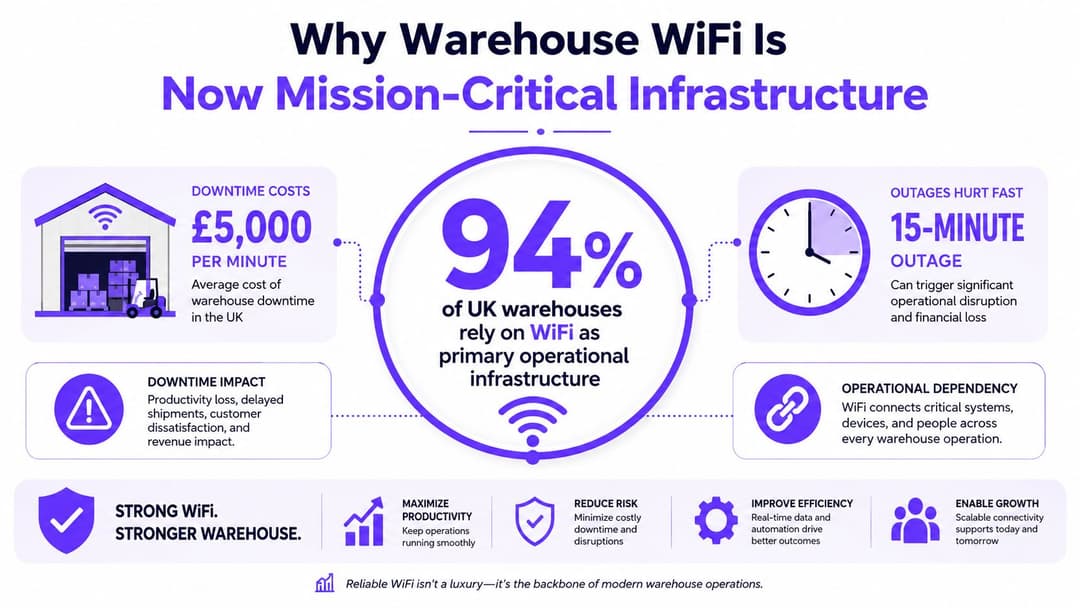
The UK industry report describes WiFi as central to barcode scanning, mobile computing, and automation. That reflects a wider operational shift. Paper-based processes and isolated terminals have given way to real-time WMS integration, mobile workflows, voice-directed tasks, and connected automation. Each system expects the network to respond consistently as people and machines move.
The cost sits on the warehouse floor
Managers often first notice a wireless fault as a scanner complaint. The operational consequences spread quickly:
- Picking pauses: A worker may need to reconnect, repeat a scan, or ask a supervisor to resolve a failed transaction.
- Inventory accuracy suffers: Delayed updates can leave stock status out of step with physical activity.
- Automation loses continuity: AGVs and other mobile systems depend on stable communication along their routes.
- Dispatch becomes exposed: Loading areas, dock thresholds, and yard transitions are common points of failure.
The commercial case is direct. If an hour of connectivity-related downtime costs £2,800 on average, as reported in the UK industry source, wireless resilience belongs in operational risk planning rather than only in the facilities budget.
Practical rule: Treat a roaming failure as an application incident, not merely an RF nuisance. The warehouse team experiences lost task continuity, regardless of whether the root cause is signal strength, interference, authentication, or client behaviour.
Coverage is only the starting point
UK warehouse deployments are frequently sized for dense industrial environments. One UK warehouse WiFi deployment example achieved strong coverage across a large facility with 130 access points, illustrating how high-rack storage, metal shelving, and wide floorplates create a specialist design problem.
The central engineering principle is simple. A device must associate, authenticate, exchange application traffic, and roam to the next access point without disrupting the task. Static coverage maps can identify obvious weak areas, but they can't prove that a scanner will transition cleanly between aisle cells or that an AGV will maintain acceptable latency at a dock-to-yard handoff.
Modern warehouse WiFi solutions therefore need survey-led planning, engineered access-point placement, and validation using the devices and routes that define the operation. Signal strength still matters, but mobility and task continuity decide whether the network is fit for purpose.
Core Components of Modern Warehouse WiFi Solutions
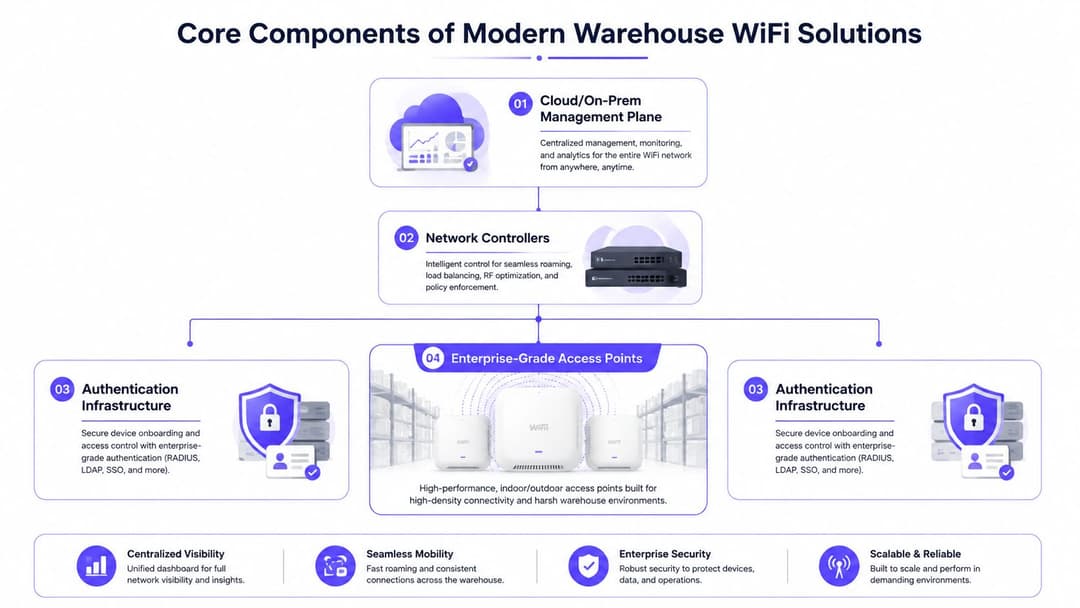
A production warehouse WLAN is a service made of several dependent layers. Access points may provide strong signals, yet scanners, AGVs, and automation still fail if roaming, authentication, switching, or monitoring is poorly designed. The target is task continuity while devices move, not an attractive coverage heatmap.
Access points built for the environment
Industrial APs need suitable environmental protection, antenna options, and an operating range for unheated sheds, loading zones, and cold areas. Select ruggedised hardware, including IP66 or IP67-rated devices and equipment designed for extended temperatures around -20°C to 50°C. These requirements are outlined in this UK warehouse wireless design guide.
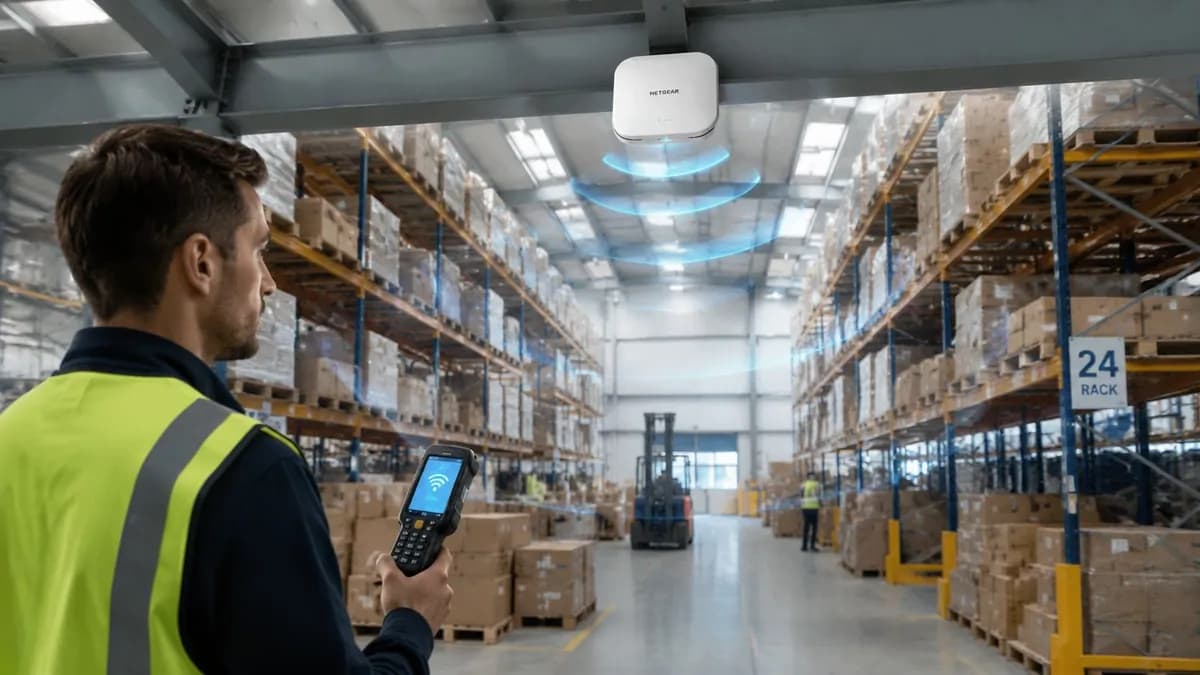
A directional antenna can focus energy along a long aisle. An omnidirectional model may suit an open packing or staging area. Choose according to racking geometry, mounting position, and device routes rather than copying an office bill of materials. AP selection also affects handoff behaviour, because excessive cell overlap can leave a scanner attached to a distant AP for too long.
Controllers and management planes
The controller applies radio policy, client distribution, firmware settings, and roaming features. A physical controller can suit one site with established local infrastructure. Virtual controllers fit organisations with resilient server platforms. Cloud-managed designs simplify multi-site visibility and central policy, provided the warehouse has a dependable management path and the licensing model remains acceptable throughout the deployment.
The management plane must expose more than AP availability. Look for RF analytics, interference data, client experience metrics, firmware orchestration, configuration history, and alerts that distinguish an AP failure from a localised roaming problem. Client telemetry should help engineers identify sticky clients, failed authentication, and transitions that occur at unsuitable signal levels.
Authentication must match the device fleet
Use RADIUS and 802.1X for managed staff and operational devices where practical. EAP-TLS with device certificates gives each scanner, AGV, or sensor a distinct identity instead of relying on a shared password. Captive portals suit guests, contractors, and temporary access. They should not provide the security model for production equipment.
Installation quality and network design are inseparable, as explained in this guide by Reworx Recycling. Physical placement, switching, power, authentication, and monitoring need a single service design.
In a cold-store deployment, ruggedised APs and central management do not compensate for an authentication service without failover. Likewise, working authentication cannot correct APs mounted for the wrong aisle geometry. Reliable roaming comes from the complete architecture, validated against the scanners, vehicles, and routes that run the operation.
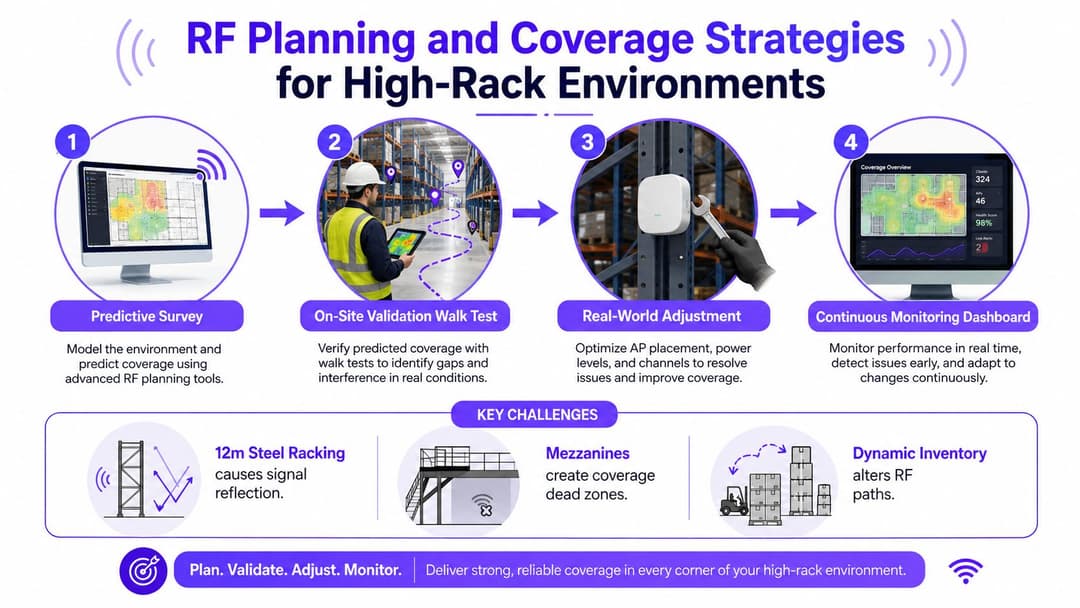
RF Planning and Coverage Strategies for High-Rack Environments
A predictive survey is useful for planning, but it is not a commissioning certificate.
Software can estimate propagation from floor plans, construction materials, rack dimensions, and proposed AP locations. It cannot fully model loaded steel shelving, changing stock, moving forklifts, reflective mezzanines, open dock doors, or the way a specific scanner stays attached to an AP near a transition point. Use an access point calculator for early planning, then confirm the design with a physical survey. Validate after racking is installed and the facility is operating.
Survey the routes, not just the rooms
Build the predictive model first to identify likely AP positions, cable routes, antenna types, and capacity zones. Follow it with passive and active testing across the routes that carry operational traffic:
- Pick paths: Walk scanner and voice-device routes, including turns and aisle ends.
- Forklift routes: Test at the height and orientation of vehicle-mounted terminals.
- Dock transitions: Include dispatch bays, loading doors, staging areas, and yard handoffs.
- Special environments: Check cold-room thresholds, mezzanines, high-bay storage, and areas where stock density changes.
- Automation paths: Run the actual AGV or robotic client profile where possible. A handheld result does not prove that an automated vehicle will behave similarly.
The acceptance pack should record signal behaviour, roaming results, interference, AP mounting height, antenna orientation, and channel allocation. A heatmap alone says little about whether scanners, AGVs, and voice devices will maintain service through a shift.
Design roaming deliberately
For mobile clients, coverage means more than usable signal. Configure 802.11r with 802.11k and 802.11v where the device fleet supports it, then test handovers against the operational requirement. Scanner continuity may require sub-50 ms transitions. Validate with the scanner model, firmware, security profile, and application traffic. A laptop roaming cleanly does not prove that a rugged handheld will do the same.
Use 5 GHz as the primary operational band where the client fleet and RF design support it. Plan channels around workflow, interference, and movement through high-bay and loading areas. Account for DFS events at UK sites, since radar detection can remove channels during operation, especially near sensitive locations such as airports.
Validate under realistic load
Measure roaming performance, packet loss, interference, throughput, and application response along active routes, not signal strength alone. Test pick paths, forklift movement, dock-to-yard transitions, and peak-load conditions with every relevant device class active. The UK logistics WiFi case study demonstrates why route-based testing should reflect the warehouse's actual operating pattern.
A scanner that associates everywhere but pauses at every AP transition is not connected well enough for the operation. Acceptance should therefore include client telemetry and application checks, with failures tied to a route, device type, and RF condition.
Comparing Enterprise Vendors for Industrial Deployments
Vendor selection should follow the warehouse's operating model, not a feature checklist copied from an office rollout. The practical decision usually turns on radio behaviour in metal-dense areas, client roaming, rugged hardware, support response, controller architecture, and the total cost of ownership.
| Vendor | Ruggedised APs | Roaming technology | Management model | Best for |
|---|---|---|---|---|
| Cisco Meraki | Available through enterprise and industrial product options | Supports coordinated enterprise roaming when RF and client settings are tuned carefully | Cloud-managed | Teams prioritising simple multi-site administration and clear dashboards |
| Aruba | Strong industrial and ruggedised options | 802.11r/k/v, AirMatch, and ClientMatch capabilities | Cloud-managed, controller-based, or mixed architectures | Complex logistics estates with demanding mobility requirements |
| Ruckus | Strong choice where antenna behaviour matters in dense environments | Enterprise roaming with adaptive radio and antenna controls | Cloud-managed or controller-based | High-rack facilities affected by multipath and difficult RF conditions |
| Juniper Mist | Enterprise AP portfolio with centralised policy options | AI-assisted client experience analysis and enterprise roaming support | Cloud-managed | IT teams seeking proactive anomaly investigation across sites |
| UniFi | Cost-conscious options, with suitability depending on the specific environment | Core roaming support, but fewer advanced enterprise controls | Cloud-managed or locally managed | Smaller operations with capable internal IT and less demanding support requirements |
Meraki's cloud administration is attractive for distributed warehouses that want consistent templates and minimal local controller infrastructure. Its simplicity doesn't remove the need for careful RF tuning, especially when scanners create dense, mobile client populations.
Aruba is often a stronger fit where roaming policy, client steering, and operational assurance need detailed control. Its Aruba hardware range is relevant when evaluating how enterprise APs fit into a broader authentication or cloud overlay strategy. Ruckus can offer a tangible advantage in difficult rack layouts through BeamFlex+ adaptive antennas, while Mist's Marvis platform focuses on detecting and explaining client experience anomalies.
UniFi's lower entry cost can make sense for a smaller, less complex site. The trade-off is support depth, advanced RF tooling, licensing expectations, and the organisation's ability to troubleshoot without enterprise-grade escalation. Compare the complete lifecycle cost, including subscriptions, replacement hardware, survey work, support, and the engineering time required to operate the platform.
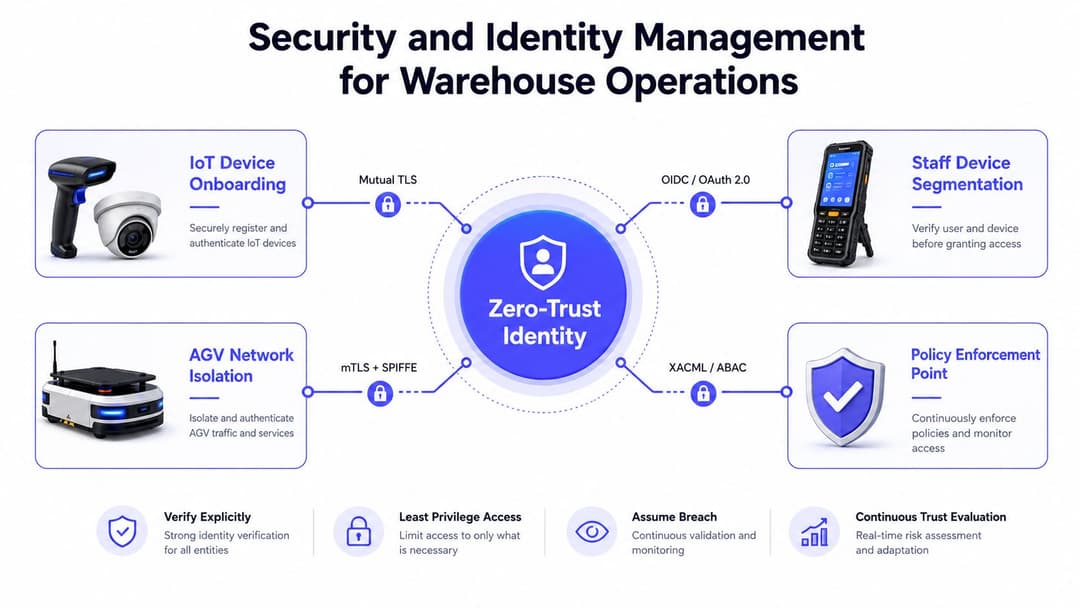
Security and Identity Management for Staff and Devices
Warehouse wireless networks often bring scanners, AGVs, sensors, tablets, voice equipment, contractors, and personal devices into the same physical RF environment. They shouldn't share the same logical access.
WPA3-Enterprise with 802.1X provides a foundation for role-based access. A scanner can receive access to the WMS services it needs, while a staff device, contractor handset, AGV, or sensor receives a different policy. Network segmentation limits the damage if one device is compromised and prevents operational equipment from becoming an easy route into corporate systems.
Replace shared credentials with identities
Shared pre-shared keys are convenient during installation and difficult during staff turnover, contractor changes, and incident response. Identity-based access lets the organisation revoke a person or device without changing every other client's credentials.
For staff, integrate network access with an identity provider such as Entra ID, Okta, or Google Workspace. A leaver's directory status can then trigger removal of access rather than leaving a former credential active. For AGVs and sensors, certificate-based authentication gives every machine a unique identity and avoids embedding one shared secret across an entire fleet.
Passpoint and OpenRoaming can reduce friction for approved users and contractors by supporting passwordless, profile-based onboarding. The important distinction is that convenience should sit on top of policy enforcement, not replace it. Guest and contractor access needs its own role, consent workflow, time limits, and isolation from WMS and automation networks.
Keep authentication resilient
RADIUS placement deserves the same attention as AP placement. A warehouse may have excellent RF coverage but still fail operationally if authentication depends on one unavailable service or an unreliable link to a remote site. Design resilient authentication paths, monitor response failures, and test behaviour when the primary service is unavailable.
Location-aware consent capture and analytics can add operational context for approved guest or contractor access. Purple's enterprise WiFi security guide provides background on identity-based enterprise wireless approaches. In a warehouse, the implementation still needs to be mapped to the device fleet, VLAN or policy architecture, WMS requirements, and incident process.
Deployment and Migration Checklist for IT Teams
Warehouse WiFi migration is a controlled infrastructure change, not an AP replacement exercise. Radio design, switching, authentication, client settings, and the operating timetable must be tested together, with mobility performance given the same weight as coverage.
Phase one, prepare the site
- Validate the survey: Compare the predictive model with the live racking plan, pick paths, forklift routes, dock areas, cold rooms, and automation lanes. Treat the model as a starting point. Walk representative routes, because racking, stock height, vehicles, and moving obstructions can change roaming behaviour.
- Confirm the infrastructure: Check cable routes, switch capacity, PoE budgets, mounting hardware, environmental ratings, and antenna orientation before equipment arrives.
- Stage the configuration: Preconfigure SSIDs, policy profiles, certificates, controller settings, firmware, monitoring, and naming conventions away from the warehouse floor.
- Record the baseline: Capture client behaviour, roaming complaints, authentication failures, and application symptoms. Include scanner, AGV, and automation routes so acceptance testing has a useful comparison.
Phase two, migrate with operational control
Run a parallel network where the client fleet and application design allow it. Prioritise busy pick faces, dispatch bays, and automation routes, then schedule changes around the warehouse's real low-activity windows rather than an office maintenance period.
Activate or replace APs in controlled groups. Keep rollback configurations ready, label every physical location, and give the service desk a clear fault-isolation process for RF, certificate, DHCP, VLAN, and WMS problems. Test a scanner and an automated vehicle after each group, not only at the end.
Phase three, accept the service
Use live scanners and representative application traffic during acceptance testing. Confirm:
- Roaming continuity: Measure handover performance against the agreed sub-50 ms requirement where scanner continuity demands it. Test both directions at aisle ends, dock transitions, and other decision points.
- Route coverage: Test floor-level devices, forklift terminals, top-rack work areas, dock-to-yard movement, cold-room thresholds, and mezzanines.
- Peak behaviour: Simulate the expected device mix and observe latency, packet loss, authentication response, and channel utilisation.
- Documentation: Deliver heatmaps tied to routes, roaming logs in milliseconds, AP and antenna records, channel plans, and exceptions.
Phase four, operate it
Forward SNMP traps and syslog to the existing monitoring platform. Alert on AP failures, authentication errors, excessive retries, abnormal channel utilisation, and deteriorating client experience. Revalidate RF performance after racking, vehicle-flow, or workflow changes. A static coverage map cannot show whether scanners or AGVs remain connected through those changes.
Measuring ROI and Operational KPIs
A warehouse WiFi business case should connect network behaviour to fulfilment results. Throughput figures alone cannot explain why a scanner pauses at an aisle entrance or why an AGV loses continuity during a dock transition.
Begin baseline measurement during validation. Record scanner transaction response, roaming handoff time, authentication behaviour, session persistence, packet loss, and application errors across representative routes. Correlate these results with WMS logs and automation telemetry, then retain the same definitions after deployment. A coverage map has limited value if devices still fail during movement.
Use operational measures
Combine vendor analytics, such as Mist User Experience data, Aruba Client Insight, and Meraki wireless health, with application-layer records. The network dashboard identifies where and when a client struggled. WMS or automation records show whether that event delayed a task, caused a retry, or interrupted a workflow.
Avoid assigning a speculative financial value to every RF event. Use the operation's measured task duration, labour model, error-handling time, and missed-dispatch consequences instead. This creates a defensible business case without treating generic productivity assumptions as facts. For a broader view of lifecycle costs beyond purchase price, an engineer's hydraulic cost guide from MA Hydraulics Ltd provides a useful total-cost perspective.
| KPI | Target threshold | Business impact | Measurement source |
|---|---|---|---|
| Scanner transaction latency | Set an agreed application threshold during validation | Faster confirmation and fewer repeated actions | WMS logs, scanner diagnostics, network analytics |
| Roaming handoff time | Sub-50 ms where scanner continuity requires it, following earlier UK industrial survey guidance | Maintains task continuity during movement | Roaming logs using production scanners |
| Session persistence | Define a site baseline and investigate unexplained drops | Fewer reconnects and manual interventions | Client telemetry and service desk records |
| Authentication availability | Establish a resilient service target for the operational design | Prevents valid devices being locked out | RADIUS logs and controller events |
| Route-level packet loss | Agree an acceptable level by application type | Protects scanning, voice, and automation exchanges | Active tests and application logs |
| Client experience by zone | Compare pick faces, aisles, docks, and cold areas | Directs remediation to operationally important locations | Vendor analytics and walk tests |
Review these measures weekly during the first 90 days, then trend them monthly. Escalate recurring failures by route and task, rather than only by AP name. That gives warehouse leaders a clearer view of wireless engineering's effect on fulfilment reliability.
Purple can add cloud-based WiFi authentication, identity-based staff access, and analytics across compatible Meraki, Aruba, Ruckus, Mist, and UniFi environments without requiring wholesale hardware replacement. Visit Purple to assess whether passwordless onboarding, certificate-grade access, and operational WiFi data fit the warehouse network design.