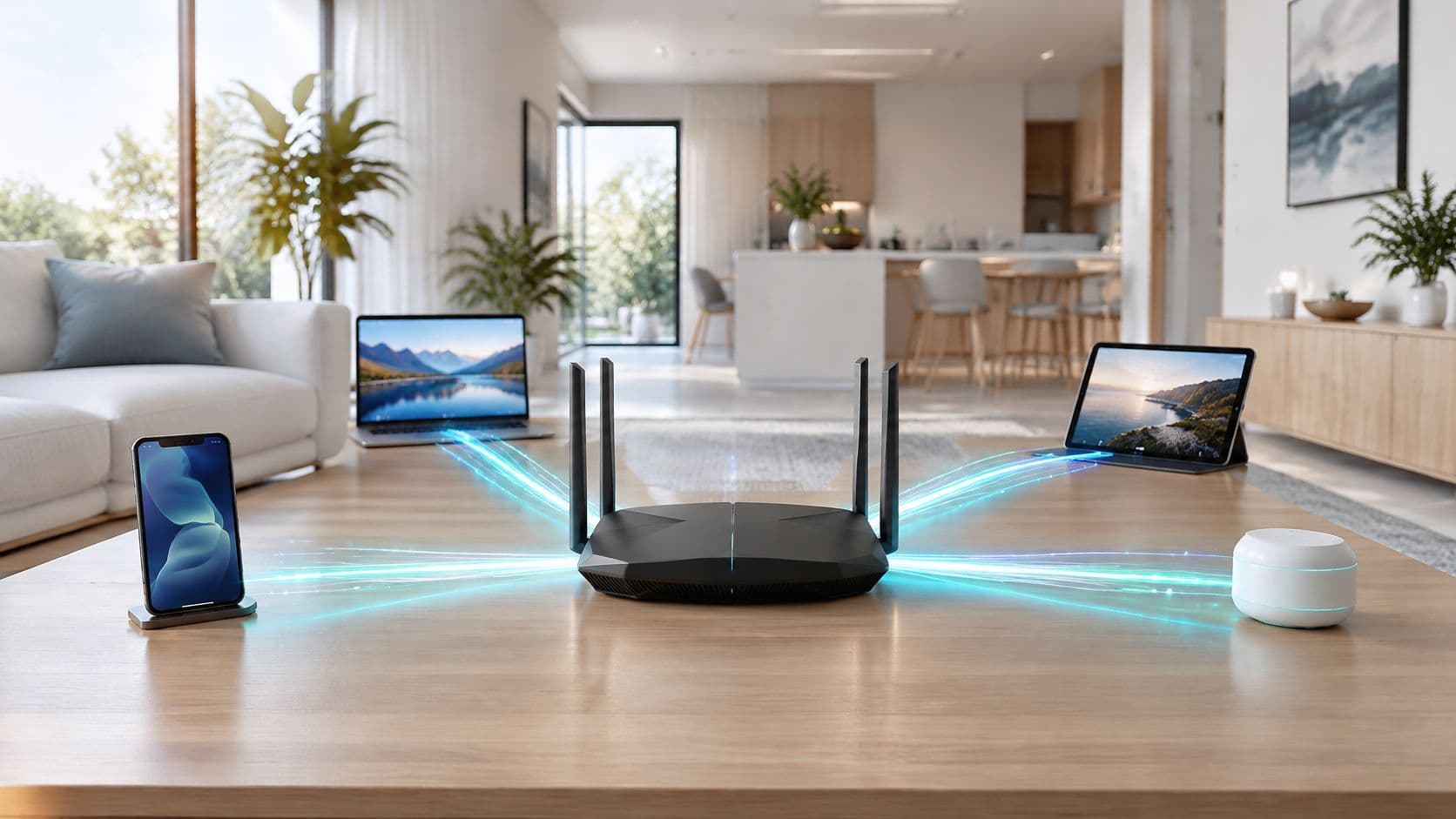
Your router says WiFi 6 and the box promises 9.6 Gbit/s. So why does the video call still freeze at eight in the evening, when two people are streaming, one is gaming and a smart speaker is still downloading an update?
That gap is the whole subject of this article. WiFi 6 is not mainly a faster pipe for one device. It's a better way of deciding whose turn it is, and the number on the box describes a laboratory arrangement that almost no phone or laptop will ever recreate. Once you understand that, the buying decisions, the coverage plans and the mixed-device problems in a hotel, hospital or block of flats all become easier to reason about.
WiFi 6 802.11ax is the technical name behind the marketing label, and it's worth twenty minutes of patient explanation before anyone signs a hardware order or replaces a working router.
WiFi 6 at a glance compared with earlier generations
WiFi 6 is the consumer name for IEEE 802.11ax, the sixth generation of the WiFi standard and the first to be sold by number rather than by a letter code. The table below places it against everything around it, so you can work out which generation you own before reading another word about features.
| Generation | IEEE standard | Bands | Peak PHY rate | Headline addition |
|---|---|---|---|---|
| WiFi 4 | 802.11n | 2.4 and 5 GHz | 600 Mbit/s | MIMO antenna streams |
| WiFi 5 | 802.11ac | 5 GHz | 3.5 Gbit/s | Wider channels and downlink multi-user MIMO |
| WiFi 6 | 802.11ax | 2.4 and 5 GHz | 9.6 Gbit/s | OFDMA, uplink multi-user MIMO and BSS colouring |
| WiFi 6E | 802.11ax | 2.4, 5 and 6 GHz | 9.6 Gbit/s | Access to the 6 GHz band |
| WiFi 7 | 802.11be | 2.4, 5 and 6 GHz | 46 Gbit/s | 320 MHz channels and multi-link operation |
Those peak rates are the vendor-published theoretical maxima for each standard, not tested throughput. Two rows matter more than the rest. WiFi 6E is not a new efficiency generation: it's 802.11ax extended into 6 GHz, so its feature list matches WiFi 6 exactly. And WiFi 7 sits above WiFi 6 as the next step, not as an instruction to scrap working access points that still serve phones and laptops perfectly well.
The UK had specific reasons to pay attention. Ofcom's statement on 6 GHz spectrum reports that approximately 89% of UK adults had internet access at home in 2020, and evidence Ofcom received from the Wi-Fi Alliance cited its 2021 Mobile Matters findings that 73% of data connections were made over WiFi rather than cellular. Wireless had stopped being the convenience layer and become the main road. The same document notes that WiFi 6 had not yet been widely deployed in access devices at the time of the assessment, which is an honest picture of a country mid-transition.
The two-minute check before you buy anything
Open the router's specification page and search for 802.11ax. Open your phone's spec sheet, or the WiFi details screen in settings, and do the same. WiFi 6 features only switch on when both ends of the link support the standard, so a WiFi 6 router paired with a WiFi 5 laptop gives you a WiFi 5 connection with a nicer box. Product pages list it as WiFi 6, 802.11ax, or both, and a device showing 802.11ac is telling you plainly that it will never use the new scheduling.
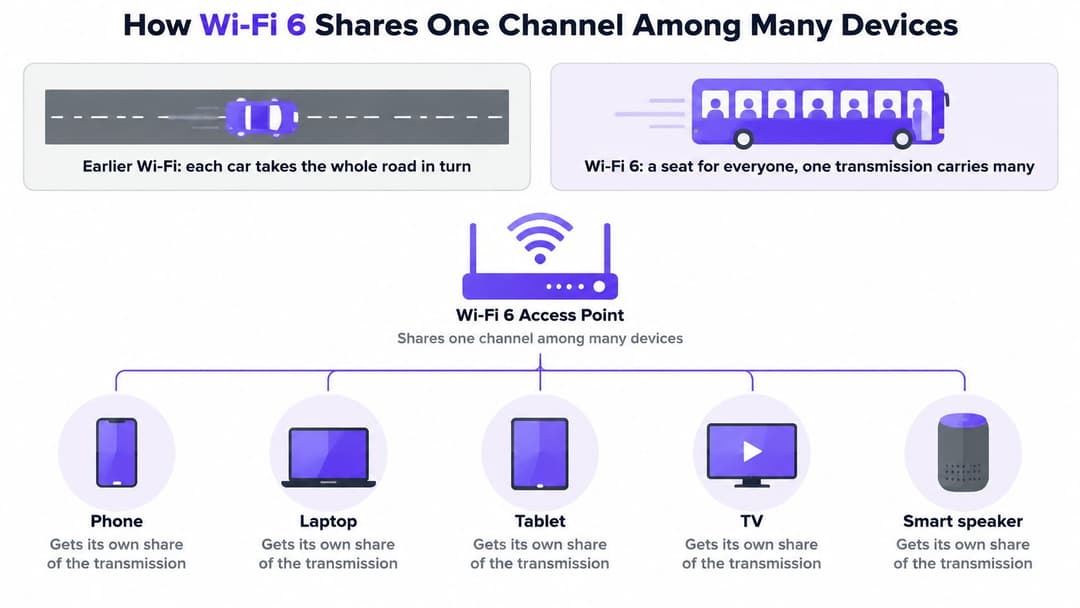
How WiFi 6 shares one channel among Many devices
The road analogy explains this better than any datasheet. A single-lane road carries traffic one car at a time: each vehicle takes the full width, and a hundred cars means a hundred turns. Older WiFi works like that, giving every device the channel to itself for its turn, even when the "car" is a smart plug sending forty bytes about the room temperature.
WiFi 6 turns the road into a bus. One transmission leaves the access point with a seat reserved for each passenger, so several devices are served in the same trip, and the small requests stop holding up the big ones.
OFDMA, the feature that makes the bus work
Orthogonal frequency-division multiple access splits a channel into resource units, small slices of spectrum and time. The access point matches a slice to each client's traffic, so a phone checking email and a laptop on a video call travel together instead of queueing. NHS England's WiFi standards roadmap identifies OFDMA, high-speed low-latency operation and up to 8×8 uplink and downlink MU-MIMO as the central capabilities of 802.11ax, which is about as close as you'll get to an official British endorsement of where the value sits.
Multi-user MIMO, the second half of the trick
MU-MIMO uses multiple antennas to talk to several clients at once rather than one after another. The uplink half is the important part: earlier multi-user schemes helped the access point transmit, while 802.11ax lets several clients send back in the same window. If you want the mechanics, how multi-user MIMO works covers beamforming and stream counts at a level a single paragraph can't.
BSS colouring and target wake time
Two smaller features solve problems that turn up in ordinary buildings. BSS colouring tags each frame with the identity of its own network, so a device can ignore traffic from the neighbouring flat's router even though both sit on the same channel. On a shared office floor or in a block of flats, that's the difference between a stable connection and an evening of retries. Target wake time lets a battery-powered sensor agree a schedule with the access point and sleep between transmissions, which is why inexpensive IoT hardware lasts longer on 802.11ax than on older kit.
Wide 160 MHz channels and 1024-QAM modulation take the headlines, and both need clean signal and matching client hardware before they do anything useful. Treat them as bonus capacity when conditions allow rather than the reason to buy.
The test that matters: count the devices in the room, not the gigabits on the box. A venue with 150 connected endpoints will feel WiFi 6 long before a single laptop ever approaches its ceiling.
Picture a hotel lobby at seven in the evening. Two hundred phones want to check email, ten laptops want a video call, and the door sensors want to report in. On older WiFi that's two hundred separate turns at the channel, and the last one waits. On 802.11ax the access point builds groups, serves the small requests together, and protects the video call's share. Nobody in the lobby notices any of it, which is exactly the point.
Why the 9.6 Gbit/s figure overstates everyday speed
9.6 Gbit/s is a theoretical PHY ceiling, not what one phone downloads. It's the sum of eight spatial streams running on a clean 160 MHz channel with 1024-QAM modulation, and every one of those conditions has to hold at the same moment, on both ends of the link, with matching hardware.
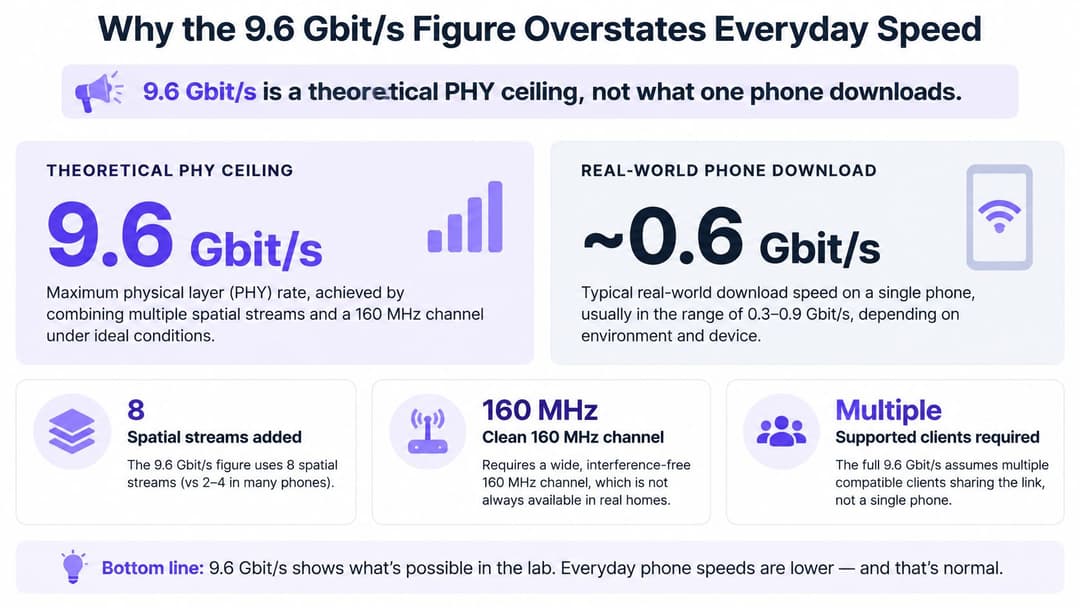
Most phones ship with two spatial streams, not eight. Most laptops are similar. Many client devices will happily sit on 80 MHz even when a 160 MHz channel is available, because the wider channel is more fragile and the battery cost is real. Then there's your broadband line, which in most buildings is the actual bottleneck. Against all of that, the ceiling stops being relevant to the experience.
The conditions behind the number
- Multiple spatial streams added together. The figure aggregates streams from one access point to several devices, not one device to one access point.
- A clean 160 MHz channel. In a busy neighbourhood, a channel that wide is rarely free of overlap for long.
- Matching client hardware. Both ends need the antennas, the stream count and the modulation support.
- Strong signal throughout. Distance, walls and even furniture reduce the modulation order the link can hold.
What one device actually gets
A typical phone on a strong signal, close to a modern access point, will see a few hundred megabits per second in a speed test. That's plenty for 4K streaming and a video call at once. Run the same test on an older tablet two rooms away and the number drops sharply, which is the mixed-device reality that headline figures skip. The gain you should care about is what happens when thirty other devices are competing for the same radio, because that's where the scheduling work pays off.
Say a conference hall seats 300 delegates, all with a phone and half with a laptop. Nobody is downloading a feature film. Everyone is syncing mail, refreshing a slide deck, joining a call. A network judged on peak rate will look fine on paper and miserable in practice. A network judged on airtime and client density keeps 300 people working, and those two measures, not peak rate, are what matter for enterprise and hospitality deployments.
Three questions to ask of any speed claim
- Is the figure a sum of streams? If yes, divide by the number of streams your own device supports before you believe it.
- What channel width does it assume? A 160 MHz claim collapses to a fraction on an 80 MHz channel in a crowded band.
- Which client hardware was used? A test with a matched top-tier adapter tells you nothing about the tablets in reception.
Judge a network by density and consistency. A venue that holds steady at 200 Mbit/s for every guest at once is doing far better work than one that hits 900 Mbit/s for the first person to connect. The WiFi RF engineering guide goes deeper on how channel width, signal strength and client behaviour interact in real buildings.
WiFi 6E and the 6 GHz Band in the UK
WiFi 6E is 802.11ax again, opened into the 6 GHz band. Every efficiency feature carries over unchanged. What changes is the neighbourhood: 6 GHz is a freshly cleared street where no legacy devices are chattering on old protocols, so the scheduling work happens without competition from years of older radios.
The UK position is specific, and it shapes what a refresh can realistically buy you. Ofcom's consultation on spectrum access for WiFi proposed opening the 5.925 to 6.425 GHz portion of the band for licence-exempt WiFi: indoor operation at up to 250 mW EIRP (effective radiated power, the transmit-strength cap regulators set), plus very-low-power use indoors and outdoors at up to 25 mW EIRP. That gives compatible devices roughly 500 MHz of new UK spectrum, rather than the 1,200 MHz the international band plan defines. The same consultation grounded its adoption projections in chipset shipments and an average four-year consumer-device replacement cycle, so it never promised that new spectrum would bring new devices overnight.
When the devices will actually arrive
Availability alone doesn't produce adoption. Routers, client devices and replacement cycles set the pace, which is why a band can sit open for years before most of a building's estate can use it. Each new phone or laptop arrives with better odds of 6E support than the model it replaces, yet the turnover happens device by device. A venue buying 6E access points today is really betting on the estate it will have after the next refresh cycle, not the one sitting on desks now.
The trade-offs, one by one
- Compatibility is not optional. 6 GHz needs a 6E access point and a 6E client. A 6E router serves a WiFi 5 phone over 5 GHz, not over the new band.
- Legacy devices cannot follow. WiFi 4 and WiFi 5 hardware has no radio for 6 GHz, so the clean band helps only the subset of your estate that can reach it.
- Early hardware can sit idle. Buying 6E access points before the client estate catches up delivers cleaner spectrum for a handful of devices and no benefit for the rest.
- Range is shorter. Higher frequencies penetrate walls less readily, so a 6 GHz design needs denser access point placement than the 5 GHz plan it replaces.
Practical rule: stay with 5 GHz WiFi 6 for most buildings and reserve 6E for dense sites where the device estate is already fully capable. Coverage economics beat a cleaner band you can't reach.
Running WiFi 6 alongside older devices
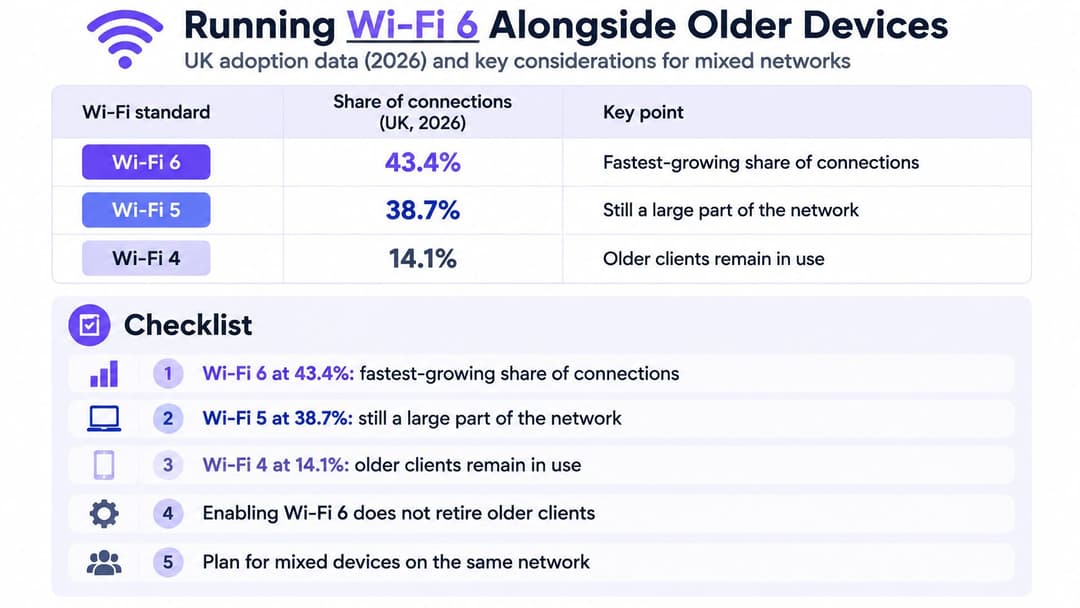
A WiFi channel works like a meeting room where only one person can speak at a time. Fitting a WiFi 6 access point changes how that room is chaired, but it does not change who is sitting in it. UK data reported in 2026 puts WiFi 6 at 43.4% of connections, with WiFi 5 still at 38.7% and WiFi 4 at 14.1%, according to ISPReview's coverage of the Ookla-derived figures. More than half of all clients still speak an older standard. A mixed estate is the normal operating condition, and running it well is where most of the benefit of WiFi 6 is won or lost.
| WiFi generation | Share of connections |
|---|---|
| WiFi 6 | 43.4% |
| WiFi 5 | 38.7% |
| WiFi 4 | 14.1% |
Three places the mix bites
A hotel welcomes guests carrying laptops bought in 2017, and nobody gets asked to upgrade at check-in. A hospital runs medical devices and building management systems on refresh cycles measured in decades, where a working infusion pump outranks a newer radio standard every time. A student accommodation block fills each September with inexpensive smart plugs, printers and consoles, every one a small client that may be several generations behind the access points serving it.
In each case, the newest hardware arrives ready to enforce WiFi 6 rules, and the oldest clients cannot follow them.
The three questions administrators actually ask
Should the network run WPA3-only or stay in WPA2/WPA3 transition mode? Transition mode keeps older clients connecting while letting capable ones use the stronger protocol. It is the pragmatic answer for guest-facing networks, and a phased removal date is what stops it becoming permanent.
Which devices belong on their own SSID or VLAN? Printers, scanners, building systems and anything with an unpatchable firmware stack are the usual candidates. Separating them limits the blast radius if one is compromised, and it makes airtime problems visible instead of hiding them inside the general pool.
How do you measure whether one legacy client is hurting the network? Watch airtime consumption per client and retry rates rather than raw throughput. A single WiFi 4 device transmits slowly, so it occupies the channel for longer per byte. In meeting-room terms, it is the participant who takes five minutes to make a ten-second point, and it shows up as a persistent share of airtime producing little traffic.
It's an operating model, not just a radio
WiFi 6 tests organisations differently from previous generations. It rewards per-device inventory, capability-based segmentation and a documented retirement path for WiFi 4 and 5 hardware, and it punishes the assumption that swapping access points is the whole job. Expect the changeover to be gradual rather than simultaneous: planning should assume that older clients remain on the network for years, and that the gains come from managing the mix, not waiting for it to disappear.
The same logic applies at home, at smaller scale. One ageing phone or smart plug drags down the experience for everyone else sharing the channel. Putting the oldest devices on a separate network, or retiring them, can improve things for the whole household without a single new access point.
Decide whether to upgrade to WiFi 6 now
The residential picture is still mid-transition. Opensignal's European fixed-broadband analysis found that WiFi 6 represented 27% of UK residential broadband users' online time in 2026, which means roughly three-quarters of home usage still runs on older standards.
That figure should shape the decision rather than delay it. Upgrade the router first when several people share it, when a growing collection of smart devices competes for airtime, when rooms at the back of the house have dead spots, or when the network serves a venue, a block of flats or a rental portfolio. A WiFi 6 router on its own helps far less when most clients are WiFi 5 handsets and laptops, because the features need both ends.
A five-step first move
- List every device and its standard. The specification sheet, or the WiFi details in settings, will say 802.11n, 802.11ac or 802.11ax.
- Confirm the router and your main devices both list 802.11ax. If either side is 802.11ac, that link runs on WiFi 5 rules.
- Decide which older devices get their own network. A separate SSID for printers, sensors and legacy hardware keeps airtime problems contained.
- Buy 6E hardware only when the devices can use 6 GHz. Otherwise a 5 GHz WiFi 6 design gives better coverage for the same money, and the WiFi buying guide weighs the two options against a real device list.
- Set a review date twelve months out. Device estates change faster than procurement cycles, and a dated review stops the plan going stale.
Where the estate spans several vendors, that's manageable. Our platform runs on the access points a site already owns, including Cisco Meraki, HPE Aruba, Ruckus, Juniper Mist, Ubiquiti UniFi, Cambium, Extreme and Fortinet, so the WiFi 6 upgrade and the authentication layer don't have to be bought together.
Check the device list this week. One page of inventory tells you more about whether you need WiFi 6, 6E or nothing at all than any comparison table on a retail site.
WiFi 6 changes how a network serves a crowd, and that's the part worth paying for. Purple runs guest WiFi, staff 802.1X security and private area networks for residents on one cloud platform, so a WiFi 6 rollout doesn't stall on passwords, captive portals or a RADIUS server nobody wants to maintain. If you're planning a refresh across a hotel, hospital, retail site or residential building, visit Purple to see how authentication and analytics fit on top of the access points you already have.