
Marina WiFi providers: berth holders, visiting boats and seasonal capacity
You will be able to shortlist marina WiFi providers against five tests: network separation, pontoon coverage, summer capacity, berth-level key control and consented visitor data. You will also know what to write into the contract, from a signed concurrent device figure to event uplift, and which 10 questions to send every provider.
By Tom HackettPublished
📖 13 min read3,050 words2 worked examples12 key definitions
Part of our core series: Guest WiFi: the complete guide →
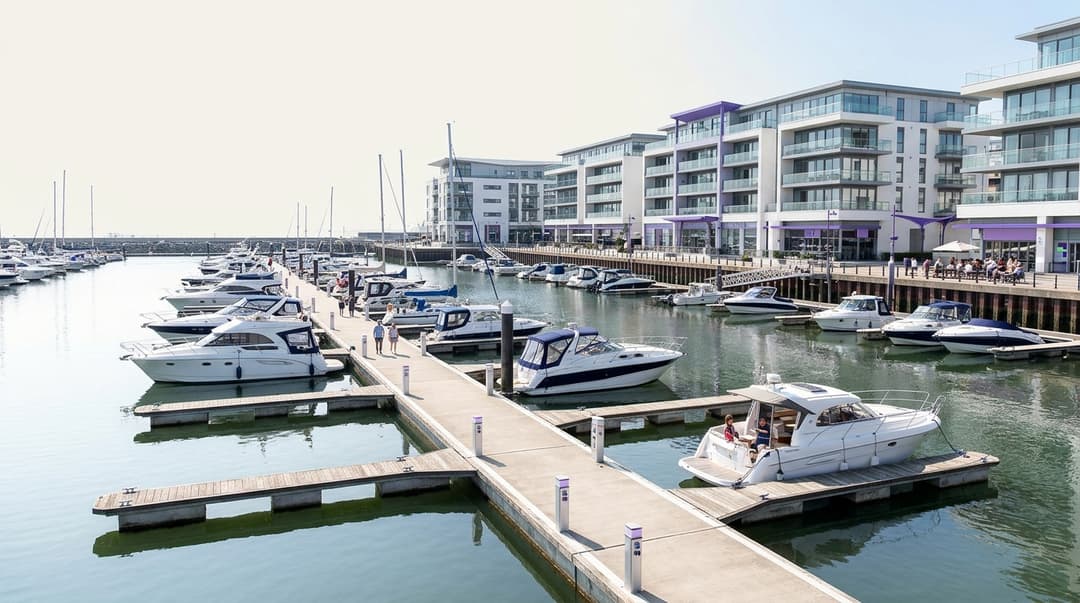
Choose a marina WiFi provider that runs three separate networks on one estate. Berth holders get a private key each, visiting crews get an open sign-in network and staff get a secured network. Then insist on an outdoor survey with pontoons full, a written summer capacity figure, same-day revocation and consented visitor data.
Which marina WiFi provider should you choose?
A marina serves three groups whose needs pull in opposite directions. Long-term berth holders treat the pontoon as home. They expect their smart TV, laptop and boat monitoring kit to connect once and stay connected. Visiting crews arrive for one or two nights. They want to be online within a minute of tying up, without a phone call to the harbour office. Your staff need a locked-down network for the harbour office, fuel berth, chandlery tills and CCTV.
Most marina WiFi providers handle one of these groups well. Few handle all three on the same access points. The provider you choose should run separate networks for each group, cover pontoons and boatyard to an agreed standard, and scale for summer without a year-round bill. Use the matrix below to match your situation to what you ask for.
| Your situation | What to ask the provider for | Why it matters |
|---|---|---|
| Berth holders share one password printed in the harbour office | A private key per berth, revocable individually | Changing a shared password disconnects every holder at once |
| Liveaboards complain that smart TVs cannot get online | A pre-shared key network, not a captive portal, for berth holders | TVs and boat monitoring devices cannot complete a web sign-in page |
| Visiting crews queue at the office for the password | An open guest network with a captive portal sign-in | Crews connect from the boat, and you capture consented contact details |
| Card terminals in the chandlery share the guest network | A separate staff and payment network | PCI DSS uses network segmentation to reduce what falls in scope |
| Coverage collapses at regatta weekends | A contracted peak capacity figure and event uplift | Summer device counts can be several times the winter figure |
| You want visiting crews to come back | Consented opt-ins feeding a marketing list | Visitor sign-ins become a return-visit audience |
Where marina WiFi providers genuinely differ
Every provider will promise coverage and speed. The real differences sit in five areas: separation, outdoor coverage, peak capacity, berth-level access control and what happens to visitor data.
How should berth holders and visiting crews be kept on separate networks?
Run at least three logical networks, each mapped to its own VLAN (virtual LAN, a way of splitting one physical network into isolated segments). Berth holders, visiting crews and staff should never see each other's traffic or devices.
The harder question is how berth holders authenticate. A captive portal (the web page that appears before you get online) suits visiting crews. It fails for berth holders, because smart TVs, games consoles and onboard monitoring units cannot fill in a web form. Berth holders need a pre-shared key network instead.
A single shared key is the wrong answer. Use an identity pre-shared key (iPSK): every berth holder gets their own passphrase on the same network name. Hardware vendors use different labels for the idea, including iPSK, PPSK (private pre-shared key) and DPSK, but the principle is the same. Each key maps to one berth holder. You can revoke it without touching anyone else.
Purple's Identity-Based Networks go one step further with a private network bubble. A berth holder's own devices can find each other, so a phone can cast to the TV aboard. They cannot see the boat on the next finger. That is the at-home experience with enterprise security that liveaboards expect.
| Approach for berth holders | Smart TVs and onboard kit | Revocation when a berth changes hands | Isolation between boats | Suits |
|---|---|---|---|---|
| One shared password | Connects | Change password, re-issue to every holder | None by default | Very small marinas only, short term |
| Captive portal sign-in | Fails on devices without a browser | Expire the login per device | Client isolation possible, no device discovery | Visiting crews, not berth holders |
| Private key per berth (iPSK) | Connects | Revoke one key; other holders unaffected | Private network bubble per berth | Annual and seasonal berth holders |
| IEEE 802.1X with RADIUS | Fails on many consumer devices | Disable one account | Per-account policy | Staff on managed devices |
IEEE 802.1X is the standard for port-based network access control. It checks each person's credentials against a RADIUS server (a central authentication service) before letting a device on. It suits staff on managed laptops and tablets. Tie it to your identity provider, such as Microsoft Entra ID, Okta or Google Workspace, so a dockmaster who leaves loses WiFi when their account is disabled.
For visiting crews, an open network with a captive portal remains the fastest sign-in. Ask whether the provider supports OWE (Opportunistic Wireless Encryption, defined in RFC 8110). It encrypts traffic on an open network without a password. Ask too whether they support OpenRoaming, which lets returning crews connect automatically from a trusted identity.
What coverage questions matter on pontoons and in the boatyard?
Pontoon WiFi is outdoor WiFi with unusual physics. Water reflects radio signals. Aluminium masts block them. Steel and aluminium hulls shield anyone sitting in the cabin. On tidal sites, a floating pontoon moves relative to any access point fixed to the harbour wall.
Ask every provider these questions:
- When will you survey? A survey in February, with half the berths empty and no visiting masts, understates the obstruction. Insist on a survey, or a validation walk, with the marina near summer occupancy.
- Where will access points be mounted? Service pedestals, light columns and pontoon posts each give a different height and line of sight. Ask for the mounting plan per pontoon, not a heat map of the whole site.
- What enclosure rating is the hardware? Salt spray corrodes connectors. Ask for the IP rating under IEC 60529 and for marine-grade fixings.
- How does each pontoon get backhaul and power? Ethernet over copper is limited to 100 metres per run under IEEE 802.3. Long pontoons may need fibre or point-to-point wireless bridges.
- Which 5 GHz channels are allowed outdoors? In the UK, Ofcom sets which bands are licence-exempt outdoors. The provider should design to those rules, not to an indoor plan.
- Is the boatyard in scope? Boats on stands, metal sheds and workshop staff create different coverage needs from the pontoons.
Coverage should be written into the contract per area: each pontoon, the fuel berth, the boatyard, the harbour office, and any bar, restaurant or hotel on site.
How much capacity do you need when summer peaks arrive?
Capacity planning starts with devices, not boats. Estimate crew per visiting boat, devices per person and the share connected at the evening peak. Do the same for berth holders aboard. Ask each provider to state the concurrent device figure they have designed for, per pontoon and site-wide.
Newer access points help. IEEE 802.11ax (WiFi 6) improves performance when many devices share the air. Still, newer radios do not replace a written capacity figure. Ask also how bandwidth is shared. A per-device or per-network rate limit stops one crew streaming in 4K from slowing the pontoon for everyone else.
How should access be issued and revoked as berths change hands?
Treat berth holders the way IT treats staff: joiners, movers and leavers. A joiner signs a berth agreement and receives a key. A mover changes berth or sells to a new owner on the same berth. A leaver's agreement ends.
Each event should trigger a WiFi action on the same day. Ask the provider who issues keys, how long it takes and whether the harbour office can do it without a support ticket. Ask whether a key can carry an expiry date matching the berth agreement. Ask whether they can take a feed from your berthing management system. If they cannot, the harbour office should issue and revoke keys from a single dashboard.
Seasonal and short-let berths need keys with fixed end dates. Visitor berths should never receive a berth holder key. They belong on the guest network.
How do visitor sign-ins become a list for return visits?
Visiting crews are your best prospects for next season. A captive portal can ask for an email address and, separately, for permission to market. Under UK GDPR and the Privacy and Electronic Communications Regulations (PECR), marketing email needs a clear, freely given opt-in. GDPR Recital 32 confirms that pre-ticked boxes do not count as consent.
Purple uses conscious-choice opt-ins, so WiFi access never depends on agreeing to marketing. On the Engage plan, consented visitors form a first-party data list you can segment by visit date, length of stay and repeat visits. The WiFi Analytics dashboard shows how many crews come back. Purple is ISO 27001 certified and GDPR compliant, which matters when a provider holds your visitor data.
Keep berth holder records out of the marketing list unless they opt in separately. They are already in your berthing system and expect a different relationship.
Got questions about your specific setup?
Our team works with venue operators, IT managers, and network engineers across 80,000 venues. Book a 20-minute call and we will show you how others like you solved it.
Where each option fits
Two worked scenarios show how the questions above translate into decisions. The venues are illustrative; the figures follow from each venue's own numbers.
Worked scenario 1: a marina with a hotel and restaurant
Situation. Consider a 250-berth marina with a 60-room hotel and a waterfront restaurant. It has 210 annual berth holders and 40 visitor berths. Berth holders share one password, changed once a year at renewal. Owners who sold their boats in spring kept access until the following January. Liveaboards' smart TVs could not join the hotel's captive portal, so they asked for the staff password instead.
What was done. The marina moved to three networks on its existing access points. Each berth holder received a private key with an expiry matching their berth agreement, inside their own private network bubble. Hotel guests and visiting crews shared one branded Guest WiFi network with a captive portal and conscious-choice opt-ins. Staff moved to IEEE 802.1X tied to Microsoft Entra ID, with card terminals on a separate segment.
Outcome. The annual password change, which disconnected 210 berth holders at once, stopped entirely. A leaver now loses access on the day their agreement ends, instead of up to 12 months later. The other 209 keys are unaffected. Staff credentials stopped circulating on the pontoons, because berth holders no longer needed them. The same guest network serves the hotels side and the marina, so one consented list covers both.
Worked scenario 2: regatta week at a 400-berth marina
Situation. Consider a 400-berth marina with 320 annual holders and 80 visitor berths. During regatta week, visiting boats raft three deep, so 80 visitor berths hold 240 boats. The marina assumes four crew per boat and two devices each, giving 1,920 visiting devices. It assumes 60% connect at the evening peak: 1,152 devices. It assumes half of berth holders are aboard with three devices each: 480 more. The planning figure is roughly 1,630 concurrent devices.
What was done. The marina wrote 1,700 concurrent devices into the contract for the five event days. Temporary access points went onto the two visitor pontoons, with removal agreed for the week after. The event ran its own captive portal page with the regatta's branding, the same pattern used in event venue WiFi providers: per-event captive portals, exhibitor access and attendee reporting. Berth holders kept their private keys, so the event load never touched their sign-in.
Outcome. The marina paid for peak capacity for five days, not 52 weeks. The event portal produced a separate consented list of regatta crews, ready for next year's early-booking campaign. Capacity was tested against a figure the provider had signed, not a verbal promise.
What each one costs to run
Running cost on a marina comes from five places. Provider quotes often show only the first two.
| Cost item | Shared password with captive portal | Identity-based: per-berth keys, guest portal and staff 802.1X |
|---|---|---|
| Outdoor access points and mounts | Same hardware | Same hardware; hardware-agnostic platforms reuse existing kit |
| Licensing | Guest portal licence | Guest, berth holder and staff network licences |
| Harbour office time when a berth changes hands | Change password, reprint notices, answer calls from every holder | Revoke one key, issue one key |
| Security exposure | Former holders and anyone shown the password stay connected | Access ends with the berth agreement |
| Marketing return | Little or no consented data | Consented visitor list for return-visit campaigns |
Hardware is often the largest single cost, so ask whether the provider needs new access points at all. Purple runs as a cloud overlay on Cisco Meraki, HPE Aruba, Ruckus, Juniper Mist, Ubiquiti UniFi, Cambium, Extreme and Fortinet. If your outdoor estate is sound, you change the software layer, not the hardware. Why your next WiFi upgrade doesn't need new hardware sets out the reasoning.
The hidden cost is staff time. Every shared-password change becomes a day of phone calls and pontoon visits. Individual keys move that work to a single action per berth.
What should the contract say about seasonal peaks?
Write the summer into the contract, not into an email. A good marina WiFi contract names:
- The peak period by date. For example, the start of May to the end of September, plus named event weeks.
- A concurrent device figure for peak and off-peak. Per pontoon and site-wide, so you can test it.
- Event uplift. Temporary access points, who installs and removes them, and the notice period you must give.
- Support hours that match the season. Weekend and evening cover in summer, when visiting crews arrive and the harbour office is busiest.
- Fault response times per area. A dead access point on the visitor pontoon in August matters more than one in the boatyard in January.
- Flexibility to scale down. Whether licences or temporary hardware reduce outside the season.
- Data terms. Who controls visitor data, where it is processed and how consent records are kept under UK GDPR.
If a provider will not put a capacity figure in writing, treat that as your answer.
How to decide for your estate
Shortlist two or three marina WiFi providers. Send each the same written questions and score the answers side by side.
- Can you run berth holder, visiting crew and staff networks on separate VLANs on our access points?
- Do berth holders get an individual key, and can one key be revoked without affecting others?
- Can each berth holder's devices see each other but not neighbouring boats?
- Can the harbour office issue and revoke keys itself, with an expiry matching the berth agreement?
- When and how will you survey the pontoons, and at what occupancy?
- What concurrent device figure will you commit to in summer, per pontoon and site-wide?
- How do you handle event weeks, and what does the uplift cost?
- How do visitor sign-ins capture marketing consent under UK GDPR and PECR?
- Which hardware vendors do you support, and do we need to replace any access points?
- Which security certifications do you hold?
Purple runs across 80,000+ live venues in over 90 countries and handles 500 million users and logins a year. The questions above are the same ones we answer for hospitality, retail and transport estates. A marina adds water, tides and a summer that triples your device count.
Frequently asked questions
Will Purple work with the access points already on our pontoons?
Yes, Purple runs on your existing outdoor access points if they come from a supported vendor. Purple works as a cloud overlay on Cisco Meraki, HPE Aruba, Ruckus, Juniper Mist, Ubiquiti UniFi, Cambium, Extreme and Fortinet. You keep the hardware and change the software layer that controls sign-in, keys and data. If a survey shows coverage gaps, you add access points from the same vendor rather than replacing the estate.
How is Purple licensed for a marina?
Purple quotes on the plan you choose, Connect, Capture or Engage, plus any security add-ons such as SecurePass, Verify or Shield. Connect covers access, Capture adds data capture at sign-in, and Engage adds marketing to consented visitors. A marina wanting private berth holder keys and a return-visit list typically looks at Engage. Ask for a quote naming your berth count, sites and peak season so seasonal needs are priced from the start.
How do we move berth holders off a shared password without a flood of complaints?
Run the new key-based network alongside the old shared password for a fixed changeover window. Issue each berth holder an individual key with clear joining instructions, then switch the shared password off on a date you announce in advance. Liveaboards with smart TVs and onboard monitoring rejoin once with their new key. After the switch, you never need to change a password for everyone again.
Is guest WiFi sign-in data GDPR compliant?
Yes, provided marketing consent is separate from WiFi access and never pre-ticked. Purple uses conscious-choice opt-ins, so a visiting crew can get online without agreeing to marketing. Under UK GDPR and PECR, marketing email needs a clear opt-in, and GDPR Recital 32 rules out pre-ticked boxes. Purple is ISO 27001 certified and GDPR compliant, and you control how long visitor data is kept.
Why not use our broadband provider's router WiFi on the pontoons?
Because a broadband router gives you one shared network, not three separated ones. It cannot issue a private key per berth, revoke one holder without affecting the rest, or capture consented visitor data. Indoor routers also lack the outdoor ratings and mounting needed for salt spray and pontoon posts. Keep the broadband line as backhaul and run a managed outdoor network with identity-based access on top of it.
How long does a marina WiFi deployment take?
It depends mainly on whether your existing access points stay. If the outdoor estate is sound, moving to per-berth keys, a guest portal and a staff network is a configuration change, not a building project. New pontoon access points add survey, cabling, power and marine-grade mounting time. Plan installation for the off-season and validate coverage once berths fill in spring, before the first busy summer weekend.
Can berth holders use smart TVs and boat monitoring devices?
Yes, because berth holders join with their own pre-shared key rather than a captive portal. Smart TVs, games consoles and onboard monitoring units can enter a WiFi passphrase but cannot complete a web sign-in page. With Purple's Identity-Based Networks, each berth holder's devices sit in their own private network bubble. A phone can cast to the TV aboard, but nobody on the next boat can see either device.
Key Definitions
VLAN
A virtual LAN, defined by IEEE 802.1Q, splits one physical network into isolated logical segments so traffic on one segment cannot reach another.
You map berth holders, visiting crews and staff to separate VLANs so no group sees another's devices or traffic.
Captive portal
The web page a device is redirected to before it gets internet access, used to sign in and collect details or consent.
It is the fastest sign-in for visiting crews, but it fails for smart TVs and boat monitoring units that cannot complete a web form.
iPSK (identity pre-shared key)
A WPA2 or WPA3 pre-shared key scheme where each user holds a unique passphrase on the same network name; vendors also call it PPSK or DPSK.
It lets each berth holder connect smart TVs and onboard kit, and lets the harbour office revoke one key without affecting the other holders.
IEEE 802.1X
The IEEE standard for port-based network access control, which checks each person's credentials via EAP against a RADIUS server before a device joins.
It suits staff on managed laptops and tablets, tied to Microsoft Entra ID, Okta or Google Workspace, so leavers lose WiFi when their account is disabled.
RADIUS
Remote Authentication Dial-In User Service, the central authentication service that IEEE 802.1X uses to approve or refuse each login.
It is the back end for the staff network, enforcing per-account policy for the harbour office, fuel berth and chandlery.
OWE (Opportunistic Wireless Encryption)
Defined in IETF RFC 8110, OWE encrypts traffic on an open wireless network without requiring a password.
Ask providers whether the visiting crew network supports OWE, so open sign-in does not mean unencrypted traffic.
OpenRoaming
A roaming framework that lets devices connect automatically to participating networks using a trusted identity, built on Passpoint (Hotspot 2.0).
It lets returning visiting crews reconnect without repeating the captive portal sign-in.
IEEE 802.11ax (WiFi 6)
The IEEE 802.11 amendment that improves wireless performance when many devices share the same airtime.
It helps on crowded pontoons in summer, but it does not replace a written concurrent device figure in the contract.
IP rating (IEC 60529)
The ingress protection code defined by IEC 60529, grading how well an enclosure resists solids and water.
Ask for the IP rating and marine-grade fixings, because salt spray corrodes connectors on pontoon hardware.
IEEE 802.3 copper run limit
IEEE 802.3 limits Ethernet over twisted-pair copper to 100 metres per run.
Long pontoons may need fibre or point-to-point wireless bridges for backhaul, which affects cost and installation time.
PECR and GDPR Recital 32
The UK Privacy and Electronic Communications Regulations require a clear opt-in for marketing email; GDPR Recital 32 confirms pre-ticked boxes are not consent.
Your guest portal must keep marketing consent separate from WiFi access to build a lawful return-visit list.
PCI DSS segmentation
The Payment Card Industry Data Security Standard uses network segmentation to reduce which systems fall within assessment scope.
Chandlery and fuel berth card terminals belong on a separate staff and payment segment, never on the guest network.
Worked Examples
A 250-berth marina with a 60-room hotel and waterfront restaurant has 210 annual berth holders sharing one password, changed once a year. Owners who sold in spring kept access until January, and liveaboards' smart TVs could not join the hotel's captive portal, so they asked for the staff password.
The marina moved to three networks on its existing access points. Each berth holder received a private key with an expiry matching their berth agreement, inside their own private network bubble. Hotel guests and visiting crews shared one branded Guest WiFi network with a captive portal and conscious-choice opt-ins. Staff moved to IEEE 802.1X tied to Microsoft Entra ID, with card terminals on a separate segment. The annual password change that disconnected 210 holders stopped. A leaver now loses access the day their agreement ends, not up to 12 months later, and the other 209 keys are unaffected. Staff credentials stopped circulating on the pontoons, and one consented list now covers hotel and marina.
A 400-berth marina with 320 annual holders and 80 visitor berths hosts regatta week. Boats raft three deep, so 80 visitor berths hold 240 boats. How much capacity should it contract for, and for how long?
The marina assumed four crew per boat and two devices each, giving 1,920 visiting devices, with 60% connected at the evening peak: 1,152. Half of berth holders aboard with three devices each added 480. The planning figure was roughly 1,630 concurrent devices. It wrote 1,700 concurrent devices into the contract for the five event days. Temporary access points went onto the two visitor pontoons, with removal agreed for the following week. The event ran its own branded captive portal, while berth holders kept their private keys. The marina paid for peak capacity for five days, not 52 weeks, gained a separate consented list of regatta crews and tested capacity against a signed figure.
Frequently asked questions
Will Purple work with the access points already on our pontoons?
Yes, Purple runs on your existing outdoor access points if they come from a supported vendor. Purple works as a cloud overlay on Cisco Meraki, HPE Aruba, Ruckus, Juniper Mist, Ubiquiti UniFi, Cambium, Extreme and Fortinet. You keep the hardware and change the software layer that controls sign-in, keys and data. If a survey shows coverage gaps, you add access points from the same vendor rather than replacing the estate.
How is Purple licensed for a marina?
Purple quotes on the plan you choose, Connect, Capture or Engage, plus any security add-ons such as SecurePass, Verify or Shield. Connect covers access, Capture adds data capture at sign-in, and Engage adds marketing to consented visitors. A marina wanting private berth holder keys and a return-visit list typically looks at Engage. Ask for a quote naming your berth count, sites and peak season so seasonal needs are priced from the start.
How do we move berth holders off a shared password without a flood of complaints?
Run the new key-based network alongside the old shared password for a fixed changeover window. Issue each berth holder an individual key with clear joining instructions, then switch the shared password off on a date you announce in advance. Liveaboards with smart TVs and onboard monitoring rejoin once with their new key. After the switch, you never need to change a password for everyone again.
Is guest WiFi sign-in data GDPR compliant?
Yes, provided marketing consent is separate from WiFi access and never pre-ticked. Purple uses conscious-choice opt-ins, so a visiting crew can get online without agreeing to marketing. Under UK GDPR and PECR, marketing email needs a clear opt-in, and GDPR Recital 32 rules out pre-ticked boxes. Purple is ISO 27001 certified and GDPR compliant, and you control how long visitor data is kept.
Why not use our broadband provider's router WiFi on the pontoons?
Because a broadband router gives you one shared network, not three separated ones. It cannot issue a private key per berth, revoke one holder without affecting the rest, or capture consented visitor data. Indoor routers also lack the outdoor ratings and mounting needed for salt spray and pontoon posts. Keep the broadband line as backhaul and run a managed outdoor network with identity-based access on top of it.
How long does a marina WiFi deployment take?
It depends mainly on whether your existing access points stay. If the outdoor estate is sound, moving to per-berth keys, a guest portal and a staff network is a configuration change, not a building project. New pontoon access points add survey, cabling, power and marine-grade mounting time. Plan installation for the off-season and validate coverage once berths fill in spring, before the first busy summer weekend.
Can berth holders use smart TVs and boat monitoring devices?
Yes, because berth holders join with their own pre-shared key rather than a captive portal. Smart TVs, games consoles and onboard monitoring units can enter a WiFi passphrase but cannot complete a web sign-in page. With Purple's Identity-Based Networks, each berth holder's devices sit in their own private network bubble. A phone can cast to the TV aboard, but nobody on the next boat can see either device.
Sources
- IETF RFC 8110: Opportunistic Wireless Encryption
- IEEE 802.1 Working Group (IEEE 802.1X)
- IEEE 802.11ax-2021
- IEC 60529: Degrees of protection provided by enclosures (IP Code)
- Regulation (EU) 2016/679 (GDPR), including Recital 32
- The Privacy and Electronic Communications (EC Directive) Regulations 2003
- PCI Security Standards Council: PCI DSS
Continue reading in this series
Golf club WiFi platforms: members, visitors and clubhouse events on one network
Use this guide to pick one golf club WiFi platform that runs member, visitor and staff networks on the access points you already own. You will be able to assign each group its route in, take tills off the guest network, size a society day and build a consented email list from visitor sign-ins.
Holiday and caravan park WiFi providers: what to look for across guests, owners and staff
You will be able to shortlist holiday park WiFi providers against the questions that separate them: owner networks, family-safe filtering, staff access tied to your identity provider and hardware reuse. You can also set consent capture for rebooking and write seasonal peak, uptime and data ownership terms into the contract.
Multi-site guest WiFi platforms compared: hardware-neutral overlays vs controller portals
You will be able to decide whether your estate can stay on built-in controller portals or needs a hardware-agnostic cloud overlay. You can test your sites against six triggers, compare the two models on 10 axes and work out your own per-AP against per-venue licensing break-even over a three-year rollout.
Got questions about your specific setup?
Our team works with venue operators, IT managers, and network engineers across 80,000 venues. Book a 20-minute call and we will show you how others like you solved it.