
Visitor attraction WiFi platforms: ticket holders, annual members and dwell time by zone
Use this guide to choose a visitor attraction WiFi platform that signs day visitors in at the gate, recognises annual pass holders by sign-in identity and reports dwell time by zone. You can then staff queues, cafes and shops against real demand. You can also invite consenting visitors back lawfully under UK GDPR and PECR.
By Gavin WheeldonPublished
📖 13 min read3,051 words2 worked examples11 key definitions
Part of our core series: WiFi analytics and location intelligence: the complete guide →
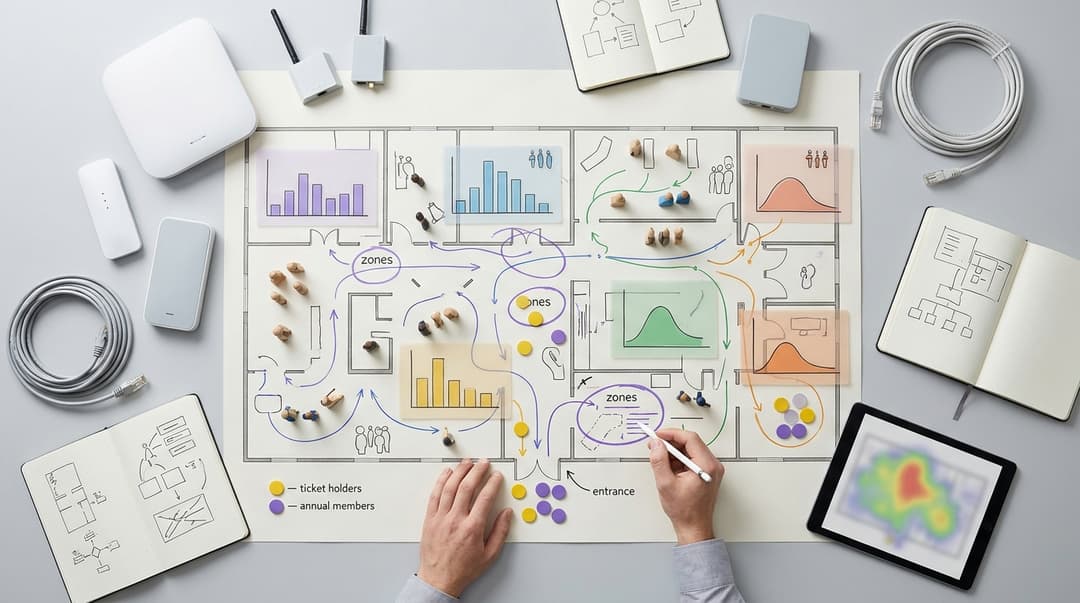
A visitor attraction WiFi platform should do three jobs well. It signs day visitors in at the gate with a short form. It recognises annual pass holders by the identity they gave at first sign-in, not by a device address. And it reports dwell time by zone, so operations can staff queues, cafes and shops against real demand.
Which visitor attraction WiFi platform should you choose?
Choose the platform that handles all three jobs on the hardware you already own. Most attractions already have adequate access points in their busy areas. The real difference between platforms is in software: the sign-in, the identity behind it, and the zone reporting. The table compares the three approaches attractions most often weigh.
| Approach | Gate sign-in for day visitors | Annual pass holder recognition | Dwell and flow by zone | Consented email to invite visitors back | Hardware needed |
|---|---|---|---|---|---|
| Open network, no sign-in | Instant connection, no data captured | None, because no identity is collected | Anonymous device counts per access point | None, because no contact details or consent exist | Existing access points |
| Access point vendor splash page | Click-through page or simple form | Device-level only, weakened by randomised addresses | Device counts per access point in the vendor dashboard | No marketing workflow, so you handle consent and exports yourself | One vendor's access points |
| Purple Guest WiFi, WiFi Analytics and Engage | Short form with conscious-choice opt-ins | Matched on sign-in identity across devices, plus OpenRoaming for automatic reconnection | Zone-level visit and dwell reporting from grouped access points | Consented visitor and pass holder email through the Engage plan | Existing Cisco Meraki, HPE Aruba, Ruckus, Juniper Mist, Ubiquiti UniFi, Cambium, Extreme or Fortinet access points |
An open network costs nothing extra and tells you nothing. A vendor splash page adds a sign-in, but its reporting stops at the access point. Purple adds the identity layer and zone reporting as a cloud overlay, so you keep your existing network. Purple runs across 80,000+ live venues in over 90 countries and handles 500 million users and logins a year. The platform is ISO 27001 certified and GDPR compliant.
Where attraction WiFi platforms genuinely differ
What should the sign-in look like for day visitors at the gate?
A captive portal is the web page a device shows before it can reach the internet. At an attraction, that page appears at the worst moment: in the entry queue, with children and bags in hand. Design it for that moment.
Keep the form to what you will actually use. For most attractions, an email address and a separate, unticked marketing consent box are enough. Every extra field slows the gate and lowers completion. Do not ask for a ticket reference at sign-in. Match the email against your booking data later instead, through a CRM integration.
Four details separate a good gate sign-in from a poor one:
- Consent that stands up. Under UK GDPR, consent must be a clear affirmative act, and Recital 32 rules out pre-ticked boxes. Purple uses conscious-choice opt-ins, so marketing consent is always a separate, active choice.
- Children. The Data Protection Act 2018 sets 13 as the age at which a child can consent to online services in the UK. Add an age question, and route under-13s to connection-only access with no marketing.
- Language. International visitors need the sign-in in their own language. Shortlist platforms that switch language to match the device setting.
- Accessibility. Build the page to WCAG 2.2 level AA. That standard covers colour contrast, text resizing and screen-reader support.
Capacity at the gate matters as much as the form. Entry peaks put large numbers of devices on a few access points at once. WiFi 6 (IEEE 802.11ax) was designed for dense environments like this. See WiFi 6 (802.11ax) explained: speed, features and gains. Test that the sign-in page loads before visitors reach the turnstile, not after it.
How are annual pass holders recognised on return?
Recognition should rest on who the visitor is, not on which device they carry. Platforms use three methods, and their reliability differs sharply.
Device recognition. The platform remembers a device's MAC address, the hardware identifier a device presents to a network. This often fails. Phones now randomise that address, and members replace their phones. Treat device recognition as a convenience, never as your member count.
Identity matching. The member signs in once with the email on their membership. The platform matches it against your membership list through a CRM integration. From then on, every visit counts against that member, on any device they sign in with. Purple integrates with CRM and marketing platforms, so the match runs without manual exports.
Automatic secure reconnection. Passpoint, also called Hotspot 2.0, lets a device join a network automatically using a stored profile. It builds on IEEE 802.11u. OpenRoaming, run by the Wireless Broadband Alliance, extends this across participating venues. Purple supports OpenRoaming. A member who accepts a profile reconnects securely on every return, with no captive portal.
Recognition turns WiFi into first-party data about your members. You can count visits per member and see which seasons they come in. You can also compare member and day-visitor behaviour by zone, which tells you where member-only offers will land.
Which zone-level reports help operations staff queues, cafes and shops?
A zone is a group of access points mapped to a physical area, such as the entrance plaza, a headline exhibit, the main cafe or the shop at exit. Reports by zone turn attraction WiFi analytics into staffing decisions. Ask for these reports in every shortlist demo.
| Report | Question it answers | Who acts on it | Decision it drives |
|---|---|---|---|
| Arrivals per 15 minutes, entrance zone | When does entry really peak? | Duty manager | Open extra gate lanes before the queue forms |
| Live connected devices by zone | Where are visitors right now? | Operations control | Move hosts and stewards to the busiest zones |
| Median dwell time by zone | How long do visitors stay in each area? | Food and beverage manager | Set cafe seating and till staffing |
| Zone-to-zone movement | Where do visitors go after the headline exhibit? | Operations and retail teams | Place kiosks and signage on the main route |
| Day-of-week by hour pattern | Which sessions are quiet and which are busy? | Rota planner | Build next month's rota from last month's pattern |
| Member versus day-visitor split by zone | Do members use the cafe more than day visitors? | Membership manager | Aim member offers where members gather |
Purple's WiFi Analytics provides zone-level visit and dwell reporting from the access points you already run. Ask every vendor one more question: can you export zone data at 15-minute resolution to your own business intelligence (BI) tool?
Use median dwell, not the mean. A few staff devices left in a zone all day pull the average up. Exclude staff and contractor devices by putting them on a separate Staff WiFi network.
How accurate is WiFi-based dwell time with randomised device addresses?
WiFi dwell time is accurate enough to staff from, provided you know what it measures. It measures connected devices, by zone, for the length of each session. It does not measure every visitor.
Randomised addresses cause most of the confusion. Apple introduced a private address feature in iOS 14, which gives a device a different MAC address on each network. Android 10 and later also randomise the address per network by default. Newer releases of both can rotate the address over time.
Here is what that means for visitor flow WiFi data:
- Same-visit dwell holds up. A per-network address normally stays stable for one visit on one network, so zone dwell within a day is dependable. Sign-in identity resolves the cases where a device rejoins under a new address.
- Return-visit counts by device do not hold up. Rotated addresses, reset settings and new phones all break device-based return counts. Count returns by sign-in identity instead.
- Counts of devices that never connect are weak. Some platforms estimate crowds from probe requests, the signals devices send while searching for networks. Those signals are now largely randomised, so one phone can look like several. Ask how a vendor handles this before you trust the number.
- Zone edges blur. A device associates with one access point at a time, often the one it joined first. Where two zones overlap, some visitors appear in the wrong one. Align zone boundaries with walls and doorways, and walk-test each zone after setup.
Then calibrate. Compare connected devices in the entrance zone with your ticket scans for the same hour. That ratio is your connection rate, and it lets you read WiFi patterns as a share of real attendance. Focus on shape and timing rather than absolute numbers. When the cafe peaks matters more than exactly how many people were in it.
Patchy coverage produces patchy dwell data. A zone served by one distant access point will under-report. Fix gaps with cabled access points rather than extenders. WiFi extender vs Access point: Which one do you need? explains the trade-off.
How can visitors be invited back for events and renewals?
Invite back only the visitors who chose to hear from you. In the UK, the Privacy and Electronic Communications Regulations (PECR) require consent for most marketing email to individuals. A WiFi sign-in is not a sale, so the soft opt-in exemption does not cover it.
Once you have captured consent at the gate, Purple's Engage plan sends email to consented visitors and pass holders. Useful triggers for an attraction include:
- A thank-you after a first visit, carrying the date of the next seasonal event.
- Event invitations to past visitors ahead of late openings, holiday programmes and exhibitions.
- Renewal reminders to pass holders before expiry, timed from your membership data.
- Win-back messages to members who have not visited in 90 days while their pass is still valid.
- Upgrade offers to day visitors who came twice in a season, where an annual pass would have cost them less.
Tie every message to what the visitor actually did. Relevant email protects your sender reputation and keeps unsubscribe rates down.
Got questions about your specific setup?
Our team works with venue operators, IT managers, and network engineers across 80,000 venues. Book a 20-minute call and we will show you how others like you solved it.
Where each platform type fits
An open network provides guest connectivity without data capture. You get no identity, no member recognition and no consent to contact anyone.
A vendor splash page provides a sign-in form tied to a single access point vendor. It adds terms of use and basic device counts, but stops short of identity matching, zone dwell and consented email.
Purple fits attractions that sell annual passes, run events or operate more than one site. You get gate sign-in, identity-based member recognition, zone reporting and consented email from one platform. Because Purple is hardware-agnostic, a group can run it on Cisco Meraki at one site and HPE Aruba at another, with a single pane of glass across both. Many attractions share patterns with Retail and Hotels: a shop at exit, a cafe and sometimes overnight stays. Guest WiFi covers the sign-in options in more detail.
Worked scenarios from events and the public sector
The figures below are illustrative and exist to show the method. Run the same calculation with your own ticket scans and till data.
Scenario 1: a science museum's late-opening events
Situation. A city-centre science museum runs monthly adult late openings. The cafe queue builds badly, and the team staffs it on instinct, adding baristas at 19:30.
What was done. The team grouped access points into five zones. They compared cafe-zone arrivals per 15 minutes with till transactions across four events. Arrivals peaked between 18:45 and 19:15, straight after the opening talk. Median cafe dwell was 22 minutes. The team moved the extra barista shift 45 minutes earlier and opened a second till in that window.
Measurable outcome. Across the next four events, staff counted the queue every 15 minutes. Peak queue length fell from about 25 people to about ten. Cafe transactions in the peak window rose by 18% against the previous four events, with no extra staff hours.
Scenario 2: a council-run heritage estate and its annual passes
Situation. A local authority runs a historic house and gardens with 4,000 annual pass holders. Renewals arrive by post, and nobody knows how often members visit.
What was done. The sign-in asked for an email address and offered an unticked marketing consent box. The team matched sign-in emails to the membership list through a CRM integration. Within a season, 1,600 members had signed in at least once, and 1,100 of them had opted in to email. The team set up two flows in the Engage plan. One was a win-back email after 90 days without a visit. The other was a renewal reminder 30 days before expiry.
Measurable outcome. Members who received the renewal reminder renewed at 64%, against 48% for members the team could not email. Zone data also showed that members made 40% of weekday cafe visits. The cafe introduced a weekday member discount on that evidence.
What each one costs to run
Total cost has four parts, and the licence is often the smallest.
- Licence. Purple is sold in three plans: Connect, Capture and Engage. Consented visitor and pass holder email sits in Engage, so match the plan to the jobs you need.
- Hardware. Purple runs as a cloud overlay on Cisco Meraki, HPE Aruba, Ruckus, Juniper Mist, Ubiquiti UniFi, Cambium, Extreme and Fortinet, with no rip and replace. See Why your next WiFi upgrade doesn't need new hardware. Budget only for access points in zones with gaps, such as an outdoor queue or a distant gallery.
- Integration time. Connecting your CRM or membership database is the main project task. Your IT and membership teams need to agree the matching field, which is normally email.
- Compliance work. The ICO lists processing that monitors geolocation or behaviour among the types likely to need a data protection impact assessment (DPIA) under UK GDPR Article 35. Complete one before go-live, and update your privacy notice.
The return comes from three places. Staff hours land where demand actually is. Renewals rise when members get relevant, timely reminders. Offers reach the zones where visitors spend their time. A vendor splash page costs less but leaves all three to guesswork.
How to decide for your attraction
Start from your situation, not from a feature list. This matrix maps common attraction profiles to what you should require.
| Your situation | What to prioritise | What to require from the platform |
|---|---|---|
| Single site, day visitors only, no membership | Fast gate sign-in and zone staffing | Minimal form, zone dwell, arrivals per 15 minutes |
| Annual pass scheme of any size | Member recognition on any device | Identity matching to your membership list |
| Regular events and late openings | Peak timing and invite-back email | Arrivals by interval, consented event email |
| Multi-site group on mixed hardware | One view across every site | Hardware-agnostic platform with cross-site reporting |
| High share of families or international visitors | Inclusive, lawful sign-in | Language switching, under-13 handling, WCAG 2.2 AA |
Then run the selection in five steps:
- Map your zones on a floor plan before any demo, aligned with walls and doorways.
- Pull one month of ticket scans and till data, so you can test any vendor's zone reports against reality.
- Run every demo against three scenarios. Use a family at the gate at 10:00, a member returning with a new phone, and a cafe manager asking when to add staff.
- Agree data protection early. Settle consent wording, under-13 handling, retention periods and the DPIA before contracts are signed.
- Pilot one zone first, usually the cafe, and compare WiFi dwell with till data for a month.
Frequently asked questions
Does Purple work with the access points we already have?
Yes. Purple is hardware-agnostic and runs as a cloud overlay on Cisco Meraki, HPE Aruba, Ruckus, Juniper Mist, Ubiquiti UniFi, Cambium, Extreme and Fortinet. You keep your existing network and add the sign-in, identity and reporting layer on top. The only hardware spend is filling coverage gaps, such as outdoor queues or remote galleries, where thin coverage would otherwise weaken your zone dwell data.
Can day visitors connect without typing in a ticket number?
Yes, and they should. A short form with an email address and a separate, unticked consent box keeps the gate moving. You link WiFi sign-ins to bookings afterwards by matching the email against your ticketing or CRM data. Asking for a ticket reference at the gate adds typing at the busiest moment of the visit and lowers completion.
How does the WiFi recognise an annual pass holder who has a new phone?
It recognises them by identity, not by device. The member signs in with the email on their membership, and the platform matches it to your membership list through a CRM integration. Each device they sign in on counts against the same member record. For automatic reconnection, Purple supports OpenRoaming, which lets a member's device rejoin securely on every visit without the captive portal.
Is WiFi dwell time accurate enough to plan staffing?
Yes, for timing and patterns. WiFi measures connected devices by zone, and per-network randomised addresses normally stay stable within a single visit. Calibrate the data by comparing entrance-zone connections with ticket scans for the same hour. Use the result to see when queues, cafes and shops peak, rather than for exact headcounts. Count return visits by sign-in identity instead of by device.
Is WiFi analytics at an attraction compliant with UK GDPR when children visit?
Yes, when you design the sign-in for it. The Data Protection Act 2018 sets 13 as the UK age of digital consent. Add an age question, and give under-13s connection-only access with no marketing. Use separate, unticked consent boxes, publish a clear privacy notice and complete a data protection impact assessment before go-live. Purple is ISO 27001 certified and GDPR compliant.
Can we email visitors after their visit?
Yes, if they opted in. Under PECR, most marketing email to individuals needs consent, and a WiFi sign-in does not qualify for the soft opt-in. Capture consent with a separate, unticked box at sign-in. Purple's Engage plan then sends email to consented visitors and pass holders, including event invitations, renewal reminders and win-back messages to members who have not visited recently.
How is Purple different from the splash page in our access point dashboard?
Purple adds identity, zone reporting and consented email on top of basic connection. A vendor splash page connects visitors on one vendor's hardware. Purple recognises members by sign-in identity across devices, reports visits and dwell by zone, and sends consented email through Engage. It also runs across mixed estates, so a group can report on every site in one place.
Key Definitions
Captive portal
The web page a device shows before it can reach the internet, used to present terms, collect sign-in details and record consent before network access is granted.
At an attraction it appears in the entry queue, so every extra field slows the gate and lowers completion.
MAC address randomisation
The practice of a device presenting a private, per-network hardware address instead of its fixed one. Apple introduced it in iOS 14, and Android 10 and later apply it by default per network.
It breaks device-based return counts, so you count member visits by sign-in identity and treat device recognition as a convenience only.
Passpoint (Hotspot 2.0)
A specification that lets a device join a network automatically using a stored profile. It builds on IEEE 802.11u, the amendment for interworking with external networks.
It removes the captive portal from return visits, so members reconnect securely without signing in again.
OpenRoaming
A federation run by the Wireless Broadband Alliance that extends Passpoint-based automatic, secure connection across participating venues.
Purple supports OpenRoaming, so a pass holder who accepts a profile reconnects on every return visit.
WiFi 6 (IEEE 802.11ax)
The IEEE 802.11 amendment designed for dense environments where many devices share a few access points at once.
Entry peaks put large numbers of devices on the gate access points, so capacity matters as much as the form.
Zone
A group of access points mapped to a physical area, such as the entrance plaza, a headline exhibit, the main cafe or the shop at exit.
Zone-level reports turn WiFi analytics into staffing decisions, provided zone edges follow walls and doorways.
Probe request
An IEEE 802.11 management frame a device sends while searching for networks, now largely sent from randomised addresses.
Platforms that estimate crowds from probe requests can count one phone as several, so ask vendors how they handle this.
Consent under UK GDPR
Consent must be a clear affirmative act, and UK GDPR Recital 32 rules out pre-ticked boxes as valid consent.
Purple uses conscious-choice opt-ins, so marketing consent at the gate is always a separate, active choice.
PECR soft opt-in
An exemption in the Privacy and Electronic Communications Regulations allowing some marketing email without consent in the context of a sale.
A WiFi sign-in is not a sale, so you need explicit consent before emailing visitors or pass holders.
Data protection impact assessment (DPIA)
An assessment required under UK GDPR Article 35 for processing likely to result in high risk. The ICO lists monitoring of geolocation or behaviour among the triggers.
Zone dwell reporting monitors visitor behaviour, so you complete a DPIA and update your privacy notice before go-live.
WCAG 2.2 level AA
The W3C Web Content Accessibility Guidelines 2.2 at conformance level AA, covering colour contrast, text resizing and screen-reader support.
Build the sign-in page to this level so every visitor at the gate can connect.
Worked Examples
A city-centre science museum runs monthly adult late openings. The cafe queue builds badly, and the team staffs it on instinct, adding baristas at 19:30. How can WiFi data fix the timing? (Figures are illustrative.)
The team grouped access points into five zones. They compared cafe-zone arrivals per 15 minutes with till transactions across four events. Arrivals peaked between 18:45 and 19:15, straight after the opening talk, and median cafe dwell was 22 minutes. The team moved the extra barista shift 45 minutes earlier and opened a second till in that window. Across the next four events, peak queue length fell from about 25 people to about ten. Cafe transactions in the peak window rose by 18% with no extra staff hours. Timing, not headcount, drove the result.
A council-run heritage estate has 4,000 annual pass holders. Renewals arrive by post, and nobody knows how often members visit. How can WiFi lift renewals lawfully? (Figures are illustrative.)
The sign-in asked for an email address and offered an unticked marketing consent box. The team matched sign-in emails to the membership list through a CRM integration. Within a season, 1,600 members had signed in, and 1,100 had opted in to email. The team set up two Engage flows: a win-back email after 90 days without a visit, and a renewal reminder 30 days before expiry. Reminded members renewed at 64%, against 48% for members the team could not email. Zone data showed members made 40% of weekday cafe visits, so the cafe introduced a weekday member discount.
Frequently asked questions
Does Purple work with the access points we already have?
Yes. Purple is hardware-agnostic and runs as a cloud overlay on Cisco Meraki, HPE Aruba, Ruckus, Juniper Mist, Ubiquiti UniFi, Cambium, Extreme and Fortinet. You keep your existing network and add the sign-in, identity and reporting layer on top. The only hardware spend is filling coverage gaps, such as outdoor queues or remote galleries, where thin coverage would otherwise weaken your zone dwell data.
Can day visitors connect without typing in a ticket number?
Yes, and they should. A short form with an email address and a separate, unticked consent box keeps the gate moving. You link WiFi sign-ins to bookings afterwards by matching the email against your ticketing or CRM data. Asking for a ticket reference at the gate adds typing at the busiest moment of the visit and lowers completion.
How does the WiFi recognise an annual pass holder who has a new phone?
It recognises them by identity, not by device. The member signs in with the email on their membership, and the platform matches it to your membership list through a CRM integration. Each device they sign in on counts against the same member record. For automatic reconnection, Purple supports OpenRoaming, which lets a member's device rejoin securely on every visit without the captive portal.
Is WiFi dwell time accurate enough to plan staffing?
Yes, for timing and patterns. WiFi measures connected devices by zone, and per-network randomised addresses normally stay stable within a single visit. Calibrate the data by comparing entrance-zone connections with ticket scans for the same hour. Use the result to see when queues, cafes and shops peak, rather than for exact headcounts. Count return visits by sign-in identity instead of by device.
Is WiFi analytics at an attraction compliant with UK GDPR when children visit?
Yes, when you design the sign-in for it. The Data Protection Act 2018 sets 13 as the UK age of digital consent. Add an age question, and give under-13s connection-only access with no marketing. Use separate, unticked consent boxes, publish a clear privacy notice and complete a data protection impact assessment before go-live. Purple is ISO 27001 certified and GDPR compliant.
Can we email visitors after their visit?
Yes, if they opted in. Under PECR, most marketing email to individuals needs consent, and a WiFi sign-in does not qualify for the soft opt-in. Capture consent with a separate, unticked box at sign-in. Purple's Engage plan then sends email to consented visitors and pass holders, including event invitations, renewal reminders and win-back messages to members who have not visited recently.
How is Purple different from the splash page in our access point dashboard?
Purple adds identity, zone reporting and consented email on top of basic connection. A vendor splash page connects visitors on one vendor's hardware. Purple recognises members by sign-in identity across devices, reports visits and dwell by zone, and sends consented email through Engage. It also runs across mixed estates, so a group can report on every site in one place.
Sources
- Data Protection Act 2018
- UK GDPR (Regulation (EU) 2016/679 as retained)
- Privacy and Electronic Communications (EC Directive) Regulations 2003
- W3C Web Content Accessibility Guidelines (WCAG) 2.2
- IEEE 802.11ax-2021
- Wireless Broadband Alliance: OpenRoaming
- Apple Support: private network addresses on Apple devices
- Android Open Source Project: MAC randomisation behaviour
Continue reading in this series
Retail park WiFi platforms for landlords: shared guest access and tenant footfall reports
Use this to choose a WiFi model for your retail park, plan outdoor coverage across car parks and walkways, and decide which footfall reports to share with tenants and leasing teams. You will also be able to set up aggregate-only tenant reporting and record consent so that you, as landlord and controller, own a lawful scheme-level visitor list.
Shopping centre WiFi analytics platforms: footfall attribution and tenant reporting compared
Use this comparison to choose between passive probe counting, authenticated guest WiFi, entrance counters and a hybrid for your shopping centre. You will be able to set up zone dwell, cross-shopping and anchor halo reporting, and join WiFi sessions to counter totals with a capture rate. You can then produce tenant packs that survive investor scrutiny and ICO guidance.
People counting: WiFi vs camera vs door sensor
Decide which people counting technology fits each question you need answered: door sensors for precise entrance totals, overhead cameras for live counts in one zone, and WiFi for venue-wide dwell time and repeat visits. You can then compare accuracy, cost lines and privacy work, pilot against a manual count, and choose a single method or a combination for your estate.
Got questions about your specific setup?
Our team works with venue operators, IT managers, and network engineers across 80,000 venues. Book a 20-minute call and we will show you how others like you solved it.