

Captive Portal कैसे बनाएँ: एक डेवलपर की मार्गदर्शिका
IT आर्किटेक्ट्स और नेटवर्क प्रबंधकों के लिए Captive Portals के निर्माण और परिनियोजन पर एक निश्चित तकनीकी मार्गदर्शिका। यह मार्गदर्शिका अंतर्निहित प्रोटोकॉल, प्रमाणीकरण प्रवाह, ओपन-सोर्स आर्किटेक्चर और यह तय करने के लिए एक ढाँचा प्रदान करती है कि एंटरप्राइज़ प्रबंधित प्लेटफ़ॉर्म कब बनाना है और कब खरीदना है।
🎧 Listen to this Guide
View Transcript
कार्यकारी सारांश
एंटरप्राइज़ नेटवर्क आर्किटेक्ट्स और IT निदेशकों के लिए, Captive Portal का परिनियोजन शायद ही कभी केवल एक नेटवर्किंग अभ्यास होता है—यह नेटवर्क सुरक्षा, नियामक अनुपालन और व्यावसायिक बुद्धिमत्ता का एक महत्वपूर्ण प्रतिच्छेदन है। चाहे आप 200-संपत्ति वाले Hospitality पोर्टफोलियो, एक विस्तृत Retail एस्टेट, या एक उच्च-घनत्व वाले स्टेडियम का प्रबंधन कर रहे हों, एक कस्टम Captive Portal बनाने या एक प्रबंधित प्लेटफ़ॉर्म को परिनियोजित करने के निर्णय का कुल स्वामित्व लागत (TCO) और परिचालन जोखिम पर गहरा प्रभाव पड़ता है।
यह मार्गदर्शिका Captive Portals की वास्तुकला में एक विक्रेता-तटस्थ, तकनीकी गहन-विश्लेषण प्रदान करती है। हम अंतर्निहित HTTP पुनर्निर्देशन यांत्रिकी, आधुनिक Captive Portal API (RFC 8908), 802.1X RADIUS प्रमाणीकरण प्रवाह, और प्रमुख ओपन-सोर्स विकल्पों का अन्वेषण करेंगे। महत्वपूर्ण रूप से, हम यह मूल्यांकन करने के लिए एक ढाँचा प्रदान करते हैं कि कब एक स्व-निर्मित ओपन-सोर्स स्टैक समझ में आता है, और कब अनुपालन और एकीकरण ओवरहेड Purple के Guest WiFi समाधान जैसे एंटरप्राइज़ प्लेटफ़ॉर्म की आवश्यकता को जन्म देता है।
एक रणनीतिक अवलोकन के लिए हमारी सहयोगी ऑडियो ब्रीफिंग सुनें:
तकनीकी गहन-विश्लेषण: Captive Portals कैसे काम करते हैं
सॉफ़्टवेयर विकल्पों का मूल्यांकन करने से पहले, मौलिक नेटवर्क यांत्रिकी को समझना आवश्यक है। एक Captive Portal अनिवार्य रूप से एक नेटवर्क एक्सेस कंट्रोल (NAC) तंत्र है जो अप्रमाणित HTTP/HTTPS ट्रैफ़िक को रोकता है और वेब-आधारित प्रमाणीकरण इंटरफ़ेस पर पुनर्निर्देशन को मजबूर करता है।
विरासत अवरोधन मॉडल
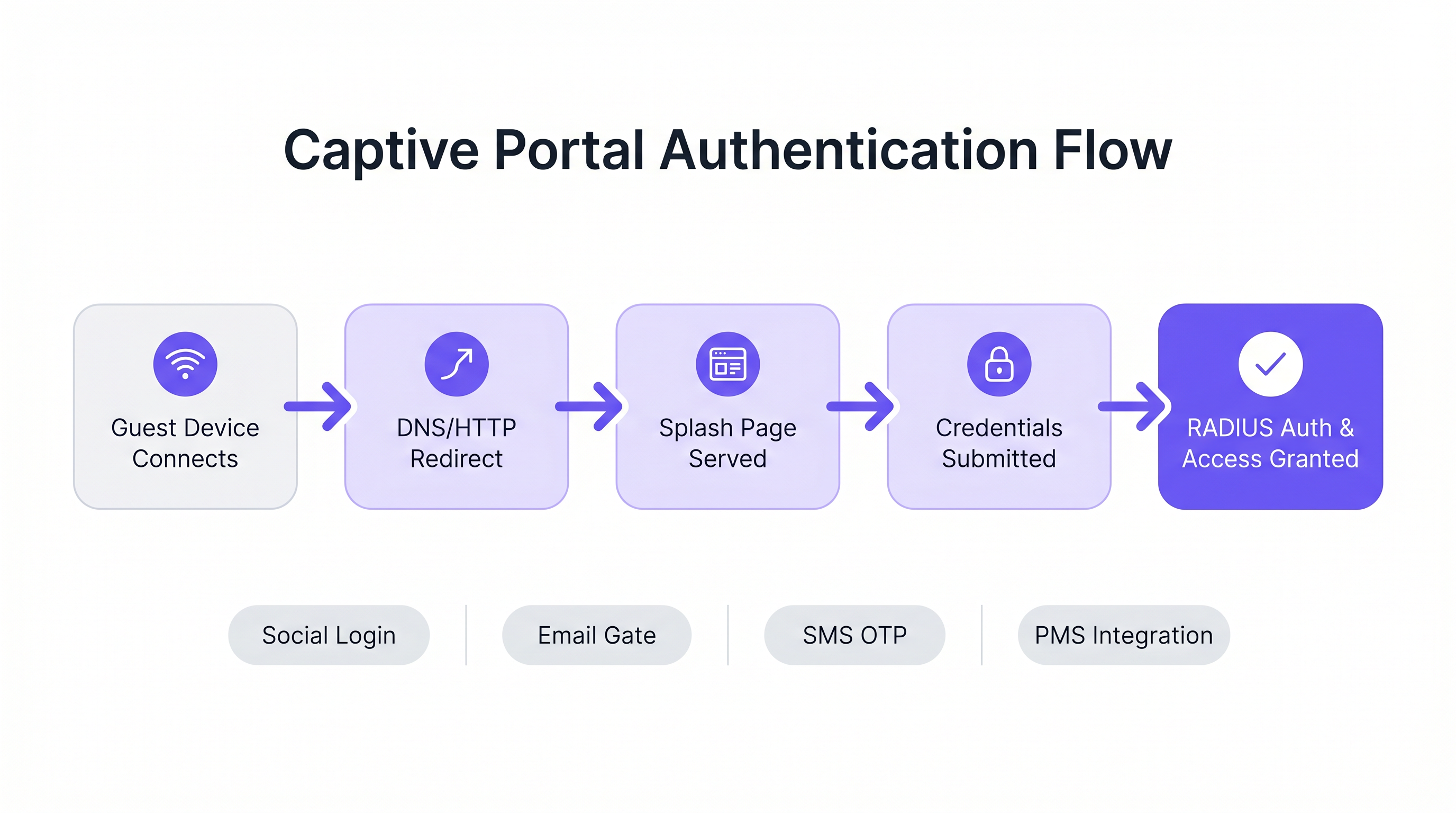
ऐतिहासिक रूप से, Captive Portals DNS हाइजैकिंग और HTTP 302 पुनर्निर्देशन के संयोजन पर निर्भर करते थे। जब कोई अतिथि डिवाइस किसी SSID से कनेक्ट होता है, तो ऑपरेटिंग सिस्टम का Captive Network Assistant (CNA) एक ज्ञात एंडपॉइंट (उदाहरण के लिए, iOS के लिए captive.apple.com) पर एक जांच अनुरोध भेजता है।
- DNS अवरोधन: स्थानीय गेटवे जांच URL के लिए DNS अनुरोध को रोकता है और इसे Captive Portal के IP पते पर हल करता है।
- HTTP पुनर्निर्देशन: यदि DNS अवरोधन का उपयोग नहीं किया जाता है, तो गेटवे आउटबाउंड HTTP GET अनुरोध को रोकता है और एक HTTP 302 Found लौटाता है, क्लाइंट को स्प्लैश पेज पर पुनर्निर्देशित करता है।
- फ़ायरवॉल वॉलड गार्डन: प्रमाणीकरण पूरा होने तक गेटवे फ़ायरवॉल द्वारा अन्य सभी आउटबाउंड ट्रैफ़िक को छोड़ दिया जाता है। केवल पोर्टल और अनुमोदित बाहरी संसाधनों (जिसे "वॉलड गार्डन" कहा जाता है) के लिए ट्रैफ़िक की अनुमति है।
इन यांत्रिकी के अधिक विस्तृत विवरण के लिए, हमारी मार्गदर्शिका देखें: Captive Portal कैसे काम करता है? तकनीकी गहन-विश्लेषण ।
आधुनिक मानक: RFC 8908 (CAPPORT API)
विरासत अवरोधन मॉडल आधुनिक HTTPS-सर्वव्यापी आर्किटेक्चर के साथ संघर्ष करता है। ब्राउज़र सही ढंग से अवरोधित HTTPS ट्रैफ़िक को मैन-इन-द-मिडल (MitM) हमले के रूप में फ़्लैग करते हैं, जिसके परिणामस्वरूप एक साफ स्प्लैश पेज के बजाय प्रमाणपत्र चेतावनी मिलती है।
इसे हल करने के लिए, IETF CAPPORT कार्य समूह ने RFC 8908 और RFC 8910 विकसित किए। ट्रैफ़िक को रोकने के बजाय, नेटवर्क DHCP (विकल्प 114) या IPv6 राउटर विज्ञापनों के माध्यम से Captive Portal की उपस्थिति का स्पष्ट रूप से विज्ञापन करता है। क्लाइंट डिवाइस पोर्टल URL और उसकी वर्तमान प्रमाणीकरण स्थिति का पता लगाने के लिए एक JSON API से क्वेरी करता है। यदि आप एक आधुनिक पोर्टल बना रहे हैं, तो आधुनिक iOS और Android डिवाइस पर एक सहज उपयोगकर्ता अनुभव के लिए CAPPORT API को लागू करना महत्वपूर्ण है।
प्रमाणीकरण और प्राधिकरण प्रवाह
एक बार स्प्लैश पेज परोसे जाने के बाद, प्रमाणीकरण प्रवाह उपयोगकर्ता अनुभव और एकत्र किए गए डेटा को निर्धारित करता है।
- क्लिक-थ्रू (सेवा की शर्तें): सबसे कम घर्षण वाला दृष्टिकोण। कोई क्रेडेंशियल आवश्यक नहीं, केवल शर्तों की एक बूलियन स्वीकृति। उच्च-घनत्व वाले वातावरण के लिए उपयुक्त जहाँ डेटा कैप्चर पर थ्रूपुट को प्राथमिकता दी जाती है।
- पहचान कैप्चर (ईमेल/सोशल): उपयोगकर्ता OAuth (Google, Facebook) या एक ईमेल फ़ॉर्म के माध्यम से प्रमाणित करता है। इसके लिए पहचान प्रदाताओं के साथ सावधानीपूर्वक एकीकरण और मजबूत GDPR अनुपालन तंत्र की आवश्यकता होती है।
- 802.1X और RADIUS: उच्च-सुरक्षा वाले वातावरण (जैसे, Healthcare या कॉर्पोरेट अतिथि नेटवर्क) के लिए, IEEE 802.1X के माध्यम से पोर्ट-आधारित नेटवर्क एक्सेस कंट्रोल की आवश्यकता होती है। एक्सेस पॉइंट एक RADIUS क्लाइंट के रूप में कार्य करता है, क्रेडेंशियल को एक RADIUS सर्वर (जैसे FreeRADIUS) पर अग्रेषित करता है ताकि एक डायरेक्टरी सेवा के विरुद्ध सत्यापन किया जा सके।
कार्यान्वयन मार्गदर्शिका: ओपन-सोर्स बनाम प्रबंधित प्लेटफ़ॉर्म
Captive Portal बनाने का काम सौंपे गए डेवलपर्स के लिए, ओपन-सोर्स इकोसिस्टम कई मजबूत नींव प्रदान करता है। हालांकि, ये उपकरण नेटवर्क प्लंबिंग प्रदान करते हैं, न कि व्यावसायिक तर्क।
प्रमुख ओपन-सोर्स विकल्प
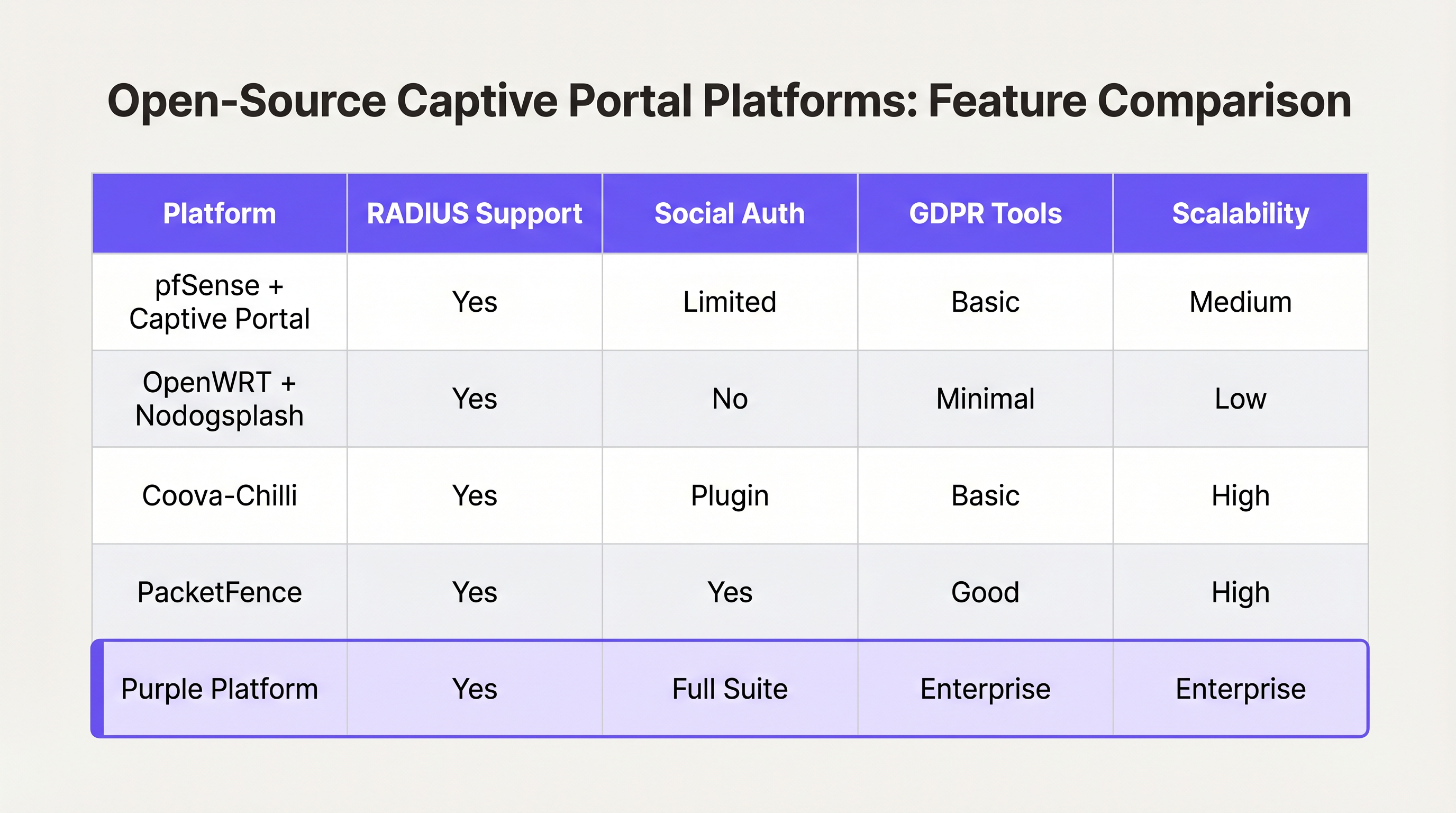
- pfSense + Captive Portal: एक लोकप्रिय फ़ायरवॉल वितरण जिसमें एक सक्षम Captive Portal मॉड्यूल शामिल है। यह RADIUS एकीकरण, MAC एड्रेस फ़िल्टरिंग और बुनियादी बैंडविड्थ शेपिंग को संभालता है। अनुभवी नेटवर्क इंजीनियरों के साथ एकल-साइट परिनियोजन के लिए आदर्श।
- Coova-Chilli: एक परिपक्व, सुविधा-संपन्न एक्सेस कंट्रोलर जो WISPr प्रोटोकॉल को लागू करता है। यह जटिल RADIUS वातावरण में उत्कृष्ट है और इसे सोशल लॉगिन के लिए बढ़ाया जा सकता है, लेकिन इसके लिए महत्वपूर्ण Linux सिस्टम प्रशासन विशेषज्ञता की आवश्यकता होती है।
- PacketFence: एक व्यापक ओपन-सोर्स NAC समाधान। यह 802.1X, BYOD ऑनबोर्डिंग और एंटरप्राइज़ डायरेक्टरी के साथ एकीकरण का समर्थन करता है। अत्यधिक स्केलेबल, लेकिन इसमें सीखने की एक कठिन प्रक्रिया और महत्वपूर्ण परिचालन ओवरहेड शामिल है।
"बनाएँ बनाम "खरीदें" निर्णय फ्रेमवर्क
जबकि ओपन-सोर्स सॉफ्टवेयर "मुफ्त" होता है, एक स्व-निर्मित Captive Portal के स्वामित्व की कुल लागत स्थानों की संख्या और व्यावसायिक आवश्यकताओं की जटिलता के साथ गैर-रेखीय रूप से बढ़ती है।
कब बनाना है:
- आप एक ही स्थान या अत्यधिक समान साइटों के एक छोटे समूह का संचालन करते हैं।
- आपकी आवश्यकताएँ केवल बुनियादी सेवा शर्तों की स्वीकृति या साधारण WPA2-PSK एक्सेस तक सीमित हैं।
- आपके पास समर्पित, इन-हाउस Linux और नेटवर्क इंजीनियरिंग संसाधन हैं।
कब खरीदना है (एंटरप्राइज़ प्लेटफ़ॉर्म):
- मल्टी-साइट स्केल: आप दर्जनों या सैकड़ों स्थानों पर विभिन्न अंतर्निहित हार्डवेयर (Cisco, Aruba, Meraki) के साथ डिप्लॉय कर रहे हैं।
- अनुपालन: आपको स्वचालित GDPR/CCPA सहमति प्रबंधन, डेटा विषय एक्सेस अनुरोध (DSAR) हैंडलिंग, और सत्यापन योग्य ऑडिट ट्रेल की आवश्यकता है।
- बिजनेस इंटेलिजेंस: आपको नेटवर्क डेटा को मार्केटिंग सिस्टम के साथ एकीकृत करने की आवश्यकता है। Purple जैसे प्लेटफ़ॉर्म एक एकीकृत WiFi Analytics लेयर प्रदान करते हैं, जो रॉ MAC एड्रेस को कार्रवाई योग्य फुटफॉल और ठहरने के समय के मेट्रिक्स में बदलता है।
- उन्नत एकीकरण: आपको प्रॉपर्टी मैनेजमेंट सिस्टम (PMS) या लॉयल्टी डेटाबेस के साथ सहज एकीकरण की आवश्यकता है।
जिस तरह एंटरप्राइज़ WAN आर्किटेक्चर प्रबंधित SD-WAN समाधानों की ओर बढ़ रहे हैं (देखें आधुनिक व्यवसायों के लिए मुख्य SD WAN लाभ ), उसी तरह एंटरप्राइज़ गेस्ट WiFi हार्डवेयर-अज्ञेयवादी क्लाउड प्लेटफ़ॉर्म की ओर बढ़ रहा है जो एज नेटवर्क की जटिलता को अमूर्त करता है।
सर्वोत्तम अभ्यास और जोखिम न्यूनीकरण
यदि आप एक कस्टम बिल्ड के साथ आगे बढ़ते हैं, या किसी वेंडर का मूल्यांकन कर रहे हैं, तो सुनिश्चित करें कि ये वास्तुशिल्प सर्वोत्तम अभ्यास पूरे हों:
1. नेटवर्क सेगमेंटेशन और सुरक्षा
अपने कॉर्पोरेट या ऑपरेशनल टेक्नोलॉजी (OT) नेटवर्क के समान VLAN पर कभी भी Captive Portal डिप्लॉय न करें। गेस्ट ट्रैफिक को सख्ती से सेगमेंट किया जाना चाहिए। यदि आपका स्थान भुगतान संसाधित करता है (उदाहरण के लिए, खुदरा रियायतों वाला एक Transport हब), तो गेस्ट WiFi को सेगमेंट करने में विफलता पूरे नेटवर्क को PCI DSS दायरे में ले आएगी, जिससे अनुपालन लागत में भारी वृद्धि होगी।
2. वॉल्ड गार्डन कॉन्फ़िगरेशन
आपके वॉल्ड गार्डन को प्रमाणीकरण सफल होने के लिए आवश्यक डोमेन पर ट्रैफिक को स्पष्ट रूप से अनुमति देनी चाहिए। सोशल लॉगिन के लिए, इसका मतलब है accounts.google.com, graph.facebook.com, और उनके संबंधित CDNs तक पहुंच की अनुमति देना। एक गलत कॉन्फ़िगर किया गया वॉल्ड गार्डन उपयोगकर्ताओं को एक खाली स्प्लैश पेज पर फंसा देता है।
3. बैंडविड्थ और सेशन प्रबंधन
प्रति-उपयोगकर्ता दर सीमित करने और सेशन टाइमआउट को सख्ती से लागू करें। एक अकेला उपयोगकर्ता एक बड़ा OS अपडेट डाउनलोड करके WAN अपलिंक को संतृप्त कर सकता है, जिससे सभी मेहमानों के लिए अनुभव खराब हो सकता है। इन सीमाओं को गतिशील रूप से लागू करने के लिए RADIUS एट्रिब्यूट (जैसे, WISPr-Bandwidth-Max-Down) का उपयोग करें।
4. MAC स्पूफिंग को कम करना
सेशन परसिस्टेंस के लिए केवल MAC एड्रेस पर निर्भर रहना एक सुरक्षा जोखिम है, क्योंकि MAC एड्रेस आसानी से स्पूफ किए जा सकते हैं, और आधुनिक OS सुविधाएँ (जैसे iOS प्राइवेट Wi-Fi एड्रेस) उन्हें डिफ़ॉल्ट रूप से रैंडमाइज़ करती हैं। सुनिश्चित करें कि आपकी पोर्टल आर्किटेक्चर MAC रैंडमाइजेशन को सहजता से संभाल सके, आमतौर पर MAC बदलने पर पुनः प्रमाणीकरण की आवश्यकता करके, या सहज, सुरक्षित रोमिंग के लिए Passpoint/Hotspot 2.0 का उपयोग करके।
ROI और व्यावसायिक प्रभाव
एक Captive Portal को केवल एक IT लागत केंद्र के रूप में नहीं देखा जाना चाहिए; यह एक महत्वपूर्ण डेटा अधिग्रहण चैनल है।
जब सही ढंग से डिप्लॉय किया जाता है—अक्सर एक प्रबंधित प्लेटफ़ॉर्म के माध्यम से—तो ROI को तीन क्षेत्रों में मापा जाता है:
- मार्केटिंग डेटाबेस वृद्धि: स्पष्ट मूल्य विनिमय (जैसे, "ईमेल के बदले मुफ्त WiFi") के साथ एक सहज ऑनबोर्डिंग प्रवाह तेजी से एक अनुपालन-योग्य, फर्स्ट-पार्टी मार्केटिंग डेटाबेस बनाता है।
- ऑपरेशनल इंटेलिजेंस: कनेक्शन डेटा से प्राप्त एनालिटिक्स स्थान ऑपरेटरों को हीटमैप, पीक लोड विश्लेषण, और बार-बार आने वाले आगंतुक मेट्रिक्स प्रदान करते हैं, जो सीधे स्टाफिंग और लेआउट निर्णयों को प्रभावित करते हैं।
- जोखिम न्यूनीकरण: केंद्रीकृत अनुपालन प्रबंधन अनुचित डेटा हैंडलिंग या PCI DSS उल्लंघनों से जुड़े नियामक जुर्माने के जोखिम को काफी कम करता है।
अंततः, एक डेवलपर या आर्किटेक्ट का लक्ष्य एक सुरक्षित, घर्षण-रहित नेटवर्क अनुभव प्रदान करना है जो व्यवसाय के रणनीतिक उद्देश्यों को पूरा करता है। ऐसी आर्किटेक्चर चुनें जो आपकी टीम को उन उद्देश्यों पर ध्यान केंद्रित करने की अनुमति दे, बजाय इसके कि वह बुनियादी ढाँचे का प्रबंधन करे।
Key Terms & Definitions
Captive Portal
A web page that the user of a public-access network is obliged to view and interact with before access is granted.
The primary interface for guest network onboarding, used for terms acceptance, payment, or data capture.
RADIUS (Remote Authentication Dial-In User Service)
A networking protocol that provides centralized Authentication, Authorization, and Accounting (AAA) management for users who connect and use a network service.
The backend engine that validates credentials and tells the network equipment what permissions a guest should have.
Walled Garden
A limited environment that controls the user's access to external web content and services prior to full authentication.
Essential for allowing users to access identity providers (like Google or Facebook) to log in, before they have general internet access.
MAC Spoofing
The practice of altering a device's factory-assigned Media Access Control (MAC) address to masquerade as another device or bypass network restrictions.
A common method used to bypass captive portal time limits, requiring robust session management strategies to mitigate.
CAPPORT API (RFC 8908)
A modern IETF standard allowing devices to securely discover the captive portal URL and authentication status via DHCP or Router Advertisements, rather than relying on HTTP interception.
Critical for modern portal development to prevent HTTPS certificate errors and improve the user onboarding experience.
IEEE 802.1X
An IEEE Standard for port-based Network Access Control (PNAC), providing an authentication mechanism to devices wishing to attach to a LAN or WLAN.
Used in enterprise and high-security environments where simple web-based authentication is insufficient.
WISPr (Wireless Internet Service Provider roaming)
A draft protocol submitted to the Wi-Fi Alliance that allows users to roam between different wireless internet service providers.
Often implemented by access controllers to handle the XML-based authentication requests from the captive portal to the gateway.
VLAN Segmentation
The practice of partitioning a single layer-2 network to create multiple distinct broadcast domains.
A mandatory security practice to ensure guest WiFi traffic cannot access corporate or operational technology networks.
Case Studies
A 200-room hotel needs to deploy guest WiFi. They require guests to authenticate using their room number and last name to access a premium bandwidth tier, while non-guests receive a throttled 2Mbps connection. The underlying network uses Cisco Meraki access points.
- Configure the Meraki SSID to use an external captive portal (Splash page URL pointing to the custom portal). 2. Set up a RADIUS server (e.g., FreeRADIUS) and configure the Meraki APs as RADIUS clients. 3. Develop the captive portal web application to present a login form requesting Room Number and Last Name. 4. Integrate the portal backend with the hotel's Property Management System (PMS) via API. When credentials are submitted, the portal queries the PMS to validate the guest. 5. Upon successful validation, the portal backend sends a RADIUS Access-Accept message to the Meraki controller, including Vendor-Specific Attributes (VSAs) to apply the 'Premium' group policy (unthrottled bandwidth). 6. For non-guests, provide a 'Free Access' button that bypasses the PMS check and returns a RADIUS Access-Accept with VSAs applying the 'Throttled' group policy.
A national retail chain with 50 locations wants to implement a captive portal to collect customer emails for marketing. They are concerned about GDPR compliance and the operational overhead of managing 50 separate local portal instances.
Instead of deploying local captive portal software (like pfSense) at each site, deploy a centralized, cloud-hosted captive portal platform (like Purple). Configure the local branch routers/APs to redirect guest traffic to the centralized portal URL. Implement a standardized splash page with explicit opt-in checkboxes for marketing consent and a link to the privacy policy. The centralized platform handles the capture, timestamping, and secure storage of consent records, and integrates directly via API with the retailer's central CRM system.
Scenario Analysis
Q1. You are deploying a captive portal in an airport. The primary goal is maximum throughput and minimizing support tickets from users unable to connect. Which authentication method should you prioritize?
💡 Hint:Consider the friction involved in verifying identities versus simply gaining legal consent.
Show Recommended Approach
A Click-Through (Terms of Service) portal. In high-density transit environments, requiring email verification or SMS OTP introduces significant friction and relies on external dependencies (cellular reception for SMS, existing email access). A simple Terms of Service acceptance minimizes support overhead while meeting basic legal requirements.
Q2. Your security team reports that users are bypassing the 2-hour free WiFi limit by changing their device's MAC address. How should you architect the network to mitigate this?
💡 Hint:MAC addresses are layer-2 identifiers that can be easily spoofed. You need a layer-7 identity verification.
Show Recommended Approach
Shift from a purely MAC-based session tracking model to an identity-based model. Require users to authenticate via a unique identifier (e.g., SMS OTP or a verified email address) and tie the session limit to that identity in the RADIUS backend, rather than the device's MAC address.
Q3. A hospital requires a guest WiFi network for patients and visitors. They also need a separate network for medical IoT devices. What is the most critical architectural requirement?
💡 Hint:Consider the impact if a compromised guest device could reach a medical device.
Show Recommended Approach
Strict VLAN segmentation. The guest WiFi network must be placed on a completely isolated VLAN that has no routing path to the clinical or IoT networks. The captive portal and guest traffic must be firewalled and routed directly to the internet.




