

Wie man ein Captive Portal erstellt: Ein Entwicklerhandbuch
Ein umfassender technischer Leitfaden für IT-Architekten und Netzwerkmanager zum Aufbau und zur Bereitstellung von Captive Portals. Dieser Leitfaden behandelt zugrunde liegende Protokolle, Authentifizierungsabläufe, Open-Source-Architekturen und einen Rahmen für die Entscheidung, wann man eine Unternehmensplattform selbst entwickeln oder kaufen sollte.
🎧 Diesen Leitfaden anhören
Transkript anzeigen
Zusammenfassung für Führungskräfte
Für Unternehmensnetzwerkarchitekten und IT-Direktoren ist die Bereitstellung eines Captive Portals selten nur eine Netzwerkübung – es ist eine kritische Schnittstelle von Netzwerksicherheit, Einhaltung gesetzlicher Vorschriften und Business Intelligence. Ob Sie ein Hospitality -Portfolio mit 200 Objekten, ein weitläufiges Retail -Immobilienportfolio oder ein Stadion mit hoher Dichte verwalten, die Entscheidung, ein benutzerdefiniertes Captive Portal zu erstellen oder eine verwaltete Plattform bereitzustellen, hat tiefgreifende Auswirkungen auf die Gesamtbetriebskosten (TCO) und das Betriebsrisiko.
Dieser Leitfaden bietet einen herstellerneutralen, technischen Einblick in die Architektur von Captive Portals. Wir werden die zugrunde liegenden HTTP-Umleitungsmechanismen, die moderne Captive Portal API (RFC 8908), 802.1X RADIUS-Authentifizierungsabläufe und die führenden Open-Source-Optionen untersuchen. Entscheidend ist, dass wir einen Rahmen für die Bewertung bieten, wann ein selbstgebauter Open-Source-Stack sinnvoll ist und wann der Compliance- und Integrationsaufwand eine Unternehmensplattform wie die Guest WiFi -Lösung von Purple erfordert.
Hören Sie sich unser begleitendes Audio-Briefing für einen strategischen Überblick an:
Technischer Einblick: Wie Captive Portals funktionieren
Bevor Softwareoptionen bewertet werden, ist es unerlässlich, die grundlegenden Netzwerkmechanismen zu verstehen. Ein Captive Portal ist im Wesentlichen ein Netzwerkzugriffskontrollmechanismus (NAC), der nicht authentifizierten HTTP/HTTPS-Verkehr abfängt und eine Umleitung zu einer webbasierten Authentifizierungsschnittstelle erzwingt.
Das ältere Abfangmodell
Historisch gesehen basierten Captive Portals auf einer Kombination aus DNS-Hijacking und HTTP 302-Weiterleitungen. Wenn sich ein Gastgerät mit einer SSID verbindet, sendet der Captive Network Assistant (CNA) des Betriebssystems eine Probe-Anfrage an einen bekannten Endpunkt (z.B. captive.apple.com für iOS).
- DNS-Abfangen: Das lokale Gateway fängt die DNS-Anfrage für die Probe-URL ab und löst sie in die IP-Adresse des Captive Portals auf.
- HTTP-Weiterleitung: Wenn kein DNS-Abfangen verwendet wird, fängt das Gateway die ausgehende HTTP GET-Anfrage ab und gibt einen HTTP 302 Found zurück, der den Client auf die Splash-Seite umleitet.
- Firewall Walled Garden: Der gesamte andere ausgehende Datenverkehr wird von der Gateway-Firewall blockiert, bis die Authentifizierung abgeschlossen ist. Nur der Datenverkehr zum Portal und zu genehmigten externen Ressourcen (dem „Walled Garden“) ist erlaubt.
Für eine detailliertere Aufschlüsselung dieser Mechanismen siehe unseren Leitfaden: Wie funktioniert ein Captive Portal? Technischer Einblick .
Der moderne Standard: RFC 8908 (CAPPORT API)
Das ältere Abfangmodell hat Schwierigkeiten mit modernen HTTPS-überall-Architekturen. Browser kennzeichnen abgefangenen HTTPS-Verkehr zu Recht als Man-in-the-Middle (MitM)-Angriff, was zu Zertifikatswarnungen anstelle einer sauberen Splash-Seite führt.
Um dies zu lösen, entwickelte die IETF CAPPORT Arbeitsgruppe RFC 8908 und RFC 8910. Anstatt den Datenverkehr abzufangen, bewirbt das Netzwerk explizit die Präsenz eines Captive Portals über DHCP (Option 114) oder IPv6 Router Advertisements. Das Client-Gerät fragt eine JSON API ab, um die Portal-URL und ihren aktuellen Authentifizierungsstatus zu ermitteln. Wenn Sie ein modernes Portal erstellen, ist die Implementierung der CAPPORT API entscheidend für eine nahtlose Benutzererfahrung auf modernen iOS- und Android-Geräten.
Authentifizierungs- und Autorisierungsabläufe
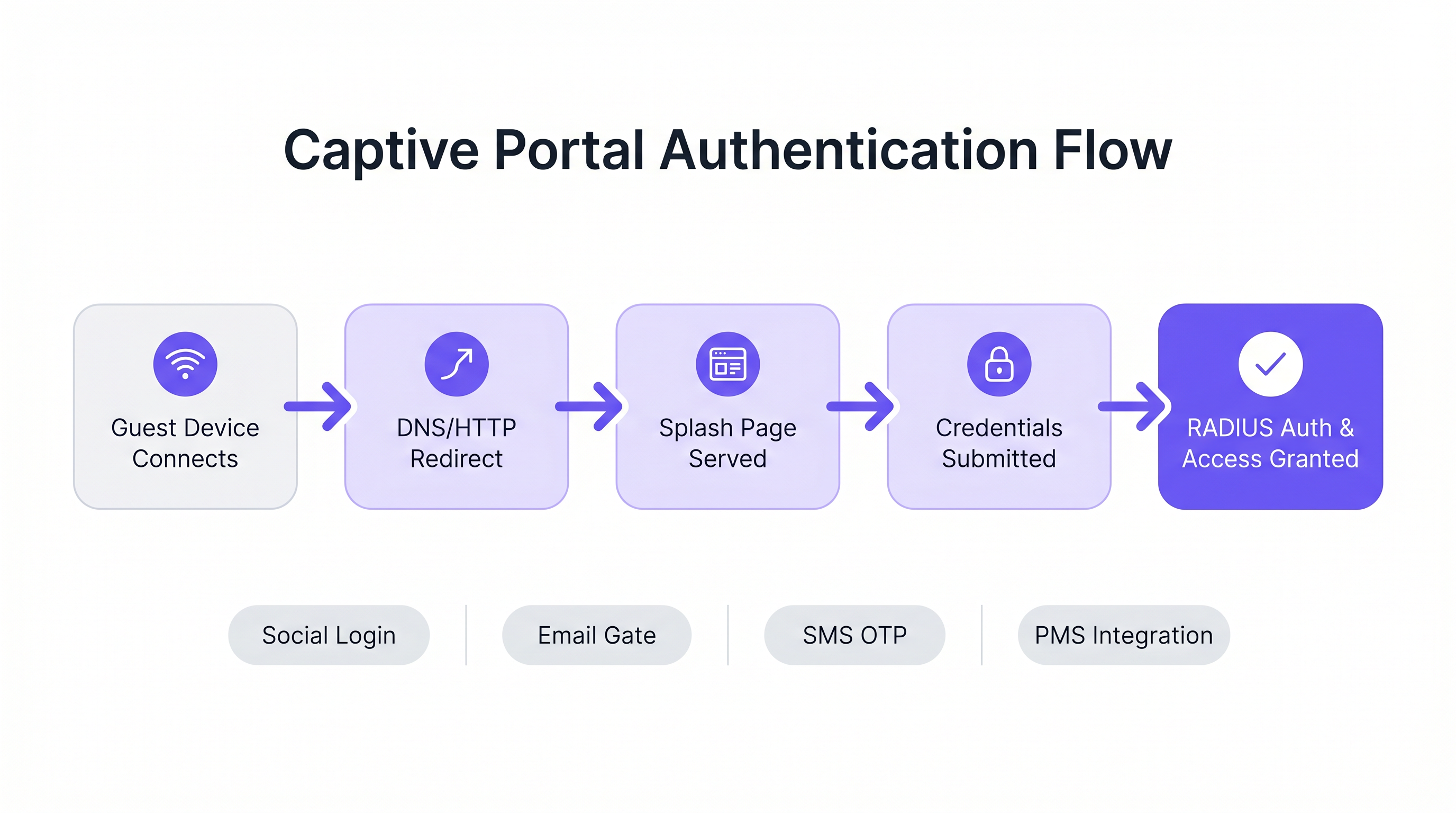
Sobald die Splash-Seite bereitgestellt wird, bestimmt der Authentifizierungsablauf die Benutzererfahrung und die gesammelten Daten.
- Click-Through (Nutzungsbedingungen): Der reibungsärmste Ansatz. Keine Anmeldeinformationen erforderlich, nur eine boolesche Akzeptanz der Bedingungen. Geeignet für Umgebungen mit hoher Dichte, in denen der Durchsatz gegenüber der Datenerfassung priorisiert wird.
- Identitätserfassung (E-Mail/Sozial): Der Benutzer authentifiziert sich über OAuth (Google, Facebook) oder ein E-Mail-Formular. Dies erfordert eine sorgfältige Integration mit Identitätsanbietern und robuste GDPR-Konformitätsmechanismen.
- 802.1X und RADIUS: Für Umgebungen mit hoher Sicherheit (z.B. Healthcare oder Unternehmens-Gastnetzwerke) ist eine portbasierte Netzwerkzugriffskontrolle über IEEE 802.1X erforderlich. Der Access Point fungiert als RADIUS-Client und leitet Anmeldeinformationen an einen RADIUS-Server (wie FreeRADIUS) zur Validierung gegen einen Verzeichnisdienst weiter.
Implementierungsleitfaden: Open-Source vs. verwaltete Plattformen
Für Entwickler, die mit dem Aufbau eines Captive Portals beauftragt sind, bietet das Open-Source-Ökosystem mehrere robuste Grundlagen.
Diese Tools stellen jedoch die Netzwerk-Infrastruktur bereit, nicht die Geschäftslogik.
Führende Open-Source-Optionen
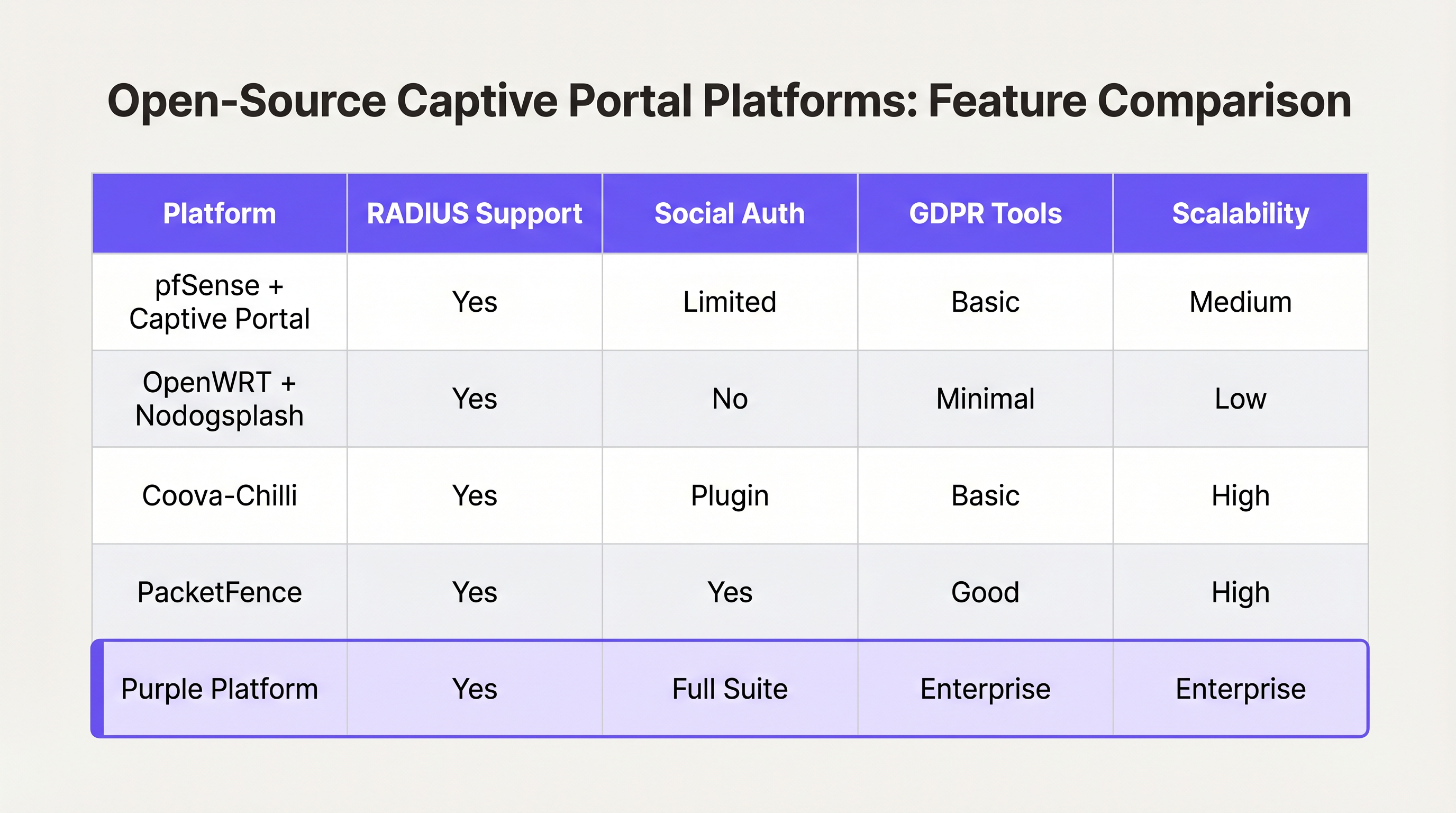
- pfSense + Captive Portal: Eine beliebte Firewall-Distribution, die ein leistungsfähiges Captive Portal-Modul enthält. Es verwaltet die RADIUS-Integration, MAC-Adressfilterung und grundlegendes Bandbreiten-Shaping. Ideal für Einzelstandort-Bereitstellungen mit erfahrenen Netzwerktechnikern.
- Coova-Chilli: Ein ausgereifter, funktionsreicher Access Controller, der das WISPr-Protokoll implementiert. Er zeichnet sich in komplexen RADIUS-Umgebungen aus und kann für Social Login erweitert werden, erfordert jedoch erhebliche Linux-Systemadministrationskenntnisse.
- PacketFence: Eine umfassende Open-Source-NAC-Lösung. Sie unterstützt 802.1X, BYOD-Onboarding und die Integration mit Unternehmensverzeichnissen. Hoch skalierbar, aber mit einer steilen Lernkurve und erheblichem Betriebsaufwand verbunden.
Die „Selbst entwickeln vs. "Kauf"-Entscheidungsrahmen
Während Open-Source-Software "kostenlos" ist, steigen die Gesamtbetriebskosten für ein selbstgebautes Portal nicht-linear mit der Anzahl der Standorte und der Komplexität der Geschäftsanforderungen.
Wann selbst entwickeln:
- Sie betreiben einen einzelnen Standort oder eine kleine Gruppe sehr homogener Standorte.
- Ihre Anforderungen beschränken sich auf die grundlegende Akzeptanz von Nutzungsbedingungen oder einfachen WPA2-PSK-Zugang.
- Sie verfügen über dedizierte, interne Linux- und Netzwerk-Engineering-Ressourcen.
Wann kaufen (Enterprise-Plattform):
- Multi-Site-Skalierung: Sie implementieren über Dutzende oder Hunderte von Standorten mit unterschiedlicher zugrunde liegender Hardware (Cisco, Aruba, Meraki).
- Compliance: Sie benötigen automatisiertes GDPR/CCPA-Einwilligungsmanagement, die Bearbeitung von Anträgen auf Auskunft durch betroffene Personen (DSAR) und nachweisbare Audit-Trails.
- Business Intelligence: Sie müssen Netzwerkdaten in Marketingsysteme integrieren. Plattformen wie Purple bieten eine einheitliche WiFi Analytics -Schicht, die rohe MAC addresses in umsetzbare Frequenz- und Verweildauer-Metriken umwandelt.
- Erweiterte Integrationen: Sie benötigen eine nahtlose Integration mit Property Management Systemen (PMS) oder Loyalitätsdatenbanken.
Ähnlich wie sich WAN-Architekturen von Unternehmen hin zu verwalteten SD-WAN-Lösungen entwickeln (siehe The Core SD WAN Benefits for Modern Businesses ), verlagert sich das Gast-WiFi von Unternehmen hin zu hardwareunabhängigen Cloud-Plattformen, die die Komplexität des Edge-Netzwerks abstrahieren.
Best Practices und Risikominderung
Wenn Sie eine Eigenentwicklung vorantreiben oder einen Anbieter evaluieren, stellen Sie sicher, dass diese architektonischen Best Practices erfüllt sind:
1. Netzwerksegmentierung und Sicherheit
Stellen Sie niemals ein Captive Portal im selben VLAN wie Ihr Unternehmens- oder Betriebstechnologie (OT)-Netzwerk bereit. Der Gastverkehr muss streng segmentiert werden. Wenn Ihr Standort Zahlungen verarbeitet (z.B. ein Transport -Hub mit Einzelhandelskonzessionen), führt eine fehlende Segmentierung des Gast-WiFi dazu, dass das gesamte Netzwerk in den PCI DSS-Geltungsbereich fällt, was die Compliance-Kosten erheblich erhöht.
2. Walled Garden Konfiguration
Ihr Walled Garden muss den Datenverkehr zu den für eine erfolgreiche Authentifizierung erforderlichen Domains explizit zulassen. Für Social Login bedeutet dies, den Zugriff auf accounts.google.com, graph.facebook.com und deren zugehörige CDNs zu erlauben. Ein falsch konfigurierter Walled Garden führt dazu, dass Benutzer auf einer leeren Splash Page hängen bleiben.
3. Bandbreiten- und Sitzungsmanagement
Implementieren Sie strenge Ratenbegrenzungen pro Benutzer und Sitzungs-Timeouts. Ein einzelner Benutzer, der ein großes OS-Update herunterlädt, kann den WAN-Uplink überlasten und die Erfahrung für alle Gäste beeinträchtigen. Verwenden Sie RADIUS-Attribute (z.B. WISPr-Bandwidth-Max-Down), um diese Grenzen dynamisch durchzusetzen.
4. MAC-Spoofing mindern
Sich ausschließlich auf MAC addresses für die Sitzungspersistenz zu verlassen, ist ein Sicherheitsrisiko, da MAC addresses leicht gefälscht werden können und moderne OS-Funktionen (wie iOS Private Wi-Fi Address) diese standardmäßig randomisieren. Stellen Sie sicher, dass Ihre Portalarchitektur die MAC-Randomisierung elegant handhaben kann, typischerweise indem eine erneute Authentifizierung erforderlich ist, wenn sich die MAC ändert, oder indem Passpoint/Hotspot 2.0 für nahtloses, sicheres Roaming genutzt wird.
ROI & Geschäftsauswirkungen
Ein Captive Portal sollte nicht nur als IT-Kostenstelle betrachtet werden; es ist ein kritischer Kanal zur Datenerfassung.
Bei korrekter Bereitstellung – oft über eine verwaltete Plattform – wird der ROI in drei Bereichen gemessen:
- Wachstum der Marketingdatenbank: Ein nahtloser Onboarding-Flow mit klarem Wertetausch (z.B. "Kostenloses WiFi im Austausch für E-Mail") baut schnell eine konforme, erstklassige Marketingdatenbank auf.
- Operative Intelligenz: Aus Verbindungsdaten abgeleitete Analysen liefern Standortbetreibern Heatmaps, Spitzenlastanalysen und Metriken zu wiederkehrenden Besuchern, die Personal- und Layoutentscheidungen direkt beeinflussen.
- Risikoreduzierung: Ein zentralisiertes Compliance-Management reduziert das Risiko von behördlichen Bußgeldern im Zusammenhang mit unsachgemäßer Datenverarbeitung oder PCI DSS-Verstößen erheblich.
Letztendlich ist es das Ziel eines Entwicklers oder Architekten, ein sicheres, reibungsloses Netzwerkerlebnis zu liefern, das den strategischen Zielen des Unternehmens dient. Wählen Sie die Architektur, die es Ihrem Team ermöglicht, sich auf diese Ziele zu konzentrieren, anstatt die Infrastruktur zu verwalten.
Schlüsselbegriffe & Definitionen
Captive Portal
A web page that the user of a public-access network is obliged to view and interact with before access is granted.
The primary interface for guest network onboarding, used for terms acceptance, payment, or data capture.
RADIUS (Remote Authentication Dial-In User Service)
A networking protocol that provides centralized Authentication, Authorization, and Accounting (AAA) management for users who connect and use a network service.
The backend engine that validates credentials and tells the network equipment what permissions a guest should have.
Walled Garden
A limited environment that controls the user's access to external web content and services prior to full authentication.
Essential for allowing users to access identity providers (like Google or Facebook) to log in, before they have general internet access.
MAC Spoofing
The practice of altering a device's factory-assigned Media Access Control (MAC) address to masquerade as another device or bypass network restrictions.
A common method used to bypass captive portal time limits, requiring robust session management strategies to mitigate.
CAPPORT API (RFC 8908)
A modern IETF standard allowing devices to securely discover the captive portal URL and authentication status via DHCP or Router Advertisements, rather than relying on HTTP interception.
Critical for modern portal development to prevent HTTPS certificate errors and improve the user onboarding experience.
IEEE 802.1X
An IEEE Standard for port-based Network Access Control (PNAC), providing an authentication mechanism to devices wishing to attach to a LAN or WLAN.
Used in enterprise and high-security environments where simple web-based authentication is insufficient.
WISPr (Wireless Internet Service Provider roaming)
A draft protocol submitted to the Wi-Fi Alliance that allows users to roam between different wireless internet service providers.
Often implemented by access controllers to handle the XML-based authentication requests from the captive portal to the gateway.
VLAN Segmentation
The practice of partitioning a single layer-2 network to create multiple distinct broadcast domains.
A mandatory security practice to ensure guest WiFi traffic cannot access corporate or operational technology networks.
Fallstudien
A 200-room hotel needs to deploy guest WiFi. They require guests to authenticate using their room number and last name to access a premium bandwidth tier, while non-guests receive a throttled 2Mbps connection. The underlying network uses Cisco Meraki access points.
- Configure the Meraki SSID to use an external captive portal (Splash page URL pointing to the custom portal). 2. Set up a RADIUS server (e.g., FreeRADIUS) and configure the Meraki APs as RADIUS clients. 3. Develop the captive portal web application to present a login form requesting Room Number and Last Name. 4. Integrate the portal backend with the hotel's Property Management System (PMS) via API. When credentials are submitted, the portal queries the PMS to validate the guest. 5. Upon successful validation, the portal backend sends a RADIUS Access-Accept message to the Meraki controller, including Vendor-Specific Attributes (VSAs) to apply the 'Premium' group policy (unthrottled bandwidth). 6. For non-guests, provide a 'Free Access' button that bypasses the PMS check and returns a RADIUS Access-Accept with VSAs applying the 'Throttled' group policy.
A national retail chain with 50 locations wants to implement a captive portal to collect customer emails for marketing. They are concerned about GDPR compliance and the operational overhead of managing 50 separate local portal instances.
Instead of deploying local captive portal software (like pfSense) at each site, deploy a centralized, cloud-hosted captive portal platform (like Purple). Configure the local branch routers/APs to redirect guest traffic to the centralized portal URL. Implement a standardized splash page with explicit opt-in checkboxes for marketing consent and a link to the privacy policy. The centralized platform handles the capture, timestamping, and secure storage of consent records, and integrates directly via API with the retailer's central CRM system.
Szenarioanalyse
Q1. You are deploying a captive portal in an airport. The primary goal is maximum throughput and minimizing support tickets from users unable to connect. Which authentication method should you prioritize?
💡 Hinweis:Consider the friction involved in verifying identities versus simply gaining legal consent.
Empfohlenen Ansatz anzeigen
A Click-Through (Terms of Service) portal. In high-density transit environments, requiring email verification or SMS OTP introduces significant friction and relies on external dependencies (cellular reception for SMS, existing email access). A simple Terms of Service acceptance minimizes support overhead while meeting basic legal requirements.
Q2. Your security team reports that users are bypassing the 2-hour free WiFi limit by changing their device's MAC address. How should you architect the network to mitigate this?
💡 Hinweis:MAC addresses are layer-2 identifiers that can be easily spoofed. You need a layer-7 identity verification.
Empfohlenen Ansatz anzeigen
Shift from a purely MAC-based session tracking model to an identity-based model. Require users to authenticate via a unique identifier (e.g., SMS OTP or a verified email address) and tie the session limit to that identity in the RADIUS backend, rather than the device's MAC address.
Q3. A hospital requires a guest WiFi network for patients and visitors. They also need a separate network for medical IoT devices. What is the most critical architectural requirement?
💡 Hinweis:Consider the impact if a compromised guest device could reach a medical device.
Empfohlenen Ansatz anzeigen
Strict VLAN segmentation. The guest WiFi network must be placed on a completely isolated VLAN that has no routing path to the clinical or IoT networks. The captive portal and guest traffic must be firewalled and routed directly to the internet.




