

How to Build a Captive Portal: A Developer's Guide
A definitive technical guide for IT architects and network managers on building and deploying captive portals. This guide covers underlying protocols, authentication flows, open-source architectures, and a framework for deciding when to build versus when to buy an enterprise managed platform.
🎧 Listen to this Guide
View Transcript
Executive Summary
For enterprise network architects and IT directors, deploying a captive portal is rarely just a networking exercise—it is a critical intersection of network security, regulatory compliance, and business intelligence. Whether you are managing a 200-property Hospitality portfolio, a sprawling Retail estate, or a high-density stadium, the decision to build a custom captive portal or deploy a managed platform has profound implications for total cost of ownership (TCO) and operational risk.
This guide provides a vendor-neutral, technical deep-dive into the architecture of captive portals. We will explore the underlying HTTP redirection mechanics, the modern Captive Portal API (RFC 8908), 802.1X RADIUS authentication flows, and the leading open-source options. Crucially, we provide a framework for evaluating when a self-built open-source stack makes sense, and when the compliance and integration overhead necessitates an enterprise platform like Purple's Guest WiFi solution.
Listen to our companion audio briefing for a strategic overview:
Technical Deep-Dive: How Captive Portals Work
Before evaluating software options, it is essential to understand the fundamental network mechanics. A captive portal is essentially a network access control (NAC) mechanism that intercepts unauthenticated HTTP/HTTPS traffic and forces a redirection to a web-based authentication interface.
The Legacy Interception Model
Historically, captive portals relied on a combination of DNS hijacking and HTTP 302 redirects. When a guest device connects to an SSID, the operating system's Captive Network Assistant (CNA) sends a probe request to a known endpoint (e.g., captive.apple.com for iOS).
- DNS Interception: The local gateway intercepts the DNS request for the probe URL and resolves it to the captive portal's IP address.
- HTTP Redirect: If DNS interception is not used, the gateway intercepts the outbound HTTP GET request and returns an HTTP 302 Found, redirecting the client to the splash page.
- Firewall Walled Garden: All other outbound traffic is dropped by the gateway firewall until authentication completes. Only traffic to the portal and approved external resources (the "walled garden") is permitted.
For a more detailed breakdown of these mechanics, see our guide: How Does a Captive Portal Work? Technical Deep Dive .
The Modern Standard: RFC 8908 (CAPPORT API)
The legacy interception model struggles with modern HTTPS-everywhere architectures. Browsers rightfully flag intercepted HTTPS traffic as a Man-in-the-Middle (MitM) attack, resulting in certificate warnings rather than a clean splash page.
To resolve this, the IETF CAPPORT working group developed RFC 8908 and RFC 8910. Instead of intercepting traffic, the network explicitly advertises the presence of a captive portal via DHCP (Option 114) or IPv6 Router Advertisements. The client device queries a JSON API to discover the portal URL and its current authentication state. If you are building a modern portal, implementing the CAPPORT API is critical for a seamless user experience on modern iOS and Android devices.
Authentication and Authorization Flows
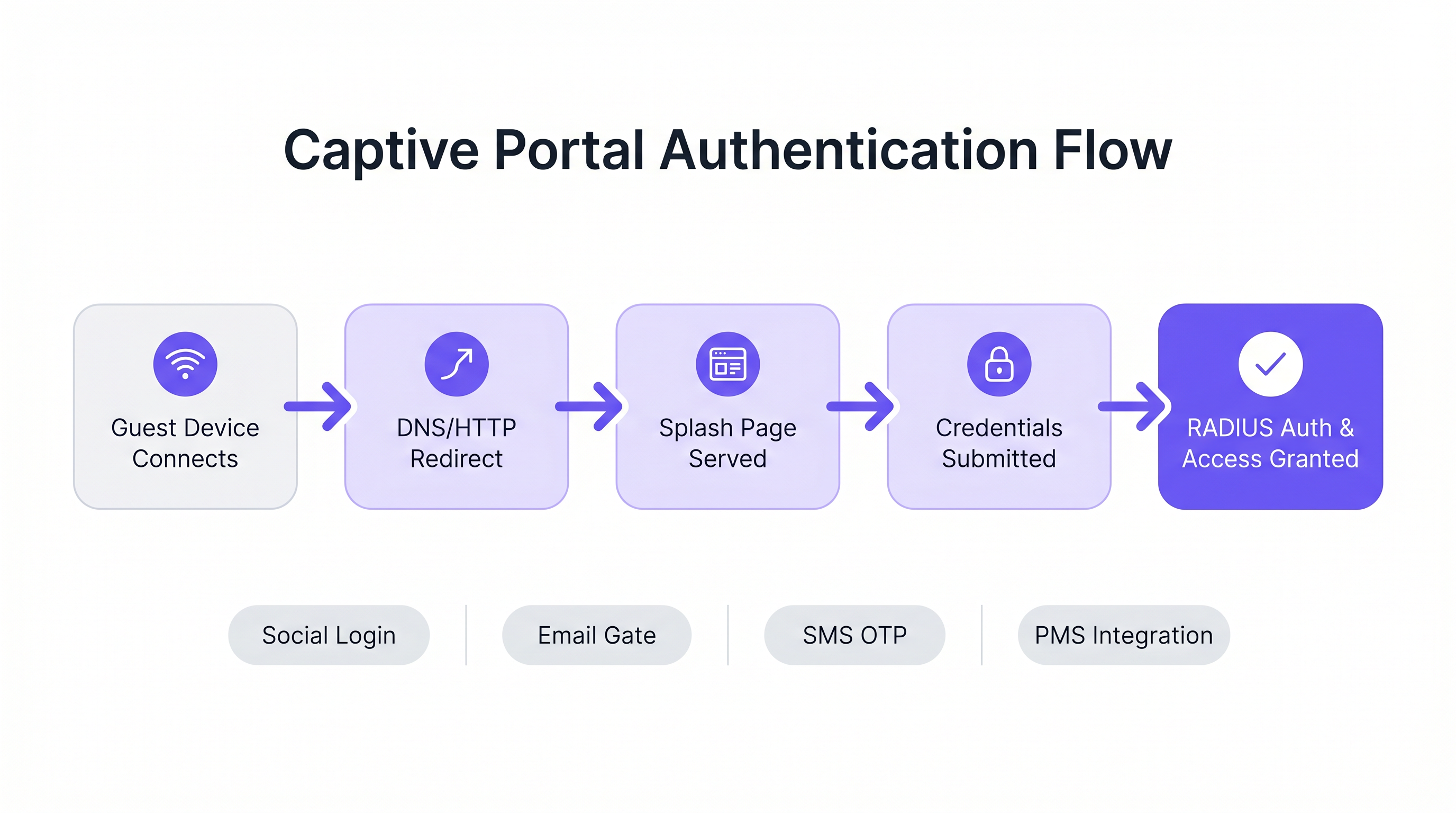
Once the splash page is served, the authentication flow dictates the user experience and the data collected.
- Click-Through (Terms of Service): The lowest friction approach. No credentials required, just a boolean acceptance of terms. Suitable for high-density environments where throughput is prioritized over data capture.
- Identity Capture (Email/Social): The user authenticates via OAuth (Google, Facebook) or an email form. This requires careful integration with identity providers and robust GDPR compliance mechanisms.
- 802.1X and RADIUS: For high-security environments (e.g., Healthcare or corporate guest networks), port-based network access control via IEEE 802.1X is required. The Access Point acts as a RADIUS client, forwarding credentials to a RADIUS server (like FreeRADIUS) for validation against a directory service.
Implementation Guide: Open-Source vs. Managed Platforms
For developers tasked with building a captive portal, the open-source ecosystem offers several robust foundations. However, these tools provide the network plumbing, not the business logic.
Leading Open-Source Options
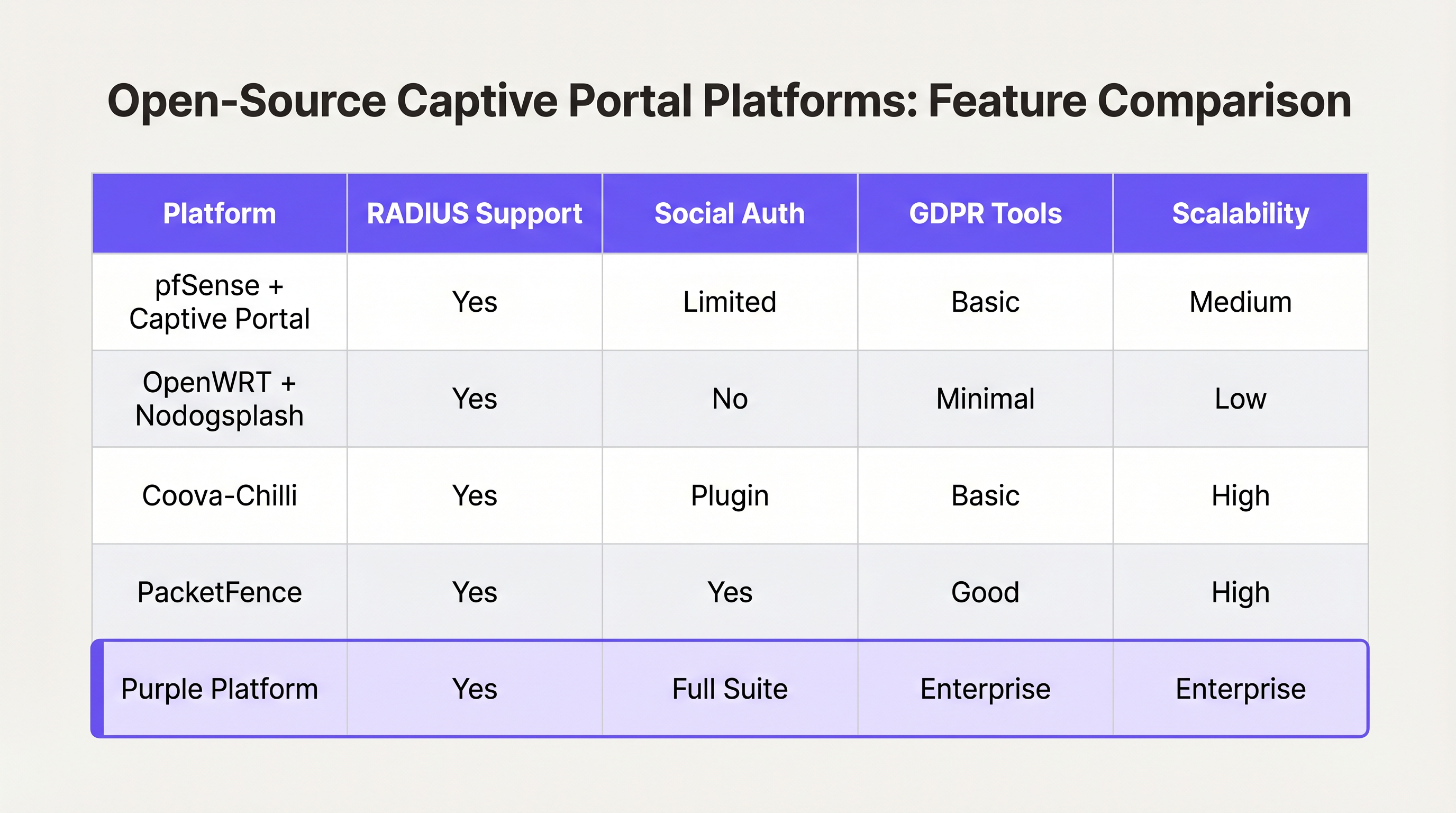
- pfSense + Captive Portal: A popular firewall distribution that includes a capable captive portal module. It handles RADIUS integration, MAC address filtering, and basic bandwidth shaping. Ideal for single-site deployments with experienced network engineers.
- Coova-Chilli: A mature, feature-rich access controller that implements the WISPr protocol. It excels in complex RADIUS environments and can be extended for social login, but requires significant Linux system administration expertise.
- PacketFence: A comprehensive open-source NAC solution. It supports 802.1X, BYOD onboarding, and integration with enterprise directories. Highly scalable, but carries a steep learning curve and significant operational overhead.
The "Build vs. Buy" Decision Framework
While open-source software is "free," the total cost of ownership for a self-built portal scales non-linearly with the number of venues and the complexity of business requirements.
When to Build:
- You operate a single venue or a small cluster of highly uniform sites.
- Your requirements are limited to basic Terms of Service acceptance or simple WPA2-PSK access.
- You have dedicated, in-house Linux and network engineering resources.
When to Buy (Enterprise Platform):
- Multi-Site Scale: You are deploying across dozens or hundreds of locations with varying underlying hardware (Cisco, Aruba, Meraki).
- Compliance: You require automated GDPR/CCPA consent management, data subject access request (DSAR) handling, and verifiable audit trails.
- Business Intelligence: You need to integrate network data with marketing systems. Platforms like Purple provide a unified WiFi Analytics layer, transforming raw MAC addresses into actionable footfall and dwell-time metrics.
- Advanced Integrations: You need seamless integration with Property Management Systems (PMS) or loyalty databases.
Similar to how enterprise WAN architectures are shifting toward managed SD-WAN solutions (see The Core SD WAN Benefits for Modern Businesses ), enterprise guest WiFi is shifting toward hardware-agnostic cloud platforms that abstract the complexity of the edge network.
Best Practices and Risk Mitigation
If you proceed with a custom build, or are evaluating a vendor, ensure these architectural best practices are met:
1. Network Segmentation and Security
Never deploy a captive portal on the same VLAN as your corporate or operational technology (OT) network. Guest traffic must be strictly segmented. If your venue processes payments (e.g., a Transport hub with retail concessions), failure to segment guest WiFi will bring the entire network into PCI DSS scope, vastly increasing compliance costs.
2. Walled Garden Configuration
Your walled garden must explicitly allow traffic to the domains required for authentication to succeed. For social login, this means allowing access to accounts.google.com, graph.facebook.com, and their associated CDNs. A misconfigured walled garden results in users being stuck on a blank splash page.
3. Bandwidth and Session Management
Implement strict per-user rate limiting and session timeouts. A single user downloading a large OS update can saturate the WAN uplink, degrading the experience for all guests. Use RADIUS attributes (e.g., WISPr-Bandwidth-Max-Down) to enforce these limits dynamically.
4. Mitigating MAC Spoofing
Relying solely on MAC addresses for session persistence is a security risk, as MAC addresses are easily spoofed, and modern OS features (like iOS Private Wi-Fi Address) randomize them by default. Ensure your portal architecture can handle MAC randomization gracefully, typically by requiring re-authentication when the MAC changes, or utilizing Passpoint/Hotspot 2.0 for seamless, secure roaming.
ROI & Business Impact
A captive portal should not be viewed merely as an IT cost center; it is a critical data acquisition channel.
When deployed correctly—often via a managed platform—the ROI is measured in three areas:
- Marketing Database Growth: A seamless onboarding flow with clear value exchange (e.g., "Free WiFi in exchange for email") rapidly builds a compliant, first-party marketing database.
- Operational Intelligence: Analytics derived from connection data provide venue operators with heatmaps, peak load analysis, and repeat visitor metrics, directly influencing staffing and layout decisions.
- Risk Reduction: Centralized compliance management significantly reduces the risk of regulatory fines associated with improper data handling or PCI DSS violations.
Ultimately, the goal of a developer or architect is to deliver a secure, frictionless network experience that serves the business's strategic objectives. Choose the architecture that allows your team to focus on those objectives, rather than managing the plumbing.
Key Terms & Definitions
Captive Portal
A web page that the user of a public-access network is obliged to view and interact with before access is granted.
The primary interface for guest network onboarding, used for terms acceptance, payment, or data capture.
RADIUS (Remote Authentication Dial-In User Service)
A networking protocol that provides centralized Authentication, Authorization, and Accounting (AAA) management for users who connect and use a network service.
The backend engine that validates credentials and tells the network equipment what permissions a guest should have.
Walled Garden
A limited environment that controls the user's access to external web content and services prior to full authentication.
Essential for allowing users to access identity providers (like Google or Facebook) to log in, before they have general internet access.
MAC Spoofing
The practice of altering a device's factory-assigned Media Access Control (MAC) address to masquerade as another device or bypass network restrictions.
A common method used to bypass captive portal time limits, requiring robust session management strategies to mitigate.
CAPPORT API (RFC 8908)
A modern IETF standard allowing devices to securely discover the captive portal URL and authentication status via DHCP or Router Advertisements, rather than relying on HTTP interception.
Critical for modern portal development to prevent HTTPS certificate errors and improve the user onboarding experience.
IEEE 802.1X
An IEEE Standard for port-based Network Access Control (PNAC), providing an authentication mechanism to devices wishing to attach to a LAN or WLAN.
Used in enterprise and high-security environments where simple web-based authentication is insufficient.
WISPr (Wireless Internet Service Provider roaming)
A draft protocol submitted to the Wi-Fi Alliance that allows users to roam between different wireless internet service providers.
Often implemented by access controllers to handle the XML-based authentication requests from the captive portal to the gateway.
VLAN Segmentation
The practice of partitioning a single layer-2 network to create multiple distinct broadcast domains.
A mandatory security practice to ensure guest WiFi traffic cannot access corporate or operational technology networks.
Case Studies
A 200-room hotel needs to deploy guest WiFi. They require guests to authenticate using their room number and last name to access a premium bandwidth tier, while non-guests receive a throttled 2Mbps connection. The underlying network uses Cisco Meraki access points.
- Configure the Meraki SSID to use an external captive portal (Splash page URL pointing to the custom portal). 2. Set up a RADIUS server (e.g., FreeRADIUS) and configure the Meraki APs as RADIUS clients. 3. Develop the captive portal web application to present a login form requesting Room Number and Last Name. 4. Integrate the portal backend with the hotel's Property Management System (PMS) via API. When credentials are submitted, the portal queries the PMS to validate the guest. 5. Upon successful validation, the portal backend sends a RADIUS Access-Accept message to the Meraki controller, including Vendor-Specific Attributes (VSAs) to apply the 'Premium' group policy (unthrottled bandwidth). 6. For non-guests, provide a 'Free Access' button that bypasses the PMS check and returns a RADIUS Access-Accept with VSAs applying the 'Throttled' group policy.
A national retail chain with 50 locations wants to implement a captive portal to collect customer emails for marketing. They are concerned about GDPR compliance and the operational overhead of managing 50 separate local portal instances.
Instead of deploying local captive portal software (like pfSense) at each site, deploy a centralized, cloud-hosted captive portal platform (like Purple). Configure the local branch routers/APs to redirect guest traffic to the centralized portal URL. Implement a standardized splash page with explicit opt-in checkboxes for marketing consent and a link to the privacy policy. The centralized platform handles the capture, timestamping, and secure storage of consent records, and integrates directly via API with the retailer's central CRM system.
Scenario Analysis
Q1. You are deploying a captive portal in an airport. The primary goal is maximum throughput and minimizing support tickets from users unable to connect. Which authentication method should you prioritize?
💡 Hint:Consider the friction involved in verifying identities versus simply gaining legal consent.
Show Recommended Approach
A Click-Through (Terms of Service) portal. In high-density transit environments, requiring email verification or SMS OTP introduces significant friction and relies on external dependencies (cellular reception for SMS, existing email access). A simple Terms of Service acceptance minimizes support overhead while meeting basic legal requirements.
Q2. Your security team reports that users are bypassing the 2-hour free WiFi limit by changing their device's MAC address. How should you architect the network to mitigate this?
💡 Hint:MAC addresses are layer-2 identifiers that can be easily spoofed. You need a layer-7 identity verification.
Show Recommended Approach
Shift from a purely MAC-based session tracking model to an identity-based model. Require users to authenticate via a unique identifier (e.g., SMS OTP or a verified email address) and tie the session limit to that identity in the RADIUS backend, rather than the device's MAC address.
Q3. A hospital requires a guest WiFi network for patients and visitors. They also need a separate network for medical IoT devices. What is the most critical architectural requirement?
💡 Hint:Consider the impact if a compromised guest device could reach a medical device.
Show Recommended Approach
Strict VLAN segmentation. The guest WiFi network must be placed on a completely isolated VLAN that has no routing path to the clinical or IoT networks. The captive portal and guest traffic must be firewalled and routed directly to the internet.




