

Comment construire un Captive Portal : Guide du développeur
Un guide technique définitif pour les architectes informatiques et les gestionnaires de réseau sur la construction et le déploiement de portails captifs. Ce guide couvre les protocoles sous-jacents, les flux d'authentification, les architectures open-source et un cadre pour décider quand construire ou acheter une plateforme d'entreprise gérée.
🎧 Écouter ce guide
Voir la transcription
Résumé Exécutif
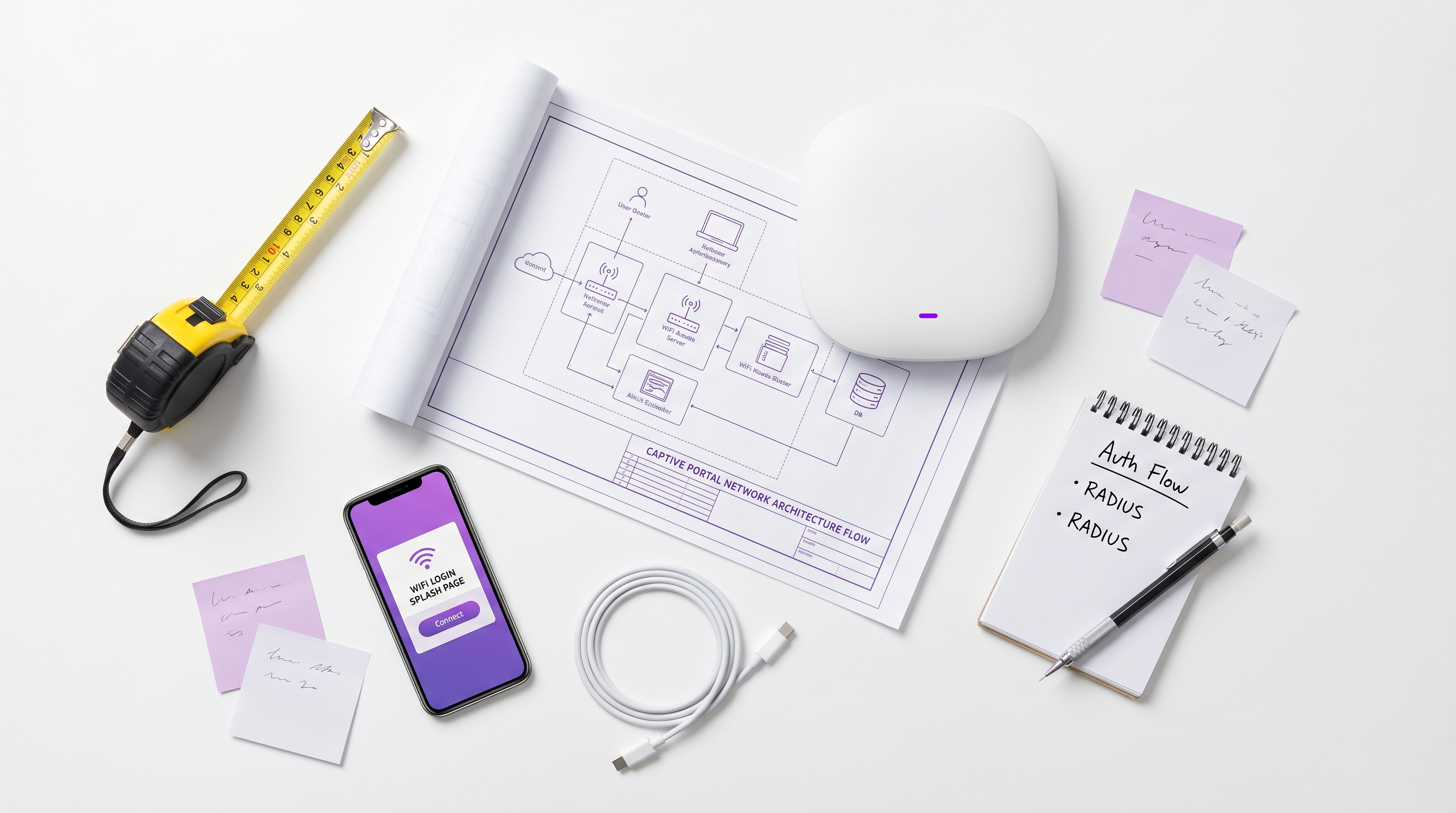
Pour les architectes réseau d'entreprise et les directeurs informatiques, le déploiement d'un Captive Portal est rarement un simple exercice de mise en réseau – c'est une intersection critique entre la sécurité réseau, la conformité réglementaire et l'intelligence économique. Que vous gériez un portefeuille de 200 propriétés Hospitality , un vaste domaine Retail ou un stade à haute densité, la décision de construire un Captive Portal personnalisé ou de déployer une plateforme gérée a des implications profondes sur le coût total de possession (TCO) et le risque opérationnel.
Ce guide propose une analyse technique approfondie et neutre de l'architecture des portails captifs. Nous explorerons les mécanismes sous-jacents de redirection HTTP, la moderne Captive Portal API (RFC 8908), les flux d'authentification 802.1X RADIUS et les principales options open-source. De manière cruciale, nous fournissons un cadre pour évaluer quand une pile open-source auto-construite est pertinente, et quand la surcharge de conformité et d'intégration nécessite une plateforme d'entreprise comme la solution Guest WiFi de Purple.
Écoutez notre briefing audio complémentaire pour un aperçu stratégique :
Analyse Technique Approfondie : Comment fonctionnent les Captive Portals
Avant d'évaluer les options logicielles, il est essentiel de comprendre les mécanismes réseau fondamentaux. Un Captive Portal est essentiellement un mécanisme de contrôle d'accès réseau (NAC) qui intercepte le trafic HTTP/HTTPS non authentifié et force une redirection vers une interface d'authentification basée sur le web.
Le Modèle d'Interception Hérité
Historiquement, les portails captifs s'appuyaient sur une combinaison de détournement DNS et de redirections HTTP 302. Lorsqu'un appareil invité se connecte à un SSID, le Captive Network Assistant (CNA) du système d'exploitation envoie une requête de sonde à un point de terminaison connu (par exemple, captive.apple.com pour iOS).
- Interception DNS : La passerelle locale intercepte la requête DNS pour l'URL de la sonde et la résout vers l'adresse IP du portail captif.
- Redirection HTTP : Si l'interception DNS n'est pas utilisée, la passerelle intercepte la requête HTTP GET sortante et renvoie un HTTP 302 Found, redirigeant le client vers la splash page.
- Firewall Walled Garden : Tout autre trafic sortant est bloqué par le firewall de la passerelle jusqu'à ce que l'authentification soit terminée. Seul le trafic vers le portail et les ressources externes approuvées (le "walled garden") est autorisé.
Pour une explication plus détaillée de ces mécanismes, consultez notre guide : Comment fonctionne un Captive Portal ? Analyse technique approfondie .
The Modern Standard: RFC 8908 (CAPPORT API)
Le modèle d'interception hérité rencontre des difficultés avec les architectures modernes "HTTPS-everywhere". Les navigateurs signalent à juste titre le trafic HTTPS intercepté comme une attaque de type Man-in-the-Middle (MitM), ce qui entraîne des avertissements de certificat plutôt qu'une splash page propre.
Pour résoudre ce problème, le groupe de travail IETF CAPPORT a développé les RFC 8908 et RFC 8910. Au lieu d'intercepter le trafic, le réseau annonce explicitement la présence d'un portail captif via DHCP (Option 114) ou les annonces de routeur IPv6. L'appareil client interroge une JSON API pour découvrir l'URL du portail et son état d'authentification actuel. Si vous construisez un portail moderne, l'implémentation de la CAPPORT API est essentielle pour une expérience utilisateur fluide sur les appareils iOS et Android modernes.
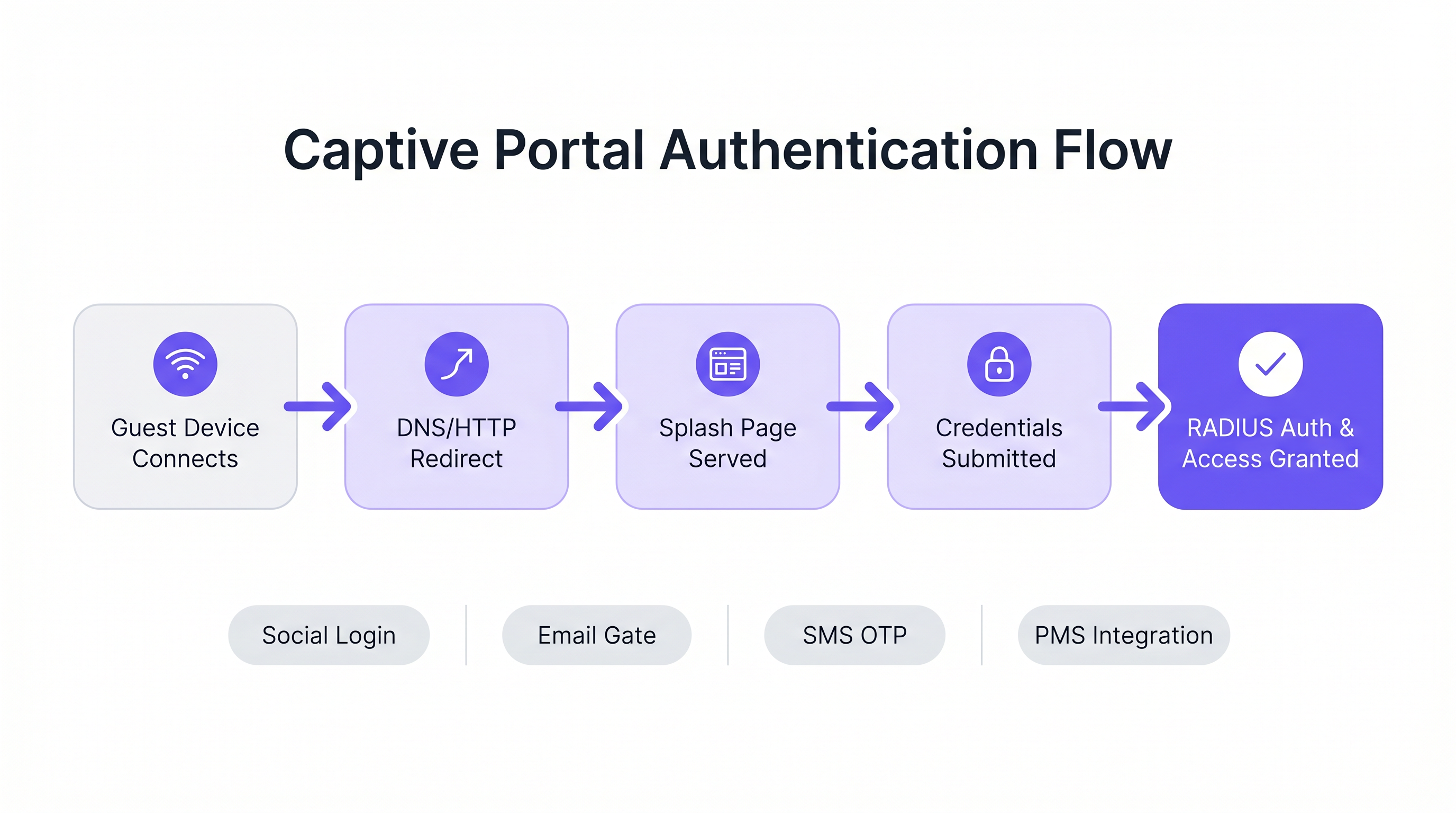
Flux d'Authentification et d'Autorisation
Une fois la splash page affichée, le flux d'authentification dicte l'expérience utilisateur et les données collectées.
- Click-Through (Terms of Service) : L'approche la moins contraignante. Aucune information d'identification requise, juste une acceptation booléenne des conditions. Convient aux environnements à haute densité où le débit est prioritaire sur la capture de données.
- Capture d'Identité (Email/Social) : L'utilisateur s'authentifie via OAuth (Google, Facebook) ou un formulaire d'e-mail. Cela nécessite une intégration minutieuse avec les fournisseurs d'identité et des mécanismes robustes de conformité GDPR.
- 802.1X et RADIUS : Pour les environnements à haute sécurité (par exemple, Healthcare ou les réseaux invités d'entreprise), un contrôle d'accès réseau basé sur les ports via IEEE 802.1X est requis. L'Access Point agit comme un client RADIUS, transmettant les informations d'identification à un serveur RADIUS (comme FreeRADIUS) pour validation par rapport à un service d'annuaire.
Guide d'Implémentation : Open-Source vs. Plateformes Gérées
Pour les développeurs chargés de construire un portail captif, l'écosystème open-source offre plusieurs bases robustes. Cependant, ces outils fournissent la plomberie réseau, pas la logique métier.
Principales Options Open-Source
- pfSense + Captive Portal : Une distribution de firewall populaire qui inclut un module de portail captif performant. Il gère l'intégration RADIUS, le filtrage des adresses MAC et la mise en forme de bande passante de base. Idéal pour les déploiements sur un seul site avec des ingénieurs réseau expérimentés.
- Coova-Chilli : Un contrôleur d'accès mature et riche en fonctionnalités qui implémente le protocole WISPr. Il excelle dans les environnements RADIUS complexes et peut être étendu pour la connexion sociale, mais nécessite une expertise significative en administration système Linux.
- PacketFence : Une solution NAC open-source complète. Elle prend en charge 802.1X, l'intégration BYOD et l'intégration avec les annuaires d'entreprise. Hautement évolutive, mais implique une courbe d'apprentissage abrupte et une surcharge opérationnelle significative.
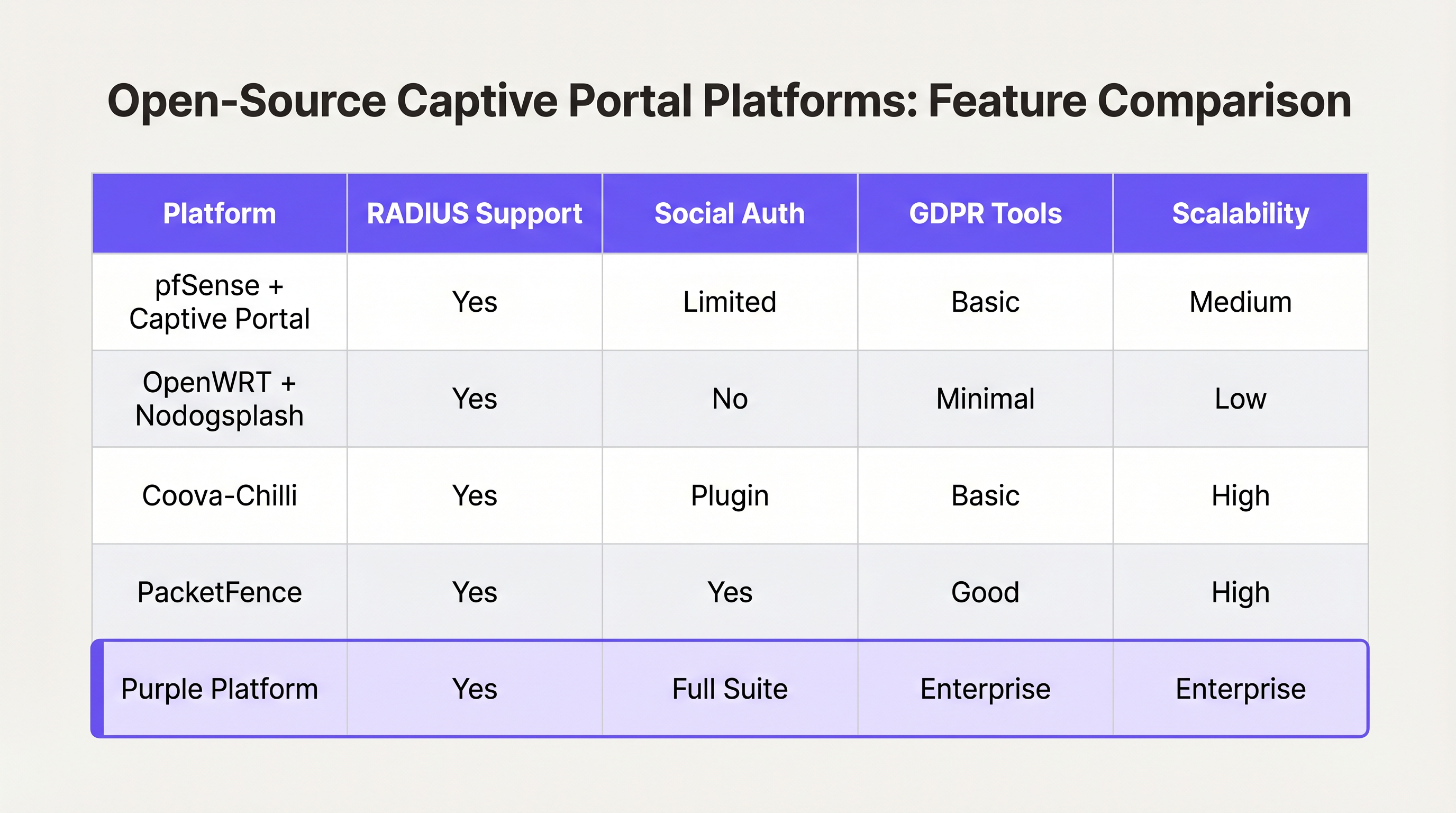
Le "Construire vs. "Cadre de décision « Acheter »
Bien que les logiciels open source soient « gratuits », le coût total de possession d'un portail auto-construit augmente de manière non linéaire avec le nombre de sites et la complexité des exigences commerciales.
Quand construire :
- Vous exploitez un seul site ou un petit groupe de sites très uniformes.
- Vos exigences se limitent à l'acceptation des conditions d'utilisation de base ou à un simple accès WPA2-PSK.
- Vous disposez de ressources internes dédiées en ingénierie Linux et réseau.
Quand acheter (plateforme d'entreprise) :
- Échelle multi-sites : Vous déployez sur des dizaines ou des centaines de sites avec du matériel sous-jacent varié (Cisco, Aruba, Meraki).
- Conformité : Vous avez besoin d'une gestion automatisée du consentement GDPR/CCPA, du traitement des demandes d'accès des personnes concernées (DSAR) et de pistes d'audit vérifiables.
- Business Intelligence : Vous devez intégrer les données réseau aux systèmes marketing. Des plateformes comme Purple fournissent une couche unifiée de WiFi Analytics , transformant les adresses MAC brutes en métriques exploitables de fréquentation et de temps de présence.
- Intégrations avancées : Vous avez besoin d'une intégration transparente avec les systèmes de gestion immobilière (PMS) ou les bases de données de fidélité.
De même que les architectures WAN d'entreprise évoluent vers des solutions SD-WAN gérées (voir Les avantages clés du SD-WAN pour les entreprises modernes ), le WiFi invité d'entreprise se tourne vers des plateformes cloud indépendantes du matériel qui abstraient la complexité du réseau périphérique.
Bonnes pratiques et atténuation des risques
Si vous optez pour une construction personnalisée ou si vous évaluez un fournisseur, assurez-vous que ces bonnes pratiques architecturales sont respectées :
1. Segmentation et sécurité du réseau
Ne déployez jamais un Captive Portal sur le même VLAN que votre réseau d'entreprise ou de technologie opérationnelle (OT). Le trafic invité doit être strictement segmenté. Si votre site traite des paiements (par exemple, un pôle de Transport avec des concessions de vente au détail), le fait de ne pas segmenter le WiFi invité entraînera l'inclusion de l'ensemble du réseau dans le périmètre PCI DSS, augmentant considérablement les coûts de conformité.
2. Configuration du Walled Garden
Votre walled garden doit explicitement autoriser le trafic vers les domaines requis pour que l'authentification réussisse. Pour la connexion sociale, cela signifie autoriser l'accès à accounts.google.com, graph.facebook.com et leurs CDN associés. Un walled garden mal configuré a pour conséquence que les utilisateurs restent bloqués sur une page d'accueil vierge.
3. Gestion de la bande passante et des sessions
Mettez en œuvre une limitation stricte du débit par utilisateur et des délais d'expiration de session. Un seul utilisateur téléchargeant une mise à jour importante du système d'exploitation peut saturer la liaison montante WAN, dégradant l'expérience pour tous les invités. Utilisez les attributs RADIUS (par exemple, WISPr-Bandwidth-Max-Down) pour appliquer ces limites dynamiquement.
4. Atténuation de l'usurpation d'adresse MAC
Se fier uniquement aux adresses MAC pour la persistance de session est un risque de sécurité, car les adresses MAC sont facilement usurpées, et les fonctionnalités modernes des systèmes d'exploitation (comme iOS Private Wi-Fi Address) les randomisent par défaut. Assurez-vous que l'architecture de votre portail peut gérer la randomisation MAC avec élégance, généralement en exigeant une réauthentification lorsque l'adresse MAC change, ou en utilisant Passpoint/Hotspot 2.0 pour un roaming fluide et sécurisé.
ROI et impact commercial
Un Captive Portal ne doit pas être considéré uniquement comme un centre de coûts informatiques ; c'est un canal d'acquisition de données essentiel.
Lorsqu'il est déployé correctement — souvent via une plateforme gérée — le ROI est mesuré dans trois domaines :
- Croissance de la base de données marketing : Un flux d'intégration fluide avec un échange de valeur clair (par exemple, « WiFi gratuit en échange d'un e-mail ») construit rapidement une base de données marketing conforme et de première partie.
- Intelligence opérationnelle : Les analyses dérivées des données de connexion fournissent aux opérateurs de sites des cartes thermiques, des analyses de charge maximale et des métriques de visiteurs récurrents, influençant directement les décisions de personnel et d'aménagement.
- Réduction des risques : La gestion centralisée de la conformité réduit considérablement le risque d'amendes réglementaires associées à une mauvaise gestion des données ou à des violations PCI DSS.
En fin de compte, l'objectif d'un développeur ou d'un architecte est de fournir une expérience réseau sécurisée et fluide qui sert les objectifs stratégiques de l'entreprise. Choisissez l'architecture qui permet à votre équipe de se concentrer sur ces objectifs, plutôt que de gérer la plomberie.
Termes clés et définitions
Captive Portal
A web page that the user of a public-access network is obliged to view and interact with before access is granted.
The primary interface for guest network onboarding, used for terms acceptance, payment, or data capture.
RADIUS (Remote Authentication Dial-In User Service)
A networking protocol that provides centralized Authentication, Authorization, and Accounting (AAA) management for users who connect and use a network service.
The backend engine that validates credentials and tells the network equipment what permissions a guest should have.
Walled Garden
A limited environment that controls the user's access to external web content and services prior to full authentication.
Essential for allowing users to access identity providers (like Google or Facebook) to log in, before they have general internet access.
MAC Spoofing
The practice of altering a device's factory-assigned Media Access Control (MAC) address to masquerade as another device or bypass network restrictions.
A common method used to bypass captive portal time limits, requiring robust session management strategies to mitigate.
CAPPORT API (RFC 8908)
A modern IETF standard allowing devices to securely discover the captive portal URL and authentication status via DHCP or Router Advertisements, rather than relying on HTTP interception.
Critical for modern portal development to prevent HTTPS certificate errors and improve the user onboarding experience.
IEEE 802.1X
An IEEE Standard for port-based Network Access Control (PNAC), providing an authentication mechanism to devices wishing to attach to a LAN or WLAN.
Used in enterprise and high-security environments where simple web-based authentication is insufficient.
WISPr (Wireless Internet Service Provider roaming)
A draft protocol submitted to the Wi-Fi Alliance that allows users to roam between different wireless internet service providers.
Often implemented by access controllers to handle the XML-based authentication requests from the captive portal to the gateway.
VLAN Segmentation
The practice of partitioning a single layer-2 network to create multiple distinct broadcast domains.
A mandatory security practice to ensure guest WiFi traffic cannot access corporate or operational technology networks.
Études de cas
A 200-room hotel needs to deploy guest WiFi. They require guests to authenticate using their room number and last name to access a premium bandwidth tier, while non-guests receive a throttled 2Mbps connection. The underlying network uses Cisco Meraki access points.
- Configure the Meraki SSID to use an external captive portal (Splash page URL pointing to the custom portal). 2. Set up a RADIUS server (e.g., FreeRADIUS) and configure the Meraki APs as RADIUS clients. 3. Develop the captive portal web application to present a login form requesting Room Number and Last Name. 4. Integrate the portal backend with the hotel's Property Management System (PMS) via API. When credentials are submitted, the portal queries the PMS to validate the guest. 5. Upon successful validation, the portal backend sends a RADIUS Access-Accept message to the Meraki controller, including Vendor-Specific Attributes (VSAs) to apply the 'Premium' group policy (unthrottled bandwidth). 6. For non-guests, provide a 'Free Access' button that bypasses the PMS check and returns a RADIUS Access-Accept with VSAs applying the 'Throttled' group policy.
A national retail chain with 50 locations wants to implement a captive portal to collect customer emails for marketing. They are concerned about GDPR compliance and the operational overhead of managing 50 separate local portal instances.
Instead of deploying local captive portal software (like pfSense) at each site, deploy a centralized, cloud-hosted captive portal platform (like Purple). Configure the local branch routers/APs to redirect guest traffic to the centralized portal URL. Implement a standardized splash page with explicit opt-in checkboxes for marketing consent and a link to the privacy policy. The centralized platform handles the capture, timestamping, and secure storage of consent records, and integrates directly via API with the retailer's central CRM system.
Analyse de scénario
Q1. You are deploying a captive portal in an airport. The primary goal is maximum throughput and minimizing support tickets from users unable to connect. Which authentication method should you prioritize?
💡 Astuce :Consider the friction involved in verifying identities versus simply gaining legal consent.
Afficher l'approche recommandée
A Click-Through (Terms of Service) portal. In high-density transit environments, requiring email verification or SMS OTP introduces significant friction and relies on external dependencies (cellular reception for SMS, existing email access). A simple Terms of Service acceptance minimizes support overhead while meeting basic legal requirements.
Q2. Your security team reports that users are bypassing the 2-hour free WiFi limit by changing their device's MAC address. How should you architect the network to mitigate this?
💡 Astuce :MAC addresses are layer-2 identifiers that can be easily spoofed. You need a layer-7 identity verification.
Afficher l'approche recommandée
Shift from a purely MAC-based session tracking model to an identity-based model. Require users to authenticate via a unique identifier (e.g., SMS OTP or a verified email address) and tie the session limit to that identity in the RADIUS backend, rather than the device's MAC address.
Q3. A hospital requires a guest WiFi network for patients and visitors. They also need a separate network for medical IoT devices. What is the most critical architectural requirement?
💡 Astuce :Consider the impact if a compromised guest device could reach a medical device.
Afficher l'approche recommandée
Strict VLAN segmentation. The guest WiFi network must be placed on a completely isolated VLAN that has no routing path to the clinical or IoT networks. The captive portal and guest traffic must be firewalled and routed directly to the internet.




