

Como Construir um Captive Portal: Um Guia para Desenvolvedores
Um guia técnico definitivo para arquitetos de TI e gestores de rede sobre como construir e implementar captive portals. Este guia abrange protocolos subjacentes, fluxos de autenticação, arquiteturas de código aberto e uma estrutura para decidir quando construir versus quando comprar uma plataforma gerida empresarial.
🎧 Ouça este Guia
Ver Transcrição
Resumo Executivo
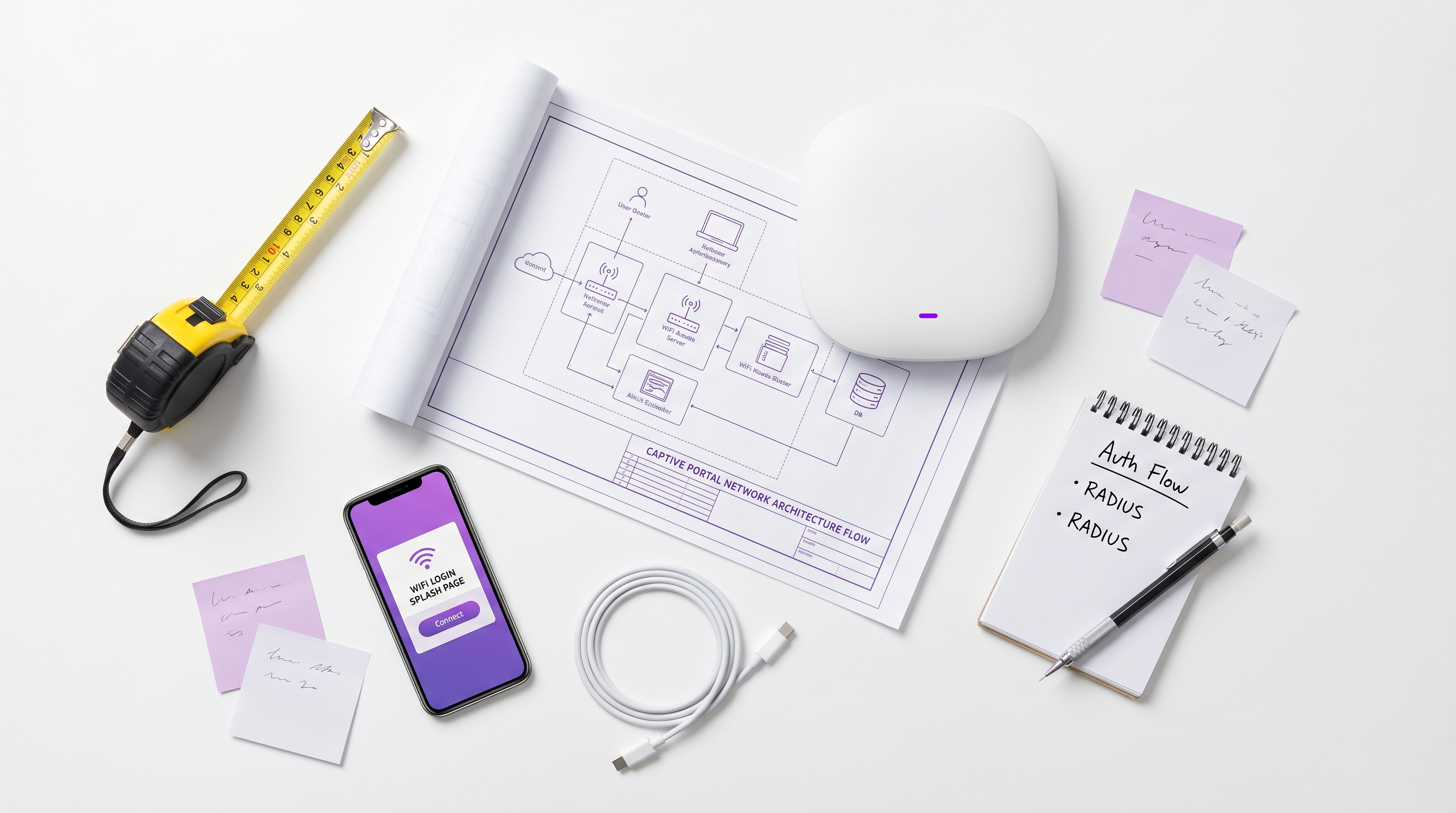
Para arquitetos de rede empresariais e diretores de TI, a implementação de um Captive Portal raramente é apenas um exercício de rede — é uma intersecção crítica de segurança de rede, conformidade regulamentar e inteligência de negócios. Quer esteja a gerir um portefólio de 200 propriedades de Hospitality , uma vasta propriedade Retail , ou um estádio de alta densidade, a decisão de construir um Captive Portal personalizado ou implementar uma plataforma gerida tem profundas implicações para o custo total de propriedade (TCO) e o risco operacional.
Este guia fornece uma análise técnica aprofundada e neutra em relação a fornecedores sobre a arquitetura de captive portals. Exploraremos a mecânica subjacente de redirecionamento HTTP, a moderna Captive Portal API (RFC 8908), os fluxos de autenticação 802.1X RADIUS e as principais opções de código aberto. Crucialmente, fornecemos uma estrutura para avaliar quando uma pilha de código aberto auto-construída faz sentido e quando a sobrecarga de conformidade e integração exige uma plataforma empresarial como a solução Guest WiFi da Purple.
Ouça o nosso briefing de áudio complementar para uma visão estratégica:
Análise Técnica Aprofundada: Como Funcionam os Captive Portals
Antes de avaliar as opções de software, é essencial compreender a mecânica fundamental da rede. Um Captive Portal é essencialmente um mecanismo de controlo de acesso à rede (NAC) que interceta o tráfego HTTP/HTTPS não autenticado e força um redirecionamento para uma interface de autenticação baseada na web.
O Modelo de Interceção Legado
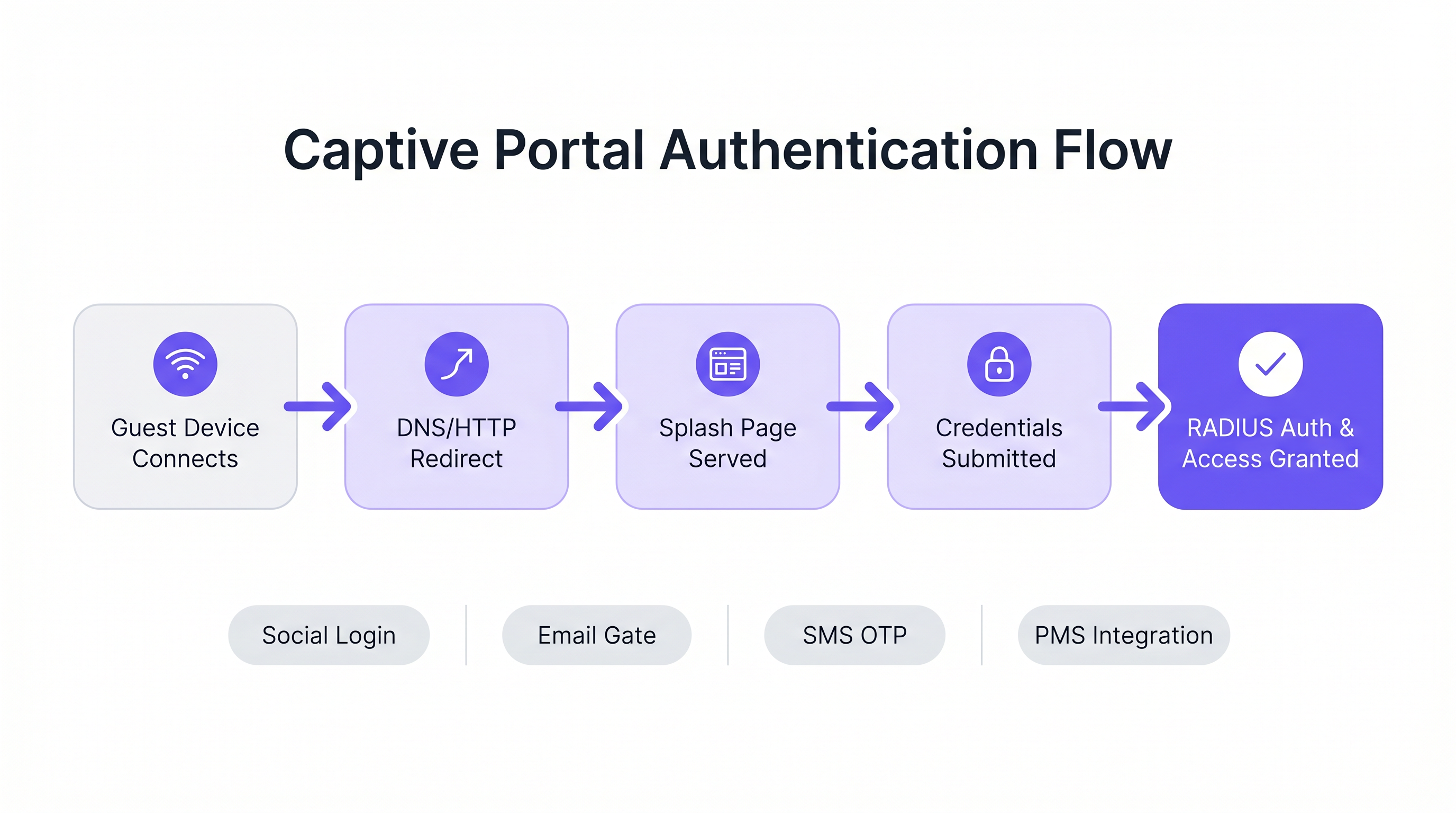
Historicamente, os captive portals dependiam de uma combinação de sequestro de DNS e redirecionamentos HTTP 302. Quando um dispositivo convidado se conecta a um SSID, o Captive Network Assistant (CNA) do sistema operativo envia um pedido de sonda para um endpoint conhecido (por exemplo, captive.apple.com para iOS).
- Interceção de DNS: O gateway local interceta o pedido de DNS para o URL da sonda e resolve-o para o endereço IP do Captive Portal.
- Redirecionamento HTTP: Se a interceção de DNS não for utilizada, o gateway interceta o pedido HTTP GET de saída e retorna um HTTP 302 Found, redirecionando o cliente para a página inicial.
- Firewall Walled Garden: Todo o outro tráfego de saída é bloqueado pela firewall do gateway até que a autenticação seja concluída. Apenas o tráfego para o portal e recursos externos aprovados (o "walled garden") é permitido.
Para uma análise mais detalhada desta mecânica, consulte o nosso guia: Como Funciona um Captive Portal? Análise Técnica Aprofundada .
O Padrão Moderno: RFC 8908 (CAPPORT API)
O modelo de interceção legado tem dificuldades com as arquiteturas modernas de HTTPS-everywhere. Os navegadores sinalizam corretamente o tráfego HTTPS intercetado como um ataque Man-in-the-Middle (MitM), resultando em avisos de certificado em vez de uma página inicial limpa.
Para resolver isso, o grupo de trabalho IETF CAPPORT desenvolveu a RFC 8908 e a RFC 8910. Em vez de intercetar o tráfego, a rede anuncia explicitamente a presença de um Captive Portal via DHCP (Opção 114) ou IPv6 Router Advertisements. O dispositivo cliente consulta uma JSON API para descobrir o URL do portal e o seu estado de autenticação atual. Se estiver a construir um portal moderno, implementar a CAPPORT API é crítico para uma experiência de utilizador perfeita em dispositivos iOS e Android modernos.
Fluxos de Autenticação e Autorização
Uma vez que a página inicial é servida, o fluxo de autenticação dita a experiência do utilizador e os dados recolhidos.
- Click-Through (Termos de Serviço): A abordagem de menor atrito. Não são necessárias credenciais, apenas uma aceitação booleana dos termos. Adequado para ambientes de alta densidade onde a taxa de transferência é priorizada sobre a captura de dados.
- Captura de Identidade (Email/Social): O utilizador autentica-se via OAuth (Google, Facebook) ou um formulário de email. Isso requer uma integração cuidadosa com provedores de identidade e mecanismos robustos de conformidade com o GDPR.
- 802.1X e RADIUS: Para ambientes de alta segurança (por exemplo, Healthcare ou redes de convidados corporativas), é necessário o controlo de acesso à rede baseado em porta via IEEE 802.1X. O Access Point atua como um cliente RADIUS, encaminhando credenciais para um servidor RADIUS (como o FreeRADIUS) para validação contra um serviço de diretório.
Guia de Implementação: Código Aberto vs. Plataformas Geridas
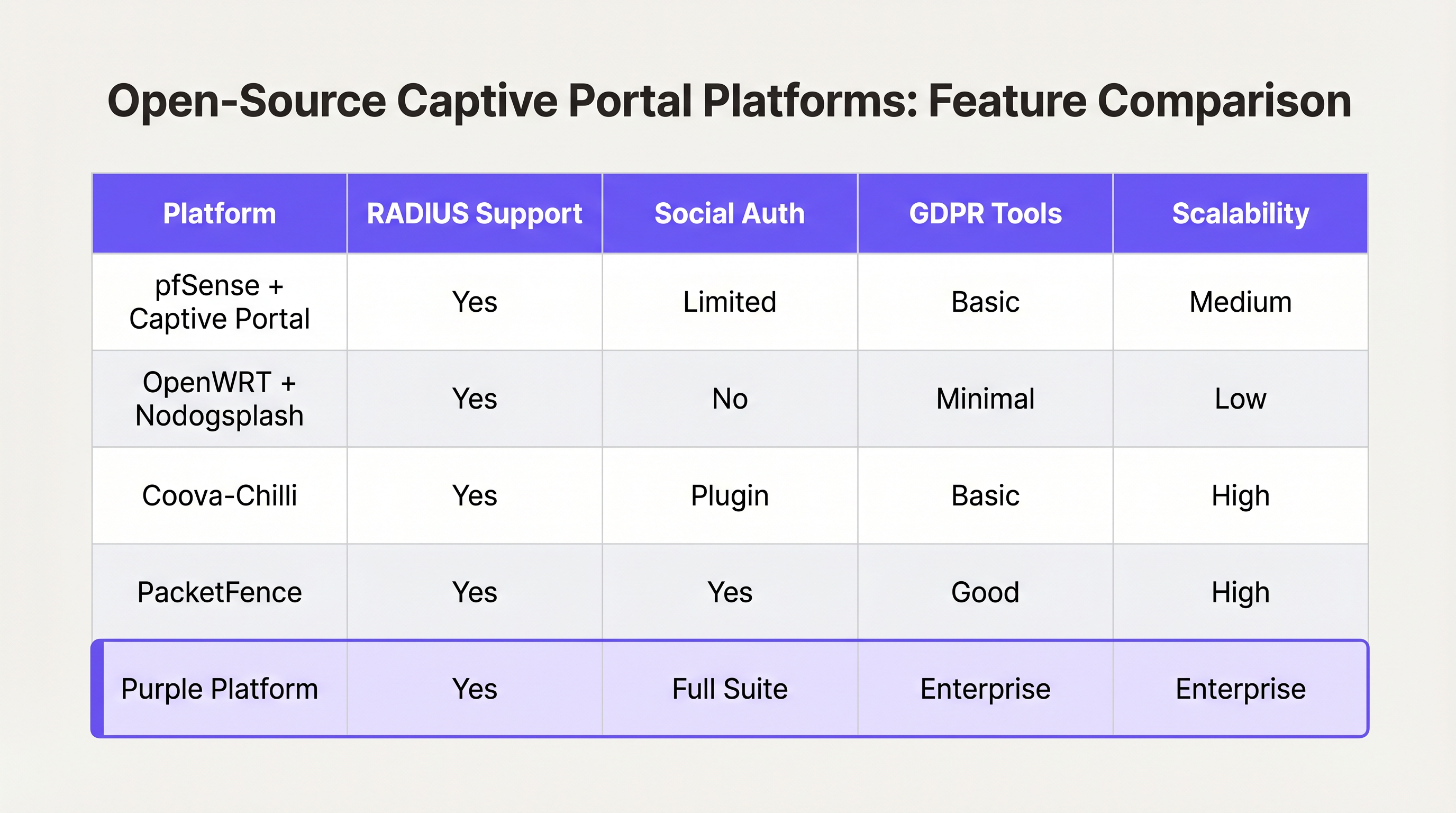
Para desenvolvedores encarregados de construir um Captive Portal, o ecossistema de código aberto oferece várias bases robustas. No entanto, estas ferramentas fornecem a infraestrutura de rede, não a lógica de negócios.
Principais Opções de Código Aberto
- pfSense + Captive Portal: Uma distribuição popular de firewall que inclui um módulo Captive Portal capaz. Lida com a integração RADIUS, filtragem de endereços MAC e modelagem básica de largura de banda. Ideal para implementações de um único local com engenheiros de rede experientes.
- Coova-Chilli: Um controlador de acesso maduro e rico em recursos que implementa o protocolo WISPr. Destaca-se em ambientes RADIUS complexos e pode ser estendido para login social, mas requer significativa experiência em administração de sistemas Linux.
- PacketFence: Uma solução NAC abrangente de código aberto. Suporta 802.1X, integração de BYOD e integração com diretórios empresariais. Altamente escalável, mas apresenta uma curva de aprendizagem acentuada e uma sobrecarga operacional significativa.
A "Construir vs. Estrutura de Decisão "Comprar"
Embora o software de código aberto seja "gratuito", o custo total de propriedade de um portal construído internamente aumenta de forma não linear com o número de locais e a complexidade dos requisitos de negócio.
Quando Construir:
- Opera um único local ou um pequeno conjunto de sites altamente uniformes.
- Os seus requisitos limitam-se à aceitação básica dos Termos de Serviço ou a um acesso WPA2-PSK simples.
- Dispõe de recursos dedicados de engenharia de Linux e de redes internos.
Quando Comprar (Plataforma Empresarial):
- Escala Multi-Local: Está a implementar em dezenas ou centenas de locais com hardware subjacente variado (Cisco, Aruba, Meraki).
- Conformidade: Requer gestão automatizada de consentimento GDPR/CCPA, tratamento de pedidos de acesso de titulares de dados (DSAR) e trilhos de auditoria verificáveis.
- Business Intelligence: Precisa de integrar dados de rede com sistemas de marketing. Plataformas como a Purple fornecem uma camada unificada de WiFi Analytics , transformando endereços MAC brutos em métricas acionáveis de fluxo de visitantes e tempo de permanência.
- Integrações Avançadas: Precisa de integração perfeita com Sistemas de Gestão de Propriedades (PMS) ou bases de dados de fidelidade.
À semelhança de como as arquiteturas WAN empresariais estão a evoluir para soluções SD-WAN geridas (ver Os Principais Benefícios do SD-WAN para Empresas Modernas ), o WiFi de convidados empresarial está a mudar para plataformas cloud agnósticas de hardware que abstraem a complexidade da rede de ponta.
Melhores Práticas e Mitigação de Riscos
Se avançar com uma construção personalizada, ou estiver a avaliar um fornecedor, certifique-se de que estas melhores práticas arquitetónicas são cumpridas:
1. Segmentação e Segurança da Rede
Nunca implemente um captive portal na mesma VLAN que a sua rede corporativa ou de tecnologia operacional (OT). O tráfego de convidados deve ser estritamente segmentado. Se o seu local processa pagamentos (por exemplo, um centro de Transporte com concessões de retalho), a falha na segmentação do WiFi de convidados colocará toda a rede no âmbito do PCI DSS, aumentando vastamente os custos de conformidade.
2. Configuração de Walled Garden
O seu walled garden deve permitir explicitamente o tráfego para os domínios necessários para que a autenticação seja bem-sucedida. Para o login social, isto significa permitir o acesso a accounts.google.com, graph.facebook.com e aos seus CDNs associados. Um walled garden mal configurado resulta em utilizadores presos numa página de splash em branco.
3. Gestão de Largura de Banda e Sessões
Implemente limites rigorosos de taxa por utilizador e tempos limite de sessão. Um único utilizador a descarregar uma grande atualização de SO pode saturar o uplink WAN, degradando a experiência para todos os convidados. Utilize atributos RADIUS (por exemplo, WISPr-Bandwidth-Max-Down) para impor estes limites dinamicamente.
4. Mitigação de Spoofing de MAC
Confiar apenas em endereços MAC para a persistência da sessão é um risco de segurança, uma vez que os endereços MAC são facilmente falsificados, e as funcionalidades modernas do OS (como o iOS Private Wi-Fi Address) os aleatorizam por predefinição. Certifique-se de que a sua arquitetura de portal consegue lidar com a aleatorização de MAC de forma elegante, tipicamente exigindo reautenticação quando o MAC muda, ou utilizando Passpoint/Hotspot 2.0 para roaming contínuo e seguro.
ROI e Impacto no Negócio
Um captive portal não deve ser visto apenas como um centro de custos de TI; é um canal crítico de aquisição de dados.
Quando implementado corretamente — frequentemente através de uma plataforma gerida — o ROI é medido em três áreas:
- Crescimento da Base de Dados de Marketing: Um fluxo de integração contínuo com uma troca de valor clara (por exemplo, "WiFi Gratuito em troca de e-mail") constrói rapidamente uma base de dados de marketing de primeira parte, em conformidade.
- Inteligência Operacional: A análise derivada dos dados de conexão fornece aos operadores de locais mapas de calor, análise de carga de pico e métricas de visitantes repetidos, influenciando diretamente as decisões de pessoal e layout.
- Redução de Risco: A gestão centralizada da conformidade reduz significativamente o risco de multas regulatórias associadas ao manuseamento inadequado de dados ou violações do PCI DSS.
Em última análise, o objetivo de um programador ou arquiteto é fornecer uma experiência de rede segura e sem atritos que sirva os objetivos estratégicos do negócio. Escolha a arquitetura que permite à sua equipa focar-se nesses objetivos, em vez de gerir a infraestrutura.
Termos-Chave e Definições
Captive Portal
A web page that the user of a public-access network is obliged to view and interact with before access is granted.
The primary interface for guest network onboarding, used for terms acceptance, payment, or data capture.
RADIUS (Remote Authentication Dial-In User Service)
A networking protocol that provides centralized Authentication, Authorization, and Accounting (AAA) management for users who connect and use a network service.
The backend engine that validates credentials and tells the network equipment what permissions a guest should have.
Walled Garden
A limited environment that controls the user's access to external web content and services prior to full authentication.
Essential for allowing users to access identity providers (like Google or Facebook) to log in, before they have general internet access.
MAC Spoofing
The practice of altering a device's factory-assigned Media Access Control (MAC) address to masquerade as another device or bypass network restrictions.
A common method used to bypass captive portal time limits, requiring robust session management strategies to mitigate.
CAPPORT API (RFC 8908)
A modern IETF standard allowing devices to securely discover the captive portal URL and authentication status via DHCP or Router Advertisements, rather than relying on HTTP interception.
Critical for modern portal development to prevent HTTPS certificate errors and improve the user onboarding experience.
IEEE 802.1X
An IEEE Standard for port-based Network Access Control (PNAC), providing an authentication mechanism to devices wishing to attach to a LAN or WLAN.
Used in enterprise and high-security environments where simple web-based authentication is insufficient.
WISPr (Wireless Internet Service Provider roaming)
A draft protocol submitted to the Wi-Fi Alliance that allows users to roam between different wireless internet service providers.
Often implemented by access controllers to handle the XML-based authentication requests from the captive portal to the gateway.
VLAN Segmentation
The practice of partitioning a single layer-2 network to create multiple distinct broadcast domains.
A mandatory security practice to ensure guest WiFi traffic cannot access corporate or operational technology networks.
Estudos de Caso
A 200-room hotel needs to deploy guest WiFi. They require guests to authenticate using their room number and last name to access a premium bandwidth tier, while non-guests receive a throttled 2Mbps connection. The underlying network uses Cisco Meraki access points.
- Configure the Meraki SSID to use an external captive portal (Splash page URL pointing to the custom portal). 2. Set up a RADIUS server (e.g., FreeRADIUS) and configure the Meraki APs as RADIUS clients. 3. Develop the captive portal web application to present a login form requesting Room Number and Last Name. 4. Integrate the portal backend with the hotel's Property Management System (PMS) via API. When credentials are submitted, the portal queries the PMS to validate the guest. 5. Upon successful validation, the portal backend sends a RADIUS Access-Accept message to the Meraki controller, including Vendor-Specific Attributes (VSAs) to apply the 'Premium' group policy (unthrottled bandwidth). 6. For non-guests, provide a 'Free Access' button that bypasses the PMS check and returns a RADIUS Access-Accept with VSAs applying the 'Throttled' group policy.
A national retail chain with 50 locations wants to implement a captive portal to collect customer emails for marketing. They are concerned about GDPR compliance and the operational overhead of managing 50 separate local portal instances.
Instead of deploying local captive portal software (like pfSense) at each site, deploy a centralized, cloud-hosted captive portal platform (like Purple). Configure the local branch routers/APs to redirect guest traffic to the centralized portal URL. Implement a standardized splash page with explicit opt-in checkboxes for marketing consent and a link to the privacy policy. The centralized platform handles the capture, timestamping, and secure storage of consent records, and integrates directly via API with the retailer's central CRM system.
Análise de Cenários
Q1. You are deploying a captive portal in an airport. The primary goal is maximum throughput and minimizing support tickets from users unable to connect. Which authentication method should you prioritize?
💡 Dica:Consider the friction involved in verifying identities versus simply gaining legal consent.
Mostrar Abordagem Recomendada
A Click-Through (Terms of Service) portal. In high-density transit environments, requiring email verification or SMS OTP introduces significant friction and relies on external dependencies (cellular reception for SMS, existing email access). A simple Terms of Service acceptance minimizes support overhead while meeting basic legal requirements.
Q2. Your security team reports that users are bypassing the 2-hour free WiFi limit by changing their device's MAC address. How should you architect the network to mitigate this?
💡 Dica:MAC addresses are layer-2 identifiers that can be easily spoofed. You need a layer-7 identity verification.
Mostrar Abordagem Recomendada
Shift from a purely MAC-based session tracking model to an identity-based model. Require users to authenticate via a unique identifier (e.g., SMS OTP or a verified email address) and tie the session limit to that identity in the RADIUS backend, rather than the device's MAC address.
Q3. A hospital requires a guest WiFi network for patients and visitors. They also need a separate network for medical IoT devices. What is the most critical architectural requirement?
💡 Dica:Consider the impact if a compromised guest device could reach a medical device.
Mostrar Abordagem Recomendada
Strict VLAN segmentation. The guest WiFi network must be placed on a completely isolated VLAN that has no routing path to the clinical or IoT networks. The captive portal and guest traffic must be firewalled and routed directly to the internet.




