

Come Costruire un Captive Portal: Una Guida per Sviluppatori
Una guida tecnica definitiva per architetti IT e gestori di rete sulla costruzione e l'implementazione di captive portal. Questa guida copre i protocolli sottostanti, i flussi di autenticazione, le architetture open-source e un framework per decidere quando costruire rispetto a quando acquistare una piattaforma gestita di livello enterprise.
🎧 Ascolta questa guida
Visualizza trascrizione
Riepilogo Esecutivo
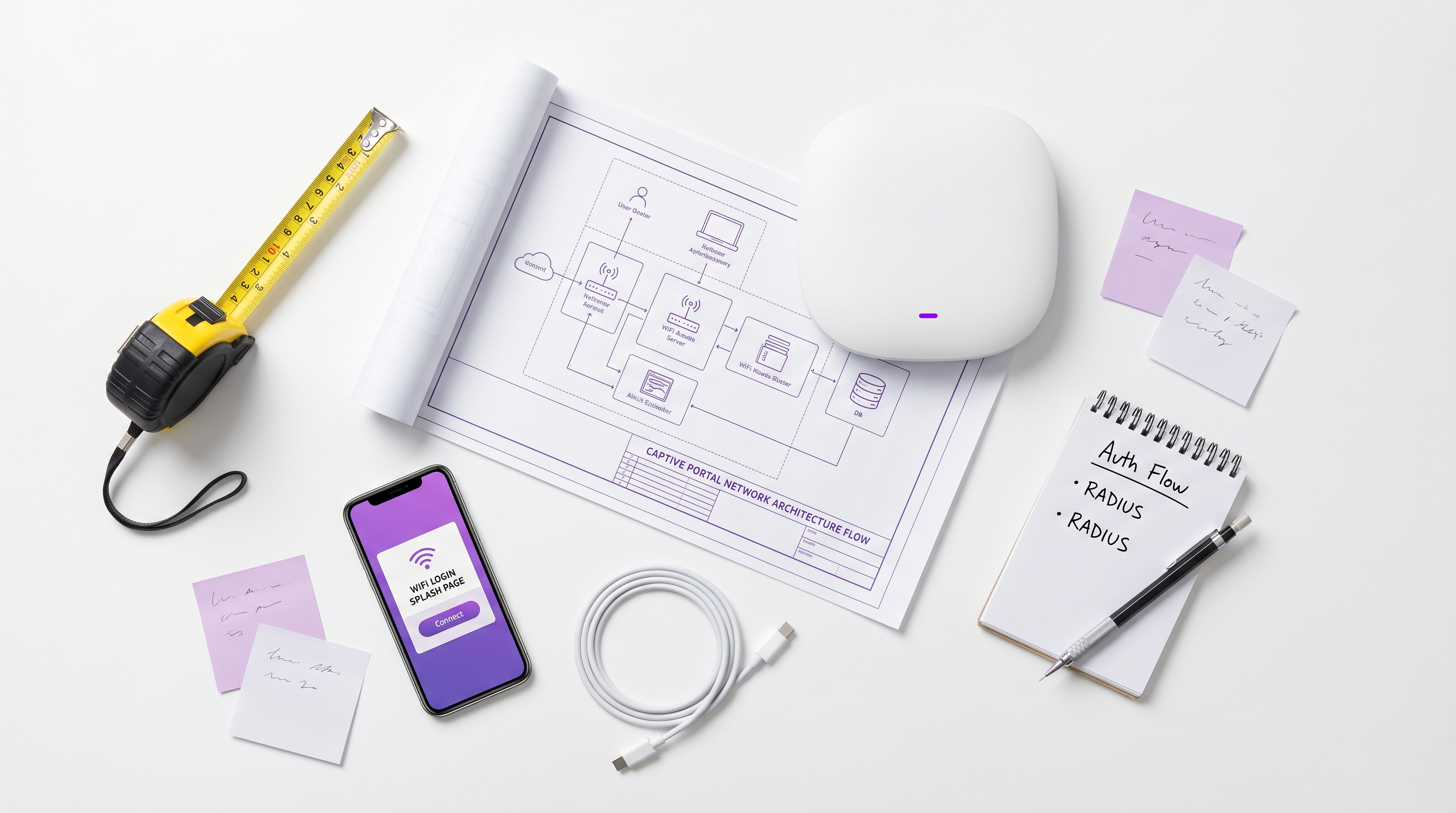
Per gli architetti di rete aziendali e i direttori IT, l'implementazione di un captive portal è raramente solo un esercizio di networking: è un'intersezione critica tra sicurezza di rete, conformità normativa e business intelligence. Che tu stia gestendo un portfolio Hospitality di 200 proprietà, una vasta proprietà Retail o uno stadio ad alta densità, la decisione di costruire un captive portal personalizzato o di implementare una piattaforma gestita ha profonde implicazioni per il costo totale di proprietà (TCO) e il rischio operativo.
Questa guida fornisce un'analisi tecnica approfondita e neutrale rispetto ai fornitori sull'architettura dei captive portal. Esploreremo i meccanismi sottostanti di reindirizzamento HTTP, la moderna Captive Portal API (RFC 8908), i flussi di autenticazione 802.1X RADIUS e le principali opzioni open-source. Fondamentalmente, forniamo un framework per valutare quando uno stack open-source auto-costruito ha senso e quando il sovraccarico di conformità e integrazione rende necessaria una piattaforma enterprise come la soluzione Guest WiFi di Purple.
Ascolta il nostro briefing audio di accompagnamento per una panoramica strategica:
Approfondimento Tecnico: Come Funzionano i Captive Portal
Prima di valutare le opzioni software, è essenziale comprendere i meccanismi di rete fondamentali. Un captive portal è essenzialmente un meccanismo di controllo dell'accesso alla rete (NAC) che intercetta il traffico HTTP/HTTPS non autenticato e forza un reindirizzamento a un'interfaccia di autenticazione basata sul web.
Il Modello di Intercettazione Legacy
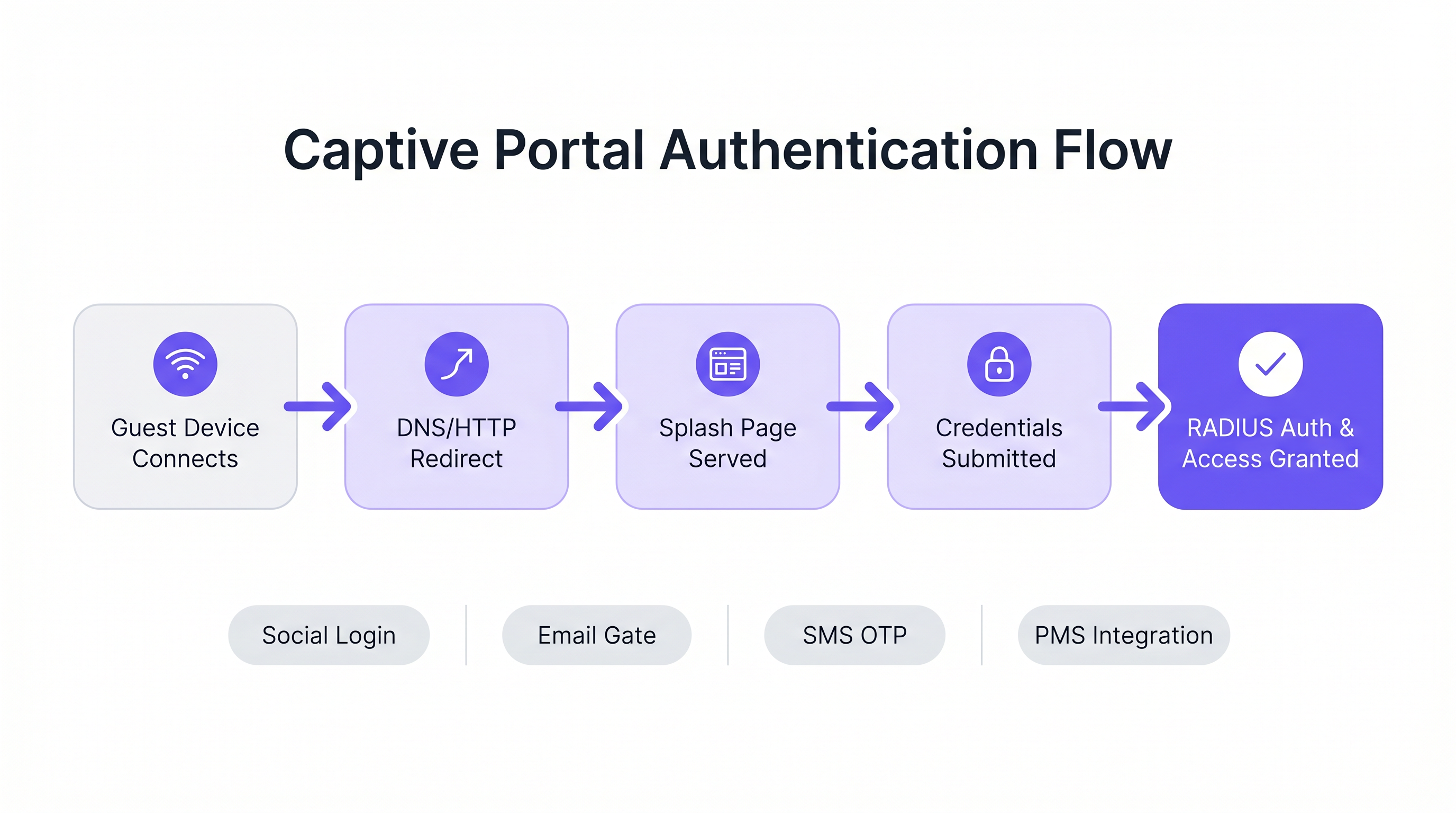
Storicamente, i captive portal si basavano su una combinazione di dirottamento DNS e reindirizzamenti HTTP 302. Quando un dispositivo ospite si connette a un SSID, il Captive Network Assistant (CNA) del sistema operativo invia una richiesta di sonda a un endpoint noto (ad esempio, captive.apple.com per iOS).
- Intercettazione DNS: Il gateway locale intercetta la richiesta DNS per l'URL della sonda e la risolve all'indirizzo IP del captive portal.
- Reindirizzamento HTTP: Se l'intercettazione DNS non viene utilizzata, il gateway intercetta la richiesta HTTP GET in uscita e restituisce un HTTP 302 Found, reindirizzando il client alla splash page.
- Firewall Walled Garden: Tutto il resto del traffico in uscita viene bloccato dal firewall del gateway fino al completamento dell'autenticazione. È consentito solo il traffico verso il portal e le risorse esterne approvate (il "walled garden").
Per una ripartizione più dettagliata di questi meccanismi, consulta la nostra guida: Come Funziona un Captive Portal? Approfondimento Tecnico .
Lo Standard Moderno: RFC 8908 (CAPPORT API)
Il modello di intercettazione legacy ha difficoltà con le moderne architetture HTTPS-everywhere. I browser segnalano giustamente il traffico HTTPS intercettato come un attacco Man-in-the-Middle (MitM), risultando in avvisi di certificato anziché una splash page pulita.
Per risolvere questo problema, il gruppo di lavoro IETF CAPPORT ha sviluppato RFC 8908 e RFC 8910. Invece di intercettare il traffico, la rete pubblicizza esplicitamente la presenza di un captive portal tramite DHCP (Opzione 114) o IPv6 Router Advertisements. Il dispositivo client interroga una JSON API per scoprire l'URL del portal e il suo stato di autenticazione attuale. Se stai costruendo un portal moderno, l'implementazione della CAPPORT API è fondamentale per un'esperienza utente senza interruzioni sui moderni dispositivi iOS e Android.
Flussi di Autenticazione e Autorizzazione
Una volta servita la splash page, il flusso di autenticazione detta l'esperienza utente e i dati raccolti.
- Click-Through (Terms of Service): L'approccio a minor attrito. Nessuna credenziale richiesta, solo un'accettazione booleana dei termini. Adatto per ambienti ad alta densità dove la velocità di trasmissione è prioritaria rispetto all'acquisizione dei dati.
- Acquisizione dell'Identità (Email/Social): L'utente si autentica tramite OAuth (Google, Facebook) o un modulo email. Ciò richiede un'attenta integrazione con i provider di identità e robusti meccanismi di conformità GDPR.
- 802.1X e RADIUS: Per ambienti ad alta sicurezza (ad esempio, Healthcare o reti ospiti aziendali), è richiesto il controllo dell'accesso alla rete basato su porta tramite IEEE 802.1X. L'Access Point agisce come client RADIUS, inoltrando le credenziali a un server RADIUS (come FreeRADIUS) per la convalida rispetto a un servizio di directory.
Guida all'Implementazione: Piattaforme Open-Source vs. Gestite
Per gli sviluppatori incaricati di costruire un captive portal, l'ecosistema open-source offre diverse solide basi. Tuttavia, questi strumenti forniscono l'infrastruttura di rete, non la logica di business.
Principali Opzioni Open-Source
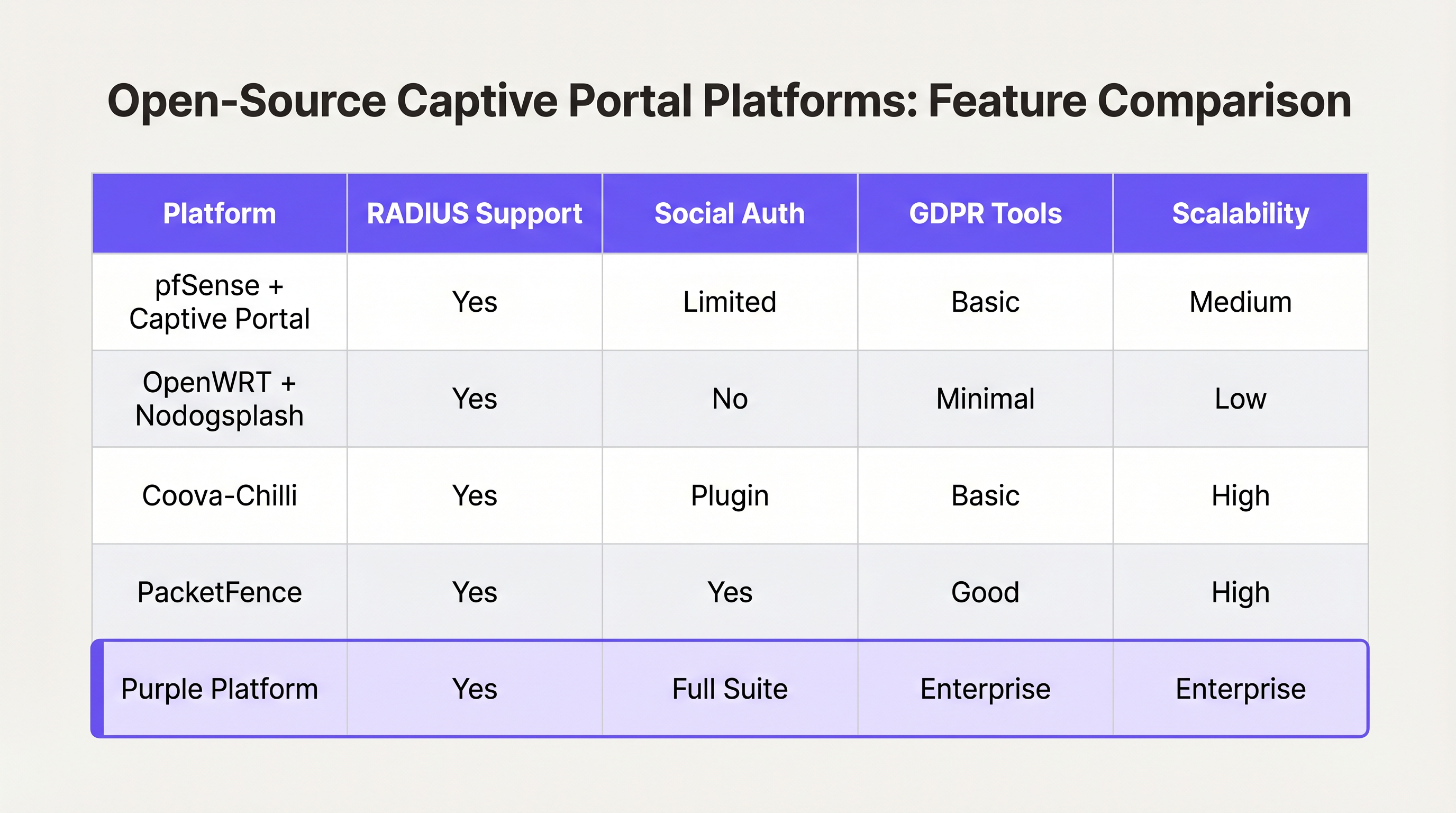
- pfSense + Captive Portal: Una popolare distribuzione firewall che include un modulo captive portal capace. Gestisce l'integrazione RADIUS, il filtraggio degli indirizzi MAC e la modellazione di base della larghezza di banda. Ideale per implementazioni a sito singolo con ingegneri di rete esperti.
- Coova-Chilli: Un controller di accesso maturo e ricco di funzionalità che implementa il protocollo WISPr. Eccelle in ambienti RADIUS complessi e può essere esteso per il social login, ma richiede una significativa esperienza nell'amministrazione di sistemi Linux.
- PacketFence: Una soluzione NAC open-source completa. Supporta 802.1X, l'onboarding BYOD e l'integrazione con le directory aziendali. Altamente scalabile, ma comporta una curva di apprendimento ripida e un significativo sovraccarico operativo.
Il "Costruire vs. "Quadro decisionale "Acquista"
Mentre il software open-source è "gratuito", il costo totale di proprietà per un Captive Portal autoprodotto scala in modo non lineare con il numero di sedi e la complessità dei requisiti aziendali.
Quando costruire:
- Gestisci una singola sede o un piccolo gruppo di siti altamente uniformi.
- I tuoi requisiti sono limitati all'accettazione di base dei Termini di Servizio o a un semplice accesso WPA2-PSK.
- Disponi di risorse interne dedicate all'ingegneria Linux e di rete.
Quando acquistare (Piattaforma Enterprise):
- Scala Multi-Sito: Stai implementando su decine o centinaia di sedi con hardware sottostante variabile (Cisco, Aruba, Meraki).
- Conformità: Richiedi la gestione automatizzata del consenso GDPR/CCPA, la gestione delle richieste di accesso dei soggetti interessati (DSAR) e percorsi di audit verificabili.
- Business Intelligence: Devi integrare i dati di rete con i sistemi di marketing. Piattaforme come Purple forniscono un livello unificato di WiFi Analytics , trasformando gli indirizzi MAC in metriche azionabili di affluenza e tempo di permanenza.
- Integrazioni Avanzate: Hai bisogno di un'integrazione senza soluzione di continuità con i sistemi di gestione della proprietà (PMS) o i database di fidelizzazione.
Similmente a come le architetture WAN aziendali si stanno spostando verso soluzioni SD-WAN gestite (vedi I principali vantaggi dell'SD-WAN per le aziende moderne ), il guest WiFi aziendale si sta spostando verso piattaforme cloud hardware-agnostic che astraggono la complessità della rete edge.
Migliori Pratiche e Mitigazione del Rischio
Se procedi con una costruzione personalizzata o stai valutando un fornitore, assicurati che queste migliori pratiche architetturali siano rispettate:
1. Segmentazione della Rete e Sicurezza
Non implementare mai un Captive Portal sulla stessa VLAN della tua rete aziendale o di tecnologia operativa (OT). Il traffico degli ospiti deve essere rigorosamente segmentato. Se la tua sede elabora pagamenti (ad esempio, un hub di Trasporto con concessioni commerciali), la mancata segmentazione del guest WiFi porterà l'intera rete nell'ambito PCI DSS, aumentando notevolmente i costi di conformità.
2. Configurazione del Walled Garden
Il tuo walled garden deve consentire esplicitamente il traffico verso i domini necessari per il successo dell'autenticazione. Per il social login, questo significa consentire l'accesso a accounts.google.com, graph.facebook.com e ai loro CDNs associati. Un walled garden mal configurato fa sì che gli utenti rimangano bloccati su una splash page vuota.
3. Gestione della Larghezza di Banda e delle Sessioni
Implementa rigorosi limiti di velocità per utente e timeout di sessione. Un singolo utente che scarica un aggiornamento di grandi dimensioni del sistema operativo può saturare l'uplink WAN, degradando l'esperienza per tutti gli ospiti. Utilizza gli attributi RADIUS (ad esempio, WISPr-Bandwidth-Max-Down) per applicare questi limiti dinamicamente.
4. Mitigazione dello Spoofing MAC
Affidarsi esclusivamente agli indirizzi MAC per la persistenza della sessione è un rischio per la sicurezza, poiché gli indirizzi MAC sono facilmente spoofabili e le moderne funzionalità del sistema operativo (come iOS Private Wi-Fi Address) li randomizzano per impostazione predefinita. Assicurati che l'architettura del tuo Captive Portal possa gestire la randomizzazione MAC in modo elegante, tipicamente richiedendo una nuova autenticazione quando il MAC cambia, o utilizzando Passpoint/Hotspot 2.0 per un roaming sicuro e senza interruzioni.
ROI e Impatto sul Business
Un Captive Portal non dovrebbe essere visto solo come un centro di costo IT; è un canale critico per l'acquisizione di dati.
Quando implementato correttamente—spesso tramite una piattaforma gestita—il ROI viene misurato in tre aree:
- Crescita del Database di Marketing: Un flusso di onboarding senza interruzioni con un chiaro scambio di valore (ad esempio, "WiFi gratuito in cambio dell'email") costruisce rapidamente un database di marketing conforme e di prima parte.
- Operational Intelligence: Gli analytics derivati dai dati di connessione forniscono agli operatori delle sedi mappe di calore, analisi del carico di punta e metriche sui visitatori ricorrenti, influenzando direttamente le decisioni relative al personale e al layout.
- Riduzione del Rischio: La gestione centralizzata della conformità riduce significativamente il rischio di multe normative associate a una gestione impropria dei dati o a violazioni PCI DSS.
In definitiva, l'obiettivo di uno sviluppatore o di un architetto è fornire un'esperienza di rete sicura e senza attriti che serva gli obiettivi strategici dell'azienda. Scegli l'architettura che consente al tuo team di concentrarsi su tali obiettivi, piuttosto che gestire l'infrastruttura.
Termini chiave e definizioni
Captive Portal
A web page that the user of a public-access network is obliged to view and interact with before access is granted.
The primary interface for guest network onboarding, used for terms acceptance, payment, or data capture.
RADIUS (Remote Authentication Dial-In User Service)
A networking protocol that provides centralized Authentication, Authorization, and Accounting (AAA) management for users who connect and use a network service.
The backend engine that validates credentials and tells the network equipment what permissions a guest should have.
Walled Garden
A limited environment that controls the user's access to external web content and services prior to full authentication.
Essential for allowing users to access identity providers (like Google or Facebook) to log in, before they have general internet access.
MAC Spoofing
The practice of altering a device's factory-assigned Media Access Control (MAC) address to masquerade as another device or bypass network restrictions.
A common method used to bypass captive portal time limits, requiring robust session management strategies to mitigate.
CAPPORT API (RFC 8908)
A modern IETF standard allowing devices to securely discover the captive portal URL and authentication status via DHCP or Router Advertisements, rather than relying on HTTP interception.
Critical for modern portal development to prevent HTTPS certificate errors and improve the user onboarding experience.
IEEE 802.1X
An IEEE Standard for port-based Network Access Control (PNAC), providing an authentication mechanism to devices wishing to attach to a LAN or WLAN.
Used in enterprise and high-security environments where simple web-based authentication is insufficient.
WISPr (Wireless Internet Service Provider roaming)
A draft protocol submitted to the Wi-Fi Alliance that allows users to roam between different wireless internet service providers.
Often implemented by access controllers to handle the XML-based authentication requests from the captive portal to the gateway.
VLAN Segmentation
The practice of partitioning a single layer-2 network to create multiple distinct broadcast domains.
A mandatory security practice to ensure guest WiFi traffic cannot access corporate or operational technology networks.
Casi di studio
A 200-room hotel needs to deploy guest WiFi. They require guests to authenticate using their room number and last name to access a premium bandwidth tier, while non-guests receive a throttled 2Mbps connection. The underlying network uses Cisco Meraki access points.
- Configure the Meraki SSID to use an external captive portal (Splash page URL pointing to the custom portal). 2. Set up a RADIUS server (e.g., FreeRADIUS) and configure the Meraki APs as RADIUS clients. 3. Develop the captive portal web application to present a login form requesting Room Number and Last Name. 4. Integrate the portal backend with the hotel's Property Management System (PMS) via API. When credentials are submitted, the portal queries the PMS to validate the guest. 5. Upon successful validation, the portal backend sends a RADIUS Access-Accept message to the Meraki controller, including Vendor-Specific Attributes (VSAs) to apply the 'Premium' group policy (unthrottled bandwidth). 6. For non-guests, provide a 'Free Access' button that bypasses the PMS check and returns a RADIUS Access-Accept with VSAs applying the 'Throttled' group policy.
A national retail chain with 50 locations wants to implement a captive portal to collect customer emails for marketing. They are concerned about GDPR compliance and the operational overhead of managing 50 separate local portal instances.
Instead of deploying local captive portal software (like pfSense) at each site, deploy a centralized, cloud-hosted captive portal platform (like Purple). Configure the local branch routers/APs to redirect guest traffic to the centralized portal URL. Implement a standardized splash page with explicit opt-in checkboxes for marketing consent and a link to the privacy policy. The centralized platform handles the capture, timestamping, and secure storage of consent records, and integrates directly via API with the retailer's central CRM system.
Analisi degli scenari
Q1. You are deploying a captive portal in an airport. The primary goal is maximum throughput and minimizing support tickets from users unable to connect. Which authentication method should you prioritize?
💡 Suggerimento:Consider the friction involved in verifying identities versus simply gaining legal consent.
Mostra l'approccio consigliato
A Click-Through (Terms of Service) portal. In high-density transit environments, requiring email verification or SMS OTP introduces significant friction and relies on external dependencies (cellular reception for SMS, existing email access). A simple Terms of Service acceptance minimizes support overhead while meeting basic legal requirements.
Q2. Your security team reports that users are bypassing the 2-hour free WiFi limit by changing their device's MAC address. How should you architect the network to mitigate this?
💡 Suggerimento:MAC addresses are layer-2 identifiers that can be easily spoofed. You need a layer-7 identity verification.
Mostra l'approccio consigliato
Shift from a purely MAC-based session tracking model to an identity-based model. Require users to authenticate via a unique identifier (e.g., SMS OTP or a verified email address) and tie the session limit to that identity in the RADIUS backend, rather than the device's MAC address.
Q3. A hospital requires a guest WiFi network for patients and visitors. They also need a separate network for medical IoT devices. What is the most critical architectural requirement?
💡 Suggerimento:Consider the impact if a compromised guest device could reach a medical device.
Mostra l'approccio consigliato
Strict VLAN segmentation. The guest WiFi network must be placed on a completely isolated VLAN that has no routing path to the clinical or IoT networks. The captive portal and guest traffic must be firewalled and routed directly to the internet.




