

Cómo construir un Captive Portal: Una guía para desarrolladores
Una guía técnica definitiva para arquitectos de TI y gerentes de red sobre la construcción y despliegue de captive portals. Esta guía cubre protocolos subyacentes, flujos de autenticación, arquitecturas de código abierto y un marco para decidir cuándo construir versus cuándo adquirir una plataforma empresarial gestionada.
🎧 Escucha esta guía
Ver transcripción
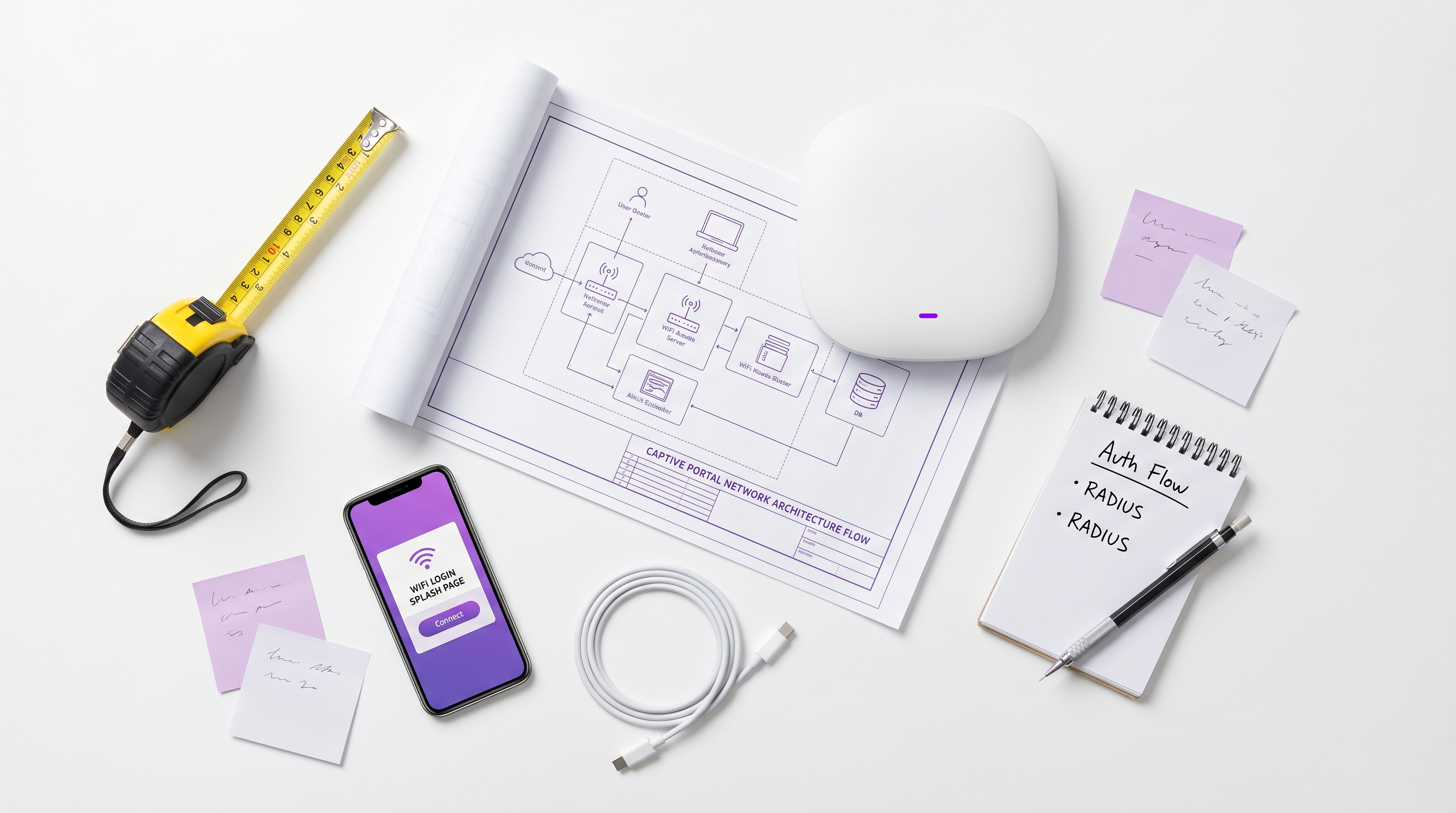
Resumen Ejecutivo
Para arquitectos de redes empresariales y directores de TI, desplegar un Captive Portal rara vez es solo un ejercicio de red; es una intersección crítica de seguridad de red, cumplimiento normativo e inteligencia de negocios. Ya sea que gestione una cartera de Hospitalidad de 200 propiedades, una extensa propiedad Minorista , o un estadio de alta densidad, la decisión de construir un Captive Portal personalizado o desplegar una plataforma gestionada tiene profundas implicaciones para el costo total de propiedad (TCO) y el riesgo operativo.
Esta guía proporciona una inmersión técnica profunda y neutral en la arquitectura de los captive portals. Exploraremos la mecánica subyacente de redirección HTTP, la moderna Captive Portal API (RFC 8908), los flujos de autenticación RADIUS 802.1X y las principales opciones de código abierto. Fundamentalmente, proporcionamos un marco para evaluar cuándo tiene sentido una pila de código abierto autoconstruida y cuándo la sobrecarga de cumplimiento e integración requiere una plataforma empresarial como la solución Guest WiFi de Purple.
Escuche nuestro informe de audio complementario para una visión estratégica:
Inmersión Técnica Profunda: Cómo Funcionan los Captive Portals
Antes de evaluar las opciones de software, es esencial comprender la mecánica fundamental de la red. Un Captive Portal es esencialmente un mecanismo de control de acceso a la red (NAC) que intercepta el tráfico HTTP/HTTPS no autenticado y fuerza una redirección a una interfaz de autenticación basada en web.
El Modelo de Intercepción Heredado
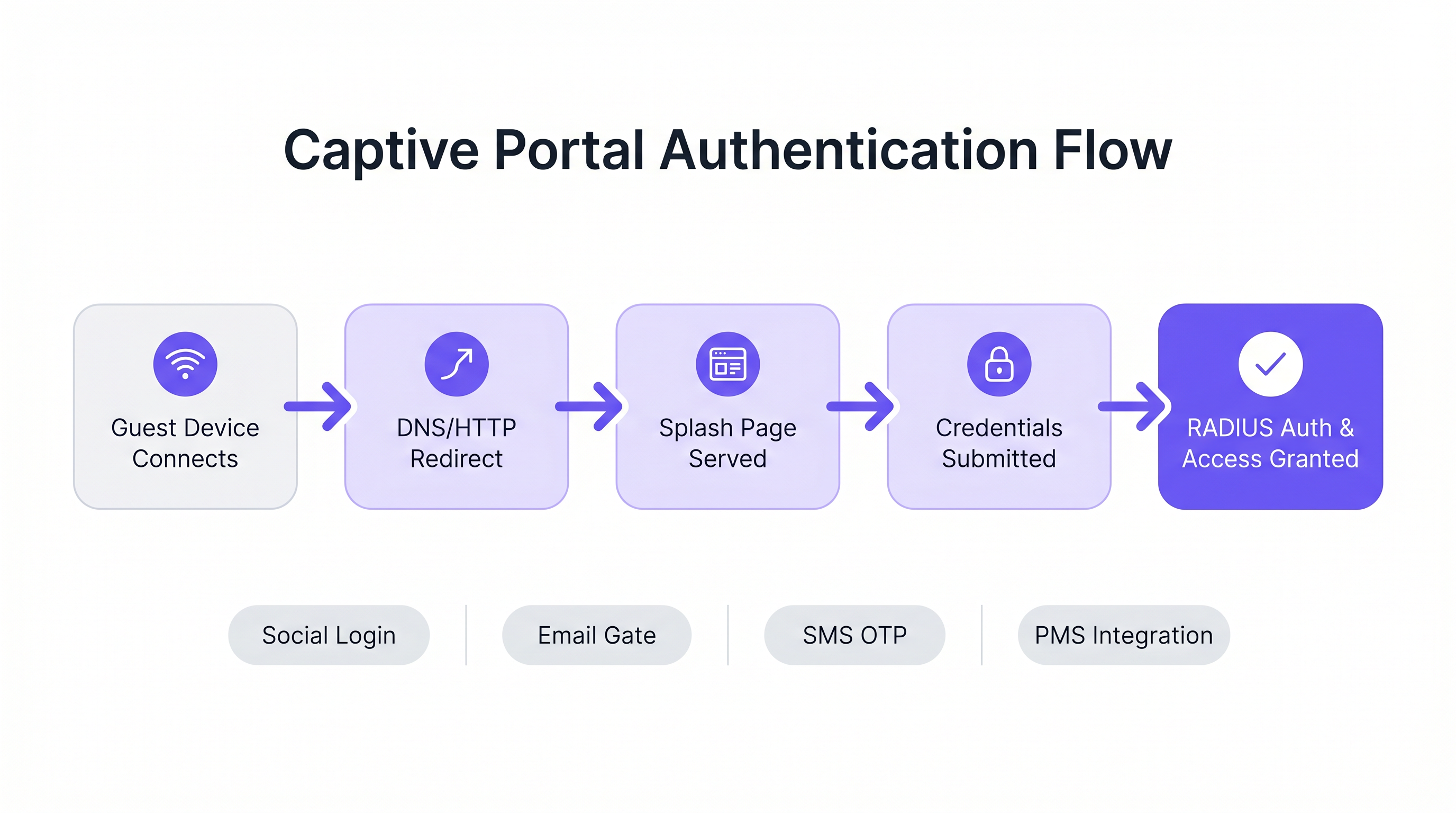
Históricamente, los captive portals dependían de una combinación de secuestro de DNS y redirecciones HTTP 302. Cuando un dispositivo invitado se conecta a un SSID, el Asistente de Red Cautiva (CNA) del sistema operativo envía una solicitud de sondeo a un punto final conocido (por ejemplo, captive.apple.com para iOS).
- Intercepción de DNS: El gateway local intercepta la solicitud DNS para la URL de sondeo y la resuelve a la dirección IP del Captive Portal.
- Redirección HTTP: Si no se utiliza la intercepción de DNS, el gateway intercepta la solicitud HTTP GET saliente y devuelve un HTTP 302 Found, redirigiendo al cliente a la página de bienvenida.
- Jardín Amurallado del Firewall: Todo el demás tráfico saliente es descartado por el firewall del gateway hasta que se completa la autenticación. Solo se permite el tráfico al portal y a los recursos externos aprobados (el "jardín amurallado").
Para un desglose más detallado de esta mecánica, consulte nuestra guía: ¿Cómo Funciona un Captive Portal? Inmersión Técnica Profunda .
El Estándar Moderno: RFC 8908 (CAPPORT API)
El modelo de intercepción heredado tiene dificultades con las arquitecturas modernas de HTTPS en todas partes. Los navegadores marcan correctamente el tráfico HTTPS interceptado como un ataque Man-in-the-Middle (MitM), lo que resulta en advertencias de certificado en lugar de una página de bienvenida limpia.
Para resolver esto, el grupo de trabajo CAPPORT de la IETF desarrolló RFC 8908 y RFC 8910. En lugar de interceptar el tráfico, la red anuncia explícitamente la presencia de un Captive Portal a través de DHCP (Opción 114) o Anuncios de Router IPv6. El dispositivo cliente consulta una API JSON para descubrir la URL del portal y su estado de autenticación actual. Si está construyendo un portal moderno, implementar la CAPPORT API es fundamental para una experiencia de usuario fluida en dispositivos iOS y Android modernos.
Flujos de Autenticación y Autorización
Una vez que se sirve la página de bienvenida, el flujo de autenticación dicta la experiencia del usuario y los datos recopilados.
- Click-Through (Términos de Servicio): El enfoque de menor fricción. No se requieren credenciales, solo una aceptación booleana de los términos. Adecuado para entornos de alta densidad donde se prioriza el rendimiento sobre la captura de datos.
- Captura de Identidad (Correo Electrónico/Red Social): El usuario se autentica a través de OAuth (Google, Facebook) o un formulario de correo electrónico. Esto requiere una integración cuidadosa con proveedores de identidad y mecanismos robustos de cumplimiento de GDPR.
- 802.1X y RADIUS: Para entornos de alta seguridad (por ejemplo, Salud o redes corporativas de invitados), se requiere control de acceso a la red basado en puertos a través de IEEE 802.1X. El Punto de Acceso actúa como cliente RADIUS, reenviando credenciales a un servidor RADIUS (como FreeRADIUS) para su validación contra un servicio de directorio.
Guía de Implementación: Código Abierto vs. Plataformas Gestionadas
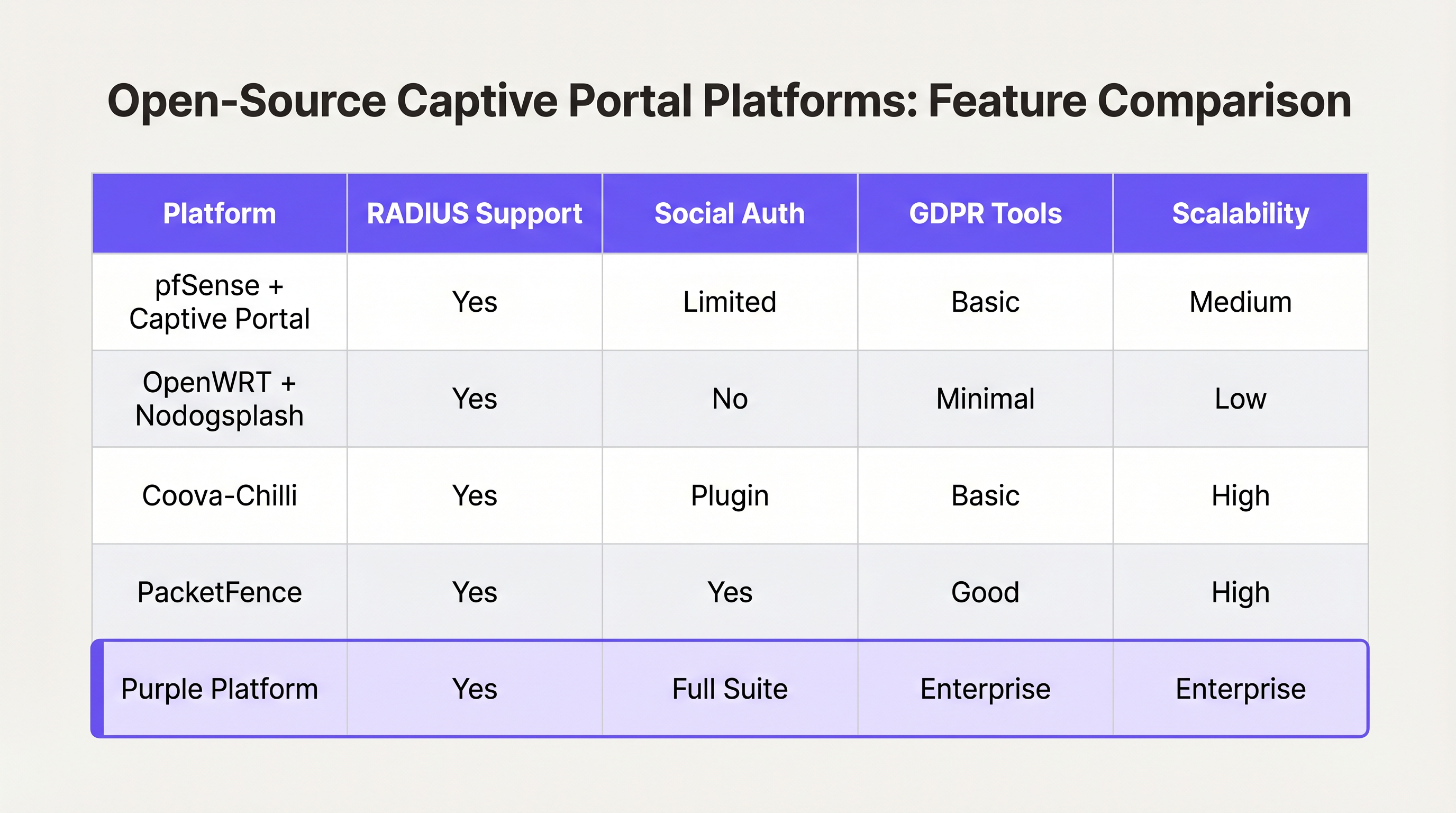
Para los desarrolladores encargados de construir un Captive Portal, el ecosistema de código abierto ofrece varias bases robustas. Sin embargo, estas herramientas proporcionan la infraestructura de red, no la lógica de negocio.
Principales Opciones de Código Abierto
- pfSense + Captive Portal: Una popular distribución de firewall que incluye un módulo Captive Portal capaz. Maneja la integración RADIUS, el filtrado de direcciones MAC y la configuración básica de ancho de banda. Ideal para despliegues de un solo sitio con ingenieros de red experimentados.
- Coova-Chilli: Un controlador de acceso maduro y rico en funciones que implementa el protocolo WISPr. Destaca en entornos RADIUS complejos y puede extenderse para el inicio de sesión social, pero requiere una experiencia significativa en administración de sistemas Linux.
- PacketFence: Una solución NAC de código abierto integral. Soporta 802.1X, incorporación de BYOD e integración con directorios empresariales. Altamente escalable, pero conlleva una curva de aprendizaje pronunciada y una sobrecarga operativa significativa.
El "Construir vs. Marco de decisión "Comprar"
Aunque el software de código abierto es "gratuito", el costo total de propiedad de un portal autoconstruido escala de forma no lineal con el número de ubicaciones y la complejidad de los requisitos empresariales.
Cuándo construir:
- Opera una sola ubicación o un pequeño grupo de sitios altamente uniformes.
- Sus requisitos se limitan a la aceptación básica de los Términos de Servicio o a un acceso WPA2-PSK simple.
- Cuenta con recursos internos dedicados de ingeniería de redes y Linux.
Cuándo comprar (Plataforma empresarial):
- Escala multi-sitio: Está implementando en docenas o cientos de ubicaciones con hardware subyacente variado (Cisco, Aruba, Meraki).
- Cumplimiento: Requiere gestión automatizada de consentimiento GDPR/CCPA, manejo de solicitudes de acceso de interesados (DSAR) y registros de auditoría verificables.
- Inteligencia de Negocio: Necesita integrar datos de red con sistemas de marketing. Plataformas como Purple proporcionan una capa unificada de WiFi Analytics , transformando direcciones MAC sin procesar en métricas accionables de afluencia y tiempo de permanencia.
- Integraciones Avanzadas: Necesita una integración perfecta con Sistemas de Gestión de Propiedades (PMS) o bases de datos de lealtad.
De manera similar a cómo las arquitecturas WAN empresariales están migrando hacia soluciones SD-WAN gestionadas (ver Los beneficios clave de SD-WAN para empresas modernas ), el WiFi para invitados empresarial está migrando hacia plataformas en la nube agnósticas al hardware que abstraen la complejidad de la red de borde.
Mejores Prácticas y Mitigación de Riesgos
Si procede con una construcción personalizada o está evaluando un proveedor, asegúrese de que se cumplan estas mejores prácticas arquitectónicas:
1. Segmentación de Red y Seguridad
Nunca implemente un Captive Portal en la misma VLAN que su red corporativa o de tecnología operativa (OT). El tráfico de invitados debe estar estrictamente segmentado. Si su ubicación procesa pagos (por ejemplo, un centro de Transporte con concesiones minoristas), la falta de segmentación del WiFi para invitados hará que toda la red entre en el alcance de PCI DSS, aumentando enormemente los costos de cumplimiento.
2. Configuración de Walled Garden
Su walled garden debe permitir explícitamente el tráfico a los dominios necesarios para que la autenticación sea exitosa. Para el inicio de sesión social, esto significa permitir el acceso a accounts.google.com, graph.facebook.com y sus CDN asociados. Un walled garden mal configurado provoca que los usuarios se queden atascados en una página de bienvenida en blanco.
3. Gestión de Ancho de Banda y Sesiones
Implemente estrictos límites de velocidad por usuario y tiempos de espera de sesión. Un solo usuario descargando una gran actualización del sistema operativo puede saturar el enlace ascendente WAN, degradando la experiencia para todos los invitados. Utilice atributos RADIUS (por ejemplo, WISPr-Bandwidth-Max-Down) para aplicar estos límites dinámicamente.
4. Mitigación de la Suplantación de MAC
Depender únicamente de las direcciones MAC para la persistencia de la sesión es un riesgo de seguridad, ya que las direcciones MAC son fácilmente suplantables, y las características modernas del sistema operativo (como iOS Private Wi-Fi Address) las aleatorizan por defecto. Asegúrese de que la arquitectura de su portal pueda manejar la aleatorización de MAC de forma elegante, típicamente requiriendo una reautenticación cuando la MAC cambia, o utilizando Passpoint/Hotspot 2.0 para una itinerancia segura y sin interrupciones.
ROI e Impacto Empresarial
Un Captive Portal no debe verse simplemente como un centro de costos de TI; es un canal crítico de adquisición de datos.
Cuando se implementa correctamente —a menudo a través de una plataforma gestionada— el ROI se mide en tres áreas:
- Crecimiento de la Base de Datos de Marketing: Un flujo de incorporación sin interrupciones con un claro intercambio de valor (por ejemplo, "WiFi gratis a cambio de un correo electrónico") construye rápidamente una base de datos de marketing de primera parte y conforme a la normativa.
- Inteligencia Operacional: Los análisis derivados de los datos de conexión proporcionan a los operadores de ubicaciones mapas de calor, análisis de carga máxima y métricas de visitantes recurrentes, influyendo directamente en las decisiones de personal y diseño.
- Reducción de Riesgos: La gestión centralizada del cumplimiento reduce significativamente el riesgo de multas regulatorias asociadas con el manejo inadecuado de datos o violaciones de PCI DSS.
En última instancia, el objetivo de un desarrollador o arquitecto es ofrecer una experiencia de red segura y sin fricciones que sirva a los objetivos estratégicos del negocio. Elija la arquitectura que permita a su equipo centrarse en esos objetivos, en lugar de gestionar la infraestructura.
Términos clave y definiciones
Captive Portal
A web page that the user of a public-access network is obliged to view and interact with before access is granted.
The primary interface for guest network onboarding, used for terms acceptance, payment, or data capture.
RADIUS (Remote Authentication Dial-In User Service)
A networking protocol that provides centralized Authentication, Authorization, and Accounting (AAA) management for users who connect and use a network service.
The backend engine that validates credentials and tells the network equipment what permissions a guest should have.
Walled Garden
A limited environment that controls the user's access to external web content and services prior to full authentication.
Essential for allowing users to access identity providers (like Google or Facebook) to log in, before they have general internet access.
MAC Spoofing
The practice of altering a device's factory-assigned Media Access Control (MAC) address to masquerade as another device or bypass network restrictions.
A common method used to bypass captive portal time limits, requiring robust session management strategies to mitigate.
CAPPORT API (RFC 8908)
A modern IETF standard allowing devices to securely discover the captive portal URL and authentication status via DHCP or Router Advertisements, rather than relying on HTTP interception.
Critical for modern portal development to prevent HTTPS certificate errors and improve the user onboarding experience.
IEEE 802.1X
An IEEE Standard for port-based Network Access Control (PNAC), providing an authentication mechanism to devices wishing to attach to a LAN or WLAN.
Used in enterprise and high-security environments where simple web-based authentication is insufficient.
WISPr (Wireless Internet Service Provider roaming)
A draft protocol submitted to the Wi-Fi Alliance that allows users to roam between different wireless internet service providers.
Often implemented by access controllers to handle the XML-based authentication requests from the captive portal to the gateway.
VLAN Segmentation
The practice of partitioning a single layer-2 network to create multiple distinct broadcast domains.
A mandatory security practice to ensure guest WiFi traffic cannot access corporate or operational technology networks.
Casos de éxito
A 200-room hotel needs to deploy guest WiFi. They require guests to authenticate using their room number and last name to access a premium bandwidth tier, while non-guests receive a throttled 2Mbps connection. The underlying network uses Cisco Meraki access points.
- Configure the Meraki SSID to use an external captive portal (Splash page URL pointing to the custom portal). 2. Set up a RADIUS server (e.g., FreeRADIUS) and configure the Meraki APs as RADIUS clients. 3. Develop the captive portal web application to present a login form requesting Room Number and Last Name. 4. Integrate the portal backend with the hotel's Property Management System (PMS) via API. When credentials are submitted, the portal queries the PMS to validate the guest. 5. Upon successful validation, the portal backend sends a RADIUS Access-Accept message to the Meraki controller, including Vendor-Specific Attributes (VSAs) to apply the 'Premium' group policy (unthrottled bandwidth). 6. For non-guests, provide a 'Free Access' button that bypasses the PMS check and returns a RADIUS Access-Accept with VSAs applying the 'Throttled' group policy.
A national retail chain with 50 locations wants to implement a captive portal to collect customer emails for marketing. They are concerned about GDPR compliance and the operational overhead of managing 50 separate local portal instances.
Instead of deploying local captive portal software (like pfSense) at each site, deploy a centralized, cloud-hosted captive portal platform (like Purple). Configure the local branch routers/APs to redirect guest traffic to the centralized portal URL. Implement a standardized splash page with explicit opt-in checkboxes for marketing consent and a link to the privacy policy. The centralized platform handles the capture, timestamping, and secure storage of consent records, and integrates directly via API with the retailer's central CRM system.
Análisis de escenarios
Q1. You are deploying a captive portal in an airport. The primary goal is maximum throughput and minimizing support tickets from users unable to connect. Which authentication method should you prioritize?
💡 Sugerencia:Consider the friction involved in verifying identities versus simply gaining legal consent.
Mostrar enfoque recomendado
A Click-Through (Terms of Service) portal. In high-density transit environments, requiring email verification or SMS OTP introduces significant friction and relies on external dependencies (cellular reception for SMS, existing email access). A simple Terms of Service acceptance minimizes support overhead while meeting basic legal requirements.
Q2. Your security team reports that users are bypassing the 2-hour free WiFi limit by changing their device's MAC address. How should you architect the network to mitigate this?
💡 Sugerencia:MAC addresses are layer-2 identifiers that can be easily spoofed. You need a layer-7 identity verification.
Mostrar enfoque recomendado
Shift from a purely MAC-based session tracking model to an identity-based model. Require users to authenticate via a unique identifier (e.g., SMS OTP or a verified email address) and tie the session limit to that identity in the RADIUS backend, rather than the device's MAC address.
Q3. A hospital requires a guest WiFi network for patients and visitors. They also need a separate network for medical IoT devices. What is the most critical architectural requirement?
💡 Sugerencia:Consider the impact if a compromised guest device could reach a medical device.
Mostrar enfoque recomendado
Strict VLAN segmentation. The guest WiFi network must be placed on a completely isolated VLAN that has no routing path to the clinical or IoT networks. The captive portal and guest traffic must be firewalled and routed directly to the internet.




