

Zapier और Purple के साथ 1,500+ ऐप्स से WiFi इवेंट्स को कनेक्ट करना
यह गाइड Purple WiFi को Zapier के साथ इंटीग्रेट करने के तकनीकी आर्किटेक्चर और व्यावहारिक कार्यान्वयन का विस्तार से वर्णन करती है। यह वेन्यू ऑपरेटर्स और IT टीमों को कस्टम कोड लिखे बिना CRM सिंक्रोनाइज़ेशन, गेस्ट कम्युनिकेशंस और ऑपरेशनल अलर्ट्स को ऑटोमेट करने के लिए कार्रवाई योग्य रेसिपीज़ प्रदान करती है।
🎧 Listen to this Guide
View Transcript
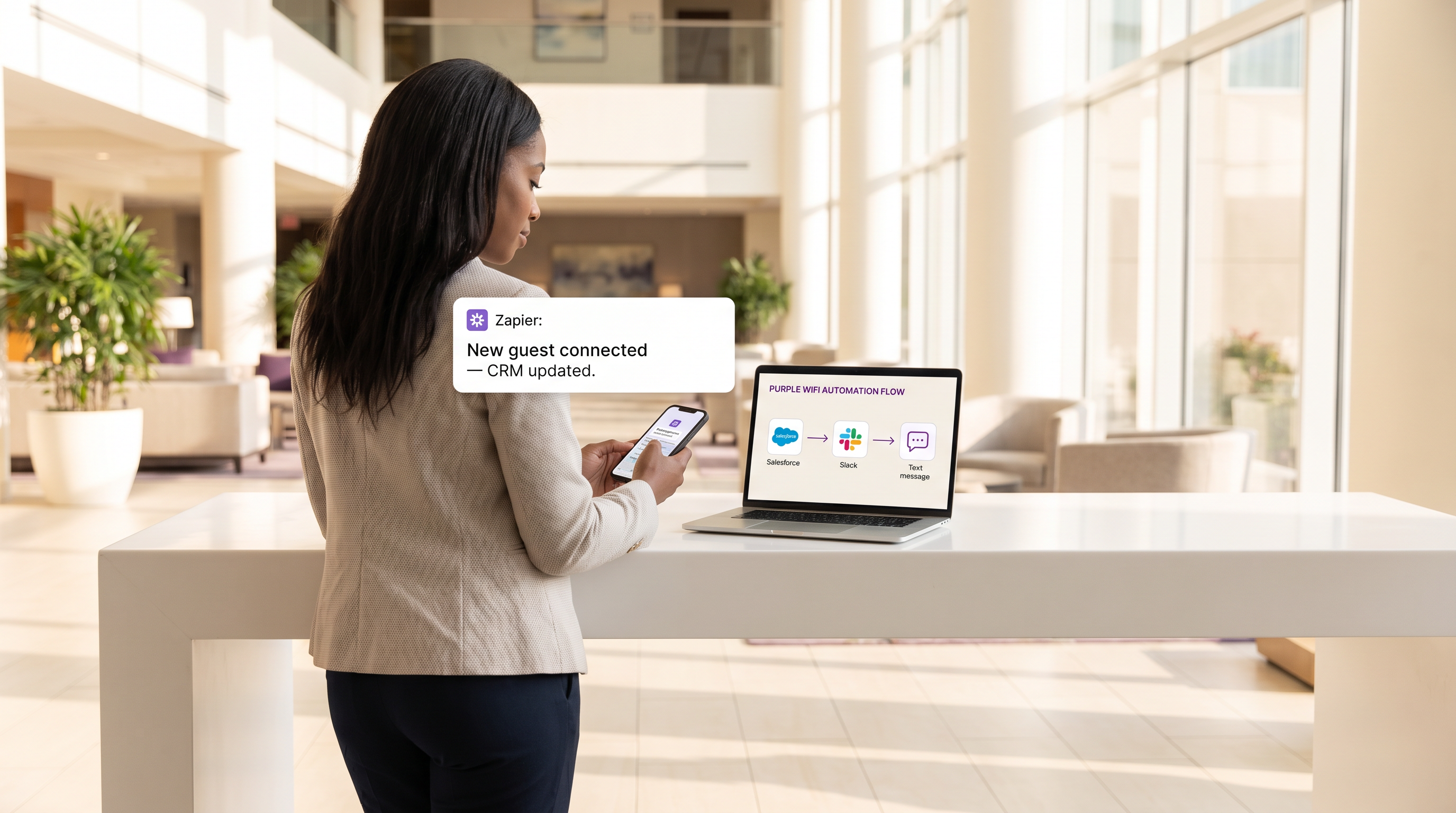
कार्यकारी सारांश
आधुनिक वेन्यूज़ के लिए, गेस्ट WiFi नेटवर्क अब केवल एक कनेक्टिविटी सुविधा नहीं है; यह ग्राहक सहभागिता और ऑपरेशनल इंटेलिजेंस के लिए एक महत्वपूर्ण सेंसर लेयर है। हालांकि, इस डेटा का मूल्य मौलिक रूप से सीमित है यदि यह एक प्रोप्राइटरी डैशबोर्ड के भीतर अलग-थलग रहता है। यह तकनीकी संदर्भ गाइड Purple द्वारा प्रदान किए गए गेस्ट WiFi और Zapier ऑटोमेशन प्लेटफॉर्म के बीच इंटीग्रेशन की पड़ताल करता है, जिससे IT और मार्केटिंग ऑपरेशंस टीमें 1,500 से अधिक डाउनस्ट्रीम एप्लीकेशंस में रियल-टाइम कनेक्शन इवेंट्स को रूट कर सकें।
Zapier को मिडलवेयर के रूप में उपयोग करके, रिटेल , हॉस्पिटैलिटी और अन्य उच्च-फुटफॉल वाले वातावरणों में संगठन जटिल वर्कफ़्लो को ऑटोमेट कर सकते हैं—रियल-टाइम CRM सिंक्रोनाइज़ेशन और लक्षित SMS मार्केटिंग से लेकर Slack के माध्यम से ऑपरेशनल अलर्टिंग तक। यह गाइड उपलब्ध ट्रिगर इवेंट्स, मुख्य आर्किटेक्चरल विचारों और छह प्रोडक्शन-रेडी ऑटोमेशन रेसिपीज़ का विस्तार से वर्णन करती है, जिन्हें GDPR और PCI DSS जैसे डेटा प्राइवेसी मानकों के साथ सख्त अनुपालन बनाए रखते हुए तत्काल ROI प्रदान करने के लिए डिज़ाइन किया गया है।
तकनीकी गहन-अध्ययन
इंटीग्रेशन आर्किटेक्चर
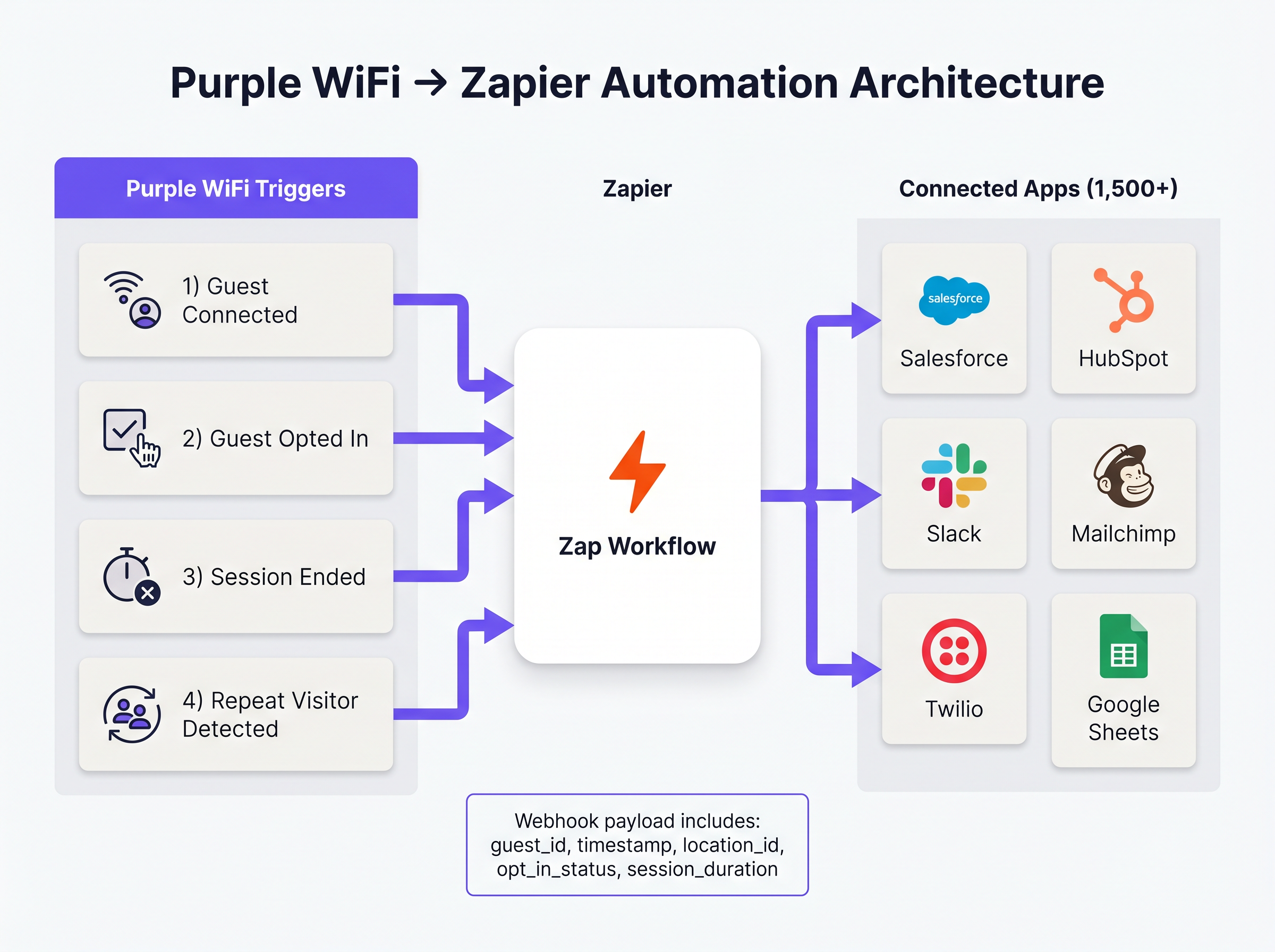
Purple और Zapier के बीच इंटीग्रेशन एक वेबहुक-संचालित इवेंट मॉडल पर संचालित होता है। Purple इवेंट स्रोत के रूप में कार्य करता है, जब भी कोई पूर्वनिर्धारित नेटवर्क इवेंट होता है तो Zapier को संरचित JSON पेलोड भेजता है। Zapier, एक इंटीग्रेशन प्लेटफॉर्म-एज़-ए-सर्विस (iPaaS) के रूप में कार्य करते हुए, इस पेलोड को प्राप्त करता है, इसे उपयोगकर्ता-परिभाषित लॉजिक ('ज़ैप') के अनुसार प्रोसेस करता है, और टारगेट एप्लीकेशंस पर API कॉल निष्पादित करता है।
यह आर्किटेक्चर सैकड़ों विभिन्न SaaS प्लेटफॉर्म्स के लिए API प्रमाणीकरण, रेट लिमिटिंग और त्रुटि प्रबंधन की जटिलता को अमूर्त करता है, जिससे नेटवर्क आर्किटेक्ट्स इंटीग्रेशन रखरखाव के बजाय बिज़नेस लॉजिक पर ध्यान केंद्रित कर सकें।
मुख्य ट्रिगर इवेंट्स
Purple Zapier को कई अलग-अलग इवेंट प्रकार उपलब्ध कराता है। सही ट्रिगर का चयन ऑपरेशनल दक्षता और नियामक अनुपालन दोनों के लिए सर्वोपरि है।
- Guest Connected: सफल नेटवर्क प्रमाणीकरण पर तुरंत ट्रिगर होता है। पेलोड में
guest_id,timestamp,location_idऔर एक्सेस पॉइंट विवरण शामिल हैं। यह फुटफॉल लॉगिंग और ऑपरेशनल अलर्टिंग के लिए प्राथमिक ट्रिगर है। - Guest Opted In: केवल तभी ट्रिगर होता है जब कोई गेस्ट कैप्टिव पोर्टल पर मार्केटिंग शर्तों को स्पष्ट रूप से स्वीकार करता है। यह किसी भी वर्कफ़्लो के लिए अनिवार्य ट्रिगर है जिसमें WiFi Analytics डेटा शामिल है जो CRM या मार्केटिंग ऑटोमेशन प्लेटफॉर्म को फीड करता है, जिससे GDPR अनुपालन सुनिश्चित होता है।
- Session Ended: तब ट्रिगर होता है जब कोई क्लाइंट डिवाइस डिस्कनेक्ट होता है या टाइम आउट हो जाता है। पेलोड में
session_durationशामिल है, जो महत्वपूर्ण ड्वेल-टाइम मेट्रिक्स प्रदान करता है। - Repeat Visitor Detected: तब ट्रिगर होता है जब Purple एनालिटिक्स इंजन एक लौटने वाले MAC एड्रेस की पहचान करता है, जिससे VIP पहचान और लॉयल्टी प्रोग्राम वर्कफ़्लो सक्षम होते हैं।
कार्यान्वयन गाइड
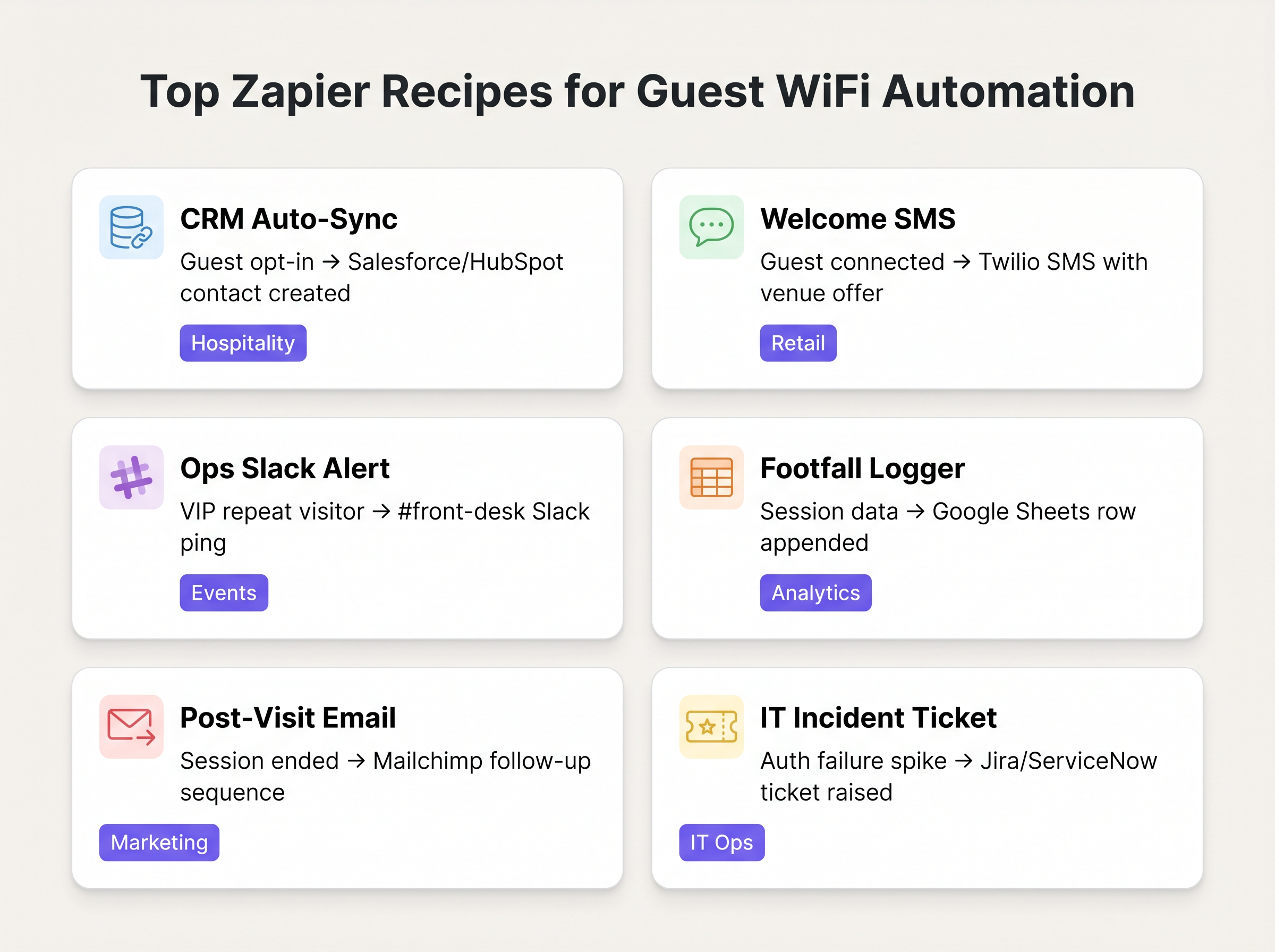
Purple-Zapier ऑटोमेशन को डिप्लॉय करने के लिए डेटा हाइजीन सुनिश्चित करने और रेट-लिमिट की कमी से बचने के लिए एक संरचित दृष्टिकोण की आवश्यकता होती है। निम्नलिखित रेसिपीज़ विशिष्ट एंटरप्राइज़ डिप्लॉयमेंट्स के लिए उच्चतम-मूल्य वाले वर्कफ़्लो को दर्शाती हैं।
मूलभूत रेसिपीज़
1. CRM ऑटो-सिंक (बेसलाइन)
- ट्रिगर: Purple
Guest Opted In - एक्शन: Salesforce या HubSpot में संपर्क बनाएं/अपडेट करें।
- तर्क: मैन्युअल CSV एक्सपोर्ट्स को समाप्त करता है। सुनिश्चित करता है कि मार्केटिंग डेटाबेस सत्यापित, ऑप्ट-इन गेस्ट डेटा के साथ लगातार अपडेट होता रहे।
2. रियल-टाइम वेलकम SMS
- ट्रिगर: Purple
Guest Connected - फ़िल्टर: Zapier फ़िल्टर (केवल तभी आगे बढ़ें जब
guest_idपिछले 30 दिनों में नहीं देखा गया हो)। - एक्शन: Twilio के माध्यम से SMS भेजें।
- तर्क: रिटेल वातावरणों में तत्काल सहभागिता को बढ़ावा देता है। लौटने वाले विज़िटर्स को स्पैमिंग से रोकने के लिए फ़िल्टर स्टेप महत्वपूर्ण है।
3. ऑपरेशनल अलर्टिंग
- ट्रिगर: Purple
Repeat Visitor Detected - एक्शन: Slack में मैसेज पोस्ट करें।
- तर्क: हॉस्पिटैलिटी सेटिंग्स में फ्रंट डेस्क या कंसीयर्ज को अलर्ट करता है जब कोई VIP या ज्ञात उच्च-मूल्य वाला गेस्ट नेटवर्क से कनेक्ट होता है।
सर्वोत्तम अभ्यास
इन वर्कफ़्लो को आर्किटेक्ट करते समय, वरिष्ठ IT पेशेवरों को स्थिरता और अनुपालन सुनिश्चित करने के लिए कई प्रमुख सिद्धांतों का पालन करना चाहिए:
- मार्केटिंग के लिए 'कनेक्टेड' के बजाय 'ऑप्ट-इन' को प्राथमिकता दें: किसी भी ज़ैप के लिए हमेशा
Guest Opted Inट्रिगर का उपयोग करें जो CRM रिकॉर्ड बनाता है या मार्केटिंग कम्युनिकेशंस भेजता है। इन उद्देश्यों के लिए कच्चेGuest Connectedइवेंट पर निर्भर रहना GDPR सहमति आवश्यकताओं का उल्लंघन करता है और डेटा गुणवत्ता को कम करता है। - डुप्लीकेशन लॉजिक लागू करें: एक अकेला उपयोगकर्ता कई डिवाइस (स्मार्टफोन, लैपटॉप, टैबलेट) के साथ कनेक्ट हो सकता है। यदि इसे सही ढंग से नहीं संभाला गया, तो यह डुप्लीकेट CRM रिकॉर्ड बनाएगा। अपने Zapier एक्शन्स में डिवाइस-बाउंड MAC एड्रेस के बजाय हैश किए गए ईमेल एड्रेस (यदि उपलब्ध हो) को प्राथमिक डुप्लीकेशन कुंजी के रूप में उपयोग करें।
- टास्क खपत की निगरानी करें: Zapier की कीमत टास्क वॉल्यूम पर आधारित है। एक व्यस्त वेन्यू आसानी से एक मानक टियर भत्ते को समाप्त कर सकता है यदि प्रत्येक कनेक्शन एक मल्टी-स्टेप ज़ैप को ट्रिगर करता है। वर्कफ़्लो में शुरुआती चरणों में अप्रासंगिक इवेंट्स को हटाने के लिए Zapier के बिल्ट-इन फ़िल्टरिंग का उपयोग करें, और उच्च-वॉल्यूम फुटफॉल लॉगिंग के लिए डेटा को बैच करने पर विचार करें (जैसे, Google शीट्स में प्रति घंटा रोल-अप)।
समस्या निवारण और जोखिम न्यूनीकरणगेशन
इस आर्किटेक्चर में सबसे आम विफलता मोड डाउनस्ट्रीम API टोकन की समय-सीमा समाप्त होना है। जबकि Purple की वेबहुक डिलीवरी अत्यधिक विश्वसनीय है, Zapier और लक्ष्य एप्लिकेशन (जैसे, Salesforce) के बीच कनेक्शन विफल हो सकता है यदि प्रमाणीकरण टोकन की समय-सीमा समाप्त हो जाती है या API दर सीमाएँ पार हो जाती हैं।
शमन रणनीति: Zapier की अंतर्निहित त्रुटि प्रबंधन को कॉन्फ़िगर करें ताकि यदि कोई Zap लगातार विफल होता है, तो IT संचालन टीम को Slack या ईमेल के माध्यम से सूचित किया जा सके। आवर्ती डेटा मैपिंग त्रुटियों की पहचान करने और उन्हें हल करने के लिए Zap इतिहास का नियमित रूप से ऑडिट करें।
इसके अलावा, संवेदनशील डेटा को संभालने वाले सिस्टम (जैसे स्वास्थ्य सेवा में) के साथ एकीकृत करते समय, सुनिश्चित करें कि Zapier के माध्यम से प्रेषित डेटा पेलोड HIPAA या स्थानीय गोपनीयता नियमों का उल्लंघन न करे। पेलोड को वर्कफ़्लो के लिए आवश्यक न्यूनतम फ़ील्ड तक सीमित रखें।
ROI और व्यावसायिक प्रभाव
Zapier एकीकरण के लिए निवेश पर प्रतिफल आमतौर पर बचाए गए घंटों और बेहतर डेटा सटीकता में मापा जाता है। CRM अंतर्ग्रहण को स्वचालित करके, मार्केटिंग टीमें मैन्युअल डेटा प्रबंधन में पहले खर्च किए गए घंटों को पुनः प्राप्त करती हैं। इससे भी महत्वपूर्ण बात यह है कि, रीयल-टाइम एकीकरण 'इन-मोमेंट' मार्केटिंग को सक्षम बनाता है—ग्राहक के भौतिक रूप से स्थल पर मौजूद होने के दौरान उसे संलग्न करना—जो पोस्ट-विज़िट ईमेल अभियानों की तुलना में लगातार उच्च रूपांतरण दर प्रदर्शित करता है।
Key Terms & Definitions
Webhook
A method for one application to provide real-time information to another application using HTTP POST requests.
This is the underlying mechanism Purple uses to send event data to Zapier the moment a guest connects.
iPaaS (Integration Platform as a Service)
A suite of cloud services enabling the development, execution and governance of integration flows connecting any combination of on premises and cloud-based processes, services, applications and data within individual or across multiple organizations.
Zapier acts as the iPaaS in this architecture, sitting between Purple and the 1,500+ downstream applications.
Captive Portal
A web page that the user of a public-access network is obliged to view and interact with before access is granted.
The point of interaction where Purple captures guest data and marketing consent, triggering the 'Guest Opted In' event.
Payload
The actual data pack that is sent in a webhook or API request, excluding the headers and metadata.
The Purple webhook payload contains the guest ID, location data, and timestamps needed to populate downstream CRM fields.
Dwell Time
The length of time a visitor spends in a specific physical area or connected to the network.
Calculated using the 'Session Ended' trigger, this metric is crucial for retail analytics and operational planning.
Rate Limiting
A strategy for limiting network traffic, restricting how often someone can repeat an action within a certain timeframe.
A critical consideration when designing Zaps; high-volume WiFi events can easily exhaust API rate limits on downstream applications like Salesforce.
Deduplication
The process of identifying and removing duplicate copies of repeating data.
Essential when building CRM Zaps to ensure that a guest connecting with both a phone and a laptop doesn't create two separate contact records.
MAC Address Correlation
The process of identifying returning devices by matching their unique hardware identifier across multiple sessions.
The mechanism Purple uses to fire the 'Repeat Visitor Detected' trigger, enabling loyalty workflows.
Case Studies
A 200-room boutique hotel wants to automatically add new guests to their Mailchimp welcome sequence, but only if the guest has explicitly agreed to receive marketing emails. They also want to ensure that returning guests do not receive the welcome sequence again.
- Set the Zapier Trigger to Purple's 'Guest Opted In' event (not 'Guest Connected'). 2. Add a Zapier Filter step to check a Google Sheet 'Log' to see if the guest's email already exists. 3. If it does not exist, proceed to Action 1: Add Subscriber to Mailchimp Audience. 4. Action 2: Append the new guest's email and timestamp to the Google Sheet 'Log' to prevent future duplicates.
A large retail chain needs to log hourly footfall data from their Purple WiFi network into a central data warehouse for the BI team, but they are concerned about exceeding their Zapier task limits due to the high volume of connections.
Instead of triggering a Zap for every individual 'Guest Connected' event, the IT team configures a Zapier 'Schedule' trigger to run every hour. The Zap then uses a Webhook action to query the Purple API for the aggregated connection count over the last 60 minutes, and writes that single aggregated value to the data warehouse.
Scenario Analysis
Q1. Your marketing team wants to automatically send a 10% discount SMS to every guest who connects to the stadium WiFi. What is the primary compliance risk, and how should the Zap be architected to mitigate it?
💡 Hint:Consider the difference between simply joining a network and agreeing to receive marketing communications.
Show Recommended Approach
The primary risk is violating GDPR/TCPA by sending marketing messages without explicit consent. The Zap must use the 'Guest Opted In' trigger, not the 'Guest Connected' trigger. Furthermore, a Zapier Filter should be implemented to ensure the SMS is only sent once per guest, rather than every time they reconnect during the event.
Q2. A retail client is complaining that their Zapier task usage has spiked, costing them thousands of dollars, after implementing a 'Log every connection to Google Sheets' Zap. How would you redesign this workflow?
💡 Hint:Does the BI team need real-time row-by-row data, or do they just need hourly aggregates?
Show Recommended Approach
Shift from an event-driven architecture to a scheduled polling architecture. Instead of triggering a Zap on every connection, configure a Zapier Schedule to run hourly. The Zap should make an API call to Purple to retrieve the aggregated connection count for the previous hour, and write that single row to Google Sheets. This reduces task consumption from potentially thousands per hour to just one per hour.
Q3. The operations team wants a Slack alert every time a specific VIP connects to the network. How do you isolate this specific user from the thousands of other daily connections?
💡 Hint:You need to evaluate the payload data before executing the action.
Show Recommended Approach
Use the 'Guest Connected' or 'Repeat Visitor Detected' trigger. Immediately follow this with a Zapier Filter step. Configure the filter to only allow the Zap to continue if the guest_id or mac_address field in the payload exactly matches the known identifier of the VIP. If it doesn't match, the Zap halts without consuming further tasks or posting to Slack.




