
Verbindung von WiFi-Ereignissen mit über 1.500 Apps über Zapier und Purple
Dieser Leitfaden beschreibt die technische Architektur und praktische Implementierung der Integration von Purple WiFi mit Zapier. Er bietet Betreibern von Veranstaltungsorten und IT-Teams umsetzbare Anleitungen zur Automatisierung der CRM-Synchronisation, der Gästekommunikation und operativer Warnmeldungen, ohne eigenen Code schreiben zu müssen.
Diesen Leitfaden anhören
Podcast-Transkript ansehen
Executive Summary
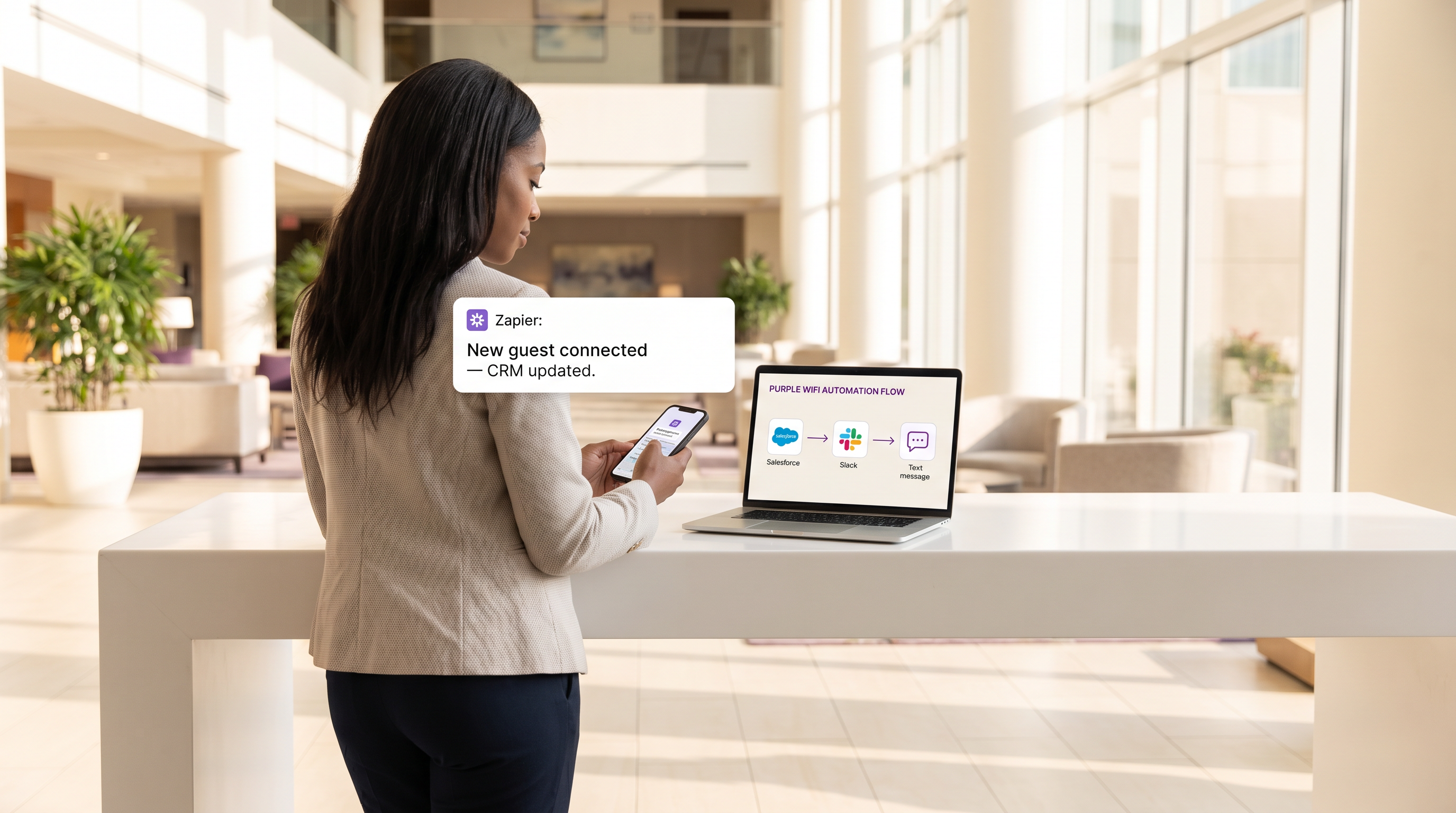
Für moderne Veranstaltungsorte ist das Gast-WiFi-Netzwerk nicht mehr nur eine Annehmlichkeit zur Konnektivität; es ist eine kritische Sensorsschicht für Kundenbindung und operative Intelligenz. Der Wert dieser Daten ist jedoch grundlegend begrenzt, wenn sie in einem proprietären Dashboard isoliert bleiben. Dieser technische Referenzleitfaden untersucht die Integration zwischen Gast-WiFi von Purple und der Zapier-Automatisierungsplattform, die es IT- und Marketing-Operations-Teams ermöglicht, Echtzeit-Verbindungsereignisse an über 1.500 nachgeschaltete Anwendungen weiterzuleiten.
Durch die Nutzung von Zapier als Middleware können Organisationen im Einzelhandel , im Gastgewerbe und in anderen Umgebungen mit hohem Besucheraufkommen komplexe Workflows automatisieren – von der Echtzeit-CRM-Synchronisation und gezieltem SMS-Marketing bis hin zu operativen Warnmeldungen über Slack. Dieser Leitfaden beschreibt die verfügbaren Trigger-Ereignisse, zentrale architektonische Überlegungen und sechs produktionsreife Automatisierungsrezepte, die darauf ausgelegt sind, sofortigen ROI zu liefern und gleichzeitig die strikte Einhaltung von Datenschutzstandards wie GDPR und PCI DSS zu gewährleisten.
Technischer Deep-Dive
Integrationsarchitektur
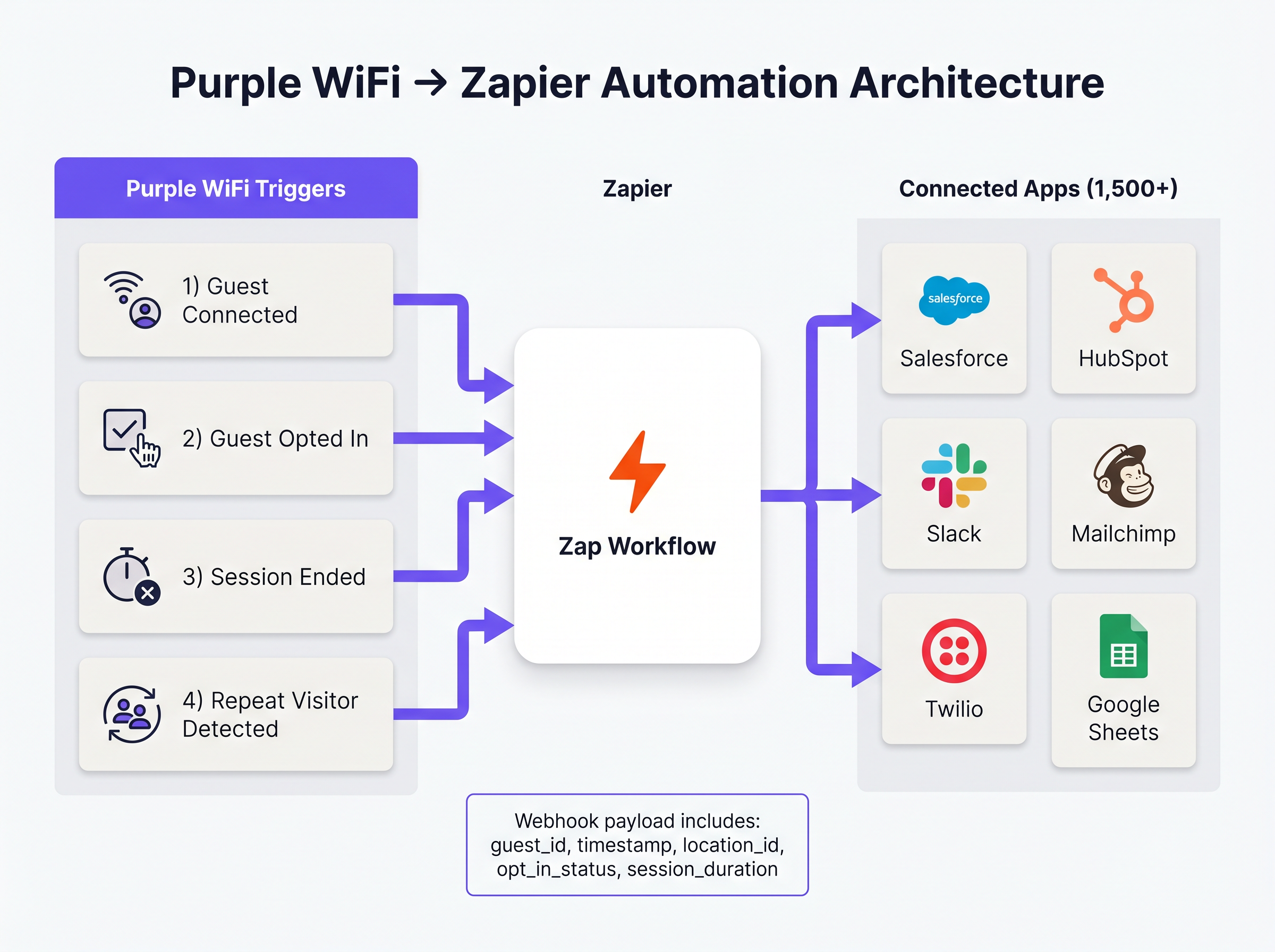
Die Integration zwischen Purple und Zapier basiert auf einem Webhook-gesteuerten Ereignismodell. Purple fungiert als Ereignisquelle und sendet strukturierte JSON-Payloads an Zapier, sobald ein vordefiniertes Netzwerkereignis auftritt. Zapier, das als Integration Platform as a Service (iPaaS) fungiert, empfängt diese Payload, verarbeitet sie gemäß benutzerdefinierter Logik (dem 'Zap') und führt API-Aufrufe an Zielanwendungen aus.
Diese Architektur abstrahiert die Komplexität der Verwaltung von API-Authentifizierung, Ratenbegrenzung und Fehlerbehandlung für Hunderte verschiedener SaaS-Plattformen, sodass Netzwerkarchitekten sich auf die Geschäftslogik statt auf die Integrationswartung konzentrieren können.
Kern-Trigger-Ereignisse
Purple stellt Zapier mehrere verschiedene Ereignistypen zur Verfügung. Die Auswahl des richtigen Triggers ist sowohl für die betriebliche Effizienz als auch für die Einhaltung gesetzlicher Vorschriften von größter Bedeutung.
- Guest Connected: Wird sofort nach erfolgreicher Netzwerkauthentifizierung ausgelöst. Die Payload enthält
guest_id,timestamp,location_idund Details zum Access Point. Dies ist der primäre Trigger für die Erfassung von Besucherzahlen und operative Warnmeldungen. - Guest Opted In: Wird nur ausgelöst, wenn ein Gast Marketingbedingungen auf dem captive portal explizit akzeptiert. Dies ist der obligatorische Trigger für jeden Workflow, der WiFi Analytics -Daten beinhaltet, die CRM- oder Marketing-Automatisierungsplattformen speisen, um die GDPR-Konformität sicherzustellen.
- Session Ended: Wird ausgelöst, wenn ein Client-Gerät die Verbindung trennt oder ein Timeout auftritt. Die Payload enthält
session_durationund liefert kritische Verweildauer-Metriken. - Repeat Visitor Detected: Wird ausgelöst, wenn die Purple Analytics-Engine eine wiederkehrende MAC address identifiziert, was die VIP-Erkennung und Loyalty-Programm-Workflows ermöglicht.
Implementierungsleitfaden
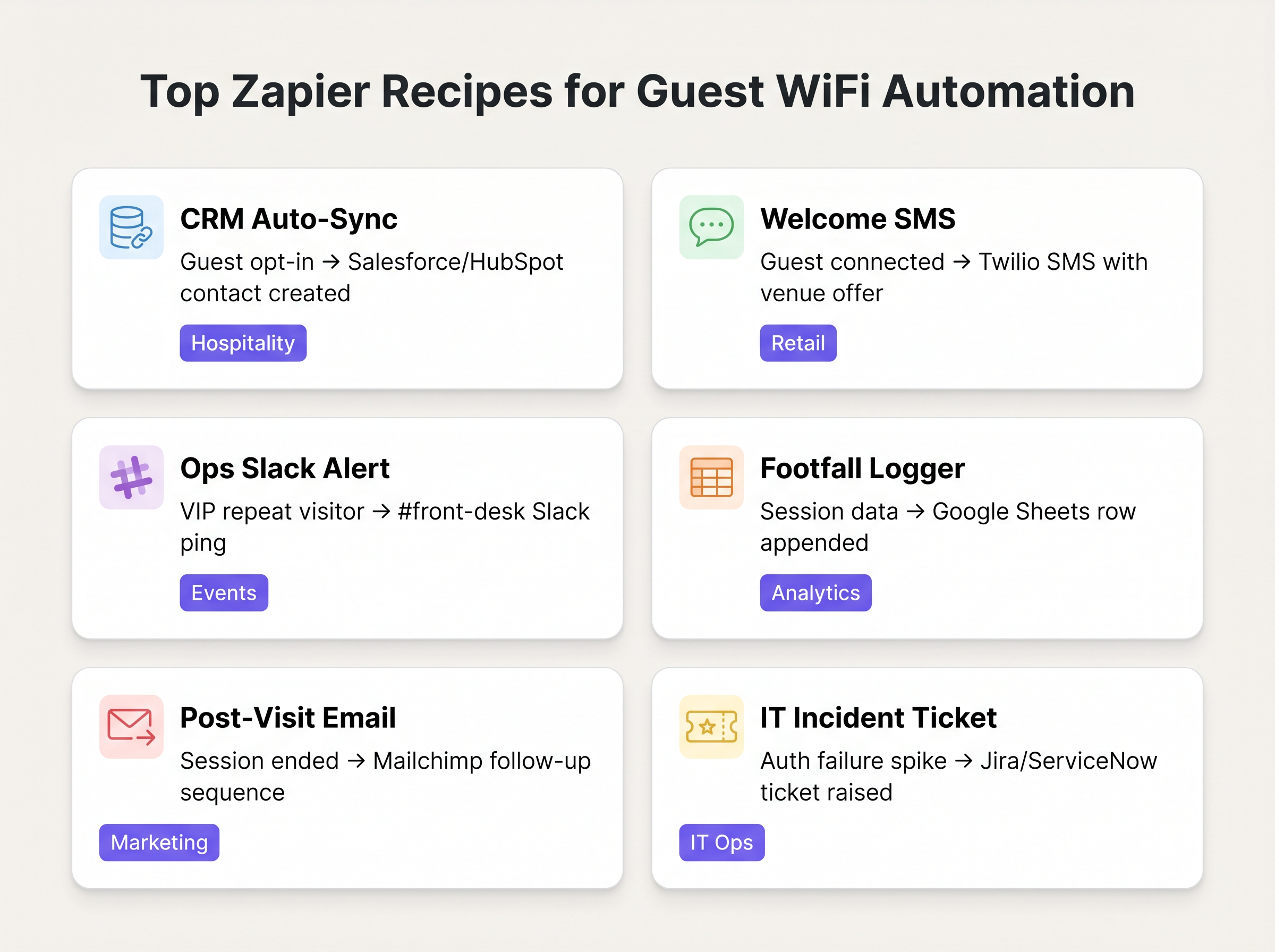
Die Bereitstellung der Purple-Zapier-Automatisierung erfordert einen strukturierten Ansatz, um Datenhygiene zu gewährleisten und die Erschöpfung von Ratenbegrenzungen zu vermeiden. Die folgenden Rezepte stellen die wertvollsten Workflows für typische Unternehmensbereitstellungen dar.
Grundlegende Rezepte
1. CRM Auto-Sync (Die Basis)
- Trigger: Purple
Guest Opted In - Aktion: Kontakt in Salesforce oder HubSpot erstellen/aktualisieren.
- Begründung: Eliminiert manuelle CSV-Exporte. Stellt sicher, dass die Marketingdatenbank kontinuierlich mit verifizierten, zugestimmten Gästedaten aktualisiert wird.
2. Echtzeit-Willkommens-SMS
- Trigger: Purple
Guest Connected - Filter: Zapier Filter (Nur fortfahren, wenn
guest_idin den letzten 30 Tagen nicht gesehen wurde). - Aktion: SMS über Twilio senden.
- Begründung: Fördert sofortige Interaktion in Einzelhandelsumgebungen . Der Filterschritt ist entscheidend, um das Spammen wiederkehrender Besucher zu verhindern.
3. Operative Warnmeldungen
- Trigger: Purple
Repeat Visitor Detected - Aktion: Nachricht in Slack posten.
- Begründung: Benachrichtigt die Rezeption oder den Concierge in Gastgewerbeumgebungen , wenn ein VIP oder bekannter, hochwertiger Gast sich mit dem Netzwerk verbindet.
Best Practices
Bei der Gestaltung dieser Workflows müssen erfahrene IT-Experten mehrere Schlüsselprinzipien beachten, um Stabilität und Compliance zu gewährleisten:
- Priorisieren Sie 'Opted In' gegenüber 'Connected' für Marketing: Verwenden Sie immer den
Guest Opted In-Trigger für jeden Zap, der einen CRM-Datensatz erstellt oder Marketingkommunikation sendet. Die Verwendung des rohenGuest Connected-Ereignisses für diese Zwecke verstößt gegen die GDPR-Zustimmungsanforderungen und beeinträchtigt die Datenqualität. - Implementieren Sie Deduplizierungslogik: Ein einzelner Benutzer kann sich mit mehreren Geräten (Smartphone, Laptop, Tablet) verbinden. Wenn dies nicht korrekt gehandhabt wird, führt dies zu doppelten CRM-Datensätzen. Verwenden Sie die gehashte E-Mail-Adresse (falls verfügbar) als primären Deduplizierungsschlüssel in Ihren Zapier-Aktionen, anstatt der gerätegebundenen MAC address.
- Überwachen Sie den Aufgabenverbrauch: Die Zapier-Preisgestaltung basiert auf dem Aufgabenvolumen. Ein belebter Veranstaltungsort kann ein Standard-Tier-Kontingent leicht erschöpfen, wenn jede einzelne Verbindung einen mehrstufigen Zap auslöst. Verwenden Sie die integrierte Filterung von Zapier, um irrelevante Ereignisse frühzeitig im Workflow zu verwerfen, und erwägen Sie die Stapelverarbeitung von Daten (z. B. stündliche Roll-ups in Google Sheets) für die Erfassung hoher Besucherzahlen.
Fehlerbehebung & Risikomitigation
Der häufigste Fehler in dieser Architektur ist das Ablaufen von nachgelagerten API-Tokens. Obwohl die Webhook-Zustellung von Purple sehr zuverlässig ist, kann die Verbindung zwischen Zapier und der Zielanwendung (z. B. Salesforce) fehlschlagen, wenn Authentifizierungs-Tokens ablaufen oder API-Ratenbegrenzungen überschritten werden.
Strategie zur Fehlerbehebung: Konfigurieren Sie die integrierte Fehlerbehandlung von Zapier, um das IT-Betriebsteam über Slack oder E-Mail zu benachrichtigen, wenn ein Zap wiederholt fehlschlägt. Überprüfen Sie regelmäßig den Zap-Verlauf, um wiederkehrende Datenzuordnungsfehler zu identifizieren und zu beheben.
Stellen Sie außerdem bei der Integration mit Systemen, die sensible Daten verarbeiten (wie z. B. im Gesundheitswesen ), sicher, dass die über Zapier übertragene Datenlast nicht gegen HIPAA oder lokale Datenschutzbestimmungen verstößt. Beschränken Sie die Datenlast auf die für den Workflow erforderlichen Mindestfelder.
ROI & Geschäftlicher Nutzen
Der Return on Investment für die Zapier-Integration wird typischerweise in eingesparten Stunden und verbesserter Datengenauigkeit gemessen. Durch die Automatisierung der CRM-Erfassung sparen Marketingteams die Stunden, die zuvor für die manuelle Datenaufbereitung aufgewendet wurden. Noch wichtiger ist, dass die Echtzeit-Integration 'In-Moment'-Marketing ermöglicht – die Ansprache des Kunden, während er physisch am Veranstaltungsort anwesend ist – was durchweg höhere Konversionsraten aufweist als E-Mail-Kampagnen nach dem Besuch.
Schlüsseldefinitionen
Webhook
A method for one application to provide real-time information to another application using HTTP POST requests.
This is the underlying mechanism Purple uses to send event data to Zapier the moment a guest connects.
iPaaS (Integration Platform as a Service)
A suite of cloud services enabling the development, execution and governance of integration flows connecting any combination of on premises and cloud-based processes, services, applications and data within individual or across multiple organizations.
Zapier acts as the iPaaS in this architecture, sitting between Purple and the 1,500+ downstream applications.
Captive Portal
A web page that the user of a public-access network is obliged to view and interact with before access is granted.
The point of interaction where Purple captures guest data and marketing consent, triggering the 'Guest Opted In' event.
Payload
The actual data pack that is sent in a webhook or API request, excluding the headers and metadata.
The Purple webhook payload contains the guest ID, location data, and timestamps needed to populate downstream CRM fields.
Dwell Time
The length of time a visitor spends in a specific physical area or connected to the network.
Calculated using the 'Session Ended' trigger, this metric is crucial for retail analytics and operational planning.
Rate Limiting
A strategy for limiting network traffic, restricting how often someone can repeat an action within a certain timeframe.
A critical consideration when designing Zaps; high-volume WiFi events can easily exhaust API rate limits on downstream applications like Salesforce.
Deduplication
The process of identifying and removing duplicate copies of repeating data.
Essential when building CRM Zaps to ensure that a guest connecting with both a phone and a laptop doesn't create two separate contact records.
MAC Address Correlation
The process of identifying returning devices by matching their unique hardware identifier across multiple sessions.
The mechanism Purple uses to fire the 'Repeat Visitor Detected' trigger, enabling loyalty workflows.
Ausgearbeitete Beispiele
A 200-room boutique hotel wants to automatically add new guests to their Mailchimp welcome sequence, but only if the guest has explicitly agreed to receive marketing emails. They also want to ensure that returning guests do not receive the welcome sequence again.
- Set the Zapier Trigger to Purple's 'Guest Opted In' event (not 'Guest Connected'). 2. Add a Zapier Filter step to check a Google Sheet 'Log' to see if the guest's email already exists. 3. If it does not exist, proceed to Action 1: Add Subscriber to Mailchimp Audience. 4. Action 2: Append the new guest's email and timestamp to the Google Sheet 'Log' to prevent future duplicates.
A large retail chain needs to log hourly footfall data from their Purple WiFi network into a central data warehouse for the BI team, but they are concerned about exceeding their Zapier task limits due to the high volume of connections.
Instead of triggering a Zap for every individual 'Guest Connected' event, the IT team configures a Zapier 'Schedule' trigger to run every hour. The Zap then uses a Webhook action to query the Purple API for the aggregated connection count over the last 60 minutes, and writes that single aggregated value to the data warehouse.
Übungsfragen
Q1. Your marketing team wants to automatically send a 10% discount SMS to every guest who connects to the stadium WiFi. What is the primary compliance risk, and how should the Zap be architected to mitigate it?
Hinweis: Consider the difference between simply joining a network and agreeing to receive marketing communications.
Musterlösung anzeigen
The primary risk is violating GDPR/TCPA by sending marketing messages without explicit consent. The Zap must use the 'Guest Opted In' trigger, not the 'Guest Connected' trigger. Furthermore, a Zapier Filter should be implemented to ensure the SMS is only sent once per guest, rather than every time they reconnect during the event.
Q2. A retail client is complaining that their Zapier task usage has spiked, costing them thousands of dollars, after implementing a 'Log every connection to Google Sheets' Zap. How would you redesign this workflow?
Hinweis: Does the BI team need real-time row-by-row data, or do they just need hourly aggregates?
Musterlösung anzeigen
Shift from an event-driven architecture to a scheduled polling architecture. Instead of triggering a Zap on every connection, configure a Zapier Schedule to run hourly. The Zap should make an API call to Purple to retrieve the aggregated connection count for the previous hour, and write that single row to Google Sheets. This reduces task consumption from potentially thousands per hour to just one per hour.
Q3. The operations team wants a Slack alert every time a specific VIP connects to the network. How do you isolate this specific user from the thousands of other daily connections?
Hinweis: You need to evaluate the payload data before executing the action.
Musterlösung anzeigen
Use the 'Guest Connected' or 'Repeat Visitor Detected' trigger. Immediately follow this with a Zapier Filter step. Configure the filter to only allow the Zap to continue if the guest_id or mac_address field in the payload exactly matches the known identifier of the VIP. If it doesn't match, the Zap halts without consuming further tasks or posting to Slack.
Weiterlesen in dieser Reihe
Restaurant WiFi Marketing: Wie Sie kostenloses WiFi in wiederkehrende Kunden verwandeln
Dieser maßgebliche technische Leitfaden untersucht die Architektur und Implementierung von Restaurant WiFi Marketing – die Praxis, den Gastnetzwerkzugang als strukturierten Datenerfassungs- und Marketingautomatisierungskanal zu nutzen. Er bietet IT-Managern, Netzwerkarchitekten und Betriebsleitern von Veranstaltungsorten einen taktischen Plan für die Bereitstellung von Captive Portals, die Integration mit CRM-Plattformen und die Auslösung automatisierter Kampagnen, die messbare Wiederholungsgeschäfte fördern. Von der GDPR-konformen Datenerfassung bis hin zu ereignisgesteuerten E-Mail-Workflows deckt dieser Leitfaden den gesamten Bereitstellungslebenszyklus mit konkreten ROI-Metriken ab.
Wie man mit Kunden in Kontakt tritt: Digitale Strategien für physische Unternehmen
Dieser maßgebliche technische Leitfaden beschreibt, wie Unternehmen mit physischen Standorten – Hotels, Einzelhandelsketten, Stadien und öffentliche Einrichtungen – eine Enterprise WiFi-Infrastruktur als Engine zur Erfassung von Erstanbieterdaten und zur Kundenbindung einsetzen können. Er behandelt die gesamte Architektur von der Gestaltung des Captive Portal und der nahtlosen Authentifizierung (IEEE 802.11u/Passpoint) bis hin zur CRM-Integration, GDPR-Konformität und messbarem ROI. IT-Verantwortliche und Betreiber von Veranstaltungsorten finden hier umsetzbare Implementierungsanleitungen, Fallstudien aus der Praxis und ein Compliance-orientiertes Risikominderungs-Framework.
Wie man Erstanbieterdaten in Marketingkampagnen nutzt
Dieser maßgebliche Leitfaden beschreibt, wie IT- und Marketingteams von Unternehmen ihre Gast-WiFi-Infrastruktur in eine leistungsstarke Erstanbieterdaten-Engine verwandeln können. Er behandelt die technische Architektur für die Datenerfassung, GDPR-konformes Einwilligungsmanagement, Segmentierungsstrategien und die praktische Aktivierung über E-Mail, SMS, soziale Werbung und programmatische Anzeigen. Betreiber von Veranstaltungsorten und IT-Teams finden konkrete Implementierungsanleitungen, Praxisbeispiele aus dem Gastgewerbe und Einzelhandel sowie messbare ROI-Frameworks.