
Restaurant WiFi Marketing: Wie Sie aus kostenlosem WiFi treue Stammkunden machen
Dieser fundierte technische Leitfaden beschreibt die Architektur und Implementierung von Restaurant WiFi Marketing - der Methode, den Gastnetzwerkzugang als Kanal zur strukturierten Datenerfassung und Marketing-Automatisierung zu nutzen. Er bietet IT-Managern, Netzwerkarchitekten und Betriebsleitern einen praktischen Leitfaden für die Bereitstellung von Captive Portalen, die Integration von CRM-Plattformen und die Auslösung automatisierter Kampagnen, die nachweislich zu wiederkehrenden Besuchen führen. Von der GDPR-konformen Datenerfassung bis hin zu ereignisgesteuerten E-Mail-Workflows deckt dieser Leitfaden den gesamten Bereitstellungszyklus mit konkreten ROI-Kennzahlen ab.
Diesen Leitfaden anhören
Podcast-Transkript ansehen
Teil unserer Kernserie: WiFi Marketing Leitfaden →

Executive Summary
Für IT-Manager, Netzwerkarchitekten und CTOs in der Systemgastronomie, dem Einzelhandel und im öffentlichen Sektor hat sich der Gast-Netzwerkzugang von einem einfachen Dienstprogramm zu einem geschäftskritischen Datenerfassungskanal entwickelt. Um den ROI von Investitionen in die Netzwerkinfrastruktur zu realisieren, ist ein grundlegendes Verständnis dafür, was Restaurant-WiFi-Marketing ist, unerlässlich. Dieser Leitfaden beschreibt die technische Architektur, die Bereitstellungsstrategien und die Protokolle zur Risikominderung, die erforderlich sind, um ein Kostenzentrum - kostenloses Gast-WiFi - in einen messbaren Motor für wiederkehrende Besuche und Kundenbindung zu verwandeln.
Die Bereitstellung einer professionellen Gast-WiFi-Lösung erfordert weit mehr als nur das Ausstrahlen einer SSID. Sie verlangt nach einer robusten Architektur, die sich nahtlos in CRM-Plattformen, Marketing-Automatisierungstools und Analytics-Engines integriert und gleichzeitig strenge Compliance-Standards wie die GDPR und PCI-DSS einhält. Durch die Implementierung einer strukturierten Datenerfassung über Captive Portals können Betriebe Nutzer segmentieren, automatisierte Marketingkampagnen (E-Mails nach dem Besuch, Geburtstagsangebote und Event-Promotions) anstoßen und wertvolle Bewertungen generieren. Dieser Leitfaden bietet einen praxisnahen Entwurf für die Konfiguration und Optimierung von WiFi-Marketing-Workflows, um den Durchsatz zu maximieren, die Sicherheit zu gewährleisten und messbare geschäftliche Erfolge zu erzielen.
Technische Vertiefung: Architektur und Standards
Das Fundament eines effektiven Gast-WiFi-Marketings basiert auf einer skalierbaren und sicheren Netzwerkarchitektur. Im Kern stützt sich das System auf einen Captive Portal-Mechanismus, der HTTP/HTTPS-Anfragen von nicht authentifizierten Geräten abfängt und sie auf eine gehostete Authentifizierungsseite umleitet. Dieser Prozess nutzt in der Regel RADIUS (Remote Authentication Dial-In User Service) für die zentrale Authentifizierung, Autorisierung und Abrechnung (AAA).
Authentifizierungs-Workflows und Datenerfassung
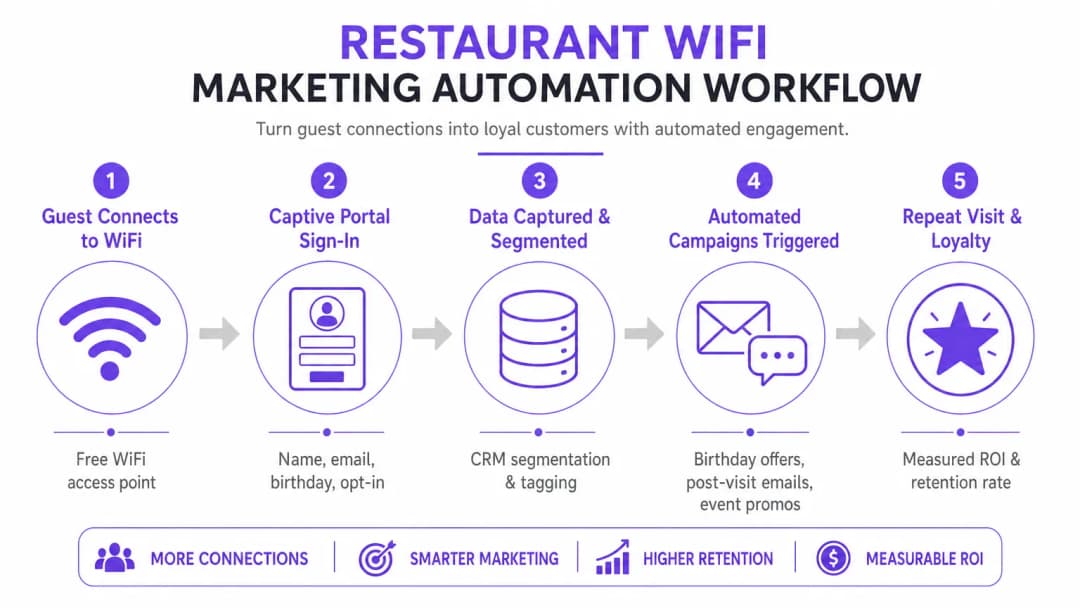
Wenn sich ein Gerät mit der Gast-SSID verbindet, schränkt der Wireless-LAN-Controller (WLC) oder Access Point den Netzwerkzugriff ein und leitet das Gerät in einen Walled Garden. Dem Nutzer wird ein Captive Portal präsentiert, das als primäre Schnittstelle zur Datenerfassung dient. Um die Conversion-Rates zu optimieren, muss das Portal mehrere Authentifizierungsmethoden unterstützen:
| Authentifizierungsmethode | Reibungspunkt-Niveau | Datenqualität | Komplexität der Implementierung |
|---|---|---|---|
| Social Login (OAuth 2.0) | Niedrig | Hoch (demografisch reichhaltig) | Mittel |
| Formularbasiert (E-Mail + Opt-in) | Mittel | Kontrolliert | Niedrig |
| SMS-Verifizierung | Mittelhoch | Hoch (verifizierte Mobilfunknummer) | Mittel |
| Passpoint / Hotspot 2.0 | Sehr niedrig | Mittel | Hoch |
Social Login (OAuth 2.0) Integrationen mit Google oder Facebook bieten einen barrierefreien Zugang und erfassen gleichzeitig wertvolle demografische Daten. Diese Methode basiert auf einem sicheren Token-Austausch, sodass Benutzer keine neuen Anmeldedaten erstellen müssen. Die formularbasierte Authentifizierung ermöglicht es Benutzern, ihren Namen, ihre E-Mail-Adresse und optional ihr Geburtsdatum oder ihre Telefonnummer anzugeben. Diese Daten werden validiert und sicher an eine zentrale Datenbank übertragen. Die nahtlose Re-Authentifizierung (MAC Caching) speichert die MAC-Adresse des Geräts für einen konfigurierbaren Zeitraum (z. B. 30 Tage) im Cache, was bei nachfolgenden Besuchen einen reibungslosen Zugang sowie eine präzise Erfassung der Besuchshäufigkeit ermöglicht.
Sicherheits- und Compliance-Protokolle
Die Bereitstellung von WiFi für Marketingzwecke erfordert die strikte Einhaltung von Sicherheits- und Datenschutzstandards. Die Architektur muss den Gast-Datenverkehr mithilfe von VLANs vom Unternehmensnetzwerk trennen, um laterale Bewegungen zu verhindern. Implementierungen müssen folgende Vorgaben erfüllen:
GDPR / CCPA: Das Captive Portal muss klare, nicht gekoppelte Zustimmungsmechanismen integrieren. Benutzer müssen aktiv in die Marketing-Kommunikation einwilligen (Opt-in), und die Plattform muss robuste Funktionen für Betroffenenrechte (DSAR) bereitstellen. Die Einwilligung zu Marketingzwecken darf nicht mit den Nutzungsbedingungen für den Netzwerkzugang gekoppelt werden.
PCI-DSS: Wenn am Standort Zahlungen über dieselbe physische Infrastruktur abgewickelt werden, müssen Netzwerksegmentierung und Firewall-Regeln die Karteninhaber-Datenumgebung (CDE) vom Gastnetzwerk isolieren.
WPA3-Enhanced Open (OWE): Der Übergang zu sicheren Onboarding-Protokollen bietet opportunistische Verschlüsselung für nicht authentifizierten Datenverkehr und mindert so die Risiken des Abhörens in offenen Netzwerken, ohne dass Benutzeranmeldedaten erforderlich sind.
Implementierungshandbuch: Bereitstellungsstrategien
Eine erfolgreiche Bereitstellung erfordert einen phasenweisen Ansatz, der sich auf Integration und Automatisierung konzentriert. Das Ziel ist es, einen nahtlosen Datenfluss von den Access Points zur Marketing-Automatisierungsplattform aufzubauen.
Schritt 1: Infrastrukturbewertung und Dimensionierung
Stellen Sie vor der Bereitstellung eines Captive Portals sicher, dass die zugrunde liegende RF-Infrastruktur die prognostizierte Client-Dichte bewältigen kann. Führen Sie eine prädiktive und aktive Standortvermessung durch, um Abdeckungslücken zu identifizieren und die Platzierung der APs zu optimieren. Berücksichtigen Sie die Kanalnutzung, Co-Kanal-Interferenzen und den erforderlichen Durchsatz pro Gerät. Bei Enterprise-Bereitstellungen sorgt die Nutzung einer dedizierten Business-Internetverbindung - wie einer Standleitung - für garantierte Bandbreite und symmetrische Geschwindigkeiten, wodurch verhindert wird, dass der Gast-Datenverkehr kritische Betriebssysteme beeinträchtigt.
Schritt 2: Konfiguration des Captive Portals
Gestalten Sie das Captive Portal mit Fokus auf Conversion-Optimierung. Die Benutzeroberfläche muss reaktionsschnell sein und auf Mobilgeräten extrem schnell laden, da die Mehrheit der Verbindungen von Smartphones ausgehen wird. Implementieren Sie Progressive Profiling: Fragen Sie beim ersten Besuch grundlegende Informationen (E-Mail-Adresse, Opt-in) ab und fordern Sie bei nachfolgenden Verbindungen zusätzliche Daten (Geburtstag, Telefonnummer) an. Dies minimiert Reibungsverluste und reichert das Kundenprofil im Laufe der Zeit an.
Schritt 3: CRM- und Automatisierungs-Integration
Der wahre Wert einer WiFi Analytics-Plattform wird erst durch die Integration realisiert. Konfigurieren Sie API-Webhooks oder native Konnektoren, um die erfassten Daten mit dem CRM des Standorts (z. B. Salesforce, HubSpot) und Marketing-Automatisierungstools zu synchronisieren. Richten Sie klare Daten-Mapping-Regeln ein, um sicherzustellen, dass Felder wie Last Visit Date und Total Visits bei jedem Authentifizierungsereignis in Echtzeit aktualisiert werden.
Schritt 4: Einrichtung der Kampagnen-Automatisierung
Konfigurieren Sie automatisierte Workflows, die durch bestimmte Netzwerkereignisse ausgelöst werden. Die drei Kernkampagnen, die in jeder Bereitstellung enthalten sein sollten, sind:
- Die Willkommens-Kampagne: Wird sofort nach der ersten erfolgreichen Authentifizierung ausgelöst. Sendet eine Begrüßungsnachricht und ein niederschwelliges Angebot, um einen erneuten Besuch innerhalb eines definierten Zeitrahmens zu fördern.
- Die "Wir vermissen Sie"-Kampagne: Wird ausgelöst, wenn ein Gerät für eine bestimmte Dauer (z. B. 45 Tage) nicht mehr im Netzwerk gesehen wurde. Bietet einen gezielten Anreiz, um inaktive Kunden genau im richtigen Moment wieder anzusprechen.
- Die Kampagne zur Generierung von Bewertungen: Wird 2 Stunden nach der Abmeldung des Benutzers vom Netzwerk ausgelöst, wobei RADIUS Accounting-Stop-Ereignisse oder Standort-API-Webhooks genutzt werden. Bittet um Feedback über TripAdvisor oder Google My Business, solange das Erlebnis noch frisch ist.
Haben Sie Fragen zu Ihrem spezifischen Setup?
Unser Team arbeitet mit Standortbetreibern, IT-Managern und Netzwerktechnikern an über 80.000 Standorten zusammen. Buchen Sie ein 20-minütiges Gespräch und wir zeigen Ihnen, wie andere diese Herausforderungen gelöst haben.
Best Practices für Enterprise-Standorte
Um die Wirksamkeit der Frage, wie sich das Kundenerlebnis in einem Restaurant durch WiFi-Marketing verbessern lässt, zu maximieren, gelten die folgenden herstellerunabhängigen Best Practices für die Bereiche Gastgewerbe, Einzelhandel und Transportwesen.
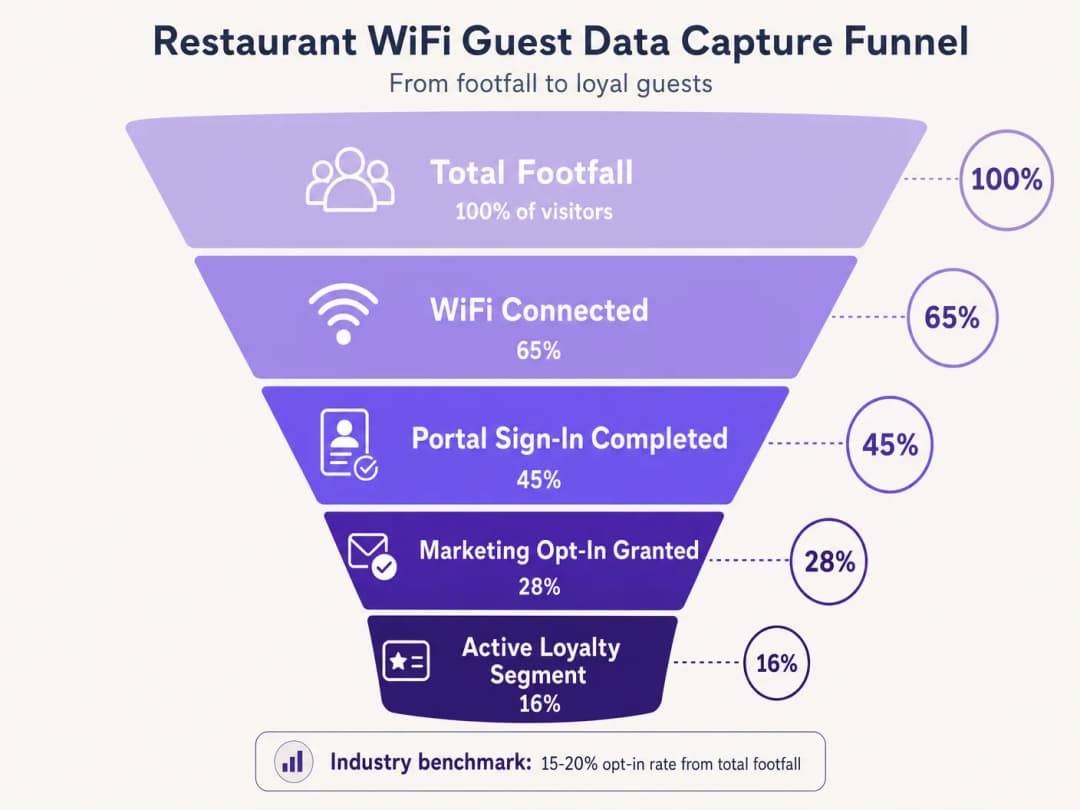
Priorisieren Sie das Opt-in. Das Hauptziel des Captive Portal besteht darin, die Zustimmung zum Marketing zu sichern. Stellen Sie sicher, dass das Wertversprechen - zum Beispiel "Nutzen Sie unser WiFi für exklusive Angebote und Geburtstagsüberraschungen" - prominent dargestellt wird. Branchen-Benchmarks zeigen, dass mit optimierten Portalen Opt-in-Raten von 15 bis 20 % der gesamten Besucherfrequenz erreicht werden können. Standorte mit schlecht gestalteten Portalen verzeichnen oft Raten von unter 5 %. Nutzen Sie Standortanalysen. Verwenden Sie die Ortungsdienste der Wireless-Infrastruktur (RSSI-Triangulation), um Verweilzeiten und Bewegungsmuster zu verstehen. Diese Daten unterstützen betriebliche Entscheidungen - Personalbesetzung, Layout-Optimierung, Spitzenzeiten-Management - weit über reine Marketinganwendungen hinaus. Eine WiFi Analytics-Plattform bietet das Dashboard und die Berichtsebene für diese Informationen.
Implementieren Sie Bandbreitenbegrenzung. Verhindern Sie, dass eine kleine Anzahl von Benutzern die Netzwerkressourcen monopolisiert, indem Sie Bandbreitenlimits pro Gerät und Sitzungszeitüberschreitungen durchsetzen. Dies sorgt für eine konsistente Quality of Experience (QoE) für alle Gäste und schützt betriebliche Systeme vor Bandbreitensättigung.
Vertikalenübergreifende Anwendung. Die Prinzipien des WiFi-Marketings lassen sich direkt auf angrenzende Sektoren übertragen. Für Betreiber von konzessionierten Betrieben bietet der Leitfaden Bar and Pub WiFi: A Complete Setup and Marketing Guide eine parallele taktische Referenz. Bei Implementierungen im Gesundheitswesen und im öffentlichen Sektor sind die Compliance-Anforderungen strenger, aber die Architektur zur Datenerfassung bleibt im Wesentlichen identisch.
Fehlerbehebung und Risikominderung
Die Bereitstellung von Gäste-WiFi bringt spezifische Risiken mit sich, die vor dem Go-Live aktiv gemanagt werden müssen.
Häufige Fehlerbilder und Lösungen
| Fehlerbild | Ursache | Lösung |
|---|---|---|
| Captive Portal erscheint nicht | Fehlkonfiguration des Walled Garden, SSL-Zertifikatsfehler | Whitelist-Domains prüfen; gültiges SSL-Zertifikat auf dem Portal installieren |
| Social Login schlägt stillschweigend fehl | OAuth-Provider-Domains nicht im Walled Garden | Authentifizierungsdomains des Anbieters zum Walled Garden hinzufügen |
| Wiederkehrende Gäste werden zur erneuten Authentifizierung aufgefordert | MAC-Randomisierung (iOS 14+, Android 10+) | Passpoint-Profile oder Standort-App implementieren |
| Verzögerungen bei der CRM-Datensynchronisierung | API-Rate-Limits oder Webhook-Fehler | Exponential Backoff und Dead-Letter-Queues implementieren |
| Niedrige Opt-in-Rate | Zu viele Formularfelder, schwaches Wertversprechen | Auf E-Mail + Opt-in beschränken; Portal-Texte optimieren |
MAC-Adress-Randomisierung erfordert besondere Aufmerksamkeit. Moderne mobile Betriebssysteme generieren randomisierte MAC-Adressen, um den Datenschutz zu verbessern, was das MAC-Caching und die Häufigkeitserfassung direkt stört. Wiederkehrende Gäste werden möglicherweise als neue Besucher behandelt, was Analysen verfälscht und fehlerhafte Kampagnensequenzen auslöst. Die langfristige Lösung besteht im Übergang zu Passpoint (Hotspot 2.0), das dauerhafte Geräteprofile unabhängig von MAC-Adressen verwendet. Wie die expansive Plattformstrategie von Purple zeigt - einschließlich der Fortschritte, die in Purple signals Higher Education ambitions with appointment of VP Education Tim Peers erörtert werden - ist die Anpassung an sich entwickelnde Datenschutzstandards entscheidend für eine nachhaltige Datenstrategie in allen Branchen.
ROI und geschäftliche Auswirkungen
Das ultimative Ziel bei der Bereitstellung einer WiFi Marketinglösung ist die Generierung eines messbaren Return on Investment (ROI). Der Erfolg sollte anhand einer definierten Reihe von KPIs gemessen werden, die vom ersten Tag an nachverfolgt werden.
| KPI | Definition | Branchen-Benchmark |
|---|---|---|
| Datenerfassungsrate | % der gesamten Besucherzahlen, die sich authentifizieren | 40-65% |
| Marketing-Opt-in-Rate | % der authentifizierten Nutzer, die ihre Zustimmung geben | 15-28% |
| Kampagnen-Öffnungsrate | % der geöffneten Kampagnen-E-Mails | 35-45% |
| Kampagnen-Konversionsrate | % der Empfänger, die Angebote einlösen | 8-15% |
| Steigerung der Wiederholungsbesuche | Zunahme der wiederkehrenden Besuche im Vergleich zur Kontrollgruppe | 12-22% |
Durch die systematische Erfassung von Daten, die Segmentierung von Zielgruppen und die Automatisierung zielgerichteter Kampagnen können IT- und Marketingteams ihre Wireless-Infrastruktur von einer notwendigen Ausgabe in ein strategisches Asset verwandeln. Für Einblicke in breitere Konnektivitätstrends, die den Betrieb von Veranstaltungsorten im Jahr 2026 beeinflussen, einschließlich der Konvergenz von WiFi Strategien im Fahrzeug und am Veranstaltungsort, siehe WiFi in Auto: The Complete 2026 Enterprise Guide.
Audio-Briefing: Ein 10-minütiges Beratungs-Briefing zur Architektur von WiFi für Marketing-ROI - mit Themen zu Architektur, Integration, Risikominderung und einer schnellen Fragerunde.
Schlüsseldefinitionen
Captive Portal
Eine Webseite, die ein Benutzer eines öffentlich zugänglichen Netzwerks ansehen und mit der er interagieren muss, bevor ihm der vollständige Internetzugang gewährt wird. Es dient als primäre Schnittstelle für die Datenerfassung und Einwilligung in einer Gast-WiFi Bereitstellung.
Das Captive Portal ist die wichtigste Einzelkomponente in einer WiFi Marketing-Architektur. Sein Design entscheidet direkt über die Datenerfassungsraten und die Marketing-Opt-In-Raten.
MAC Caching
Der Prozess der Speicherung der Media Access Control (MAC)-Adresse eines Geräts in einer Datenbank nach der ersten Authentifizierung, um bei nachfolgenden Besuchen den automatischen Netzwerkzugriff zu ermöglichen, ohne das Captive Portal erneut anzeigen zu müssen.
Unerlässlich, um Reibungsverluste für wiederkehrende Kunden zu reduzieren und die Besuchshäufigkeit genau zu erfassen. Wird durch die MAC-Adressen-Randomisierung in modernen mobilen Betriebssystemen zunehmend erschwert.
Walled Garden
Eine eingeschränkte Netzwerkumgebung, die steuert, auf welche IP-Adressen oder Domänen ein Gerät zugreifen kann, bevor die Authentifizierung abgeschlossen ist. Im Gast-WiFi definiert sie die Ressourcen, auf die vor der Anmeldung am Captive Portal zugegriffen werden kann.
Kritische Konfiguration, die erforderlich ist, damit Geräte das Captive Portal, Social-Login-Anbieter und die erforderlichen Backend-Dienste erreichen können, bevor der vollständige Internetzugang gewährt wird. Eine Fehlkonfiguration ist die Hauptursache dafür, dass das Portal nicht angezeigt wird.
Progressives Profiling
Die Methode zur schrittweisen Erfassung von Kundeninformationen über mehrere Interaktionen oder Besuche hinweg, anstatt alle Details auf einmal bei der ersten Interaktion abzufragen.
Wird verwendet, um die anfänglichen Opt-In-Raten zu maximieren, indem die erste Interaktion mit dem Captive Portal kurz gehalten wird (nur E-Mail + Opt-In), während bei nachfolgenden Besuchen reichhaltigere Kundenprofile aufgebaut werden.
RADIUS (Remote Authentication Dial-In User Service)
Ein Netzwerkprotokoll, das ein zentralisiertes Authentifizierungs-, Autorisierungs- und Accounting-Management (AAA) für Benutzer bereitstellt, die sich mit einem Netzwerkdienst verbinden.
Das zugrunde liegende Protokoll, das von den meisten Enterprise-WLC-Infrastrukturen zur Kommunikation mit der zentralen Datenbank zur Verwaltung des Gastzugangs verwendet wird. RADIUS Accounting-Stop-Nachrichten werden verwendet, um Abgänge von Gästen für ereignisgesteuerte Kampagnen-Trigger zu erkennen.
OAuth 2.0
Ein Autorisierungsprotokoll nach Industriestandard, das Drittanbieter-Anwendungen über einen sicheren Token-Austausch begrenzten Zugriff auf einen HTTP-Dienst gewährt, ohne dass Benutzerpasswörter weitergegeben werden.
Das Protokoll, das den Optionen für Social Login zugrunde liegt (Anmeldung mit Google, Anmeldung mit Facebook). Bietet eine reibungslose Authentifizierung für Captive Portale und erfasst gleichzeitig verifizierte demografische Daten des Identity-Providers.
Passpoint (Hotspot 2.0)
Ein Standard der Wi-Fi Alliance, der eine automatische, sichere Netzwerkerkennung und -verbindung mittels WPA2/WPA3-Verschlüsselung auf Enterprise-Niveau ermöglicht, ohne dass eine manuelle Interaktion mit dem Captive Portal erforderlich ist.
Die strategische, langfristige Alternative zu offenen Captive Portalen, die eine dauerhafte Geräteidentifikation bietet, die nicht von der Randomisierung von MAC-Adressen betroffen ist. Höhere Implementierungskomplexität, aber überragende Benutzererfahrung und Datengenauigkeit.
MAC Address Randomization
Eine Datenschutzfunktion in modernen mobilen Betriebssystemen (iOS 14+, Android 10+), die für jede Netzwerkverbindung eine eindeutige, zufällige MAC-Adresse generiert oder diese regelmäßig rotiert.
Beeinträchtigt direkt das MAC-Caching und die Frequenzmessung bei WiFi-Marketing-Implementierungen. Wiederkehrende Gäste werden möglicherweise als neue Besucher behandelt, was die Analysen verfälscht und fehlerhafte Kampagnensequenzen auslöst. Erfordert Passpoint oder eine App-basierte Identifizierung als Gegenmaßnahme.
Ausgearbeitete Beispiele
Eine nationale Restaurantkette mit 150 Standorten verzeichnet auf ihrem bestehenden Gast-WiFi-Netzwerk eine niedrige Datenerfassungsrate von unter 5 % der gesamten Besucherzahl. Die aktuelle Einrichtung verlangt von den Benutzern das Ausfüllen eines langen Formulars mit 6 Feldern, bevor der Zugriff gewährt wird. Das IT-Team wurde beauftragt, diese Erfassungsrate auf mindestens 20 % zu steigern, ohne die zugrunde liegende WLC-Infrastruktur zu ersetzen. Wie sollte die Architektur neu konfiguriert werden?
Die Implementierung erfordert den Übergang zu Progressive Profiling und reibungsarmer Authentifizierung, was ohne den Austausch der WLC-Hardware möglich ist. Schritt 1: Konfigurieren Sie die Captive Portal-Anwendungsebene so, dass OAuth 2.0-Social-Login-Schaltflächen (Google, Facebook) als primäre Authentifizierungsoption angezeigt werden. Dazu müssen die Authentifizierungsdomänen der OAuth-Anbieter zur Walled-Garden-White-List auf dem WLC hinzugefügt werden. Schritt 2: Für Benutzer, die eine formularbasierte Authentifizierung bevorzugen, reduzieren Sie das anfängliche Formular auf nur zwei Felder: E-Mail-Adresse und ein deutlich gekennzeichnetes Marketing-Opt-In-Kontrollkästchen. Entfernen Sie alle anderen Felder aus der ersten Interaktion. Schritt 3: Implementieren Sie ein MAC-Caching mit einer 30-tägigen Gültigkeit im Portal-Backend. Authentifizierte MAC-Adressen werden in der Portal-Datenbank gespeichert; der WLC prüft diese Liste, bevor er das Portal anzeigt. Schritt 4: Konfigurieren Sie das Portal so, dass beim zweiten oder dritten Besuch, sobald Vertrauen aufgebaut wurde, eine sekundäre Datenerfassungsaufforderung (Geburtsdatum, Telefonnummer) angezeigt wird. Schritt 5: Integrieren Sie die Portal-Datenbank über REST-API-Webhooks in das zentrale CRM und stellen Sie sicher, dass das Feld "Besuchsanzahl" bei jedem Authentifizierungsereignis erhöht wird, um die Progressive-Profiling-Logik zu steuern.
Ein großes Konferenzzentrum mit mehr als 200 Veranstaltungen pro Jahr möchte eine automatisierte Kampagne zur Bewertungsgenerierung implementieren. Das System soll genau 2 Stunden nach dem Verlassen des Veranstaltungsorts eine E-Mail an die Teilnehmer senden, wobei der E-Mail-Inhalt auf die spezifische besuchte Veranstaltung personalisiert sein muss. Welche technischen Komponenten und Konfigurationen sind erforderlich?
Dies erfordert eine Integration zwischen dem WLC, der Location Analytics Engine, dem Event-Management-System und der Marketing-Automation-Plattform. Schritt 1: Konfigurieren Sie den WLC so, dass er RADIUS Accounting-Stop-Nachrichten generiert, wenn sich ein Client-Gerät trennt. Alternativ können Sie die Location Analytics Engine so konfigurieren, dass sie ein "Abgang"-Event auslöst, wenn die RSSI eines Geräts für einen längeren Zeitraum (z. B. 5 Minuten) unter den Geofence-Schwellenwert des Standorts fällt. Schritt 2: Konfigurieren Sie einen Webhook in der WiFi Analytics Plattform, der beim Empfang des Abgangs-Events ausgelöst wird. Die Webhook-Payload muss die E-Mail-Adresse des Benutzers, die Zonen-ID des Standorts und den Zeitstempel enthalten. Schritt 3: Im Event-Management-System wird eine Lookup-Tabelle gepflegt, die die Zonen-IDs des Standorts und die Zeitfenster bestimmten Event-Namen zuordnet. Die Marketing-Automation-Plattform fragt diese Tabelle ab, um die Webhook-Payload mit dem Event-Namen anzureichern. Schritt 4: Erstellen Sie in der Marketing-Automation-Plattform einen Workflow, der den angereicherten Webhook empfängt, einen Verzögerungstimer von 2 Stunden startet und dann eine personalisierte E-Mail mit der Bitte um eine Bewertung unter Verwendung des Event-Namens als dynamische Inhaltsvariable versendet. Schritt 5: Konfigurieren Sie Ausschlusslisten, um den Versand der E-Mail zu verhindern, wenn der Teilnehmer bereits eine Bewertung abgegeben hat oder wenn er als VIP gekennzeichnet ist, was eine persönliche Nachbereitung erfordert.
Übungsfragen
Q1. Ein Standort meldet, dass iOS-Nutzer bei jedem Besuch wiederholt zur Anmeldung aufgefordert werden, obwohl das MAC-Caching mit einer 30-tägigen Gültigkeit aktiviert ist. Android-Nutzer haben dieses Problem nicht in gleichem Maße. Die WLC-Protokolle zeigen für jede iOS-Verbindung desselben physischen Geräts neue MAC-Adressen an. Was ist die Ursache und welche Lösungsstrategien gibt es?
Hinweis: Berücksichtigen Sie die in iOS 14 und neuer eingeführten Datenschutzfunktionen bezüglich Hardware-Identifikatoren auf Netzwerkbasis.
Musterlösung anzeigen
Die Ursache ist die MAC Address Randomization (Funktion "Private WLAN-Adresse" in iOS 14+). iOS-Geräte generieren eine eindeutige, zufällige MAC-Adresse für jede SSID und rotieren diese unter Umständen regelmäßig. Da die gecachte MAC-Adresse nicht mehr mit der aktuellen zufälligen Adresse des Geräts übereinstimmt, behandelt der WLC jede Verbindung als neues Gerät und zeigt das Captive Portal an. Kurzfristige Lösung: Weisen Sie die Nutzer an, die private WLAN-Adresse für die spezifische SSID des Standorts in ihren iOS-Netzwerkeinstellungen zu deaktivieren. Langfristige Lösung: Implementieren Sie Passpoint (Hotspot 2.0)-Profile, die eine dauerhafte, zertifikatsbasierte Geräteidentifikation unabhängig von der MAC-Adresse ermöglichen, oder entwickeln Sie eine standorteigene mobile App, die eine dauerhafte Identifikationsnummer für die Nutzersitzung speichert.
Q2. Sie entwerfen die Walled-Garden-Konfiguration für die Implementierung eines neuen Captive Portals, das Facebook und Google für den Social Login nutzt und die Portal-Benutzeroberfläche auf einem CDN hostet. Das Portal verwendet außerdem eine externe Schriftartenbibliothek. Welche spezifischen Ressourcenkategorien müssen auf die Whitelist gesetzt werden, um sicherzustellen, dass der Authentifizierungsprozess erfolgreich abgeschlossen wird?
Hinweis: Skizzieren Sie die vollständige Abfolge der HTTP-Anfragen, die ein Client-Gerät ab dem Moment der Verbindung mit der SSID bis zum Erhalt des OAuth-Callback-Tokens stellt.
Musterlösung anzeigen
Der Walled Garden muss die folgenden Ressourcenkategorien auf die Whitelist setzen: 1. Den eigenen IP-Bereich oder die Domain des Captive Portal-Servers. 2. Die CDN-Domains, die die HTML-, CSS- und JavaScript-Dateien des Portals hosten. 3. Die Domain der externen Schriftartenbibliothek (z. B. fonts.googleapis.com). 4. Die OAuth-Authentifizierungsdomains für Facebook (z. B. graph.facebook.com, www.facebook.com) und Google (z. B. accounts.google.com, oauth2.googleapis.com). 5. Alle Bild- oder Asset-CDNs, die von den Login-Buttons der OAuth-Anbieter verwendet werden. 6. Certificate Revocation List (CRL)- oder OCSP-Endpunkte, damit das Client-Gerät das SSL-Zertifikat des Portals validieren kann. Wenn eine dieser Kategorien fehlt, bricht der Authentifizierungsfluss unbemerkt ab oder zeigt eine fehlerhafte Benutzeroberfläche an.
Q3. Ein Marketing-Team möchte eine SMS-Kampagne an Gäste genau in dem Moment auslösen, in dem sie an einer bestimmten Desserttheke im Restaurant vorbeigehen. Die aktuelle Infrastruktur nutzt Standard-802.11ac-Access-Points mit RSSI-basierten Standortanalysen. Ist dies mit der erforderlichen Genauigkeit und Latenz machbar? Welche Infrastrukturänderungen wären gegebenenfalls erforderlich?
Hinweis: Bewerten Sie die räumliche Auflösung und die Aktualisierungslatenz der standardmäßigen RSSI-basierten Triangulation im Vergleich zur Präzision, die für einen Trigger auf Kassenebene erforderlich ist.
Musterlösung anzeigen
Nein, dies ist mit standardmäßigen RSSI-basierten Standortanalysen nicht machbar. Die RSSI-Triangulation bietet typischerweise eine Positionsgenauigkeit von 5 bis 10 Metern, was unzureichend ist, um eine bestimmte Theke innerhalb eines Restaurants zu unterscheiden. Darüber hinaus führt das Abfrageintervall für RSSI-Updates zu einer Latenz von mehreren Sekunden, was bedeutet, dass der Gast den Zielbereich möglicherweise bereits verlassen hat, bevor der Trigger ausgelöst wird. Um eine Genauigkeit auf Thekenebene bei geringer Latenz zu erreichen, müsste die Infrastruktur durch BLE-Beacons (Bluetooth Low Energy) an der Desserttheke oder Ultra-Wideband-Technologie (UWB) erweitert werden. Die App des Standorts oder ein BLE-fähiges Gerät würde das Proximity-Signal des Beacons erkennen und die SMS über die Marketing-Automatisierungsplattform auslösen. Dies erfordert eine standortspezifische mobile Anwendung und ein BLE-Beacon-Managementsystem, was eine erhebliche Steigerung der Bereitstellungskomplexität und der Kosten bedeutet.
Weiterlesen in dieser Reihe
Kundenbeziehungen aufbauen: Digitale Strategien für physische Unternehmen
Dieser maßgebliche technische Leitfaden beschreibt detailliert, wie physische Unternehmen - wie Hotels, Einzelhandelsketten, Stadien und Veranstaltungsorte des öffentlichen Sektors - eine Enterprise WiFi Infrastruktur als Motor für First-Party-Datenerfassung und Kundenbindung einsetzen können. Er deckt die gesamte Architektur ab, von der Gestaltung des Captive Portal und der nahtlosen Authentifizierung (IEEE 802.11u/Passpoint) bis hin zur CRM-Integration, GDPR Compliance und messbarem ROI. IT-Leiter und Betreiber von Veranstaltungsorten finden hier praxisnahe Bereitstellungsanleitungen, Fallstudien aus der Praxis und ein Compliance-fokussiertes Framework zur Risikominderung.
So nutzen Sie First-Party-Daten in Marketingkampagnen
Dieser fundierte Leitfaden beschreibt detailliert, wie IT- und Marketingteams in Unternehmen ihre Guest-WiFi-Infrastruktur in eine leistungsstarke First-Party-Daten-Engine verwandeln können. Er behandelt die technische Architektur für die Datenerfassung, das GDPR-konforme Einwilligungsmanagement, Segmentierungsstrategien sowie die praxisnahe Aktivierung über E-Mail, SMS, Social Advertising und Programmatic Display. Betreiber von Veranstaltungsorten und IT-Teams finden hier konkrete Implementierungsanleitungen, Praxisbeispiele aus Hotellerie und Einzelhandel sowie messbare ROI-Frameworks.
Warum WiFi-Marketing nutzen? Der Business Case mit echten Daten
Dieser technische Leitfaden beschreibt den evidenzbasierten Business Case für WiFi-Marketing. Er bietet IT-Leitern und Standortbetreibern umsetzbare Daten zu ROI, Verweildauer und wiederholten Besuchen, die aus realen Implementierungen abgeleitet wurden.
Haben Sie Fragen zu Ihrem spezifischen Setup?
Unser Team arbeitet mit Standortbetreibern, IT-Managern und Netzwerktechnikern an über 80.000 Standorten zusammen. Buchen Sie ein 20-minütiges Gespräch und wir zeigen Ihnen, wie andere diese Herausforderungen gelöst haben.