
Zapier आणि Purple सह WiFi इव्हेंट्स 1,500+ अॅप्सशी कनेक्ट करणे
हे मार्गदर्शक Purple WiFi ला Zapier सोबत इंटिग्रेट करण्याच्या तांत्रिक आर्किटेक्चर आणि व्यावहारिक अंमलबजावणीचा तपशील देते. हे कस्टम कोड न लिहिता CRM सिंक्रोनायझेशन, अतिथी कम्युनिकेशन्स आणि ऑपरेशनल अलर्ट्स स्वयंचलित करण्यासाठी व्हेन्यू ऑपरेटर्स आणि IT टीम्सना कृती करण्यायोग्य रेसिपीज प्रदान करते.
हे मार्गदर्शक ऐका
पॉडकास्ट ट्रान्सक्रिप्ट पहा
कार्यकारी सारांश
आधुनिक ठिकाणांसाठी, अतिथी WiFi नेटवर्क आता केवळ कनेक्टिव्हिटीची सुविधा राहिलेली नाही; ग्राहक प्रतिबद्धता आणि ऑपरेशनल इंटेलिजन्ससाठी हा एक महत्त्वपूर्ण सेन्सर लेयर आहे. तथापि, जर हा डेटा प्रोप्रायटरी डॅशबोर्डमध्ये मर्यादित राहिला, तर त्याचे मूल्य मूलभूतपणे मर्यादित होते. हे तांत्रिक संदर्भ मार्गदर्शक Purple द्वारे प्रदान केलेल्या Guest WiFi आणि Zapier ऑटोमेशन प्लॅटफॉर्ममधील इंटिग्रेशन एक्सप्लोर करते, जे IT आणि मार्केटिंग ऑपरेशन्स टीम्सना रिअल-टाइम कनेक्शन इव्हेंट्स 1,500 पेक्षा जास्त डाउनस्ट्रीम अॅप्लिकेशन्सकडे राउट करण्यास सक्षम करते.
Zapier चा मिडलवेअर म्हणून वापर करून, Retail , Hospitality आणि इतर जास्त गर्दीच्या वातावरणातील संस्था जटिल वर्कफ्लो स्वयंचलित करू शकतात—रिअल-टाइम CRM सिंक्रोनायझेशन आणि टार्गेटेड SMS मार्केटिंगपासून ते Slack द्वारे ऑपरेशनल अलर्टिंगपर्यंत. हे मार्गदर्शक उपलब्ध ट्रिगर इव्हेंट्स, मुख्य आर्किटेक्चरल विचार आणि GDPR आणि PCI DSS सारख्या डेटा गोपनीयता मानकांचे काटेकोरपणे पालन करताना त्वरित ROI प्रदान करण्यासाठी डिझाइन केलेल्या सहा प्रोडक्शन-रेडी ऑटोमेशन रेसिपीजचा तपशील देते.
तांत्रिक सखोल माहिती (Technical Deep-Dive)
इंटिग्रेशन आर्किटेक्चर
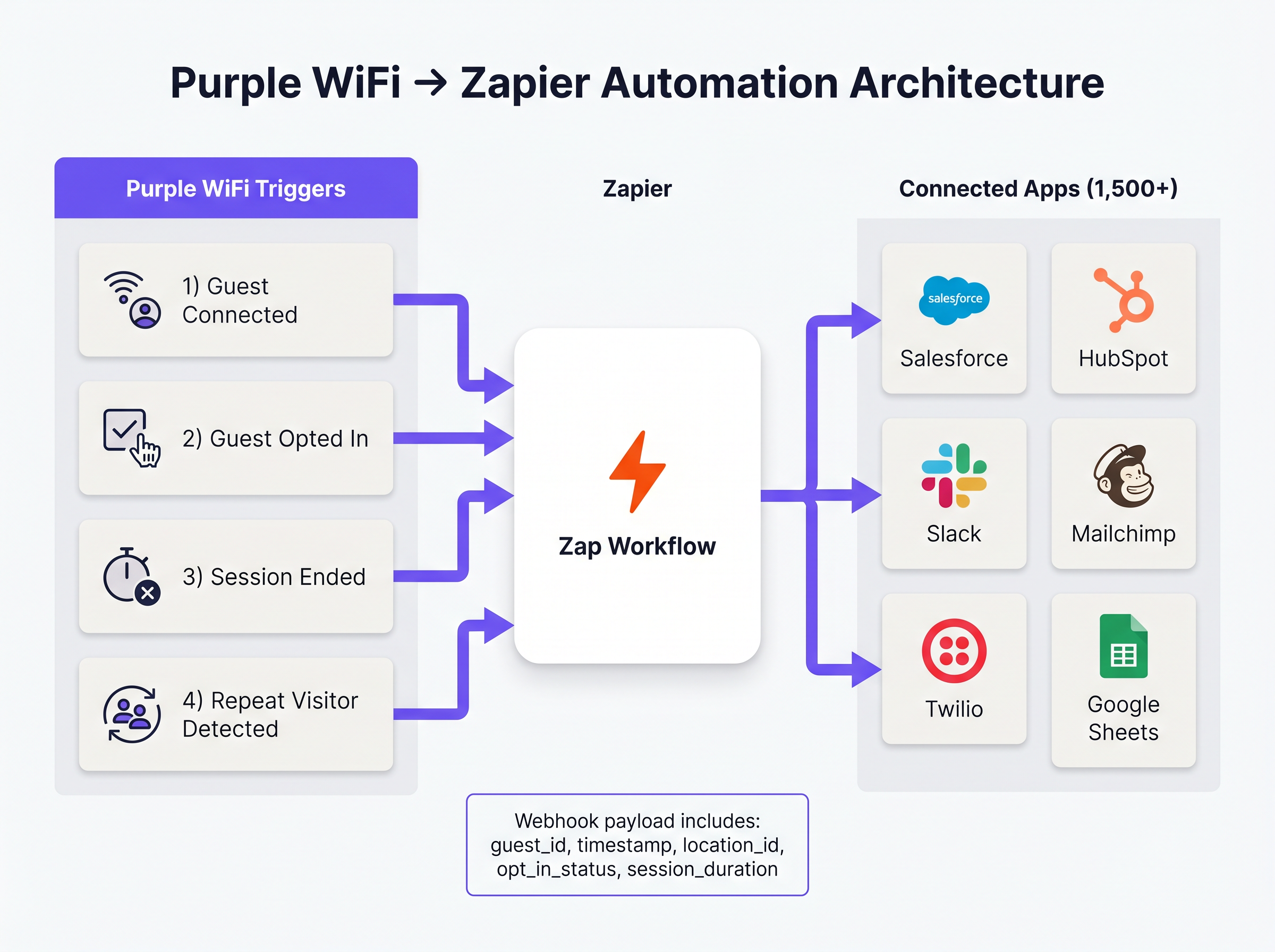
Purple आणि Zapier मधील इंटिग्रेशन वेबहुक-चालित इव्हेंट मॉडेलवर कार्य करते. जेव्हा एखादा पूर्वनिर्धारित नेटवर्क इव्हेंट घडतो तेव्हा Purple इव्हेंट स्रोत म्हणून कार्य करते आणि Zapier ला स्ट्रक्चर्ड JSON पेलोड्स पुश करते. Zapier, इंटिग्रेशन प्लॅटफॉर्म अॅज अ सर्व्हिस (iPaaS) म्हणून कार्य करत, हा पेलोड प्राप्त करते, वापरकर्त्याने परिभाषित केलेल्या लॉजिकनुसार ('Zap') त्यावर प्रक्रिया करते आणि टार्गेट अॅप्लिकेशन्सना API कॉल्स एक्झिक्युट करते.
हे आर्किटेक्चर शेकडो वेगवेगळ्या SaaS प्लॅटफॉर्म्ससाठी API ऑथेंटिकेशन, रेट लिमिटिंग आणि एरर हँडलिंग व्यवस्थापित करण्याची गुंतागुंत दूर करते, ज्यामुळे नेटवर्क आर्किटेक्ट्सना इंटिग्रेशन मेंटेनन्सऐवजी बिझनेस लॉजिकवर लक्ष केंद्रित करण्याची अनुमती मिळते.
मुख्य ट्रिगर इव्हेंट्स
Purple Zapier ला अनेक भिन्न इव्हेंट प्रकार एक्सपोज करते. ऑपरेशनल कार्यक्षमता आणि नियामक अनुपालन या दोन्हीसाठी योग्य ट्रिगर निवडणे अत्यंत महत्त्वाचे आहे.
- Guest Connected: यशस्वी नेटवर्क ऑथेंटिकेशनवर त्वरित फायर होतो. पेलोडमध्ये
guest_id,timestamp,location_idआणि अॅक्सेस पॉईंट तपशील समाविष्ट असतात. फूटफॉल लॉगिंग आणि ऑपरेशनल अलर्टिंगसाठी हा प्राथमिक ट्रिगर आहे. - Guest Opted In: जेव्हा अतिथी Captive Portal वर मार्केटिंग अटी स्पष्टपणे स्वीकारतो तेव्हाच फायर होतो. CRM किंवा मार्केटिंग ऑटोमेशन प्लॅटफॉर्म्सना फीड करणाऱ्या WiFi Analytics डेटाचा समावेश असलेल्या कोणत्याही वर्कफ्लोसाठी हा अनिवार्य ट्रिगर आहे, जो GDPR अनुपालन सुनिश्चित करतो.
- Session Ended: जेव्हा क्लायंट डिव्हाइस डिस्कनेक्ट होते किंवा टाइम आउट होते तेव्हा फायर होतो. पेलोडमध्ये
session_durationसमाविष्ट असते, जे महत्त्वपूर्ण ड्वेल-टाइम मेट्रिक्स प्रदान करते. - Repeat Visitor Detected: जेव्हा Purple अॅनालिटिक्स इंजिन परत येणारा MAC अॅड्रेस ओळखते तेव्हा ट्रिगर होतो, ज्यामुळे VIP रेकग्निशन आणि लॉयल्टी प्रोग्राम वर्कफ्लो सक्षम होतात.
अंमलबजावणी मार्गदर्शक
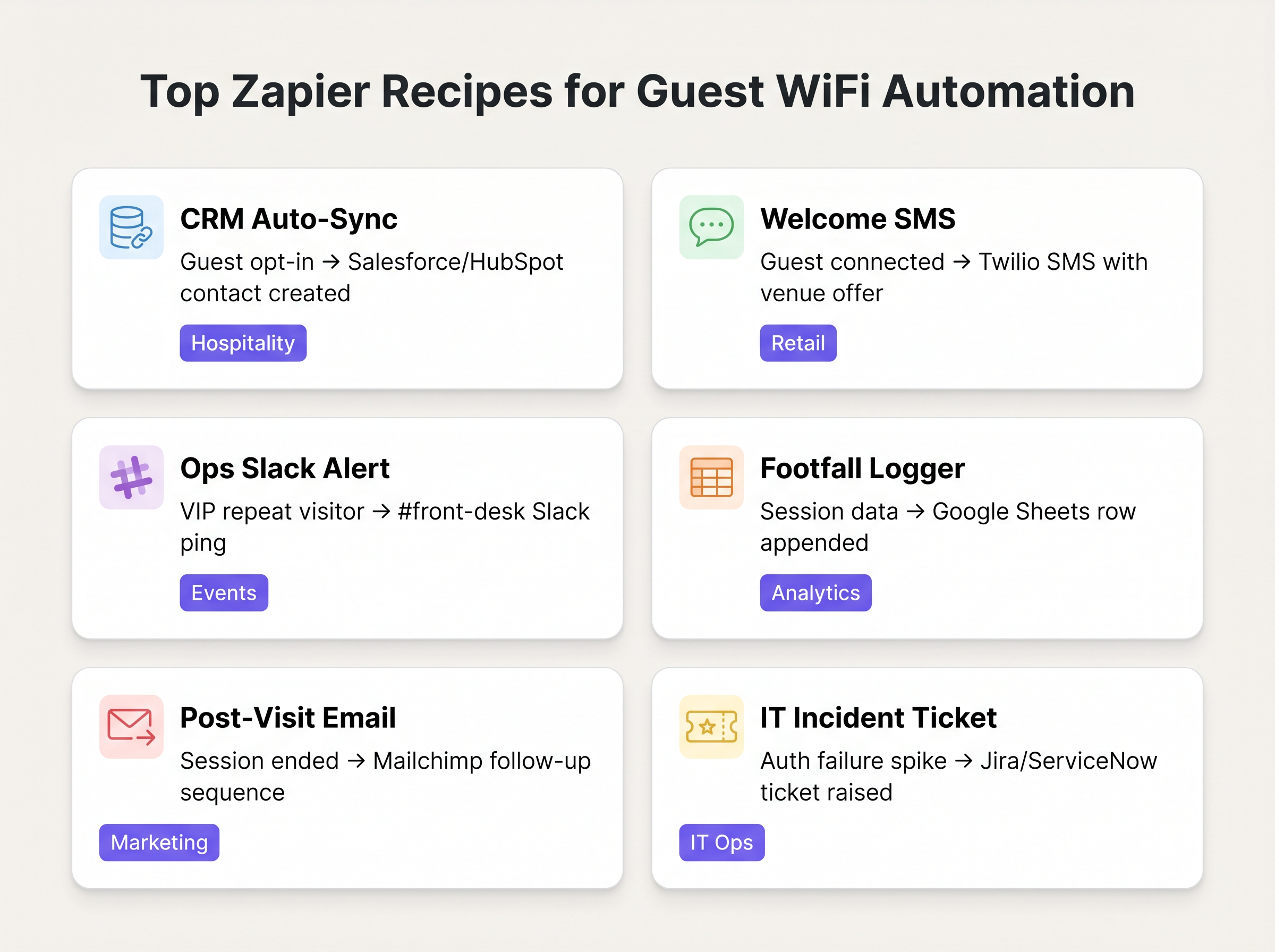
डेटा हायजीन सुनिश्चित करण्यासाठी आणि रेट-लिमिट संपणे टाळण्यासाठी Purple-Zapier ऑटोमेशन तैनात करण्यासाठी संरचित दृष्टिकोन आवश्यक आहे. खालील रेसिपीज सामान्य एंटरप्राइझ डिप्लॉयमेंटसाठी सर्वोच्च-मूल्य वर्कफ्लो दर्शवतात.
मूलभूत रेसिपीज
1. CRM ऑटो-सिंक (बेसलाइन)
- ट्रिगर: Purple
Guest Opted In - अॅक्शन: Salesforce किंवा HubSpot मध्ये संपर्क तयार करा/अपडेट करा.
- कारण: मॅन्युअल CSV एक्सपोर्ट्स काढून टाकते. मार्केटिंग डेटाबेस सत्यापित, ऑप्ट-इन केलेल्या अतिथी डेटासह सतत अपडेट केला जातो हे सुनिश्चित करते.
2. रिअल-टाइम वेलकम SMS
- ट्रिगर: Purple
Guest Connected - फिल्टर: Zapier फिल्टर (जर
guest_idगेल्या 30 दिवसांत दिसला नसेल तरच पुढे जा). - अॅक्शन: Twilio द्वारे SMS पाठवा.
- कारण: Retail वातावरणात त्वरित प्रतिबद्धता वाढवते. परत येणाऱ्या अभ्यागतांना स्पॅम करणे टाळण्यासाठी फिल्टर स्टेप महत्त्वपूर्ण आहे.
3. ऑपरेशनल अलर्टिंग
- ट्रिगर: Purple
Repeat Visitor Detected - अॅक्शन: Slack मध्ये मेसेज पोस्ट करा.
- कारण: जेव्हा एखादा VIP किंवा ज्ञात उच्च-मूल्य अतिथी नेटवर्कशी कनेक्ट होतो तेव्हा Hospitality सेटिंग्जमध्ये फ्रंट डेस्क किंवा कॉन्सिअर्जला अलर्ट करते.
सर्वोत्तम पद्धती (Best Practices)
हे वर्कफ्लो आर्किटेक्ट करताना, स्थिरता आणि अनुपालन सुनिश्चित करण्यासाठी वरिष्ठ IT व्यावसायिकांनी अनेक प्रमुख तत्त्वांचे पालन केले पाहिजे:
- मार्केटिंगसाठी 'Connected' पेक्षा 'Opted In' ला प्राधान्य द्या: CRM रेकॉर्ड तयार करणाऱ्या किंवा मार्केटिंग कम्युनिकेशन्स पाठवणाऱ्या कोणत्याही Zap साठी नेहमी
Guest Opted Inट्रिगर वापरा. या उद्देशांसाठी कच्च्याGuest Connectedइव्हेंटवर अवलंबून राहणे GDPR संमती आवश्यकतांचे उल्लंघन करते आणि डेटा गुणवत्ता कमी करते. - डिडुप्लिकेशन लॉजिक लागू करा: एकच वापरकर्ता एकाधिक उपकरणांसह (स्मार्टफोन, लॅपटॉप, टॅबलेट) कनेक्ट होऊ शकतो. योग्यरित्या हाताळले नाही तर, यामुळे डुप्लिकेट CRM रेकॉर्ड तयार होतील. तुमच्या Zapier अॅक्शन्समध्ये डिव्हाइस-बाउंड MAC अॅड्रेसऐवजी प्राथमिक डिडुप्लिकेशन की म्हणून हॅश केलेला ईमेल अॅड्रेस (उपलब्ध असल्यास) वापरा.
- टास्क कन्झम्प्शनवर लक्ष ठेवा: Zapier ची किंमत टास्क व्हॉल्यूमवर आधारित आहे. जर प्रत्येक कनेक्शनने मल्टी-स्टेप Zap ट्रिगर केले तर एखादे व्यस्त ठिकाण सहजपणे मानक टियर अलाउन्स संपवू शकते. वर्कफ्लोच्या सुरुवातीलाच असंबद्ध इव्हेंट्स वगळण्यासाठी Zapier चे अंगभूत फिल्टरिंग वापरा आणि हाय-व्हॉल्यूम फूटफॉल लॉगिंगसाठी डेटा बॅचिंगचा (उदा. Google Sheets मध्ये प्रति तास रोल-अप्स) विचार करा.
ट्रबलशूटिंग आणि जोखीम निवारण
या आर्किटेक्चरमधील सर्वात सामान्य फेल्युअर मोड म्हणजे डाउनस्ट्रीम API टोकन कालबाह्य होणे. Purple ची वेबहुक डिलिव्हरी अत्यंत विश्वासार्ह असली तरी, जर ऑथेंटिकेशन टोकन्स कालबाह्य झाले किंवा API रेट लिमिट्स ओलांडले गेले तर Zapier आणि टार्गेट अॅप्लिकेशन (उदा. Salesforce) मधील कनेक्शन अयशस्वी होऊ शकते.
निवारण धोरण: जर एखादा Zap सलग अयशस्वी झाला तर IT ऑपरेशन्स टीमला Slack किंवा ईमेलद्वारे अलर्ट करण्यासाठी Zapier चे अंगभूत एरर हँडलिंग कॉन्फिगर करा. वारंवार होणाऱ्या डेटा मॅपिंग एरर्स ओळखण्यासाठी आणि सोडवण्यासाठी Zap हिस्ट्रीचे नियमितपणे ऑडिट करा.
याव्यतिरिक्त, संवेदनशील डेटा हाताळणाऱ्या सिस्टीम्सशी (जसे की Healthcare मध्ये) इंटिग्रेट करताना, Zapier द्वारे प्रसारित केलेला डेटा पेलोड HIPAA किंवा स्थानिक गोपनीयता नियमांचे उल्लंघन करत नाही याची खात्री करा. वर्कफ्लोसाठी आवश्यक असलेल्या किमान आवश्यक फील्ड्सपुरता पेलोड मर्यादित ठेवा.
ROI आणि व्यावसायिक प्रभाव
Zapier इंटिग्रेशनसाठी गुंतवणुकीवरील परतावा (ROI) सामान्यतः वाचलेले तास आणि सुधारित डेटा अचूकतेमध्ये मोजला जातो. CRM इंजेशन स्वयंचलित करून, मार्केटिंग टीम्स मॅन्युअल डेटा रँगलिंगवर पूर्वी खर्च केलेले तास वाचवतात. अधिक महत्त्वाचे म्हणजे, रिअल-टाइम इंटिग्रेशन 'इन-मोमेंट' मार्केटिंग सक्षम करते—ग्राहक प्रत्यक्ष ठिकाणी उपस्थित असताना त्यांना गुंतवून ठेवणे—जे पोस्ट-व्हिजिट ईमेल मोहिमांपेक्षा सातत्याने उच्च रूपांतरण दर (conversion rates) दर्शवते.
महत्वाच्या व्याख्या
वेबहुक (Webhook)
HTTP POST विनंत्या वापरून एका अॅप्लिकेशनने दुसऱ्या अॅप्लिकेशनला रिअल-टाइम माहिती प्रदान करण्याची एक पद्धत.
अतिथी कनेक्ट होताच Zapier ला इव्हेंट डेटा पाठवण्यासाठी Purple वापरत असलेली ही अंतर्निहित यंत्रणा आहे.
iPaaS (इंटिग्रेशन प्लॅटफॉर्म अॅज अ सर्व्हिस)
क्लाउड सेवांचा एक संच जो वैयक्तिक किंवा एकाधिक संस्थांमधील ऑन-प्रिमाइसेस आणि क्लाउड-आधारित प्रक्रिया, सेवा, अॅप्लिकेशन्स आणि डेटाच्या कोणत्याही संयोजनाला जोडणाऱ्या इंटिग्रेशन फ्लोचा विकास, अंमलबजावणी आणि प्रशासन सक्षम करतो.
या आर्किटेक्चरमध्ये Zapier iPaaS म्हणून कार्य करते, जे Purple आणि 1,500+ डाउनस्ट्रीम अॅप्लिकेशन्सच्या दरम्यान असते.
Captive Portal
एक वेब पेज जे सार्वजनिक-अॅक्सेस नेटवर्कच्या वापरकर्त्याला अॅक्सेस मिळण्यापूर्वी पाहणे आणि त्याच्याशी संवाद साधणे बंधनकारक असते.
परस्परसंवादाचा बिंदू जिथे Purple अतिथी डेटा आणि मार्केटिंग संमती कॅप्चर करते, ज्यामुळे 'Guest Opted In' इव्हेंट ट्रिगर होतो.
पेलोड (Payload)
हेडर्स आणि मेटाडेटा वगळून, वेबहुक किंवा API विनंतीमध्ये पाठवला जाणारा वास्तविक डेटा पॅक.
Purple वेबहुक पेलोडमध्ये डाउनस्ट्रीम CRM फील्ड्स भरण्यासाठी आवश्यक असलेला अतिथी ID, लोकेशन डेटा आणि टाइमस्टॅम्प्स असतात.
ड्वेल टाइम (Dwell Time)
अभ्यागत विशिष्ट भौतिक क्षेत्रात किंवा नेटवर्कशी कनेक्ट राहून घालवत असलेला वेळेचा कालावधी.
'Session Ended' ट्रिगर वापरून मोजले जाणारे, हे मेट्रिक रिटेल अॅनालिटिक्स आणि ऑपरेशनल प्लॅनिंगसाठी महत्त्वपूर्ण आहे.
रेट लिमिटिंग (Rate Limiting)
नेटवर्क ट्रॅफिक मर्यादित करण्यासाठी एक धोरण, जे विशिष्ट कालमर्यादेत एखादी व्यक्ती किती वेळा कृतीची पुनरावृत्ती करू शकते हे प्रतिबंधित करते.
Zaps डिझाइन करताना एक महत्त्वपूर्ण विचार; हाय-व्हॉल्यूम WiFi इव्हेंट्स Salesforce सारख्या डाउनस्ट्रीम अॅप्लिकेशन्सवरील API रेट लिमिट्स सहजपणे संपवू शकतात.
डिडुप्लिकेशन (Deduplication)
पुनरावृत्ती होणाऱ्या डेटाच्या डुप्लिकेट प्रती ओळखण्याची आणि काढून टाकण्याची प्रक्रिया.
फोन आणि लॅपटॉप दोन्हीसह कनेक्ट होणारा अतिथी दोन स्वतंत्र संपर्क रेकॉर्ड तयार करणार नाही याची खात्री करण्यासाठी CRM Zaps तयार करताना आवश्यक आहे.
MAC अॅड्रेस कोरिलेशन (MAC Address Correlation)
एकाधिक सेशन्समध्ये त्यांचे युनिक हार्डवेअर आयडेंटिफायर जुळवून परत येणारी उपकरणे ओळखण्याची प्रक्रिया.
लॉयल्टी वर्कफ्लो सक्षम करून, 'Repeat Visitor Detected' ट्रिगर फायर करण्यासाठी Purple वापरत असलेली यंत्रणा.
सोडवलेली उदाहरणे
एका 200-खोल्यांच्या बुटीक हॉटेलला नवीन अतिथींना त्यांच्या Mailchimp वेलकम सिक्वेन्समध्ये स्वयंचलितपणे जोडायचे आहे, परंतु केवळ तेव्हाच जेव्हा अतिथीने मार्केटिंग ईमेल्स प्राप्त करण्यास स्पष्टपणे सहमती दर्शविली असेल. त्यांना हे देखील सुनिश्चित करायचे आहे की परत येणाऱ्या अतिथींना पुन्हा वेलकम सिक्वेन्स मिळणार नाही.
- Zapier ट्रिगर Purple च्या 'Guest Opted In' इव्हेंटवर सेट करा ('Guest Connected' वर नाही). 2. अतिथीचा ईमेल आधीपासून अस्तित्वात आहे की नाही हे पाहण्यासाठी Google Sheet 'Log' तपासण्यासाठी Zapier फिल्टर स्टेप जोडा. 3. जर तो अस्तित्वात नसेल, तर अॅक्शन 1 कडे जा: Mailchimp ऑडियन्समध्ये सबस्क्रायबर जोडा. 4. अॅक्शन 2: भविष्यातील डुप्लिकेट्स टाळण्यासाठी नवीन अतिथीचा ईमेल आणि टाइमस्टॅम्प Google Sheet 'Log' मध्ये जोडा.
एका मोठ्या रिटेल चेनला त्यांच्या Purple WiFi नेटवर्कवरून BI टीमसाठी मध्यवर्ती डेटा वेअरहाऊसमध्ये प्रति तास फूटफॉल डेटा लॉग करणे आवश्यक आहे, परंतु कनेक्शनच्या उच्च प्रमाणामुळे त्यांच्या Zapier टास्क मर्यादा ओलांडण्याबद्दल त्यांना चिंता आहे.
प्रत्येक वैयक्तिक 'Guest Connected' इव्हेंटसाठी Zap ट्रिगर करण्याऐवजी, IT टीम दर तासाला रन होण्यासाठी Zapier 'Schedule' ट्रिगर कॉन्फिगर करते. त्यानंतर Zap गेल्या 60 मिनिटांतील एकत्रित कनेक्शन काउंटसाठी Purple API ला क्वेरी करण्यासाठी Webhook अॅक्शन वापरते आणि ते एकच एकत्रित मूल्य डेटा वेअरहाऊसमध्ये लिहिते.
सराव प्रश्न
Q1. तुमच्या मार्केटिंग टीमला स्टेडियम WiFi शी कनेक्ट होणाऱ्या प्रत्येक अतिथीला स्वयंचलितपणे 10% सवलतीचा SMS पाठवायचा आहे. प्राथमिक अनुपालन जोखीम काय आहे आणि ती कमी करण्यासाठी Zap कसे आर्किटेक्ट केले पाहिजे?
टीप: केवळ नेटवर्कमध्ये सामील होणे आणि मार्केटिंग कम्युनिकेशन्स प्राप्त करण्यास सहमती देणे यातील फरकाचा विचार करा.
नमुना उत्तर पहा
स्पष्ट संमतीशिवाय मार्केटिंग मेसेजेस पाठवून GDPR/TCPA चे उल्लंघन करणे ही प्राथमिक जोखीम आहे. Zap ने 'Guest Connected' ट्रिगर नव्हे तर 'Guest Opted In' ट्रिगर वापरला पाहिजे. याव्यतिरिक्त, इव्हेंटदरम्यान प्रत्येक वेळी ते पुन्हा कनेक्ट झाल्यावर पाठवण्याऐवजी, प्रति अतिथी केवळ एकदाच SMS पाठवला जाईल याची खात्री करण्यासाठी Zapier फिल्टर लागू केले पाहिजे.
Q2. एक रिटेल क्लायंट तक्रार करत आहे की 'Log every connection to Google Sheets' Zap लागू केल्यानंतर त्यांचा Zapier टास्क वापर वाढला आहे, ज्यामुळे त्यांना हजारो डॉलर्सचा खर्च येत आहे. तुम्ही हा वर्कफ्लो पुन्हा कसा डिझाइन कराल?
टीप: BI टीमला रिअल-टाइम रो-बाय-रो डेटा आवश्यक आहे की त्यांना फक्त प्रति तास एकत्रित डेटा (hourly aggregates) आवश्यक आहे?
नमुना उत्तर पहा
इव्हेंट-ड्रिव्हन आर्किटेक्चरवरून शेड्युल्ड पोलिंग आर्किटेक्चरकडे शिफ्ट करा. प्रत्येक कनेक्शनवर Zap ट्रिगर करण्याऐवजी, दर तासाला रन होण्यासाठी Zapier Schedule कॉन्फिगर करा. Zap ने मागील तासासाठी एकत्रित कनेक्शन काउंट मिळवण्यासाठी Purple ला API कॉल केला पाहिजे आणि ती एकच रो Google Sheets मध्ये लिहिली पाहिजे. यामुळे टास्कचा वापर प्रति तास संभाव्य हजारो वरून प्रति तास फक्त एकावर कमी होतो.
Q3. जेव्हा एखादा विशिष्ट VIP नेटवर्कशी कनेक्ट होतो तेव्हा ऑपरेशन्स टीमला प्रत्येक वेळी Slack अलर्ट हवा असतो. तुम्ही या विशिष्ट वापरकर्त्याला इतर हजारो दैनंदिन कनेक्शन्समधून कसे वेगळे कराल?
टीप: अॅक्शन एक्झिक्युट करण्यापूर्वी तुम्हाला पेलोड डेटाचे मूल्यांकन करणे आवश्यक आहे.
नमुना उत्तर पहा
'Guest Connected' किंवा 'Repeat Visitor Detected' ट्रिगर वापरा. यानंतर लगेचच Zapier फिल्टर स्टेप वापरा. जर पेलोडमधील guest_id किंवा mac_address फील्ड VIP च्या ज्ञात आयडेंटिफायरशी तंतोतंत जुळत असेल तरच Zap ला पुढे जाण्याची अनुमती देण्यासाठी फिल्टर कॉन्फिगर करा. जर ते जुळत नसेल, तर पुढील टास्क न वापरता किंवा Slack वर पोस्ट न करता Zap थांबतो.
या मालिकेमध्ये पुढे वाचा
रेस्टॉरंट WiFi मार्केटिंग: मोफत WiFi चे रूपांतर नियमित ग्राहकांमध्ये कसे करावे
हे अधिकृत तांत्रिक संदर्भ मार्गदर्शक रेस्टॉरंट WiFi मार्केटिंगच्या आर्किटेक्चर आणि अंमलबजावणीचे अन्वेषण करते — अतिथी नेटवर्क ॲक्सेसचा स्ट्रक्चर्ड डेटा संपादन आणि मार्केटिंग ऑटोमेशन चॅनेल म्हणून वापर करण्याची पद्धत. हे आयटी मॅनेजर्स, नेटवर्क आर्किटेक्ट्स आणि व्हेन्यू ऑपरेशन्स डायरेक्टर्सना Captive Portal डिप्लॉय करण्यासाठी, CRM प्लॅटफॉर्म्ससह समाकलित करण्यासाठी आणि मोजता येण्याजोगा नियमित व्यवसाय चालविणाऱ्या स्वयंचलित मोहिमा ट्रिगर करण्यासाठी एक रणनीतिक ब्लूप्रिंट प्रदान करते. GDPR-अनुरूप डेटा कॅप्चरपासून ते इव्हेंट-चालित ईमेल वर्कफ्लोपर्यंत, हे मार्गदर्शक ठोस ROI मेट्रिक्ससह संपूर्ण डिप्लॉयमेंट जीवनचक्र कव्हर करते.
ग्राहकांशी कसे जोडावे: भौतिक व्यवसायांसाठी डिजिटल धोरणे
हे अधिकृत तांत्रिक संदर्भ मार्गदर्शक भौतिक-स्थान असलेले व्यवसाय — हॉटेल्स, रिटेल चेन्स, स्टेडियम्स आणि सार्वजनिक-क्षेत्रातील ठिकाणे — फर्स्ट-पार्टी डेटा कॅप्चर आणि कस्टमर एंगेजमेंट इंजिन म्हणून एंटरप्राइझ WiFi इन्फ्रास्ट्रक्चर कसे तैनात करू शकतात याचा तपशील देते. हे Captive Portal डिझाइन आणि अखंड ऑथेंटिकेशन (IEEE 802.11u/Passpoint) पासून ते CRM इंटिग्रेशन, GDPR अनुपालन आणि मोजता येण्याजोग्या ROI पर्यंतचे संपूर्ण आर्किटेक्चर कव्हर करते. IT लीडर्स आणि व्हेन्यू ऑपरेटर्सना कृती करण्यायोग्य डिप्लॉयमेंट मार्गदर्शन, वास्तविक-जगातील केस स्टडीज आणि कंप्लायन्स-फर्स्ट रिस्क मिटिगेशन फ्रेमवर्क मिळेल.
मार्केटिंग मोहिमांमध्ये फर्स्ट-पार्टी डेटा कसा वापरावा
हे अधिकृत मार्गदर्शक एंटरप्राइज आयटी आणि मार्केटिंग टीम्स त्यांच्या अतिथी WiFi इन्फ्रास्ट्रक्चरचे एका शक्तिशाली फर्स्ट-पार्टी डेटा इंजिनमध्ये कसे रूपांतर करू शकतात याचा तपशील देते. यात डेटा कॅप्चरसाठी तांत्रिक आर्किटेक्चर, GDPR-सुसंगत संमती व्यवस्थापन, सेगमेंटेशन धोरणे आणि ईमेल, एसएमएस, सोशल ॲडव्हर्टायझिंग आणि प्रोग्रॅमॅटिक डिस्प्लेवर वास्तविक-जगातील ॲक्टिव्हेशन समाविष्ट आहे. ठिकाण ऑपरेटर आणि आयटी टीम्सना ठोस अंमलबजावणी मार्गदर्शन, हॉस्पिटॅलिटी आणि रिटेलमधील सोडवलेली उदाहरणे आणि मोजता येण्याजोगे ROI फ्रेमवर्क्स मिळतील.