
Connessione degli eventi WiFi a oltre 1.500 app con Zapier e Purple
Questa guida illustra l'architettura tecnica e l'implementazione pratica dell'integrazione di Purple WiFi con Zapier. Fornisce agli operatori di locali e ai team IT ricette attuabili per automatizzare la sincronizzazione del CRM, le comunicazioni con gli ospiti e gli avvisi operativi senza scrivere codice personalizzato.
Ascolta questa guida
Visualizza trascrizione del podcast
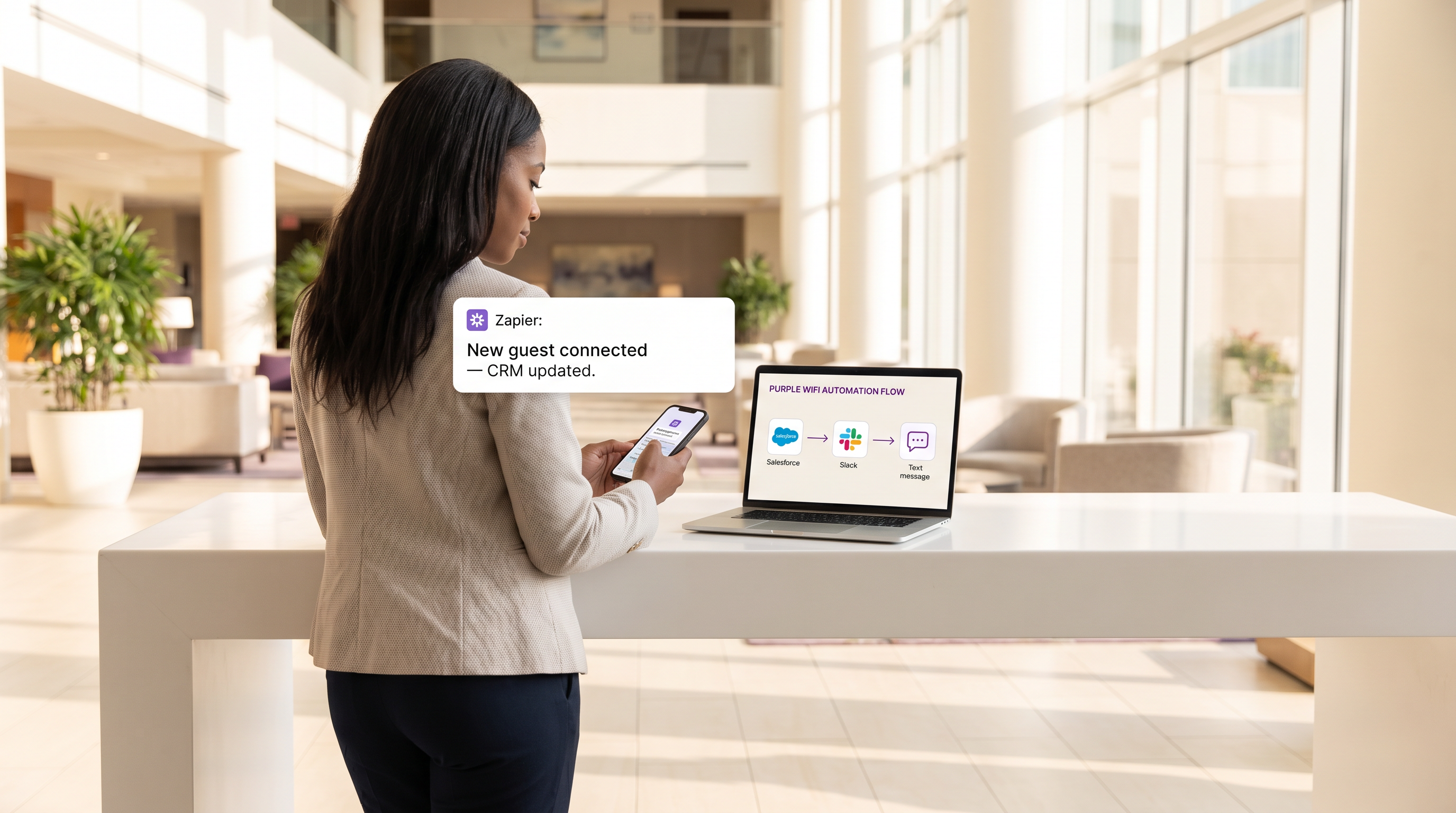
Riepilogo Esecutivo
Per i locali moderni, la rete WiFi per gli ospiti non è più solo un servizio di connettività; è uno strato sensoriale critico per il coinvolgimento dei clienti e l'intelligence operativa. Tuttavia, il valore di questi dati è fondamentalmente limitato se rimangono isolati all'interno di una dashboard proprietaria. Questa guida di riferimento tecnico esplora l'integrazione tra il Guest WiFi fornito da Purple e la piattaforma di automazione Zapier, consentendo ai team IT e di marketing di instradare eventi di connessione in tempo reale a oltre 1.500 applicazioni a valle.
Sfruttando Zapier come middleware, le organizzazioni nel Retail , nell' Hospitality e in altri ambienti ad alto traffico possono automatizzare flussi di lavoro complessi, dalla sincronizzazione CRM in tempo reale e marketing SMS mirato all'alerting operativo tramite Slack. Questa guida descrive in dettaglio gli eventi trigger disponibili, le considerazioni architettoniche fondamentali e sei ricette di automazione pronte per la produzione, progettate per fornire un ROI immediato mantenendo una rigorosa conformità agli standard di privacy dei dati come GDPR e PCI DSS.
Approfondimento Tecnico
Architettura di Integrazione
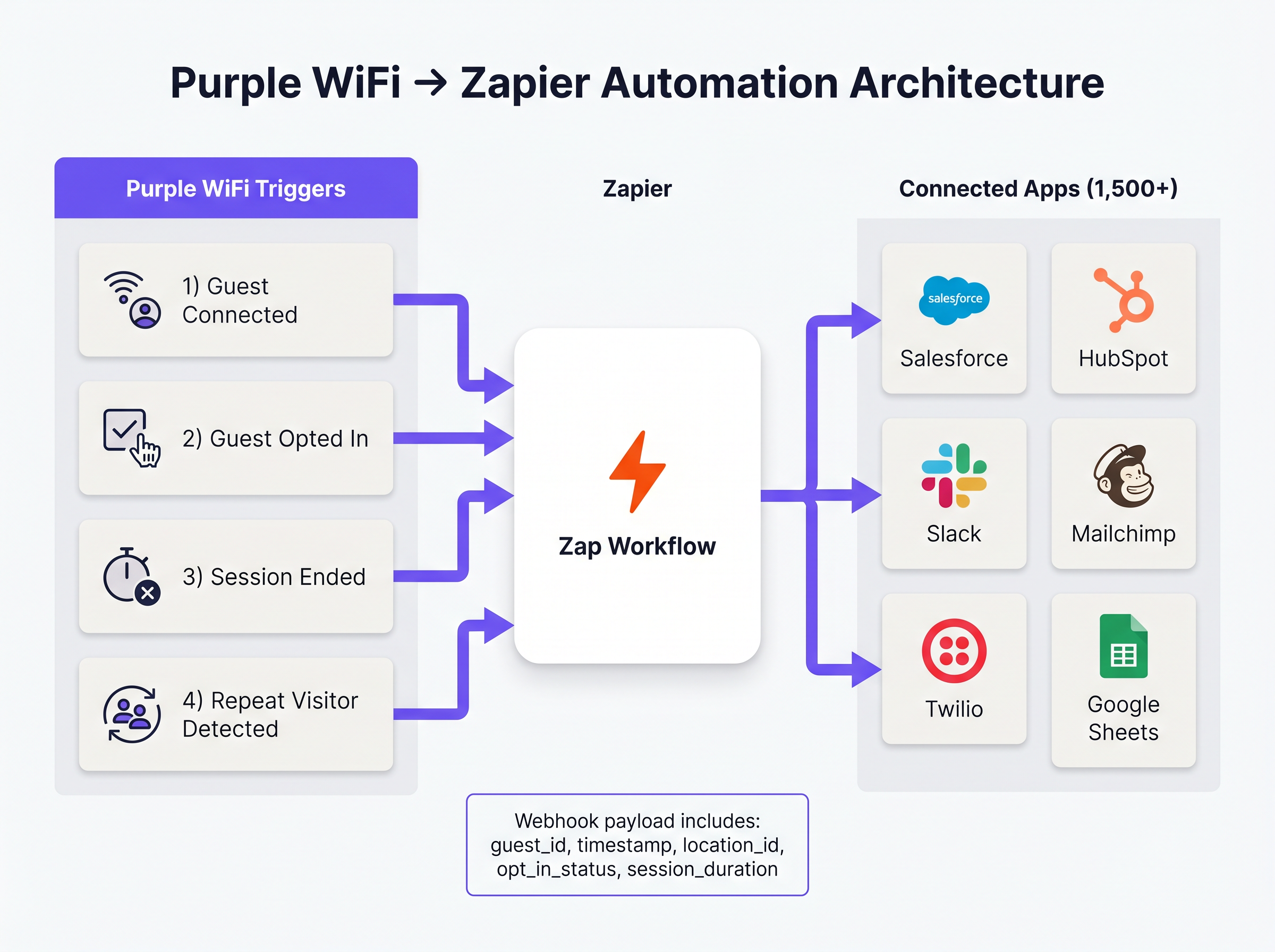
L'integrazione tra Purple e Zapier opera su un modello di eventi basato su webhook. Purple agisce come sorgente dell'evento, inviando payload JSON strutturati a Zapier ogni volta che si verifica un evento di rete predefinito. Zapier, funzionando come piattaforma di integrazione come servizio (iPaaS), riceve questo payload, lo elabora secondo la logica definita dall'utente (lo 'Zap') ed esegue chiamate API alle applicazioni di destinazione.
Questa architettura astrae la complessità della gestione dell'autenticazione API, della limitazione della frequenza e della gestione degli errori per centinaia di diverse piattaforme SaaS, consentendo agli architetti di rete di concentrarsi sulla logica di business piuttosto che sulla manutenzione dell'integrazione.
Eventi Trigger Principali
Purple espone diversi tipi di eventi distinti a Zapier. La selezione del trigger corretto è fondamentale sia per l'efficienza operativa che per la conformità normativa.
- Ospite Connesso: Si attiva immediatamente al successo dell'autenticazione di rete. Il payload include
guest_id,timestamp,location_ide i dettagli del punto di accesso. Questo è il trigger primario per la registrazione del traffico e l'alerting operativo. - Ospite Ha Acconsentito: Si attiva solo quando un ospite accetta esplicitamente i termini di marketing sul captive portal. Questo è il trigger obbligatorio per qualsiasi flusso di lavoro che coinvolga dati di WiFi Analytics che alimentano piattaforme CRM o di automazione del marketing, garantendo la conformità al GDPR.
- Sessione Terminata: Si attiva quando un dispositivo client si disconnette o scade. Il payload include
session_duration, fornendo metriche critiche sul tempo di permanenza. - Visitatore Ripetuto Rilevato: Si attiva quando il motore di analisi di Purple identifica un indirizzo MAC di ritorno, abilitando il riconoscimento VIP e i flussi di lavoro dei programmi fedeltà.
Guida all'Implementazione
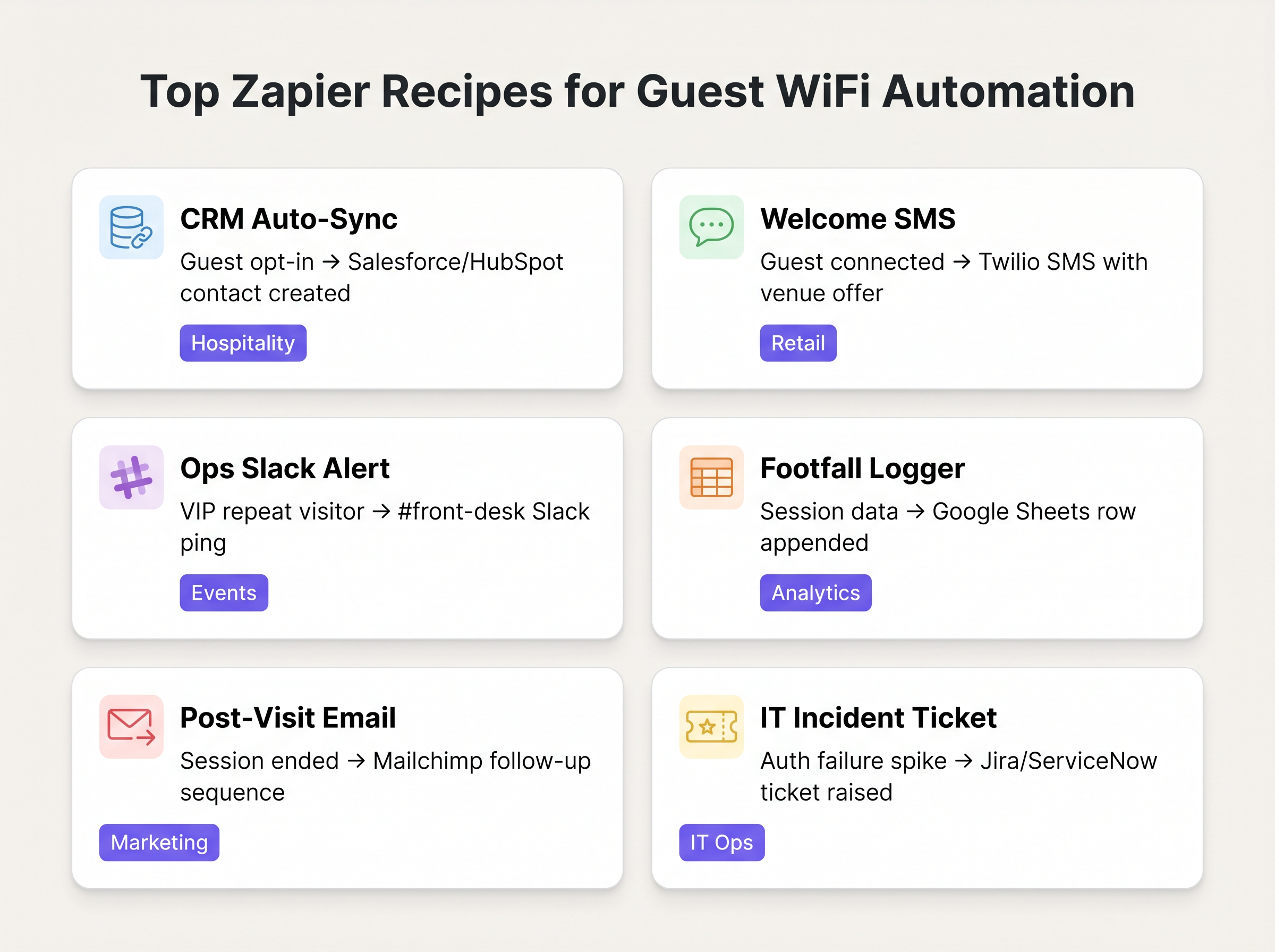
L'implementazione dell'automazione Purple-Zapier richiede un approccio strutturato per garantire l'igiene dei dati ed evitare l'esaurimento dei limiti di frequenza. Le seguenti ricette rappresentano i flussi di lavoro di maggior valore per le tipiche implementazioni aziendali.
Ricette Fondamentali
1. Sincronizzazione Automatica CRM (La Base)
- Trigger: Purple
Ospite Ha Acconsentito - Azione: Crea/Aggiorna Contatto in Salesforce o HubSpot.
- Motivazione: Elimina le esportazioni CSV manuali. Assicura che il database di marketing sia continuamente aggiornato con dati verificati e con consenso degli ospiti.
2. SMS di Benvenuto in Tempo Reale
- Trigger: Purple
Ospite Connesso - Filtro: Filtro Zapier (Procedi solo se
guest_idnon è stato visto negli ultimi 30 giorni). - Azione: Invia SMS tramite Twilio.
- Motivazione: Favorisce l'engagement immediato negli ambienti Retail . Il passaggio del filtro è fondamentale per prevenire lo spamming dei visitatori di ritorno.
3. Alerting Operativo
- Trigger: Purple
Visitatore Ripetuto Rilevato - Azione: Pubblica Messaggio in Slack.
- Motivazione: Avvisa la reception o il concierge in ambienti Hospitality quando un VIP o un ospite di alto valore noto si connette alla rete.
Best Practice
Quando si progettano questi flussi di lavoro, i professionisti IT senior devono aderire a diversi principi chiave per garantire stabilità e conformità:
- Dare Priorità a 'Ha Acconsentito' Rispetto a 'Connesso' per il Marketing: Utilizzare sempre il trigger
Ospite Ha Acconsentitoper qualsiasi Zap che crea un record CRM o invia comunicazioni di marketing. Affidarsi all'eventoOspite Connessogrezzo per questi scopi viola i requisiti di consenso GDPR e degrada la qualità dei dati. - Implementare la Logica di Deduplicazione: Un singolo utente può connettersi con più dispositivi (smartphone, laptop, tablet). Se non gestito correttamente, ciò creerà record CRM duplicati. Utilizzare l'indirizzo email con hash (se disponibile) come chiave di deduplicazione primaria nelle azioni Zapier, piuttosto che l'indirizzo MAC legato al dispositivo.
- Monitorare il Consumo di Task: Il prezzo di Zapier si basa sul volume dei task. Un locale affollato può facilmente esaurire un'allocazione di livello standard se ogni singola connessione attiva uno Zap a più passaggi. Utilizzare il filtro integrato di Zapier per eliminare gli eventi irrilevanti all'inizio del flusso di lavoro e considerare il raggruppamento dei dati (ad esempio, riepiloghi orari su Google Sheets) per la registrazione di un elevato volume di traffico.
Risoluzione dei Problemi e Mitigazione dei Rischigazione
La modalità di errore più comune in questa architettura è la scadenza dei token API a valle. Sebbene la consegna dei webhook di Purple sia altamente affidabile, la connessione tra Zapier e l'applicazione di destinazione (ad esempio, Salesforce) può fallire se i token di autenticazione scadono o se i limiti di frequenza delle API vengono superati.
Strategia di Mitigazione: Configurare la gestione degli errori integrata di Zapier per avvisare il team operativo IT tramite Slack o e-mail se uno Zap fallisce consecutivamente. Controllare regolarmente la cronologia di Zap per identificare e risolvere errori ricorrenti di mappatura dei dati.
Inoltre, quando si integra con sistemi che gestiscono dati sensibili (come nel settore Sanitario ), assicurarsi che il payload di dati trasmesso tramite Zapier non violi HIPAA o le normative locali sulla privacy. Limitare il payload ai campi minimi necessari per il flusso di lavoro.
ROI e Impatto sul Business
Il ritorno sull'investimento per l'integrazione di Zapier è tipicamente misurato in ore risparmiate e accuratezza dei dati migliorata. Automatizzando l'ingestione nel CRM, i team di marketing recuperano le ore precedentemente dedicate alla manipolazione manuale dei dati. Ancora più importante, l'integrazione in tempo reale consente il marketing 'in-moment' – coinvolgendo il cliente mentre è fisicamente presente nella sede – il che dimostra costantemente tassi di conversione più elevati rispetto alle campagne e-mail post-visita.
Definizioni chiave
Webhook
A method for one application to provide real-time information to another application using HTTP POST requests.
This is the underlying mechanism Purple uses to send event data to Zapier the moment a guest connects.
iPaaS (Integration Platform as a Service)
A suite of cloud services enabling the development, execution and governance of integration flows connecting any combination of on premises and cloud-based processes, services, applications and data within individual or across multiple organizations.
Zapier acts as the iPaaS in this architecture, sitting between Purple and the 1,500+ downstream applications.
Captive Portal
A web page that the user of a public-access network is obliged to view and interact with before access is granted.
The point of interaction where Purple captures guest data and marketing consent, triggering the 'Guest Opted In' event.
Payload
The actual data pack that is sent in a webhook or API request, excluding the headers and metadata.
The Purple webhook payload contains the guest ID, location data, and timestamps needed to populate downstream CRM fields.
Dwell Time
The length of time a visitor spends in a specific physical area or connected to the network.
Calculated using the 'Session Ended' trigger, this metric is crucial for retail analytics and operational planning.
Rate Limiting
A strategy for limiting network traffic, restricting how often someone can repeat an action within a certain timeframe.
A critical consideration when designing Zaps; high-volume WiFi events can easily exhaust API rate limits on downstream applications like Salesforce.
Deduplication
The process of identifying and removing duplicate copies of repeating data.
Essential when building CRM Zaps to ensure that a guest connecting with both a phone and a laptop doesn't create two separate contact records.
MAC Address Correlation
The process of identifying returning devices by matching their unique hardware identifier across multiple sessions.
The mechanism Purple uses to fire the 'Repeat Visitor Detected' trigger, enabling loyalty workflows.
Esempi pratici
A 200-room boutique hotel wants to automatically add new guests to their Mailchimp welcome sequence, but only if the guest has explicitly agreed to receive marketing emails. They also want to ensure that returning guests do not receive the welcome sequence again.
- Set the Zapier Trigger to Purple's 'Guest Opted In' event (not 'Guest Connected'). 2. Add a Zapier Filter step to check a Google Sheet 'Log' to see if the guest's email already exists. 3. If it does not exist, proceed to Action 1: Add Subscriber to Mailchimp Audience. 4. Action 2: Append the new guest's email and timestamp to the Google Sheet 'Log' to prevent future duplicates.
A large retail chain needs to log hourly footfall data from their Purple WiFi network into a central data warehouse for the BI team, but they are concerned about exceeding their Zapier task limits due to the high volume of connections.
Instead of triggering a Zap for every individual 'Guest Connected' event, the IT team configures a Zapier 'Schedule' trigger to run every hour. The Zap then uses a Webhook action to query the Purple API for the aggregated connection count over the last 60 minutes, and writes that single aggregated value to the data warehouse.
Domande di esercitazione
Q1. Your marketing team wants to automatically send a 10% discount SMS to every guest who connects to the stadium WiFi. What is the primary compliance risk, and how should the Zap be architected to mitigate it?
Suggerimento: Consider the difference between simply joining a network and agreeing to receive marketing communications.
Visualizza risposta modello
The primary risk is violating GDPR/TCPA by sending marketing messages without explicit consent. The Zap must use the 'Guest Opted In' trigger, not the 'Guest Connected' trigger. Furthermore, a Zapier Filter should be implemented to ensure the SMS is only sent once per guest, rather than every time they reconnect during the event.
Q2. A retail client is complaining that their Zapier task usage has spiked, costing them thousands of dollars, after implementing a 'Log every connection to Google Sheets' Zap. How would you redesign this workflow?
Suggerimento: Does the BI team need real-time row-by-row data, or do they just need hourly aggregates?
Visualizza risposta modello
Shift from an event-driven architecture to a scheduled polling architecture. Instead of triggering a Zap on every connection, configure a Zapier Schedule to run hourly. The Zap should make an API call to Purple to retrieve the aggregated connection count for the previous hour, and write that single row to Google Sheets. This reduces task consumption from potentially thousands per hour to just one per hour.
Q3. The operations team wants a Slack alert every time a specific VIP connects to the network. How do you isolate this specific user from the thousands of other daily connections?
Suggerimento: You need to evaluate the payload data before executing the action.
Visualizza risposta modello
Use the 'Guest Connected' or 'Repeat Visitor Detected' trigger. Immediately follow this with a Zapier Filter step. Configure the filter to only allow the Zap to continue if the guest_id or mac_address field in the payload exactly matches the known identifier of the VIP. If it doesn't match, the Zap halts without consuming further tasks or posting to Slack.
Continua a leggere questa serie
Marketing WiFi per Ristoranti: Come Trasformare il WiFi Gratuito in Clienti Fedeli
Questa guida tecnica di riferimento autorevole esplora l'architettura e l'implementazione del marketing WiFi per ristoranti — la pratica di utilizzare l'accesso alla rete ospite come canale strutturato per l'acquisizione di dati e l'automazione del marketing. Fornisce a manager IT, architetti di rete e direttori delle operazioni delle sedi un piano tattico per l'implementazione di captive portals, l'integrazione con piattaforme CRM e l'attivazione di campagne automatizzate che generano affari ripetuti misurabili. Dalla raccolta dati conforme al GDPR ai flussi di lavoro email basati su eventi, questa guida copre l'intero ciclo di vita dell'implementazione con metriche ROI concrete.
Come Connettersi con i Clienti: Strategie Digitali per le Attività Fisiche
Questa guida tecnica di riferimento autorevole descrive in dettaglio come le attività con sede fisica — hotel, catene di vendita al dettaglio, stadi e luoghi del settore pubblico — possano implementare un'infrastruttura WiFi aziendale come motore di acquisizione dati di prima parte e di coinvolgimento dei clienti. Copre l'intera architettura, dalla progettazione del captive portal e l'autenticazione senza interruzioni (IEEE 802.11u/Passpoint) all'integrazione CRM, alla conformità GDPR e al ROI misurabile. I responsabili IT e gli operatori delle strutture troveranno indicazioni pratiche per l'implementazione, casi di studio reali e un framework di mitigazione del rischio incentrato sulla conformità.
Come utilizzare i dati di prima parte nelle campagne di marketing
This authoritative guide details how enterprise IT and marketing teams can transform their guest WiFi infrastructure into a powerful first-party data engine. It covers technical architecture for data capture, GDPR-compliant consent management, segmentation strategies, and real-world activation across email, SMS, social advertising, and programmatic display. Venue operators and IT teams will find concrete implementation guidance, worked examples from hospitality and retail, and measurable ROI frameworks.