
Conectando eventos de WiFi a más de 1.500 aplicaciones con Zapier y Purple
Esta guía detalla la arquitectura técnica y la implementación práctica de la integración de Purple WiFi con Zapier. Ofrece a los operadores de recintos y a los equipos de TI recetas prácticas para automatizar la sincronización de CRM, las comunicaciones con los invitados y las alertas operativas sin necesidad de escribir código personalizado.
Escuchar esta guía
Ver transcripción del podcast
Resumen Ejecutivo
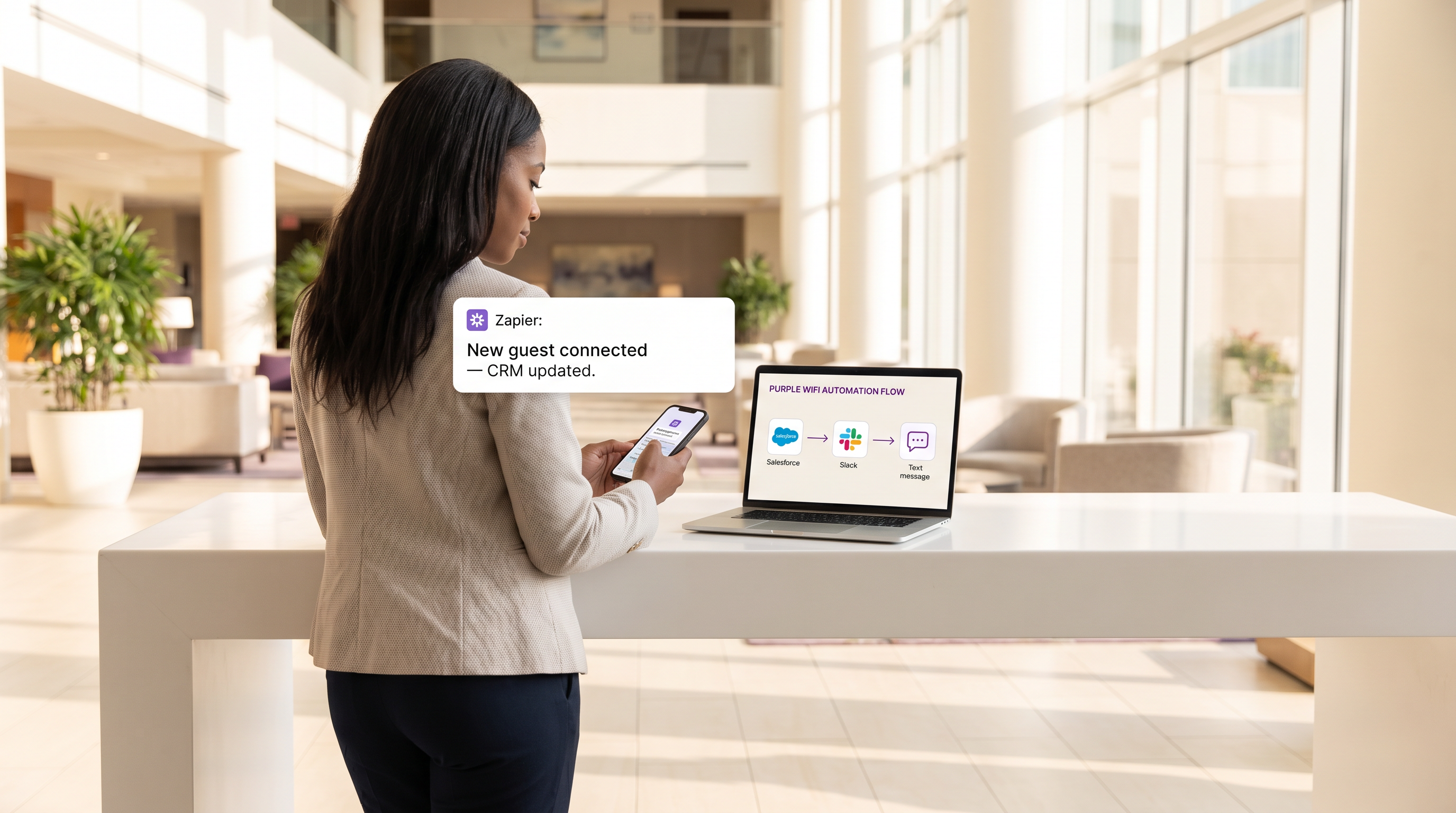
Para los recintos modernos, la red WiFi para invitados ya no es simplemente una comodidad de conectividad; es una capa de sensor crítica para la interacción con el cliente y la inteligencia operativa. Sin embargo, el valor de estos datos es fundamentalmente limitado si permanecen aislados en un panel de control propietario. Esta guía de referencia técnica explora la integración entre el Guest WiFi proporcionado por Purple y la plataforma de automatización Zapier, permitiendo a los equipos de TI y operaciones de marketing dirigir eventos de conexión en tiempo real a más de 1.500 aplicaciones posteriores.
Al aprovechar Zapier como middleware, las organizaciones en Retail , Hospitality y otros entornos de alta afluencia pueden automatizar flujos de trabajo complejos, desde la sincronización de CRM en tiempo real y el marketing por SMS dirigido hasta las alertas operativas a través de Slack. Esta guía detalla los eventos de activación disponibles, las consideraciones arquitectónicas clave y seis recetas de automatización listas para producción diseñadas para ofrecer un ROI inmediato mientras se mantiene un estricto cumplimiento de los estándares de privacidad de datos como GDPR y PCI DSS.
Análisis Técnico Detallado
Arquitectura de Integración
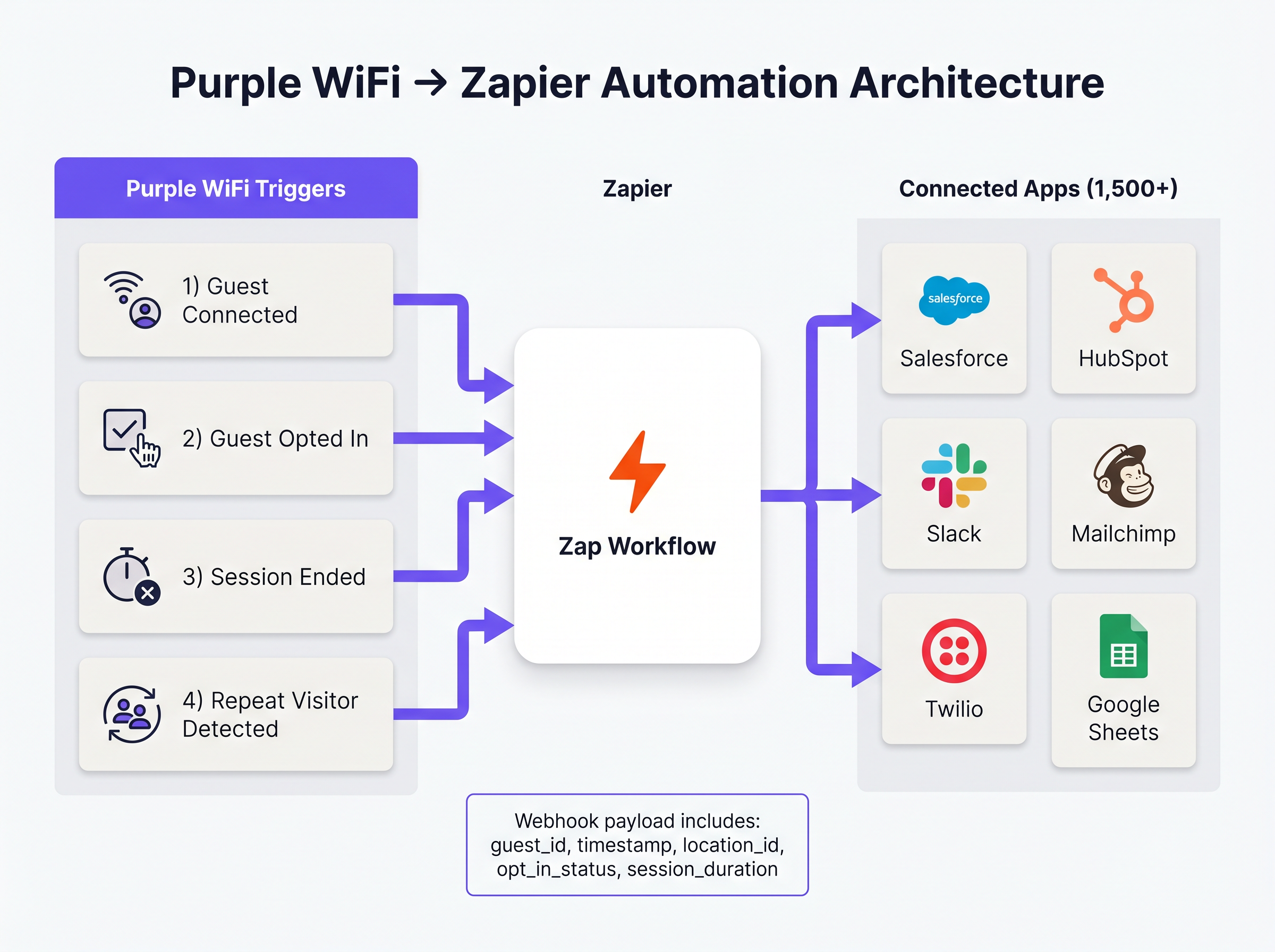
La integración entre Purple y Zapier opera sobre un modelo de eventos impulsado por webhooks. Purple actúa como la fuente de eventos, enviando cargas útiles JSON estructuradas a Zapier cada vez que ocurre un evento de red predefinido. Zapier, funcionando como plataforma de integración como servicio (iPaaS), recibe esta carga útil, la procesa según la lógica definida por el usuario (el 'Zap') y ejecuta llamadas API a las aplicaciones de destino.
Esta arquitectura abstrae la complejidad de gestionar la autenticación API, la limitación de velocidad y el manejo de errores para cientos de plataformas SaaS diferentes, permitiendo a los arquitectos de red centrarse en la lógica de negocio en lugar del mantenimiento de la integración.
Eventos de Activación Principales
Purple expone varios tipos de eventos distintos a Zapier. Seleccionar el activador correcto es primordial tanto para la eficiencia operativa como para el cumplimiento normativo.
- Invitado Conectado: Se activa inmediatamente tras una autenticación de red exitosa. La carga útil incluye
guest_id,timestamp,location_idy detalles del punto de acceso. Este es el activador principal para el registro de afluencia y las alertas operativas. - Invitado Acepta Marketing: Se activa solo cuando un invitado acepta explícitamente los términos de marketing en el Captive Portal. Este es el activador obligatorio para cualquier flujo de trabajo que involucre datos de WiFi Analytics que alimenten plataformas de CRM o automatización de marketing, asegurando el cumplimiento de GDPR.
- Sesión Finalizada: Se activa cuando un dispositivo cliente se desconecta o agota el tiempo de espera. La carga útil incluye
session_duration, proporcionando métricas críticas de tiempo de permanencia. - Visitante Recurrente Detectado: Se activa cuando el motor de análisis de Purple identifica una dirección MAC recurrente, lo que permite el reconocimiento VIP y flujos de trabajo de programas de fidelización.
Guía de Implementación
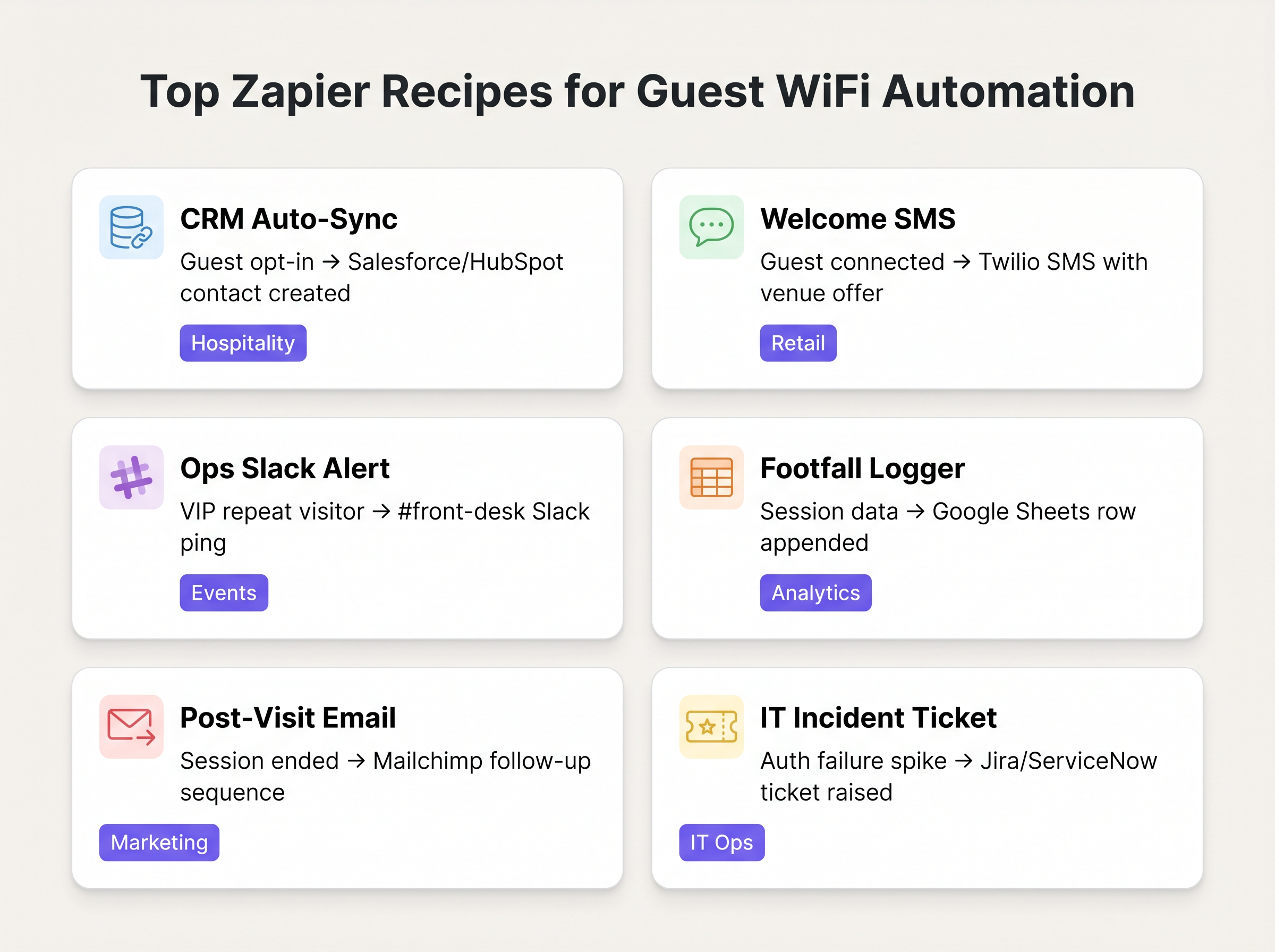
La implementación de la automatización Purple-Zapier requiere un enfoque estructurado para garantizar la higiene de los datos y evitar el agotamiento del límite de velocidad. Las siguientes recetas representan los flujos de trabajo de mayor valor para implementaciones empresariales típicas.
Recetas Fundamentales
1. Sincronización Automática de CRM (La Base)
- Activador: Purple
Guest Opted In - Acción: Crear/Actualizar Contacto en Salesforce o HubSpot.
- Justificación: Elimina las exportaciones manuales de CSV. Asegura que la base de datos de marketing se actualice continuamente con datos de invitados verificados y que han dado su consentimiento.
2. SMS de Bienvenida en Tiempo Real
- Activador: Purple
Guest Connected - Filtro: Filtro de Zapier (Solo proceder si
guest_idno se ha visto en los últimos 30 días). - Acción: Enviar SMS a través de Twilio.
- Justificación: Impulsa la interacción inmediata en entornos de Retail . El paso del filtro es crítico para evitar el envío de spam a visitantes recurrentes.
3. Alertas Operativas
- Activador: Purple
Repeat Visitor Detected - Acción: Publicar Mensaje en Slack.
- Justificación: Alerta a la recepción o al conserje en entornos de Hospitality cuando un VIP o un invitado de alto valor conocido se conecta a la red.
Mejores Prácticas
Al diseñar estos flujos de trabajo, los profesionales de TI sénior deben adherirse a varios principios clave para garantizar la estabilidad y el cumplimiento:
- Priorizar 'Acepta Marketing' sobre 'Conectado' para Marketing: Utilice siempre el activador
Guest Opted Inpara cualquier Zap que cree un registro de CRM o envíe comunicaciones de marketing. Confiar en el eventoGuest Connectedsin procesar para estos fines viola los requisitos de consentimiento de GDPR y degrada la calidad de los datos. - Implementar Lógica de Deduplicación: Un único usuario puede conectarse con múltiples dispositivos (smartphone, portátil, tablet). Si no se maneja correctamente, esto creará registros de CRM duplicados. Utilice la dirección de correo electrónico hash (si está disponible) como clave de deduplicación principal en sus acciones de Zapier, en lugar de la dirección MAC vinculada al dispositivo.
- Monitorizar el Consumo de Tareas: El precio de Zapier se basa en el volumen de tareas. Un recinto concurrido puede agotar fácilmente una asignación de nivel estándar si cada conexión activa un Zap de varios pasos. Utilice el filtrado incorporado de Zapier para descartar eventos irrelevantes al principio del flujo de trabajo, y considere agrupar datos (por ejemplo, resúmenes horarios en Google Sheets) para el registro de afluencia de alto volumen.
Resolución de Problemas y Mitigación de Riesgosgación
El modo de fallo más común en esta arquitectura es la caducidad de los tokens de la API descendente. Aunque la entrega de webhooks de Purple es altamente fiable, la conexión entre Zapier y la aplicación de destino (por ejemplo, Salesforce) puede fallar si los tokens de autenticación caducan o se superan los límites de tasa de la API.
Estrategia de Mitigación: Configure el manejo de errores integrado de Zapier para alertar al equipo de operaciones de TI a través de Slack o correo electrónico si un Zap falla consecutivamente. Audite regularmente el Historial de Zaps para identificar y resolver errores recurrentes de mapeo de datos.
Además, al integrar con sistemas que manejan datos sensibles (como en Sanidad ), asegúrese de que la carga de datos transmitida a través de Zapier no infrinja la HIPAA ni las regulaciones de privacidad locales. Restrinja la carga útil a los campos mínimos necesarios para el flujo de trabajo.
ROI e Impacto Empresarial
El retorno de la inversión para la integración de Zapier se mide típicamente en horas ahorradas y mejora de la precisión de los datos. Al automatizar la ingesta de CRM, los equipos de marketing recuperan las horas que antes dedicaban a la manipulación manual de datos. Más importante aún, la integración en tiempo real permite el marketing 'en el momento' —interactuando con el cliente mientras está físicamente presente en el lugar— lo que demuestra consistentemente tasas de conversión más altas que las campañas de correo electrónico posteriores a la visita.
Definiciones clave
Webhook
A method for one application to provide real-time information to another application using HTTP POST requests.
This is the underlying mechanism Purple uses to send event data to Zapier the moment a guest connects.
iPaaS (Integration Platform as a Service)
A suite of cloud services enabling the development, execution and governance of integration flows connecting any combination of on premises and cloud-based processes, services, applications and data within individual or across multiple organizations.
Zapier acts as the iPaaS in this architecture, sitting between Purple and the 1,500+ downstream applications.
Captive Portal
A web page that the user of a public-access network is obliged to view and interact with before access is granted.
The point of interaction where Purple captures guest data and marketing consent, triggering the 'Guest Opted In' event.
Payload
The actual data pack that is sent in a webhook or API request, excluding the headers and metadata.
The Purple webhook payload contains the guest ID, location data, and timestamps needed to populate downstream CRM fields.
Dwell Time
The length of time a visitor spends in a specific physical area or connected to the network.
Calculated using the 'Session Ended' trigger, this metric is crucial for retail analytics and operational planning.
Rate Limiting
A strategy for limiting network traffic, restricting how often someone can repeat an action within a certain timeframe.
A critical consideration when designing Zaps; high-volume WiFi events can easily exhaust API rate limits on downstream applications like Salesforce.
Deduplication
The process of identifying and removing duplicate copies of repeating data.
Essential when building CRM Zaps to ensure that a guest connecting with both a phone and a laptop doesn't create two separate contact records.
MAC Address Correlation
The process of identifying returning devices by matching their unique hardware identifier across multiple sessions.
The mechanism Purple uses to fire the 'Repeat Visitor Detected' trigger, enabling loyalty workflows.
Ejemplos prácticos
A 200-room boutique hotel wants to automatically add new guests to their Mailchimp welcome sequence, but only if the guest has explicitly agreed to receive marketing emails. They also want to ensure that returning guests do not receive the welcome sequence again.
- Set the Zapier Trigger to Purple's 'Guest Opted In' event (not 'Guest Connected'). 2. Add a Zapier Filter step to check a Google Sheet 'Log' to see if the guest's email already exists. 3. If it does not exist, proceed to Action 1: Add Subscriber to Mailchimp Audience. 4. Action 2: Append the new guest's email and timestamp to the Google Sheet 'Log' to prevent future duplicates.
A large retail chain needs to log hourly footfall data from their Purple WiFi network into a central data warehouse for the BI team, but they are concerned about exceeding their Zapier task limits due to the high volume of connections.
Instead of triggering a Zap for every individual 'Guest Connected' event, the IT team configures a Zapier 'Schedule' trigger to run every hour. The Zap then uses a Webhook action to query the Purple API for the aggregated connection count over the last 60 minutes, and writes that single aggregated value to the data warehouse.
Preguntas de práctica
Q1. Your marketing team wants to automatically send a 10% discount SMS to every guest who connects to the stadium WiFi. What is the primary compliance risk, and how should the Zap be architected to mitigate it?
Sugerencia: Consider the difference between simply joining a network and agreeing to receive marketing communications.
Ver respuesta modelo
The primary risk is violating GDPR/TCPA by sending marketing messages without explicit consent. The Zap must use the 'Guest Opted In' trigger, not the 'Guest Connected' trigger. Furthermore, a Zapier Filter should be implemented to ensure the SMS is only sent once per guest, rather than every time they reconnect during the event.
Q2. A retail client is complaining that their Zapier task usage has spiked, costing them thousands of dollars, after implementing a 'Log every connection to Google Sheets' Zap. How would you redesign this workflow?
Sugerencia: Does the BI team need real-time row-by-row data, or do they just need hourly aggregates?
Ver respuesta modelo
Shift from an event-driven architecture to a scheduled polling architecture. Instead of triggering a Zap on every connection, configure a Zapier Schedule to run hourly. The Zap should make an API call to Purple to retrieve the aggregated connection count for the previous hour, and write that single row to Google Sheets. This reduces task consumption from potentially thousands per hour to just one per hour.
Q3. The operations team wants a Slack alert every time a specific VIP connects to the network. How do you isolate this specific user from the thousands of other daily connections?
Sugerencia: You need to evaluate the payload data before executing the action.
Ver respuesta modelo
Use the 'Guest Connected' or 'Repeat Visitor Detected' trigger. Immediately follow this with a Zapier Filter step. Configure the filter to only allow the Zap to continue if the guest_id or mac_address field in the payload exactly matches the known identifier of the VIP. If it doesn't match, the Zap halts without consuming further tasks or posting to Slack.
Continúe leyendo esta serie
Marketing WiFi para Restaurantes: Cómo Convertir el WiFi Gratuito en Clientes Recurrentes
Esta guía de referencia técnica autorizada explora la arquitectura e implementación del marketing WiFi para restaurantes — la práctica de utilizar el acceso a la red de invitados como un canal estructurado de adquisición de datos y automatización de marketing. Proporciona a los gerentes de TI, arquitectos de red y directores de operaciones de locales un plan táctico para implementar captive portals, integrarse con plataformas CRM y activar campañas automatizadas que impulsen negocios recurrentes medibles. Desde la captura de datos compatible con GDPR hasta los flujos de trabajo de correo electrónico basados en eventos, esta guía cubre el ciclo de vida completo de la implementación con métricas de ROI concretas.
Cómo conectar con los clientes: Estrategias digitales para negocios físicos
Esta guía técnica de referencia autorizada detalla cómo las empresas con ubicación física —hoteles, cadenas minoristas, estadios y recintos del sector público— pueden implementar infraestructura WiFi empresarial como motor de captura de datos de primera parte y de interacción con el cliente. Cubre la arquitectura completa, desde el diseño del Captive Portal y la autenticación sin interrupciones (IEEE 802.11u/Passpoint) hasta la integración con CRM, el cumplimiento del GDPR y un ROI medible. Los líderes de IT y los operadores de recintos encontrarán orientación de implementación práctica, estudios de caso reales y un marco de mitigación de riesgos centrado en el cumplimiento.
Cómo usar datos de primera parte en campañas de marketing
Esta guía autorizada detalla cómo los equipos de TI y marketing empresariales pueden transformar su infraestructura de WiFi para invitados en un potente motor de datos de primera parte. Cubre la arquitectura técnica para la captura de datos, la gestión del consentimiento compatible con GDPR, las estrategias de segmentación y la activación en el mundo real a través de correo electrónico, SMS, publicidad social y display programático. Los operadores de recintos y los equipos de TI encontrarán orientación de implementación concreta, ejemplos prácticos de hostelería y comercio minorista, y marcos de ROI medibles.