
Zapier और Purple के साथ WiFi इवेंट्स को 1,500+ ऐप्स से कनेक्ट करना
यह मार्गदर्शिका Purple WiFi को Zapier के साथ एकीकृत करने के तकनीकी आर्किटेक्चर और व्यावहारिक कार्यान्वयन का विवरण देती है। यह वेन्यू ऑपरेटरों और IT टीमों को कस्टम कोड लिखे बिना CRM सिंक्रोनाइज़ेशन, अतिथि संचार और परिचालन अलर्ट को स्वचालित करने के लिए कार्रवाई योग्य रेसिपीज़ प्रदान करती है।
इस गाइड को सुनें
पॉडकास्ट ट्रांसक्रिप्ट देखें
कार्यकारी सारांश
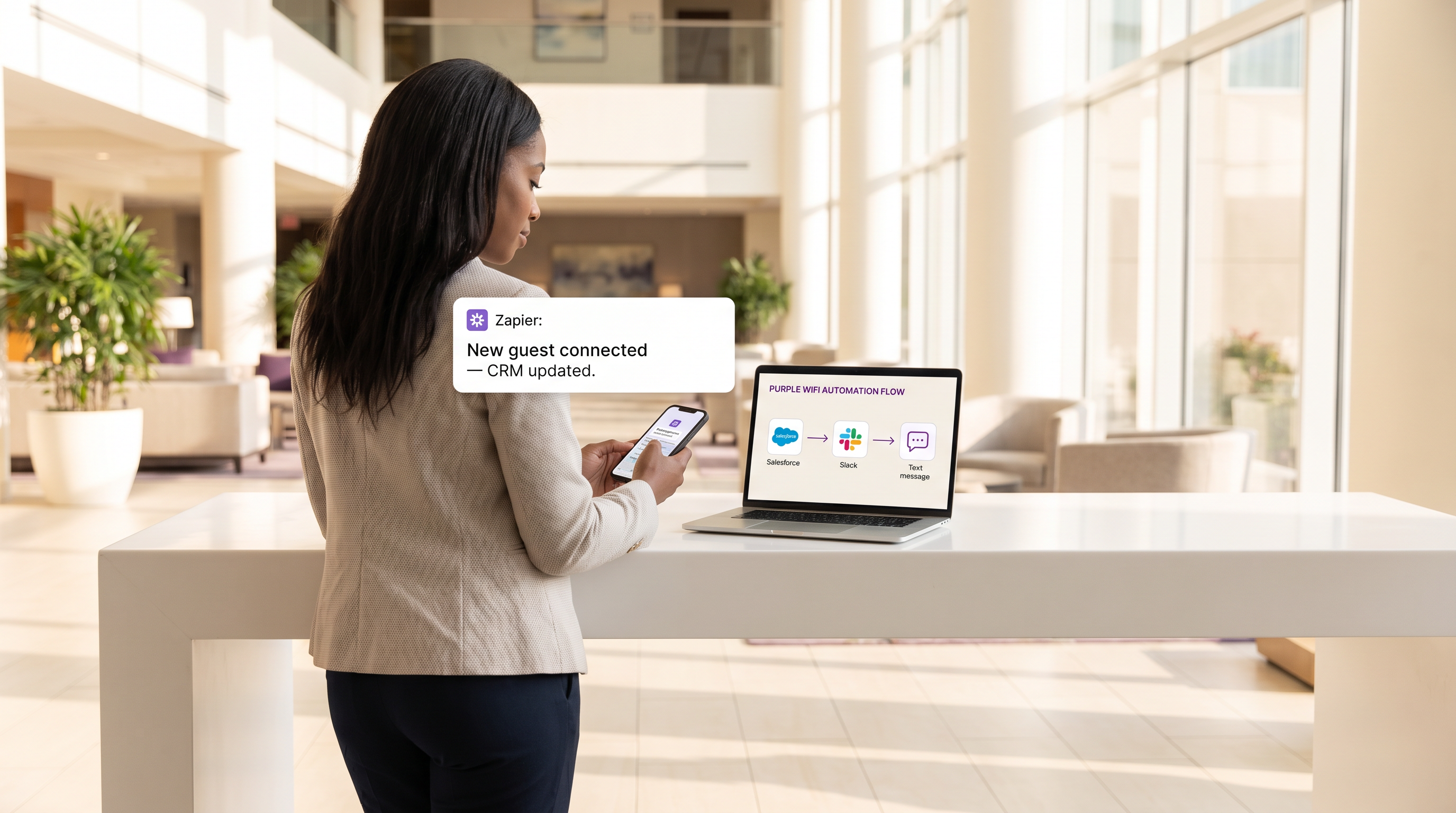
आधुनिक स्थानों के लिए, गेस्ट WiFi नेटवर्क अब केवल एक कनेक्टिविटी सुविधा नहीं रह गया है; यह ग्राहक जुड़ाव (customer engagement) और परिचालन बुद्धिमत्ता (operational intelligence) के लिए एक महत्वपूर्ण सेंसर लेयर है। हालाँकि, यदि यह डेटा किसी प्रोपराइटरी डैशबोर्ड तक ही सीमित रहता है, तो इसका मूल्य मौलिक रूप से सीमित हो जाता है। यह तकनीकी संदर्भ मार्गदर्शिका Purple द्वारा प्रदान किए गए Guest WiFi और Zapier ऑटोमेशन प्लेटफ़ॉर्म के बीच एकीकरण (integration) का अन्वेषण करती है, जो IT और मार्केटिंग ऑपरेशंस टीमों को रीयल-टाइम कनेक्शन इवेंट्स को 1,500 से अधिक डाउनस्ट्रीम एप्लिकेशन तक रूट करने में सक्षम बनाती है。
Zapier का मिडलवेयर के रूप में लाभ उठाकर, Retail , Hospitality , और अन्य उच्च-फुटफॉल वाले वातावरणों में संगठन जटिल वर्कफ़्लो को स्वचालित कर सकते हैं—रीयल-टाइम CRM सिंक्रोनाइज़ेशन और लक्षित SMS मार्केटिंग से लेकर Slack के माध्यम से परिचालन अलर्टिंग तक। यह मार्गदर्शिका उपलब्ध ट्रिगर इवेंट्स, मुख्य आर्किटेक्चरल विचारों और छह प्रोडक्शन-रेडी ऑटोमेशन रेसिपीज़ का विवरण देती है, जिन्हें GDPR और PCI DSS जैसे डेटा गोपनीयता मानकों के साथ सख्त अनुपालन बनाए रखते हुए तत्काल ROI प्रदान करने के लिए डिज़ाइन किया गया है।
तकनीकी डीप-डाइव
इंटीग्रेशन आर्किटेक्चर
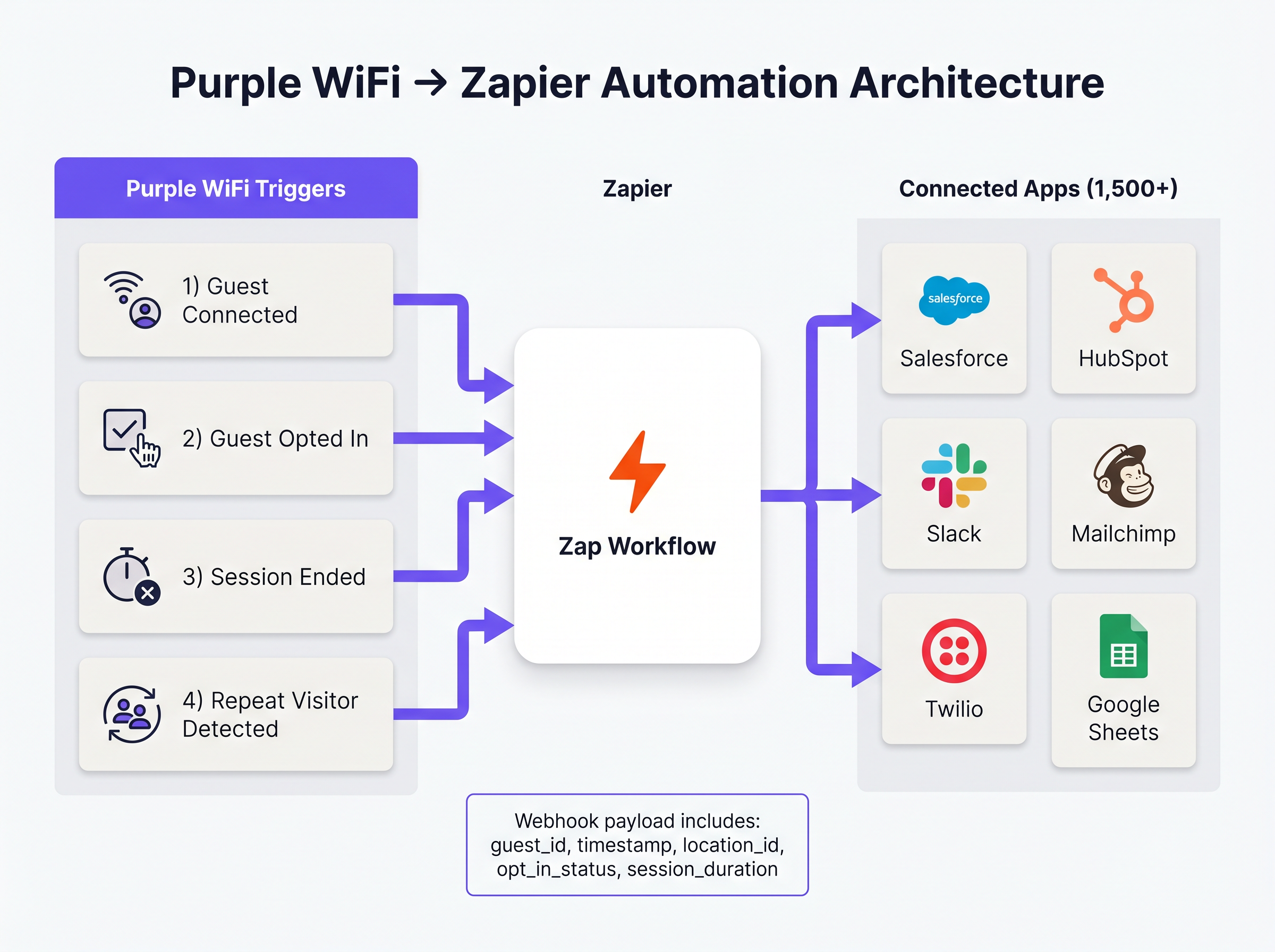
Purple और Zapier के बीच एकीकरण वेबहुक-संचालित इवेंट मॉडल पर काम करता है। Purple इवेंट स्रोत के रूप में कार्य करता है, जब भी कोई पूर्वनिर्धारित नेटवर्क इवेंट होता है, तो Zapier को संरचित JSON पेलोड पुश करता है। Zapier, इंटीग्रेशन प्लेटफ़ॉर्म एज़ ए सर्विस (iPaaS) के रूप में कार्य करते हुए, इस पेलोड को प्राप्त करता है, इसे उपयोगकर्ता-परिभाषित लॉजिक ('Zap') के अनुसार प्रोसेस करता है, और लक्षित एप्लिकेशन्स पर API कॉल निष्पादित करता है।
यह आर्किटेक्चर सैकड़ों विभिन्न SaaS प्लेटफ़ॉर्म के लिए API प्रमाणीकरण, रेट लिमिटिंग और त्रुटि प्रबंधन (error handling) के प्रबंधन की जटिलता को दूर करता है, जिससे नेटवर्क आर्किटेक्ट्स को एकीकरण रखरखाव के बजाय व्यावसायिक लॉजिक पर ध्यान केंद्रित करने की अनुमति मिलती है।
मुख्य ट्रिगर इवेंट्स
Purple, Zapier के लिए कई विशिष्ट इवेंट प्रकारों को एक्सपोज़ करता है। परिचालन दक्षता और विनियामक अनुपालन दोनों के लिए सही ट्रिगर का चयन करना सर्वोपरि है।
- Guest Connected: सफल नेटवर्क प्रमाणीकरण पर तुरंत फ़ायर होता है। पेलोड में
guest_id,timestamp,location_id, और एक्सेस पॉइंट विवरण शामिल हैं। यह फुटफॉल लॉगिंग और परिचालन अलर्टिंग के लिए प्राथमिक ट्रिगर है। - Guest Opted In: यह केवल तब फ़ायर होता है जब कोई अतिथि Captive Portal पर स्पष्ट रूप से मार्केटिंग शर्तों को स्वीकार करता है। यह किसी भी वर्कफ़्लो के लिए अनिवार्य ट्रिगर है जिसमें WiFi Analytics डेटा शामिल है जो CRM या मार्केटिंग ऑटोमेशन प्लेटफ़ॉर्म को फ़ीड करता है, जिससे GDPR अनुपालन सुनिश्चित होता है।
- Session Ended: जब कोई क्लाइंट डिवाइस डिस्कनेक्ट हो जाता है या टाइम आउट हो जाता है, तब फ़ायर होता है। पेलोड में
session_durationशामिल है, जो महत्वपूर्ण ड्वेल-टाइम मेट्रिक्स प्रदान करता है। - Repeat Visitor Detected: तब ट्रिगर होता है जब Purple एनालिटिक्स इंजन लौटने वाले MAC एड्रेस की पहचान करता है, जो VIP पहचान और लॉयल्टी प्रोग्राम वर्कफ़्लो को सक्षम बनाता है。
कार्यान्वयन मार्गदर्शिका
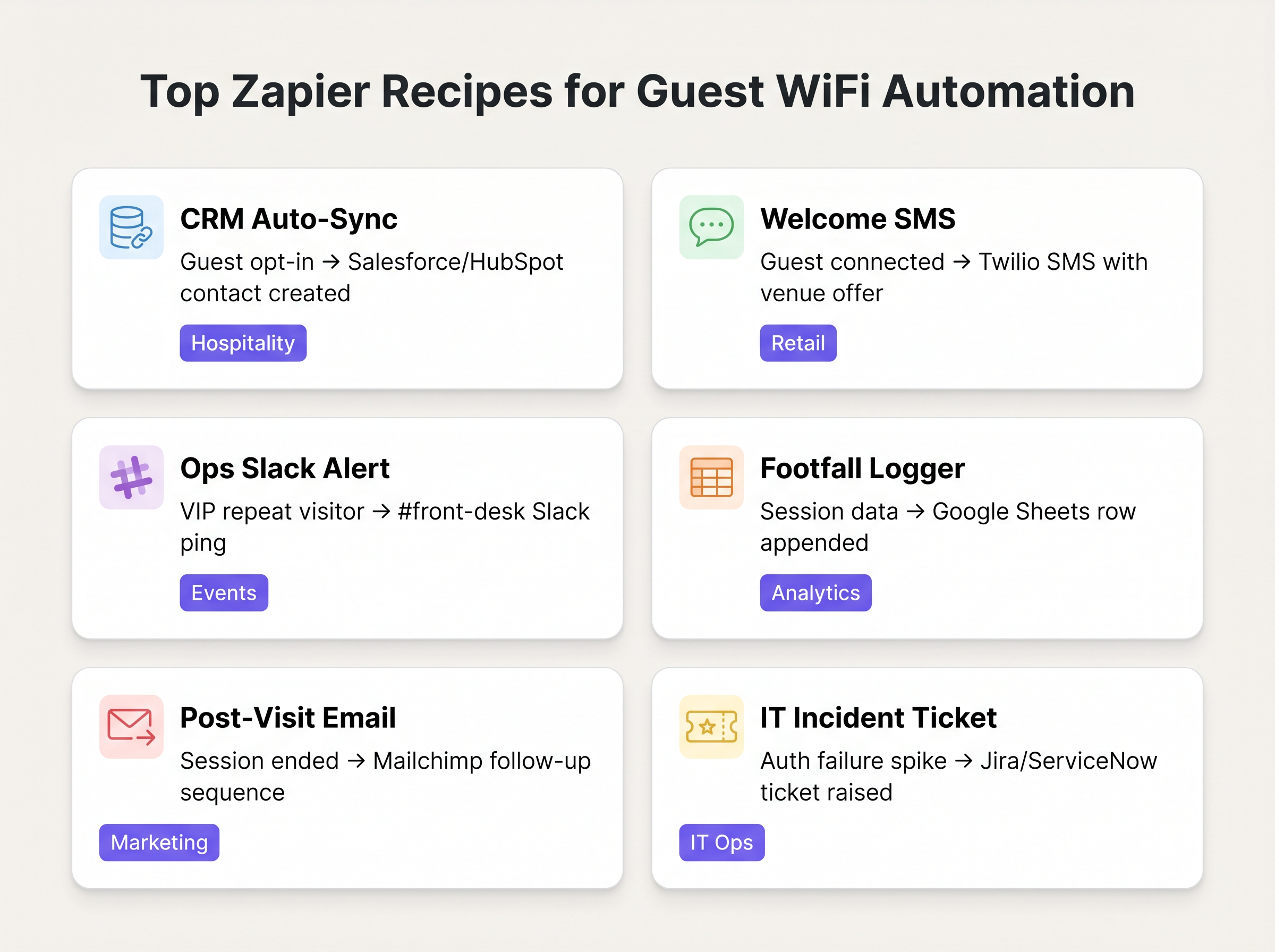
Purple-Zapier ऑटोमेशन को तैनात करने के लिए डेटा हाइजीन सुनिश्चित करने और रेट-लिमिट की समाप्ति से बचने के लिए एक संरचित दृष्टिकोण की आवश्यकता होती है। निम्नलिखित रेसिपीज़ विशिष्ट एंटरप्राइज़ परिनियोजन (deployments) के लिए उच्चतम-मूल्य वाले वर्कफ़्लो का प्रतिनिधित्व करती हैं।
बुनियादी रेसिपीज़
1. CRM ऑटो-सिंक (बेसलाइन)
- ट्रिगर: Purple
Guest Opted In - एक्शन: Salesforce या HubSpot में संपर्क (Contact) बनाएँ/अपडेट करें।
- तर्क (Rationale): मैन्युअल CSV निर्यात को समाप्त करता है। यह सुनिश्चित करता है कि मार्केटिंग डेटाबेस लगातार सत्यापित, ऑप्ट-इन किए गए अतिथि डेटा के साथ अपडेट किया जाता है।
2. रीयल-टाइम वेलकम SMS
- ट्रिगर: Purple
Guest Connected - फ़िल्टर: Zapier फ़िल्टर (केवल तभी आगे बढ़ें जब
guest_idपिछले 30 दिनों में नहीं देखा गया हो)। - एक्शन: Twilio के माध्यम से SMS भेजें।
- तर्क: Retail वातावरण में तत्काल जुड़ाव बढ़ाता है। लौटने वाले आगंतुकों को स्पैमिंग से रोकने के लिए फ़िल्टर चरण महत्वपूर्ण है。
3. परिचालन अलर्टिंग (Operational Alerting)
- ट्रिगर: Purple
Repeat Visitor Detected - एक्शन: Slack में संदेश पोस्ट करें。
- तर्क: Hospitality सेटिंग्स में फ्रंट डेस्क या कंसीयज को सचेत करता है जब कोई VIP या ज्ञात उच्च-मूल्य वाला अतिथि नेटवर्क से जुड़ता है。
सर्वोत्तम प्रथाएँ (Best Practices)
इन वर्कफ़्लो को आर्किटेक्ट करते समय, वरिष्ठ IT पेशेवरों को स्थिरता और अनुपालन सुनिश्चित करने के लिए कई प्रमुख सिद्धांतों का पालन करना चाहिए:
- मार्केटिंग के लिए 'Connected' के बजाय 'Opted In' को प्राथमिकता दें: किसी भी Zap के लिए हमेशा
Guest Opted Inट्रिगर का उपयोग करें जो CRM रिकॉर्ड बनाता है या मार्केटिंग संचार भेजता है। इन उद्देश्यों के लिए कच्चेGuest Connectedइवेंट पर निर्भर रहना GDPR सहमति आवश्यकताओं का उल्लंघन करता है और डेटा गुणवत्ता को कम करता है। - डीडुप्लीकेशन लॉजिक लागू करें: एक एकल उपयोगकर्ता कई उपकरणों (स्मार्टफोन, लैपटॉप, टैबलेट) के साथ जुड़ सकता है। जब तक इसे सही ढंग से नहीं संभाला जाता, यह डुप्लिकेट CRM रिकॉर्ड बनाएगा। डिवाइस-बाउंड MAC एड्रेस के बजाय, अपने Zapier एक्शन में प्राथमिक डीडुप्लीकेशन कुंजी के रूप में हैश किए गए ईमेल पते (यदि उपलब्ध हो) का उपयोग करें।
- टास्क खपत की निगरानी करें: Zapier मूल्य निर्धारण टास्क वॉल्यूम पर आधारित है। एक व्यस्त स्थान आसानी से एक मानक टियर भत्ते को समाप्त कर सकता है यदि हर एक कनेक्शन एक मल्टी-स्टेप Zap को ट्रिगर करता है। वर्कफ़्लो में अप्रासंगिक इवेंट्स को जल्दी छोड़ने के लिए Zapier के अंतर्निहित फ़िल्टरिंग का उपयोग करें, और उच्च-वॉल्यूम फुटफॉल लॉगिंग के लिए डेटा बैचिंग (उदा., Google Sheets में प्रति घंटा रोल-अप) पर विचार करें।
समस्या निवारण और जोखिम न्यूनीकरण
इस आर्किटेक्चर में सबसे आम विफलता मोड डाउनस्ट्रीम API टोकन की समाप्ति है। जबकि Purple की वेबहुक डिलीवरी अत्यधिक विश्वसनीय है, Zapier और लक्षित एप्लिकेशन (उदा., Salesforce) के बीच कनेक्शन विफल हो सकता है यदि प्रमाणीकरण टोकन समाप्त हो जाते हैं या API रेट लिमिट पार हो जाती है।
न्यूनीकरण रणनीति: यदि कोई Zap लगातार विफल होता है, तो Slack या ईमेल के माध्यम से IT ऑपरेशंस टीम को सचेत करने के लिए Zapier के अंतर्निहित त्रुटि प्रबंधन को कॉन्फ़िगर करें। आवर्ती डेटा मैपिंग त्रुटियों को पहचानने और हल करने के लिए नियमित रूप से Zap History का ऑडिट करें।
इसके अलावा, संवेदनशील डेटा को संभालने वाले सिस्टम (जैसे Healthcare में) के साथ एकीकरण करते समय, सुनिश्चित करें कि Zapier के माध्यम से प्रेषित डेटा पेलोड HIPAA या स्थानीय गोपनीयता नियमों का उल्लंघन नहीं करता है। पेलोड को वर्कफ़्लो के लिए आवश्यक न्यूनतम फ़ील्ड तक सीमित करें।
ROI और व्यावसायिक प्रभाव
Zapier एकीकरण के लिए निवेश पर प्रतिफल (ROI) आमतौर पर बचाए गए घंटों और डेटा सटीकता में सुधार में मापा जाता है। CRM अंतर्ग्रहण (ingestion) को स्वचालित करके, मार्केटिंग टीमें मैन्युअल डेटा रैंगलिंग पर पहले खर्च किए गए घंटों को पुनः प्राप्त करती हैं। इससे भी महत्वपूर्ण बात यह है कि रीयल-टाइम एकीकरण 'इन-मोमेंट' मार्केटिंग को सक्षम बनाता है—ग्राहक को तब जोड़ना जब वे भौतिक रूप से स्थान पर मौजूद हों—जो लगातार यात्रा के बाद के ईमेल अभियानों की तुलना में उच्च रूपांतरण दर (conversion rates) प्रदर्शित करता है।
मुख्य परिभाषाएं
Webhook
HTTP POST अनुरोधों का उपयोग करके एक एप्लिकेशन द्वारा दूसरे एप्लिकेशन को रीयल-टाइम जानकारी प्रदान करने की एक विधि।
यह वह अंतर्निहित तंत्र है जिसका उपयोग Purple अतिथि के कनेक्ट होते ही Zapier को इवेंट डेटा भेजने के लिए करता है।
iPaaS (Integration Platform as a Service)
क्लाउड सेवाओं का एक सूट जो व्यक्तिगत या कई संगठनों में ऑन-प्रिमाइसेस और क्लाउड-आधारित प्रक्रियाओं, सेवाओं, एप्लिकेशन्स और डेटा के किसी भी संयोजन को जोड़ने वाले एकीकरण प्रवाह के विकास, निष्पादन और शासन को सक्षम बनाता है।
Zapier इस आर्किटेक्चर में iPaaS के रूप में कार्य करता है, जो Purple और 1,500+ डाउनस्ट्रीम एप्लिकेशन्स के बीच स्थित है।
Captive Portal
एक वेब पेज जिसे सार्वजनिक-एक्सेस नेटवर्क के उपयोगकर्ता को एक्सेस दिए जाने से पहले देखने और इंटरैक्ट करने के लिए बाध्य किया जाता है।
बातचीत का वह बिंदु जहां Purple अतिथि डेटा और मार्केटिंग सहमति कैप्चर करता है, जिससे 'Guest Opted In' इवेंट ट्रिगर होता है।
Payload
वास्तविक डेटा पैक जो हेडर और मेटाडेटा को छोड़कर वेबहुक या API अनुरोध में भेजा जाता है।
Purple वेबहुक पेलोड में डाउनस्ट्रीम CRM फ़ील्ड को पॉप्युलेट करने के लिए आवश्यक अतिथि ID, स्थान डेटा और टाइमस्टैम्प शामिल हैं।
Dwell Time
वह समय जो कोई आगंतुक किसी विशिष्ट भौतिक क्षेत्र में या नेटवर्क से जुड़े रहने में व्यतीत करता है।
'Session Ended' ट्रिगर का उपयोग करके गणना की गई, यह मीट्रिक रिटेल एनालिटिक्स और परिचालन योजना के लिए महत्वपूर्ण है।
Rate Limiting
नेटवर्क ट्रैफ़िक को सीमित करने की एक रणनीति, जो यह प्रतिबंधित करती है कि कोई व्यक्ति एक निश्चित समय सीमा के भीतर कितनी बार किसी क्रिया को दोहरा सकता है।
Zaps डिज़ाइन करते समय एक महत्वपूर्ण विचार; उच्च-वॉल्यूम WiFi इवेंट आसानी से Salesforce जैसे डाउनस्ट्रीम एप्लिकेशन्स पर API रेट लिमिट को समाप्त कर सकते हैं।
Deduplication
दोहराए जाने वाले डेटा की डुप्लिकेट प्रतियों को पहचानने और हटाने की प्रक्रिया।
CRM Zaps बनाते समय यह सुनिश्चित करने के लिए आवश्यक है कि फोन और लैपटॉप दोनों से कनेक्ट होने वाला अतिथि दो अलग-अलग संपर्क रिकॉर्ड न बनाए।
MAC Address Correlation
कई सत्रों (sessions) में उनके अद्वितीय हार्डवेयर पहचानकर्ता का मिलान करके लौटने वाले उपकरणों की पहचान करने की प्रक्रिया।
वह तंत्र जिसका उपयोग Purple 'Repeat Visitor Detected' ट्रिगर को फ़ायर करने के लिए करता है, जो लॉयल्टी वर्कफ़्लो को सक्षम बनाता है।
हल किए गए उदाहरण
एक 200-कमरों वाला बुटीक होटल नए मेहमानों को स्वचालित रूप से अपने Mailchimp वेलकम सीक्वेंस में जोड़ना चाहता है, लेकिन केवल तभी जब अतिथि ने मार्केटिंग ईमेल प्राप्त करने के लिए स्पष्ट रूप से सहमति व्यक्त की हो। वे यह भी सुनिश्चित करना चाहते हैं कि लौटने वाले मेहमानों को फिर से वेलकम सीक्वेंस प्राप्त न हो।
- Zapier ट्रिगर को Purple के 'Guest Opted In' इवेंट (न कि 'Guest Connected') पर सेट करें। 2. यह देखने के लिए कि क्या अतिथि का ईमेल पहले से मौजूद है, Google Sheet 'Log' की जांच करने के लिए एक Zapier फ़िल्टर चरण जोड़ें। 3. यदि यह मौजूद नहीं है, तो एक्शन 1 पर आगे बढ़ें: Mailchimp ऑडियंस में सब्सक्राइबर जोड़ें। 4. एक्शन 2: भविष्य के डुप्लिकेट को रोकने के लिए Google Sheet 'Log' में नए अतिथि का ईमेल और टाइमस्टैम्प जोड़ें।
एक बड़ी रिटेल चेन को BI टीम के लिए अपने Purple WiFi नेटवर्क से प्रति घंटा फुटफॉल डेटा को एक केंद्रीय डेटा वेयरहाउस में लॉग करने की आवश्यकता है, लेकिन वे कनेक्शन की उच्च मात्रा के कारण अपनी Zapier टास्क सीमा को पार करने के बारे में चिंतित हैं।
प्रत्येक व्यक्तिगत 'Guest Connected' इवेंट के लिए Zap ट्रिगर करने के बजाय, IT टीम हर घंटे चलने के लिए Zapier 'Schedule' ट्रिगर कॉन्फ़िगर करती है। फिर Zap पिछले 60 मिनट में एकत्रित कनेक्शन गणना के लिए Purple API को क्वेरी करने के लिए एक वेबहुक एक्शन का उपयोग करता है, और उस एकल एकत्रित मूल्य को डेटा वेयरहाउस में लिखता है।
अभ्यास प्रश्न
Q1. आपकी मार्केटिंग टीम स्टेडियम WiFi से जुड़ने वाले प्रत्येक अतिथि को स्वचालित रूप से 10% छूट वाला SMS भेजना चाहती है। प्राथमिक अनुपालन जोखिम क्या है, और इसे कम करने के लिए Zap को कैसे आर्किटेक्ट किया जाना चाहिए?
संकेत: नेटवर्क से जुड़ने और मार्केटिंग संचार प्राप्त करने के लिए सहमत होने के बीच के अंतर पर विचार करें।
मॉडल उत्तर देखें
प्राथमिक जोखिम स्पष्ट सहमति के बिना मार्केटिंग संदेश भेजकर GDPR/TCPA का उल्लंघन करना है। Zap को 'Guest Connected' ट्रिगर के बजाय 'Guest Opted In' ट्रिगर का उपयोग करना चाहिए। इसके अलावा, यह सुनिश्चित करने के लिए एक Zapier फ़िल्टर लागू किया जाना चाहिए कि SMS प्रति अतिथि केवल एक बार भेजा जाए, न कि इवेंट के दौरान हर बार उनके फिर से कनेक्ट होने पर।
Q2. एक रिटेल क्लाइंट शिकायत कर रहा है कि 'Log every connection to Google Sheets' Zap लागू करने के बाद उनके Zapier टास्क का उपयोग बढ़ गया है, जिससे उन्हें हजारों डॉलर का खर्च आ रहा है। आप इस वर्कफ़्लो को फिर से कैसे डिज़ाइन करेंगे?
संकेत: क्या BI टीम को रीयल-टाइम पंक्ति-दर-पंक्ति डेटा की आवश्यकता है, या उन्हें केवल प्रति घंटा एग्रीगेट्स की आवश्यकता है?
मॉडल उत्तर देखें
इवेंट-संचालित आर्किटेक्चर से शेड्यूल्ड पोलिंग आर्किटेक्चर में शिफ्ट करें। हर कनेक्शन पर Zap ट्रिगर करने के बजाय, हर घंटे चलने के लिए Zapier Schedule कॉन्फ़िगर करें। Zap को पिछले घंटे के लिए एकत्रित कनेक्शन गणना प्राप्त करने के लिए Purple को एक API कॉल करना चाहिए, और उस एकल पंक्ति को Google Sheets में लिखना चाहिए। यह टास्क की खपत को संभावित रूप से प्रति घंटे हजारों से घटाकर प्रति घंटे केवल एक कर देता है।
Q3. ऑपरेशंस टीम हर बार किसी विशिष्ट VIP के नेटवर्क से कनेक्ट होने पर Slack अलर्ट चाहती है। आप इस विशिष्ट उपयोगकर्ता को हजारों अन्य दैनिक कनेक्शनों से कैसे अलग करते हैं?
संकेत: एक्शन निष्पादित करने से पहले आपको पेलोड डेटा का मूल्यांकन करने की आवश्यकता है।
मॉडल उत्तर देखें
'Guest Connected' या 'Repeat Visitor Detected' ट्रिगर का उपयोग करें। इसके तुरंत बाद एक Zapier फ़िल्टर चरण का पालन करें। फ़िल्टर को केवल तभी Zap को जारी रखने की अनुमति देने के लिए कॉन्फ़िगर करें जब पेलोड में guest_id या mac_address फ़ील्ड VIP के ज्ञात पहचानकर्ता से बिल्कुल मेल खाता हो। यदि यह मेल नहीं खाता है, तो Zap आगे के टास्क का उपभोग किए बिना या Slack पर पोस्ट किए बिना रुक जाता है।
इस श्रृंखला में आगे पढ़ें
रेस्टोरेंट WiFi मार्केटिंग: फ्री WiFi को दोबारा आने वाले ग्राहकों में कैसे बदलें
यह आधिकारिक तकनीकी संदर्भ गाइड रेस्टोरेंट WiFi मार्केटिंग के आर्किटेक्चर और कार्यान्वयन की पड़ताल करती है — जो गेस्ट नेटवर्क एक्सेस को एक संरचित डेटा अधिग्रहण और मार्केटिंग ऑटोमेशन चैनल के रूप में उपयोग करने की प्रथा है। यह IT प्रबंधकों, नेटवर्क आर्किटेक्ट्स और वेन्यू संचालन निदेशकों को Captive Portals को तैनात करने, CRM प्लेटफॉर्म के साथ एकीकृत करने और स्वचालित अभियानों को ट्रिगर करने के लिए एक व्यावहारिक खाका प्रदान करता है जो मापने योग्य दोबारा आने वाले व्यवसाय को बढ़ावा देते हैं। GDPR-अनुपालन डेटा कैप्चर से लेकर इवेंट-संचालित ईमेल वर्कफ़्लो तक, यह गाइड ठोस ROI मेट्रिक्स के साथ पूर्ण परिनियोजन जीवनचक्र को कवर करती है।
ग्राहकों से कैसे जुड़ें: भौतिक व्यवसायों के लिए डिजिटल रणनीतियाँ
यह आधिकारिक तकनीकी संदर्भ मार्गदर्शिका विवरण देती है कि कैसे भौतिक-स्थान वाले व्यवसाय — होटल, रिटेल श्रृंखलाएं, स्टेडियम और सार्वजनिक क्षेत्र के स्थान — एंटरप्राइज WiFi इन्फ्रास्ट्रक्चर को फर्स्ट-पार्टी डेटा कैप्चर और ग्राहक जुड़ाव इंजन के रूप में तैनात कर सकते हैं। यह कैप्टिव पोर्टल डिज़ाइन और सहज प्रमाणीकरण (IEEE 802.11u/Passpoint) से लेकर CRM एकीकरण, GDPR अनुपालन और मापने योग्य ROI तक के पूर्ण आर्किटेक्चर को कवर करता है। IT लीडर्स और स्थान ऑपरेटरों को कार्रवाई योग्य परिनियोजन मार्गदर्शन, वास्तविक दुनिया के केस स्टडीज और अनुपालन-प्रथम जोखिम शमन ढांचा मिलेगा।
मार्केटिंग कैंपेन में फ़र्स्ट-पार्टी डेटा का उपयोग कैसे करें
यह आधिकारिक गाइड विस्तार से बताती है कि एंटरप्राइज़ IT और मार्केटिंग टीमें अपने गेस्ट WiFi इंफ्रास्ट्रक्चर को एक शक्तिशाली फ़र्स्ट-पार्टी डेटा इंजन में कैसे बदल सकती हैं। इसमें डेटा कैप्चर के लिए तकनीकी आर्किटेक्चर, GDPR-कंप्लायंट सहमति प्रबंधन, सेगमेंटेशन रणनीतियाँ, और ईमेल, SMS, सोशल एडवरटाइज़िंग और प्रोग्रामेटिक डिस्प्ले में वास्तविक दुनिया के एक्टिवेशन शामिल हैं। वेन्यू ऑपरेटरों और IT टीमों को ठोस इम्प्लीमेंटेशन मार्गदर्शन, हॉस्पिटैलिटी और रिटेल से काम किए गए उदाहरण, और मापने योग्य ROI फ़्रेमवर्क मिलेंगे।