
Connecter les événements WiFi à plus de 1 500 applications avec Zapier et Purple
Ce guide détaille l'architecture technique et la mise en œuvre pratique de l'intégration de Purple WiFi avec Zapier. Il fournit aux opérateurs de sites et aux équipes informatiques des recettes exploitables pour automatiser la synchronisation CRM, les communications avec les invités et les alertes opérationnelles sans écrire de code personnalisé.
Écouter ce guide
Voir la transcription du podcast
Résumé Exécutif
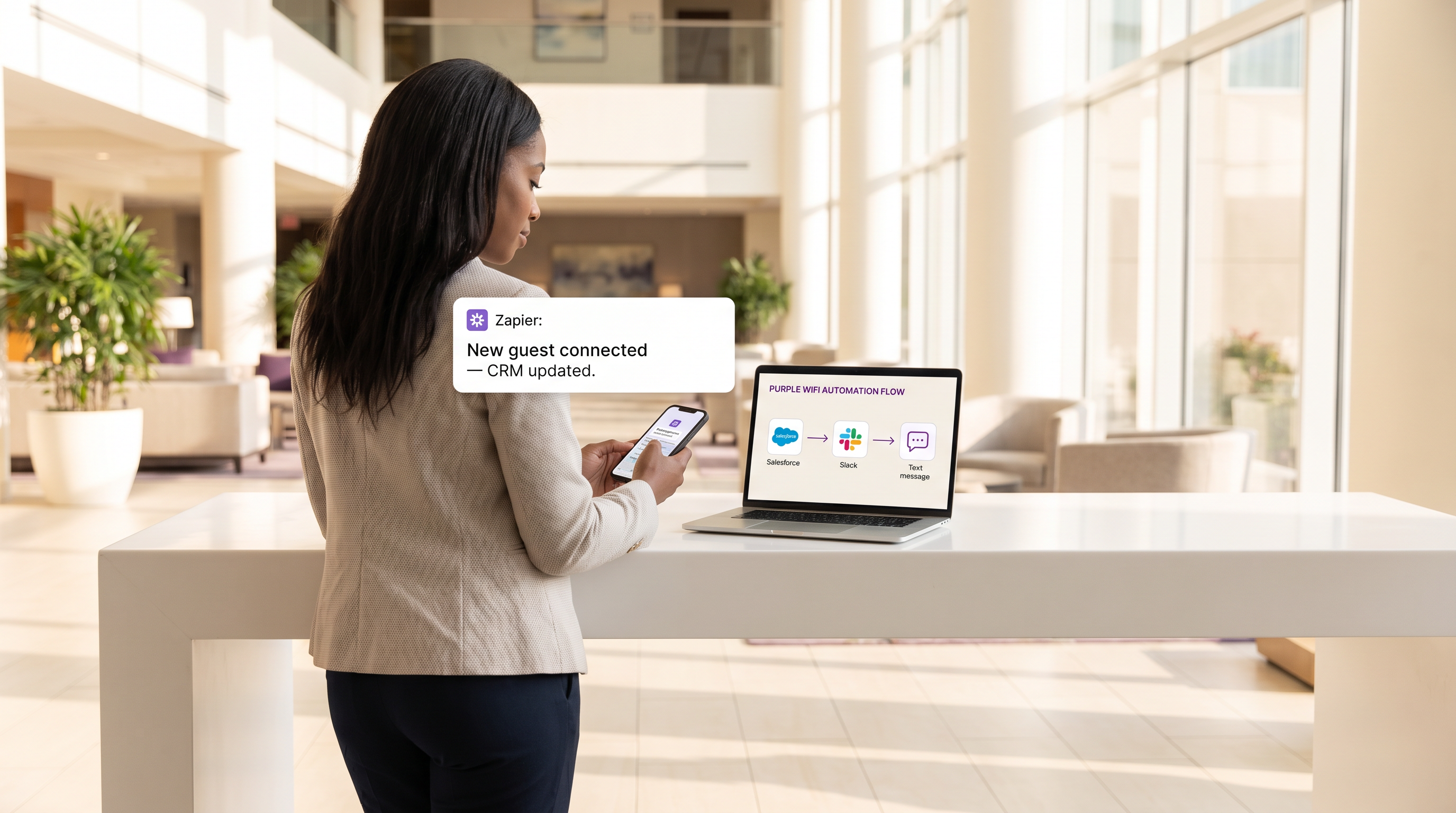
Pour les sites modernes, le réseau WiFi invité n'est plus seulement un service de connectivité ; il s'agit d'une couche de capteurs critique pour l'engagement client et l'intelligence opérationnelle. Cependant, la valeur de ces données est fondamentalement limitée si elles restent cloisonnées dans un tableau de bord propriétaire. Ce guide de référence technique explore l'intégration entre le Guest WiFi fourni par Purple et la plateforme d'automatisation Zapier, permettant aux équipes informatiques et marketing de router les événements de connexion en temps réel vers plus de 1 500 applications en aval.
En tirant parti de Zapier comme middleware, les organisations du Retail , de l' Hospitality et d'autres environnements à forte affluence peuvent automatiser des flux de travail complexes — de la synchronisation CRM en temps réel et du marketing SMS ciblé à l'alerte opérationnelle via Slack. Ce guide détaille les événements déclencheurs disponibles, les considérations architecturales fondamentales et six recettes d'automatisation prêtes pour la production, conçues pour offrir un ROI immédiat tout en maintenant une conformité stricte avec les normes de confidentialité des données telles que GDPR et PCI DSS.
Approfondissement Technique
Architecture d'Intégration
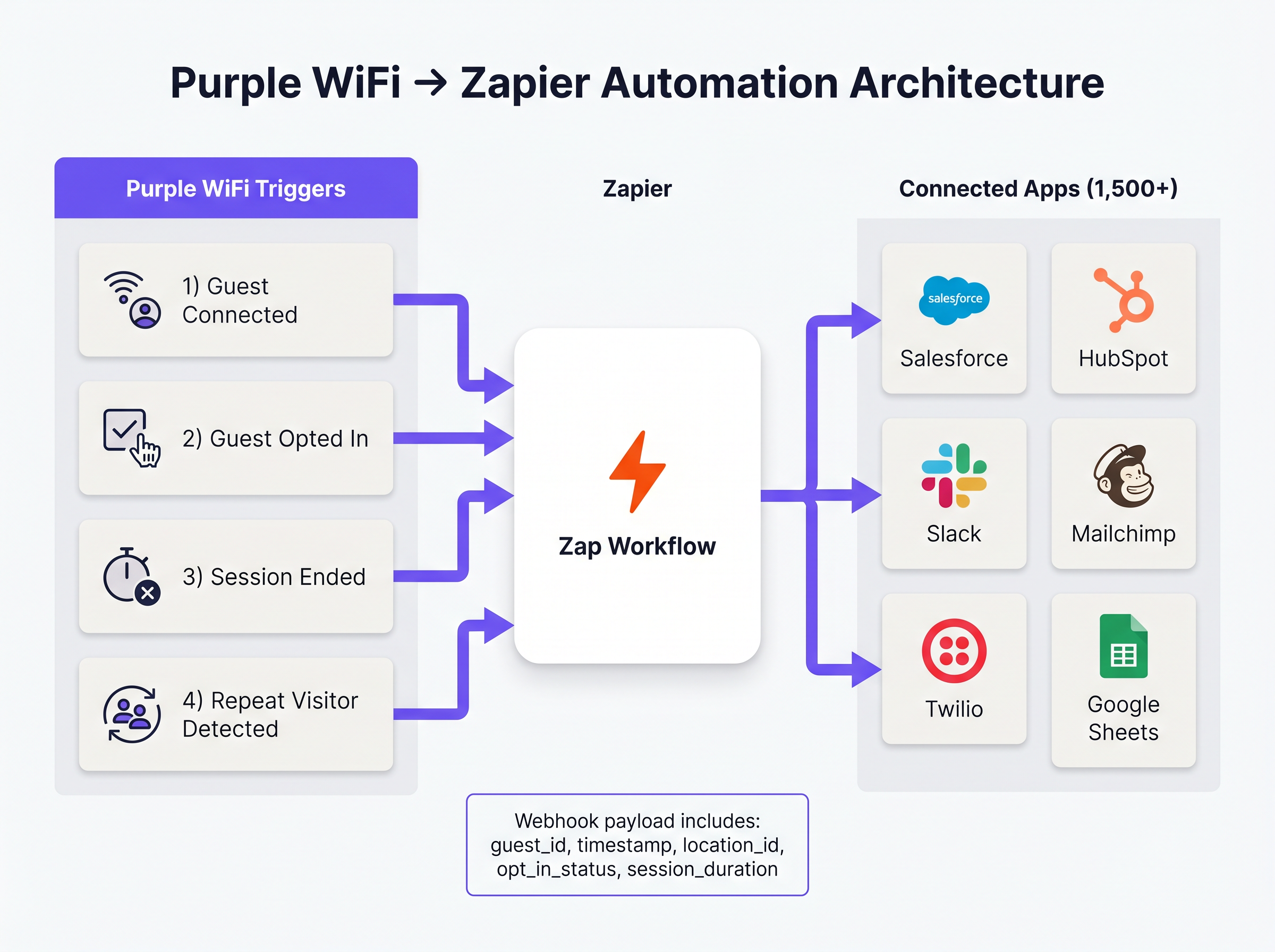
L'intégration entre Purple et Zapier fonctionne sur un modèle d'événements basé sur des webhooks. Purple agit comme la source d'événements, poussant des charges utiles JSON structurées vers Zapier chaque fois qu'un événement réseau prédéfini se produit. Zapier, fonctionnant comme la plateforme d'intégration en tant que service (iPaaS), reçoit cette charge utile, la traite selon une logique définie par l'utilisateur (le 'Zap'), et exécute des appels API vers les applications cibles.
Cette architecture abstraite la complexité de la gestion de l'authentification API, de la limitation de débit et de la gestion des erreurs pour des centaines de plateformes SaaS différentes, permettant aux architectes réseau de se concentrer sur la logique métier plutôt que sur la maintenance de l'intégration.
Événements Déclencheurs Clés
Purple expose plusieurs types d'événements distincts à Zapier. La sélection du bon déclencheur est primordiale pour l'efficacité opérationnelle et la conformité réglementaire.
- Guest Connected : Se déclenche immédiatement après une authentification réseau réussie. La charge utile comprend
guest_id,timestamp,location_idet les détails du point d'accès. C'est le déclencheur principal pour l'enregistrement de la fréquentation et l'alerte opérationnelle. - Guest Opted In : Se déclenche uniquement lorsqu'un invité accepte explicitement les conditions marketing sur le Captive Portal. C'est le déclencheur obligatoire pour tout flux de travail impliquant des données WiFi Analytics qui alimentent les plateformes CRM ou d'automatisation marketing, garantissant la conformité GDPR.
- Session Ended : Se déclenche lorsqu'un appareil client se déconnecte ou expire. La charge utile comprend
session_duration, fournissant des métriques critiques de temps de présence. - Repeat Visitor Detected : Déclenché lorsque le moteur d'analyse Purple identifie une adresse MAC récurrente, permettant la reconnaissance VIP et les flux de travail de programme de fidélité.
Guide d'Implémentation
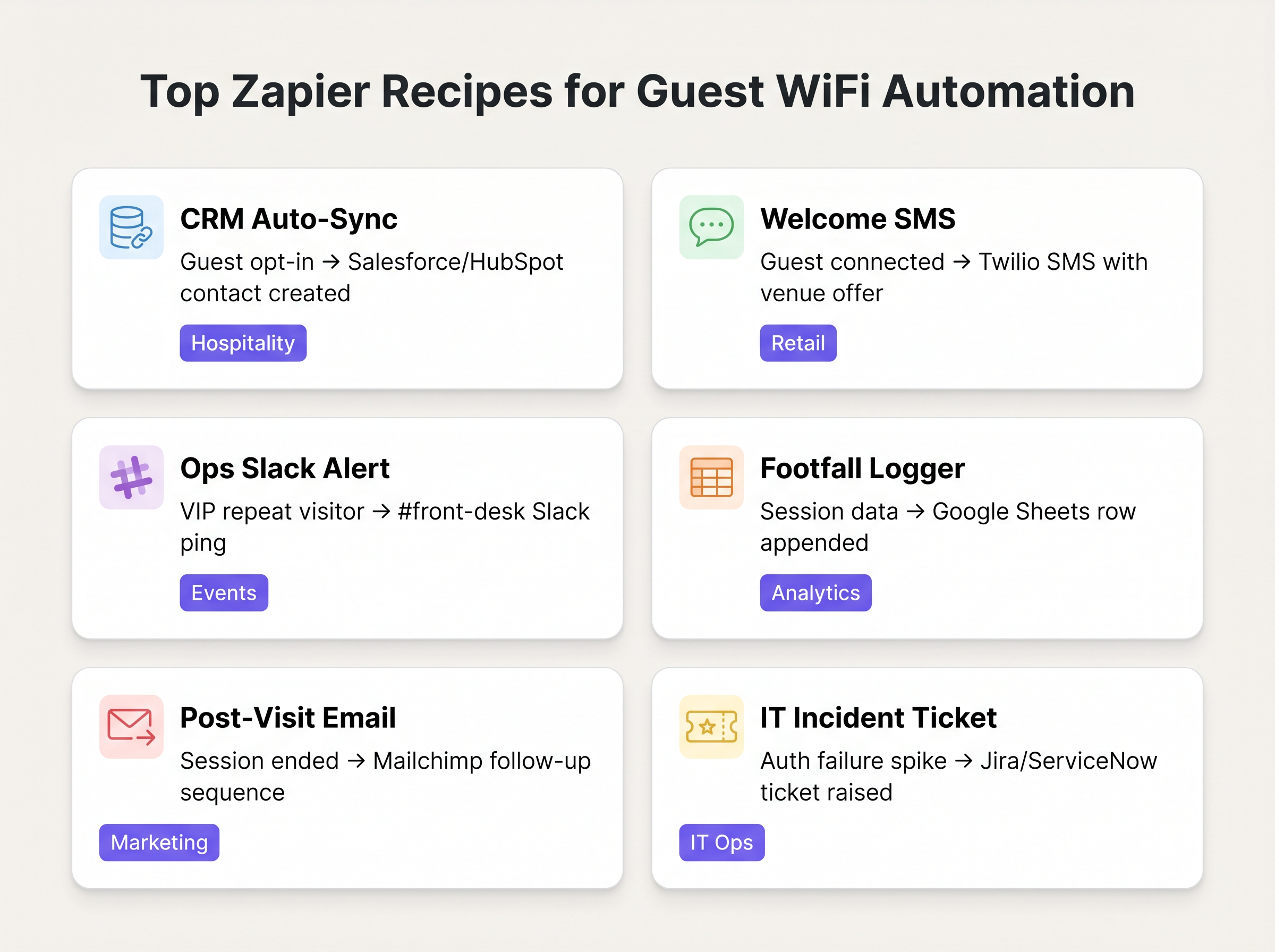
Le déploiement de l'automatisation Purple-Zapier nécessite une approche structurée pour garantir l'hygiène des données et éviter l'épuisement des limites de débit. Les recettes suivantes représentent les flux de travail à plus forte valeur ajoutée pour les déploiements d'entreprise typiques.
Recettes Fondamentales
1. Synchronisation Automatique CRM (La Base)
- Déclencheur : Purple
Guest Opted In - Action : Créer/Mettre à jour un contact dans Salesforce ou HubSpot.
- Raisonnement : Élimine les exportations CSV manuelles. Garantit que la base de données marketing est continuellement mise à jour avec des données d'invités vérifiées et ayant donné leur consentement.
2. SMS de Bienvenue en Temps Réel
- Déclencheur : Purple
Guest Connected - Filtre : Zapier Filter (Procéder uniquement si
guest_idn'a pas été vu au cours des 30 derniers jours). - Action : Envoyer un SMS via Twilio.
- Raisonnement : Favorise l'engagement immédiat dans les environnements de Retail . L'étape de filtrage est essentielle pour éviter de spammer les visiteurs récurrents.
3. Alerte Opérationnelle
- Déclencheur : Purple
Repeat Visitor Detected - Action : Publier un message dans Slack.
- Raisonnement : Alerte la réception ou le concierge dans les établissements d' Hospitality lorsqu'un VIP ou un invité de grande valeur connu se connecte au réseau.
Bonnes Pratiques
Lors de l'architecture de ces flux de travail, les professionnels IT seniors doivent adhérer à plusieurs principes clés pour garantir la stabilité et la conformité :
- Prioriser 'Opted In' sur 'Connected' pour le Marketing : Utilisez toujours le déclencheur
Guest Opted Inpour tout Zap qui crée un enregistrement CRM ou envoie des communications marketing. S'appuyer sur l'événement brutGuest Connectedà ces fins viole les exigences de consentement GDPR et dégrade la qualité des données. - Implémenter une Logique de Déduplication : Un seul utilisateur peut se connecter avec plusieurs appareils (smartphone, ordinateur portable, tablette). Sauf si elle est gérée correctement, cela créera des enregistrements CRM en double. Utilisez l'adresse e-mail hachée (si disponible) comme clé de déduplication principale dans vos actions Zapier, plutôt que l'adresse MAC liée à l'appareil.
- Surveiller la Consommation de Tâches : La tarification de Zapier est basée sur le volume de tâches. Un site très fréquenté peut facilement épuiser une allocation de niveau standard si chaque connexion déclenche un Zap en plusieurs étapes. Utilisez le filtrage intégré de Zapier pour supprimer les événements non pertinents tôt dans le flux de travail, et envisagez de regrouper les données (par exemple, des récapitulatifs horaires vers Google Sheets) pour l'enregistrement de la fréquentation à volume élevé.
Dépannage et Atténuation des Risquesgation
Le mode de défaillance le plus courant dans cette architecture est l'expiration des jetons API en aval. Bien que la livraison des webhooks de Purple soit très fiable, la connexion entre Zapier et l'application cible (par exemple, Salesforce) peut échouer si les jetons d'authentification expirent ou si les limites de débit de l'API sont dépassées.
Stratégie d'atténuation : Configurez la gestion des erreurs intégrée de Zapier pour alerter l'équipe des opérations informatiques via Slack ou e-mail si un Zap échoue consécutivement. Auditez régulièrement l'historique des Zaps pour identifier et résoudre les erreurs de mappage de données récurrentes.
De plus, lors de l'intégration avec des systèmes traitant des données sensibles (comme dans le secteur de la santé ), assurez-vous que la charge utile des données transmise via Zapier ne viole pas la HIPAA ou les réglementations locales en matière de confidentialité. Limitez la charge utile aux champs minimaux nécessaires au flux de travail.
ROI et impact commercial
Le retour sur investissement de l'intégration Zapier se mesure généralement en heures économisées et en amélioration de la précision des données. En automatisant l'ingestion CRM, les équipes marketing récupèrent les heures précédemment consacrées à la manipulation manuelle des données. Plus important encore, l'intégration en temps réel permet un marketing « en direct » – engageant le client pendant qu'il est physiquement présent sur le site – ce qui démontre constamment des taux de conversion plus élevés que les campagnes d'e-mails post-visite.
Définitions clés
Webhook
A method for one application to provide real-time information to another application using HTTP POST requests.
This is the underlying mechanism Purple uses to send event data to Zapier the moment a guest connects.
iPaaS (Integration Platform as a Service)
A suite of cloud services enabling the development, execution and governance of integration flows connecting any combination of on premises and cloud-based processes, services, applications and data within individual or across multiple organizations.
Zapier acts as the iPaaS in this architecture, sitting between Purple and the 1,500+ downstream applications.
Captive Portal
A web page that the user of a public-access network is obliged to view and interact with before access is granted.
The point of interaction where Purple captures guest data and marketing consent, triggering the 'Guest Opted In' event.
Payload
The actual data pack that is sent in a webhook or API request, excluding the headers and metadata.
The Purple webhook payload contains the guest ID, location data, and timestamps needed to populate downstream CRM fields.
Dwell Time
The length of time a visitor spends in a specific physical area or connected to the network.
Calculated using the 'Session Ended' trigger, this metric is crucial for retail analytics and operational planning.
Rate Limiting
A strategy for limiting network traffic, restricting how often someone can repeat an action within a certain timeframe.
A critical consideration when designing Zaps; high-volume WiFi events can easily exhaust API rate limits on downstream applications like Salesforce.
Deduplication
The process of identifying and removing duplicate copies of repeating data.
Essential when building CRM Zaps to ensure that a guest connecting with both a phone and a laptop doesn't create two separate contact records.
MAC Address Correlation
The process of identifying returning devices by matching their unique hardware identifier across multiple sessions.
The mechanism Purple uses to fire the 'Repeat Visitor Detected' trigger, enabling loyalty workflows.
Exemples concrets
A 200-room boutique hotel wants to automatically add new guests to their Mailchimp welcome sequence, but only if the guest has explicitly agreed to receive marketing emails. They also want to ensure that returning guests do not receive the welcome sequence again.
- Set the Zapier Trigger to Purple's 'Guest Opted In' event (not 'Guest Connected'). 2. Add a Zapier Filter step to check a Google Sheet 'Log' to see if the guest's email already exists. 3. If it does not exist, proceed to Action 1: Add Subscriber to Mailchimp Audience. 4. Action 2: Append the new guest's email and timestamp to the Google Sheet 'Log' to prevent future duplicates.
A large retail chain needs to log hourly footfall data from their Purple WiFi network into a central data warehouse for the BI team, but they are concerned about exceeding their Zapier task limits due to the high volume of connections.
Instead of triggering a Zap for every individual 'Guest Connected' event, the IT team configures a Zapier 'Schedule' trigger to run every hour. The Zap then uses a Webhook action to query the Purple API for the aggregated connection count over the last 60 minutes, and writes that single aggregated value to the data warehouse.
Questions d'entraînement
Q1. Your marketing team wants to automatically send a 10% discount SMS to every guest who connects to the stadium WiFi. What is the primary compliance risk, and how should the Zap be architected to mitigate it?
Conseil : Consider the difference between simply joining a network and agreeing to receive marketing communications.
Voir la réponse type
The primary risk is violating GDPR/TCPA by sending marketing messages without explicit consent. The Zap must use the 'Guest Opted In' trigger, not the 'Guest Connected' trigger. Furthermore, a Zapier Filter should be implemented to ensure the SMS is only sent once per guest, rather than every time they reconnect during the event.
Q2. A retail client is complaining that their Zapier task usage has spiked, costing them thousands of dollars, after implementing a 'Log every connection to Google Sheets' Zap. How would you redesign this workflow?
Conseil : Does the BI team need real-time row-by-row data, or do they just need hourly aggregates?
Voir la réponse type
Shift from an event-driven architecture to a scheduled polling architecture. Instead of triggering a Zap on every connection, configure a Zapier Schedule to run hourly. The Zap should make an API call to Purple to retrieve the aggregated connection count for the previous hour, and write that single row to Google Sheets. This reduces task consumption from potentially thousands per hour to just one per hour.
Q3. The operations team wants a Slack alert every time a specific VIP connects to the network. How do you isolate this specific user from the thousands of other daily connections?
Conseil : You need to evaluate the payload data before executing the action.
Voir la réponse type
Use the 'Guest Connected' or 'Repeat Visitor Detected' trigger. Immediately follow this with a Zapier Filter step. Configure the filter to only allow the Zap to continue if the guest_id or mac_address field in the payload exactly matches the known identifier of the VIP. If it doesn't match, the Zap halts without consuming further tasks or posting to Slack.
Continuer la lecture de cette série
Marketing WiFi pour restaurants : Comment transformer le WiFi gratuit en clients fidèles
Ce guide de référence technique et faisant autorité explore l'architecture et la mise en œuvre du marketing WiFi pour restaurants — la pratique consistant à utiliser l'accès au réseau invité comme un canal structuré d'acquisition de données et d'automatisation marketing. Il fournit aux responsables informatiques, aux architectes réseau et aux directeurs d'exploitation de sites un plan tactique pour déployer des captive portals, s'intégrer aux plateformes CRM et déclencher des campagnes automatisées qui génèrent des affaires récurrentes mesurables. De la capture de données conforme au GDPR aux flux de travail d'e-mails basés sur des événements, ce guide couvre le cycle de vie complet du déploiement avec des métriques de ROI concrètes.
Comment se connecter avec les clients : Stratégies numériques pour les entreprises physiques
This authoritative technical reference guide details how physical-location businesses — hotels, retail chains, stadiums, and public-sector venues — can deploy enterprise WiFi infrastructure as a first-party data capture and customer engagement engine. It covers the full architecture from captive portal design and seamless authentication (IEEE 802.11u/Passpoint) through to CRM integration, GDPR compliance, and measurable ROI. IT leaders and venue operators will find actionable deployment guidance, real-world case studies, and a compliance-first risk mitigation framework.
Comment utiliser les données de première partie dans les campagnes marketing
Ce guide de référence explique comment les équipes informatiques et marketing des entreprises peuvent transformer leur infrastructure WiFi invité en un puissant moteur de données de première partie. Il couvre l'architecture technique de la capture de données, la gestion du consentement conforme au GDPR, les stratégies de segmentation et l'activation concrète via l'e-mail, les SMS, la publicité sociale et l'affichage programmatique. Les exploitants de sites et les équipes informatiques y trouveront des conseils de mise en œuvre concrets, des exemples pratiques issus de l'hôtellerie et du commerce de détail, ainsi que des cadres de mesure du retour sur investissement.