

10 सर्वश्रेष्ठ WiFi स्प्लैश पेज उदाहरण (और उन्हें क्या सफल बनाता है)
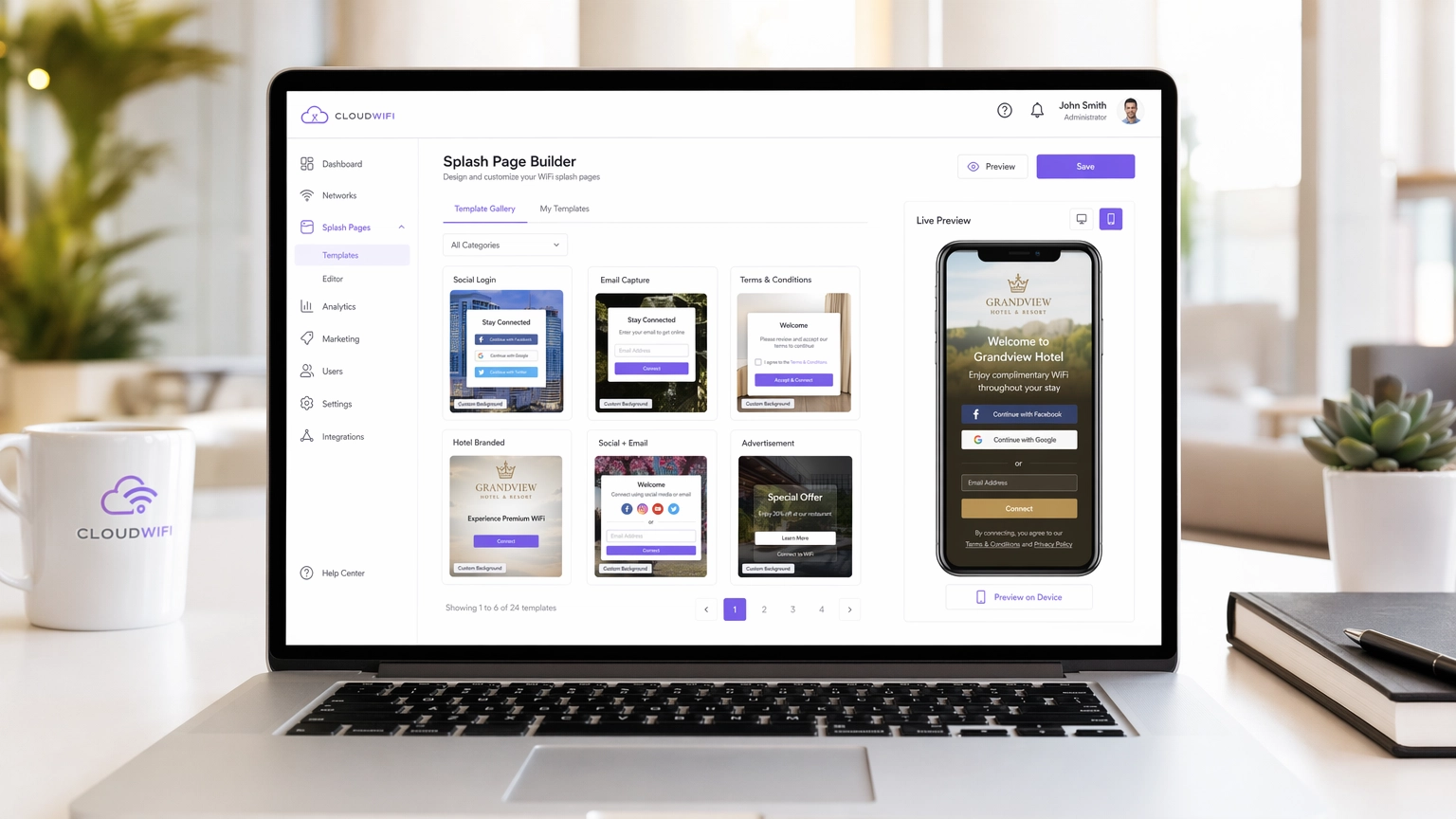
आईटी प्रबंधकों, नेटवर्क आर्किटेक्ट्स और वेन्यू ऑपरेशंस डायरेक्टर्स के लिए एक तकनीकी संदर्भ मार्गदर्शिका जो उच्च-परिवर्तनशील WiFi स्प्लैश पेजों के डिज़ाइन, आर्किटेक्चर और डिप्लॉयमेंट को कवर करती है। यह मार्गदर्शिका हॉस्पिटैलिटी, रिटेल, इवेंट्स और सार्वजनिक क्षेत्र के वातावरण में 10 वास्तविक-विश्व कार्यान्वयन रणनीतियों का विश्लेषण करती है, जिसमें प्रमाणीकरण विधियों, GDPR अनुपालन, वॉल्ड गार्डन कॉन्फ़िगरेशन और MAC रैंडमाइज़ेशन शमन पर विशिष्ट मार्गदर्शन शामिल है।
🎧 Listen to this Guide
View Transcript
कार्यकारी सारांश
आधुनिक एंटरप्राइज़ वेन्यू के लिए, गेस्ट WiFi नेटवर्क अब केवल एक लागत केंद्र नहीं है — यह एक महत्वपूर्ण डेटा अधिग्रहण चैनल है। हालांकि, इस चैनल की सफलता पूरी तरह से कैप्टिव पोर्टल, विशेष रूप से WiFi स्प्लैश पेज पर निर्भर करती है। एक खराब डिज़ाइन किया गया स्प्लैश पेज उच्च परित्याग दर, निराश मेहमानों और खोए हुए मार्केटिंग अवसरों की ओर ले जाता है। यह मार्गदर्शिका आईटी प्रबंधकों, नेटवर्क आर्किटेक्ट्स और वेन्यू ऑपरेशंस डायरेक्टर्स के लिए डिज़ाइन की गई है, और यह हॉस्पिटैलिटी , रिटेल और अन्य क्षेत्रों में उच्च-परिवर्तनशील स्प्लैश पेजों के तकनीकी और डिज़ाइन तत्वों को विस्तार से बताती है।
शुरू करने से पहले, WiFi लैंडिंग पेज बनाम स्प्लैश पेज: क्या अंतर है? के बीच के अंतर को स्पष्ट करना उचित है — यह एक सूक्ष्म अंतर है जिसके आपके आर्किटेक्चर निर्णयों के लिए सीधे निहितार्थ हैं। चाहे आप एक नया नेटवर्क डिप्लॉय कर रहे हों या मौजूदा नेटवर्क को ऑप्टिमाइज़ कर रहे हों, इस अंतर को समझना एक सफल गेस्ट WiFi रणनीति बनाने की दिशा में पहला कदम है जो मापने योग्य ROI प्रदान करती है।
तकनीकी गहन विश्लेषण: कैप्टिव पोर्टल वास्तव में कैसे काम करते हैं
एक WiFi स्प्लैश पेज, या कैप्टिव पोर्टल, अप्रमाणित डिवाइसों से HTTP/HTTPS ट्रैफ़िक को इंटरसेप्ट करके और उन्हें एक वॉल्ड गार्डन वातावरण में रीडायरेक्ट करके काम करता है। यह इंटरसेप्शन वायरलेस LAN कंट्रोलर (WLC) या एक्सेस पॉइंट (AP) द्वारा DNS हाइजैकिंग और IP रीडायरेक्शन के संयोजन का उपयोग करके संभाला जाता है। जब कोई क्लाइंट डिवाइस एक खुले SSID से कनेक्ट होता है, तो OS एक कैप्टिव पोर्टल डिटेक्शन चेक करता है — iOS डिवाइस captive.apple.com को पिंग करते हैं, Android डिवाइस connectivitycheck.gstatic.com पर हिट करते हैं। यदि WLC इस अनुरोध को इंटरसेप्ट और रीडायरेक्ट करता है, तो OS स्प्लैश पेज को एक मिनी-ब्राउज़र में प्रदर्शित करता है।
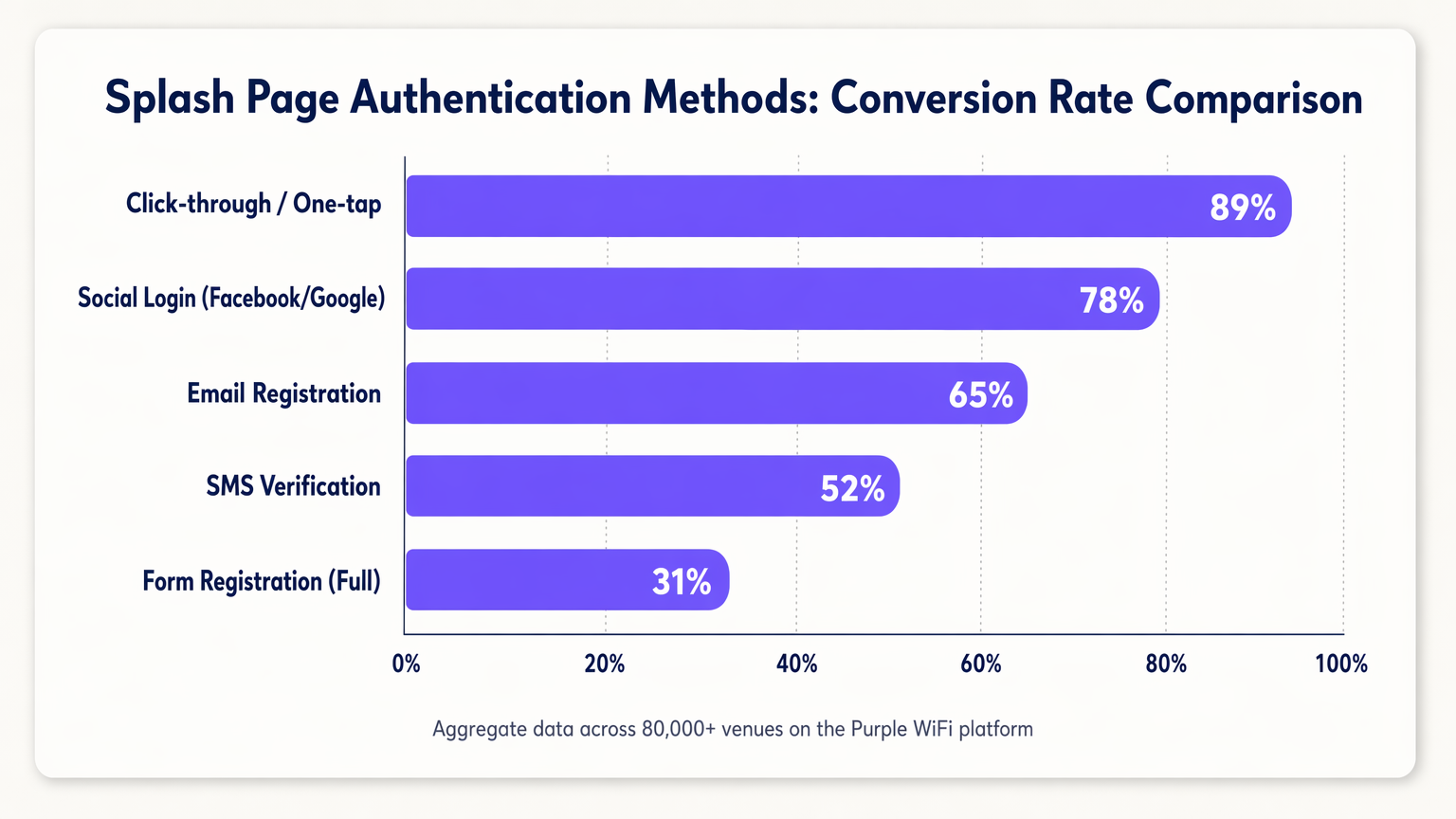
स्प्लैश पेज का मुख्य कार्य प्रमाणीकरण है। प्रमाणीकरण विधि का चुनाव सीधे सुरक्षा स्थिति और रूपांतरण दरों दोनों को प्रभावित करता है, और ये दोनों उद्देश्य अक्सर तनाव में होते हैं।
| Authentication Method | Typical Conversion Rate | Data Quality | Compliance Complexity |
|---|---|---|---|
| क्लिक-थ्रू / वन-टैप | ~89% | कम (कोई PII नहीं) | कम |
| सोशल लॉगिन (OAuth 2.0) | ~78% | उच्च (सत्यापित) | मध्यम |
| ईमेल पंजीकरण | ~65% | मध्यम | मध्यम |
| SMS सत्यापन (OTP) | ~52% | उच्च (सत्यापित फ़ोन) | मध्यम |
| पूर्ण फ़ॉर्म पंजीकरण | ~31% | बहुत उच्च | उच्च |
MAC प्रमाणीकरण बाईपास (MAB) को अलग से संबोधित करना उचित है। ऐतिहासिक रूप से, MAB ने लौटने वाले डिवाइसों को उनके MAC एड्रेस को पहचानकर स्प्लैश पेज को बाईपास करने की अनुमति दी थी। iOS 14+, Android 10+ और Windows 11 में MAC रैंडमाइज़ेशन के व्यापक रूप से अपनाने के साथ, MAB पर निर्भर रहना अब एक विश्वसनीय लौटने वाले-मेहमान अनुभव के लिए व्यवहार्य नहीं है। सही प्रतिक्रिया सत्र टोकन का उपयोग करके पहचान-आधारित प्रमाणीकरण की ओर बढ़ना या OpenRoaming जैसे मानकों का मूल्यांकन करना है, जिसे Purple एक पहचान प्रदाता के रूप में समर्थन करता है।
सुरक्षा और अनुपालन आर्किटेक्चर
एक कैप्टिव पोर्टल डिप्लॉय करने से विशिष्ट सुरक्षा और अनुपालन आवश्यकताएं उत्पन्न होती हैं जिन्हें आर्किटेक्चर चरण में ही संबोधित किया जाना चाहिए, न कि डिप्लॉयमेंट के बाद रेट्रोफिट किया जाना चाहिए।
HTTPS और प्रमाणपत्र प्रबंधन: आधुनिक ब्राउज़र HTTPS को सख्ती से लागू करते हैं। कैप्टिव पोर्टल रीडायरेक्ट चरण के दौरान, WLC को एक वैध SSL/TLS प्रमाणपत्र प्रस्तुत करना होगा। ऐसा करने में विफलता के परिणामस्वरूप ब्राउज़र सुरक्षा चेतावनियाँ मिलती हैं जिन्हें अधिकांश उपयोगकर्ता बाईपास नहीं करेंगे। अनुशंसित दृष्टिकोण यह है कि आपके कैप्टिव पोर्टल के लिए एक समर्पित, विश्वसनीय सबडोमेन का उपयोग किया जाए जिसमें आपके पोर्टल प्रदाता द्वारा प्रबंधित एक वैध प्रमाणपत्र हो।
वॉल्ड गार्डन कॉन्फ़िगरेशन: प्रमाणीकरण से पहले, डिवाइस केवल वॉल्ड गार्डन में स्पष्ट रूप से श्वेतसूचीबद्ध संसाधनों तक ही पहुँच सकते हैं। इसमें शामिल होना चाहिए: आपके पोर्टल के CDN एसेट्स, OAuth प्रदाता एंडपॉइंट्स (accounts.google.com, graph.facebook.com, appleid.apple.com), और OS कैप्टिव पोर्टल डिटेक्शन URL। गलत कॉन्फ़िगर किए गए वॉल्ड गार्डन स्प्लैश पेज विफलताओं का सबसे आम कारण हैं।
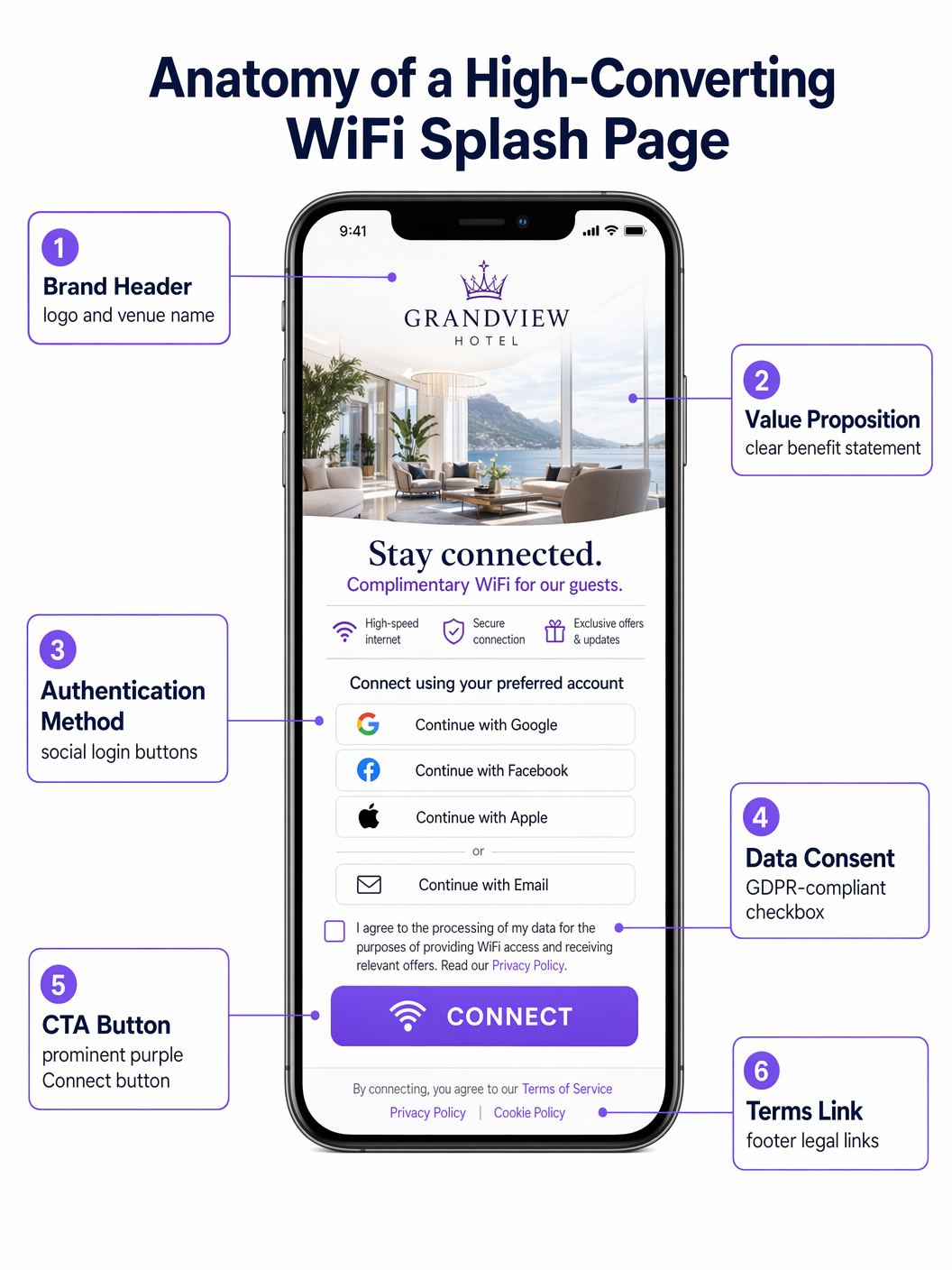
GDPR/CCPA अनुपालन: स्प्लैश पेज एक डेटा संग्रह बिंदु है और इसलिए डेटा गोपनीयता विनियमों के अधीन है। मुख्य आवश्यकताओं में शामिल हैं: मार्केटिंग संचार के लिए स्पष्ट, अन-टिक किए गए सहमति चेकबॉक्स; गोपनीयता नीति का एक स्पष्ट लिंक; विस्तृत सहमति विकल्प (जैसे, ईमेल और SMS मार्केटिंग के लिए अलग-अलग चेकबॉक्स); और आपके CRM में संग्रहीत एक लॉग किया गया, टाइमस्टैम्प्ड सहमति रिकॉर्ड। GDPR अनुच्छेद 7 के तहत पहले से टिक किए गए बॉक्स गैर-अनुपालक हैं।
कार्यान्वयन मार्गदर्शिका: 10 सर्वश्रेष्ठ स्प्लैश पेज रणनीतियाँ
1. निर्बाध सोशल लॉगिन (रिटेल)
तेजी से बदलते रिटेल वातावरण में, गति सर्वोपरि है। उच्चतम-परिवर्तनशील स्प्लैश पेज OAuth 2.0 के माध्यम से वन-टैप सोशल लॉगिन को प्राथमिकता देते हैं। Google और Apple लॉगिन बटन को प्रमुखता से रखना — फोल्ड के ऊपर, बिना स्क्रॉलिंग के — कनेक्ट होने के समय को मिनटों से सेकंडों तक कम कर देता है। यह दृष्टिकोण उपयोगकर्ता के डिवाइस पर मौजूदा प्रमाणित सत्रों का लाभ उठाता है, जिससे मैन्युअल फ़ॉर्म प्रविष्टि की तुलना में रूपांतरण में उल्लेखनीय वृद्धि होती है। इसके कार्य करने के लिए वॉल्ड गार्डन में प्रासंगिक OAuth एंडपॉइंट्स शामिल होने चाहिए।
2. टियरड बैंडविड्थ मॉडल (हॉस्पिटैलिटी)
हॉस्पिटैलिटी नेटवर्क संचालित करने वाले होटल अक्सर एक टियरड मॉडल डिप्लॉय करते हैं। स्प्लैश पेज एक मुफ्त, गति-सीमित टियर (ब्राउज़िंग और मैसेजिंग के लिए उपयुक्त) और एक प्रीमियमm, हाई-थ्रूपुट टियर (स्ट्रीमिंग या VPN के लिए उपयुक्त)। प्रीमियम टियर को सीधे मुद्रीकृत किया जा सकता है या लॉयल्टी प्रोग्राम सदस्यों के लिए एक सुविधा के रूप में पेश किया जा सकता है। इसके लिए Captive Portal, रेडियस सर्वर और प्रॉपर्टी मैनेजमेंट सिस्टम (PMS) के बीच एकीकरण की आवश्यकता होती है ताकि मेहमानों की स्थिति के आधार पर बैंडविड्थ नीतियों को गतिशील रूप से असाइन किया जा सके।
3. द ऐप डाउनलोड इंसेंटिव (ट्रांसपोर्ट)
परिवहन हब जैसे हवाई अड्डों और रेलवे स्टेशनों में, स्प्लैश पेज ऐप अपनाने को बढ़ावा देने के लिए एक शक्तिशाली उपकरण है। वेन्यू के ऐप को डाउनलोड करने के बदले में उच्च थ्रूपुट या विस्तारित सत्र समय की पेशकश करना — जिसमें आमतौर पर इनडोर मैपिंग, प्रस्थान बोर्ड और खुदरा ऑफ़र शामिल होते हैं — एक पारस्परिक रूप से लाभकारी आदान-प्रदान बनाता है। घर्षण को कम करने के लिए स्प्लैश पेज को सीधे ऐप स्टोर या गूगल प्ले लिस्टिंग से डीप-लिंक करना चाहिए।
4. द टारगेटेड स्पॉन्सरशिप (इवेंट्स और स्टेडियम)
स्टेडियमों और कॉन्फ्रेंस सेंटरों के लिए, स्प्लैश पेज प्रीमियम डिजिटल रियल एस्टेट है। एक्सेस देने से पहले रोटेटिंग स्पॉन्सरशिप या इंटरस्टिशियल विज्ञापन लागू करने से सीधा राजस्व उत्पन्न होता है। महत्वपूर्ण डिज़ाइन बाधा यह है कि प्राथमिक कॉल-टू-एक्शन ("Connect to WiFi") एक परिभाषित अंतराल — आमतौर पर 5 से 10 सेकंड — के बाद स्पष्ट रूप से दिखाई देना और सुलभ रहना चाहिए ताकि उच्च-घनत्व वाले वातावरण में मेहमानों को निराश होने से बचाया जा सके।
5. द प्रोग्रेसिव प्रोफाइलिंग अप्रोच (हेल्थकेयर)
हेल्थकेयर सेटिंग्स में, रोगी प्रतिक्रिया और संपर्क विवरण एकत्र करना परिचालन रूप से मूल्यवान है। हालांकि, शुरुआत में व्यापक जानकारी मांगने से परित्याग होता है। प्रोग्रेसिव प्रोफाइलिंग पहली विज़िट पर न्यूनतम डेटा (जैसे, केवल ईमेल) का अनुरोध करती है, फिर बाद की विज़िट पर धीरे-धीरे अतिरिक्त जानकारी (जैसे, संतुष्टि रेटिंग, विज़िट का कारण) का अनुरोध करती है। यह दृष्टिकोण एक्सेस के बिंदु पर बाधा उत्पन्न किए बिना समय के साथ एक व्यापक प्रोफ़ाइल बनाता है।
6. द हाइपर-लोकलाइज़्ड एक्सपीरियंस (रिटेल चेन)
मल्टी-साइट रिटेल चेन के लिए, स्प्लैश पेज को विशिष्ट वेन्यू के आधार पर गतिशील रूप से अनुकूलित होना चाहिए। WLC से पोर्टल तक पारित स्थान डेटा का उपयोग करके, पेज स्टोर-विशिष्ट प्रचार, स्थानीय कार्यक्रम, या क्षेत्र-विशिष्ट सेवा की शर्तें प्रदर्शित कर सकता है। इसके लिए एक केंद्रीकृत पोर्टल प्रबंधन प्लेटफॉर्म — जैसे Purple — की आवश्यकता होती है जो वेन्यू मेटाडेटा के आधार पर गतिशील सामग्री इंजेक्शन का समर्थन करता है।
7. द फ्रिक्शनलेस SMS वेरिफिकेशन (पब्लिक सेक्टर)
जब सत्यापित पहचान की आवश्यकता होती है लेकिन सोशल लॉगिन उपयुक्त नहीं होता है — उदाहरण के लिए, एक सार्वजनिक पुस्तकालय या परिषद भवन में — SMS OTP सत्यापन एक सुरक्षित विकल्प प्रदान करता है। उपयोगकर्ता अपना फ़ोन नंबर दर्ज करता है, एक वन-टाइम पासवर्ड प्राप्त करता है, और एक्सेस प्राप्त करता है। यह सुनिश्चित करता है कि एक वैध, सत्यापित संपर्क विधि कैप्चर की जाती है जबकि एक अपेक्षाकृत सहज उपयोगकर्ता यात्रा बनाए रखी जाती है। प्रत्येक विज़िट पर पुनः सत्यापन की आवश्यकता से बचने के लिए सत्र प्रबंधन को कॉन्फ़िगर किया जाना चाहिए।
8. द लॉयल्टी प्रोग्राम इंटीग्रेशन (हॉस्पिटैलिटी)
स्प्लैश पेज को सीधे CRM और लॉयल्टी प्लेटफॉर्म के साथ एकीकृत करने से लौटने वाले मेहमानों को एक सुरक्षित सत्र टोकन के माध्यम से तुरंत पहचाना जा सकता है। एक व्यक्तिगत अभिवादन ("Welcome back, Sarah") और विशिष्ट सदस्यों के लिए स्वचालित कनेक्शन मेहमानों के अनुभव को महत्वपूर्ण रूप से बढ़ाता है और ब्रांड निष्ठा को मजबूत करता है। यह एकीकरण WiFi Analytics प्लेटफॉर्म को वेन्यू विज़िट को सीधे लॉयल्टी प्रोफाइल से जोड़ने में भी सक्षम बनाता है।
9. द मिनिमलिस्ट डिज़ाइन (कॉर्पोरेट गेस्ट नेटवर्क)
कॉर्पोरेट गेस्ट नेटवर्क में, ध्यान व्यावसायिकता और गति पर होना चाहिए। एक साधारण नियम-स्वीकृति बटन और कंपनी लोगो के साथ एक स्वच्छ, न्यूनतम डिज़ाइन अक्सर इष्टतम दृष्टिकोण होता है। लक्ष्य अनावश्यक मार्केटिंग सामग्री के बिना 10 सेकंड से कम समय में एक्सेस प्रदान करना है। यह डिज़ाइन पैटर्न वॉल्ड गार्डन की जटिलता को भी कम करता है, क्योंकि व्हाइटलिस्ट करने के लिए कोई OAuth एंडपॉइंट या बाहरी CDN नहीं हैं।
10. द मल्टीलिंगुअल पोर्टल (टूरिज्म और इंटरनेशनल वेन्यू)
पर्यटक हॉटस्पॉट या अंतरराष्ट्रीय कॉन्फ्रेंस सेंटरों में वेन्यू के लिए, Accept-Language HTTP हेडर के माध्यम से उपयोगकर्ता की ब्राउज़र भाषा का स्वचालित रूप से पता लगाना और स्प्लैश पेज को उनकी मूल भाषा में प्रस्तुत करना प्रवेश के लिए एक महत्वपूर्ण बाधा को हटाता है। इसके लिए एक पोर्टल प्लेटफॉर्म की आवश्यकता होती है जो बहु-भाषा सामग्री प्रबंधन और अनुपालन उद्देश्यों के लिए स्थानीय-विशिष्ट कानूनी पाठ (सेवा की शर्तें, गोपनीयता नीति) का समर्थन करता है।
बेस्ट प्रैक्टिसेज
एक मोबाइल-फर्स्ट डिज़ाइन फिलॉसफी गैर-परक्राम्य है: 80% से अधिक गेस्ट WiFi कनेक्शन मोबाइल उपकरणों पर होते हैं। स्प्लैश पेज पूरी तरह से प्रतिक्रियाशील होना चाहिए, जिसमें बड़े, आसानी से टैप किए जा सकने वाले बटन (WCAG 2.1 दिशानिर्देशों के अनुसार न्यूनतम 44x44px टच टारगेट) और मानक मोबाइल फ़ॉन्ट आकार पर सुपाठ्य पाठ हो। लोड समय भी उतना ही महत्वपूर्ण है — एक स्प्लैश पेज जिसे रेंडर होने में तीन सेकंड से अधिक लगते हैं, उसमें महत्वपूर्ण परित्याग देखा जाएगा, खासकर उच्च-घनत्व वाले वातावरण में।
WiFi Analytics प्लेटफॉर्म द्वारा सक्षम निरंतर A/B परीक्षण, चल रहे अनुकूलन के लिए आवश्यक है। परीक्षण चर में बटन का रंग, प्रमाणीकरण विधि का क्रम, मूल्य प्रस्ताव कॉपी, और पृष्ठभूमि छवि की उपस्थिति या अनुपस्थिति शामिल होनी चाहिए। यहां तक कि छोटे बदलाव — जैसे सोशल लॉगिन बटन को फिर से व्यवस्थित करके Google को Facebook से ऊपर रखना — भी मापने योग्य रूपांतरण सुधार उत्पन्न कर सकते हैं।
ट्रबलशूटिंग और रिस्क मिटिगेशन
अंतिम उपयोगकर्ताओं से सबसे आम शिकायत यह है कि Captive Portal स्वचालित रूप से पॉप अप नहीं होता है। यह DNS कॉन्फ़िगरेशन त्रुटियों, गलत तरीके से कॉन्फ़िगर किए गए वॉल्ड गार्डन, या उपयोगकर्ता के डिवाइस में कैश्ड DNS एंट्री होने के कारण होता है। समाधान का मार्ग है: सत्यापित करें कि WLC पर DNS इंटरसेप्शन सक्रिय है, पुष्टि करें कि सभी OS Captive Portal डिटेक्शन डोमेन वॉल्ड गार्डन में हैं, और किसी भी क्लाइंट-साइड VPN या DNS-ओवर-HTTPS सेटिंग्स की जांच करें जो इंटरसेप्शन को बायपास कर सकती हैं।
MAC रैंडमाइजेशन, जैसा कि चर्चा की गई है, आज Captive Portal डिप्लॉयमेंट के सामने सबसे महत्वपूर्ण संरचनात्मक चुनौती है। अनुशंसित शमन रणनीति विस्तारित सत्र टाइमआउट (r की आवृत्ति को कम करना) का एक संयोजन है।ई-प्रमाणीकरण) और पहचान-आधारित प्रमाणीकरण की ओर एक बदलाव। Purple का OpenRoaming सपोर्ट उन लौटने वाले यूज़र्स के लिए Captive Portal को पूरी तरह से खत्म करने के लिए एक मानक-आधारित मार्ग प्रदान करता है जिन्होंने पहले प्रमाणीकरण किया है।
ROI और व्यावसायिक प्रभाव
एक अच्छी तरह से ऑप्टिमाइज़्ड स्प्लैश पेज गेस्ट WiFi नेटवर्क को एक डूबे हुए खर्च से एक राजस्व-उत्पादक संपत्ति में बदल देता है। प्राथमिक ROI ड्राइवर फर्स्ट-पार्टी डेटा अधिग्रहण है: प्रत्येक प्रमाणीकृत कनेक्शन एक सत्यापित संपर्क रिकॉर्ड बनाता है जिसे लक्षित ईमेल अभियानों, लॉयल्टी प्रोग्राम नामांकन और व्यक्तिगत इन-वेन्यू अनुभवों के माध्यम से सक्रिय किया जा सकता है। Purple के Guest WiFi प्लेटफॉर्म को 80,000 से अधिक स्थानों पर तैनात करने वाले वेन्यू लगातार केवल WiFi साइन-अप से प्रति माह 15-25% की ईमेल सूची वृद्धि दर रिपोर्ट करते हैं।
टियर किए गए बैंडविड्थ मॉडल या स्पॉन्सरशिप इन्वेंट्री के माध्यम से सीधा मुद्रीकरण एक माध्यमिक राजस्व धारा प्रदान करता है। परिचालन संबंधी जानकारी — फुट ट्रैफिक पैटर्न, ठहरने का समय, ज़ोन उपयोग — जो WiFi Analytics प्लेटफॉर्म से प्राप्त होती है, स्टाफिंग निर्णयों, स्टोर लेआउट ऑप्टिमाइज़ेशन और पूंजीगत व्यय योजना को सूचित करती है, जिससे ROI मिलता है जो मार्केटिंग फ़ंक्शन से कहीं आगे तक फैला हुआ है।
Key Terms & Definitions
Captive Portal
A network access control mechanism that intercepts unauthenticated HTTP/HTTPS traffic and redirects it to a web page (the splash page) where the user must complete an action before gaining full network access.
The underlying infrastructure that makes a WiFi splash page function. IT teams encounter this when configuring WLCs, access points, or cloud-managed network platforms.
Walled Garden
A list of IP addresses and domain names that are accessible to unauthenticated devices before they complete the captive portal authentication process.
Critical for allowing devices to load the splash page assets and authenticate via third-party OAuth providers. Misconfiguration is the primary cause of splash page failures.
MAC Randomization
A privacy feature in modern mobile operating systems (iOS 14+, Android 10+, Windows 11) that generates a new, random MAC address for each Wi-Fi network connection, preventing persistent device tracking.
Breaks traditional MAC Authentication Bypass (MAB) strategies for returning guest recognition, requiring a shift to identity-based authentication.
OAuth 2.0
An industry-standard authorization protocol that enables users to grant third-party applications (e.g., a captive portal) access to their account information from an identity provider (e.g., Google, Facebook) without exposing their credentials.
The technology underpinning Social Login on splash pages. Requires specific OAuth endpoints to be whitelisted in the walled garden.
Progressive Profiling
A data collection strategy that gathers user information incrementally across multiple interactions, rather than requesting all data in a single form submission.
Used to increase splash page conversion rates while still building comprehensive user profiles over time. Requires session token management to recognize returning users.
RADIUS Server
Remote Authentication Dial-In User Service; a networking protocol that provides centralized Authentication, Authorization, and Accounting (AAA) management for network access.
The backend system that receives authentication requests from the WLC, validates credentials against the user directory or CRM, and returns an access-grant or access-deny response.
IEEE 802.1X
An IEEE standard for port-based network access control that provides an authentication mechanism for devices wishing to attach to a LAN or WLAN.
Used in enterprise environments for secure, certificate-based authentication. Typically replaces the need for a captive portal for employees, while guests use a separate SSID with a splash page.
OpenRoaming
A Wi-Fi roaming federation service (built on the Hotspot 2.0/Passpoint standard) that enables automatic, secure Wi-Fi onboarding across participating venues without requiring users to interact with a captive portal.
A modern alternative to traditional captive portals that provides a seamless connection experience. Purple operates as an identity provider within the OpenRoaming federation.
MAC Authentication Bypass (MAB)
A network access control method that uses a device's MAC address as its identity credential to bypass the standard authentication process.
Historically used to provide seamless re-connection for returning guests. Rendered unreliable by MAC randomization in modern mobile operating systems.
Session Token
A unique, time-limited identifier stored as a browser cookie that allows a captive portal to recognize a previously authenticated user without requiring them to re-authenticate.
The correct mechanism for providing returning-guest recognition in a post-MAC-randomization environment. Session expiry should be configured based on the venue's operational requirements.
Case Studies
A 200-room boutique hotel wants to increase sign-ups for its new loyalty programme. Currently, they use a generic shared-password WiFi login. How should they redesign their splash page and supporting infrastructure?
Phase 1 — Remove the shared password entirely and deploy a captive portal integrated with the hotel's PMS and CRM. Phase 2 — Design the splash page with two primary authentication paths: 'Log in with Loyalty Account' (prominent, cookie-based, frictionless for returning members) and 'Join Loyalty Programme for Free WiFi' (requires email and first name only). Phase 3 — Offer a paid premium tier (e.g., 50 Mbps vs. 10 Mbps free) as a deterrent for non-members and a direct revenue stream. Phase 4 — Configure the Radius server to dynamically assign bandwidth policies based on the CRM response. Phase 5 — Implement session tokens with a 30-day expiry so returning guests are not re-prompted on each visit.
A national retail chain is experiencing a 68% abandonment rate on their WiFi splash page, which currently requires users to complete a 5-field registration form (first name, last name, email, date of birth, postcode). The marketing team is reluctant to reduce the data fields. How do you resolve the tension between data capture and conversion?
Implement a two-phase strategy. Phase 1 — Replace the 5-field form with Social Login (Google, Facebook, Apple) as the primary authentication method, supplemented by a 1-field email-only option. Ensure the walled garden is correctly configured to allow access to all OAuth endpoints. This will immediately increase conversion rates. Phase 2 — Implement progressive profiling. On the second visit, the system recognises the returning user via session token and presents a single additional question (e.g., 'What is your postcode?') in exchange for a discount or loyalty points. On the third visit, it requests date of birth. Over 90 days, the system builds the same 5-field profile without ever presenting a 5-field form.
Scenario Analysis
Q1. Your venue is hosting a major technology conference with 5,000 attendees. You need to provide WiFi access to all attendees simultaneously. The event sponsor requires that all attendees see a branded splash page and that email addresses are captured for post-event marketing. You cannot afford any delays or bottlenecks at the network login stage. What is the optimal splash page configuration, and what infrastructure considerations are critical?
💡 Hint:Consider the balance between data capture and throughput in a high-density environment. What authentication method minimizes per-user connection time while still capturing a verified contact? What walled garden entries are essential?
Show Recommended Approach
Deploy Social Login (Google and Apple) as the primary authentication method, with a single-field email form as a fallback. This minimizes per-user connection time while capturing verified contact data. Ensure the walled garden includes all OAuth endpoints for Google and Apple. Pre-scale the Radius server to handle concurrent authentication requests — a 5,000-person event can generate hundreds of simultaneous auth requests during registration periods. Configure session timeouts of at least 8 hours to avoid re-authentication during the event. Avoid SMS verification, which introduces per-user delays and can bottleneck in areas with poor mobile signal.
Q2. A hospital IT director reports that patients are complaining about the WiFi disconnecting and requiring re-authentication on the splash page every time they move between wards. The current setup uses MAC Authentication Bypass with a 1-hour session timeout. How do you diagnose and resolve this?
💡 Hint:The issue relates to session management and device identity. Consider the impact of MAC randomization and the interaction between session timeout and patient dwell times.
Show Recommended Approach
The root cause is a combination of MAC randomization (meaning the WLC cannot reliably identify the returning device) and an excessively short session timeout. Resolution: (1) Extend the session timeout to 24 hours on the Radius server, matching typical patient stay duration. (2) Shift from MAB to session-token-based recognition — when a patient authenticates, store a session cookie with a 24-hour expiry. (3) For longer-stay patients, evaluate deploying a lightweight onboarding profile (Passpoint/Hotspot 2.0) via the hospital's patient portal app, which provides seamless, certificate-based authentication without a captive portal.
Q3. You are deploying a captive portal for a national retail chain operating across the UK and EU. The marketing team wants to automatically subscribe all WiFi users to the weekly promotional newsletter and pre-tick the marketing consent checkbox to increase opt-in rates. How do you advise them, and what is the correct technical implementation?
💡 Hint:Consider the legal requirements for consent under GDPR Article 7 and Recital 32. What constitutes valid consent, and what are the consequences of non-compliance?
Show Recommended Approach
Advise the marketing team that pre-ticked consent checkboxes are explicitly non-compliant under GDPR Article 7 and Recital 32, which require that consent be freely given, specific, informed and unambiguous, and that silence, pre-ticked boxes or inactivity should not constitute consent. The correct implementation is: (1) A clearly labelled, un-ticked checkbox for marketing email communications, separate from the mandatory Terms of Service acceptance. (2) A compelling value proposition adjacent to the checkbox (e.g., Tick to receive exclusive offers and 10% off your next purchase). (3) A logged, timestamped consent record stored in the CRM, including the specific consent text version the user agreed to. (4) A clear and accessible unsubscribe mechanism in all subsequent communications.




