
Los 10 mejores ejemplos de páginas de inicio de WiFi (y qué los hace funcionar)
Una guía de referencia técnica para gerentes de TI, arquitectos de red y directores de operaciones de recintos que cubre el diseño, la arquitectura y la implementación de páginas de inicio de WiFi de alta conversión. La guía analiza 10 estrategias de implementación del mundo real en entornos de hospitalidad, comercio minorista, eventos y sector público, con orientación específica sobre métodos de autenticación, cumplimiento de GDPR, configuración de walled garden y mitigación de la aleatorización de MAC.
Escucha esta guía
Ver transcripción del podcast
Resumen Ejecutivo
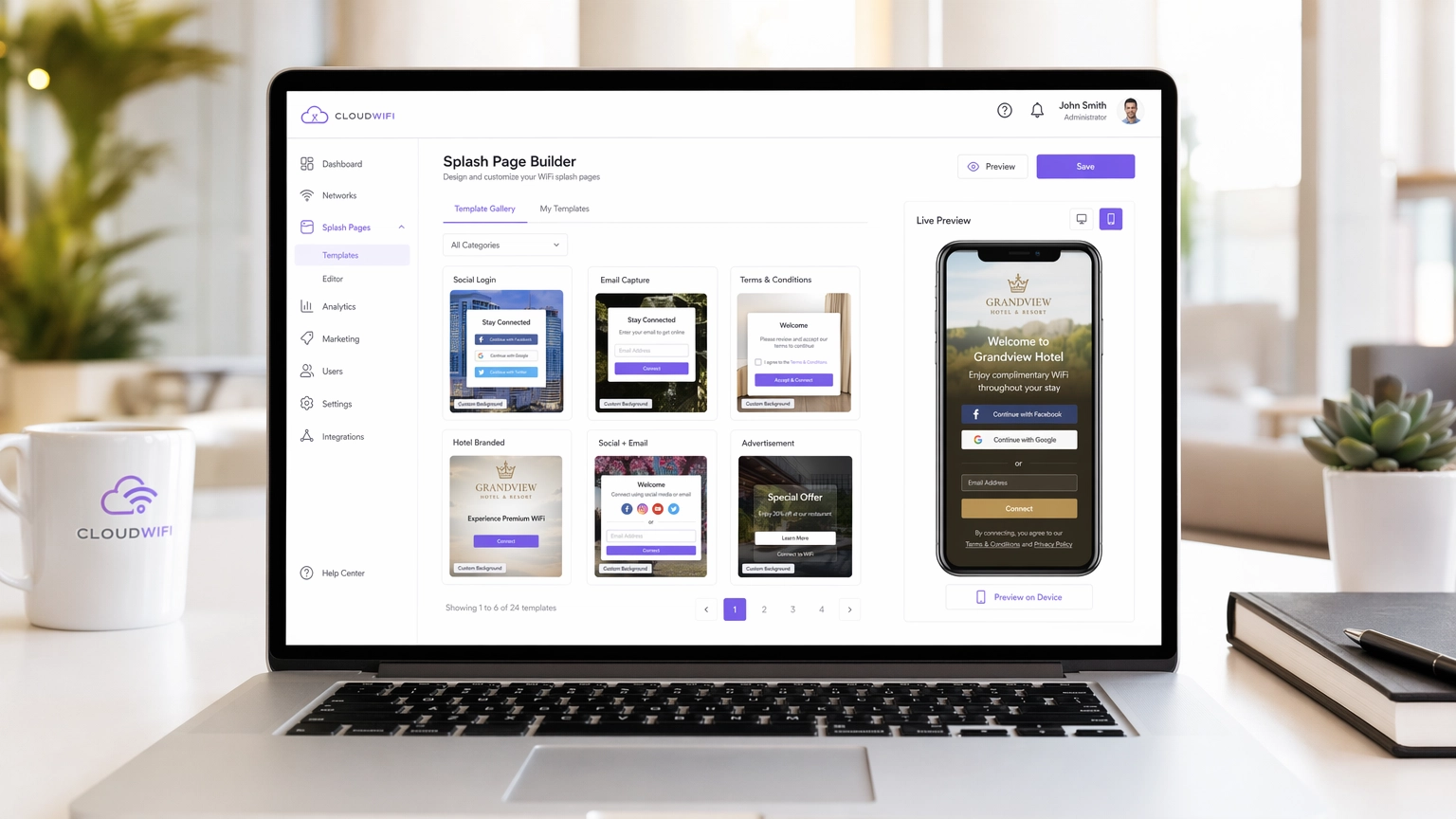
Para los recintos empresariales modernos, la red WiFi para invitados ya no es solo un centro de costos, es un canal crítico de adquisición de datos. Sin embargo, el éxito de este canal depende completamente del Captive Portal, específicamente de la página de inicio de WiFi. Una página de inicio mal diseñada conduce a altas tasas de abandono, huéspedes frustrados y oportunidades de marketing perdidas. Esta guía está diseñada para gerentes de TI, arquitectos de red y directores de operaciones de recintos, y desglosa los elementos técnicos y de diseño de las páginas de inicio de alta conversión en los sectores de Hospitalidad , Comercio Minorista y otros.
Antes de profundizar, vale la pena aclarar la distinción entre una Página de Aterrizaje de WiFi vs. Página de Inicio: ¿Cuál es la Diferencia? — un matiz que tiene implicaciones directas para sus decisiones de arquitectura. Ya sea que esté implementando una nueva red u optimizando una existente, comprender esta distinción es el primer paso para construir una estrategia exitosa de WiFi para Invitados que ofrezca un ROI medible.
Análisis Técnico Detallado: Cómo Funcionan Realmente los Captive Portals
Una página de inicio de WiFi, o Captive Portal, opera interceptando el tráfico HTTP/HTTPS de dispositivos no autenticados y redirigiéndolos a un entorno de walled garden. Esta interceptación es manejada por el controlador de LAN inalámbrica (WLC) o el punto de acceso (AP) utilizando una combinación de secuestro de DNS y redirección de IP. Cuando un dispositivo cliente se conecta a un SSID abierto, el sistema operativo realiza una verificación de detección de Captive Portal — los dispositivos iOS hacen ping a captive.apple.com, los dispositivos Android acceden a connectivitycheck.gstatic.com. Si el WLC intercepta y redirige esta solicitud, el sistema operativo muestra la página de inicio en un mini-navegador.
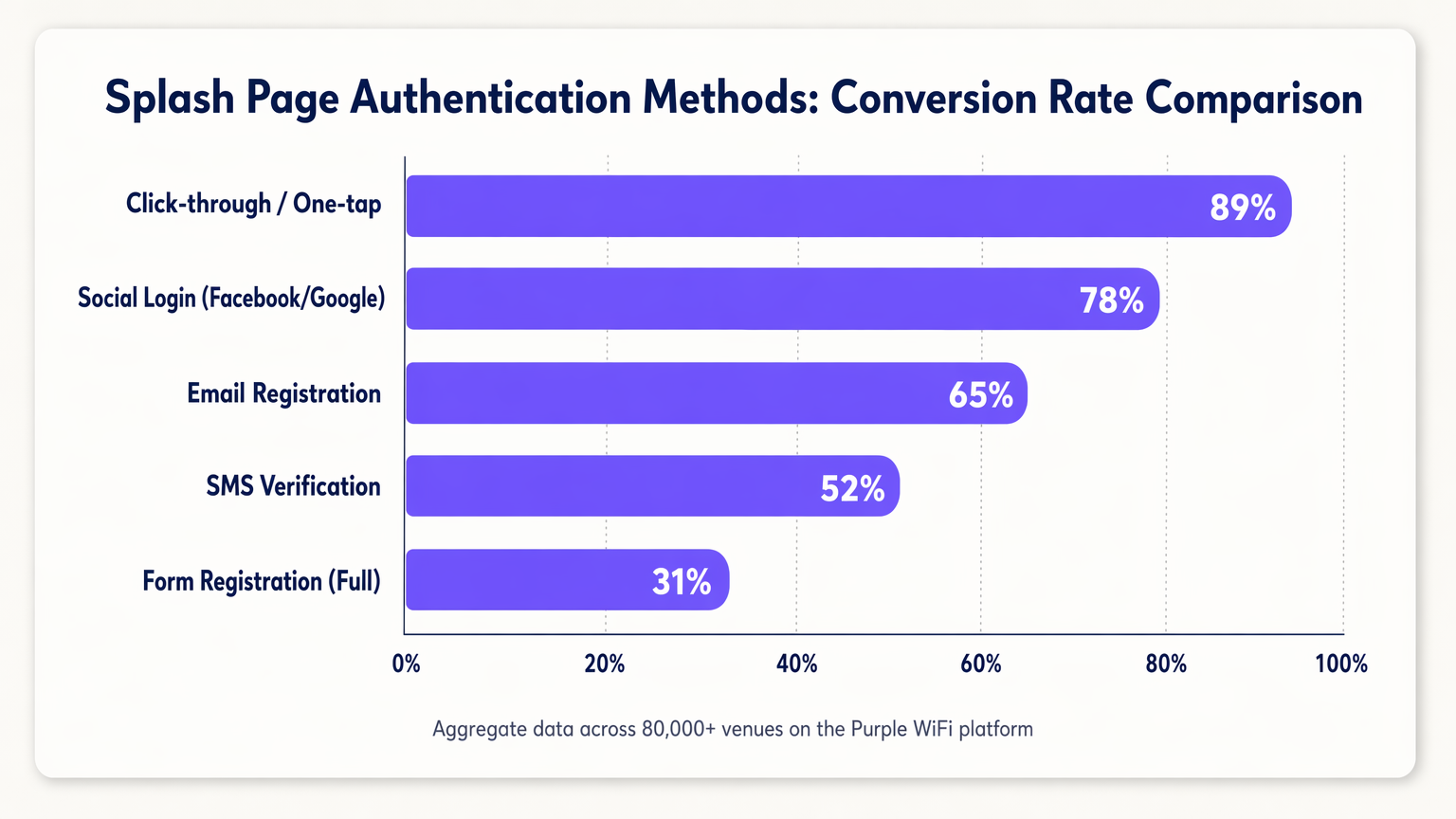
La función principal de la página de inicio es la autenticación. La elección del método de autenticación impacta directamente tanto la postura de seguridad como las tasas de conversión, y estos dos objetivos a menudo están en tensión.
| Método de Autenticación | Tasa de Conversión Típica | Calidad de Datos | Complejidad de Cumplimiento |
|---|---|---|---|
| Clic-a-través / Un toque | ~89% | Baja (sin PII) | Baja |
| Inicio de Sesión Social (OAuth 2.0) | ~78% | Alta (verificado) | Media |
| Registro por Correo Electrónico | ~65% | Media | Media |
| Verificación por SMS (OTP) | ~52% | Alta (teléfono verificado) | Media |
| Registro con Formulario Completo | ~31% | Muy Alta | Alta |
MAC Authentication Bypass (MAB) merece ser abordado por separado. Históricamente, MAB permitía a los dispositivos recurrentes omitir la página de inicio al reconocer su dirección MAC. Con la adopción generalizada de la aleatorización de MAC en iOS 14+, Android 10+ y Windows 11, depender de MAB ya no es viable para una experiencia confiable para el huésped recurrente. La respuesta correcta es cambiar hacia la autenticación basada en identidad utilizando tokens de sesión o evaluar estándares como OpenRoaming, que Purple soporta como proveedor de identidad.
Arquitectura de Seguridad y Cumplimiento
La implementación de un Captive Portal introduce requisitos específicos de seguridad y cumplimiento que deben abordarse en la etapa de arquitectura, no adaptarse después de la implementación.
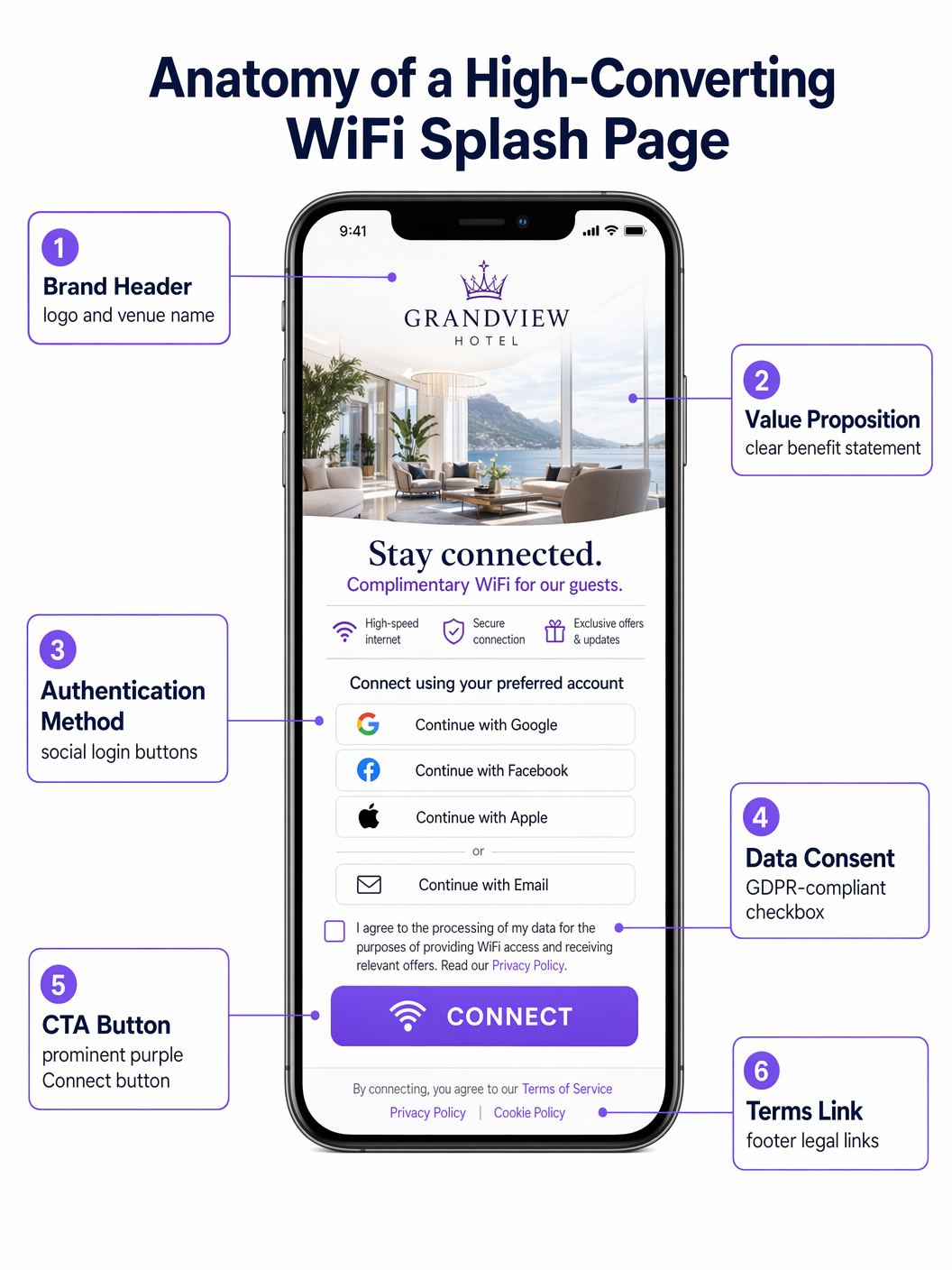
HTTPS y Gestión de Certificados: Los navegadores modernos aplican HTTPS estrictamente. Durante la fase de redirección del Captive Portal, el WLC debe presentar un certificado SSL/TLS válido. No hacerlo resulta en advertencias de seguridad del navegador que la mayoría de los usuarios no omitirán. El enfoque recomendado es usar un subdominio dedicado y confiable para su Captive Portal con un certificado válido administrado por su proveedor de portal.
Configuración de Walled Garden: Antes de la autenticación, los dispositivos solo pueden acceder a los recursos explícitamente incluidos en la lista blanca del walled garden. Esto debe incluir: los activos CDN de su portal, los puntos finales del proveedor de OAuth (accounts.google.com, graph.facebook.com, appleid.apple.com) y las URL de detección de Captive Portal del sistema operativo. Los walled gardens mal configurados son la causa más común de fallas en la página de inicio.
Cumplimiento de GDPR/CCPA: La página de inicio es un punto de recopilación de datos y, por lo tanto, está sujeta a las regulaciones de privacidad de datos. Los requisitos clave incluyen: casillas de verificación de consentimiento explícitas y sin marcar para comunicaciones de marketing; un enlace claro a la política de privacidad; opciones de consentimiento granular (por ejemplo, casillas de verificación separadas para marketing por correo electrónico y SMS); y un registro de consentimiento con marca de tiempo almacenado en su CRM. Las casillas premarcadas no cumplen con el Artículo 7 de GDPR.
Guía de Implementación: Las 10 Mejores Estrategias de Páginas de Inicio
1. El Inicio de Sesión Social Sin Interrupciones (Comercio Minorista)
En entornos de Comercio Minorista de ritmo rápido, la velocidad es primordial. Las páginas de inicio de mayor conversión priorizan los inicios de sesión sociales de un solo toque a través de OAuth 2.0. Colocar los botones de inicio de sesión de Google y Apple de manera prominente — por encima del pliegue, sin necesidad de desplazamiento — reduce el tiempo de conexión de minutos a segundos. Este enfoque aprovecha las sesiones autenticadas existentes en el dispositivo del usuario, aumentando significativamente la conversión en comparación con la entrada manual de formularios. El walled garden debe incluir los puntos finales de OAuth relevantes para que esto funcione.
2. El Modelo de Ancho de Banda por Niveles (Hospitalidad)
Los hoteles que operan redes de Hospitalidad a menudo implementan un modelo por niveles. La página de inicio presenta un nivel gratuito con límite de velocidad (adecuado para navegar y enviar mensajes) y un premium, nivel de alto rendimiento (adecuado para streaming o VPN). El nivel premium puede monetizarse directamente u ofrecerse como un beneficio para los miembros del programa de lealtad. Esto requiere la integración entre el Captive Portal, el servidor Radius y el sistema de gestión de propiedades (PMS) para asignar dinámicamente políticas de ancho de banda basadas en el estado del huésped.
3. El incentivo de descarga de la aplicación (Transporte)
En centros de Transporte como aeropuertos y estaciones de tren, la página de inicio es una herramienta poderosa para impulsar la adopción de aplicaciones. Ofrecer un mayor rendimiento o tiempos de sesión extendidos a cambio de descargar la aplicación del lugar —que normalmente incluye mapas interiores, paneles de salidas y ofertas minoristas— crea un intercambio mutuamente beneficioso. La página de inicio debe enlazar directamente a la App Store o a la lista de Google Play para minimizar la fricción.
4. El patrocinio dirigido (Eventos y Estadios)
Para estadios y centros de conferencias, la página de inicio es un bien inmueble digital premium. La implementación de patrocinios rotativos o anuncios intersticiales antes de conceder el acceso genera ingresos directos. La restricción de diseño crítica es que la llamada a la acción principal ("Conectarse a WiFi") debe permanecer claramente visible y accesible después de un intervalo definido —típicamente de 5 a 10 segundos— para evitar frustrar a los huéspedes en un entorno de alta densidad.
5. El enfoque de perfilado progresivo (Salud)
En entornos de Salud , recopilar comentarios de pacientes y detalles de contacto es valioso operativamente. Sin embargo, solicitar información extensa de antemano provoca el abandono. El perfilado progresivo solicita datos mínimos en la primera visita (por ejemplo, solo correo electrónico), luego solicita incrementalmente información adicional en visitas posteriores (por ejemplo, calificación de satisfacción, motivo de la visita). Este enfoque construye un perfil completo con el tiempo sin crear un cuello de botella en el punto de acceso.
6. La experiencia hiperlocalizada (Cadenas minoristas)
Para cadenas minoristas multisitio, la página de inicio debe adaptarse dinámicamente según el lugar específico. Utilizando datos de ubicación pasados del WLC al portal, la página puede mostrar promociones específicas de la tienda, eventos locales o términos de servicio específicos de la región. Esto requiere una plataforma de gestión de portal centralizada —como Purple— que admita la inyección dinámica de contenido basada en metadatos del lugar.
7. La verificación SMS sin fricciones (Sector público)
Cuando se requiere una identidad verificada pero el inicio de sesión social no es apropiado —por ejemplo, en una biblioteca pública o un edificio municipal— la verificación SMS OTP ofrece una alternativa segura. El usuario ingresa su número de teléfono, recibe una contraseña de un solo uso y obtiene acceso. Esto asegura que se capture un método de contacto válido y verificado, manteniendo al mismo tiempo un recorrido de usuario relativamente fluido. La gestión de sesiones debe configurarse para evitar requerir una nueva verificación en cada visita.
8. La integración del programa de lealtad (Hostelería)
La integración de la página de inicio directamente con el CRM y la plataforma de lealtad permite que los huéspedes recurrentes sean reconocidos inmediatamente a través de un token de sesión seguro. Un saludo personalizado ("Bienvenida de nuevo, Sarah") y la conexión automática para miembros élite mejoran significativamente la experiencia del huésped y refuerzan la lealtad a la marca. Esta integración también permite que la plataforma WiFi Analytics atribuya las visitas al lugar directamente a los perfiles de lealtad.
9. El diseño minimalista (Redes de invitados corporativas)
En las redes de invitados corporativas, el enfoque debe ser la profesionalidad y la velocidad. Un diseño limpio y minimalista con un botón simple de aceptación de términos y el logotipo de la empresa suele ser el enfoque óptimo. El objetivo es proporcionar acceso en menos de 10 segundos sin contenido de marketing innecesario. Este patrón de diseño también reduce la complejidad del walled garden, ya que no hay puntos finales de OAuth ni CDN externos que incluir en la lista blanca.
10. El portal multilingüe (Turismo y Lugares Internacionales)
Para lugares en puntos turísticos o centros de conferencias internacionales, la detección automática del idioma del navegador del usuario a través del encabezado HTTP Accept-Language y la presentación de la página de inicio en su idioma nativo elimina una barrera de entrada significativa. Esto requiere una plataforma de portal que admita la gestión de contenido multilingüe y texto legal específico de la configuración regional (términos de servicio, política de privacidad) para fines de cumplimiento.
Mejores prácticas
Una filosofía de diseño mobile-first es innegociable: más del 80% de las conexiones WiFi de invitados ocurren en dispositivos móviles. La página de inicio debe ser totalmente responsiva, con botones grandes y fáciles de tocar (objetivos táctiles mínimos de 44x44px según las pautas WCAG 2.1) y texto legible en tamaños de fuente móviles estándar. El tiempo de carga es igualmente crítico: una página de inicio que tarde más de tres segundos en renderizarse experimentará un abandono significativo, particularmente en entornos de alta densidad.
Las pruebas A/B continuas, habilitadas por la plataforma WiFi Analytics , son esenciales para la optimización continua. Las variables de prueba deben incluir el color del botón, el orden del método de autenticación, el texto de la propuesta de valor y la presencia o ausencia de una imagen de fondo. Incluso pequeños cambios —como reordenar los botones de inicio de sesión social para colocar Google por encima de Facebook— pueden producir mejoras medibles en la conversión.
Solución de problemas y mitigación de riesgos
La queja más común de los usuarios finales es que el Captive Portal no aparece automáticamente. Esto se debe a errores de configuración de DNS, walled gardens mal configurados o que el dispositivo del usuario tiene una entrada DNS en caché. La ruta de resolución es: verificar que la intercepción de DNS esté activa en el WLC, confirmar que todos los dominios de detección de Captive Portal del sistema operativo estén en el walled garden y verificar cualquier configuración de VPN o DNS-over-HTTPS del lado del cliente que pueda eludir la intercepción.
La aleatorización de MAC, como se discutió, es el desafío estructural más significativo que enfrentan las implementaciones de Captive Portal hoy en día. La estrategia de mitigación recomendada es una combinación de tiempos de espera de sesión extendidos (reduciendo la frecuencia de rautenticación electrónica) y una transición hacia la autenticación basada en identidad. El soporte de OpenRoaming de Purple proporciona una ruta basada en estándares hacia la eliminación completa del Captive Portal para usuarios recurrentes que se hayan autenticado previamente.
ROI y Impacto Comercial
Una página de inicio bien optimizada transforma la red WiFi para invitados de un costo irrecuperable en un activo generador de ingresos. El principal impulsor del ROI es la adquisición de datos de primera parte: cada conexión autenticada genera un registro de contacto verificado que puede activarse a través de campañas de correo electrónico dirigidas, la inscripción en programas de lealtad y experiencias personalizadas en el lugar. Los establecimientos que implementan la plataforma Guest WiFi de Purple en más de 80,000 ubicaciones informan consistentemente tasas de crecimiento de listas de correo electrónico del 15-25% mensual solo a partir de los registros de WiFi.
La monetización directa a través de modelos de ancho de banda por niveles o inventario de patrocinio proporciona una fuente de ingresos secundaria. La inteligencia operativa —patrones de tráfico peatonal, tiempos de permanencia, utilización de zonas— derivada de la plataforma WiFi Analytics informa las decisiones de personal, la optimización del diseño de la tienda y la planificación de gastos de capital, generando un ROI que se extiende mucho más allá de la función de marketing.
Definiciones clave
Captive Portal
A network access control mechanism that intercepts unauthenticated HTTP/HTTPS traffic and redirects it to a web page (the splash page) where the user must complete an action before gaining full network access.
The underlying infrastructure that makes a WiFi splash page function. IT teams encounter this when configuring WLCs, access points, or cloud-managed network platforms.
Walled Garden
A list of IP addresses and domain names that are accessible to unauthenticated devices before they complete the captive portal authentication process.
Critical for allowing devices to load the splash page assets and authenticate via third-party OAuth providers. Misconfiguration is the primary cause of splash page failures.
MAC Randomization
A privacy feature in modern mobile operating systems (iOS 14+, Android 10+, Windows 11) that generates a new, random MAC address for each Wi-Fi network connection, preventing persistent device tracking.
Breaks traditional MAC Authentication Bypass (MAB) strategies for returning guest recognition, requiring a shift to identity-based authentication.
OAuth 2.0
An industry-standard authorization protocol that enables users to grant third-party applications (e.g., a captive portal) access to their account information from an identity provider (e.g., Google, Facebook) without exposing their credentials.
The technology underpinning Social Login on splash pages. Requires specific OAuth endpoints to be whitelisted in the walled garden.
Progressive Profiling
A data collection strategy that gathers user information incrementally across multiple interactions, rather than requesting all data in a single form submission.
Used to increase splash page conversion rates while still building comprehensive user profiles over time. Requires session token management to recognize returning users.
RADIUS Server
Remote Authentication Dial-In User Service; a networking protocol that provides centralized Authentication, Authorization, and Accounting (AAA) management for network access.
The backend system that receives authentication requests from the WLC, validates credentials against the user directory or CRM, and returns an access-grant or access-deny response.
IEEE 802.1X
An IEEE standard for port-based network access control that provides an authentication mechanism for devices wishing to attach to a LAN or WLAN.
Used in enterprise environments for secure, certificate-based authentication. Typically replaces the need for a captive portal for employees, while guests use a separate SSID with a splash page.
OpenRoaming
A Wi-Fi roaming federation service (built on the Hotspot 2.0/Passpoint standard) that enables automatic, secure Wi-Fi onboarding across participating venues without requiring users to interact with a captive portal.
A modern alternative to traditional captive portals that provides a seamless connection experience. Purple operates as an identity provider within the OpenRoaming federation.
MAC Authentication Bypass (MAB)
A network access control method that uses a device's MAC address as its identity credential to bypass the standard authentication process.
Historically used to provide seamless re-connection for returning guests. Rendered unreliable by MAC randomization in modern mobile operating systems.
Session Token
A unique, time-limited identifier stored as a browser cookie that allows a captive portal to recognize a previously authenticated user without requiring them to re-authenticate.
The correct mechanism for providing returning-guest recognition in a post-MAC-randomization environment. Session expiry should be configured based on the venue's operational requirements.
Ejemplos resueltos
A 200-room boutique hotel wants to increase sign-ups for its new loyalty programme. Currently, they use a generic shared-password WiFi login. How should they redesign their splash page and supporting infrastructure?
Phase 1 — Remove the shared password entirely and deploy a captive portal integrated with the hotel's PMS and CRM. Phase 2 — Design the splash page with two primary authentication paths: 'Log in with Loyalty Account' (prominent, cookie-based, frictionless for returning members) and 'Join Loyalty Programme for Free WiFi' (requires email and first name only). Phase 3 — Offer a paid premium tier (e.g., 50 Mbps vs. 10 Mbps free) as a deterrent for non-members and a direct revenue stream. Phase 4 — Configure the Radius server to dynamically assign bandwidth policies based on the CRM response. Phase 5 — Implement session tokens with a 30-day expiry so returning guests are not re-prompted on each visit.
A national retail chain is experiencing a 68% abandonment rate on their WiFi splash page, which currently requires users to complete a 5-field registration form (first name, last name, email, date of birth, postcode). The marketing team is reluctant to reduce the data fields. How do you resolve the tension between data capture and conversion?
Implement a two-phase strategy. Phase 1 — Replace the 5-field form with Social Login (Google, Facebook, Apple) as the primary authentication method, supplemented by a 1-field email-only option. Ensure the walled garden is correctly configured to allow access to all OAuth endpoints. This will immediately increase conversion rates. Phase 2 — Implement progressive profiling. On the second visit, the system recognises the returning user via session token and presents a single additional question (e.g., 'What is your postcode?') in exchange for a discount or loyalty points. On the third visit, it requests date of birth. Over 90 days, the system builds the same 5-field profile without ever presenting a 5-field form.
Preguntas de práctica
Q1. Your venue is hosting a major technology conference with 5,000 attendees. You need to provide WiFi access to all attendees simultaneously. The event sponsor requires that all attendees see a branded splash page and that email addresses are captured for post-event marketing. You cannot afford any delays or bottlenecks at the network login stage. What is the optimal splash page configuration, and what infrastructure considerations are critical?
Sugerencia: Consider the balance between data capture and throughput in a high-density environment. What authentication method minimizes per-user connection time while still capturing a verified contact? What walled garden entries are essential?
Ver respuesta modelo
Deploy Social Login (Google and Apple) as the primary authentication method, with a single-field email form as a fallback. This minimizes per-user connection time while capturing verified contact data. Ensure the walled garden includes all OAuth endpoints for Google and Apple. Pre-scale the Radius server to handle concurrent authentication requests — a 5,000-person event can generate hundreds of simultaneous auth requests during registration periods. Configure session timeouts of at least 8 hours to avoid re-authentication during the event. Avoid SMS verification, which introduces per-user delays and can bottleneck in areas with poor mobile signal.
Q2. A hospital IT director reports that patients are complaining about the WiFi disconnecting and requiring re-authentication on the splash page every time they move between wards. The current setup uses MAC Authentication Bypass with a 1-hour session timeout. How do you diagnose and resolve this?
Sugerencia: The issue relates to session management and device identity. Consider the impact of MAC randomization and the interaction between session timeout and patient dwell times.
Ver respuesta modelo
The root cause is a combination of MAC randomization (meaning the WLC cannot reliably identify the returning device) and an excessively short session timeout. Resolution: (1) Extend the session timeout to 24 hours on the Radius server, matching typical patient stay duration. (2) Shift from MAB to session-token-based recognition — when a patient authenticates, store a session cookie with a 24-hour expiry. (3) For longer-stay patients, evaluate deploying a lightweight onboarding profile (Passpoint/Hotspot 2.0) via the hospital's patient portal app, which provides seamless, certificate-based authentication without a captive portal.
Q3. You are deploying a captive portal for a national retail chain operating across the UK and EU. The marketing team wants to automatically subscribe all WiFi users to the weekly promotional newsletter and pre-tick the marketing consent checkbox to increase opt-in rates. How do you advise them, and what is the correct technical implementation?
Sugerencia: Consider the legal requirements for consent under GDPR Article 7 and Recital 32. What constitutes valid consent, and what are the consequences of non-compliance?
Ver respuesta modelo
Advise the marketing team that pre-ticked consent checkboxes are explicitly non-compliant under GDPR Article 7 and Recital 32, which require that consent be freely given, specific, informed and unambiguous, and that silence, pre-ticked boxes or inactivity should not constitute consent. The correct implementation is: (1) A clearly labelled, un-ticked checkbox for marketing email communications, separate from the mandatory Terms of Service acceptance. (2) A compelling value proposition adjacent to the checkbox (e.g., Tick to receive exclusive offers and 10% off your next purchase). (3) A logged, timestamped consent record stored in the CRM, including the specific consent text version the user agreed to. (4) A clear and accessible unsubscribe mechanism in all subsequent communications.
Continúe leyendo esta serie
Captive Portal personalizado: Guía de HTML y CSS
Esta guía de referencia técnica autorizada describe los estándares de desarrollo, la arquitectura CSS y las restricciones a nivel de red requeridas para diseñar y programar una página de inicio de Captive Portal personalizada. Proporciona a los desarrolladores frontend y arquitectos de red estrategias prácticas para navegar por los entornos de Apple CNA y webview de Android, garantizando experiencias de WiFi para invitados impecables, conformes y de alto rendimiento.
Cómo Configurar un Hotspot WiFi para Su Negocio
Esta guía autorizada proporciona a líderes de TI, arquitectos de red y directores de operaciones de recintos un plan práctico y neutral en cuanto a proveedores para implementar hotspots WiFi para invitados seguros, conformes y que mejoran el negocio. Cubre decisiones arquitectónicas críticas —desde la segmentación de VLAN y la configuración de Captive Portal hasta el cumplimiento de GDPR y la gestión de tráfico— y demuestra cómo transformar la infraestructura de red de un centro de costos en una plataforma de análisis que genera ingresos utilizando las capacidades de Guest WiFi y análisis de Purple.
Purple vs. Cisco Spaces (DNA Spaces): Cuándo Elegir Cada Uno
Esta guía de referencia técnica ofrece una comparación exhaustiva de Purple y Cisco Spaces (anteriormente DNA Spaces) para implementaciones de Captive Portal empresarial y WiFi para invitados. Evalúa las diferencias arquitectónicas, la profundidad de la automatización de marketing y la cuestión crítica de la dependencia del proveedor de hardware para ayudar a los líderes de TI a tomar decisiones informadas sobre la infraestructura.