
I 10 migliori esempi di Splash Page WiFi (e cosa li rende efficaci)
Una guida di riferimento tecnico per IT manager, architetti di rete e direttori delle operazioni di sede che copre la progettazione, l'architettura e l'implementazione di splash page WiFi ad alta conversione. La guida analizza 10 strategie di implementazione reali in ambienti ospedalieri, retail, eventi e settore pubblico, con indicazioni specifiche sui metodi di autenticazione, conformità GDPR, configurazione del walled garden e mitigazione della randomizzazione MAC.
Ascolta questa guida
Visualizza trascrizione del podcast
Sintesi Esecutiva
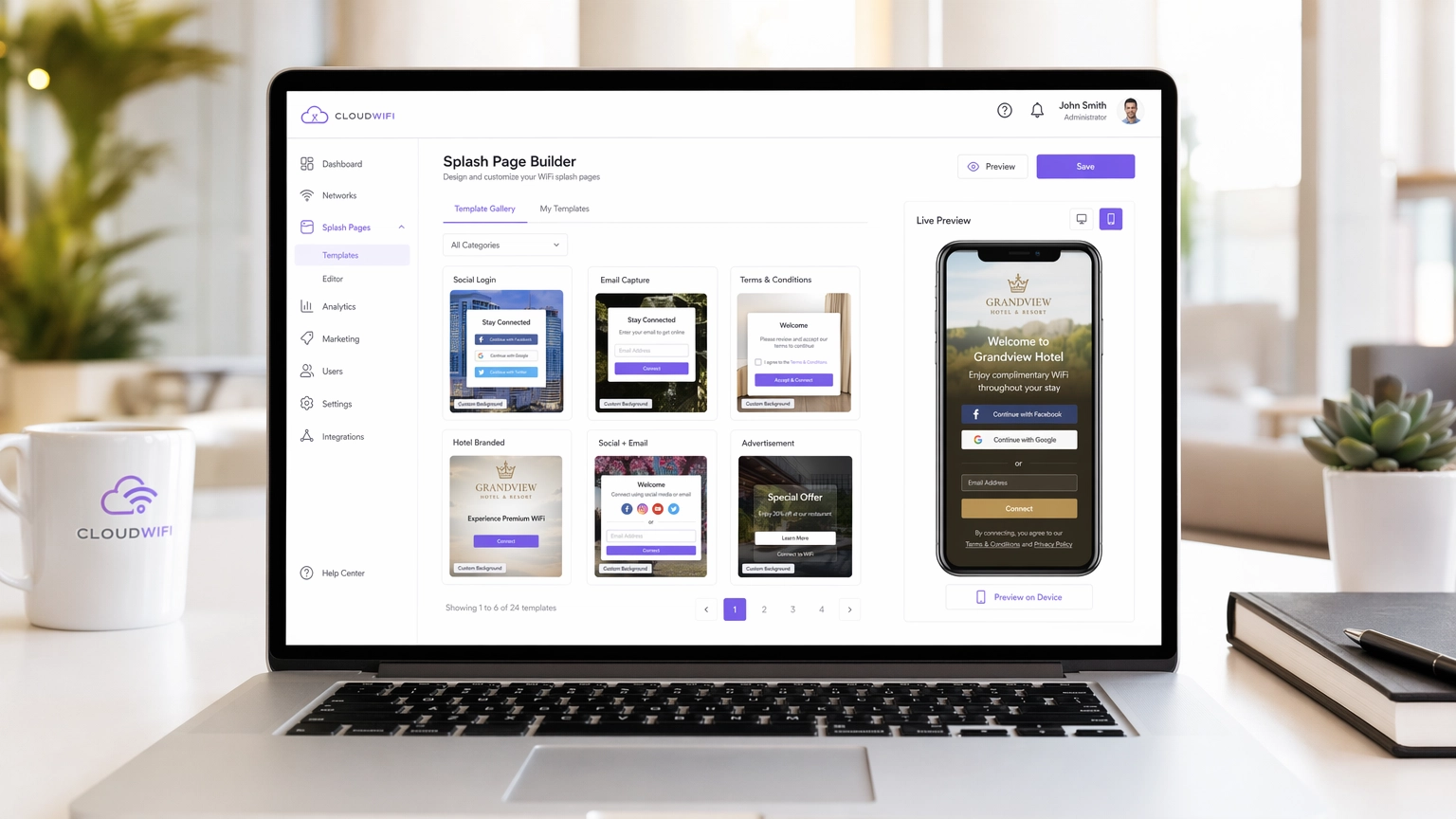
Per le moderne sedi aziendali, la rete WiFi per gli ospiti non è più solo un centro di costo, ma un canale critico per l'acquisizione di dati. Tuttavia, il successo di questo canale dipende interamente dal Captive Portal, in particolare dalla WiFi splash page. Una splash page mal progettata porta a tassi di abbandono elevati, ospiti frustrati e opportunità di marketing perse. Questa guida è pensata per IT manager, architetti di rete e direttori delle operazioni di sede, e analizza gli elementi tecnici e di design delle splash page ad alta conversione in Ospitalità , Retail e altri settori.
Prima di approfondire, vale la pena chiarire la distinzione tra una WiFi Landing Page e una Splash Page: Qual è la Differenza? — una sfumatura che ha implicazioni dirette per le vostre decisioni architetturali. Che stiate implementando una nuova rete o ottimizzandone una esistente, comprendere questa distinzione è il primo passo verso la costruzione di una strategia Guest WiFi di successo che offra un ROI misurabile.
Approfondimento Tecnico: Come Funzionano Effettivamente i Captive Portal
Una WiFi splash page, o Captive Portal, opera intercettando il traffico HTTP/HTTPS da dispositivi non autenticati e reindirizzandoli a un ambiente walled garden. Questa intercettazione è gestita dal controller LAN wireless (WLC) o dall'access point (AP) utilizzando una combinazione di DNS hijacking e reindirizzamento IP. Quando un dispositivo client si connette a un SSID aperto, il sistema operativo esegue un controllo di rilevamento del Captive Portal — i dispositivi iOS pingano captive.apple.com, i dispositivi Android contattano connectivitycheck.gstatic.com. Se il WLC intercetta e reindirizza questa richiesta, il sistema operativo mostra la splash page in un mini-browser.
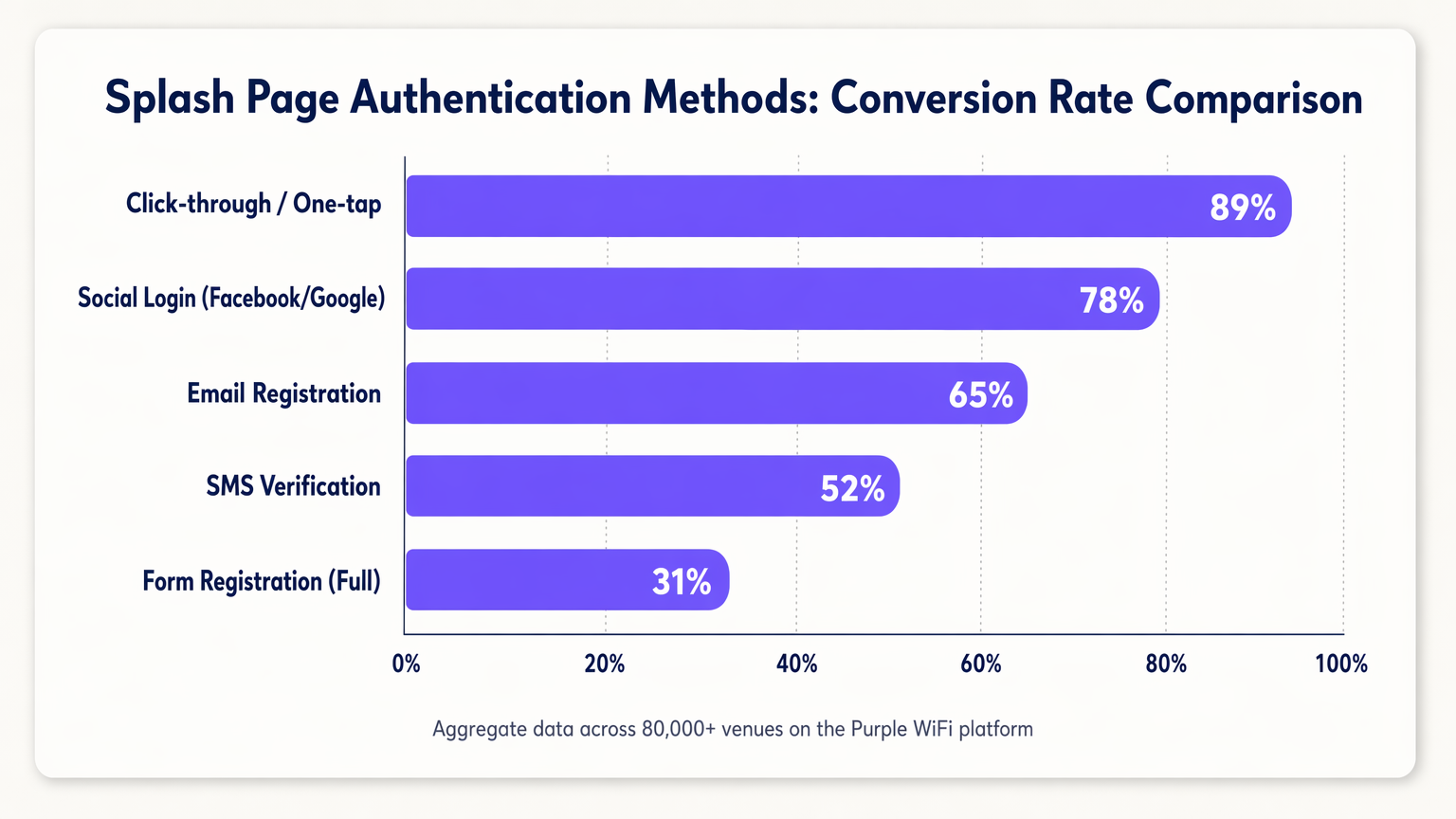
La funzione principale della splash page è l'autenticazione. La scelta del metodo di autenticazione influisce direttamente sia sulla postura di sicurezza che sui tassi di conversione, e questi due obiettivi sono spesso in tensione.
| Metodo di Autenticazione | Tasso di Conversione Tipico | Qualità dei Dati | Complessità di Conformità |
|---|---|---|---|
| Click-through / One-tap | ~89% | Bassa (nessun PII) | Bassa |
| Social Login (OAuth 2.0) | ~78% | Alta (verificata) | Media |
| Registrazione Email | ~65% | Media | Media |
| Verifica SMS (OTP) | ~52% | Alta (telefono verificato) | Media |
| Registrazione con Modulo Completo | ~31% | Molto Alta | Alta |
MAC Authentication Bypass (MAB) merita di essere affrontato separatamente. Storicamente, il MAB permetteva ai dispositivi di ritorno di bypassare la splash page riconoscendo il loro indirizzo MAC. Con l'adozione diffusa della randomizzazione MAC in iOS 14+, Android 10+ e Windows 11, fare affidamento sul MAB non è più praticabile per un'esperienza affidabile per gli ospiti di ritorno. La risposta corretta è spostarsi verso l'autenticazione basata sull'identità utilizzando token di sessione o valutare standard come OpenRoaming, che Purple supporta come identity provider.
Architettura di Sicurezza e Conformità
L'implementazione di un Captive Portal introduce requisiti specifici di sicurezza e conformità che devono essere affrontati nella fase di architettura, non adattati dopo l'implementazione.
HTTPS e Gestione dei Certificati: I browser moderni impongono rigorosamente l'HTTPS. Durante la fase di reindirizzamento del Captive Portal, il WLC deve presentare un certificato SSL/TLS valido. La mancata presentazione di un certificato valido comporta avvisi di sicurezza del browser che la maggior parte degli utenti non bypasserà. L'approccio raccomandato è utilizzare un sottodominio dedicato e affidabile per il vostro Captive Portal con un certificato valido gestito dal vostro provider di portali.
Configurazione del Walled Garden: Prima dell'autenticazione, i dispositivi possono accedere solo alle risorse esplicitamente inserite nella whitelist del walled garden. Questo deve includere: gli asset CDN del vostro portale, gli endpoint del provider OAuth (accounts.google.com, graph.facebook.com, appleid.apple.com) e gli URL di rilevamento del Captive Portal del sistema operativo. I walled garden mal configurati sono la causa più comune di fallimenti delle splash page.
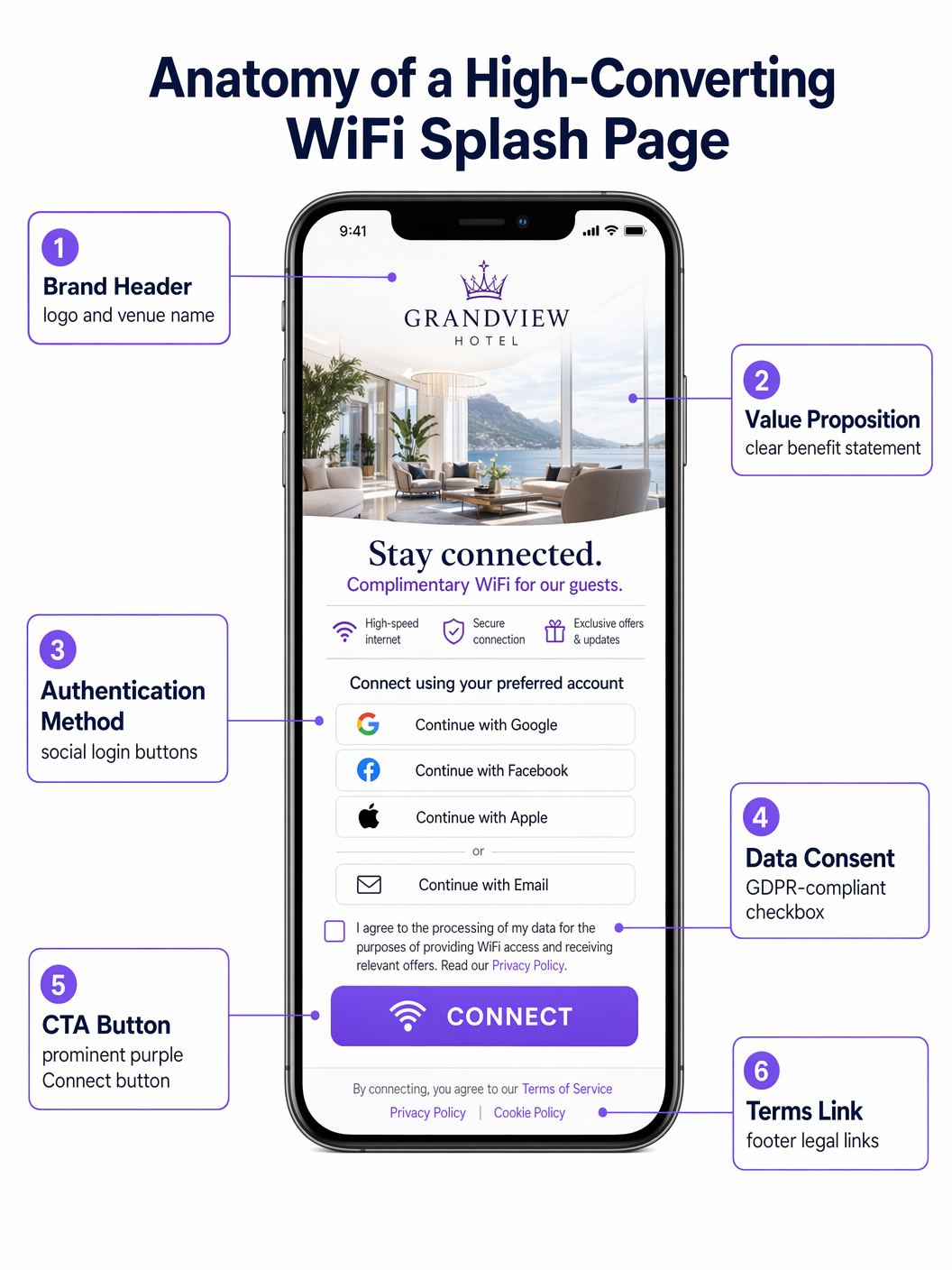
Conformità GDPR/CCPA: La splash page è un punto di raccolta dati ed è quindi soggetta alle normative sulla privacy dei dati. I requisiti chiave includono: caselle di consenso esplicite e non pre-spuntate per le comunicazioni di marketing; un link chiaro all'informativa sulla privacy; opzioni di consenso granulari (ad esempio, caselle di controllo separate per il marketing via email e SMS); e un registro di consenso loggato e con timestamp memorizzato nel vostro CRM. Le caselle pre-spuntate non sono conformi all'Articolo 7 del GDPR.
Guida all'Implementazione: Le 10 Migliori Strategie per le Splash Page
1. Il Social Login Senza Interruzioni (Retail)
Negli ambienti Retail frenetici, la velocità è fondamentale. Le splash page con il più alto tasso di conversione privilegiano i social login con un solo tocco tramite OAuth 2.0. Posizionare i pulsanti di login di Google e Apple in modo prominente — sopra la piega, senza necessità di scorrimento — riduce il tempo di connessione da minuti a secondi. Questo approccio sfrutta le sessioni autenticate esistenti sul dispositivo dell'utente, aumentando significativamente la conversione rispetto all'inserimento manuale dei dati. Il walled garden deve includere gli endpoint OAuth pertinenti affinché ciò funzioni.
2. Il Modello di Larghezza di Banda a Livelli (Hospitality)
Gli hotel che gestiscono reti Hospitality spesso implementano un modello a livelli. La splash page presenta un livello gratuito, con velocità limitata (adatto per la navigazione e la messaggistica) e un premium, livello ad alta velocità (adatto per streaming o VPN). Il livello premium può essere monetizzato direttamente o offerto come vantaggio per i membri del programma fedeltà. Ciò richiede l'integrazione tra il Captive Portal, il server Radius e il sistema di gestione della proprietà (PMS) per assegnare dinamicamente le politiche di larghezza di banda in base allo stato dell'ospite.
3. L'incentivo al download dell'app (Transport)
Negli hub di Transport come aeroporti e stazioni ferroviarie, la splash page è uno strumento potente per promuovere l'adozione delle app. Offrire una maggiore velocità di trasmissione o tempi di sessione estesi in cambio del download dell'app della struttura — che in genere include mappe interne, tabelloni delle partenze e offerte commerciali — crea uno scambio reciprocamente vantaggioso. La splash page deve collegarsi direttamente all'App Store o all'elenco di Google Play per ridurre al minimo l'attrito.
4. La sponsorizzazione mirata (eventi e stadi)
Per stadi e centri congressi, la splash page è un immobile digitale di pregio. L'implementazione di sponsorizzazioni a rotazione o annunci interstitial prima di concedere l'accesso genera entrate dirette. Il vincolo di progettazione critico è che la call-to-action principale ("Connect to WiFi") deve rimanere chiaramente visibile e accessibile dopo un intervallo definito — tipicamente da 5 a 10 secondi — per evitare di frustrare gli ospiti in un ambiente ad alta densità.
5. L'approccio di profilazione progressiva (Healthcare)
Negli ambienti Healthcare , la raccolta del feedback dei pazienti e dei dettagli di contatto è operativamente preziosa. Tuttavia, richiedere informazioni estese in anticipo causa l'abbandono. La profilazione progressiva richiede dati minimi alla prima visita (ad esempio, solo l'email), quindi richiede in modo incrementale informazioni aggiuntive nelle visite successive (ad esempio, valutazione della soddisfazione, motivo della visita). Questo approccio costruisce un profilo completo nel tempo senza creare un collo di bottiglia al punto di accesso.
6. L'esperienza iper-localizzata (catene di negozi)
Per le catene di negozi multi-sito, la splash page dovrebbe adattarsi dinamicamente in base alla sede specifica. Utilizzando i dati di localizzazione passati dal WLC al portal, la pagina può visualizzare promozioni specifiche del negozio, eventi locali o termini di servizio specifici della regione. Ciò richiede una piattaforma di gestione del portal centralizzata — come Purple — che supporti l'iniezione dinamica di contenuti basata sui metadati della sede.
7. La verifica SMS senza attrito (settore pubblico)
Quando è richiesta un'identità verificata ma il social login non è appropriato — ad esempio, in una biblioteca pubblica o in un edificio comunale — la verifica SMS OTP offre un'alternativa sicura. L'utente inserisce il proprio numero di telefono, riceve una password monouso e ottiene l'accesso. Ciò garantisce che venga acquisito un metodo di contatto valido e verificato, mantenendo al contempo un percorso utente relativamente fluido. La gestione della sessione deve essere configurata per evitare di richiedere una nuova verifica ad ogni visita.
8. L'integrazione del programma fedeltà (Hospitality)
L'integrazione della splash page direttamente con il CRM e la piattaforma di fidelizzazione consente agli ospiti di ritorno di essere riconosciuti immediatamente tramite un token di sessione sicuro. Un saluto personalizzato ("Bentornata, Sarah") e la connessione automatica per i membri élite migliorano significativamente l'esperienza dell'ospite e rafforzano la fedeltà al brand. Questa integrazione consente inoltre alla piattaforma WiFi Analytics di attribuire le visite alla sede direttamente ai profili di fidelizzazione.
9. Il design minimalista (reti ospiti aziendali)
Nelle reti ospiti aziendali, l'attenzione dovrebbe essere rivolta alla professionalità e alla velocità. Un design pulito e minimalista con un semplice pulsante di accettazione dei termini e il logo aziendale è spesso l'approccio ottimale. L'obiettivo è fornire l'accesso in meno di 10 secondi senza contenuti di marketing non necessari. Questo modello di design riduce anche la complessità del walled garden, poiché non ci sono endpoint OAuth o CDN esterni da inserire nella whitelist.
10. Il portal multilingue (turismo e sedi internazionali)
Per le sedi in località turistiche o centri congressi internazionali, il rilevamento automatico della lingua del browser dell'utente tramite l'header HTTP Accept-Language e la presentazione della splash page nella loro lingua madre rimuove una barriera significativa all'ingresso. Ciò richiede una piattaforma portal che supporti la gestione di contenuti multilingue e testi legali specifici per la locale (termini di servizio, privacy policy) a fini di conformità.
Migliori Pratiche
Una filosofia di design mobile-first è non negoziabile: oltre l'80% delle connessioni WiFi degli ospiti avviene su dispositivi mobili. La splash page deve essere completamente responsive, con pulsanti grandi e facilmente cliccabili (obiettivi touch minimi di 44x44px secondo le linee guida WCAG 2.1) e testo leggibile con dimensioni di carattere standard per dispositivi mobili. Il tempo di caricamento è altrettanto critico — una splash page che impiega più di tre secondi per essere renderizzata vedrà un significativo tasso di abbandono, in particolare in ambienti ad alta densità.
Il test A/B continuo, abilitato dalla piattaforma WiFi Analytics , è essenziale per l'ottimizzazione continua. Le variabili di test dovrebbero includere il colore del pulsante, l'ordine del metodo di autenticazione, il testo della proposta di valore e la presenza o assenza di un'immagine di sfondo. Anche piccole modifiche — come il riordino dei pulsanti di social login per posizionare Google sopra Facebook — possono produrre miglioramenti misurabili nella conversione.
Risoluzione dei problemi e mitigazione del rischio
La lamentela più comune da parte degli utenti finali è che il Captive Portal non si apre automaticamente. Ciò deriva da errori di configurazione DNS, walled garden configurati in modo errato o dal dispositivo dell'utente che ha una voce DNS memorizzata nella cache. Il percorso di risoluzione è: verificare che l'intercettazione DNS sia attiva sul WLC, confermare che tutti i domini di rilevamento del Captive Portal del sistema operativo siano nel walled garden e controllare eventuali impostazioni VPN o DNS-over-HTTPS lato client che potrebbero bypassare l'intercettazione.
La randomizzazione MAC, come discusso, è la sfida strutturale più significativa che le implementazioni di Captive Portal devono affrontare oggi. La strategia di mitigazione raccomandata è una combinazione di timeout di sessione estesi (riducendo la frequenza di re-autenticazione) e una transizione verso l'autenticazione basata sull'identità. Il supporto OpenRoaming di Purple offre un percorso basato su standard per eliminare completamente il Captive Portal per gli utenti di ritorno che si sono precedentemente autenticati.
ROI e Impatto sul Business
Una splash page ben ottimizzata trasforma la rete WiFi per gli ospiti da un costo irrecuperabile a una risorsa generatrice di entrate. Il principale motore di ROI è l'acquisizione di dati di prima parte: ogni connessione autenticata genera un record di contatto verificato che può essere attivato tramite campagne email mirate, iscrizioni a programmi fedeltà ed esperienze personalizzate all'interno della struttura. Le strutture che implementano la piattaforma Guest WiFi di Purple in oltre 80.000 sedi riportano costantemente tassi di crescita delle liste email del 15-25% al mese solo dalle iscrizioni WiFi.
La monetizzazione diretta tramite modelli di larghezza di banda a livelli o inventario di sponsorizzazioni fornisce un flusso di entrate secondario. L'intelligence operativa — modelli di traffico pedonale, tempi di permanenza, utilizzo delle zone — derivata dalla piattaforma WiFi Analytics informa le decisioni relative al personale, l'ottimizzazione del layout del negozio e la pianificazione delle spese in conto capitale, fornendo un ROI che si estende ben oltre la funzione di marketing.
Definizioni chiave
Captive Portal
A network access control mechanism that intercepts unauthenticated HTTP/HTTPS traffic and redirects it to a web page (the splash page) where the user must complete an action before gaining full network access.
The underlying infrastructure that makes a WiFi splash page function. IT teams encounter this when configuring WLCs, access points, or cloud-managed network platforms.
Walled Garden
A list of IP addresses and domain names that are accessible to unauthenticated devices before they complete the captive portal authentication process.
Critical for allowing devices to load the splash page assets and authenticate via third-party OAuth providers. Misconfiguration is the primary cause of splash page failures.
MAC Randomization
A privacy feature in modern mobile operating systems (iOS 14+, Android 10+, Windows 11) that generates a new, random MAC address for each Wi-Fi network connection, preventing persistent device tracking.
Breaks traditional MAC Authentication Bypass (MAB) strategies for returning guest recognition, requiring a shift to identity-based authentication.
OAuth 2.0
An industry-standard authorization protocol that enables users to grant third-party applications (e.g., a captive portal) access to their account information from an identity provider (e.g., Google, Facebook) without exposing their credentials.
The technology underpinning Social Login on splash pages. Requires specific OAuth endpoints to be whitelisted in the walled garden.
Progressive Profiling
A data collection strategy that gathers user information incrementally across multiple interactions, rather than requesting all data in a single form submission.
Used to increase splash page conversion rates while still building comprehensive user profiles over time. Requires session token management to recognize returning users.
RADIUS Server
Remote Authentication Dial-In User Service; a networking protocol that provides centralized Authentication, Authorization, and Accounting (AAA) management for network access.
The backend system that receives authentication requests from the WLC, validates credentials against the user directory or CRM, and returns an access-grant or access-deny response.
IEEE 802.1X
An IEEE standard for port-based network access control that provides an authentication mechanism for devices wishing to attach to a LAN or WLAN.
Used in enterprise environments for secure, certificate-based authentication. Typically replaces the need for a captive portal for employees, while guests use a separate SSID with a splash page.
OpenRoaming
A Wi-Fi roaming federation service (built on the Hotspot 2.0/Passpoint standard) that enables automatic, secure Wi-Fi onboarding across participating venues without requiring users to interact with a captive portal.
A modern alternative to traditional captive portals that provides a seamless connection experience. Purple operates as an identity provider within the OpenRoaming federation.
MAC Authentication Bypass (MAB)
A network access control method that uses a device's MAC address as its identity credential to bypass the standard authentication process.
Historically used to provide seamless re-connection for returning guests. Rendered unreliable by MAC randomization in modern mobile operating systems.
Session Token
A unique, time-limited identifier stored as a browser cookie that allows a captive portal to recognize a previously authenticated user without requiring them to re-authenticate.
The correct mechanism for providing returning-guest recognition in a post-MAC-randomization environment. Session expiry should be configured based on the venue's operational requirements.
Esempi pratici
A 200-room boutique hotel wants to increase sign-ups for its new loyalty programme. Currently, they use a generic shared-password WiFi login. How should they redesign their splash page and supporting infrastructure?
Phase 1 — Remove the shared password entirely and deploy a captive portal integrated with the hotel's PMS and CRM. Phase 2 — Design the splash page with two primary authentication paths: 'Log in with Loyalty Account' (prominent, cookie-based, frictionless for returning members) and 'Join Loyalty Programme for Free WiFi' (requires email and first name only). Phase 3 — Offer a paid premium tier (e.g., 50 Mbps vs. 10 Mbps free) as a deterrent for non-members and a direct revenue stream. Phase 4 — Configure the Radius server to dynamically assign bandwidth policies based on the CRM response. Phase 5 — Implement session tokens with a 30-day expiry so returning guests are not re-prompted on each visit.
A national retail chain is experiencing a 68% abandonment rate on their WiFi splash page, which currently requires users to complete a 5-field registration form (first name, last name, email, date of birth, postcode). The marketing team is reluctant to reduce the data fields. How do you resolve the tension between data capture and conversion?
Implement a two-phase strategy. Phase 1 — Replace the 5-field form with Social Login (Google, Facebook, Apple) as the primary authentication method, supplemented by a 1-field email-only option. Ensure the walled garden is correctly configured to allow access to all OAuth endpoints. This will immediately increase conversion rates. Phase 2 — Implement progressive profiling. On the second visit, the system recognises the returning user via session token and presents a single additional question (e.g., 'What is your postcode?') in exchange for a discount or loyalty points. On the third visit, it requests date of birth. Over 90 days, the system builds the same 5-field profile without ever presenting a 5-field form.
Domande di esercitazione
Q1. Your venue is hosting a major technology conference with 5,000 attendees. You need to provide WiFi access to all attendees simultaneously. The event sponsor requires that all attendees see a branded splash page and that email addresses are captured for post-event marketing. You cannot afford any delays or bottlenecks at the network login stage. What is the optimal splash page configuration, and what infrastructure considerations are critical?
Suggerimento: Consider the balance between data capture and throughput in a high-density environment. What authentication method minimizes per-user connection time while still capturing a verified contact? What walled garden entries are essential?
Visualizza risposta modello
Deploy Social Login (Google and Apple) as the primary authentication method, with a single-field email form as a fallback. This minimizes per-user connection time while capturing verified contact data. Ensure the walled garden includes all OAuth endpoints for Google and Apple. Pre-scale the Radius server to handle concurrent authentication requests — a 5,000-person event can generate hundreds of simultaneous auth requests during registration periods. Configure session timeouts of at least 8 hours to avoid re-authentication during the event. Avoid SMS verification, which introduces per-user delays and can bottleneck in areas with poor mobile signal.
Q2. A hospital IT director reports that patients are complaining about the WiFi disconnecting and requiring re-authentication on the splash page every time they move between wards. The current setup uses MAC Authentication Bypass with a 1-hour session timeout. How do you diagnose and resolve this?
Suggerimento: The issue relates to session management and device identity. Consider the impact of MAC randomization and the interaction between session timeout and patient dwell times.
Visualizza risposta modello
The root cause is a combination of MAC randomization (meaning the WLC cannot reliably identify the returning device) and an excessively short session timeout. Resolution: (1) Extend the session timeout to 24 hours on the Radius server, matching typical patient stay duration. (2) Shift from MAB to session-token-based recognition — when a patient authenticates, store a session cookie with a 24-hour expiry. (3) For longer-stay patients, evaluate deploying a lightweight onboarding profile (Passpoint/Hotspot 2.0) via the hospital's patient portal app, which provides seamless, certificate-based authentication without a captive portal.
Q3. You are deploying a captive portal for a national retail chain operating across the UK and EU. The marketing team wants to automatically subscribe all WiFi users to the weekly promotional newsletter and pre-tick the marketing consent checkbox to increase opt-in rates. How do you advise them, and what is the correct technical implementation?
Suggerimento: Consider the legal requirements for consent under GDPR Article 7 and Recital 32. What constitutes valid consent, and what are the consequences of non-compliance?
Visualizza risposta modello
Advise the marketing team that pre-ticked consent checkboxes are explicitly non-compliant under GDPR Article 7 and Recital 32, which require that consent be freely given, specific, informed and unambiguous, and that silence, pre-ticked boxes or inactivity should not constitute consent. The correct implementation is: (1) A clearly labelled, un-ticked checkbox for marketing email communications, separate from the mandatory Terms of Service acceptance. (2) A compelling value proposition adjacent to the checkbox (e.g., Tick to receive exclusive offers and 10% off your next purchase). (3) A logged, timestamped consent record stored in the CRM, including the specific consent text version the user agreed to. (4) A clear and accessible unsubscribe mechanism in all subsequent communications.
Continua a leggere questa serie
Captive Portal vs Splash Page
Questa guida autorevole analizza la distinzione fondamentale tra Captive Portal e splash page nelle reti WiFi per gli ospiti. Chiarisce come il meccanismo di intercettazione di rete sottostante funzioni in sinergia con l'interfaccia visiva per gli ospiti, aiutando i responsabili IT e i gestori delle strutture a prendere decisioni architetturali e di acquisto informate.
Login al Captive Portal: Risoluzione dei problemi e guida esplicativa
Questa guida fornisce un riferimento tecnico completo per comprendere, implementare e risolvere i problemi dei sistemi di login al captive portal in ambienti WiFi aziendali per ospiti. Spiega gli esatti meccanismi di reindirizzamento HTTP e di dirottamento DNS utilizzati dai moderni captive portal, descrive in dettaglio come l'HSTS e i browser HTTPS sicuri possano bloccare i reindirizzamenti locali e fornisce una checklist di risoluzione dei problemi chiara e pratica che copre sia le soluzioni lato client (disattivazione delle VPN, disattivazione della randomizzazione MAC, utilizzo di NeverSSL) sia le risoluzioni lato operatore (configurazione del walled garden, ottimizzazione del tempo di lease DHCP, verifica dell'intercettazione DNS). I gestori delle sedi, i responsabili IT e gli architetti di rete troveranno questa guida essenziale per ridurre al minimo i ticket di supporto degli ospiti e massimizzare il ROI della loro infrastruttura wireless.
Come configurare un hotspot WiFi per la tua attività
Questa guida autorevole fornisce a leader IT, architetti di rete e direttori delle operazioni di sede un modello pratico e indipendente dal fornitore per l'implementazione di hotspot WiFi per ospiti sicuri, conformi e che migliorano il business. Copre decisioni architetturali critiche — dalla segmentazione VLAN e configurazione del Captive Portal alla conformità GDPR e alla modellazione del traffico — e dimostra come trasformare l'infrastruttura di rete da un centro di costo a una piattaforma di analisi che genera entrate utilizzando le capacità di Guest WiFi e analisi di Purple.