
Die 10 besten WiFi Splash Page Beispiele (und was sie erfolgreich macht)
Ein technischer Leitfaden für IT-Manager, Netzwerkarchitekten und Betriebsleiter von Veranstaltungsorten, der das Design, die Architektur und die Bereitstellung von hochkonvertierenden WiFi Splash Pages behandelt. Der Leitfaden analysiert 10 reale Implementierungsstrategien in den Bereichen Gastgewerbe, Einzelhandel, Veranstaltungen und öffentlicher Sektor, mit spezifischen Anleitungen zu Authentifizierungsmethoden, GDPR-Konformität, Walled Garden-Konfiguration und MAC randomization-Minderung.
Diesen Leitfaden anhören
Podcast-Transkript ansehen
Zusammenfassung
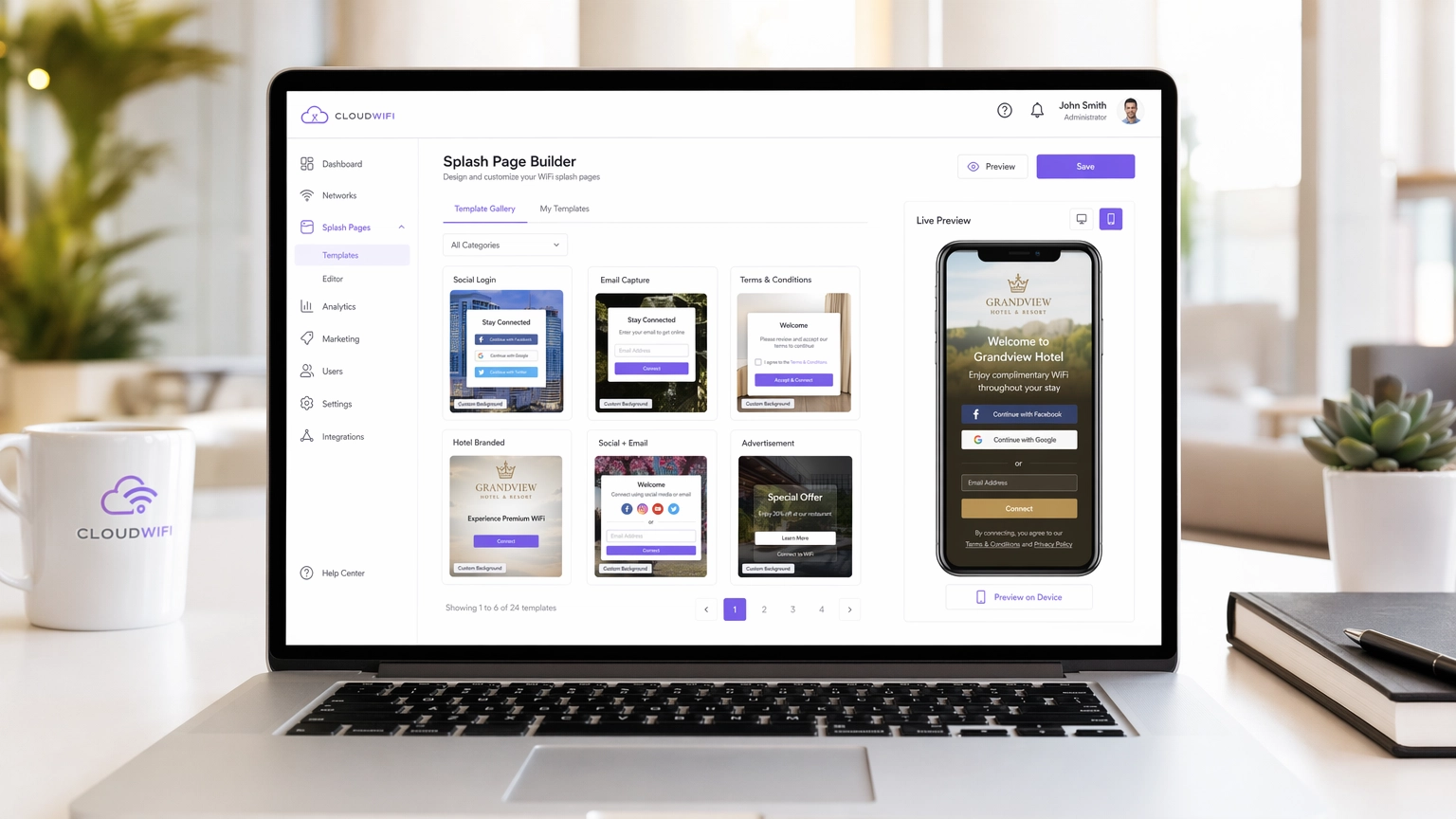
Für moderne Unternehmensstandorte ist das Gast-WiFi-Netzwerk nicht länger nur ein Kostenfaktor – es ist ein entscheidender Kanal zur Datenerfassung. Der Erfolg dieses Kanals hängt jedoch vollständig vom Captive Portal ab, insbesondere von der WiFi Splash Page. Eine schlecht gestaltete Splash Page führt zu hohen Abbruchraten, frustrierten Gästen und verpassten Marketingchancen. Dieser Leitfaden richtet sich an IT-Manager, Netzwerkarchitekten und Betriebsleiter von Veranstaltungsorten und beleuchtet die technischen und gestalterischen Elemente von hochkonvertierenden Splash Pages in den Bereichen Gastgewerbe , Einzelhandel und anderen Sektoren.
Bevor wir tiefer eintauchen, ist es sinnvoll, den Unterschied zwischen einer WiFi Landing Page vs. Splash Page: Was ist der Unterschied? zu klären – eine Nuance, die direkte Auswirkungen auf Ihre Architektur-Entscheidungen hat. Egal, ob Sie ein neues Netzwerk bereitstellen oder ein bestehendes optimieren, das Verständnis dieses Unterschieds ist der erste Schritt zum Aufbau einer erfolgreichen Guest WiFi -Strategie, die messbaren ROI liefert.
Technischer Deep-Dive: Wie Captive Portals tatsächlich funktionieren
Eine WiFi Splash Page, oder Captive Portal, funktioniert, indem sie HTTP/HTTPS-Verkehr von nicht authentifizierten Geräten abfängt und diese in eine Walled Garden-Umgebung umleitet. Dieses Abfangen wird vom Wireless LAN Controller (WLC) oder Access Point (AP) mithilfe einer Kombination aus DNS-Hijacking und IP-Umleitung gehandhabt. Wenn ein Client-Gerät sich mit einer offenen SSID verbindet, führt das OS eine Captive Portal-Erkennung durch – iOS-Geräte pingen captive.apple.com, Android-Geräte rufen connectivitycheck.gstatic.com auf. Wenn der WLC diese Anfrage abfängt und umleitet, zeigt das OS die Splash Page in einem Mini-Browser an.
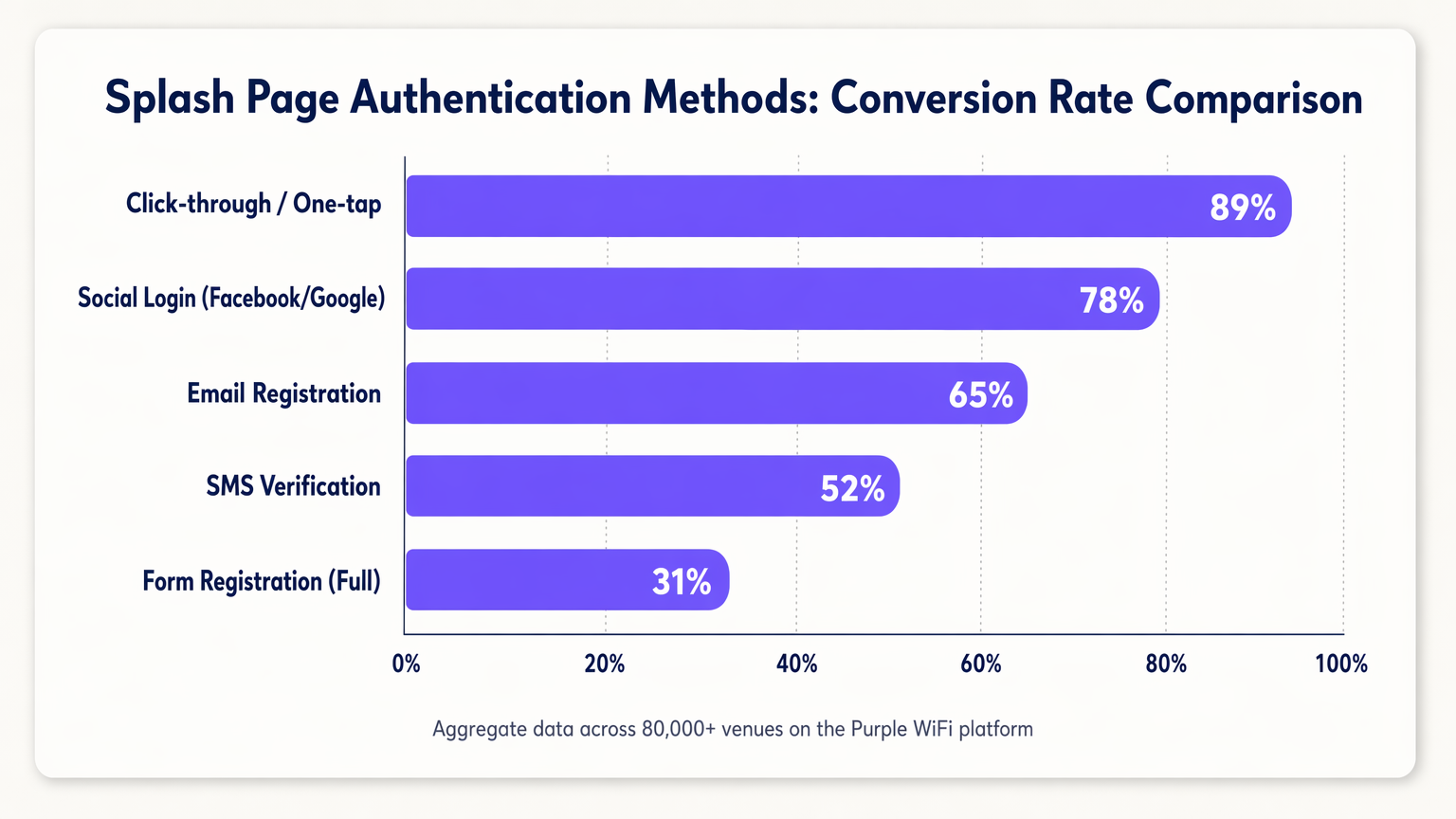
Die Kernfunktion der Splash Page ist die Authentifizierung. Die Wahl der Authentifizierungsmethode wirkt sich direkt auf die Sicherheitslage und die Konversionsraten aus, und diese beiden Ziele stehen oft im Widerspruch.
| Authentifizierungsmethode | Typische Konversionsrate | Datenqualität | Komplexität der Compliance |
|---|---|---|---|
| Click-through / One-tap | ~89% | Niedrig (keine PII) | Niedrig |
| Social Login (OAuth 2.0) | ~78% | Hoch (verifiziert) | Mittel |
| E-Mail-Registrierung | ~65% | Mittel | Mittel |
| SMS-Verifizierung (OTP) | ~52% | Hoch (verifiziertes Telefon) | Mittel |
| Vollständige Formularregistrierung | ~31% | Sehr hoch | Hoch |
MAC Authentication Bypass (MAB) sollte separat behandelt werden. Historisch gesehen ermöglichte MAB wiederkehrenden Geräten, die Splash Page zu umgehen, indem ihre MAC address erkannt wurde. Mit der weit verbreiteten Einführung von MAC randomization in iOS 14+, Android 10+ und Windows 11 ist die Nutzung von MAB für ein zuverlässiges Erlebnis für wiederkehrende Gäste nicht mehr praktikabel. Die richtige Antwort ist, auf identitätsbasierte Authentifizierung mittels Session-Tokens umzusteigen oder Standards wie OpenRoaming zu evaluieren, die Purple als Identitätsanbieter unterstützt.
Sicherheits- und Compliance-Architektur
Die Bereitstellung eines Captive Portals führt zu spezifischen Sicherheits- und Compliance-Anforderungen, die bereits in der Architekturphase berücksichtigt und nicht nachträglich implementiert werden sollten.
HTTPS und Zertifikatsverwaltung: Moderne Browser erzwingen HTTPS strikt. Während der Captive Portal-Umleitungsphase muss der WLC ein gültiges SSL/TLS-Zertifikat präsentieren. Andernfalls führt dies zu Browser-Sicherheitswarnungen, die die meisten Benutzer nicht umgehen werden. Der empfohlene Ansatz ist die Verwendung einer dedizierten, vertrauenswürdigen Subdomain für Ihr Captive Portal mit einem gültigen Zertifikat, das von Ihrem Portal-Anbieter verwaltet wird.
Walled Garden-Konfiguration: Vor der Authentifizierung können Geräte nur auf Ressourcen zugreifen, die explizit im Walled Garden auf der Whitelist stehen. Dies muss umfassen: die CDN-Assets Ihres Portals, OAuth-Anbieter-Endpunkte (accounts.google.com, graph.facebook.com, appleid.apple.com) und die OS Captive Portal-Erkennungs-URLs. Fehlkonfigurierte Walled Gardens sind die häufigste Ursache für Splash Page-Fehler.
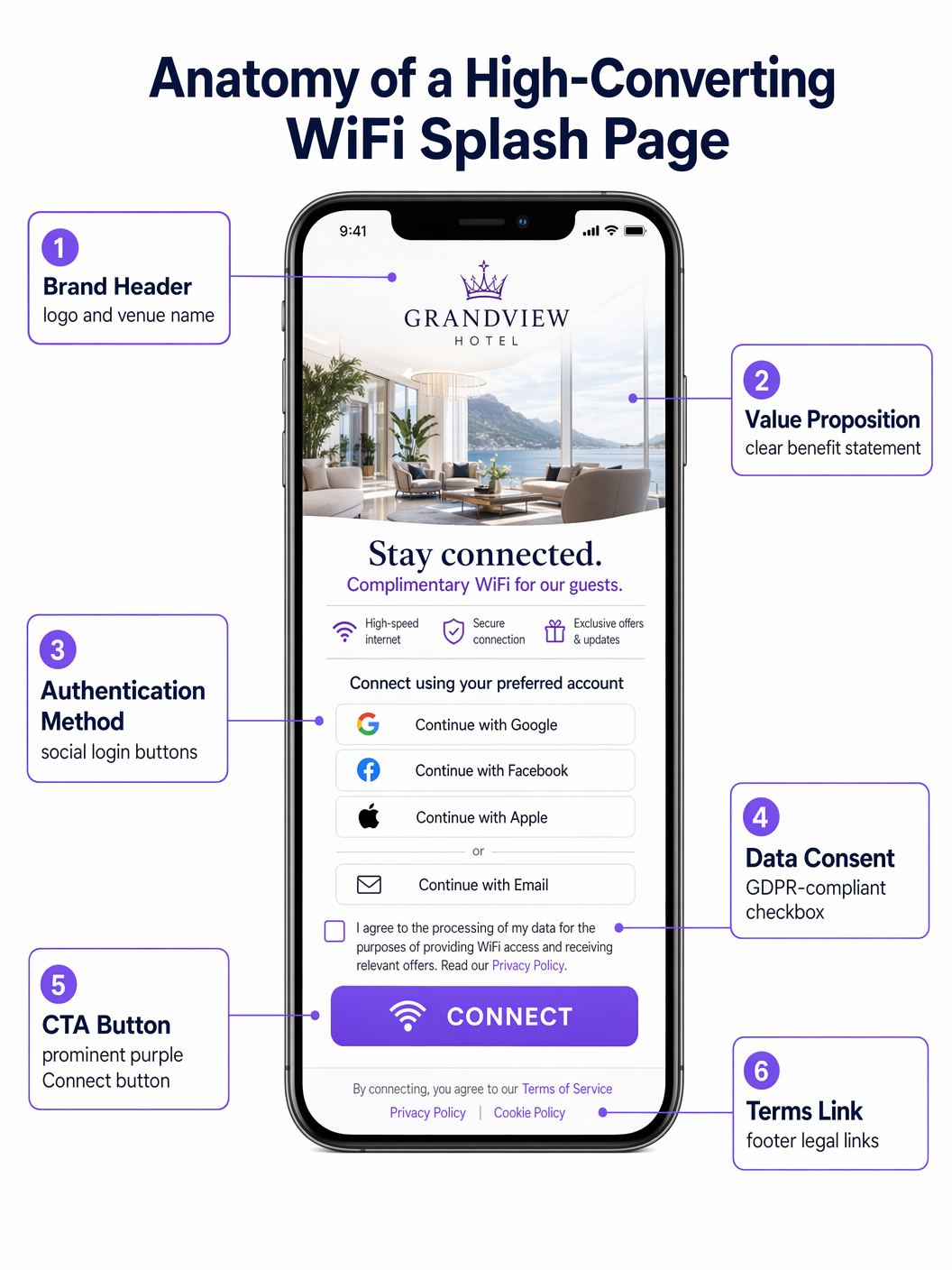
GDPR/CCPA Compliance: Die Splash Page ist ein Datenerfassungspunkt und unterliegt daher den Datenschutzbestimmungen. Zu den wichtigsten Anforderungen gehören: explizite, nicht angekreuzte Zustimmungs-Kontrollkästchen für Marketingkommunikation; ein klarer Link zur Datenschutzerklärung; granulare Zustimmungsoptionen (z. B. separate Kontrollkästchen für E-Mail- und SMS-Marketing); und eine protokollierte, mit Zeitstempel versehene Zustimmungsaufzeichnung, die in Ihrem CRM gespeichert wird. Vorgekreuzte Kästchen sind gemäß GDPR Artikel 7 nicht konform.
Implementierungsleitfaden: Die 10 besten Splash Page-Strategien
1. Der nahtlose Social Login (Retail)
In schnelllebigen Retail -Umgebungen ist Geschwindigkeit entscheidend. Die am besten konvertierenden Splash Pages priorisieren One-Tap Social Logins über OAuth 2.0. Die prominente Platzierung von Google- und Apple-Login-Buttons – above the fold, ohne Scrollen erforderlich – reduziert die Verbindungszeit von Minuten auf Sekunden. Dieser Ansatz nutzt bestehende authentifizierte Sitzungen auf dem Gerät des Benutzers und steigert die Konversion im Vergleich zur manuellen Formulareingabe erheblich. Der Walled Garden muss die relevanten OAuth-Endpunkte enthalten, damit dies funktioniert.
2. Das gestaffelte Bandbreitenmodell (Hospitality)
Hotels, die Hospitality -Netzwerke betreiben, setzen oft ein gestaffeltes Modell ein. Die Splash Page präsentiert eine kostenlose, geschwindigkeitsbegrenzte Stufe (geeignet zum Surfen und Messaging) und eine Premium, High-Throughput-Stufe (geeignet für Streaming oder VPN). Die Premium-Stufe kann direkt monetarisiert oder als Vorteil für Mitglieder von Treueprogrammen angeboten werden. Dies erfordert eine Integration zwischen dem Captive Portal, dem Radius-Server und dem Property Management System (PMS), um Bandbreitenrichtlinien dynamisch basierend auf dem Gaststatus zuzuweisen.
3. Der Anreiz zum App-Download (Transport)
In Transport -Drehkreuzen wie Flughäfen und Bahnhöfen ist die Splash Page ein leistungsstarkes Tool zur Förderung der App-Akzeptanz. Das Anbieten höherer Durchsatzraten oder längerer Sitzungszeiten im Austausch für das Herunterladen der App des Veranstaltungsortes – die typischerweise Indoor-Karten, Abfahrtstafeln und Einzelhandelsangebote umfasst – schafft einen gegenseitig vorteilhaften Austausch. Die Splash Page muss direkt zum App Store- oder Google Play-Eintrag deep-linken, um die Reibung zu minimieren.
4. Das gezielte Sponsoring (Veranstaltungen und Stadien)
Für Stadien und Konferenzzentren ist die Splash Page eine erstklassige digitale Werbefläche. Die Implementierung rotierender Sponsorings oder Interstitial Ads vor der Gewährung des Zugangs generiert direkte Einnahmen. Die entscheidende Designbeschränkung besteht darin, dass der primäre Call-to-Action („Connect to WiFi“) nach einem definierten Intervall – typischerweise 5 bis 10 Sekunden – deutlich sichtbar und zugänglich bleiben muss, um Gäste in einer Umgebung mit hoher Dichte nicht zu frustrieren.
5. Der progressive Profiling-Ansatz (Healthcare)
In Healthcare -Einrichtungen ist das Sammeln von Patientenfeedback und Kontaktdaten operativ wertvoll. Das Anfordern umfangreicher Informationen im Voraus führt jedoch zu Abbrüchen. Progressives Profiling fordert beim ersten Besuch minimale Daten an (z. B. nur E-Mail), dann inkrementell zusätzliche Informationen bei nachfolgenden Besuchen (z. B. Zufriedenheitsbewertung, Besuchsgrund). Dieser Ansatz erstellt im Laufe der Zeit ein umfassendes Profil, ohne einen Engpass am Zugangspunkt zu schaffen.
6. Das hyperlokalisierte Erlebnis (Einzelhandelsketten)
Für Einzelhandelsketten mit mehreren Standorten sollte sich die Splash Page dynamisch an den jeweiligen Veranstaltungsort anpassen. Mithilfe von Standortdaten, die vom WLC an das Portal übermittelt werden, kann die Seite geschäftsspezifische Aktionen, lokale Veranstaltungen oder regionsspezifische Nutzungsbedingungen anzeigen. Dies erfordert eine zentralisierte Portal-Management-Plattform – wie Purple –, die die dynamische Inhaltseinfügung basierend auf Veranstaltungsort-Metadaten unterstützt.
7. Die reibungslose SMS-Verifizierung (Öffentlicher Sektor)
Wenn eine verifizierte Identität erforderlich ist, aber Social Login nicht angemessen ist – zum Beispiel in einer öffentlichen Bibliothek oder einem Gemeindegebäude – bietet die SMS OTP-Verifizierung eine sichere Alternative. Der Benutzer gibt seine Telefonnummer ein, erhält ein Einmalpasswort und erhält Zugang. Dies stellt sicher, dass eine gültige, verifizierte Kontaktmethode erfasst wird, während eine relativ reibungslose User Journey beibehalten wird. Das Session Management muss so konfiguriert werden, dass bei jedem Besuch keine erneute Verifizierung erforderlich ist.
8. Die Integration von Treueprogrammen (Gastgewerbe)
Die direkte Integration der Splash Page mit dem CRM und der Loyalty-Plattform ermöglicht es, wiederkehrende Gäste sofort über ein sicheres Session Token zu erkennen. Eine personalisierte Begrüßung („Willkommen zurück, Sarah“) und die automatische Verbindung für Elite-Mitglieder verbessern das Gästeerlebnis erheblich und stärken die Markentreue. Diese Integration ermöglicht es der WiFi Analytics -Plattform auch, Veranstaltungsortbesuche direkt Treueprofilen zuzuordnen.
9. Das minimalistische Design (Corporate Guest Networks)
In Corporate Guest Networks sollte der Fokus auf Professionalität und Geschwindigkeit liegen. Ein klares, minimalistisches Design mit einem einfachen Button zur Annahme der Bedingungen und dem Firmenlogo ist oft der optimale Ansatz. Ziel ist es, den Zugang in weniger als 10 Sekunden ohne unnötige Marketinginhalte zu ermöglichen. Dieses Designmuster reduziert auch die Komplexität des Walled Garden, da keine OAuth-Endpunkte oder externen CDNs zur Whitelist hinzugefügt werden müssen.
10. Das mehrsprachige Portal (Tourismus und internationale Veranstaltungsorte)
Für Veranstaltungsorte in touristischen Hotspots oder internationalen Konferenzzentren beseitigt die automatische Erkennung der Browsersprache des Benutzers über den Accept-Language HTTP-Header und die Präsentation der Splash Page in dessen Muttersprache eine erhebliche Eintrittsbarriere. Dies erfordert eine Portal-Plattform, die mehrsprachiges Content Management und lokalspezifische Rechtstexte (Nutzungsbedingungen, Datenschutzrichtlinie) für Compliance-Zwecke unterstützt.
Best Practices
Eine Mobile-First-Designphilosophie ist nicht verhandelbar: Über 80 % der Gast-WiFi-Verbindungen erfolgen über mobile Geräte. Die Splash Page muss vollständig responsiv sein, mit großen, leicht antippbaren Schaltflächen (mindestens 44x44px Touch-Ziele gemäß WCAG 2.1-Richtlinien) und lesbarem Text in Standard-Mobil-Schriftgrößen. Die Ladezeit ist ebenso entscheidend – eine Splash Page, die länger als drei Sekunden zum Rendern benötigt, wird eine erhebliche Abbruchrate verzeichnen, insbesondere in Umgebungen mit hoher Dichte.
Kontinuierliches A/B-Testing, ermöglicht durch die WiFi Analytics -Plattform, ist für die fortlaufende Optimierung unerlässlich. Testvariablen sollten die Schaltflächenfarbe, die Reihenfolge der Authentifizierungsmethoden, den Text des Wertversprechens und das Vorhandensein oder Fehlen eines Hintergrundbildes umfassen. Selbst kleine Änderungen – wie das Neuanordnen der Social Login-Schaltflächen, um Google über Facebook zu platzieren – können messbare Konversionsverbesserungen erzielen.
Fehlerbehebung & Risikominderung
Die häufigste Beschwerde von Endbenutzern ist, dass das Captive Portal nicht automatisch aufspringt. Dies resultiert aus DNS-Konfigurationsfehlern, falsch konfigurierten Walled Gardens oder einem zwischengespeicherten DNS-Eintrag auf dem Gerät des Benutzers. Der Lösungsweg ist: Überprüfen Sie, ob die DNS-Interception auf dem WLC aktiv ist, bestätigen Sie, dass alle OS Captive Portal-Erkennungsdomänen im Walled Garden enthalten sind, und prüfen Sie auf clientseitige VPN- oder DNS-over-HTTPS-Einstellungen, die die Interception umgehen könnten.
MAC randomization, wie besprochen, ist die größte strukturelle Herausforderung für Captive Portal-Implementierungen heute. Die empfohlene Minderungsstrategie ist eine Kombination aus verlängerten Session-Timeouts (wodurch die Häufigkeit von rE-Authentifizierung) und ein Übergang zu identitätsbasierter Authentifizierung. Die OpenRoaming-Unterstützung von Purple bietet einen standardbasierten Weg zur vollständigen Eliminierung des Captive Portal für wiederkehrende Benutzer, die sich zuvor authentifiziert haben.
ROI & Geschäftlicher Nutzen
Eine gut optimierte Splash Page verwandelt das Gast-WiFi-Netzwerk von einer versunkenen Investition in ein umsatzgenerierendes Asset. Der primäre ROI-Treiber ist die Erfassung von Erstanbieterdaten: Jede authentifizierte Verbindung generiert einen verifizierten Kontaktdatensatz, der durch gezielte E-Mail-Kampagnen, die Anmeldung zu Treueprogrammen und personalisierte Erlebnisse vor Ort aktiviert werden kann. Standorte, die die Guest WiFi -Plattform von Purple an über 80.000 Standorten einsetzen, melden durchweg monatliche Wachstumsraten der E-Mail-Listen von 15-25 % allein durch WiFi-Anmeldungen.
Die direkte Monetarisierung durch gestaffelte Bandbreitenmodelle oder Sponsoring-Inventar bietet eine sekundäre Einnahmequelle. Operative Intelligenz – Fußgängerverkehrsmuster, Verweildauern, Zonennutzung – abgeleitet von der WiFi Analytics -Plattform, informiert Personalentscheidungen, die Optimierung der Ladenlayouts und die Investitionsplanung und liefert einen ROI, der weit über die Marketingfunktion hinausgeht.
Schlüsseldefinitionen
Captive Portal
A network access control mechanism that intercepts unauthenticated HTTP/HTTPS traffic and redirects it to a web page (the splash page) where the user must complete an action before gaining full network access.
The underlying infrastructure that makes a WiFi splash page function. IT teams encounter this when configuring WLCs, access points, or cloud-managed network platforms.
Walled Garden
A list of IP addresses and domain names that are accessible to unauthenticated devices before they complete the captive portal authentication process.
Critical for allowing devices to load the splash page assets and authenticate via third-party OAuth providers. Misconfiguration is the primary cause of splash page failures.
MAC Randomization
A privacy feature in modern mobile operating systems (iOS 14+, Android 10+, Windows 11) that generates a new, random MAC address for each Wi-Fi network connection, preventing persistent device tracking.
Breaks traditional MAC Authentication Bypass (MAB) strategies for returning guest recognition, requiring a shift to identity-based authentication.
OAuth 2.0
An industry-standard authorization protocol that enables users to grant third-party applications (e.g., a captive portal) access to their account information from an identity provider (e.g., Google, Facebook) without exposing their credentials.
The technology underpinning Social Login on splash pages. Requires specific OAuth endpoints to be whitelisted in the walled garden.
Progressive Profiling
A data collection strategy that gathers user information incrementally across multiple interactions, rather than requesting all data in a single form submission.
Used to increase splash page conversion rates while still building comprehensive user profiles over time. Requires session token management to recognize returning users.
RADIUS Server
Remote Authentication Dial-In User Service; a networking protocol that provides centralized Authentication, Authorization, and Accounting (AAA) management for network access.
The backend system that receives authentication requests from the WLC, validates credentials against the user directory or CRM, and returns an access-grant or access-deny response.
IEEE 802.1X
An IEEE standard for port-based network access control that provides an authentication mechanism for devices wishing to attach to a LAN or WLAN.
Used in enterprise environments for secure, certificate-based authentication. Typically replaces the need for a captive portal for employees, while guests use a separate SSID with a splash page.
OpenRoaming
A Wi-Fi roaming federation service (built on the Hotspot 2.0/Passpoint standard) that enables automatic, secure Wi-Fi onboarding across participating venues without requiring users to interact with a captive portal.
A modern alternative to traditional captive portals that provides a seamless connection experience. Purple operates as an identity provider within the OpenRoaming federation.
MAC Authentication Bypass (MAB)
A network access control method that uses a device's MAC address as its identity credential to bypass the standard authentication process.
Historically used to provide seamless re-connection for returning guests. Rendered unreliable by MAC randomization in modern mobile operating systems.
Session Token
A unique, time-limited identifier stored as a browser cookie that allows a captive portal to recognize a previously authenticated user without requiring them to re-authenticate.
The correct mechanism for providing returning-guest recognition in a post-MAC-randomization environment. Session expiry should be configured based on the venue's operational requirements.
Ausgearbeitete Beispiele
A 200-room boutique hotel wants to increase sign-ups for its new loyalty programme. Currently, they use a generic shared-password WiFi login. How should they redesign their splash page and supporting infrastructure?
Phase 1 — Remove the shared password entirely and deploy a captive portal integrated with the hotel's PMS and CRM. Phase 2 — Design the splash page with two primary authentication paths: 'Log in with Loyalty Account' (prominent, cookie-based, frictionless for returning members) and 'Join Loyalty Programme for Free WiFi' (requires email and first name only). Phase 3 — Offer a paid premium tier (e.g., 50 Mbps vs. 10 Mbps free) as a deterrent for non-members and a direct revenue stream. Phase 4 — Configure the Radius server to dynamically assign bandwidth policies based on the CRM response. Phase 5 — Implement session tokens with a 30-day expiry so returning guests are not re-prompted on each visit.
A national retail chain is experiencing a 68% abandonment rate on their WiFi splash page, which currently requires users to complete a 5-field registration form (first name, last name, email, date of birth, postcode). The marketing team is reluctant to reduce the data fields. How do you resolve the tension between data capture and conversion?
Implement a two-phase strategy. Phase 1 — Replace the 5-field form with Social Login (Google, Facebook, Apple) as the primary authentication method, supplemented by a 1-field email-only option. Ensure the walled garden is correctly configured to allow access to all OAuth endpoints. This will immediately increase conversion rates. Phase 2 — Implement progressive profiling. On the second visit, the system recognises the returning user via session token and presents a single additional question (e.g., 'What is your postcode?') in exchange for a discount or loyalty points. On the third visit, it requests date of birth. Over 90 days, the system builds the same 5-field profile without ever presenting a 5-field form.
Übungsfragen
Q1. Your venue is hosting a major technology conference with 5,000 attendees. You need to provide WiFi access to all attendees simultaneously. The event sponsor requires that all attendees see a branded splash page and that email addresses are captured for post-event marketing. You cannot afford any delays or bottlenecks at the network login stage. What is the optimal splash page configuration, and what infrastructure considerations are critical?
Hinweis: Consider the balance between data capture and throughput in a high-density environment. What authentication method minimizes per-user connection time while still capturing a verified contact? What walled garden entries are essential?
Musterlösung anzeigen
Deploy Social Login (Google and Apple) as the primary authentication method, with a single-field email form as a fallback. This minimizes per-user connection time while capturing verified contact data. Ensure the walled garden includes all OAuth endpoints for Google and Apple. Pre-scale the Radius server to handle concurrent authentication requests — a 5,000-person event can generate hundreds of simultaneous auth requests during registration periods. Configure session timeouts of at least 8 hours to avoid re-authentication during the event. Avoid SMS verification, which introduces per-user delays and can bottleneck in areas with poor mobile signal.
Q2. A hospital IT director reports that patients are complaining about the WiFi disconnecting and requiring re-authentication on the splash page every time they move between wards. The current setup uses MAC Authentication Bypass with a 1-hour session timeout. How do you diagnose and resolve this?
Hinweis: The issue relates to session management and device identity. Consider the impact of MAC randomization and the interaction between session timeout and patient dwell times.
Musterlösung anzeigen
The root cause is a combination of MAC randomization (meaning the WLC cannot reliably identify the returning device) and an excessively short session timeout. Resolution: (1) Extend the session timeout to 24 hours on the Radius server, matching typical patient stay duration. (2) Shift from MAB to session-token-based recognition — when a patient authenticates, store a session cookie with a 24-hour expiry. (3) For longer-stay patients, evaluate deploying a lightweight onboarding profile (Passpoint/Hotspot 2.0) via the hospital's patient portal app, which provides seamless, certificate-based authentication without a captive portal.
Q3. You are deploying a captive portal for a national retail chain operating across the UK and EU. The marketing team wants to automatically subscribe all WiFi users to the weekly promotional newsletter and pre-tick the marketing consent checkbox to increase opt-in rates. How do you advise them, and what is the correct technical implementation?
Hinweis: Consider the legal requirements for consent under GDPR Article 7 and Recital 32. What constitutes valid consent, and what are the consequences of non-compliance?
Musterlösung anzeigen
Advise the marketing team that pre-ticked consent checkboxes are explicitly non-compliant under GDPR Article 7 and Recital 32, which require that consent be freely given, specific, informed and unambiguous, and that silence, pre-ticked boxes or inactivity should not constitute consent. The correct implementation is: (1) A clearly labelled, un-ticked checkbox for marketing email communications, separate from the mandatory Terms of Service acceptance. (2) A compelling value proposition adjacent to the checkbox (e.g., Tick to receive exclusive offers and 10% off your next purchase). (3) A logged, timestamped consent record stored in the CRM, including the specific consent text version the user agreed to. (4) A clear and accessible unsubscribe mechanism in all subsequent communications.
Weiterlesen in dieser Reihe
Mitarbeiter-WiFi Captive Portal: Onboarding und Authentifizierung von Mitarbeitern
Eine umfassende technische Referenz für IT-Leiter zur Konzeption und Bereitstellung von Mitarbeiter-WiFi Captive Portals. Dieser Leitfaden behandelt EAP-TLS-Authentifizierung, BYOD-Onboarding, VLAN-Segmentierung und Bandbreitenmanagement zur Steigerung der betrieblichen Effizienz und Minimierung von Sicherheitsrisiken.
So richten Sie einen WiFi Hotspot für Ihr Unternehmen ein
Dieser maßgebliche Leitfaden bietet IT-Führungskräften, Netzwerkarchitekten und Direktoren für Veranstaltungsbetrieb eine praktische, herstellerunabhängige Blaupause für die Bereitstellung sicherer, konformer und geschäftsfördernder Gast-WiFi-Hotspots. Er behandelt kritische Architektur-Entscheidungen – von VLAN-Segmentierung und Captive Portal-Konfiguration bis hin zu GDPR-Konformität und Traffic Shaping – und zeigt, wie Netzwerkinfrastruktur von einem Kostenfaktor in eine umsatzsteigernde Analyseplattform umgewandelt werden kann, unter Nutzung der Gast-WiFi- und Analysefunktionen von Purple.
Purple vs. Cisco Spaces (DNA Spaces): Wann man sich für welches entscheiden sollte
Dieser technische Referenzleitfaden bietet einen umfassenden Vergleich von Purple und Cisco Spaces (ehemals DNA Spaces) für die Bereitstellung von Enterprise Captive Portals und Gast-WiFi. Er bewertet architektonische Unterschiede, die Tiefe der Marketingautomatisierung und die kritische Frage der Hardware-Herstellerbindung, um IT-Führungskräften zu helfen, fundierte Infrastruktur-Entscheidungen zu treffen.