
The 10 Best WiFi Splash Page Examples (And What Makes Them Work)
A technical reference guide for IT managers, network architects, and venue operations directors covering the design, architecture, and deployment of high-converting WiFi splash pages. The guide analyses 10 real-world implementation strategies across hospitality, retail, events, and public-sector environments, with specific guidance on authentication methods, GDPR compliance, walled garden configuration, and MAC randomization mitigation.
Listen to this guide
View podcast transcript
Executive Summary
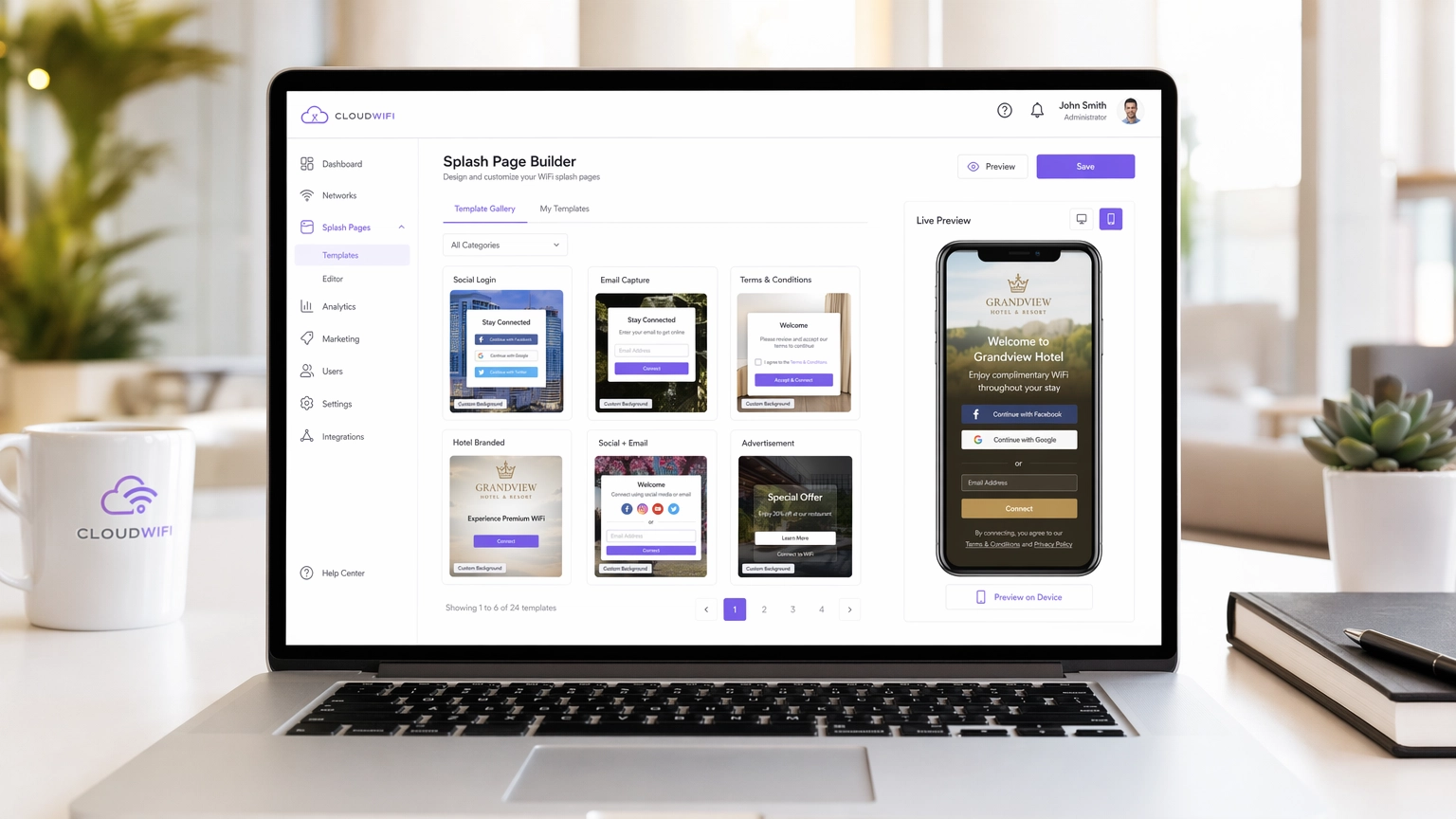
For modern enterprise venues, the guest WiFi network is no longer just a cost centre — it is a critical data acquisition channel. However, the success of this channel hinges entirely on the captive portal, specifically the WiFi splash page. A poorly designed splash page leads to high abandonment rates, frustrated guests, and lost marketing opportunities. This guide is designed for IT managers, network architects, and venue operations directors, and it breaks down the technical and design elements of high-converting splash pages across Hospitality , Retail , and other sectors.
Before diving in, it is worth clarifying the distinction between a WiFi Landing Page vs. Splash Page: What's the Difference? — a nuance that has direct implications for your architecture decisions. Whether you are deploying a new network or optimizing an existing one, understanding this distinction is the first step toward building a successful Guest WiFi strategy that delivers measurable ROI.
Technical Deep-Dive: How Captive Portals Actually Work
A WiFi splash page, or captive portal, operates by intercepting HTTP/HTTPS traffic from unauthenticated devices and redirecting them to a walled garden environment. This interception is handled by the wireless LAN controller (WLC) or access point (AP) using a combination of DNS hijacking and IP redirection. When a client device connects to an open SSID, the OS performs a captive portal detection check — iOS devices ping captive.apple.com, Android devices hit connectivitycheck.gstatic.com. If the WLC intercepts and redirects this request, the OS surfaces the splash page in a mini-browser.
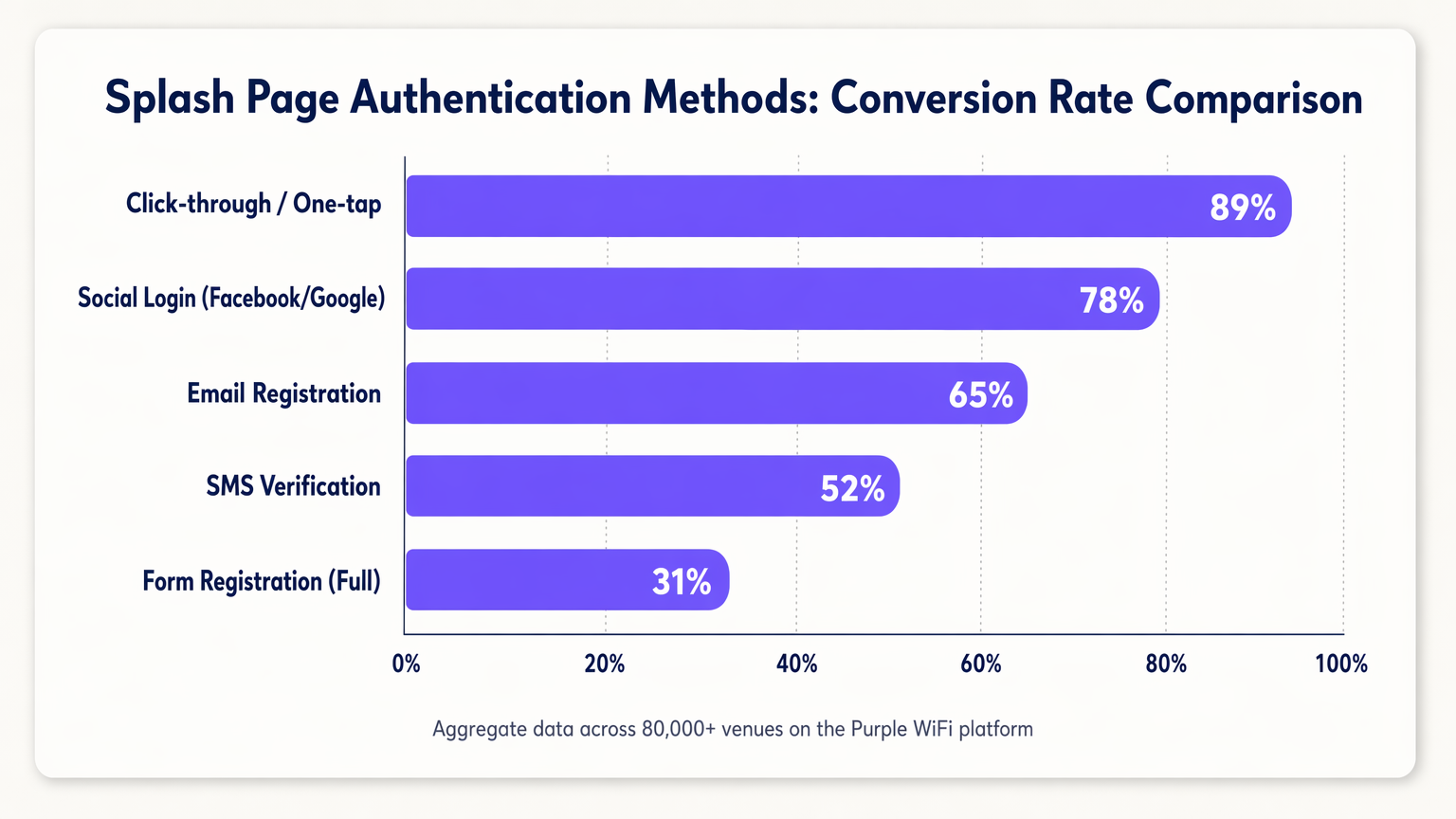
The core function of the splash page is authentication. The choice of authentication method directly impacts both security posture and conversion rates, and these two objectives are often in tension.
| Authentication Method | Typical Conversion Rate | Data Quality | Compliance Complexity |
|---|---|---|---|
| Click-through / One-tap | ~89% | Low (no PII) | Low |
| Social Login (OAuth 2.0) | ~78% | High (verified) | Medium |
| Email Registration | ~65% | Medium | Medium |
| SMS Verification (OTP) | ~52% | High (verified phone) | Medium |
| Full Form Registration | ~31% | Very High | High |
MAC Authentication Bypass (MAB) is worth addressing separately. Historically, MAB allowed returning devices to bypass the splash page by recognizing their MAC address. With the widespread adoption of MAC randomization in iOS 14+, Android 10+, and Windows 11, relying on MAB is no longer viable for a reliable returning-guest experience. The correct response is to shift toward identity-based authentication using session tokens or to evaluate standards like OpenRoaming, which Purple supports as an identity provider.
Security and Compliance Architecture
Deploying a captive portal introduces specific security and compliance requirements that must be addressed at the architecture stage, not retrofitted post-deployment.
HTTPS and Certificate Management: Modern browsers enforce HTTPS strictly. During the captive portal redirect phase, the WLC must present a valid SSL/TLS certificate. Failure to do so results in browser security warnings that most users will not bypass. The recommended approach is to use a dedicated, trusted subdomain for your captive portal with a valid certificate managed by your portal provider.
Walled Garden Configuration: Before authentication, devices can only access resources explicitly whitelisted in the walled garden. This must include: your portal's CDN assets, OAuth provider endpoints (accounts.google.com, graph.facebook.com, appleid.apple.com), and the OS captive portal detection URLs. Misconfigured walled gardens are the single most common cause of splash page failures.
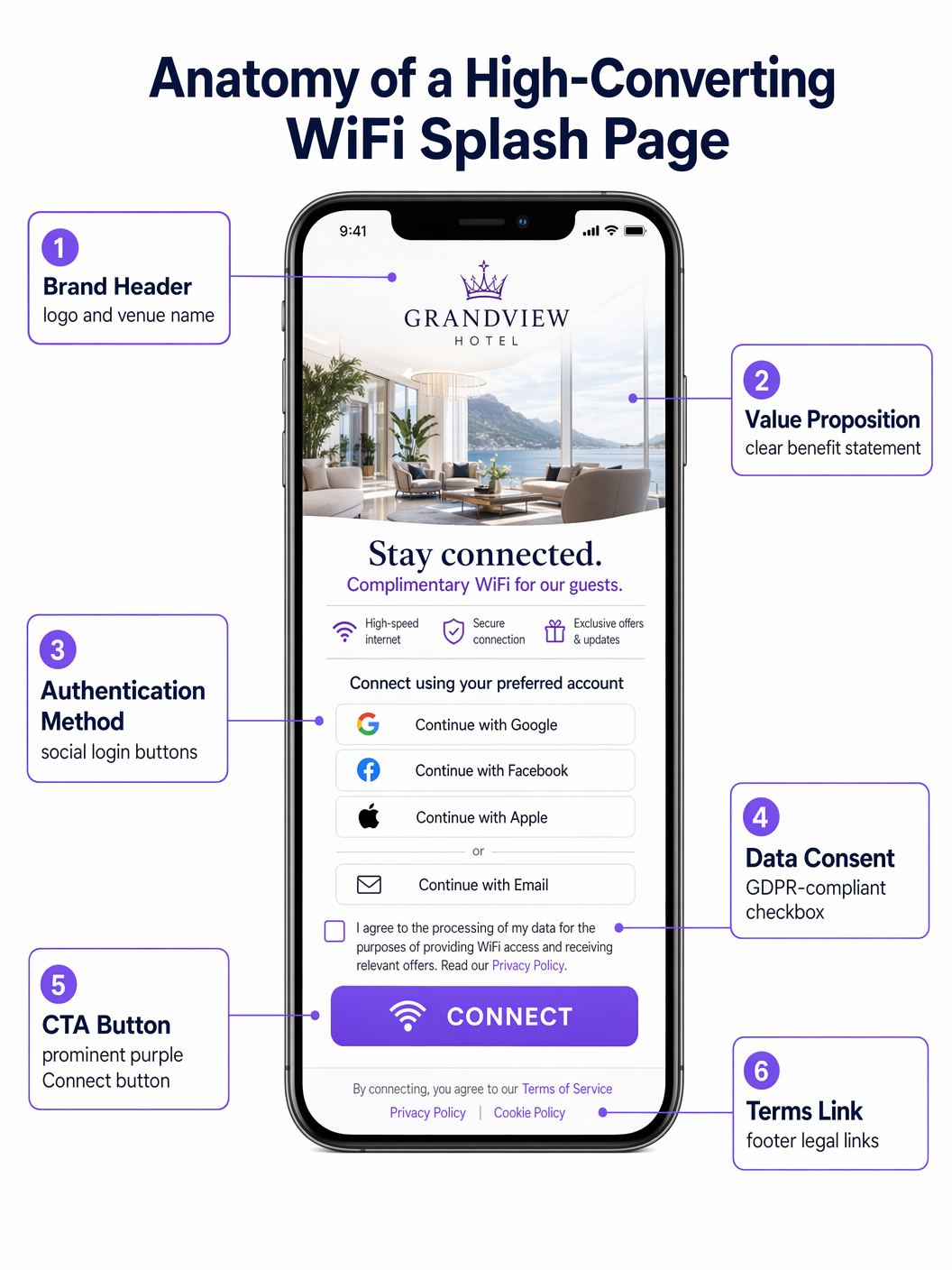
GDPR/CCPA Compliance: The splash page is a data collection point and is therefore subject to data privacy regulations. Key requirements include: explicit, un-ticked consent checkboxes for marketing communications; a clear link to the privacy policy; granular consent options (e.g., separate checkboxes for email and SMS marketing); and a logged, timestamped consent record stored in your CRM. Pre-ticked boxes are non-compliant under GDPR Article 7.
Implementation Guide: The 10 Best Splash Page Strategies
1. The Seamless Social Login (Retail)
In fast-paced Retail environments, speed is paramount. The highest-converting splash pages prioritize one-tap social logins via OAuth 2.0. Placing Google and Apple login buttons prominently — above the fold, with no scrolling required — reduces time-to-connect from minutes to seconds. This approach leverages existing authenticated sessions on the user's device, significantly boosting conversion compared to manual form entry. The walled garden must include the relevant OAuth endpoints for this to function.
2. The Tiered Bandwidth Model (Hospitality)
Hotels operating Hospitality networks often deploy a tiered model. The splash page presents a free, speed-capped tier (suitable for browsing and messaging) and a premium, high-throughput tier (suitable for streaming or VPN). The premium tier can be monetized directly or offered as a perk for loyalty program members. This requires integration between the captive portal, the Radius server, and the property management system (PMS) to dynamically assign bandwidth policies based on guest status.
3. The App Download Incentive (Transport)
In Transport hubs such as airports and train stations, the splash page is a powerful tool for driving app adoption. Offering higher throughput or extended session times in exchange for downloading the venue's app — which typically includes indoor mapping, departure boards, and retail offers — creates a mutually beneficial exchange. The splash page must deep-link directly to the App Store or Google Play listing to minimize friction.
4. The Targeted Sponsorship (Events and Stadiums)
For stadiums and conference centres, the splash page is premium digital real estate. Implementing rotating sponsorships or interstitial ads before granting access generates direct revenue. The critical design constraint is that the primary call-to-action ("Connect to WiFi") must remain clearly visible and accessible after a defined interval — typically 5 to 10 seconds — to avoid frustrating guests in a high-density environment.
5. The Progressive Profiling Approach (Healthcare)
In Healthcare settings, gathering patient feedback and contact details is operationally valuable. However, requesting extensive information upfront causes abandonment. Progressive profiling requests minimal data on the first visit (e.g., email only), then incrementally requests additional information on subsequent visits (e.g., satisfaction rating, visit reason). This approach builds a comprehensive profile over time without creating a bottleneck at the point of access.
6. The Hyper-Localized Experience (Retail Chains)
For multi-site retail chains, the splash page should dynamically adapt based on the specific venue. Using location data passed from the WLC to the portal, the page can display store-specific promotions, local events, or region-specific terms of service. This requires a centralized portal management platform — such as Purple — that supports dynamic content injection based on venue metadata.
7. The Frictionless SMS Verification (Public Sector)
When verified identity is required but social login is not appropriate — for example, in a public library or council building — SMS OTP verification offers a secure alternative. The user enters their phone number, receives a one-time password, and gains access. This ensures a valid, verified contact method is captured while maintaining a relatively smooth user journey. Session management must be configured to avoid requiring re-verification on every visit.
8. The Loyalty Programme Integration (Hospitality)
Integrating the splash page directly with the CRM and loyalty platform allows returning guests to be recognized immediately via a secure session token. A personalized greeting ("Welcome back, Sarah") and automatic connection for elite members significantly enhances the guest experience and reinforces brand loyalty. This integration also enables the WiFi Analytics platform to attribute venue visits directly to loyalty profiles.
9. The Minimalist Design (Corporate Guest Networks)
In corporate guest networks, the focus should be on professionalism and speed. A clean, minimalist design with a simple terms-acceptance button and the company logo is often the optimal approach. The goal is to provide access in under 10 seconds without unnecessary marketing content. This design pattern also reduces the walled garden complexity, as there are no OAuth endpoints or external CDNs to whitelist.
10. The Multilingual Portal (Tourism and International Venues)
For venues in tourist hotspots or international conference centres, automatically detecting the user's browser language via the Accept-Language HTTP header and presenting the splash page in their native tongue removes a significant barrier to entry. This requires a portal platform that supports multi-language content management and locale-specific legal text (terms of service, privacy policy) for compliance purposes.
Best Practices
A mobile-first design philosophy is non-negotiable: over 80% of guest WiFi connections occur on mobile devices. The splash page must be fully responsive, with large, easily tappable buttons (minimum 44x44px touch targets per WCAG 2.1 guidelines) and legible text at standard mobile font sizes. Load time is equally critical — a splash page that takes more than three seconds to render will see significant abandonment, particularly in high-density environments.
Continuous A/B testing, enabled by the WiFi Analytics platform, is essential for ongoing optimization. Testing variables should include button colour, authentication method order, value proposition copy, and the presence or absence of a background image. Even small changes — such as reordering the social login buttons to place Google above Facebook — can produce measurable conversion improvements.
Troubleshooting & Risk Mitigation
The most common complaint from end users is that the captive portal does not pop up automatically. This stems from DNS configuration errors, misconfigured walled gardens, or the user's device having a cached DNS entry. The resolution path is: verify DNS interception is active on the WLC, confirm all OS captive portal detection domains are in the walled garden, and check for any client-side VPN or DNS-over-HTTPS settings that may bypass the interception.
MAC randomization, as discussed, is the most significant structural challenge facing captive portal deployments today. The recommended mitigation strategy is a combination of extended session timeouts (reducing the frequency of re-authentication) and a transition toward identity-based authentication. Purple's OpenRoaming support provides a standards-based path toward eliminating the captive portal entirely for returning users who have previously authenticated.
ROI & Business Impact
A well-optimized splash page transforms the guest WiFi network from a sunk cost into a revenue-generating asset. The primary ROI driver is first-party data acquisition: every authenticated connection generates a verified contact record that can be activated through targeted email campaigns, loyalty program enrollment, and personalized in-venue experiences. Venues deploying Purple's Guest WiFi platform across 80,000+ locations consistently report email list growth rates of 15-25% per month from WiFi sign-ups alone.
Direct monetization through tiered bandwidth models or sponsorship inventory provides a secondary revenue stream. Operational intelligence — foot traffic patterns, dwell times, zone utilization — derived from the WiFi Analytics platform informs staffing decisions, store layout optimization, and capital expenditure planning, delivering ROI that extends well beyond the marketing function.
Key Definitions
Captive Portal
A network access control mechanism that intercepts unauthenticated HTTP/HTTPS traffic and redirects it to a web page (the splash page) where the user must complete an action before gaining full network access.
The underlying infrastructure that makes a WiFi splash page function. IT teams encounter this when configuring WLCs, access points, or cloud-managed network platforms.
Walled Garden
A list of IP addresses and domain names that are accessible to unauthenticated devices before they complete the captive portal authentication process.
Critical for allowing devices to load the splash page assets and authenticate via third-party OAuth providers. Misconfiguration is the primary cause of splash page failures.
MAC Randomization
A privacy feature in modern mobile operating systems (iOS 14+, Android 10+, Windows 11) that generates a new, random MAC address for each Wi-Fi network connection, preventing persistent device tracking.
Breaks traditional MAC Authentication Bypass (MAB) strategies for returning guest recognition, requiring a shift to identity-based authentication.
OAuth 2.0
An industry-standard authorization protocol that enables users to grant third-party applications (e.g., a captive portal) access to their account information from an identity provider (e.g., Google, Facebook) without exposing their credentials.
The technology underpinning Social Login on splash pages. Requires specific OAuth endpoints to be whitelisted in the walled garden.
Progressive Profiling
A data collection strategy that gathers user information incrementally across multiple interactions, rather than requesting all data in a single form submission.
Used to increase splash page conversion rates while still building comprehensive user profiles over time. Requires session token management to recognize returning users.
RADIUS Server
Remote Authentication Dial-In User Service; a networking protocol that provides centralized Authentication, Authorization, and Accounting (AAA) management for network access.
The backend system that receives authentication requests from the WLC, validates credentials against the user directory or CRM, and returns an access-grant or access-deny response.
IEEE 802.1X
An IEEE standard for port-based network access control that provides an authentication mechanism for devices wishing to attach to a LAN or WLAN.
Used in enterprise environments for secure, certificate-based authentication. Typically replaces the need for a captive portal for employees, while guests use a separate SSID with a splash page.
OpenRoaming
A Wi-Fi roaming federation service (built on the Hotspot 2.0/Passpoint standard) that enables automatic, secure Wi-Fi onboarding across participating venues without requiring users to interact with a captive portal.
A modern alternative to traditional captive portals that provides a seamless connection experience. Purple operates as an identity provider within the OpenRoaming federation.
MAC Authentication Bypass (MAB)
A network access control method that uses a device's MAC address as its identity credential to bypass the standard authentication process.
Historically used to provide seamless re-connection for returning guests. Rendered unreliable by MAC randomization in modern mobile operating systems.
Session Token
A unique, time-limited identifier stored as a browser cookie that allows a captive portal to recognize a previously authenticated user without requiring them to re-authenticate.
The correct mechanism for providing returning-guest recognition in a post-MAC-randomization environment. Session expiry should be configured based on the venue's operational requirements.
Worked Examples
A 200-room boutique hotel wants to increase sign-ups for its new loyalty programme. Currently, they use a generic shared-password WiFi login. How should they redesign their splash page and supporting infrastructure?
Phase 1 — Remove the shared password entirely and deploy a captive portal integrated with the hotel's PMS and CRM. Phase 2 — Design the splash page with two primary authentication paths: 'Log in with Loyalty Account' (prominent, cookie-based, frictionless for returning members) and 'Join Loyalty Programme for Free WiFi' (requires email and first name only). Phase 3 — Offer a paid premium tier (e.g., 50 Mbps vs. 10 Mbps free) as a deterrent for non-members and a direct revenue stream. Phase 4 — Configure the Radius server to dynamically assign bandwidth policies based on the CRM response. Phase 5 — Implement session tokens with a 30-day expiry so returning guests are not re-prompted on each visit.
A national retail chain is experiencing a 68% abandonment rate on their WiFi splash page, which currently requires users to complete a 5-field registration form (first name, last name, email, date of birth, postcode). The marketing team is reluctant to reduce the data fields. How do you resolve the tension between data capture and conversion?
Implement a two-phase strategy. Phase 1 — Replace the 5-field form with Social Login (Google, Facebook, Apple) as the primary authentication method, supplemented by a 1-field email-only option. Ensure the walled garden is correctly configured to allow access to all OAuth endpoints. This will immediately increase conversion rates. Phase 2 — Implement progressive profiling. On the second visit, the system recognises the returning user via session token and presents a single additional question (e.g., 'What is your postcode?') in exchange for a discount or loyalty points. On the third visit, it requests date of birth. Over 90 days, the system builds the same 5-field profile without ever presenting a 5-field form.
Practice Questions
Q1. Your venue is hosting a major technology conference with 5,000 attendees. You need to provide WiFi access to all attendees simultaneously. The event sponsor requires that all attendees see a branded splash page and that email addresses are captured for post-event marketing. You cannot afford any delays or bottlenecks at the network login stage. What is the optimal splash page configuration, and what infrastructure considerations are critical?
Hint: Consider the balance between data capture and throughput in a high-density environment. What authentication method minimizes per-user connection time while still capturing a verified contact? What walled garden entries are essential?
View model answer
Deploy Social Login (Google and Apple) as the primary authentication method, with a single-field email form as a fallback. This minimizes per-user connection time while capturing verified contact data. Ensure the walled garden includes all OAuth endpoints for Google and Apple. Pre-scale the Radius server to handle concurrent authentication requests — a 5,000-person event can generate hundreds of simultaneous auth requests during registration periods. Configure session timeouts of at least 8 hours to avoid re-authentication during the event. Avoid SMS verification, which introduces per-user delays and can bottleneck in areas with poor mobile signal.
Q2. A hospital IT director reports that patients are complaining about the WiFi disconnecting and requiring re-authentication on the splash page every time they move between wards. The current setup uses MAC Authentication Bypass with a 1-hour session timeout. How do you diagnose and resolve this?
Hint: The issue relates to session management and device identity. Consider the impact of MAC randomization and the interaction between session timeout and patient dwell times.
View model answer
The root cause is a combination of MAC randomization (meaning the WLC cannot reliably identify the returning device) and an excessively short session timeout. Resolution: (1) Extend the session timeout to 24 hours on the Radius server, matching typical patient stay duration. (2) Shift from MAB to session-token-based recognition — when a patient authenticates, store a session cookie with a 24-hour expiry. (3) For longer-stay patients, evaluate deploying a lightweight onboarding profile (Passpoint/Hotspot 2.0) via the hospital's patient portal app, which provides seamless, certificate-based authentication without a captive portal.
Q3. You are deploying a captive portal for a national retail chain operating across the UK and EU. The marketing team wants to automatically subscribe all WiFi users to the weekly promotional newsletter and pre-tick the marketing consent checkbox to increase opt-in rates. How do you advise them, and what is the correct technical implementation?
Hint: Consider the legal requirements for consent under GDPR Article 7 and Recital 32. What constitutes valid consent, and what are the consequences of non-compliance?
View model answer
Advise the marketing team that pre-ticked consent checkboxes are explicitly non-compliant under GDPR Article 7 and Recital 32, which require that consent be freely given, specific, informed and unambiguous, and that silence, pre-ticked boxes or inactivity should not constitute consent. The correct implementation is: (1) A clearly labelled, un-ticked checkbox for marketing email communications, separate from the mandatory Terms of Service acceptance. (2) A compelling value proposition adjacent to the checkbox (e.g., Tick to receive exclusive offers and 10% off your next purchase). (3) A logged, timestamped consent record stored in the CRM, including the specific consent text version the user agreed to. (4) A clear and accessible unsubscribe mechanism in all subsequent communications.
Continue reading in this series
Staff WiFi Captive Portal: Onboarding and Authenticating Employees
A comprehensive technical reference for IT leaders on designing and deploying staff WiFi captive portals. This guide covers EAP-TLS authentication, BYOD onboarding, VLAN segmentation, and bandwidth management to enhance operational efficiency and mitigate security risks.
Staff WiFi Captive Portal: Onboarding and Authenticating Employees
A comprehensive technical reference for IT leaders on designing and deploying staff WiFi captive portals. This guide covers EAP-TLS authentication, BYOD onboarding, VLAN segmentation, and bandwidth management to enhance operational efficiency and mitigate security risks.
Why Your Captive Portal Isn't Loading on iPhone
An authoritative technical reference guide explaining why captive portals fail to load on iOS devices. It dives deep into Apple's Captive Network Assistant (CNA) daemon detection logic, identifies key iOS-specific interference factors like iCloud Private Relay and Private MAC addresses, and outlines comprehensive mitigation strategies for network engineers and venue operators.