

WPA2 बनाम 802.1X: क्या है अंतर?
यह गाइड WPA2 एन्क्रिप्शन और IEEE 802.1X प्रमाणीकरण फ्रेमवर्क के बीच के संबंध को स्पष्ट करती है — दो पूरक मानक जिन्हें अक्सर विक्रेता दस्तावेज़ों और नेटवर्क डिज़ाइन चर्चाओं में भ्रमित किया जाता है। यह IT निदेशकों, नेटवर्क आर्किटेक्ट्स और वेन्यू ऑपरेशंस लीडर्स को इन प्रोटोकॉल के इंटरैक्शन का स्पष्ट तकनीकी विश्लेषण, आतिथ्य, खुदरा और सार्वजनिक क्षेत्र के वातावरण में व्यावहारिक परिनियोजन रणनीतियाँ, और अनुपालन, जोखिम न्यूनीकरण और गेस्ट WiFi एकीकरण पर कार्रवाई योग्य मार्गदर्शन प्रदान करती है।
🎧 Listen to this Guide
View Transcript
कार्यकारी सारांश
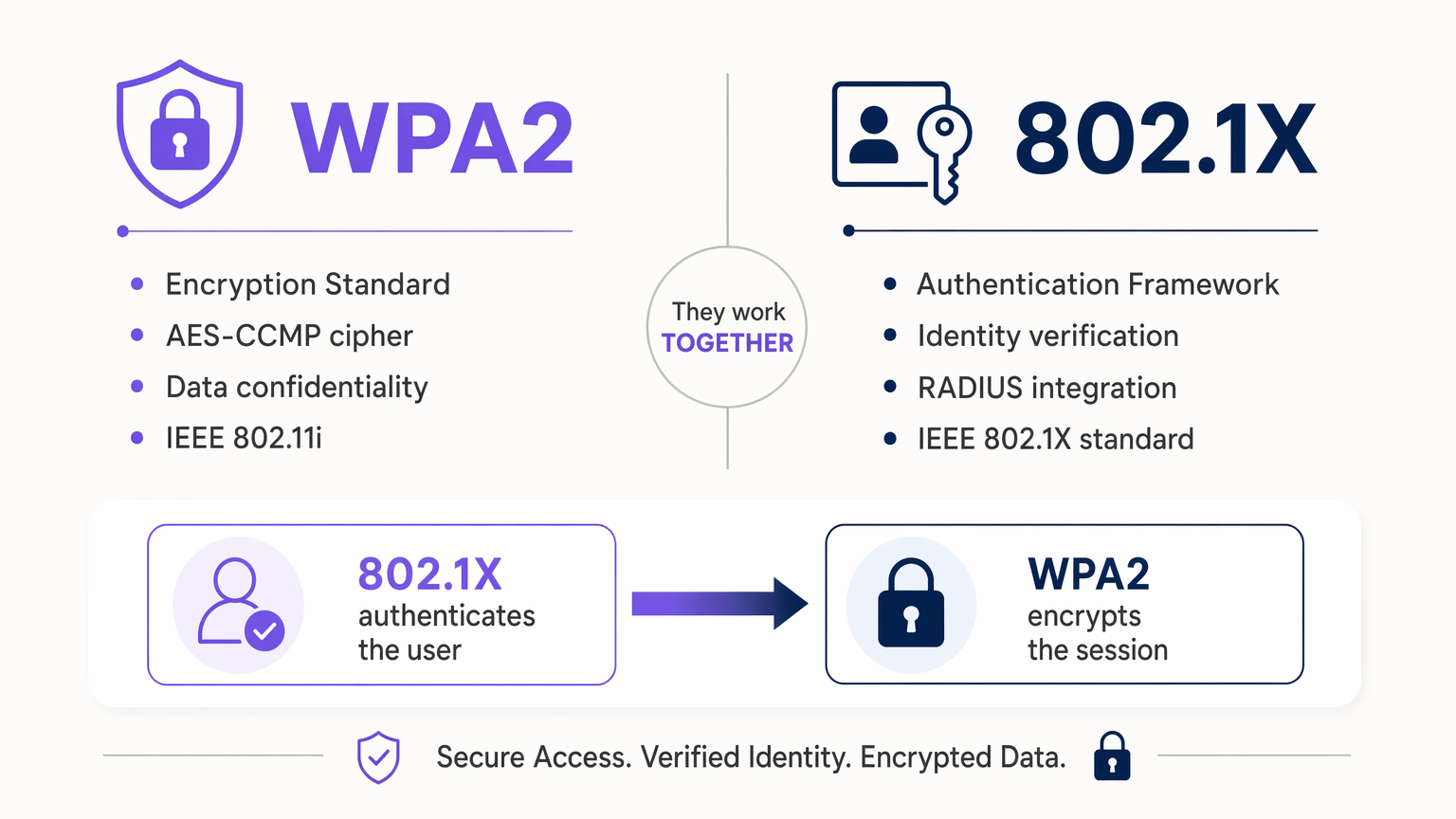
एंटरप्राइज़ वातावरण का प्रबंधन करने वाले IT निदेशकों और नेटवर्क आर्किटेक्ट्स के लिए, WPA2 और 802.1X के बीच का अंतर अक्सर विक्रेता दस्तावेज़ों में अस्पष्ट होता है। WPA2 एक सुरक्षा प्रमाणन कार्यक्रम है जो यह निर्धारित करता है कि वायरलेस डेटा हवा में कैसे एन्क्रिप्ट किया जाता है। इसके विपरीत, IEEE 802.1X एक पोर्ट-आधारित नेटवर्क एक्सेस कंट्रोल (PNAC) फ्रेमवर्क है जो यह निर्धारित करता है कि कोई उपयोगकर्ता या डिवाइस नेटवर्क पर अनुमति दिए जाने से पहले अपनी पहचान कैसे साबित करता है।
वे प्रतिस्पर्धी मानक नहीं हैं — वे एक सुरक्षित वायरलेस आर्किटेक्चर की पूरक परतें हैं। जब कोई एंटरप्राइज़ "WPA2-Enterprise" को डिप्लॉय करता है, तो वे स्वाभाविक रूप से एन्क्रिप्शन के लिए WPA2 और प्रमाणीकरण के लिए 802.1X को डिप्लॉय कर रहे होते हैं। इन प्रोटोकॉल के इंटरैक्शन को समझना अनधिकृत एक्सेस को कम करने, PCI DSS और GDPR जैसे फ्रेमवर्क के साथ अनुपालन सुनिश्चित करने और वितरित स्थानों पर स्केलेबल इन्फ्रास्ट्रक्चर को डिप्लॉय करने के लिए महत्वपूर्ण है। यह गाइड दोनों मानकों की कार्यप्रणाली का विश्लेषण करती है, विक्रेता-तटस्थ कार्यान्वयन रणनीतियाँ प्रदान करती है, और बताती है कि Purple के Guest WiFi जैसे आधुनिक प्लेटफ़ॉर्म इन सुरक्षित आर्किटेक्चर में कैसे सहजता से एकीकृत होते हैं।
तकनीकी गहन विश्लेषण: मानकों का विखंडन
एक सुरक्षित वायरलेस नेटवर्क आर्किटेक्ट करने के लिए, डेटा गोपनीयता (एन्क्रिप्शन) की अवधारणाओं को पहचान सत्यापन (प्रमाणीकरण) से अलग करना होगा। ये अलग-अलग समस्याएँ हैं, जिन्हें अलग-अलग मानकों द्वारा हल किया जाता है, जो क्रम में संचालित होते हैं।
WPA2: एन्क्रिप्शन मानक
Wi-Fi Protected Access 2 (WPA2) एक प्रमाणन कार्यक्रम है जिसे Wi-Fi Alliance द्वारा वायरलेस कंप्यूटर नेटवर्क को सुरक्षित करने के लिए विकसित किया गया है। यह IEEE 802.11i मानक पर आधारित है। इसका प्राथमिक कार्य यह सुनिश्चित करना है कि क्लाइंट डिवाइस (सप्लिकेंट) और एक्सेस पॉइंट (ऑथेंटिकेटर) के बीच प्रेषित डेटा को दुर्भावनापूर्ण तत्वों द्वारा इंटरसेप्ट और पढ़ा न जा सके।
WPA2 AES (एडवांस्ड एन्क्रिप्शन स्टैंडर्ड) के उपयोग को CCMP (काउंटर मोड सिफर ब्लॉक चेनिंग मैसेज ऑथेंटिकेशन कोड प्रोटोकॉल) के साथ अनिवार्य करता है। इसने मूल WPA मानक में उपयोग किए गए कमजोर TKIP सिफर को बदल दिया। WPA2 दो प्राथमिक मोड में संचालित होता है: WPA2-Personal (PSK), जो एक प्री-शेयर्ड की का उपयोग करता है जहाँ प्रत्येक डिवाइस एन्क्रिप्शन कीज़ उत्पन्न करने के लिए एक ही पासवर्ड का उपयोग करता है, और WPA2-Enterprise, जो एक 802.1X प्रमाणीकरण सर्वर के साथ एकीकृत होता है और प्रत्येक व्यक्तिगत सत्र के लिए अद्वितीय, गतिशील एन्क्रिप्शन कीज़ उत्पन्न करता है।
WPA2-Personal की महत्वपूर्ण भेद्यता यह है कि एक ही समझौता किया गया PSK पूरे नेटवर्क को उजागर कर देता है। 400 स्थानों की एक खुदरा श्रृंखला में, प्रत्येक AP और प्रत्येक डिवाइस पर PSK को घुमाना परिचालन रूप से निषेधात्मक है। WPA2-Enterprise, 802.1X द्वारा समर्थित, इस समस्या को पूरी तरह से समाप्त कर देता है।
802.1X: प्रमाणीकरण फ्रेमवर्क
IEEE 802.1X पोर्ट-आधारित नेटवर्क एक्सेस कंट्रोल (PNAC) के लिए एक मानक है। मूल रूप से वायर्ड ईथरनेट के लिए डिज़ाइन किया गया, इसे मजबूत, प्रति-उपयोगकर्ता प्रमाणीकरण प्रदान करने के लिए वायरलेस नेटवर्क के लिए अनुकूलित किया गया था। यह डेटा को एन्क्रिप्ट नहीं करता है — यह एक डिजिटल गेटकीपर के रूप में कार्य करता है, नेटवर्क पोर्ट को तार्किक रूप से "बंद" रखता है जब तक कि डिवाइस एक केंद्रीकृत प्रमाणीकरण सर्वर को अपनी पहचान साबित नहीं कर देता।
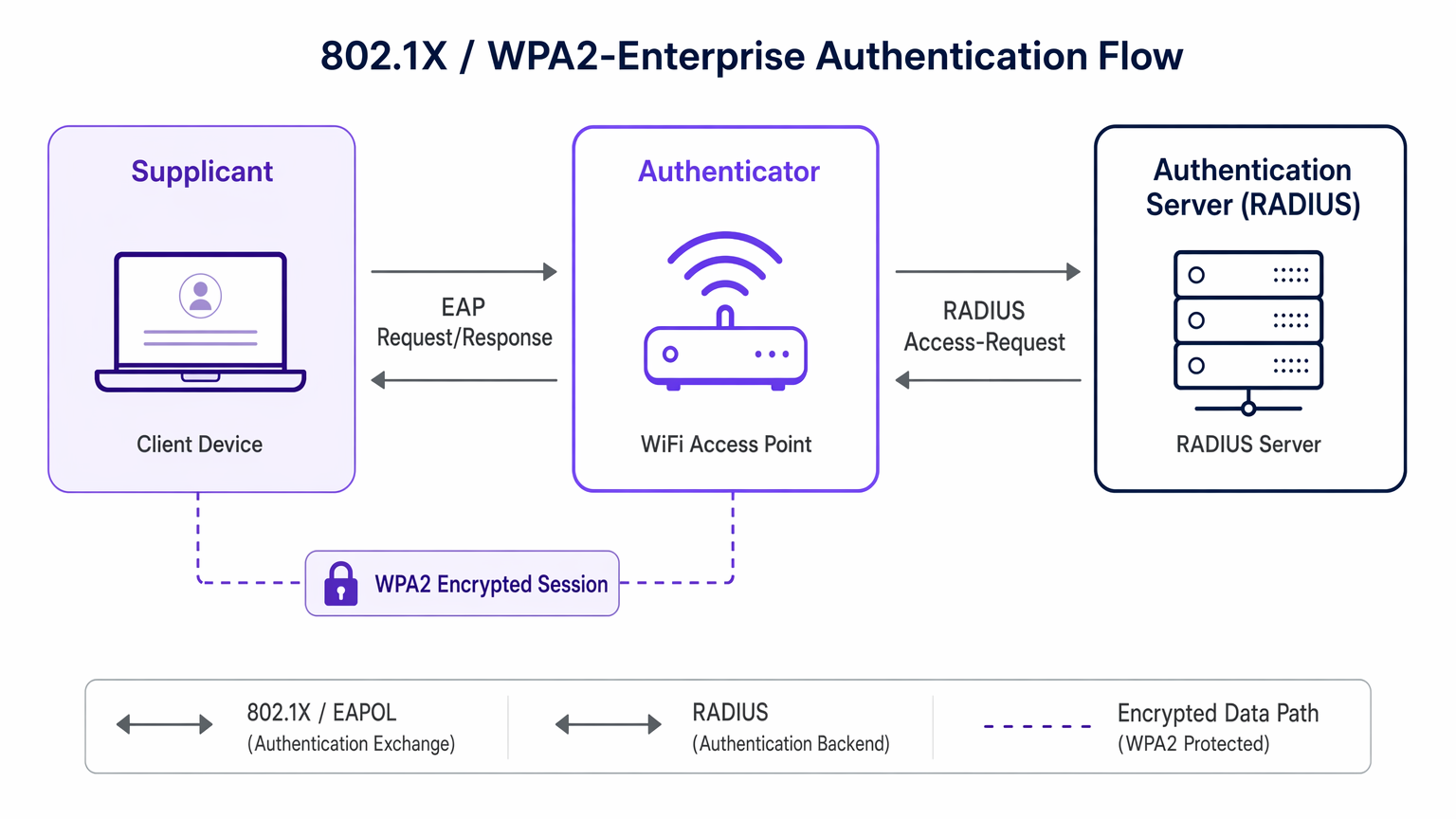
802.1X फ्रेमवर्क तीन भूमिकाओं पर आधारित है। सप्लिकेंट वह क्लाइंट डिवाइस (लैपटॉप, स्मार्टफोन, IoT सेंसर) है जो नेटवर्क एक्सेस का अनुरोध कर रहा है। ऑथेंटिकेटर नेटवर्क एक्सेस डिवाइस है — आमतौर पर एक वायरलेस एक्सेस पॉइंट या प्रबंधित स्विच — जो एक्सेस निर्णय स्वयं लिए बिना प्रमाणीकरण विनिमय को सुगम बनाता है। प्रमाणीकरण सर्वर (आमतौर पर एक RADIUS सर्वर) वह केंद्रीकृत प्रणाली है जो एक्टिव डायरेक्टरी या LDAP जैसी डायरेक्टरी के विरुद्ध सप्लिकेंट के क्रेडेंशियल को सत्यापित करती है और एक्सेस निर्णय जारी करती है।
802.1X सप्लिकेंट और प्रमाणीकरण सर्वर के बीच प्रमाणीकरण डेटा को ट्रांसपोर्ट करने के लिए एक्सटेंसिबल ऑथेंटिकेशन प्रोटोकॉल (EAP) पर निर्भर करता है। EAP अत्यधिक लचीला है, जो आंतरिक विधियों की एक श्रृंखला का समर्थन करता है। EAP-TLS पारस्परिक प्रमाणपत्र-आधारित प्रमाणीकरण का उपयोग करता है और इसे ज़ीरो-ट्रस्ट वातावरण के लिए स्वर्ण मानक माना जाता है। PEAP TLS टनल के भीतर क्रेडेंशियल को एनकैप्सुलेट करता है, जिसके लिए केवल सर्वर-साइड प्रमाणपत्र की आवश्यकता होती है। इन विधियों की विस्तृत तुलना के लिए, EAP-TLS बनाम PEAP पर हमारी गाइड देखें: आपके नेटवर्क के लिए कौन सा प्रमाणीकरण प्रोटोकॉल सही है? ।
WPA2 और 802.1X एक साथ कैसे काम करते हैं
जब कोई डिवाइस WPA2-Enterprise SSID से कनेक्ट होता है, तो निम्न क्रम होता है। सबसे पहले, डिवाइस AP से जुड़ता है, लेकिन AP 802.1X EAP संदेशों को छोड़कर सभी ट्रैफिक को ब्लॉक कर देता है। दूसरा, डिवाइस और RADIUS सर्वर AP के माध्यम से क्रेडेंशियल का आदान-प्रदान करते हैं — यह 802.1X प्रमाणीकरण चरण है। यदि सफल होता है, तो RADIUS सर्वर AP को एक "एक्सेस-एक्सेप्ट" संदेश भेजता है, साथ ही एक मास्टर सेशन की (MSK) भी। तीसरा, AP और डिवाइस MSK का उपयोग WPA2 4-वे हैंडशेक करने के लिए करते हैं, उस सत्र के डेटा ट्रैफिक को AES-CCMP के माध्यम से एन्क्रिप्ट करने के लिए उपयोग की जाने वाली विशिष्ट पेयरवाइज ट्रांजिएंट की (PTK) प्राप्त करते हैं। अंत में, पोर्ट "खुल जाता है," और एन्क्रिप्टेड डेटा प्रवाहित होता है। प्रत्येक उपयोगकर्ता के पास एक अद्वितीय एन्क्रिप्शन कुंजी होती है, जिसका अर्थ है कि एक उपयोगकर्ता के ट्रैफिक को कैप्चर करने से दूसरे के बारे में कोई जानकारी नहीं मिलती है।
कार्यान्वयन गाइड: अपने वेन्यू के लिए आर्किटेक्टिंग
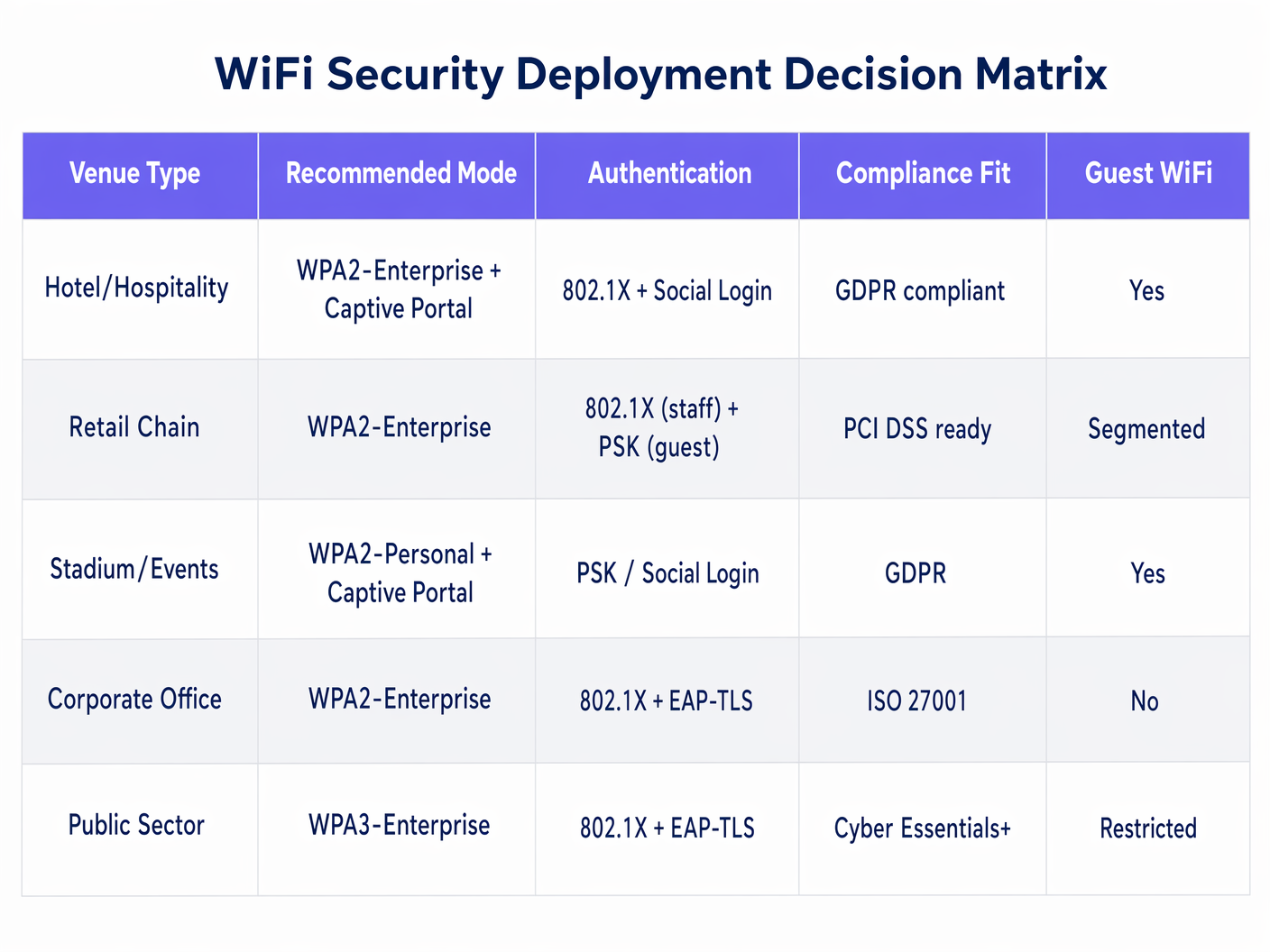
इन मानकों को डिप्लॉय करने के लिए तकनीकी क्षमताओं को व्यावसायिक आवश्यकताओं के साथ संरेखित करने की आवश्यकता होती है। दृष्टिकोण वेन्यू के प्रकार और उपयोगकर्ता जनसांख्यिकी के आधार पर काफी भिन्न होता है।
कॉर्पोरेट कार्यालय: ज़ीरो ट्रस्ट आर्किटेक्चर
उन संगठनों के लिए जो IS को लक्षित कर रहे हैंO 27001 या Cyber Essentials+ अनुपालन के लिए, अनुशंसित परिनियोजन WPA2-Enterprise (या नए निर्माणों के लिए WPA3-Enterprise) है जिसमें EAP-TLS का उपयोग करके 802.1X शामिल है। इसके लिए Microsoft Intune या Jamf जैसे MDM समाधान के माध्यम से सभी कॉर्पोरेट उपकरणों पर डिजिटल प्रमाणपत्रों को परिनियोजित करना आवश्यक है। यह पासवर्ड-आधारित कमजोरियों को पूरी तरह से समाप्त करता है — केवल कंपनी के स्वामित्व वाले, प्रबंधित उपकरण ही प्रमाणित कर सकते हैं। अप्रबंधित या व्यक्तिगत उपकरणों को स्वचालित रूप से एक खंडित गेस्ट SSID में भेज दिया जाता है। RADIUS विशेषताओं के माध्यम से डायनामिक VLAN असाइनमेंट भूमिका के अनुसार आगे विभाजन की अनुमति देता है: IT प्रशासकों, सामान्य कर्मचारियों और ठेकेदारों को उपयुक्त ACLs के साथ विभिन्न VLANs में असाइन किया जा सकता है, सभी एक ही SSID से।
Retail Chain: PCI DSS के लिए खंडित सुरक्षा
एक बड़ी retail श्रृंखला के लिए, चुनौती दोहरी है: PCI DSS अनुपालन के लिए PoS टर्मिनलों को सुरक्षित करना और साथ ही लॉयल्टी प्रोग्राम साइन-अप को बढ़ावा देने के लिए घर्षण-रहित गेस्ट एक्सेस प्रदान करना। वास्तुकला को एक ही भौतिक बुनियादी ढांचे पर दो अलग-अलग सुरक्षा स्थितियों की आवश्यकता होती है। स्टाफ और PoS SSID को 802.1X के साथ WPA2-Enterprise का उपयोग करना चाहिए (कर्मचारियों के लिए Active Directory से जुड़ा PEAP-MSCHAPv2, PoS टर्मिनलों के लिए मशीन प्रमाणपत्रों के साथ EAP-TLS)। यह व्यक्तिगत जवाबदेही सुनिश्चित करता है और PoS ट्रैफ़िक को एक कड़ाई से अलग, PCI-अनुरूप VLAN पर रखता है। गेस्ट SSID एक ओपन नेटवर्क का उपयोग करता है जिसे सीधे एक captive portal पर रूट किया जाता है। Purple का WiFi Analytics प्लेटफॉर्म सोशल लॉगिन या फॉर्म फिल के माध्यम से गेस्ट प्रमाणीकरण को संभालता है, GDPR के तहत अनुपालनपूर्वक फर्स्ट-पार्टी डेटा कैप्चर करता है, जबकि PoS वातावरण से पूर्ण नेटवर्क विभाजन बनाए रखता है।
Hospitality और सार्वजनिक स्थान: बड़े पैमाने पर सहज ऑनबोर्डिंग
hospitality वातावरणों — होटलों, सम्मेलन केंद्रों, स्टेडियमों — के लिए, 802.1X उन अस्थायी मेहमानों के लिए बहुत अधिक परिचालन रूप से जटिल है जिनका कॉर्पोरेट डायरेक्टरी से कोई संबंध नहीं है। इस उपयोग के मामले के लिए उभरता हुआ मानक Passpoint (Hotspot 2.0) है, जो अंदरूनी तौर पर 802.1X और WPA2-Enterprise का उपयोग करता है लेकिन डिवाइस प्रोविजनिंग प्रक्रिया को स्वचालित करता है। Purple Connect लाइसेंस के तहत OpenRoaming जैसी सेवाओं के लिए एक मुफ्त पहचान प्रदाता के रूप में कार्य करता है, जिससे मेहमान अपनी मौजूदा प्रोफाइल का उपयोग करके बिना किसी मैन्युअल नेटवर्क कॉन्फ़िगरेशन के सहजता से प्रमाणित हो सकते हैं। transport और सार्वजनिक-क्षेत्र के स्थानों में, यह दृष्टिकोण सहमति प्रबंधन को सीधे प्रमाणीकरण प्रवाह में एकीकृत करके GDPR डेटा कैप्चर आवश्यकताओं के अनुपालन का भी समर्थन करता है।
एंटरप्राइज़ परिनियोजन के लिए सर्वोत्तम अभ्यास
सभी सप्लिकेंट पर सख्त प्रमाणपत्र सत्यापन लागू करें। PEAP का उपयोग करते समय, सुनिश्चित करें कि क्लाइंट डिवाइस RADIUS सर्वर के प्रमाणपत्र को मान्य करने के लिए कॉन्फ़िगर किए गए हैं। ऐसा करने में विफलता नेटवर्क को Evil Twin हमलों के प्रति उजागर करती है, जहाँ एक दुष्ट AP उन उपकरणों से क्रेडेंशियल प्राप्त करता है जो किसी भी सर्वर पर आँख बंद करके भरोसा करते हैं जो EAP चुनौती प्रस्तुत करता है। इस कॉन्फ़िगरेशन को ग्रुप पॉलिसी या MDM के माध्यम से परिनियोजित करें — इस निर्णय को मैन्युअल रूप से करने के लिए कभी भी अंतिम उपयोगकर्ताओं पर निर्भर न रहें।
डायनामिक VLAN असाइनमेंट लागू करें। सफल 802.1X प्रमाणीकरण पर उपयोगकर्ताओं को उनकी Active Directory समूह सदस्यता के आधार पर विशिष्ट VLANs में असाइन करने के लिए RADIUS विशेषताओं (विशेष रूप से Tunnel-Type, Tunnel-Medium-Type, और Tunnel-Private-Group-ID) का लाभ उठाएं। यह प्रत्येक उपयोगकर्ता वर्ग के लिए अलग SSID की आवश्यकता के बिना भूमिका-आधारित नेटवर्क विभाजन को सक्षम बनाता है।
लेगेसी सिफर सूट को हटा दें। सुनिश्चित करें कि सभी वायरलेस कंट्रोलर और एक्सेस पॉइंट पर TKIP और WEP पूरी तरह से अक्षम हैं। दोनों क्रिप्टोग्राफिक रूप से टूटे हुए हैं। एक नेटवर्क जो WPA2 का विज्ञापन करता है लेकिन TKIP फॉलबैक की अनुमति देता है, वह WEP से सार्थक रूप से अधिक सुरक्षित नहीं है।
उच्च-घनत्व वाले वातावरण के लिए RADIUS क्षमता की योजना बनाएं। स्टेडियमों, सम्मेलन केंद्रों और बड़े healthcare परिसरों में, हजारों डिवाइस एक साथ प्रमाणित करने का प्रयास कर सकते हैं। सुनिश्चित करें कि RADIUS बुनियादी ढांचा लोड-बैलेंस्ड है और APs और प्रमाणीकरण सर्वर के बीच नेटवर्क पथों में 10ms से कम विलंबता है। वितरित परिनियोजन के लिए कनेक्टिविटी विश्वसनीयता एक महत्वपूर्ण विचार है — केंद्रीकृत प्रमाणीकरण सेवाओं के लिए लचीले WAN पथों को सुनिश्चित करने पर मार्गदर्शन के लिए The Core SD-WAN Benefits for Modern Businesses देखें।
समस्या निवारण और जोखिम न्यूनीकरण
साइलेंट विफलता। एक डिवाइस कनेक्ट होने में विफल रहता है, लेकिन उपयोगकर्ता को कोई सार्थक त्रुटि नहीं मिलती है। यह लगभग हमेशा एक प्रमाणपत्र विश्वास का मुद्दा होता है — सप्लिकेंट RADIUS सर्वर के प्रमाणपत्र को अस्वीकार कर रहा है। न्यूनीकरण: सुनिश्चित करें कि RADIUS प्रमाणपत्र जारी करने वाला रूट CA GPO या MDM के माध्यम से सभी क्लाइंट डिवाइस पर वितरित किया गया है, और वायरलेस प्रोफाइल इसे विश्वसनीय मानने के लिए पूर्व-कॉन्फ़िगर किया गया है।
RADIUS टाइमआउट। AP ट्रैफ़िक को अग्रेषित करना बंद कर देता है क्योंकि RADIUS सर्वर ने प्रतिक्रिया टाइमआउट सीमा को पार कर लिया है। न्यूनीकरण: RADIUS सर्वर अतिरेक (प्राथमिक और द्वितीयक) लागू करें, सुनिश्चित करें कि प्रमाणीकरण सर्वर एक भीड़भाड़ वाले नेटवर्क सेगमेंट पर सह-स्थित नहीं है, और AP के RADIUS टाइमआउट और पुनः प्रयास मापदंडों को उचित रूप से ट्यून करें।
MAC प्रमाणीकरण बाईपास (MAB) कमजोरियां। हेडलेस IoT उपकरणों के लिए जो 802.1X सप्लिकेंट नहीं चला सकते हैं, प्रशासक अक्सर MAB पर वापस आ जाते हैं, जो MAC पते के आधार पर प्रमाणित करता है। MAC पते को आसानी से स्पूफ किया जा सकता है। न्यूनीकरण: सभी MAB-प्रमाणित उपकरणों को अत्यधिक प्रतिबंधित, अलग-थलग VLANs में रखें, जिसमें सख्त ACLs केवल डिवाइस संचालन के लिए आवश्यक विशिष्ट ट्रैफ़िक प्रवाह की अनुमति देते हैं। सभी MAB उपकरणों को डिफ़ॉल्ट रूप से अविश्वसनीय मानें।
Evil Twin हमले। एक दुष्ट AP कॉर्पोरेट SSID का प्रसारण करता है और उन उपकरणों से क्रेडेंशियल प्राप्त करता है जो सर्वर प्रमाणपत्र को मान्य नहीं करते हैं। न्यूनीकरण: प्रमाणपत्र सत्यापन लागू करें (जैसा कि ऊपर बताया गया है) और वायरलेस LAN कंट्रोलर पर दुष्ट AP पहचान परिनियोजित करें। अधिकांश एंटरप्राइज़-ग्रेड कंट्रोलर में यह क्षमता मूल रूप से शामिल होती है।
ROI और व्यावसायिक प्रभाव
WPA2-Personal से 802.1X-समर्थित WPA2-Enterprise आर्किटेक्चर में संक्रमण के लिए RADIUS बुनियादी ढांचे में निवेश की आवश्यकता होती है और, EAP-TLS परिनियोजन के लिए, एक PKI (पब्लिक की इन्फ्रास्ट्रक्चर) की। कैसेहालांकि, इसका व्यावसायिक मामला बहुत आकर्षक है।
जोखिम कम करना प्राथमिक प्रेरक है। साझा PSK को खत्म करने से वायरलेस नेटवर्क में सबसे बड़ा हमला वेक्टर हट जाता है। जब कोई कर्मचारी छोड़ता है, तो Active Directory में उनकी विशिष्ट पहुंच केंद्रीय रूप से रद्द कर दी जाती है — संभावित रूप से हजारों एक्सेस पॉइंट पर PSK रोटेशन की आवश्यकता नहीं होती है। 400-स्थानों वाले खुदरा प्रतिष्ठान में परिचालन लागत बचत महत्वपूर्ण है।
अनुपालन सक्षम करना द्वितीयक प्रेरक है। PCI DSS आवश्यकता 8 अद्वितीय उपयोगकर्ता ID और व्यक्तिगत जवाबदेही अनिवार्य करती है। 802.1X इसे स्वाभाविक रूप से प्रदान करता है। एक्सेस कंट्रोल और ऑडिट लॉगिंग के लिए HIPAA की तकनीकी सुरक्षा आवश्यकताएं भी 802.1X के RADIUS अकाउंटिंग लॉग में प्रति-उपयोगकर्ता प्रमाणीकरण रिकॉर्ड द्वारा पूरी होती हैं।
बड़े पैमाने पर परिचालन दक्षता दीर्घकालिक लाभ है। केंद्रीय डायरेक्टरी एकीकरण के माध्यम से दैनिक प्रबंधन सुव्यवस्थित होता है। नए कर्मचारियों को उनके AD खाते के प्रावधान होते ही नेटवर्क एक्सेस मिल जाता है। छोड़ने वाले कर्मचारियों की पहुंच अक्षम होते ही समाप्त हो जाती है। भूले हुए WiFi पासवर्ड के लिए कोई हेल्पडेस्क टिकट नहीं।
एन्क्रिप्शन (WPA2) को प्रमाणीकरण (802.1X) से अलग करके, एंटरप्राइज़ IT टीमें ऐसे वायरलेस नेटवर्क बनाती हैं जो स्केलेबल, ऑडिट करने योग्य और लचीले होते हैं — जो सबसे अधिक मांग वाली कॉर्पोरेट सुरक्षा स्थितियों और सबसे सहज अतिथि अनुभवों दोनों का समर्थन करने में सक्षम होते हैं।
Key Terms & Definitions
WPA2 (Wi-Fi Protected Access 2)
A Wi-Fi Alliance certification program based on IEEE 802.11i that mandates AES-CCMP encryption for wireless data in transit.
IT teams encounter this when configuring SSIDs on wireless controllers. The choice between WPA2-Personal and WPA2-Enterprise determines whether authentication is handled by a shared password or an 802.1X server.
IEEE 802.1X
An IEEE standard for port-based Network Access Control (PNAC) that provides an authentication framework for devices attempting to connect to a network.
Referenced when configuring RADIUS integration on wireless controllers and switches. It is the underlying mechanism that enables WPA2-Enterprise to provide per-user authentication.
Supplicant
The client device (laptop, smartphone, IoT sensor) that initiates the 802.1X authentication exchange and provides credentials or certificates.
In troubleshooting, the supplicant is often the source of configuration issues — particularly around certificate validation settings in the wireless network profile.
Authenticator
The network access device (typically a wireless AP or managed switch) that relays EAP messages between the supplicant and the authentication server without making the access decision itself.
The authenticator blocks all non-EAP traffic until it receives an Access-Accept from the RADIUS server, at which point it opens the logical port.
RADIUS (Remote Authentication Dial-In User Service)
A centralised AAA (Authentication, Authorisation, and Accounting) protocol server that verifies credentials, enforces policies, and logs access events.
The RADIUS server is the backbone of any 802.1X deployment. It integrates with Active Directory or LDAP and returns dynamic VLAN assignments and other policy attributes upon successful authentication.
EAP-TLS (Extensible Authentication Protocol - Transport Layer Security)
A certificate-based EAP method requiring digital certificates on both the client and the server, providing mutual authentication.
Considered the most secure EAP method. Used in zero-trust corporate environments where devices are managed via MDM and certificates can be deployed automatically.
PEAP (Protected Extensible Authentication Protocol)
An EAP method that encapsulates the inner authentication exchange within a TLS tunnel, requiring only a server-side certificate.
Widely deployed in BYOD and mixed-device environments because it allows users to authenticate with standard AD username and password credentials without requiring client certificates.
AES-CCMP
The mandatory encryption cipher suite in WPA2, combining the AES block cipher with the CCMP protocol for data confidentiality and integrity.
IT teams must ensure all APs and client devices support AES-CCMP. Any deployment permitting TKIP fallback undermines the security guarantees of WPA2.
4-Way Handshake
The WPA2 cryptographic exchange between a client device and an access point that derives the session-specific Pairwise Transient Key (PTK) used to encrypt data traffic.
Occurs after successful 802.1X authentication, using the Master Session Key provided by the RADIUS server. Each user's PTK is unique, ensuring traffic isolation between sessions.
Captive Portal
A web-based authentication or consent page presented to users before granting access to a public or guest WiFi network.
Used in hospitality, retail, and public venues where 802.1X is impractical for transient users. Platforms like Purple's Guest WiFi use captive portals to capture first-party data compliantly while keeping guest traffic isolated from corporate infrastructure.
Case Studies
A 400-location retail chain currently uses a single WPA2-Personal password (PSK) shared across both staff tablets and PoS terminals. They are failing their PCI DSS audit under Requirement 8 (unique user IDs) and Requirement 1 (network segmentation). They need to secure the internal network without disrupting the existing guest WiFi captive portal. How should they re-architect their wireless security?
Step 1: Deploy a RADIUS server (e.g., Cisco ISE, Microsoft NPS, or FreeRADIUS) integrated with the corporate Active Directory. For a distributed estate, deploy RADIUS proxies at regional hubs to reduce authentication latency at remote sites.
Step 2: Reconfigure the corporate SSID on all wireless controllers to use WPA2-Enterprise. Configure 802.1X with PEAP-MSCHAPv2 for staff tablets (authenticating against AD user credentials) and EAP-TLS with machine certificates (deployed via MDM) for PoS terminals.
Step 3: Configure the RADIUS server to return dynamic VLAN assignment attributes. Staff tablets are assigned to a staff VLAN; PoS terminals are assigned to a strictly isolated PCI VLAN with ACLs permitting only traffic to the payment processor's IP range.
Step 4: Leave the guest SSID unchanged. It remains open (or WPA2-Personal with a publicly known PSK) but is mapped to a separate VLAN that routes directly to the Purple Guest WiFi captive portal. Guest traffic never touches the PCI VLAN.
Step 5: Enable RADIUS accounting on all APs to generate per-user authentication logs, satisfying PCI DSS audit trail requirements.
A university campus is experiencing credential harvesting attacks. Students are connecting to rogue access points broadcasting the official 'CampusNet' SSID. The network uses WPA2-Enterprise with PEAP-MSCHAPv2, but the student devices are not configured to validate the RADIUS server certificate. What is the attack vector, and how should the network team remediate it?
The attack is an Evil Twin. The attacker deploys a rogue AP broadcasting 'CampusNet' with a higher signal strength. Student devices, configured to trust any server presenting a PEAP challenge, connect to the rogue AP and complete the PEAP handshake, transmitting their hashed AD credentials to the attacker's server.
Remediation Step 1: Identify the Root CA that issued the RADIUS server's TLS certificate. If using an internal CA, ensure this CA certificate is distributed to all student and staff devices.
Remediation Step 2: Create a wireless network profile (via MDM for university-managed devices, or a downloadable configuration profile for BYOD) that specifies: (a) the exact RADIUS server hostname to validate against, (b) the trusted Root CA, and (c) the 'Validate Server Certificate' flag set to true.
Remediation Step 3: Deploy rogue AP detection on the wireless LAN controllers. Configure alerts for any AP broadcasting 'CampusNet' that is not in the authorised AP inventory.
Remediation Step 4: For BYOD devices, consider deploying an onboarding tool (such as Cloudpath or Cisco ISE's BYOD portal) that automates the supplicant configuration, removing the burden from end users.
Scenario Analysis
Q1. Your organisation is migrating from WPA2-Personal to WPA2-Enterprise across 50 office locations. During pilot testing, users report that their Windows laptops display a prompt asking them to 'Accept a Certificate' before they can enter their username and password. Several users click 'Reject' and cannot connect. What is causing this behaviour, and how should it be resolved before the full rollout?
💡 Hint:Consider the role of the supplicant in PEAP authentication and how it verifies the identity of the RADIUS server before transmitting credentials.
Show Recommended Approach
The Windows supplicant is performing server certificate validation as part of the PEAP TLS handshake. Because the RADIUS server's certificate was issued by an internal CA that is not in the device's trusted root store, Windows prompts the user to manually accept it. Relying on users to accept certificates is both a poor user experience and a security risk — users who click 'Accept' on any certificate are equally susceptible to Evil Twin attacks. The correct resolution is to use Group Policy (GPO) to distribute the internal Root CA certificate to all corporate devices and to pre-configure the Windows wireless profile to automatically trust it and validate the RADIUS server hostname. This eliminates the prompt entirely and enforces certificate validation without user intervention.
Q2. A hospital IT director needs to connect IoT medical devices (infusion pumps, patient monitoring systems) to the wireless network. These devices run embedded firmware with no 802.1X supplicant capability and can only connect using a static Pre-Shared Key. How should the network architect handle these devices without compromising the overall security posture?
💡 Hint:Think about network segmentation, VLAN isolation, and the risks associated with MAC Authentication Bypass as an alternative to 802.1X.
Show Recommended Approach
Since these devices cannot perform 802.1X, the architect has two options: WPA2-Personal (PSK) on a dedicated SSID, or MAC Authentication Bypass (MAB) on the corporate SSID. MAB is generally preferable for auditability but carries spoofing risks. Regardless of the authentication method chosen, the critical control is network segmentation. These devices must be placed on a dedicated, isolated VLAN with strict ACLs permitting only the specific traffic flows required — for example, communication to the clinical management server on a specific port, with all other traffic blocked. The SSID or MAB VLAN must have no routing path to the corporate network, the PoS environment, or the internet. Additionally, the PSK (if used) should be rotated periodically and managed centrally. Devices should be inventoried by MAC address, and any unrecognised MAC attempting to join the medical device VLAN should trigger an alert.
Q3. A stadium CIO is evaluating Passpoint (Hotspot 2.0) to improve the fan WiFi onboarding experience at a 60,000-capacity venue. The CIO asks: 'Does Passpoint replace WPA2 and 802.1X, or does it use them?' How do you respond, and what are the key operational considerations for a deployment at this scale?
💡 Hint:Consider what Passpoint actually automates versus what it replaces, and the RADIUS capacity requirements for a high-density venue.
Show Recommended Approach
Passpoint does not replace WPA2 or 802.1X — it automates and abstracts them. Passpoint is a provisioning and discovery layer built on top of WPA2-Enterprise (or WPA3-Enterprise) and 802.1X. It uses 802.1X for authentication (typically via credentials from a mobile carrier or a loyalty app identity provider) and WPA2/WPA3 to encrypt the resulting session. From the fan's perspective, their device connects automatically without any manual configuration. From the network's perspective, every connection is a full 802.1X exchange. The key operational considerations at 60,000 capacity are: (1) RADIUS infrastructure must be sized to handle concurrent authentication storms — particularly at kick-off when thousands of devices attempt to connect simultaneously; (2) RADIUS servers should be deployed with load balancing and geographic redundancy; (3) the identity provider (such as Purple under the OpenRoaming framework) must have sufficient throughput agreements; and (4) the wireless controller must support fast BSS transition (802.11r) to minimise re-authentication overhead as fans move around the venue.




