
About 28% of UK businesses did not report having a network firewall, according to the UK Government's Cyber Security Breaches Survey 2025. Yet owning a firewall doesn't answer the harder operational question: when someone leaves your organization, can you prove their network access has ended?
Security in network management means keeping legitimate services available while controlling who can reach them. For venue and enterprise teams, the difficult part isn't usually drawing separate networks. It's connecting identity, access withdrawal and named responsibility to what happens on site.
The US baseline for secure network management
A control that exists on paper can still fail in the hallway. The government survey works best as a scorecard of what US businesses reported having. Treating it as proof of configuration would be a mistake: a firewall can be installed while an overly permissive rule still exposes a management interface.
US business baseline for network management controls
| Control | Reported by | What it limits |
|---|---|---|
| Network firewalls | 72% of businesses | Unwanted traffic crossing the perimeter |
| Restricted administrator rights | 68% of businesses | Damage from stolen credentials or insider misuse |
| Secure cloud backups | 71% of businesses | Permanent loss after files or services are disrupted |
| Up-to-date malware protection | 77% of businesses | Known malicious software on managed devices |
| No reported network firewall | About 28% of businesses | Broader exposure of users and management traffic |
| No reported restricted admin access | About one-third of businesses | A wider blast radius from shared privilege |
Reported controls and their complements, from the UK Government's Cyber Security Breaches Survey 2025. The final column describes the job each control is meant to do.
Read the table as a set of separate jobs. A firewall decides which traffic may pass, and that decision has to cover connections between internal systems as well as traffic arriving from the internet. An open route from visitor WiFi to a controller's administration page undoes the separation those networks were meant to create.
Restricted administrator rights address a second failure. The person checking wireless coverage on a Tuesday morning rarely needs permission to export credentials, rewrite authentication policy or create another administrator account.
What the baseline doesn't prove
Backups and malware protection cover recovery and detection. A backup supports getting files and services back, but the team still has to test whether restored configurations work. Malware tools help identify malicious software on supported devices, yet they say nothing about a television, a sensor or an unmanaged guest cell phone that was never enrolled.
The scorecard records presence alone. None of the rows shows who maintains the control, when it was last tested, or how quickly one person's access could be withdrawn. Physical work sits outside it too: during a build or remodel, teams coordinating a new venue connection may work with construction partners such as Southern Tier Resources and its greenfield broadband build specialists on cabling and circuits, while authentication, administration and incident escalation remain decisions for the network team.
Practical rule: Mark a control as verified only when someone can demonstrate what it blocks, who maintains it and how you know it still works.
Before changing products, annotate your own estate against the table. For each row record the control, its named owner, the most recent test evidence and any exception. A missing control needs action. An installed control with no accountable operator needs attention just as much.
Treat every network as a hostile environment
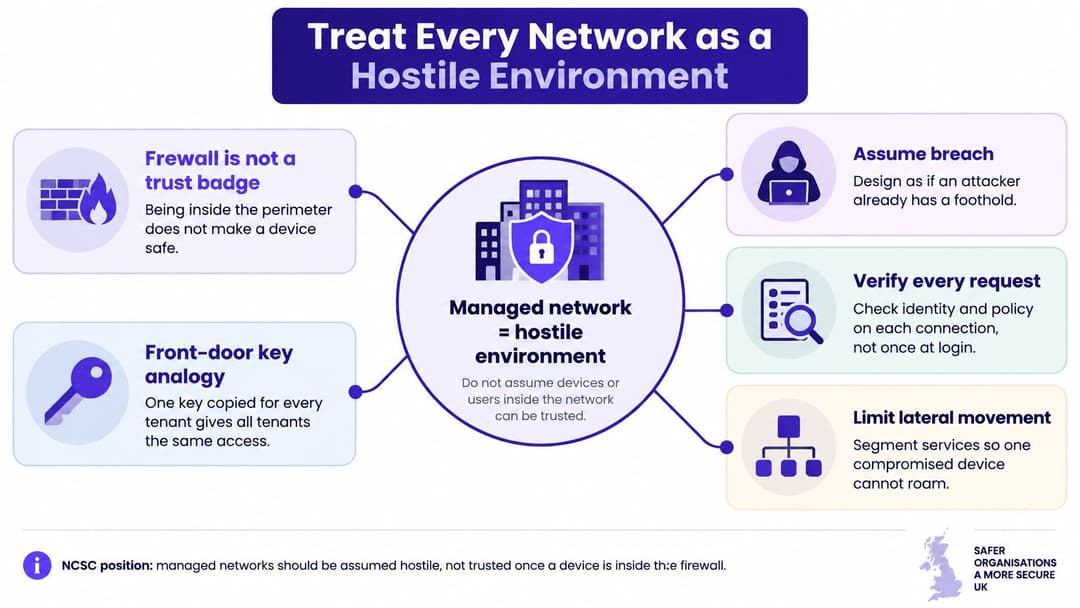
A building with a front-door key copied for every contractor has a familiar weakness: nobody can withdraw just one person's copy. A badge system offers a better model because each badge can carry different permissions and stop working when its holder leaves.
The National Cyber Security Centre's network security fundamentals recommend treating networks as hostile environments rather than assuming that devices inside a perimeter are trustworthy. In a zero-trust approach, access decisions consider authentication, authorization, device health and the sensitivity of the requested resource.
Separate people from their permitted destinations
Consider a hotel where a maintenance contractor needs to reach a heating controller. Connecting to the building's WiFi shouldn't also grant access to reservations, payments or staff records. The useful question is not whether the contractor has the password, but whether this person, using this device, may reach this service now.
Organize traffic around operational roles:
- Guests: Allow the services visitors need without providing a route into business systems.
- Staff: Match access to job responsibilities and the devices used for work.
- Operational systems: Permit documented connections for building controls, sensors and specialist equipment.
- Tenants or residents: Provide private connectivity without exposing neighboring occupants.
A VLAN, or virtual local area network, creates a logical traffic boundary. It doesn't automatically enforce a useful security policy. Administrators must also control the routes between those boundaries.
Make trust conditional
Authentication establishes an identity. Authorization decides what that identity may do. A valid employee account therefore shouldn't automatically permit a personal laptop to administer the wireless controller.
Bind policy to verified people or devices rather than a passphrase written on a whiteboard. Where device-health checks are available, decide what happens when a device becomes non-compliant. Restricted access to remediation services may be more practical than leaving the user with no way to fix the problem.
There's a trade-off: stronger verification needs reliable identity information and a workable onboarding process. If legitimate users can't connect, staff may create informal exceptions that undermine the design.
Being inside the firewall is a location, not proof of trust.
Monitor user, device and service behavior against the permissions you've defined. In hospitality, healthcare, retail, transportation and residential sites, unmanaged cell phones and connected equipment mustn't inherit the privileges of business devices merely because they share access points.
Review your SSIDs, the WiFi names users see, alongside their underlying VLANs. Identify which still behave like a copied front-door key.
Disruption when Access files and services fail
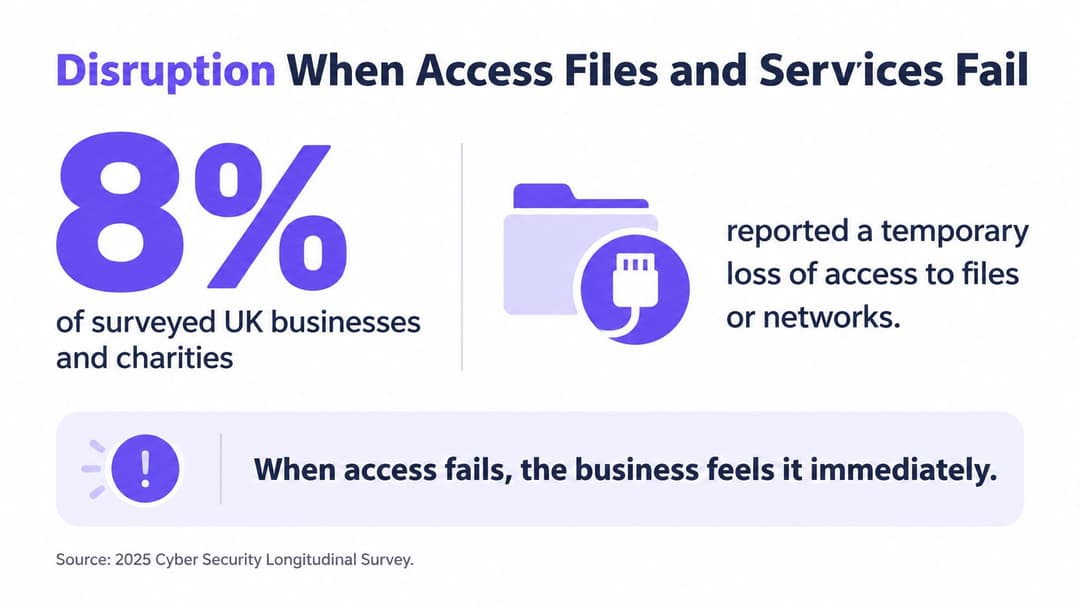
Among surveyed US businesses and charities, 8% reported temporary loss of access to files or networks after a cyber incident; 5% of businesses reported websites, applications or online services being taken down or slowed, and 6% reported losing access to third-party services, according to the Cyber Security Longitudinal Survey published in 2025.
These are different failure modes, not interchangeable measures of a data breach. A team can avoid a confirmed data leak and still be unable to take payments, retrieve bookings or update clinical notes.
Follow the service dependency
Say a venue's internet connection is working, but employees can't authenticate. From the network dashboard, the access points may look healthy. From reception, the service is unavailable because staff can't reach the booking system.
Map each important workflow through its dependencies: the device, wireless connection, authentication service, name resolution, application and external supplier. This helps the responder distinguish an access problem from an application outage before making disruptive changes.
For authentication planning, the RADIUS-as-a-Service overview provides context for evaluating a hosted authentication model. Compare that model against your connectivity dependencies and recovery requirements, rather than assuming that moving a component removes every possible failure.
Decide what continues during an outage
Continuity planning starts with operational questions, not a spare-equipment list. Can reception check arriving guests safely? Can authorized staff retrieve essential information? Who approves a temporary workaround, and how will records be reconciled afterward?
- Lost file or network access: Identify usable recovery copies and document the order in which services must return.
- Slowed public services: Agree how staff will distinguish degraded performance from complete failure and communicate with customers.
- Unavailable supplier platforms: Record support contacts, local alternatives and the business decision needed to activate them.
Test these arrangements without casually bypassing security. An emergency shared administrator account might restore access while leaving an untraceable route into sensitive systems.
Availability belongs beside confidentiality and integrity. The useful outcome is not a network that rejects attackers, but an organization that can continue essential work and restore normal operations safely.
Access models from shared keys to identity
Choose an access model by asking how an individual loses permission, not just how easily they connect. The onboarding demonstration rarely exposes the most expensive weakness: removing a departing user without interrupting everyone else.
Network access models and how access is withdrawn
| Access model | How trust is proved | How access is withdrawn | Best fit |
|---|---|---|---|
| Shared pre-shared key | One passphrase used by many people | Rotate the key for every device, which is often delayed | A tiny closed team, never guests or residents |
| Captive portal on open WiFi | A web login after the device associates | Disable the account, while the radio may stay unencrypted | Short guest visits only if encryption is added |
| WPA2 or WPA3-Enterprise with 802.1X | Per-user or per-device check via RADIUS | Disable the directory account so the next authentication fails | Staff and managed corporate devices |
| Certificate-based EAP-TLS | A managed device certificate, no shared passphrase | Revoke the certificate or directory object and enforce that status during authentication | Employees and MDM-enrolled devices |
| Unique key per device or resident | One pre-shared key with isolation from other keys | Delete that single key and terminate associated sessions where supported | IoT, consoles, TVs and residents who cannot use 802.1X |
Don't confuse a login page with encryption
A captive portal is a web page used to admit or identify visitors. By itself, it doesn't encrypt the wireless link or prove that a similarly named hotspot belongs to the venue. Application encryption still matters, but it isn't a substitute for choosing an appropriate wireless security method.
A shared pre-shared key is simple to distribute and awkward to withdraw. It's the wrong fit when people come and go independently or when the same credential would give visitors and employees equivalent access.
With 802.1X, the network checks a user or device through an authentication service, commonly RADIUS. Administrators must configure devices to validate the authentication server correctly; otherwise, users may be persuaded to trust an impostor.
Plan for active sessions and awkward devices
Disabling an account doesn't necessarily disconnect a device that's already online. Configure reauthentication and, where supported, change of authorization or session termination. Test the full withdrawal process on the actual controller rather than assuming a directory change immediately reaches every session.
EAP-TLS uses certificates for authentication. It removes shared-password distribution, but requires certificate enrollment, renewal and revocation handling. Mobile device management, or MDM, can help manage those credentials on enrolled equipment.
Unique keys, often called iPSK or xPSK, accommodate devices that can't perform enterprise authentication. Isolation still needs explicit configuration, including whether a resident's cell phone may discover their own television without discovering a neighbor's.
The broader access-control discipline is also relevant to sensitive document systems. Data room security advice from Bizbe, from Bizbe, Inc., provides a useful parallel for thinking about permissions beyond initial sign-in.
Use identity-based networking principles to connect access decisions with joiner-mover-leaver changes. Choose a model for each traffic class, not a single compromise for the entire building.
Safeguards to Run on a Managed Network
The NCSC reported handling 429 cyber incidents in the twelve months to August 2025, including 204 nationally significant incidents, in its Annual Review 2025. That caseload reinforces the need to investigate misuse as well as prevent it.
Turn the work into assigned operating tasks. A purchase order isn't evidence that a safeguard is functioning.
Assign the operating routine
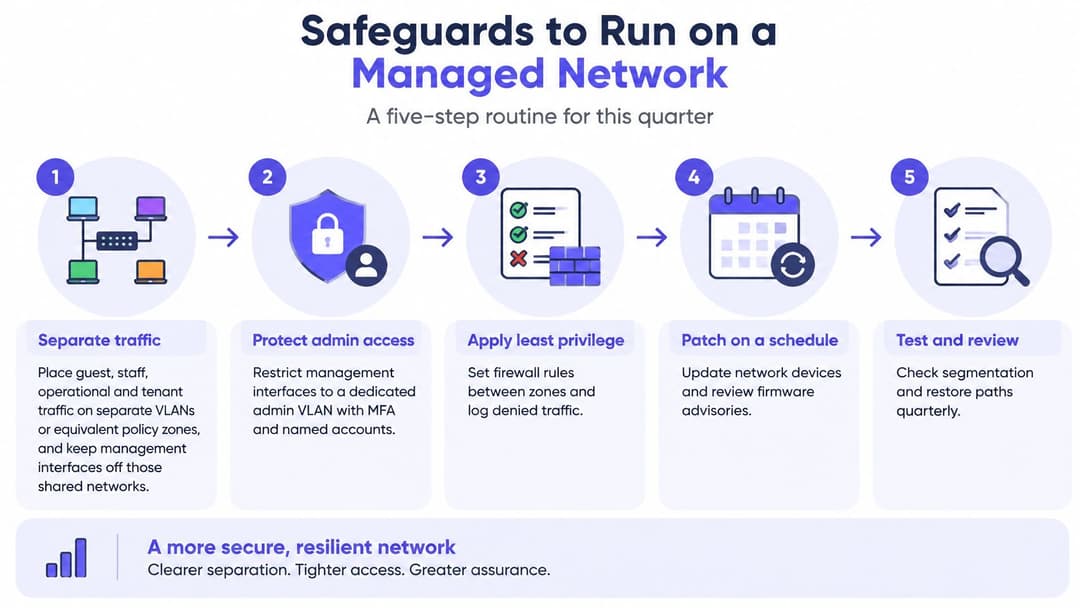
Separate traffic deliberately. Put guest, staff, operational and tenant traffic into VLANs or equivalent policy zones. Keep management interfaces on a restricted administration path, then test prohibited connections from an ordinary guest device.
Replace shared business credentials. Apply the selected identity-based access model to zones containing business systems. Pilot enrollment and withdrawal before migrating equipment that supports trading or care delivery.
Restrict administration to named people. Use individual administrator accounts and multifactor authentication where supported. Vendor access should be approved for a defined task, with standing access removed when that work ends.
Maintain network software and configurations. Set a patching cycle for controllers, access points and authentication services, with an urgent route for serious vulnerabilities. Record exceptions, compensating controls and who accepts the operational risk.
Collect useful evidence. Retain the sources below in a central, searchable location. Synchronize device clocks so responders can reconstruct events across systems.
Protect and use the logs. Separate log administration from routine network administration where practical. Alert on abnormal authentication and attempted movement between internal zones, with someone responsible for investigating.
Rehearse escalation. Name who contacts the connectivity provider, bank and insurer when relevant. Store contact details somewhere accessible when the normal collaboration platform is unavailable.
Prove recovery. Test restoration of configurations and essential services. Maintain a vendor-dependency note that explains what stops working if an external platform disappears.
Retain evidence that answers questions
Logs a network team should be able to investigate
| Log source | What to retain | Misuse it can show |
|---|---|---|
| Authentication events | User, device, time, success or failure | Password spraying and stolen credentials |
| Administrator actions | Who changed policy, and when | Compromised admin accounts and insider misuse |
| DHCP and DNS | Address leases and names queried | Unknown devices and suspicious lookups |
| Firewall decisions | Allows and denies by segment | Scans and attempts to cross zones |
| Wireless controller events | Associations, roaming and key type | Unexpected SSIDs and rogue access points where wireless monitoring supports detection |
| East-west traffic | Flows between internal segments | Lateral movement after the first foothold |
Choose retention periods around investigation needs, privacy obligations and storage capacity. Collecting everything indefinitely isn't a substitute for knowing which question each log can answer.
Physical-access planning needs the same attention to exceptions. Fitness GM's guide to secure your 24/7 fitness facility offers relevant context for unattended venues, where door access and network access require coordinated but distinct procedures.
Operational check: Give every safeguard an owner, an evidence location and a next review date. Don't check it complete because a feature exists.
How the same rules look in real venues
Hotels and healthcare
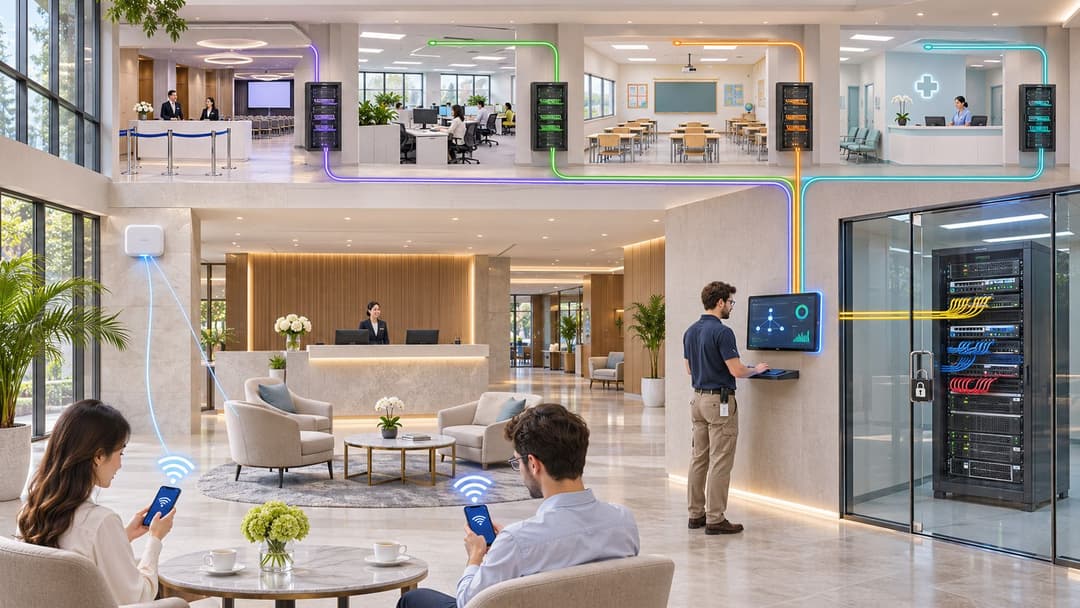
At a hotel, a seasonal receptionist finishes their contract while guests continue checking in. Their staff identity should stop working without requiring reception to reconnect every back-office device; guest cell phones should remain on an internet-only path, separate from property-management and payment systems.
In a hospital, a visitor streams video while a clinical team retrieves patient information. Visitor access mustn't provide a route to clinical networks, and a medical device that can't use enterprise authentication needs a documented exception, its own credential and tightly limited destinations.
These are separate operating environments, but both need access changes that don't interrupt unrelated users. Avoid using a convenient staff SSID as the default home for equipment nobody has classified.
Stores, homes and temporary contractors
In retail, a shopper connects near a payment terminal while an employee uses a inventory handheld. The shopper needs an encrypted guest route, not visibility of the register network; the handheld needs only the business services required for its task.
In student housing or multi-family, a resident wants their cell phone to control their television and console. Their private network should support that interaction without exposing a neighboring apartment's devices, and moving out should end their access without disrupting the building.
For a contractor, an engineer's maintenance ticket defines a narrow purpose and an end point. Close the remote-access session and remove the associated permissions when the work ends, rather than leaving a vendor account active because its firewall rule appears harmless.
For another venue context, the Newcastle City Council case study is a useful reference when considering public-facing connectivity. Treat any case study as context, not a configuration template: your application dependencies and permitted routes still need local verification.
Ask your team which live SSIDs mix these roles today. A recognizable WiFi name isn't evidence that the users behind it have appropriately different permissions.
Name an owner before Adding another tool
The Cyber Security Breaches Survey 2025 found that 81% of US businesses had at least three specified technical controls in place, yet 43% still reported a breach or attack in the preceding twelve months. Owning the equipment and running it well are two different things.
A building can have a lock on every door and still be open to anyone holding an old key. Networks fail the same way. Firewalls, VLANs and separate SSIDs decide what traffic may do, but a stale identity walks through all of them. The survey cannot say which control failed in any single incident, yet it makes clear that procurement alone cannot demonstrate managed access.
Ask for evidence, not reassurance
Name an accountable owner who can answer the board's practical question: Do network privileges still match employment status, vendor contracts and operational need? That person needs authority to close exceptions and revoke access directly. Owning a spreadsheet is a different job.
The test is evidence produced on demand, not reassurance given at renewal time. Useful evidence includes:
- Joiner-mover-leaver records: Show when permissions were granted, changed and withdrawn, including the result of a withdrawal test. If a leaver's credentials still authenticate a week after departure, the process ran but the outcome failed.
- An exception inventory: Record unusual firewall routes, WiFi arrangements and unsupported devices, each with a named business justification and a review date.
- Vendor offboarding checks: Confirm removal of accounts, keys, remote-access permissions and active sessions when contracts end.
A network separation diagram means little if stale identities preserve access across it. Segmentation draws the walls; identity decides who holds keys.
For teams seeking identity-based staff WiFi without building their own public-key infrastructure, Purple's Staff WiFi onboards employee devices with managed EAP-TLS certificates on the access points a business already owns, so there is no shared passphrase to rotate. Purple operates the cloud RADIUS that replaces FreeRADIUS or Windows NPS, removing the on-premises authentication servers that need patching and failover, and providing enterprise-level employee WiFi security without the complexity of a NAC.
Pick the accountable owner first. Then map every live SSID to an access model, a withdrawal mechanism and evidence that the mechanism works. Adding another tool before that mapping exists produces a new dashboard rather than an answer.
Purple offers guest, staff and multi-tenant WiFi built around appropriate identities rather than a building-wide shared password. Visit Purple to discuss your existing access points, directory integration and the revocation paths your team needs to verify.