

Cómo Passpoint (Hotspot 2.0) transforma la experiencia de Wi-Fi para invitados
Una guía de referencia técnica integral que detalla cómo los protocolos Passpoint (Hotspot 2.0) y 802.11u reemplazan los Captive Portals tradicionales con un roaming de Wi-Fi fluido, seguro y similar al celular. Proporciona a los líderes de TI resúmenes arquitectónicos, marcos de implementación y el caso de negocio para adoptar la autenticación basada en credenciales para resolver los desafíos de aleatorización de MAC y mejorar la experiencia del invitado.
🎧 Escucha esta guía
Ver transcripción
Resumen ejecutivo
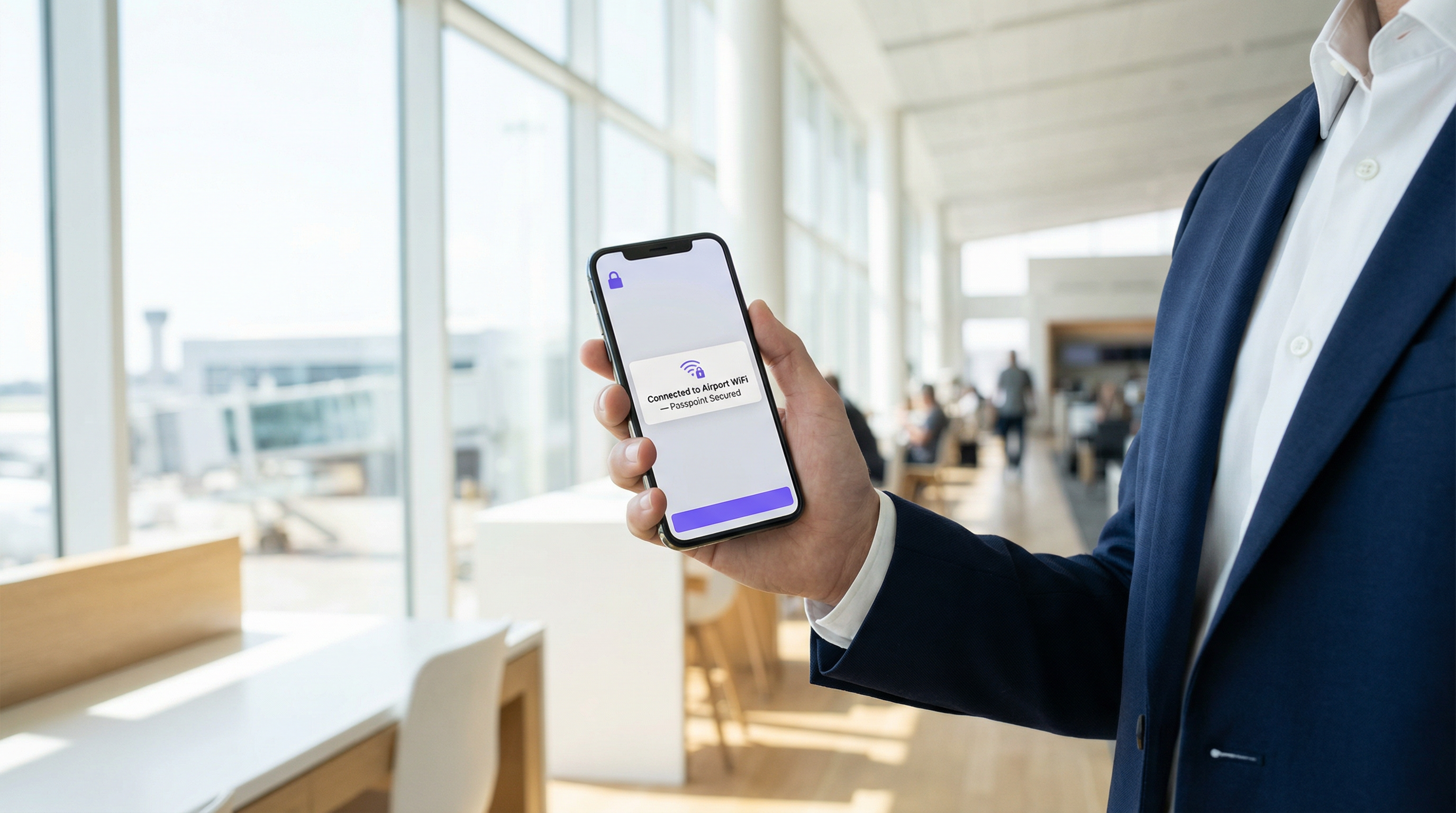
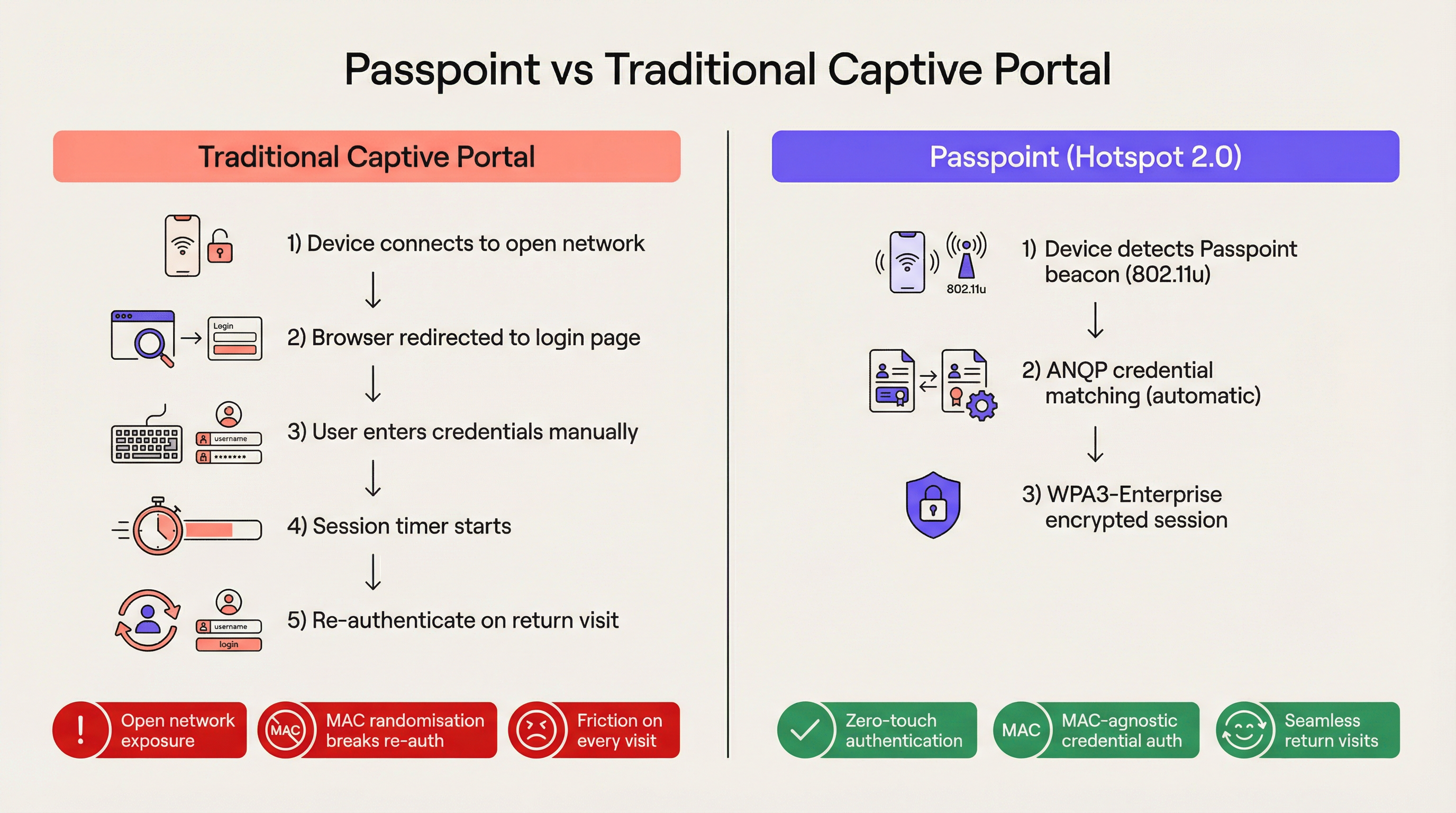
Para el entorno empresarial moderno, la fricción es una desventaja competitiva. Los Captive Portals tradicionales, aunque alguna vez fueron el estándar para el acceso a redes de invitados, ahora representan un cuello de botella operativo significativo y una fuente de frustración persistente para el usuario. Passpoint, también conocido como Hotspot 2.0, transforma fundamentalmente este paradigma al reemplazar la autenticación manual basada en la web con un roaming fluido similar al celular. Al aprovechar el estándar IEEE 802.11u y el cifrado WPA3-Enterprise, Passpoint permite que los dispositivos de los invitados descubran, se autentiquen y se conecten a las redes Wi-Fi empresariales de forma automática y segura.
Para los líderes de TI en los sectores de Hospitalidad , Retail y grandes recintos públicos, la transición a Passpoint ya no es opcional. La aleatorización de direcciones MAC predeterminada implementada en los dispositivos iOS y Android modernos ha roto efectivamente la lógica de reautenticación de los Captive Portals heredados, lo que significa que los invitados que regresan aparecen como dispositivos nuevos en cada visita. Passpoint resuelve esto al autenticar el perfil de credenciales del usuario en lugar de su dirección de hardware. Esta guía detalla la arquitectura técnica de Passpoint, el impacto comercial del despliegue y un marco de implementación neutral respecto al proveedor diseñado para mejorar la experiencia de Guest WiFi mientras se reduce la carga de trabajo del soporte técnico.
Inmersión técnica profunda
El problema de la selección de red y 802.11u
En los despliegues de Wi-Fi heredados, los dispositivos dependen de un mecanismo fundamentalmente frágil para la selección de red: el escaneo de Service Set Identifiers (SSID) conocidos. Este enfoque requiere que el usuario se haya conectado previamente a la red o que seleccione manualmente la red de una lista. No proporciona visibilidad previa a la asociación sobre la postura de seguridad de la red, los requisitos de autenticación o la disponibilidad de internet ascendente. Passpoint aborda esta limitación a través de la enmienda IEEE 802.11u, que introduce el Interworking con redes externas.
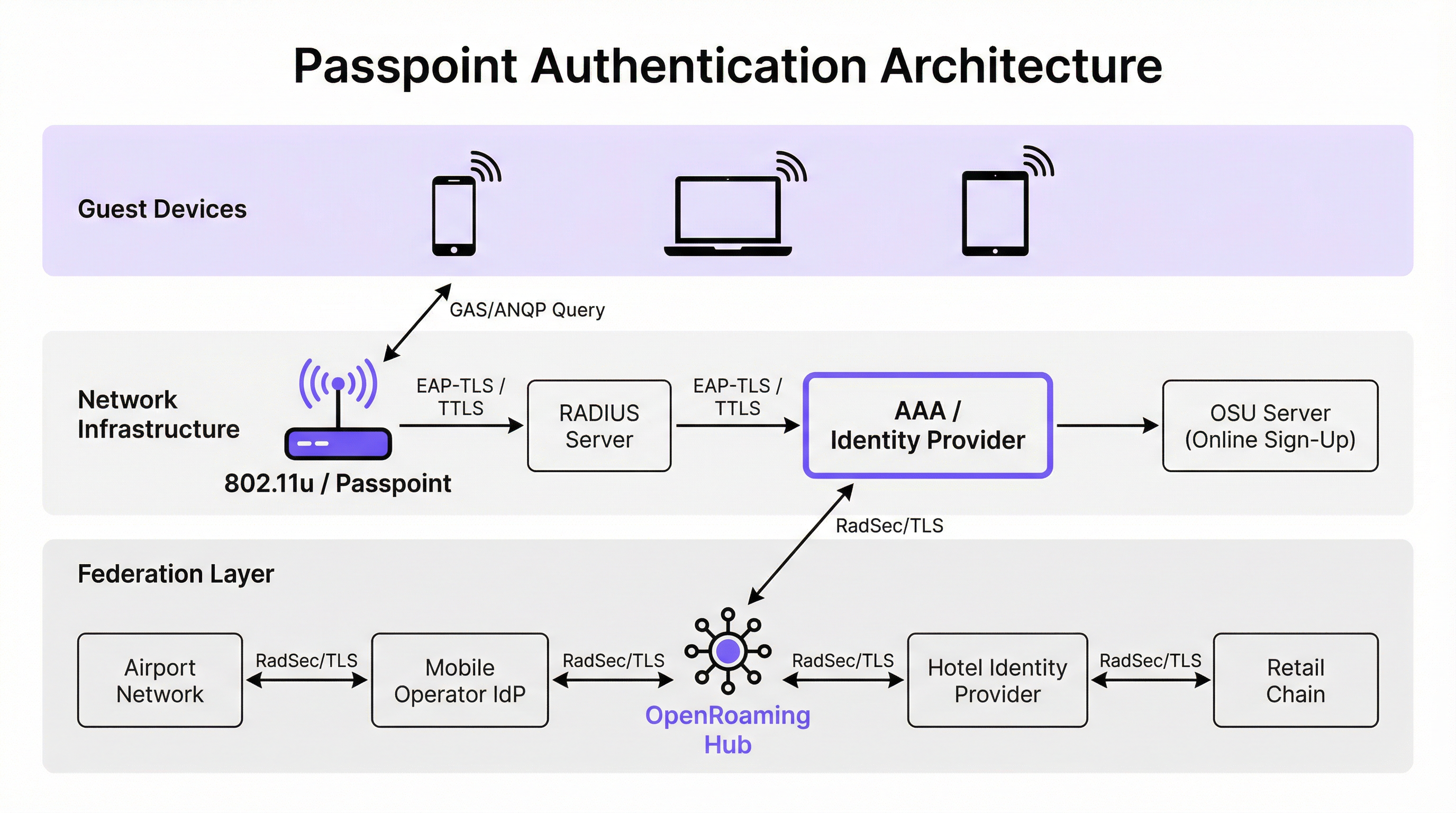
En lugar de escanear pasivamente los SSID, un dispositivo habilitado para Passpoint consulta activamente la infraestructura de red antes de intentar la asociación. Cuando un punto de acceso emite su baliza (beacon), incluye un Elemento de Interworking, un indicador que señala el soporte para 802.11u. El dispositivo cliente detecta este indicador e inicia una solicitud de Generic Advertisement Service (GAS). Encapsulada dentro de esta solicitud se encuentra una consulta de Access Network Query Protocol (ANQP). El dispositivo pregunta a la infraestructura: "¿Qué Roaming Consortium Organisational Identifiers (OIs) soportas?". Si la respuesta del punto de acceso coincide con un perfil de credenciales almacenado en el dispositivo, se procede a la autenticación automática.
Arquitectura de autenticación y seguridad
Passpoint exige seguridad de grado empresarial, eliminando por completo la fase de "red abierta" inherente a los despliegues de Captive Portal. La autenticación se gestiona a través del control de acceso a la red basado en puertos IEEE 802.1X, junto con un método de Extensible Authentication Protocol (EAP). Los métodos más prevalentes en los despliegues empresariales son EAP-TLS (que depende de certificados de cliente y servidor), EAP-TTLS (credenciales tunelizadas) y EAP-SIM/AKA (para escenarios de descarga celular).
Esta arquitectura proporciona autenticación mutua. El dispositivo demuestra criptográficamente su identidad a la red y, lo que es crucial, la red demuestra su identidad al dispositivo. Esta verificación mutua es la defensa principal contra los puntos de acceso "evil twin" y los intentos de interceptación de intermediarios (man-in-the-middle). Además, Passpoint exige el cifrado WPA2-Enterprise o WPA3-Enterprise. WPA3-Enterprise introduce el modo de seguridad de 192 bits y exige el secreto hacia adelante (forward secrecy), garantizando que incluso si las claves de sesión se ven comprometidas en el futuro, el tráfico histórico permanezca cifrado.
La federación OpenRoaming
Mientras que Passpoint define el mecanismo técnico para el descubrimiento y la autenticación, OpenRoaming proporciona el marco de confianza. Desarrollado por la Wireless Broadband Alliance (WBA), OpenRoaming es una federación global que permite a los proveedores de identidad (como operadores de redes móviles, Google o Apple) y a los proveedores de acceso (como hoteles, estadios y cadenas de retail) confiar en las credenciales de los demás sin requerir acuerdos bilaterales entre cada entidad.
OpenRoaming opera bajo un modelo de infraestructura de clave pública (PKI) de tipo hub-and-spoke. Las solicitudes de autenticación se envían por proxy a través de la federación utilizando túneles RadSec (RADIUS sobre TLS). Al emitir el OI de OpenRoaming libre de liquidación (5A-03-BA), un entorno empresarial puede proporcionar instantáneamente un acceso Wi-Fi fluido y seguro a millones de usuarios en todo el mundo que ya poseen un perfil de identidad compatible en sus dispositivos.
Guía de implementación
Desplegar Passpoint requiere una base de infraestructura más sofisticada que una red abierta tradicional, pero los componentes son estándar dentro de los entornos empresariales modernos.
Requisitos previos de infraestructura
- Puntos de acceso certificados para Passpoint: La infraestructura inalámbrica debe soportar las especificaciones 802.11u y Hotspot 2.0. La gran mayoría de los puntos de acceso empresariales fabricados en los últimos cinco años por proveedores como Cisco, Aruba y Ruckus cumplen con este requisito.
- Infraestructura RADIUS/AAA: Un servidor RADIUS robusto capaz de manejar la autenticación EAP y enrutar las solicitudes a los almacenes de identidad apropiados. Si se participa en OpenRoaming, el servidor RADIUSEl servidor debe ser compatible con RadSec para un proxy seguro.
- Servidor de registro en línea (OSU): Para entornos que emiten sus propias credenciales (en lugar de depender únicamente de identidades federadas), un servidor OSU proporciona el mecanismo para el aprovisionamiento seguro de perfiles Passpoint en dispositivos de invitados.
La estrategia de SSID dual
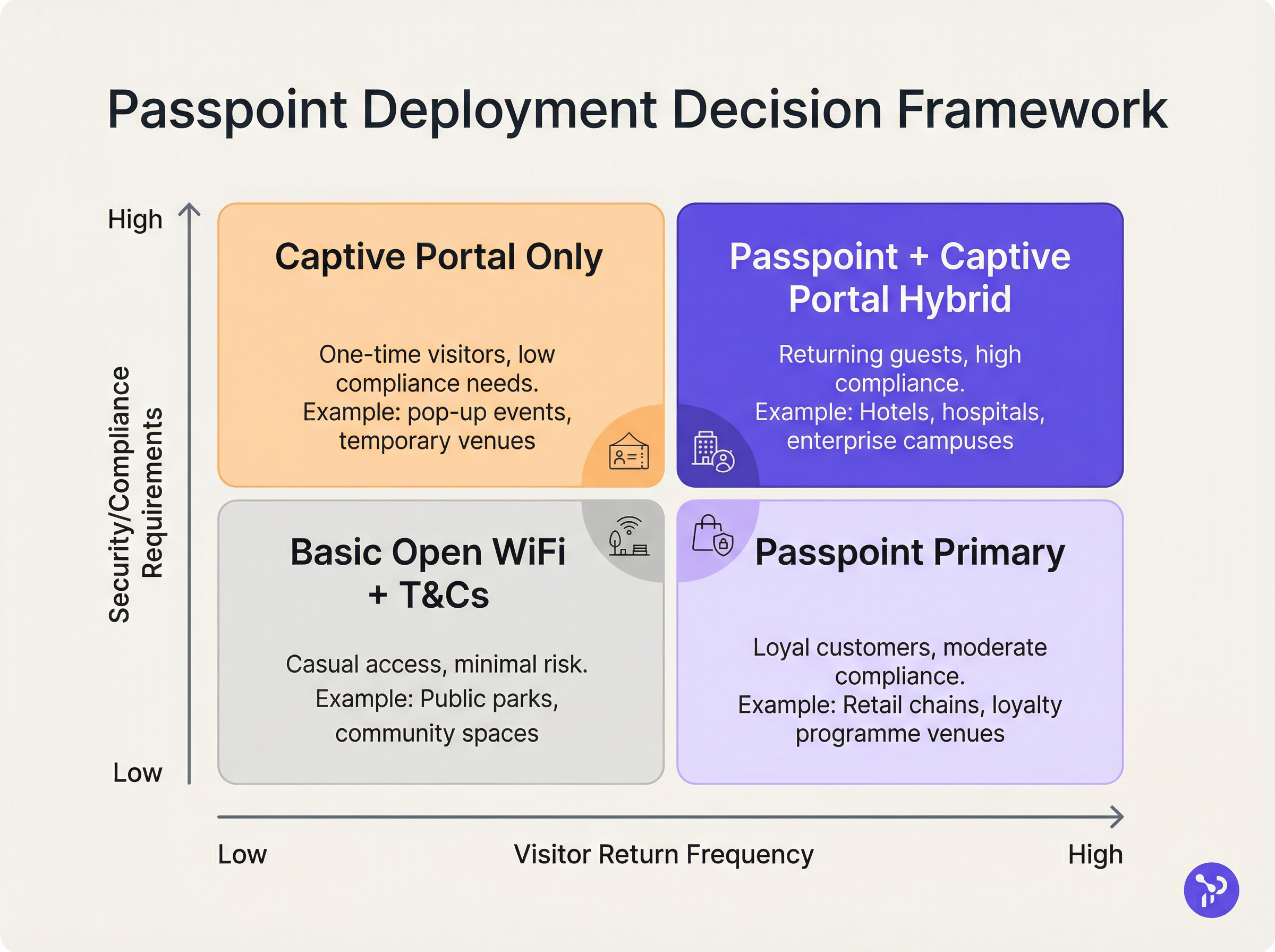
El modelo de implementación más eficaz para los recintos que están en transición a Passpoint es la estrategia de SSID dual. Este enfoque mantiene un SSID de Captive Portal tradicional para el registro inicial, mientras proporciona un SSID de Passpoint para conexiones posteriores sin interrupciones.
Cuando un invitado se conecta al SSID del Captive Portal por primera vez, completa el flujo de autenticación estándar (por ejemplo, aceptar términos y condiciones, proporcionar una dirección de correo electrónico). Tras una autenticación exitosa, el portal presenta una opción para descargar un perfil Passpoint. Una vez instalado, el dispositivo preferirá automáticamente el SSID seguro de Passpoint en todas las visitas futuras. Este modelo de registro progresivo garantiza la accesibilidad para dispositivos antiguos, mientras migra a la mayoría de los usuarios a la red Passpoint segura y sin fricciones.
Mejores prácticas
Al diseñar una arquitectura Passpoint, los líderes de TI deben adherirse a varias mejores prácticas críticas para garantizar la estabilidad operativa y la seguridad.
En primer lugar, la gestión del ciclo de vida de los certificados es fundamental. Si se utiliza EAP-TLS, la expiración de los certificados de cliente o servidor provocará fallos de autenticación silenciosos que son difíciles de diagnosticar para los servicios de asistencia de primera línea. Implemente protocolos de renovación de certificados automatizados y monitoreo proactivo. Como se destaca en nuestra guía sobre Evaluación de la postura del dispositivo para el control de acceso a la red , la visibilidad sólida de los endpoints es esencial al gestionar el acceso basado en certificados.
En segundo lugar, garantice la compatibilidad con dispositivos antiguos. Aunque iOS 7+, Android 6+ y Windows 10+ son compatibles de forma nativa con Passpoint, ciertos dispositivos IoT, hardware antiguo y dispositivos estrictamente gestionados por empresas pueden carecer de soporte. La estrategia de SSID dual mitiga este riesgo al proporcionar un método de acceso de respaldo.
En tercer lugar, al configurar los elementos ANQP, asegúrese de que la Información del recinto sea precisa y descriptiva. Estos metadatos suelen ser mostrados por el sistema operativo del dispositivo cliente para proporcionar contexto sobre la red a la que se une el usuario.
Resolución de problemas y mitigación de riesgos
La complejidad de Passpoint introduce dominios de fallo específicos que difieren de las implementaciones de Captive Portal.
Modo de fallo 1: Tiempo de espera agotado o inaccesibilidad de RADIUS Si el servidor RADIUS local no puede alcanzar al proveedor de identidad ascendente (especialmente en escenarios de OpenRoaming federados), el protocolo de enlace EAP se agotará. Mitigación: Implemente una infraestructura RADIUS redundante y garantice un monitoreo sólido de los túneles RadSec. Revise nuestra documentación técnica sobre RadSec: Asegurando el tráfico de autenticación RADIUS con TLS para obtener orientación sobre la configuración.
Modo de fallo 2: Fallos en el aprovisionamiento del perfil Los usuarios pueden encontrar errores al intentar descargar el perfil Passpoint desde el servidor OSU, a menudo debido a las limitaciones del navegador del Captive Portal en dispositivos móviles. Mitigación: Diseñe el flujo del Captive Portal para salir del mini-navegador del asistente de red cautiva (CNA) hacia el navegador nativo del sistema del dispositivo antes de iniciar la descarga del perfil.
Modo de fallo 3: Impacto en la analítica por aleatorización de MAC Aunque Passpoint resuelve la interrupción de la autenticación causada por la aleatorización de MAC, las plataformas de analítica antiguas que dependen únicamente de las direcciones MAC seguirán reportando recuentos de visitantes inexactos. Mitigación: Integre los registros de autenticación RADIUS con su plataforma de WiFi Analytics . Al rastrear identificadores de credenciales únicos (como la Identidad de Usuario Facturable o NAI anonimizada) en lugar de direcciones MAC, los recuentos de afluencia y las métricas de lealtad de los recintos pueden volver a ser precisos.
ROI e impacto en el negocio
El caso de negocio para la implementación de Passpoint se basa en tres pilares medibles: eficiencia operativa, reducción de riesgos y experiencia del usuario.
Desde el punto de vista operativo, la eliminación de la fricción del Captive Portal se correlaciona directamente con una reducción en los tickets de soporte de TI relacionados con la conectividad Wi-Fi. En grandes entornos de Salud o Transporte , esto representa ahorros de costos significativos.
En cuanto a la mitigación de riesgos, el cambio de redes abiertas al cifrado WPA3-Enterprise reduce sustancialmente la responsabilidad legal del recinto. Para los entornos minoristas sujetos a PCI DSS, la reducción del área de superficie de manejo de datos (al eliminar la recopilación de credenciales basada en la web) simplifica las auditorías de cumplimiento.
Finalmente, la mejora en la experiencia del usuario es profunda. En el sector de la hospitalidad, los estudios muestran consistentemente que un Wi-Fi confiable y sin interrupciones es el principal motor de la satisfacción del huésped y de las reservas recurrentes. Al implementar Passpoint, los recintos ofrecen una experiencia de conectividad que refleja la confiabilidad de las redes celulares, transformando el Wi-Fi de un servicio frustrante en una amenidad premium y transparente.
Términos clave y definiciones
IEEE 802.11u
The wireless networking standard amendment that enables Interworking with External Networks, allowing devices to query APs before associating.
When configuring wireless controllers, engineers must enable 802.11u to allow devices to discover Passpoint capabilities.
ANQP (Access Network Query Protocol)
A query and response protocol used by devices to discover network services, roaming agreements, and venue information before connecting.
IT teams configure ANQP profiles on the wireless controller to broadcast their supported Roaming Consortium OIs and NAI Realms.
Roaming Consortium OI
An Organisational Identifier broadcast by the access point that indicates which identity providers or federations the network supports.
If an enterprise joins OpenRoaming, they must ensure their APs broadcast the specific OpenRoaming OI (5A-03-BA).
OSU (Online Sign-Up)
A standardized process and server infrastructure for securely provisioning Passpoint credentials and certificates to a user's device.
When building a self-service onboarding flow for a loyalty programme, developers will integrate with an OSU server to push the profile to the device.
RadSec
A protocol that encapsulates RADIUS authentication traffic within a TLS tunnel to ensure secure transmission over untrusted networks.
Required when proxying authentication requests from a local venue to a cloud-based OpenRoaming hub.
NAI Realm
Network Access Identifier Realm; indicates the domain of the user and the specific EAP authentication methods supported by the network.
Configured alongside ANQP to tell client devices whether the network requires EAP-TLS, EAP-TTLS, or EAP-SIM.
EAP-TLS
Extensible Authentication Protocol - Transport Layer Security; a highly secure authentication method requiring both client and server certificates.
Often used in enterprise employee Wi-Fi deployments where IT can push certificates to managed devices via MDM.
MAC Address Randomisation
A privacy feature in modern mobile operating systems that generates a fake, temporary hardware address for each Wi-Fi network connection.
The primary catalyst driving venues away from captive portals, as it breaks the ability to recognize returning visitors based on their hardware.
Casos de éxito
A 400-room enterprise hotel chain is experiencing a high volume of helpdesk tickets from returning guests who complain they must manually reconnect to the Wi-Fi in the lobby, restaurant, and their rooms, despite having connected previously. The hotel currently uses a traditional open SSID with a captive portal. How should the network architect resolve this?
The architect should implement a Dual-SSID strategy. First, deploy a secure Passpoint SSID broadcasting the hotel's specific Roaming Consortium OI. Second, modify the existing captive portal on the open SSID to serve as an onboarding funnel. When a guest logs in via the portal, they are prompted to download a Passpoint configuration profile to their device. Once installed, the device will automatically and securely authenticate via 802.1X/EAP to the Passpoint SSID as they move between the lobby, restaurant, and room, eliminating manual re-authentication.
A national retail chain wants to offer secure, seamless Wi-Fi across its 500 locations to drive loyalty app engagement. However, managing custom certificates or individual credentials for millions of potential customers is deemed operationally unfeasible. What is the recommended deployment architecture?
The retailer should deploy Passpoint and federate with OpenRoaming. By configuring their access points to broadcast the settlement-free OpenRoaming OI (5A-03-BA) and establishing RadSec tunnels from their RADIUS infrastructure to an OpenRoaming hub, the retailer allows any customer with a compatible identity provider profile (such as a modern Samsung device or a mobile carrier profile) to connect automatically. The retailer can then integrate this with their loyalty app to trigger push notifications upon successful network association.
Análisis de escenarios
Q1. A hospital IT director wants to deploy Passpoint to ensure doctors' mobile devices connect securely to the clinical network, while patients connect to a separate guest network. The doctors use unmanaged personal devices (BYOD). Which EAP method and provisioning strategy should the architect recommend?
💡 Sugerencia:Consider the balance between security and the operational overhead of managing certificates on unmanaged personal devices.
Mostrar enfoque recomendado
The architect should recommend EAP-TTLS with an Online Sign-Up (OSU) server provisioning flow. EAP-TLS requires client certificates, which are operationally difficult to deploy and manage on unmanaged BYOD devices. EAP-TTLS allows the doctors to authenticate securely using their existing Active Directory/LDAP credentials (username and password) tunneled inside a secure TLS session. The OSU server can provide a self-service portal where doctors log in once to download the profile, enabling automatic connection thereafter.
Q2. During a Passpoint deployment pilot, Android devices are successfully authenticating and connecting, but iOS devices are failing during the EAP handshake. The RADIUS logs show 'Unknown CA' errors. What is the most likely cause and solution?
💡 Sugerencia:Apple's iOS has strict requirements regarding the trust chain for RADIUS server certificates.
Mostrar enfoque recomendado
The most likely cause is that the RADIUS server is using a self-signed certificate or a certificate issued by a private internal Certificate Authority (CA) that the iOS devices do not inherently trust. Android devices sometimes allow users to bypass or ignore certificate validation (though this is poor security practice), whereas iOS strictly enforces it for Passpoint profiles. The solution is to replace the RADIUS server certificate with one issued by a publicly trusted commercial CA (e.g., DigiCert, Let's Encrypt), or ensure the private CA root certificate is explicitly bundled within the Passpoint configuration profile pushed to the iOS devices.
Q3. A stadium venue has implemented OpenRoaming. A user with a valid Google OpenRoaming profile walks into the venue, but their device does not attempt to connect automatically. What specific configuration on the stadium's wireless LAN controller should the network engineer verify first?
💡 Sugerencia:How does the device know that the access point supports the OpenRoaming federation before it attempts to connect?
Mostrar enfoque recomendado
The engineer should verify the ANQP configuration, specifically checking that the Access Points are broadcasting the correct Roaming Consortium Organisational Identifier (OI) for OpenRoaming, which is 5A-03-BA. If this OI is not included in the AP's beacon or GAS response, the device will not recognize the network as an OpenRoaming participant and will not attempt to authenticate.
Conclusiones clave
- ✓Passpoint (Hotspot 2.0) replaces manual captive portal logins with automatic, cellular-like Wi-Fi roaming.
- ✓It uses IEEE 802.11u for pre-association network discovery and WPA3-Enterprise for encrypted, mutually authenticated connections.
- ✓Passpoint solves the MAC address randomisation issue by authenticating the user's credential profile rather than their hardware address.
- ✓OpenRoaming is the global federation framework that allows Passpoint devices to connect across different venues seamlessly.
- ✓A dual-SSID strategy (Captive Portal for onboarding, Passpoint for returning users) is the recommended deployment model for enterprise venues.




