

Como o Passpoint (Hotspot 2.0) transforma a experiência de Wi-Fi para convidados
Um guia de referência técnica abrangente detalhando como os protocolos Passpoint (Hotspot 2.0) e 802.11u substituem os Captive Portal tradicionais por um roaming Wi-Fi contínuo, seguro e semelhante ao celular. Ele fornece aos líderes de TI visões gerais de arquitetura, frameworks de implementação e o caso de negócio para a adoção de autenticação baseada em credenciais para resolver desafios de randomização de MAC e melhorar a experiência do convidado.
🎧 Ouça este Guia
Ver Transcrição
Resumo Executivo
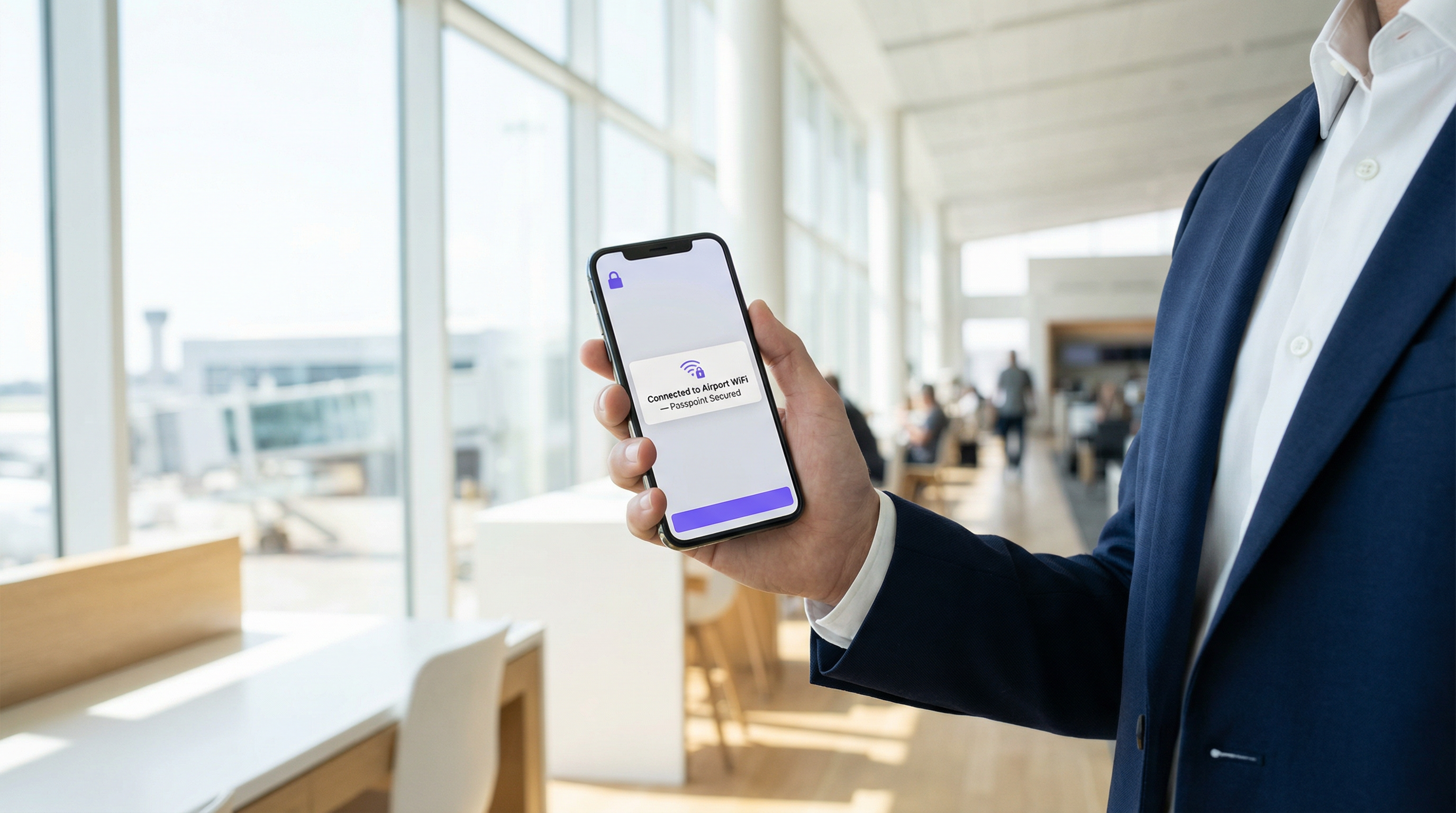
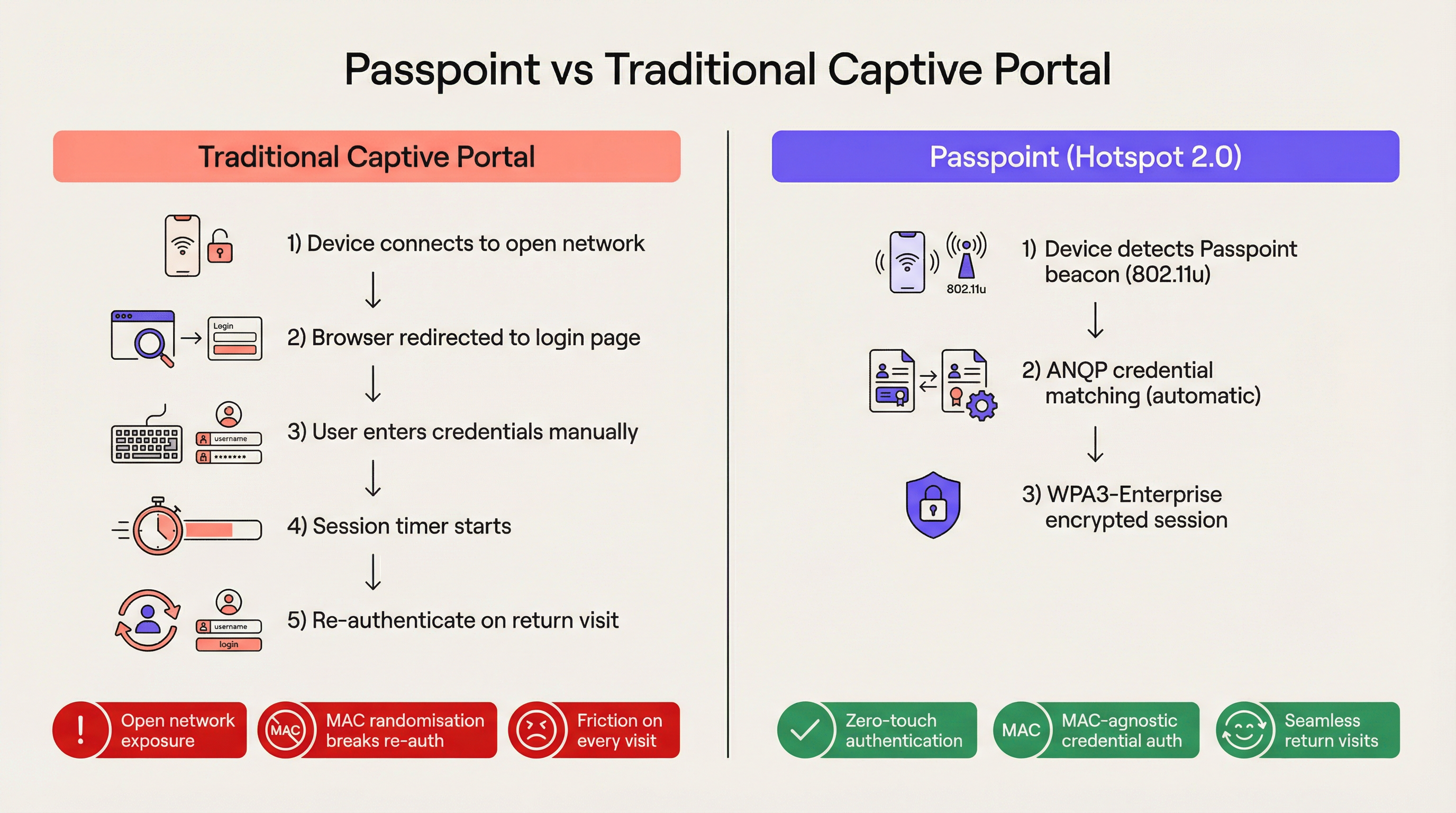
Para o local empresarial moderno, o atrito é uma desvantagem competitiva. Os Captive Portal tradicionais, embora tenham sido o padrão para acesso à rede de convidados, agora representam um gargalo operacional significativo e uma fonte de frustração persistente para o usuário. O Passpoint, também conhecido como Hotspot 2.0, transforma fundamentalmente esse paradigma ao substituir a autenticação manual baseada na web por um roaming contínuo, semelhante ao celular. Ao aproveitar o padrão IEEE 802.11u e a criptografia WPA3-Enterprise, o Passpoint permite que os dispositivos dos convidados descubram, autentiquem e se conectem a redes Wi-Fi empresariais de forma automática e segura.
Para líderes de TI nos setores de Hospitalidade , Varejo e grandes locais públicos, a transição para o Passpoint não é mais opcional. A randomização de endereço MAC padrão implementada em dispositivos iOS e Android modernos quebrou efetivamente a lógica de reautenticação dos Captive Portal legados, o que significa que os convidados que retornam aparecem como novos dispositivos a cada visita. O Passpoint resolve isso autenticando o perfil de credencial do usuário em vez de seu endereço de hardware. Este guia detalha a arquitetura técnica do Passpoint, o impacto comercial da implantação e um framework de implementação neutro em relação ao fornecedor, projetado para melhorar a experiência de Wi-Fi para Convidados e, ao mesmo tempo, reduzir a carga de trabalho do suporte técnico.
Aprofundamento Técnico
O Problema da Seleção de Rede e o 802.11u
Em implantações de Wi-Fi legadas, os dispositivos dependem de um mecanismo fundamentalmente frágil para a seleção de rede: a varredura de Identificadores de Conjunto de Serviços (SSID) conhecidos. Essa abordagem exige que o usuário tenha se conectado anteriormente à rede ou selecione manualmente a rede em uma lista. Ela não fornece visibilidade pré-associação sobre a postura de segurança da rede, requisitos de autenticação ou disponibilidade de internet upstream. O Passpoint aborda essa limitação por meio da emenda IEEE 802.11u, que introduz o Interworking com Redes Externas.
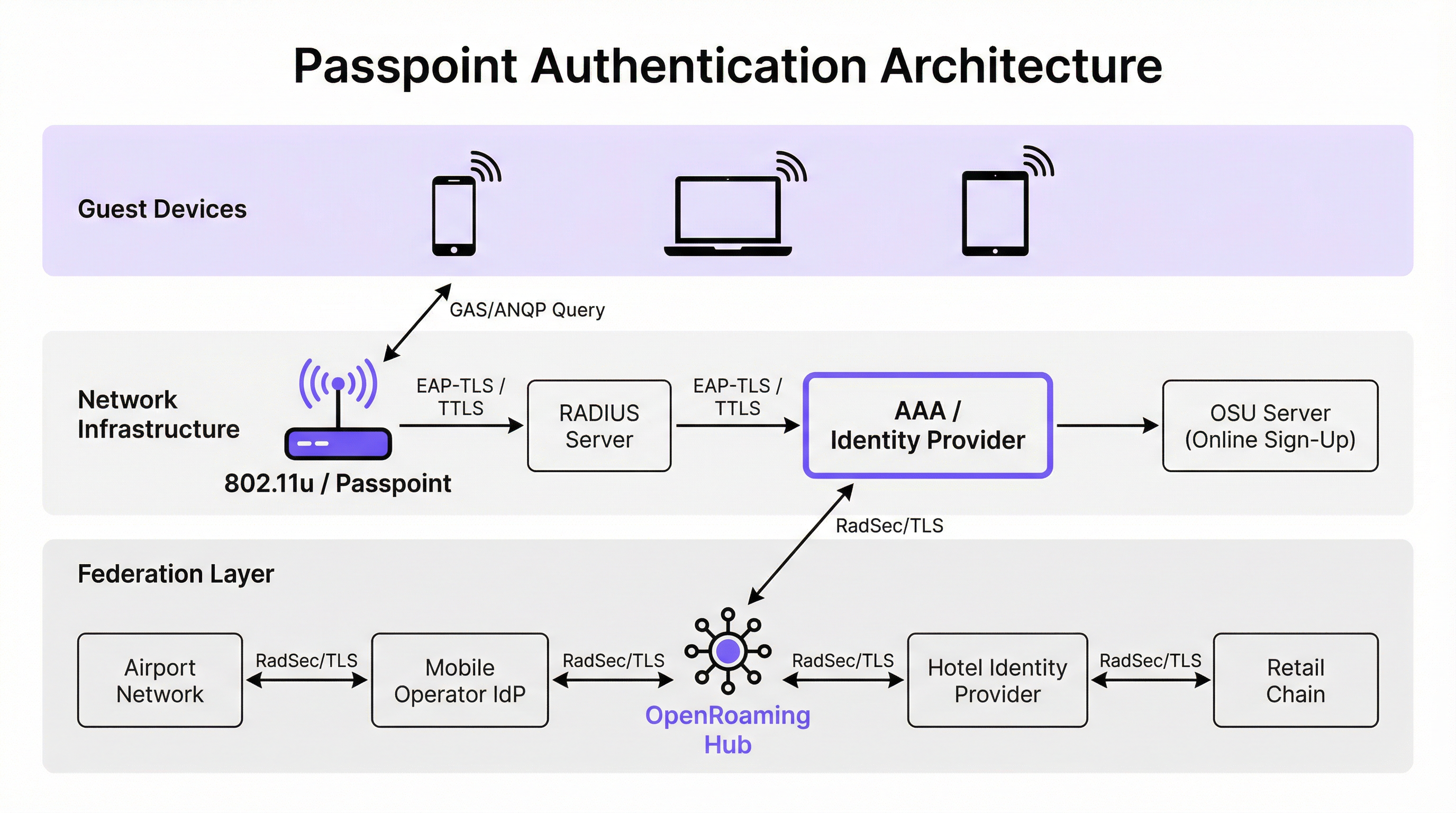
Em vez de escanear passivamente por SSID, um dispositivo habilitado para Passpoint consulta ativamente a infraestrutura de rede antes de tentar a associação. Quando um ponto de acesso transmite seu beacon, ele inclui um Elemento de Interworking — uma sinalização indicando suporte para 802.11u. O dispositivo cliente detecta essa sinalização e inicia uma solicitação de Generic Advertisement Service (GAS). Encapsulada nesta solicitação está uma consulta de Access Network Query Protocol (ANQP). O dispositivo pergunta à infraestrutura: "Quais Identificadores Organizacionais (OIs) de Consórcio de Roaming você suporta?" Se a resposta do ponto de acesso corresponder a um perfil de credencial armazenado no dispositivo, a autenticação automática prossegue.
Arquitetura de Autenticação e Segurança
O Passpoint exige segurança de nível empresarial, eliminando completamente a fase de "rede aberta" inerente às implantações de Captive Portal. A autenticação é tratada via controle de acesso à rede baseado em porta IEEE 802.1X, combinado com um método de Extensible Authentication Protocol (EAP). Os métodos mais prevalentes em implantações empresariais são EAP-TLS (baseado em certificados de cliente e servidor), EAP-TTLS (credenciais tuneladas) e EAP-SIM/AKA (para cenários de offload de celular).
Esta arquitetura fornece autenticação mútua. O dispositivo prova criptograficamente sua identidade para a rede e, crucialmente, a rede prova sua identidade para o dispositivo. Essa verificação mútua é a defesa primária contra pontos de acesso "evil twin" e tentativas de interceptação man-in-the-middle. Além disso, o Passpoint exige criptografia WPA2-Enterprise ou WPA3-Enterprise. O WPA3-Enterprise introduz o modo de segurança de 192 bits e exige o sigilo de encaminhamento (forward secrecy), garantindo que, mesmo que as chaves de sessão sejam comprometidas no futuro, o tráfego histórico permaneça criptografado.
A Federação OpenRoaming
Enquanto o Passpoint define o mecanismo técnico para descoberta e autenticação, o OpenRoaming fornece o framework de confiança. Desenvolvido pela Wireless Broadband Alliance (WBA), o OpenRoaming é uma federação global que permite que Provedores de Identidade (como operadoras de rede móvel, Google ou Apple) e Provedores de Acesso (como hotéis, estádios e redes de varejo) confiem nas credenciais uns dos outros sem exigir acordos bilaterais entre cada entidade.
O OpenRoaming opera em um modelo de Infraestrutura de Chaves Públicas (PKI) hub-and-spoke. As solicitações de autenticação são enviadas por proxy pela federação usando túneis RadSec (RADIUS sobre TLS). Ao transmitir o OI do OpenRoaming livre de custos de liquidação (5A-03-BA), um local empresarial pode fornecer instantaneamente acesso Wi-Fi contínuo e seguro a milhões de usuários globalmente que já possuem um perfil de identidade compatível em seus dispositivos.
Guia de Implementação
A implantação do Passpoint requer uma base de infraestrutura mais sofisticada do que uma rede aberta tradicional, mas os componentes são padrão em ambientes empresariais modernos.
Pré-requisitos de Infraestrutura
- Pontos de Acesso Certificados para Passpoint: A infraestrutura sem fio deve suportar as especificações 802.11u e Hotspot 2.0. A grande maioria dos pontos de acesso empresariais fabricados nos últimos cinco anos por fornecedores como Cisco, Aruba e Ruckus atende a esse requisito.
- Infraestrutura RADIUS/AAA: Um servidor RADIUS robusto capaz de lidar com autenticação EAP e rotear solicitações para os repositórios de identidade apropriados. Se estiver participando do OpenRoaming, o servidor RADIUS deve suportar RadSec para proxy seguro.
- Servidor de Inscrição Online (OSU): Para ambientes que emitem suas próprias credenciais (em vez de depender apenas de identidades federadas), um servidor OSU fornece o mecanismo para provisionar perfis Passpoint com segurança para dispositivos de convidados.
A Estratégia de SSID Duplo
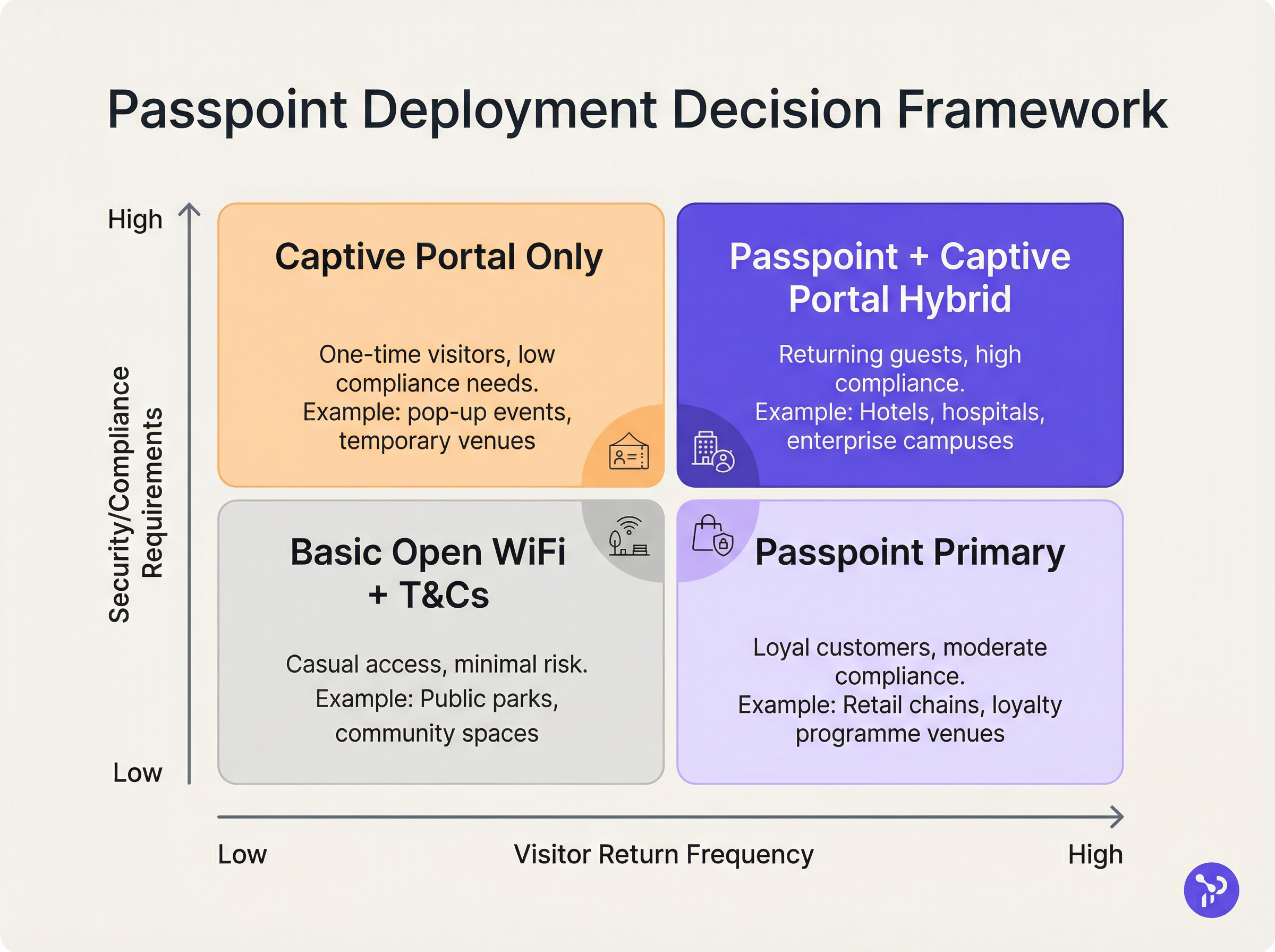
O modelo de implantação mais eficaz para locais em transição para o Passpoint é a estratégia de SSID duplo. Essa abordagem mantém um SSID de Captive Portal tradicional para o onboarding inicial, enquanto fornece um SSID Passpoint para conexões subsequentes contínuas.
Quando um convidado se conecta ao SSID do Captive Portal pela primeira vez, ele conclui o fluxo de autenticação padrão (por exemplo, aceitando termos e condições, fornecendo um endereço de e-mail). Após a autenticação bem-sucedida, o portal apresenta uma opção para baixar um perfil Passpoint. Uma vez instalado, o dispositivo preferirá automaticamente o SSID Passpoint seguro em todas as visitas futuras. Este modelo de onboarding progressivo garante a acessibilidade para dispositivos legados enquanto migra a maioria dos usuários para a rede Passpoint segura e sem atrito.
Melhores Práticas
Ao projetar uma arquitetura Passpoint, os líderes de TI devem aderir a várias melhores práticas críticas para garantir estabilidade operacional e segurança.
Em primeiro lugar, a gestão do ciclo de vida dos certificados é fundamental. Se estiver utilizando EAP-TLS, a expiração dos certificados do cliente ou do servidor resultará em falhas de autenticação silenciosas que são difíceis de diagnosticar pelos suportes técnicos de linha de frente. Implemente protocolos automatizados de renovação de certificados e monitoramento proativo. Como destacado em nosso guia sobre Avaliação de Postura de Dispositivo para Controle de Acesso à Rede , a visibilidade robusta do endpoint é essencial ao gerenciar o acesso baseado em certificados.
Em segundo lugar, garanta a compatibilidade com dispositivos legados. Embora iOS 7+, Android 6+ e Windows 10+ suportem nativamente o Passpoint, certos dispositivos IoT, hardware legado e dispositivos estritamente gerenciados por empresas podem não ter suporte. A estratégia de SSID duplo mitiga esse risco, fornecendo um método de acesso alternativo.
Em terceiro lugar, ao configurar elementos ANQP, certifique-se de que as Informações do Local sejam precisas e descritivas. Esses metadados são frequentemente exibidos pelo sistema operacional do dispositivo cliente para fornecer contexto sobre a rede à qual o usuário está se conectando.
Solução de Problemas e Mitigação de Riscos
A complexidade do Passpoint introduz domínios de falha específicos que diferem das implantações de Captive Portal.
Modo de Falha 1: Tempo de Espera ou Inacessibilidade do RADIUS Se o servidor RADIUS local não conseguir alcançar o Provedor de Identidade upstream (especialmente em cenários federados de OpenRoaming), o handshake EAP expirará. Mitigação: Implemente infraestrutura RADIUS redundante e garanta um monitoramento robusto dos túneis RadSec. Revise nossa documentação técnica sobre RadSec: Protegendo o tráfego de autenticação RADIUS com TLS para orientação de configuração.
Modo de Falha 2: Falhas no Provisionamento de Perfil Os usuários podem encontrar erros ao tentar baixar o perfil Passpoint do servidor OSU, muitas vezes devido a limitações do navegador do Captive Portal em dispositivos móveis. Mitigação: Projete o fluxo do Captive Portal para sair do assistente de rede cativa (CNA) para o navegador nativo do sistema do dispositivo antes de iniciar o download do perfil.
Modo de Falha 3: Impacto da Randomização de MAC nas Análises Embora o Passpoint resolva a quebra de autenticação causada pela randomização de MAC, as plataformas de análise legadas que dependem exclusivamente de endereços MAC ainda relatarão contagens de visitantes imprecisas. Mitigação: Integre os logs de autenticação RADIUS com sua plataforma de Análise de WiFi . Ao rastrear identificadores de credenciais exclusivos (como a Identidade de Usuário Cobrável ou NAI anonimizado) em vez de endereços MAC, os locais podem restaurar métricas precisas de fluxo de pessoas e fidelidade.
ROI e Impacto nos Negócios
O caso de negócio para a implantação do Passpoint baseia-se em três pilares mensuráveis: eficiência operacional, redução de riscos e experiência do usuário.
Do ponto de vista operacional, a eliminação do atrito do Captive Portal correlaciona-se diretamente com uma redução nos chamados de suporte de TI relacionados à conectividade Wi-Fi. Em grandes ambientes de Saúde ou Transporte , isso representa uma economia de custos significativa.
Em relação à mitigação de riscos, a mudança de redes abertas para a criptografia WPA3-Enterprise reduz substancialmente a exposição de responsabilidade do local. Para ambientes de varejo sujeitos ao PCI DSS, a redução na área de superfície de tratamento de dados (ao eliminar a coleta de credenciais baseada na web) simplifica as auditorias de conformidade.
Finalmente, a melhoria na experiência do usuário é profunda. Na hospitalidade, estudos mostram consistentemente que um Wi-Fi contínuo e confiável é um dos principais impulsionadores da satisfação dos hóspedes e das reservas repetidas. Ao implementar o Passpoint, os locais oferecem uma experiência de conectividade que reflete a confiabilidade das redes celulares, transformando o Wi-Fi de um serviço utilitário frustrante em uma comodidade premium e transparente.
Termos-Chave e Definições
IEEE 802.11u
The wireless networking standard amendment that enables Interworking with External Networks, allowing devices to query APs before associating.
When configuring wireless controllers, engineers must enable 802.11u to allow devices to discover Passpoint capabilities.
ANQP (Access Network Query Protocol)
A query and response protocol used by devices to discover network services, roaming agreements, and venue information before connecting.
IT teams configure ANQP profiles on the wireless controller to broadcast their supported Roaming Consortium OIs and NAI Realms.
Roaming Consortium OI
An Organisational Identifier broadcast by the access point that indicates which identity providers or federations the network supports.
If an enterprise joins OpenRoaming, they must ensure their APs broadcast the specific OpenRoaming OI (5A-03-BA).
OSU (Online Sign-Up)
A standardized process and server infrastructure for securely provisioning Passpoint credentials and certificates to a user's device.
When building a self-service onboarding flow for a loyalty programme, developers will integrate with an OSU server to push the profile to the device.
RadSec
A protocol that encapsulates RADIUS authentication traffic within a TLS tunnel to ensure secure transmission over untrusted networks.
Required when proxying authentication requests from a local venue to a cloud-based OpenRoaming hub.
NAI Realm
Network Access Identifier Realm; indicates the domain of the user and the specific EAP authentication methods supported by the network.
Configured alongside ANQP to tell client devices whether the network requires EAP-TLS, EAP-TTLS, or EAP-SIM.
EAP-TLS
Extensible Authentication Protocol - Transport Layer Security; a highly secure authentication method requiring both client and server certificates.
Often used in enterprise employee Wi-Fi deployments where IT can push certificates to managed devices via MDM.
MAC Address Randomisation
A privacy feature in modern mobile operating systems that generates a fake, temporary hardware address for each Wi-Fi network connection.
The primary catalyst driving venues away from captive portals, as it breaks the ability to recognize returning visitors based on their hardware.
Estudos de Caso
A 400-room enterprise hotel chain is experiencing a high volume of helpdesk tickets from returning guests who complain they must manually reconnect to the Wi-Fi in the lobby, restaurant, and their rooms, despite having connected previously. The hotel currently uses a traditional open SSID with a captive portal. How should the network architect resolve this?
The architect should implement a Dual-SSID strategy. First, deploy a secure Passpoint SSID broadcasting the hotel's specific Roaming Consortium OI. Second, modify the existing captive portal on the open SSID to serve as an onboarding funnel. When a guest logs in via the portal, they are prompted to download a Passpoint configuration profile to their device. Once installed, the device will automatically and securely authenticate via 802.1X/EAP to the Passpoint SSID as they move between the lobby, restaurant, and room, eliminating manual re-authentication.
A national retail chain wants to offer secure, seamless Wi-Fi across its 500 locations to drive loyalty app engagement. However, managing custom certificates or individual credentials for millions of potential customers is deemed operationally unfeasible. What is the recommended deployment architecture?
The retailer should deploy Passpoint and federate with OpenRoaming. By configuring their access points to broadcast the settlement-free OpenRoaming OI (5A-03-BA) and establishing RadSec tunnels from their RADIUS infrastructure to an OpenRoaming hub, the retailer allows any customer with a compatible identity provider profile (such as a modern Samsung device or a mobile carrier profile) to connect automatically. The retailer can then integrate this with their loyalty app to trigger push notifications upon successful network association.
Análise de Cenário
Q1. A hospital IT director wants to deploy Passpoint to ensure doctors' mobile devices connect securely to the clinical network, while patients connect to a separate guest network. The doctors use unmanaged personal devices (BYOD). Which EAP method and provisioning strategy should the architect recommend?
💡 Dica:Consider the balance between security and the operational overhead of managing certificates on unmanaged personal devices.
Mostrar Abordagem Recomendada
The architect should recommend EAP-TTLS with an Online Sign-Up (OSU) server provisioning flow. EAP-TLS requires client certificates, which are operationally difficult to deploy and manage on unmanaged BYOD devices. EAP-TTLS allows the doctors to authenticate securely using their existing Active Directory/LDAP credentials (username and password) tunneled inside a secure TLS session. The OSU server can provide a self-service portal where doctors log in once to download the profile, enabling automatic connection thereafter.
Q2. During a Passpoint deployment pilot, Android devices are successfully authenticating and connecting, but iOS devices are failing during the EAP handshake. The RADIUS logs show 'Unknown CA' errors. What is the most likely cause and solution?
💡 Dica:Apple's iOS has strict requirements regarding the trust chain for RADIUS server certificates.
Mostrar Abordagem Recomendada
The most likely cause is that the RADIUS server is using a self-signed certificate or a certificate issued by a private internal Certificate Authority (CA) that the iOS devices do not inherently trust. Android devices sometimes allow users to bypass or ignore certificate validation (though this is poor security practice), whereas iOS strictly enforces it for Passpoint profiles. The solution is to replace the RADIUS server certificate with one issued by a publicly trusted commercial CA (e.g., DigiCert, Let's Encrypt), or ensure the private CA root certificate is explicitly bundled within the Passpoint configuration profile pushed to the iOS devices.
Q3. A stadium venue has implemented OpenRoaming. A user with a valid Google OpenRoaming profile walks into the venue, but their device does not attempt to connect automatically. What specific configuration on the stadium's wireless LAN controller should the network engineer verify first?
💡 Dica:How does the device know that the access point supports the OpenRoaming federation before it attempts to connect?
Mostrar Abordagem Recomendada
The engineer should verify the ANQP configuration, specifically checking that the Access Points are broadcasting the correct Roaming Consortium Organisational Identifier (OI) for OpenRoaming, which is 5A-03-BA. If this OI is not included in the AP's beacon or GAS response, the device will not recognize the network as an OpenRoaming participant and will not attempt to authenticate.
Principais Conclusões
- ✓Passpoint (Hotspot 2.0) replaces manual captive portal logins with automatic, cellular-like Wi-Fi roaming.
- ✓It uses IEEE 802.11u for pre-association network discovery and WPA3-Enterprise for encrypted, mutually authenticated connections.
- ✓Passpoint solves the MAC address randomisation issue by authenticating the user's credential profile rather than their hardware address.
- ✓OpenRoaming is the global federation framework that allows Passpoint devices to connect across different venues seamlessly.
- ✓A dual-SSID strategy (Captive Portal for onboarding, Passpoint for returning users) is the recommended deployment model for enterprise venues.




