

Comment Passpoint (Hotspot 2.0) transforme l'expérience Wi-Fi invité
Un guide de référence technique complet détaillant comment les protocoles Passpoint (Hotspot 2.0) et 802.11u remplacent les Captive Portals traditionnels par un roaming Wi-Fi fluide, sécurisé et similaire au réseau cellulaire. Il fournit aux responsables IT des aperçus architecturaux, des cadres de mise en œuvre et l'argumentaire commercial pour l'adoption de l'authentification basée sur les identifiants afin de résoudre les défis de randomisation MAC et d'améliorer l'expérience invité.
🎧 Écouter ce guide
Voir la transcription
Résumé exécutif
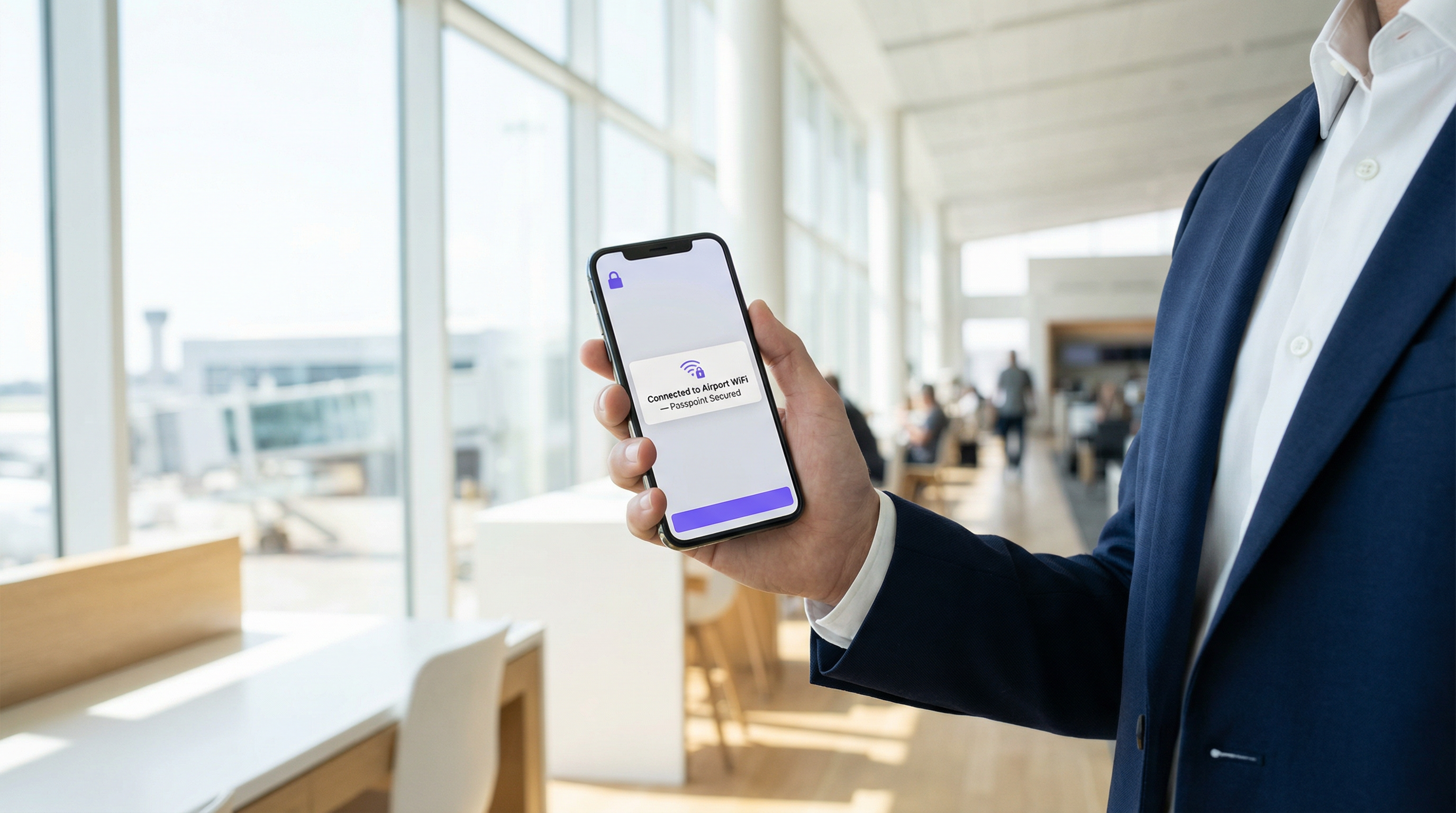
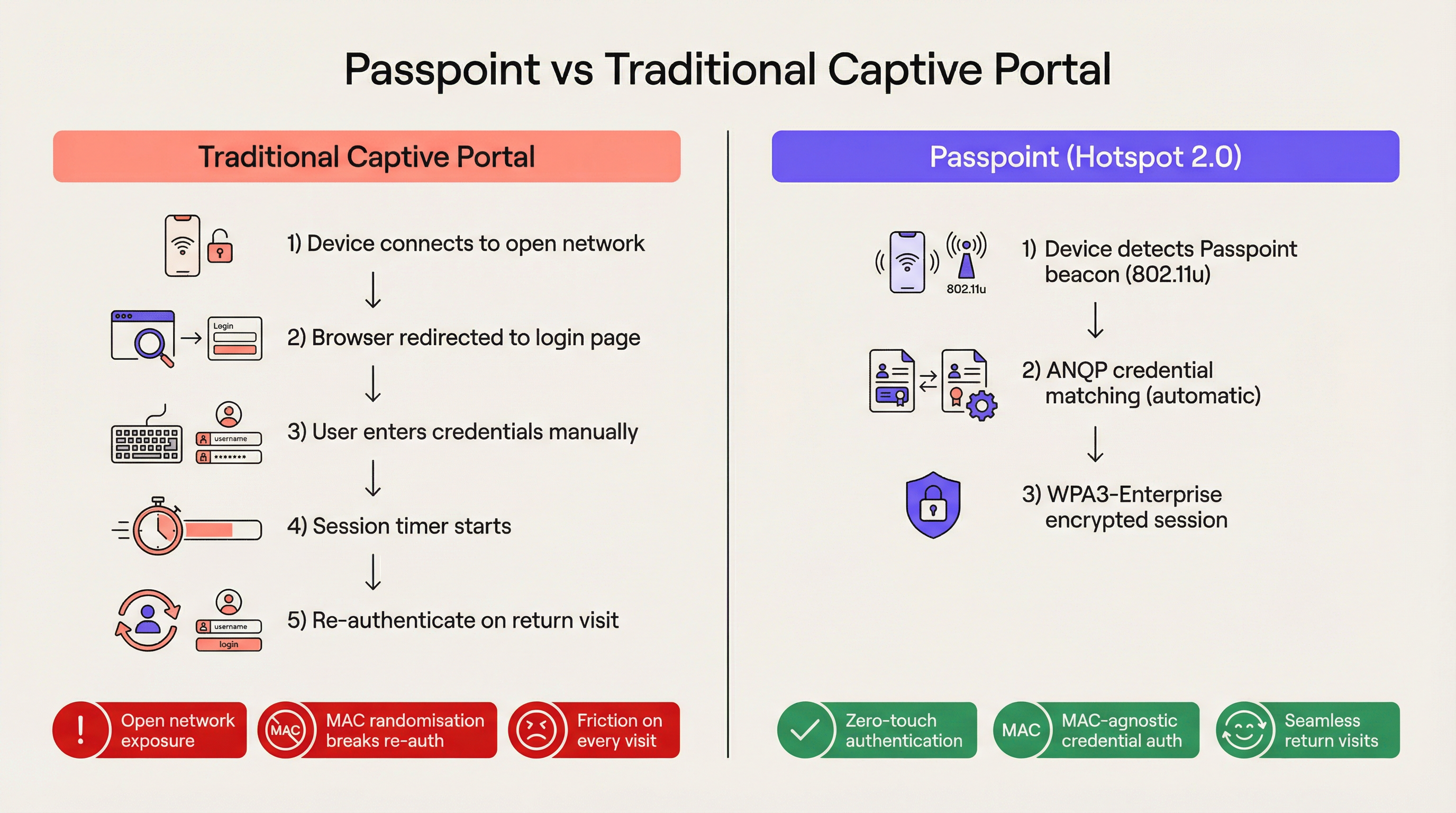
Pour les sites d'entreprise modernes, la friction est un désavantage concurrentiel. Les Captive Portals traditionnels, autrefois la norme pour l'accès au réseau invité, représentent désormais un goulot d'étranglement opérationnel majeur et une source de frustration persistante pour les utilisateurs. Passpoint, également connu sous le nom de Hotspot 2.0, transforme fondamentalement ce paradigme en remplaçant l'authentification manuelle via le web par un roaming fluide, similaire au cellulaire. En s'appuyant sur la norme IEEE 802.11u et le chiffrement WPA3-Enterprise, Passpoint permet aux appareils invités de découvrir, de s'authentifier et de se connecter aux réseaux Wi-Fi d'entreprise automatiquement et en toute sécurité.
Pour les responsables IT des secteurs de l' Hôtellerie , du Commerce de détail et des grands lieux publics, la transition vers Passpoint n'est plus facultative. La randomisation par défaut des adresses MAC implémentée dans les appareils iOS et Android modernes a effectivement brisé la logique de ré-authentification des Captive Portals hérités, ce qui signifie que les invités revenant sur le site apparaissent comme de nouveaux appareils à chaque visite. Passpoint résout ce problème en authentifiant le profil d'identifiant de l'utilisateur plutôt que son adresse matérielle. Ce guide détaille l'architecture technique de Passpoint, l'impact commercial du déploiement et un cadre de mise en œuvre neutre vis-à-vis des fournisseurs, conçu pour améliorer l'expérience Guest WiFi tout en réduisant la charge de travail du support technique.
Analyse technique approfondie
Le problème de sélection du réseau et le 802.11u
Dans les déploiements Wi-Fi hérités, les appareils s'appuient sur un mécanisme de sélection de réseau fondamentalement fragile : le balayage des Service Set Identifiers (SSID) connus. Cette approche exige que l'utilisateur se soit déjà connecté au réseau ou qu'il sélectionne manuellement le réseau dans une liste. Elle n'offre aucune visibilité avant l'association sur la posture de sécurité du réseau, les exigences d'authentification ou la disponibilité de l'accès internet en amont. Passpoint répond à cette limitation via l'amendement IEEE 802.11u, qui introduit l'interfonctionnement avec les réseaux externes.
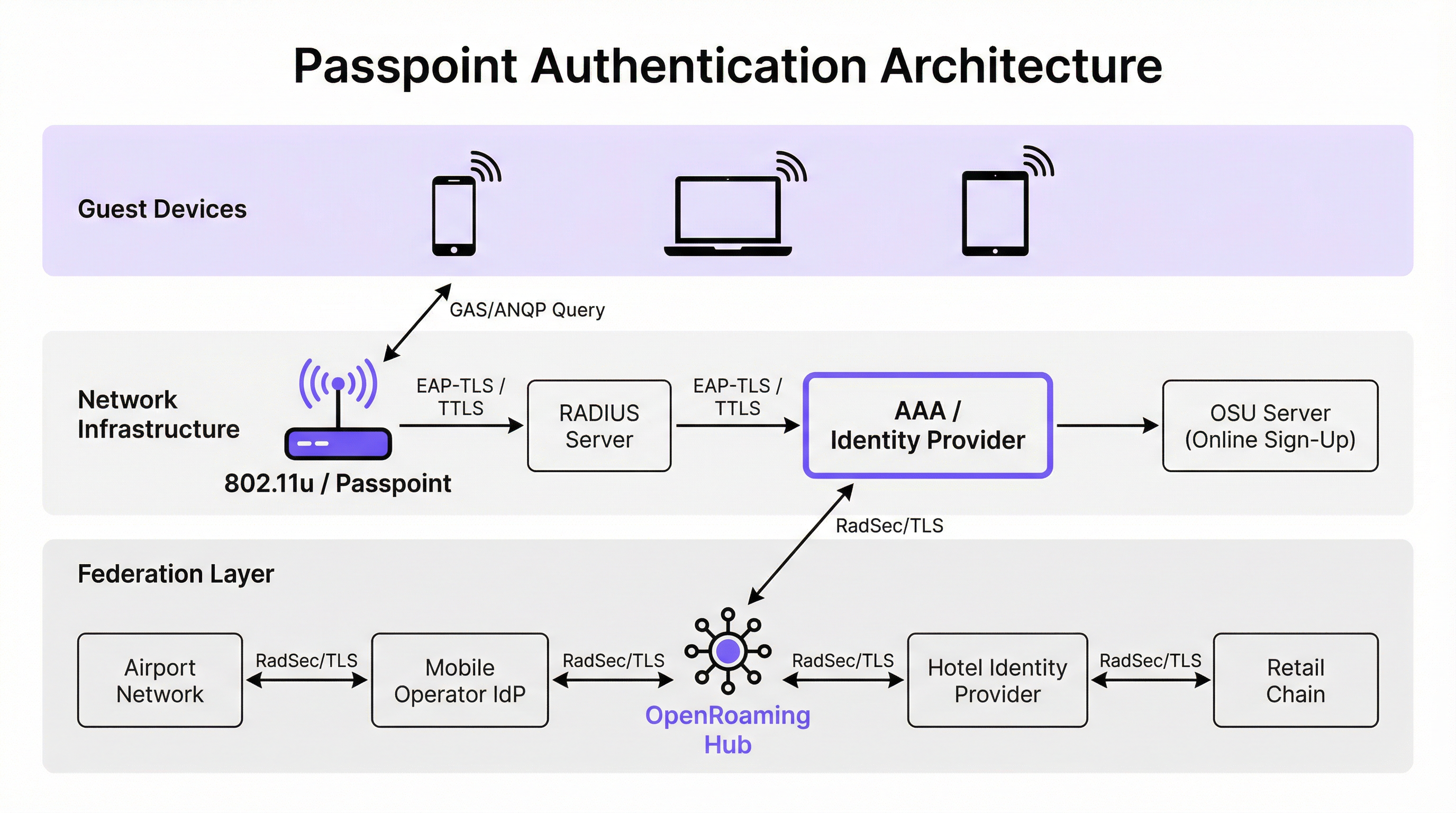
Au lieu de scanner passivement les SSID, un appareil compatible Passpoint interroge activement l'infrastructure réseau avant de tenter une association. Lorsqu'un point d'accès diffuse sa balise (beacon), il inclut un élément d'interfonctionnement — un indicateur signalant la prise en charge du 802.11u. L'appareil client détecte cet indicateur et initie une requête GAS (Generic Advertisement Service). Une requête ANQP (Access Network Query Protocol) est encapsulée dans cette demande. L'appareil demande à l'infrastructure : « Quels identifiants organisationnels de consortium de roaming (OI) prenez-vous en charge ? » Si la réponse du point d'accès correspond à un profil d'identifiant stocké sur l'appareil, l'authentification automatique se poursuit.
Architecture d'authentification et de sécurité
Passpoint impose une sécurité de classe entreprise, éliminant complètement la phase de « réseau ouvert » inhérente aux déploiements de Captive Portals. L'authentification est gérée via le contrôle d'accès réseau par port IEEE 802.1X, couplé à une méthode EAP (Extensible Authentication Protocol). Les méthodes les plus répandues dans les déploiements d'entreprise sont EAP-TLS (basée sur des certificats client et serveur), EAP-TTLS (identifiants tunnelisés) et EAP-SIM/AKA (pour les scénarios de déchargement cellulaire).
Cette architecture assure une authentification mutuelle. L'appareil prouve son identité au réseau de manière cryptographique et, surtout, le réseau prouve son identité à l'appareil. Cette vérification mutuelle est la principale défense contre les points d'accès pirates (evil twin) et les tentatives d'interception de type « man-in-the-middle ». De plus, Passpoint impose le chiffrement WPA2-Enterprise ou WPA3-Enterprise. Le WPA3-Enterprise introduit un mode de sécurité 192 bits et impose la confidentialité persistante (forward secrecy), garantissant que même si les clés de session sont compromises à l'avenir, le trafic historique reste chiffré.
La fédération OpenRoaming
Alors que Passpoint définit le mécanisme technique de découverte et d'authentification, OpenRoaming fournit le cadre de confiance. Développé par la Wireless Broadband Alliance (WBA), OpenRoaming est une fédération mondiale qui permet aux fournisseurs d'identité (tels que les opérateurs de réseaux mobiles, Google ou Apple) et aux fournisseurs d'accès (tels que les hôtels, les stades et les chaînes de vente au détail) de faire confiance à leurs identifiants respectifs sans nécessiter d'accords bilatéraux entre chaque entité.
OpenRoaming fonctionne sur un modèle d'infrastructure à clés publiques (PKI) en étoile. Les demandes d'authentification sont relayées à travers la fédération via des tunnels RadSec (RADIUS sur TLS). En diffusant l'OI OpenRoaming sans compensation (5A-03-BA), un site d'entreprise peut instantanément fournir un accès Wi-Fi fluide et sécurisé à des millions d'utilisateurs dans le monde qui possèdent déjà un profil d'identité compatible sur leurs appareils.
Guide de mise en œuvre
Le déploiement de Passpoint nécessite une base d'infrastructure plus sophistiquée qu'un réseau ouvert traditionnel, mais les composants sont standards dans les environnements d'entreprise modernes.
Prérequis d'infrastructure
- Points d'accès certifiés Passpoint : L'infrastructure sans fil doit supporter les spécifications 802.11u et Hotspot 2.0. La grande majorité des points d'accès d'entreprise fabriqués au cours des cinq dernières années par des fournisseurs comme Cisco, Aruba et Ruckus répondent à cette exigence.
- Infrastructure RADIUS/AAA : Un serveur RADIUS robuste capable de gérer l'authentification EAP et d'acheminer les requêtes vers les bases d'identités appropriées. En cas de participation à OpenRoaming, le serveur RADIUS doit supporter RadSec pour un proxying sécurisé.
- Serveur d'inscription en ligne (OSU) : Pour les environnements émettant leurs propres identifiants (plutôt que de s'appuyer uniquement sur des identités fédérées), un serveur OSU fournit le mécanisme permettant de provisionner en toute sécurité des profils Passpoint sur les appareils invités.
La stratégie du double SSID
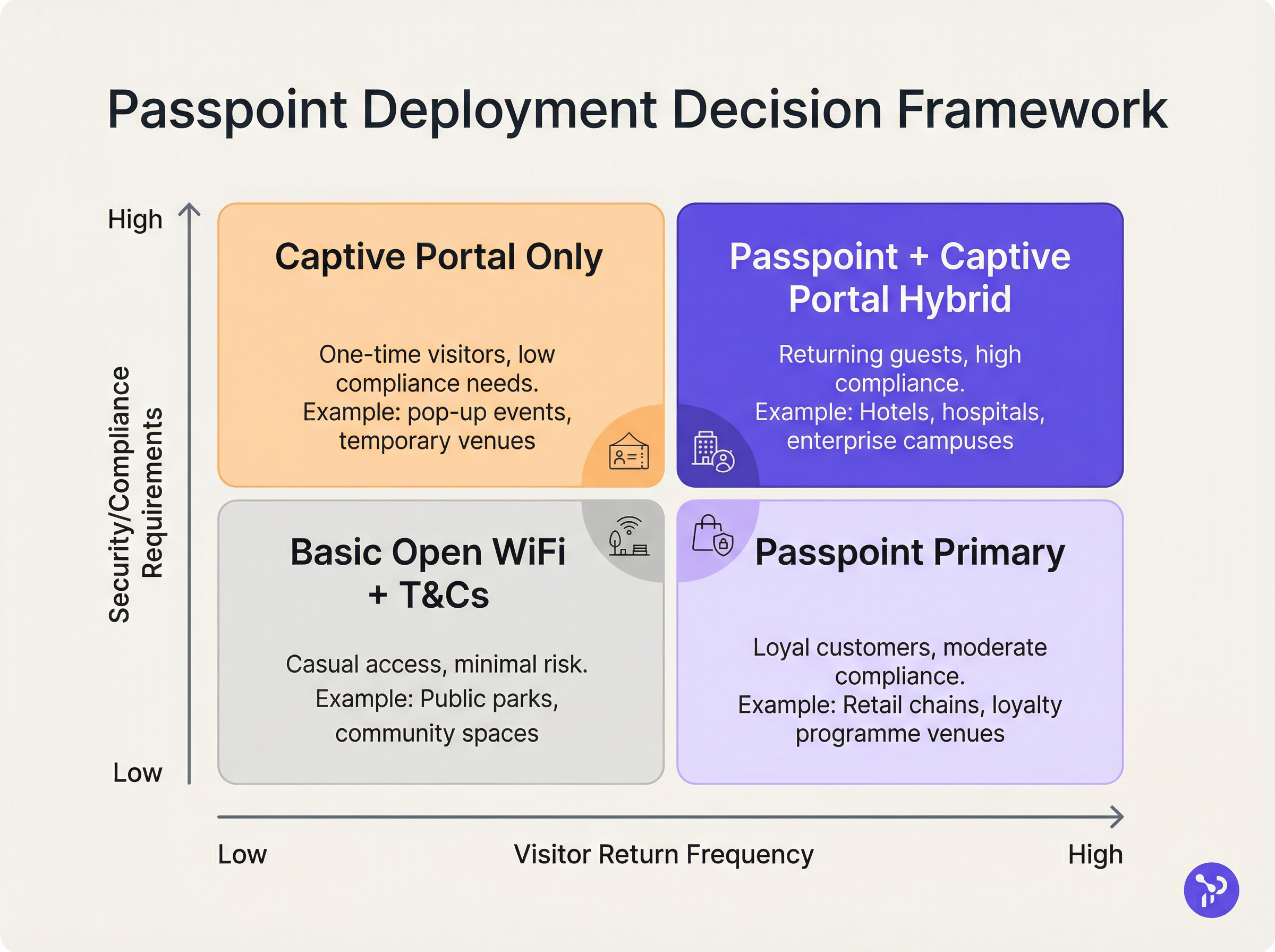
Le modèle de déploiement le plus efficace pour les sites en transition vers Passpoint est la stratégie du double SSID. Cette approche maintient un SSID Captive Portal traditionnel pour l'intégration initiale tout en fournissant un SSID Passpoint pour les connexions ultérieures fluides.
Lorsqu'un invité se connecte au SSID du Captive Portal pour la première fois, il suit le flux d'authentification standard (ex: acceptation des conditions générales, saisie d'une adresse e-mail). Une fois l'authentification réussie, le portail propose de télécharger un profil Passpoint. Une fois installé, l'appareil privilégiera automatiquement le SSID Passpoint sécurisé lors de toutes les visites futures. Ce modèle d'intégration progressive garantit l'accessibilité pour les appareils hérités tout en migrant la majorité des utilisateurs vers le réseau Passpoint sécurisé et sans friction.
Pratiques exemplaires
Lors de la conception d'une architecture Passpoint, les responsables IT doivent respecter plusieurs pratiques exemplaires critiques pour garantir la stabilité opérationnelle et la sécurité.
Premièrement, la gestion du cycle de vie des certificats est primordiale. En cas d'utilisation d'EAP-TLS, l'expiration des certificats client ou serveur entraînera des échecs d'authentification silencieux difficiles à diagnostiquer pour les supports techniques de première ligne. Implémentez des protocoles de renouvellement automatique des certificats et une surveillance proactive. Comme souligné dans notre guide sur l' Évaluation de la posture des appareils pour le contrôle d'accès réseau , une visibilité robuste sur les terminaux est essentielle lors de la gestion d'un accès basé sur des certificats.
Deuxièmement, assurez la compatibilité avec les appareils hérités. Bien qu'iOS 7+, Android 6+ et Windows 10+ supportent nativement Passpoint, certains appareils IoT, du matériel ancien et des appareils gérés par l'entreprise de manière stricte peuvent manquer de support. La stratégie du double SSID atténue ce risque en fournissant une méthode d'accès de secours.
Troisièmement, lors de la configuration des éléments ANQP, assurez-vous que les informations sur le site (Venue Information) sont précises et descriptives. Ces métadonnées sont souvent affichées par le système d'exploitation de l'appareil client pour donner du contexte sur le réseau que l'utilisateur rejoint.
Dépannage et atténuation des risques
La complexité de Passpoint introduit des domaines de défaillance spécifiques qui diffèrent des déploiements de Captive Portals.
Mode de défaillance 1 : Délai d'attente ou inaccessibilité RADIUS Si le serveur RADIUS local ne peut pas joindre le fournisseur d'identité en amont (particulièrement dans les scénarios OpenRoaming fédérés), le handshake EAP expirera. Atténuation : Implémentez une infrastructure RADIUS redondante et assurez une surveillance robuste des tunnels RadSec. Consultez notre documentation technique sur RadSec : Sécurisation du trafic d'authentification RADIUS avec TLS pour des conseils de configuration.
Mode de défaillance 2 : Échecs de provisionnement de profil Les utilisateurs peuvent rencontrer des erreurs lors de la tentative de téléchargement du profil Passpoint depuis le serveur OSU, souvent en raison des limitations du navigateur de l'assistant de réseau captif sur les appareils mobiles. Atténuation : Concevez le flux du Captive Portal pour sortir du mini-navigateur de l'assistant réseau (CNA) vers le navigateur natif du système de l'appareil avant de lancer le téléchargement du profil.
Mode de défaillance 3 : Impact de la randomisation MAC sur les analyses Bien que Passpoint résolve la rupture d'authentification causée par la randomisation MAC, les plateformes d'analyse héritées s'appuyant uniquement sur les adresses MAC rapporteront toujours des comptages de visiteurs inexacts. Atténuation : Intégrez les journaux d'authentification RADIUS à votre plateforme WiFi Analytics . En suivant des identifiants uniques (tels que le Chargeable User Identity ou le NAI anonymisé) plutôt que les adresses MAC, les sites peuvent restaurer des mesures précises de fréquentation et de fidélité.
ROI et impact commercial
L'argumentaire commercial pour le déploiement de Passpoint repose sur trois piliers mesurables : l'efficacité opérationnelle, la réduction des risques et l'expérience utilisateur.
D'un point de vue opérationnel, l'élimination de la friction du Captive Portal est directement corrélée à une réduction des tickets de support IT liés à la connectivité Wi-Fi. Dans les grands environnements de Santé ou de Transport , cela représente des économies de coûts significatives.
Concernant l'atténuation des risques, le passage des réseaux ouverts au chiffrement WPA3-Enterprise réduit considérablement la responsabilité du site. Pour les environnements de vente au détail soumis à la norme PCI DSS, la réduction de la surface de manipulation des données (en éliminant la collecte d'identifiants via le web) simplifie les audits de conformité.
Enfin, l'amélioration de l'expérience utilisateur est profonde. Dans l'hôtellerie, les études montrent systématiquement qu'un Wi-Fi fluide et fiable est un moteur principal de satisfaction client et de réservations répétées. En implémentant Passpoint, les sites offrent une expérience de connectivité qui reflète la fiabilité des réseaux cellulaires, transformant le Wi-Fi d'un service utilitaire frustrant en un équipement premium transparent.
Termes clés et définitions
IEEE 802.11u
The wireless networking standard amendment that enables Interworking with External Networks, allowing devices to query APs before associating.
When configuring wireless controllers, engineers must enable 802.11u to allow devices to discover Passpoint capabilities.
ANQP (Access Network Query Protocol)
A query and response protocol used by devices to discover network services, roaming agreements, and venue information before connecting.
IT teams configure ANQP profiles on the wireless controller to broadcast their supported Roaming Consortium OIs and NAI Realms.
Roaming Consortium OI
An Organisational Identifier broadcast by the access point that indicates which identity providers or federations the network supports.
If an enterprise joins OpenRoaming, they must ensure their APs broadcast the specific OpenRoaming OI (5A-03-BA).
OSU (Online Sign-Up)
A standardized process and server infrastructure for securely provisioning Passpoint credentials and certificates to a user's device.
When building a self-service onboarding flow for a loyalty programme, developers will integrate with an OSU server to push the profile to the device.
RadSec
A protocol that encapsulates RADIUS authentication traffic within a TLS tunnel to ensure secure transmission over untrusted networks.
Required when proxying authentication requests from a local venue to a cloud-based OpenRoaming hub.
NAI Realm
Network Access Identifier Realm; indicates the domain of the user and the specific EAP authentication methods supported by the network.
Configured alongside ANQP to tell client devices whether the network requires EAP-TLS, EAP-TTLS, or EAP-SIM.
EAP-TLS
Extensible Authentication Protocol - Transport Layer Security; a highly secure authentication method requiring both client and server certificates.
Often used in enterprise employee Wi-Fi deployments where IT can push certificates to managed devices via MDM.
MAC Address Randomisation
A privacy feature in modern mobile operating systems that generates a fake, temporary hardware address for each Wi-Fi network connection.
The primary catalyst driving venues away from captive portals, as it breaks the ability to recognize returning visitors based on their hardware.
Études de cas
A 400-room enterprise hotel chain is experiencing a high volume of helpdesk tickets from returning guests who complain they must manually reconnect to the Wi-Fi in the lobby, restaurant, and their rooms, despite having connected previously. The hotel currently uses a traditional open SSID with a captive portal. How should the network architect resolve this?
The architect should implement a Dual-SSID strategy. First, deploy a secure Passpoint SSID broadcasting the hotel's specific Roaming Consortium OI. Second, modify the existing captive portal on the open SSID to serve as an onboarding funnel. When a guest logs in via the portal, they are prompted to download a Passpoint configuration profile to their device. Once installed, the device will automatically and securely authenticate via 802.1X/EAP to the Passpoint SSID as they move between the lobby, restaurant, and room, eliminating manual re-authentication.
A national retail chain wants to offer secure, seamless Wi-Fi across its 500 locations to drive loyalty app engagement. However, managing custom certificates or individual credentials for millions of potential customers is deemed operationally unfeasible. What is the recommended deployment architecture?
The retailer should deploy Passpoint and federate with OpenRoaming. By configuring their access points to broadcast the settlement-free OpenRoaming OI (5A-03-BA) and establishing RadSec tunnels from their RADIUS infrastructure to an OpenRoaming hub, the retailer allows any customer with a compatible identity provider profile (such as a modern Samsung device or a mobile carrier profile) to connect automatically. The retailer can then integrate this with their loyalty app to trigger push notifications upon successful network association.
Analyse de scénario
Q1. A hospital IT director wants to deploy Passpoint to ensure doctors' mobile devices connect securely to the clinical network, while patients connect to a separate guest network. The doctors use unmanaged personal devices (BYOD). Which EAP method and provisioning strategy should the architect recommend?
💡 Astuce :Consider the balance between security and the operational overhead of managing certificates on unmanaged personal devices.
Afficher l'approche recommandée
The architect should recommend EAP-TTLS with an Online Sign-Up (OSU) server provisioning flow. EAP-TLS requires client certificates, which are operationally difficult to deploy and manage on unmanaged BYOD devices. EAP-TTLS allows the doctors to authenticate securely using their existing Active Directory/LDAP credentials (username and password) tunneled inside a secure TLS session. The OSU server can provide a self-service portal where doctors log in once to download the profile, enabling automatic connection thereafter.
Q2. During a Passpoint deployment pilot, Android devices are successfully authenticating and connecting, but iOS devices are failing during the EAP handshake. The RADIUS logs show 'Unknown CA' errors. What is the most likely cause and solution?
💡 Astuce :Apple's iOS has strict requirements regarding the trust chain for RADIUS server certificates.
Afficher l'approche recommandée
The most likely cause is that the RADIUS server is using a self-signed certificate or a certificate issued by a private internal Certificate Authority (CA) that the iOS devices do not inherently trust. Android devices sometimes allow users to bypass or ignore certificate validation (though this is poor security practice), whereas iOS strictly enforces it for Passpoint profiles. The solution is to replace the RADIUS server certificate with one issued by a publicly trusted commercial CA (e.g., DigiCert, Let's Encrypt), or ensure the private CA root certificate is explicitly bundled within the Passpoint configuration profile pushed to the iOS devices.
Q3. A stadium venue has implemented OpenRoaming. A user with a valid Google OpenRoaming profile walks into the venue, but their device does not attempt to connect automatically. What specific configuration on the stadium's wireless LAN controller should the network engineer verify first?
💡 Astuce :How does the device know that the access point supports the OpenRoaming federation before it attempts to connect?
Afficher l'approche recommandée
The engineer should verify the ANQP configuration, specifically checking that the Access Points are broadcasting the correct Roaming Consortium Organisational Identifier (OI) for OpenRoaming, which is 5A-03-BA. If this OI is not included in the AP's beacon or GAS response, the device will not recognize the network as an OpenRoaming participant and will not attempt to authenticate.
Points clés à retenir
- ✓Passpoint (Hotspot 2.0) replaces manual captive portal logins with automatic, cellular-like Wi-Fi roaming.
- ✓It uses IEEE 802.11u for pre-association network discovery and WPA3-Enterprise for encrypted, mutually authenticated connections.
- ✓Passpoint solves the MAC address randomisation issue by authenticating the user's credential profile rather than their hardware address.
- ✓OpenRoaming is the global federation framework that allows Passpoint devices to connect across different venues seamlessly.
- ✓A dual-SSID strategy (Captive Portal for onboarding, Passpoint for returning users) is the recommended deployment model for enterprise venues.




