

Come Passpoint (Hotspot 2.0) trasforma l'esperienza Guest Wi-Fi
Una guida tecnica di riferimento completa che dettaglia come i protocolli Passpoint (Hotspot 2.0) e 802.11u sostituiscano i tradizionali Captive Portal con un roaming Wi-Fi fluido, sicuro e simile a quello cellulare. Fornisce ai responsabili IT panoramiche architetturali, framework di implementazione e il business case per l'adozione dell'autenticazione basata su credenziali per risolvere le sfide della randomizzazione MAC e migliorare l'esperienza degli ospiti.
🎧 Ascolta questa guida
Visualizza trascrizione
Sintesi operativa
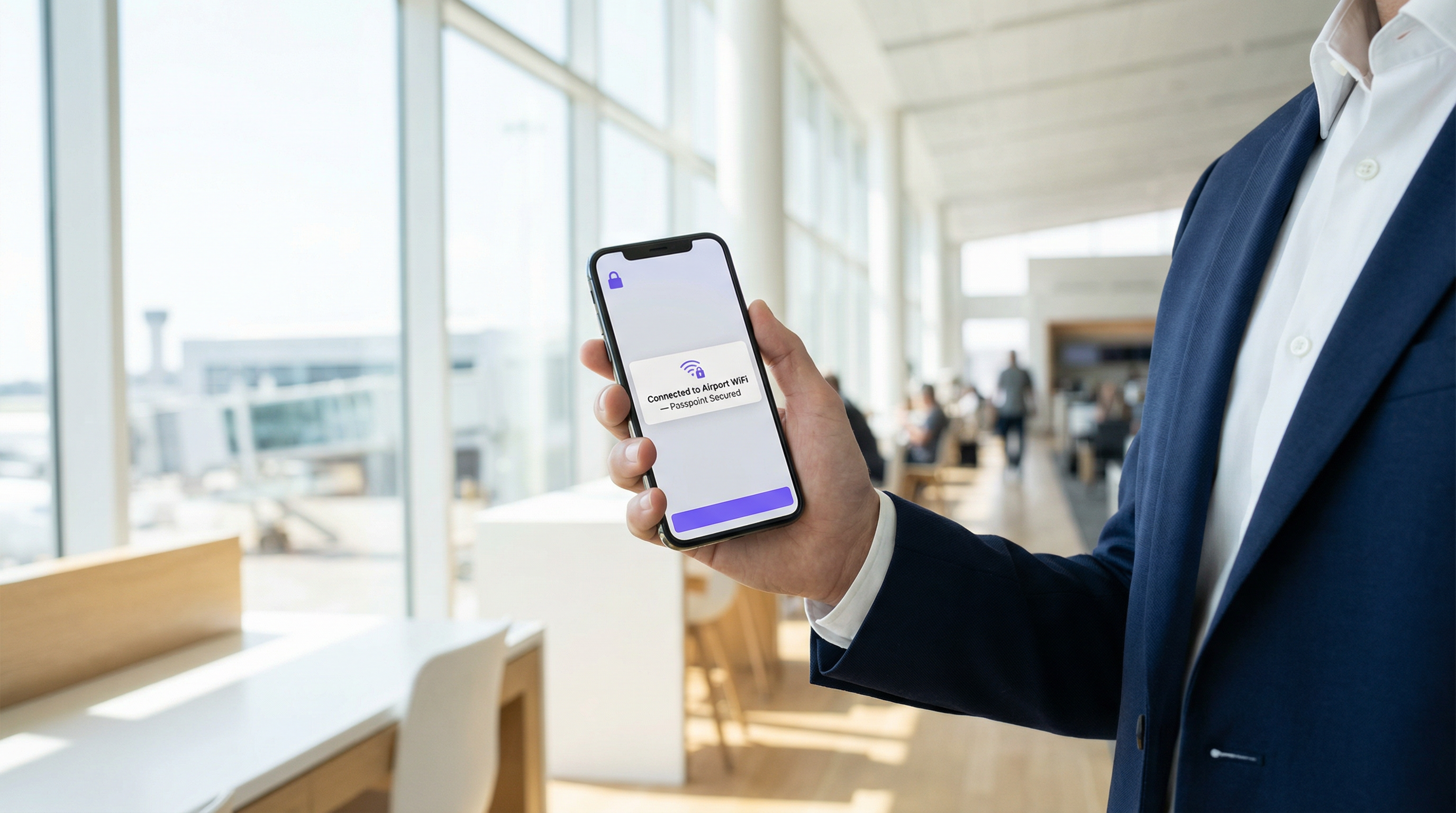
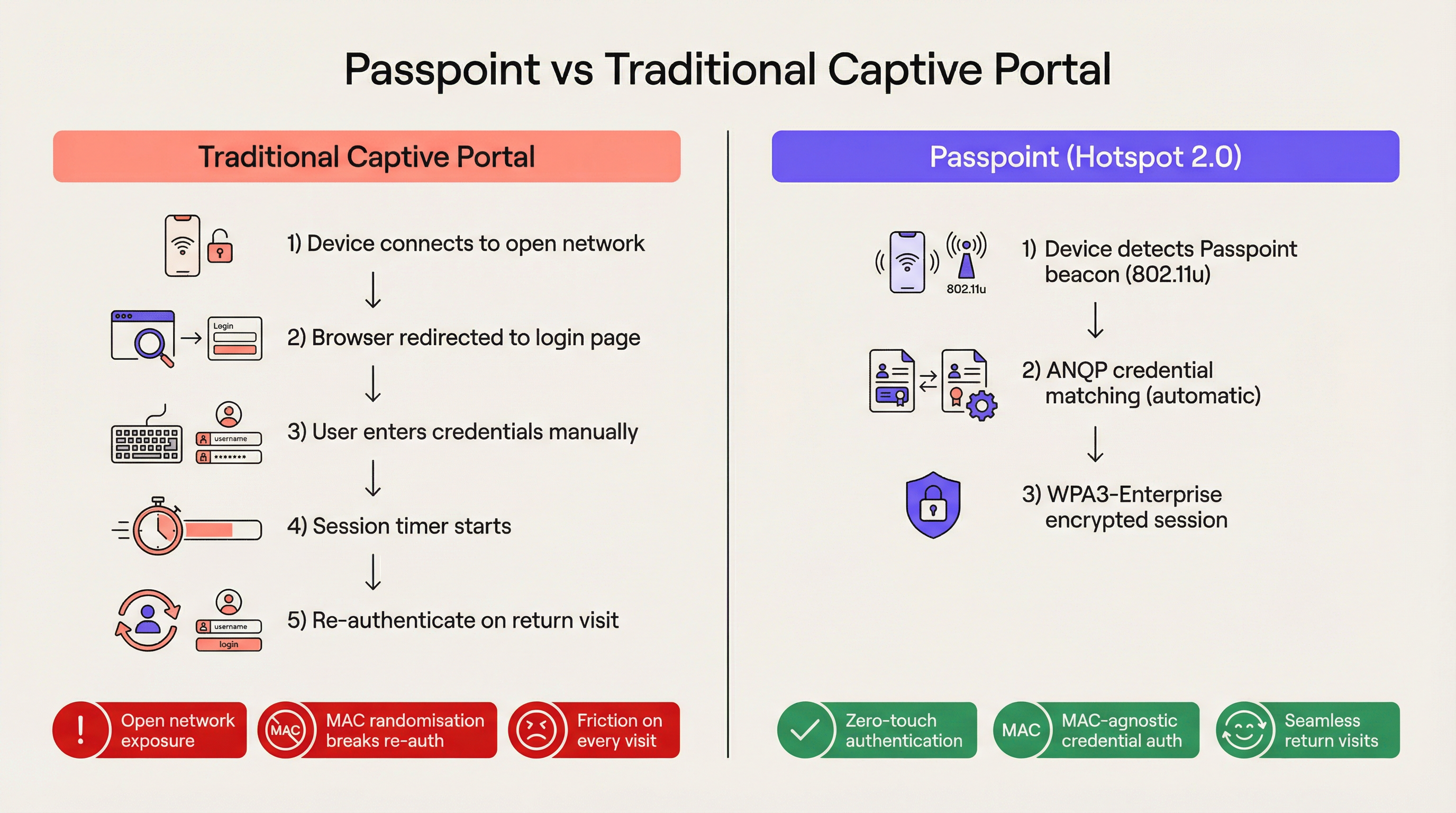
Per le moderne sedi aziendali, l'attrito è uno svantaggio competitivo. I tradizionali Captive Portal, pur essendo stati lo standard per l'accesso alla rete ospite, rappresentano oggi un significativo collo di bottiglia operativo e una fonte di persistente frustrazione per l'utente. Passpoint, noto anche come Hotspot 2.0, trasforma radicalmente questo paradigma sostituendo l'autenticazione manuale basata sul web con un roaming fluido, simile a quello cellulare. Sfruttando lo standard IEEE 802.11u e la crittografia WPA3-Enterprise, Passpoint consente ai dispositivi degli ospiti di rilevare, autenticarsi e connettersi alle reti Wi-Fi aziendali in modo automatico e sicuro.
Per i leader IT nei settori Hospitality , Retail e nei grandi spazi pubblici, il passaggio a Passpoint non è più opzionale. La randomizzazione dell'indirizzo MAC predefinita implementata nei moderni dispositivi iOS e Android ha di fatto interrotto la logica di ri-autenticazione dei Captive Portal legacy, il che significa che gli ospiti che ritornano appaiono come nuovi dispositivi a ogni visita. Passpoint risolve questo problema autenticando il profilo delle credenziali dell'utente anziché il suo indirizzo hardware. Questa guida dettaglia l'architettura tecnica di Passpoint, l'impatto aziendale dell'implementazione e un framework di implementazione neutrale rispetto ai fornitori progettato per migliorare l'esperienza Guest WiFi riducendo al contempo il carico di lavoro dell'helpdesk.
Approfondimento tecnico
Il problema della selezione della rete e lo standard 802.11u
Nelle implementazioni Wi-Fi legacy, i dispositivi si affidano a un meccanismo di selezione della rete fondamentalmente fragile: la scansione di Service Set Identifiers (SSID) noti. Questo approccio richiede che l'utente si sia precedentemente connesso alla rete o che selezioni manualmente la rete da un elenco. Non fornisce alcuna visibilità pre-associazione sulla postura di sicurezza della rete, sui requisiti di autenticazione o sulla disponibilità di internet a monte. Passpoint affronta questa limitazione attraverso l'emendamento IEEE 802.11u, che introduce l'Interworking con reti esterne.
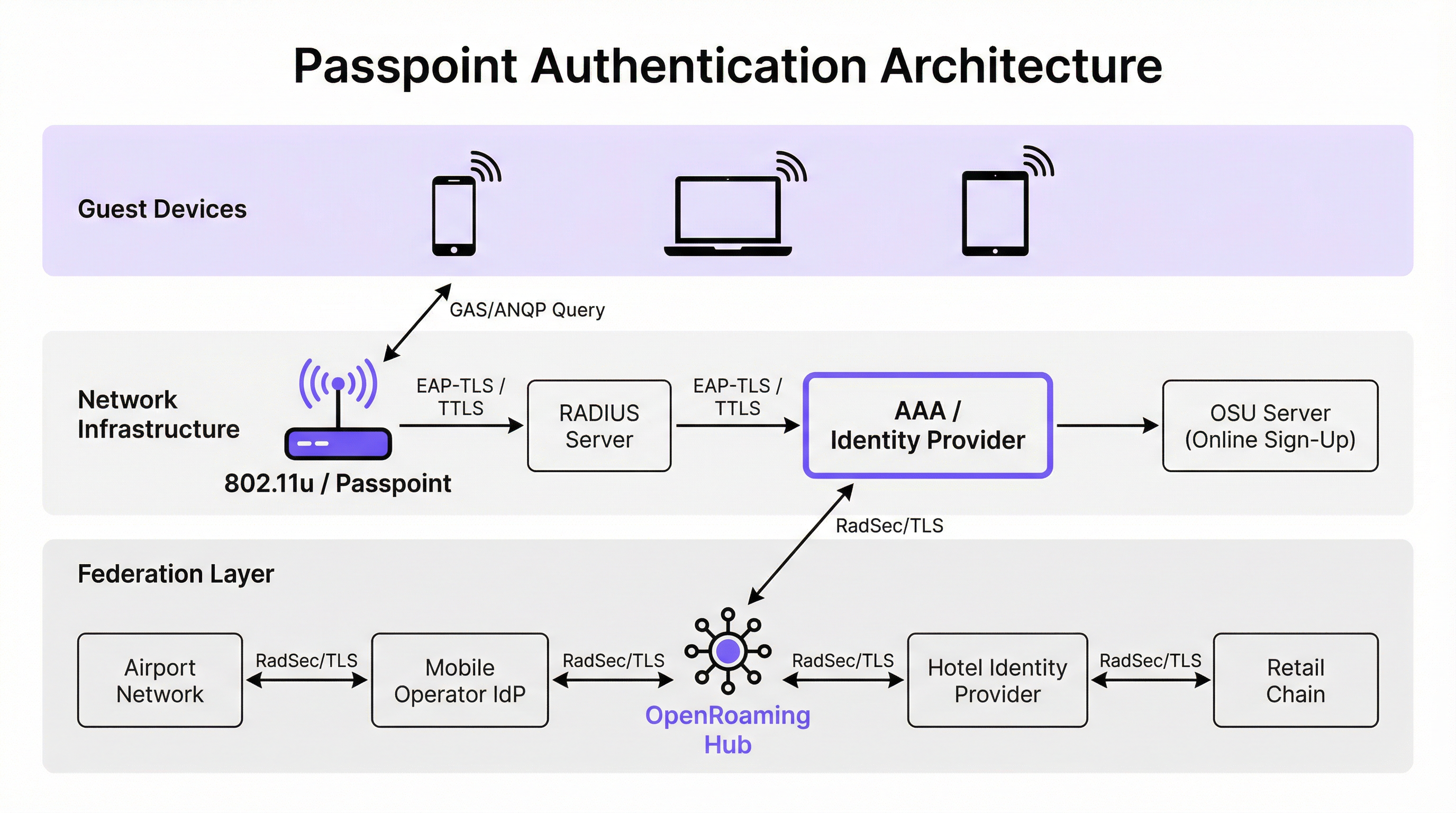
Invece di scansionare passivamente gli SSID, un dispositivo abilitato a Passpoint interroga attivamente l'infrastruttura di rete prima di tentare l'associazione. Quando un access point trasmette il suo beacon, include un Interworking Element — un flag che indica il supporto per 802.11u. Il dispositivo client rileva questo flag e avvia una richiesta Generic Advertisement Service (GAS). All'interno di questa richiesta è incapsulata una query Access Network Query Protocol (ANQP). Il dispositivo chiede all'infrastruttura: "Quali Roaming Consortium Organisational Identifiers (OI) supporti?". Se la risposta dell'access point corrisponde a un profilo di credenziali memorizzato sul dispositivo, l'autenticazione automatica procede.
Architettura di autenticazione e sicurezza
Passpoint impone una sicurezza di livello enterprise, eliminando completamente la fase di "rete aperta" inerente alle implementazioni dei Captive Portal. L'autenticazione è gestita tramite il controllo dell'accesso alla rete basato su porta IEEE 802.1X, abbinato a un metodo Extensible Authentication Protocol (EAP). I metodi più diffusi nelle implementazioni aziendali sono EAP-TLS (basato su certificati client e server), EAP-TTLS (credenziali tunnelizzate) e EAP-SIM/AKA (per scenari di offload cellulare).
Questa architettura fornisce un'autenticazione reciproca. Il dispositivo dimostra crittograficamente la propria identità alla rete e, cosa fondamentale, la rete dimostra la propria identità al dispositivo. Questa verifica reciproca è la difesa principale contro gli access point evil twin e i tentativi di intercettazione man-in-the-middle. Inoltre, Passpoint impone la crittografia WPA2-Enterprise o WPA3-Enterprise. WPA3-Enterprise introduce la modalità di sicurezza a 192 bit e impone la forward secrecy, garantendo che anche se le chiavi di sessione venissero compromesse in futuro, il traffico storico rimanga crittografato.
La federazione OpenRoaming
Mentre Passpoint definisce il meccanismo tecnico per il rilevamento e l'autenticazione, OpenRoaming fornisce il framework di fiducia. Sviluppata dalla Wireless Broadband Alliance (WBA), OpenRoaming è una federazione globale che consente agli Identity Provider (come operatori di rete mobile, Google o Apple) e agli Access Provider (come hotel, stadi e catene di vendita al dettaglio) di fidarsi reciprocamente delle credenziali senza richiedere accordi bilaterali tra ogni entità.
OpenRoaming opera su un modello Public Key Infrastructure (PKI) hub-and-spoke. Le richieste di autenticazione vengono inoltrate attraverso la federazione utilizzando tunnel RadSec (RADIUS su TLS). Trasmettendo l'OI OpenRoaming settlement-free (5A-03-BA), una sede aziendale può fornire istantaneamente un accesso Wi-Fi fluido e sicuro a milioni di utenti in tutto il mondo che già possiedono un profilo di identità compatibile sui propri dispositivi.
Guida all'implementazione
L'implementazione di Passpoint richiede una base infrastrutturale più sofisticata rispetto a una rete aperta tradizionale, ma i componenti sono standard nei moderni ambienti aziendali.
Prerequisiti dell'infrastruttura
- Access Point certificati Passpoint: L'infrastruttura wireless deve supportare le specifiche 802.11u e Hotspot 2.0. La stragrande maggioranza degli access point aziendali prodotti negli ultimi cinque anni da fornitori come Cisco, Aruba e Ruckus soddisfa questo requisito.
- Infrastruttura RADIUS/AAA: Un server RADIUS robusto in grado di gestire l'autenticazione EAP e di instradare le richieste agli archivi di identità appropriati. Se si partecipa a OpenRoaming, il server RADIUSIl server deve supportare RadSec per il proxying sicuro.
- Server Online Sign-Up (OSU): Per gli ambienti che emettono le proprie credenziali (anziché affidarsi esclusivamente a identità federate), un server OSU fornisce il meccanismo per il provisioning sicuro dei profili Passpoint sui dispositivi degli ospiti.
La Strategia Dual-SSID
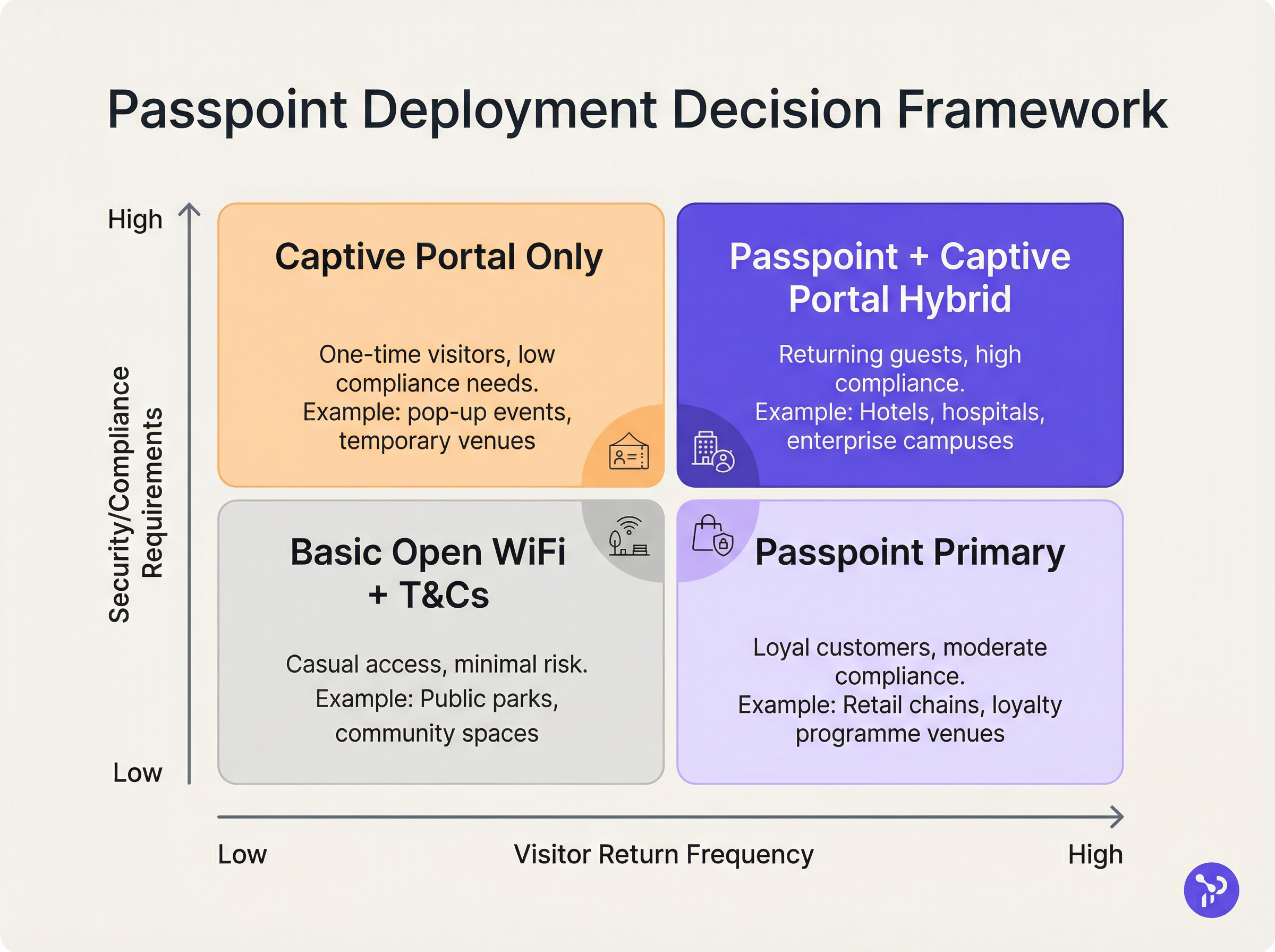
Il modello di implementazione più efficace per le sedi che passano a Passpoint è la strategia dual-SSID. Questo approccio mantiene un SSID Captive Portal tradizionale per l'onboarding iniziale, fornendo al contempo un SSID Passpoint per le connessioni successive senza interruzioni.
Quando un ospite si connette all'SSID Captive Portal per la prima volta, completa il flusso di autenticazione standard (ad esempio, accettando termini e condizioni, fornendo un indirizzo email). Una volta completata l'autenticazione, il portale presenta l'opzione per scaricare un profilo Passpoint. Una volta installato, il dispositivo preferirà automaticamente l'SSID Passpoint sicuro per tutte le visite future. Questo modello di onboarding progressivo garantisce l'accessibilità per i dispositivi legacy, migrando al contempo la maggior parte degli utenti verso la rete Passpoint sicura e senza attriti.
Best Practice
Nella progettazione di un'architettura Passpoint, i responsabili IT devono attenersi ad alcune best practice critiche per garantire stabilità operativa e sicurezza.
In primo luogo, la gestione del ciclo di vita dei certificati è fondamentale. Se si utilizza EAP-TLS, la scadenza dei certificati client o server comporterà fallimenti di autenticazione silenziosi, difficili da diagnosticare per gli helpdesk di prima linea. Implementate protocolli di rinnovo automatico dei certificati e un monitoraggio proattivo. Come evidenziato nella nostra guida sulla Valutazione della postura del dispositivo per il controllo degli accessi alla rete , una visibilità robusta degli endpoint è essenziale quando si gestisce l'accesso basato su certificati.
In secondo luogo, garantite la compatibilità con i dispositivi legacy. Sebbene iOS 7+, Android 6+ e Windows 10+ supportino nativamente Passpoint, alcuni dispositivi IoT, hardware datati e dispositivi gestiti a livello aziendale con restrizioni rigorose potrebbero non supportarlo. La strategia dual-SSID mitiga questo rischio fornendo un metodo di accesso alternativo.
In terzo luogo, durante la configurazione degli elementi ANQP, assicuratevi che le Venue Information siano accurate e descrittive. Questi metadati vengono spesso visualizzati dal sistema operativo del dispositivo client per fornire il contesto sulla rete a cui l'utente si sta connettendo.
Risoluzione dei problemi e mitigazione dei rischi
La complessità di Passpoint introduce domini di errore specifici che differiscono dalle implementazioni Captive Portal.
Modalità di errore 1: Timeout o irraggiungibilità RADIUS Se il server RADIUS locale non riesce a raggiungere l'Identity Provider a monte (specialmente negli scenari OpenRoaming federati), l'handshake EAP andrà in timeout. Mitigazione: Implementate un'infrastruttura RADIUS ridondante e garantite un monitoraggio robusto dei tunnel RadSec. Consultate la nostra documentazione tecnica su RadSec: Protezione del traffico di autenticazione RADIUS con TLS per indicazioni sulla configurazione.
Modalità di errore 2: Errori di provisioning del profilo Gli utenti potrebbero riscontrare errori durante il tentativo di scaricare il profilo Passpoint dal server OSU, spesso a causa delle limitazioni del browser del Captive Portal sui dispositivi mobili. Mitigazione: Progettate il flusso del Captive Portal in modo che esca dal mini-browser del captive network assistant (CNA) per passare al browser di sistema nativo del dispositivo prima di avviare il download del profilo.
Modalità di errore 3: Impatto della randomizzazione MAC sulle analisi Sebbene Passpoint risolva l'interruzione dell'autenticazione causata dalla randomizzazione MAC, le piattaforme di analisi legacy che si affidano esclusivamente agli indirizzi MAC continueranno a riportare conteggi dei visitatori imprecisi. Mitigazione: Integrate i log di autenticazione RADIUS con la vostra piattaforma WiFi Analytics. Tracciando identificatori di credenziali univoci (come la Chargeable User Identity o la NAI anonimizzata) anziché gli indirizzi MAC, le sedi possono ripristinare metriche accurate su affluenza e fedeltà.
ROI e impatto aziendale
Il business case per l'implementazione di Passpoint si basa su tre pilastri misurabili: efficienza operativa, riduzione del rischio ed esperienza utente.
Dal punto di vista operativo, l'eliminazione dell'attrito del Captive Portal correla direttamente con una riduzione dei ticket di assistenza IT relativi alla connettività Wi-Fi. In ampi ambienti Sanitari o di Trasporto , ciò rappresenta un risparmio significativo sui costi.
Per quanto riguarda la mitigazione del rischio, il passaggio dalle reti aperte alla crittografia WPA3-Enterprise riduce sostanzialmente il profilo di responsabilità della sede. Per gli ambienti retail soggetti a PCI DSS, la riduzione della superficie di gestione dei dati (eliminando la raccolta di credenziali basata sul web) semplifica gli audit di conformità.
Infine, il miglioramento dell'esperienza utente è profondo. Nel settore dell'ospitalità, gli studi dimostrano costantemente che un Wi-Fi affidabile e senza interruzioni è uno dei principali fattori di soddisfazione degli ospiti e di prenotazioni ripetute. Implementando Passpoint, le sedi offrono un'esperienza di connettività che rispecchia l'affidabilità delle reti cellulari, trasformando il Wi-Fi da un servizio frustrante a un comfort premium e trasparente.
Termini chiave e definizioni
IEEE 802.11u
The wireless networking standard amendment that enables Interworking with External Networks, allowing devices to query APs before associating.
When configuring wireless controllers, engineers must enable 802.11u to allow devices to discover Passpoint capabilities.
ANQP (Access Network Query Protocol)
A query and response protocol used by devices to discover network services, roaming agreements, and venue information before connecting.
IT teams configure ANQP profiles on the wireless controller to broadcast their supported Roaming Consortium OIs and NAI Realms.
Roaming Consortium OI
An Organisational Identifier broadcast by the access point that indicates which identity providers or federations the network supports.
If an enterprise joins OpenRoaming, they must ensure their APs broadcast the specific OpenRoaming OI (5A-03-BA).
OSU (Online Sign-Up)
A standardized process and server infrastructure for securely provisioning Passpoint credentials and certificates to a user's device.
When building a self-service onboarding flow for a loyalty programme, developers will integrate with an OSU server to push the profile to the device.
RadSec
A protocol that encapsulates RADIUS authentication traffic within a TLS tunnel to ensure secure transmission over untrusted networks.
Required when proxying authentication requests from a local venue to a cloud-based OpenRoaming hub.
NAI Realm
Network Access Identifier Realm; indicates the domain of the user and the specific EAP authentication methods supported by the network.
Configured alongside ANQP to tell client devices whether the network requires EAP-TLS, EAP-TTLS, or EAP-SIM.
EAP-TLS
Extensible Authentication Protocol - Transport Layer Security; a highly secure authentication method requiring both client and server certificates.
Often used in enterprise employee Wi-Fi deployments where IT can push certificates to managed devices via MDM.
MAC Address Randomisation
A privacy feature in modern mobile operating systems that generates a fake, temporary hardware address for each Wi-Fi network connection.
The primary catalyst driving venues away from captive portals, as it breaks the ability to recognize returning visitors based on their hardware.
Casi di studio
A 400-room enterprise hotel chain is experiencing a high volume of helpdesk tickets from returning guests who complain they must manually reconnect to the Wi-Fi in the lobby, restaurant, and their rooms, despite having connected previously. The hotel currently uses a traditional open SSID with a captive portal. How should the network architect resolve this?
The architect should implement a Dual-SSID strategy. First, deploy a secure Passpoint SSID broadcasting the hotel's specific Roaming Consortium OI. Second, modify the existing captive portal on the open SSID to serve as an onboarding funnel. When a guest logs in via the portal, they are prompted to download a Passpoint configuration profile to their device. Once installed, the device will automatically and securely authenticate via 802.1X/EAP to the Passpoint SSID as they move between the lobby, restaurant, and room, eliminating manual re-authentication.
A national retail chain wants to offer secure, seamless Wi-Fi across its 500 locations to drive loyalty app engagement. However, managing custom certificates or individual credentials for millions of potential customers is deemed operationally unfeasible. What is the recommended deployment architecture?
The retailer should deploy Passpoint and federate with OpenRoaming. By configuring their access points to broadcast the settlement-free OpenRoaming OI (5A-03-BA) and establishing RadSec tunnels from their RADIUS infrastructure to an OpenRoaming hub, the retailer allows any customer with a compatible identity provider profile (such as a modern Samsung device or a mobile carrier profile) to connect automatically. The retailer can then integrate this with their loyalty app to trigger push notifications upon successful network association.
Analisi degli scenari
Q1. A hospital IT director wants to deploy Passpoint to ensure doctors' mobile devices connect securely to the clinical network, while patients connect to a separate guest network. The doctors use unmanaged personal devices (BYOD). Which EAP method and provisioning strategy should the architect recommend?
💡 Suggerimento:Consider the balance between security and the operational overhead of managing certificates on unmanaged personal devices.
Mostra l'approccio consigliato
The architect should recommend EAP-TTLS with an Online Sign-Up (OSU) server provisioning flow. EAP-TLS requires client certificates, which are operationally difficult to deploy and manage on unmanaged BYOD devices. EAP-TTLS allows the doctors to authenticate securely using their existing Active Directory/LDAP credentials (username and password) tunneled inside a secure TLS session. The OSU server can provide a self-service portal where doctors log in once to download the profile, enabling automatic connection thereafter.
Q2. During a Passpoint deployment pilot, Android devices are successfully authenticating and connecting, but iOS devices are failing during the EAP handshake. The RADIUS logs show 'Unknown CA' errors. What is the most likely cause and solution?
💡 Suggerimento:Apple's iOS has strict requirements regarding the trust chain for RADIUS server certificates.
Mostra l'approccio consigliato
The most likely cause is that the RADIUS server is using a self-signed certificate or a certificate issued by a private internal Certificate Authority (CA) that the iOS devices do not inherently trust. Android devices sometimes allow users to bypass or ignore certificate validation (though this is poor security practice), whereas iOS strictly enforces it for Passpoint profiles. The solution is to replace the RADIUS server certificate with one issued by a publicly trusted commercial CA (e.g., DigiCert, Let's Encrypt), or ensure the private CA root certificate is explicitly bundled within the Passpoint configuration profile pushed to the iOS devices.
Q3. A stadium venue has implemented OpenRoaming. A user with a valid Google OpenRoaming profile walks into the venue, but their device does not attempt to connect automatically. What specific configuration on the stadium's wireless LAN controller should the network engineer verify first?
💡 Suggerimento:How does the device know that the access point supports the OpenRoaming federation before it attempts to connect?
Mostra l'approccio consigliato
The engineer should verify the ANQP configuration, specifically checking that the Access Points are broadcasting the correct Roaming Consortium Organisational Identifier (OI) for OpenRoaming, which is 5A-03-BA. If this OI is not included in the AP's beacon or GAS response, the device will not recognize the network as an OpenRoaming participant and will not attempt to authenticate.
Punti chiave
- ✓Passpoint (Hotspot 2.0) replaces manual captive portal logins with automatic, cellular-like Wi-Fi roaming.
- ✓It uses IEEE 802.11u for pre-association network discovery and WPA3-Enterprise for encrypted, mutually authenticated connections.
- ✓Passpoint solves the MAC address randomisation issue by authenticating the user's credential profile rather than their hardware address.
- ✓OpenRoaming is the global federation framework that allows Passpoint devices to connect across different venues seamlessly.
- ✓A dual-SSID strategy (Captive Portal for onboarding, Passpoint for returning users) is the recommended deployment model for enterprise venues.




